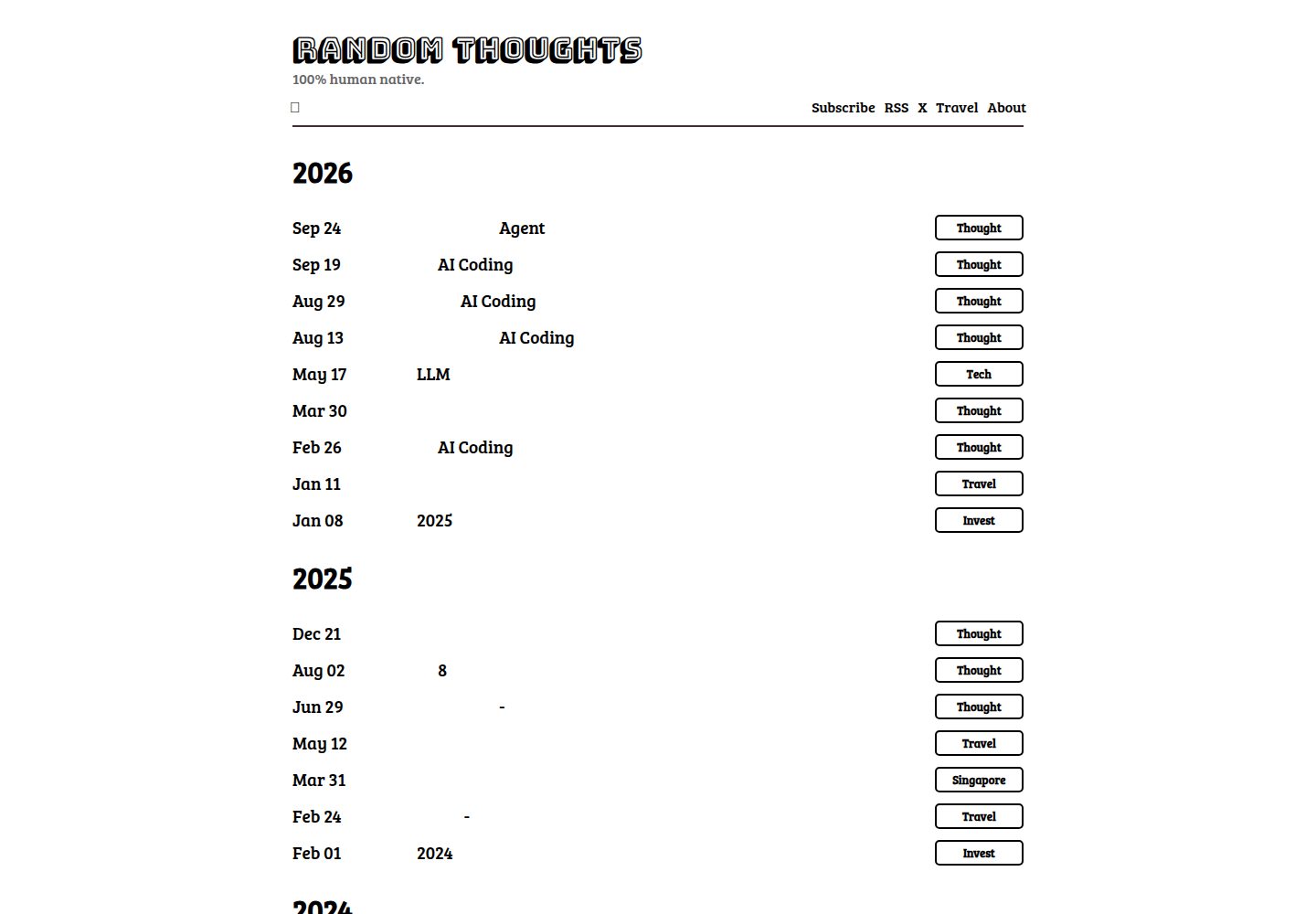
黑白极简的博客主题风格
Hugo博客
hugo-theme-kia — Hugo 博客模板
作者 sean9999
hugo-theme-kia 是一个面向博客的 Hugo 主题,采用黑白极简风格,支持多语言、Disqus 评论与 SEO 相关配置。
看看你的网站会是什么样
浏览真实页面截图,比较内容排版与手机效果。点击下方缩略图切换,放大查看整页细节。
全部页面与视图 3
截图用于了解视觉与布局,交互效果请以实际项目为准。
采集于 2026-10-03查看来源
值得关注的模板亮点
从已有项目资料中,快速了解它的特点。
通过 Hugo languages 配置实现多语言内容分目录管理
支持 Disqus 评论,可在配置中填写账号名
提供 SEO 相关模板与 Twitter Cards 开关
可在每篇文章头部或尾部插入统一的自定义内容
支持通过 extraHead 与 extraCSSFiles 注入额外脚本和样式
模板详细介绍
该主题仓库名为 hugo-theme-kia,README 中将其描述为 YinYang——一个黑白配色的 Hugo 博客主题,演示站点为 blog.joway.io。主题定位是个人博客:文章放在主 section(默认 posts)下,页脚可配置社交链接,并可在每篇文章头部或尾部插入自定义内容。
功能方面,README 列出极简风格、多语言支持、Disqus 评论以及 SEO 优化。多语言通过 Hugo 的 languages 配置实现,不同语言的内容分别放在各自的 contentDir 中。SEO 与社交分享方面提供 Twitter Cards 开关,需要在文章 front matter 中提供 images 列表。
配置入口集中在 config.toml:headTitle 用于页面标题,未设置时回退到站点作者的 name;mainSections 指定主内容区;socials 数组定义页脚链接;extraHead 与 extraCSSFiles 可注入额外的脚本和样式;postHeaderContent 与 postFooterContent 用于在每篇文章中插入统一内容。示例配置还展示了 Goldmark 渲染、代码高亮样式以及 Disqus 账号名等设置。
安装方式为将仓库克隆到站点 themes 目录,并在 config.toml 中把 theme 设为 yinyang。仓库采用 MIT 许可,允许免费使用、修改、商用和分发该版本代码,但演示图片、字体、图标等第三方素材需单独核对许可,域名、托管等外部服务也可能产生费用。
Hugo博客
适合你的项目吗?
适用场景
- 搭建个人技术博客或写作站点
- 需要中英文等多语言内容分目录维护的博客
- 希望使用 Disqus 作为文章评论系统的站点
- 需要在文章前后统一插入订阅或推广内容的博客
适合人群
- 使用 Hugo 构建静态博客的开发者
- 偏好黑白极简阅读界面的写作者
- 需要多语言博客结构的内容维护者
上手与定制指南
结合仓库当前版本的说明,按下面的资料检查内容、配置与运行要求。
- 1
将主题仓库克隆到站点的 themes 目录,并在 config.toml 中设置 theme = "yinyang"
- 2
在 params 中配置 headTitle、mainSections、socials 等参数,未设置 headTitle 时会回退到站点作者的 name
- 3
多语言需在 languages 下为每种语言指定 contentDir、languageName 与 weight,文章放入对应目录
- 4
启用 Disqus 需在 params 中填写 disqus 账号名;启用 Twitter Cards 需设置 twitterCards = true 并在文章 front matter 提供 images 列表
- 5
使用 extraHead、extraCSSFiles、postHeaderContent、postFooterContent 可注入额外脚本、样式或文章前后内容
授权与来源资料
使用条件与限制
免费使用 · 保留许可声明本次收录的是公开仓库中采用 MIT 许可的免费版本;免费范围为该版本代码,不代表外部服务或第三方素材免费。
使用时需要遵守
- 允许免费使用、修改、商用和分发该版本代码。
- 分发代码副本或实质性部分时,保留原作者版权声明和完整 MIT 许可声明。
- 代码按现状提供;担保与责任限制以原许可证及适用法律为准。
额外费用与待核对事项
- 启用评论功能需在 params 中填写 Disqus 账号名,评论数据托管于 Disqus 第三方服务,需自行注册账号并受其服务条款约束。
- 示例配置注入 Google Analytics 脚本,属于外部第三方服务,需自行申请跟踪 ID 并遵守其条款,可能产生数据合规义务。
- 示例中的订阅链接指向作者本人的 Mailchimp 邮件列表,属于外部服务,直接沿用会指向他人账号,需替换为自己的链接。
- 安装命令使用 SSH 方式克隆作者仓库,需具备 GitHub SSH 密钥配置;也可改用 HTTPS 地址克隆。
- 演示站点为作者个人博客,其中的图片、字体、图标等素材许可未在 README 中说明,需单独核对后方可复用。
- 演示图片、字体、图标及其他第三方素材需按各自许可核对,不能仅凭代码的 MIT 许可判断。
- 域名、托管、数据库、支付或 AI 等外部服务可能另外收费。
查看原文依据
Permission is hereby granted, free of charge
许可证原文
disqus = "joway" # disqus account name
README 原文
extraHead = '<script async src="https://www.googletagmanager.com/gtag/js?id=UA-xxx"></script>'
README 原文
postFooterContent = "<br/><br/><p>Subscribe:<a target='_blank' href='https://mailchi.mp/a1a0d59e7a19/joway'>Joway's Blog</a></p>"
README 原文
git clone [email protected]:joway/hugo-theme-yinyang.git themes/yinyang
README 原文
https://github.com/sean9999/hugo-theme-kia/blob/master/LICENSE.mdhttps://github.com/sean9999/hugo-theme-kia/blob/master/README.md[**Demo**](https://blog.joway.io)
README 原文
DeepSeek 根据仓库许可证和 README 整理 ·2026-10-03。结果仅覆盖已读取资料,依赖、图片、字体及后续条款变更以各自原文为准。
项目核对记录与介绍依据
模板资料
- 来源平台
- GitHub
- 资料与维护参考分
- 资料一般 · 72 / 100
- 技术栈
- Hugo
- 网站类型
- 博客
这个分数如何计算
本站按许可资料(最高30分)、演示链接(12分)、预览图(10分)、Star数(15分)、记录的维护时间(15分)、描述完整度(8分)、功能记录(5分)和分类资料(5分)计算。它不是代码、安全或性能测试,也不是 Google 评分;有链接不代表已实测可用。
这个项目需要核对什么
- 记录的仓库更新时间
- 2026-08-12
- 截图检查日期
- 2026-10-03
已收录演示链接。请用你的内容与屏幕尺寸检查;有演示不代表表单、认证或支付已经可用。
目录记录的主要技术栈是 Hugo。请通过依赖清单和锁文件核对实际版本与托管要求。这些说明基于收录资料,不代表代码审计或部署实测。
查看具体选型方法 →介绍的制作与核对状态
介绍由 AI 辅助整理目录与仓库资料。仓库作者不等于这篇介绍的审核者。
已完成服务器许可规则与 AI 来源核对;未经过人工编辑审核。
查看当时使用的来源资料
SHA-256: b40ee60dc25e4f25c2b8663d55e0f5e139883e7ccf7c362b5eb5d92a89e195b0
2026-10-03T00:54:41.422Z
来源文件 / 仓库# YinYang [YinYang](https://en.wikipedia.org/wiki/Yin_and_yang) is a black-white theme for [Hugo](https://gohugo.io/). [**Demo**](https://blog.joway.io) ## Feature - minimalist - multi-language support - [disqus](https://disqus.com) support - [SEO Optimization](https://github.com/joway/hugo-theme-yinyang/blob/master/layouts/partials/seo.html) ## Screenshot  ## Installation From the root of your site: ```shell git clone [email protected]:joway/hugo-theme-yinyang.git themes/yinyang ``` Change `config.toml`: ```toml theme = "yinyang" ``` ## Configuration ### Head Title ``` [params] headTitle = "Joway Wang" ``` If there is no `headTitle` in params, use `.Site.Author.name`. ### Main section Set your main section: ``` [params] mainSections = ["posts"] ``` ### Multi-Language ``` [languages] [languages.en] contentDir = "content/en" languageName = "English" weight = 1 [languages.cn] contentDir = "content/cn" languageName = "Chinese" weight = 2 ``` Then your posts files should be put into `content/en` or `content/cn`. ### Footer ``` [[params.socials]] name = "About Me" link = "https://joway.io" [[params.socials]] name = "Github" link = "https://github.com/joway" ``` ### Extra Head ``` [params] extraHead = '<script src="xxxx.js"></script>' ``` ### Extra CSS files ``` [params] extraCSSFiles = ["css/foo.css", "css/bar.css"] ``` ### Twitter Cards Add the following setting: ``` [params] twitterCards = true ``` In a post's front matter, include a keyword `images` with a value of a list of URLs of images that will be used for Twitter Cards. ### Insert content on every post ``` [params] postHeaderContent = "" postFooterContent = "<br/><br/><p>Subscribe:<a target='_blank' href='https://mailchi.mp/a1a0d59e7a19/joway'>Joway's Blog</a></p>" ``` ### Example ``` baseURL = "https://blog.joway.io/" languageCode = "en-us" title = "Joway's Blog" theme = "yinyang" DefaultContentLanguage = "cn" [markup] [markup.goldmark] [markup.goldmark.renderer] unsafe = true [markup.highlight] guessSyntax = true noClasses = true style = "bw" tabWidth = 2 [author] name = "Joway" homepage = "https://joway.io/" [languages] [languages.en] contentDir = "content/en" languageName = "English" weight = 1 [languages.cn] contentDir = "content/cn" languageName = "Chinese" weight = 2 [params] mainSections = ["posts"] headTitle = "Joway Wang" disqus = "joway" # disqus account name extraHead = '<script async src="https://www.googletagmanager.com/gtag/js?id=UA-xxx"></script>' [[params.socials]] name = "About Me" link = "https://joway.io" [[params.socials]] name = "Github" link = "https://github.com/joway" postHeaderContent = "" postFooterContent = "<br/><br/><p>Subscribe to:<a target='_blank' href='https://mailchi.mp/a1a0d59e7a19/joway'>Joway's Blog</a></p>" # extraCSSFiles = ["css/foo.css", "css/bar.css"] extraCSSFiles = [] ```
看看同类模板
对比同技术栈与用途的模板,找到更适合的视觉与内容结构。

hugo-PaperMod
PaperMod 是 Hugo 生态里知名度较高的主题之一,定位很明确:给博客和轻量作品集站点提供一套干净、响应式的阅读界面。
Hugo · 作品集

LoveIt
❤️A clean, elegant but advanced blog theme for Hugo 一个简洁、优雅且高效的 Hugo 主题
Hugo · 博客

hugo-coder
A minimalist blog theme for hugo.
Hugo · 博客

blowfish
Personal Website & Blog Theme for Hugo
Hugo · 博客

hugo-paper
🪺 A simple, clean, customizable Hugo theme
Hugo · 博客

hextra
Hextra 是一个 Hugo 主题,定位在文档站与博客之间:既提供侧边栏导航、目录、面包屑、分页这类文档站结构,也能承载博客内容。
Hugo · 文档