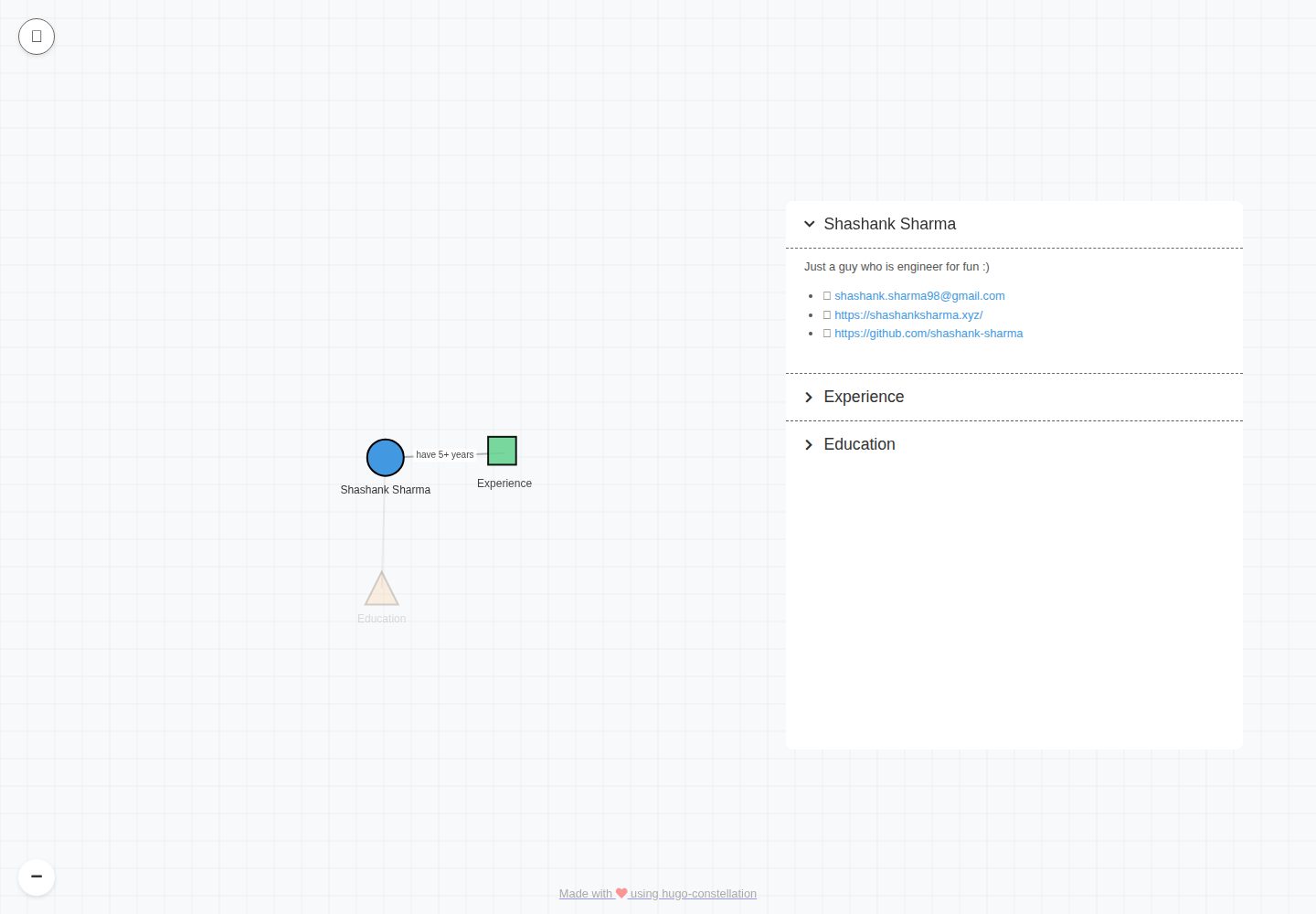
以 Markdown 文件为节点,通过 parent 字段连接成可交互图谱
Hugo作品集
hugo-constellation — Hugo 作品集模板
作者 shashank-sharma
hugo-constellation 是一个 Hugo 主题,用可交互的 Markdown 节点图展示个人作品集与项目关系。
看看你的网站会是什么样
浏览真实页面截图,比较内容排版与手机效果。点击下方缩略图切换,放大查看整页细节。
全部页面与视图 2
截图用于了解视觉与布局,交互效果请以实际项目为准。
采集于 2026-10-01查看来源
值得关注的模板亮点
从已有项目资料中,快速了解它的特点。
节点基于物理运动,可拖动,并支持多种形状与实线/虚线连接
点击节点后在侧边栏显示该节点的 Markdown 正文
通过 Hugo 输出格式生成 JSON 供图谱读取
作者自述为副项目,功能有限,移动端适配为高度实验性
模板详细介绍
hugo-constellation 是一个面向个人作品集与项目可视化的 Hugo 主题,核心是把内容组织成可交互的知识图谱。每个节点对应 content/nodes 目录下的一个 Markdown 文件,节点之间通过 front matter 中的 parent 字段建立连接,点击节点后其正文内容显示在侧边栏。
主题提供基于物理的节点运动,节点可拖动,并支持自定义节点形状(circle、square、triangle、pentagon、diamond、hexagon、octagon)与连接线类型(solid、dotted)。节点还可设置颜色、副标题、权重与连接标签。页面需要输出 JSON 格式,主题据此生成图谱数据。
作者在 README 中说明这是一个副项目,功能有限,移动端响应式设计标注为高度实验性。主题的 Customization 章节仍为 TODO,未提供进一步的自定义说明。
Hugo作品集
适合你的项目吗?
适用场景
- 用图谱形式展示个人作品集与项目之间的关联
- 把人物、项目、文章等内容组织成可点击探索的节点网络
- 为 Hugo 站点增加一个可交互的 Markdown 内容可视化页面
适合人群
- 使用 Hugo 搭建个人作品集或项目展示站的开发者
- 希望以图谱而非列表呈现内容关系的人
- 能接受主题功能有限、移动端仍属实验状态的用户
上手与定制指南
结合仓库当前版本的说明,按下面的资料检查内容、配置与运行要求。
- 1
在 Hugo 站点中通过 git submodule 将仓库加入 themes 目录,并在 config.toml 设置 theme = "hugo-constellation"
- 2
在 config.toml 中为 home、section、page 配置 HTML 与 JSON 输出格式
- 3
在 content/nodes 目录创建 Markdown 节点文件,front matter 的 id 需与文件名一致
- 4
必须存在 person.md 作为图谱中心节点,其余节点通过 parent 字段连接
- 5
节点形状与连接类型分别通过 shape 和 connectionType 字段设置
授权与来源资料
使用条件与限制
免费使用 · 保留许可声明本次收录的是公开仓库中采用 MIT 许可的免费版本;免费范围为该版本代码,不代表外部服务或第三方素材免费。
使用时需要遵守
- 允许免费使用、修改、商用和分发该版本代码。
- 分发代码副本或实质性部分时,保留原作者版权声明和完整 MIT 许可声明。
- 代码按现状提供;担保与责任限制以原许可证及适用法律为准。
额外费用与待核对事项
- 演示图片、字体、图标及其他第三方素材需按各自许可核对,不能仅凭代码的 MIT 许可判断。
- 域名、托管、数据库、支付或 AI 等外部服务可能另外收费。
查看原文依据
https://github.com/shashank-sharma/hugo-constellation/blob/master/LICENSEhttps://github.com/shashank-sharma/hugo-constellation/blob/master/README.mdPermission is hereby granted, free of charge
许可证原文
DeepSeek 根据仓库许可证和 README 整理 ·2026-10-01。结果仅覆盖已读取资料,依赖、图片、字体及后续条款变更以各自原文为准。
项目核对记录与介绍依据
模板资料
- 来源平台
- GitHub
- 资料与维护参考分
- 资料较完整 · 81 / 100
- 技术栈
- Hugo
- 网站类型
- 作品集
这个分数如何计算
本站按许可资料(最高30分)、演示链接(12分)、预览图(10分)、Star数(15分)、记录的维护时间(15分)、描述完整度(8分)、功能记录(5分)和分类资料(5分)计算。它不是代码、安全或性能测试,也不是 Google 评分;有链接不代表已实测可用。
这个项目需要核对什么
- 记录的仓库更新时间
- 2025-03-08
- 截图检查日期
- 2026-10-01
已收录演示链接。请用你的内容与屏幕尺寸检查;有演示不代表表单、认证或支付已经可用。
目录记录的主要技术栈是 Hugo。请通过依赖清单和锁文件核对实际版本与托管要求。这些说明基于收录资料,不代表代码审计或部署实测。
查看具体选型方法 →介绍的制作与核对状态
介绍由 AI 辅助整理目录与仓库资料。仓库作者不等于这篇介绍的审核者。
已完成服务器许可规则与 AI 来源核对;未经过人工编辑审核。
查看当时使用的来源资料
SHA-256: bf6becac4814d4e371622347b08967d272bf827c8c44247d86471b4f78a5fb60
2026-10-01T00:57:04.722Z
来源文件 / 仓库# Hugo Constellation Theme An interactive markdown graph theme to showcase personal portfolios in a visually engaging way. It's just a side project, and have limited functionality  ## Features - Interactive markdown graph visualization - Physics-based node movement with draggable nodes - Customizable node shapes, colors, and connections - Responsive design for both desktop and mobile (Highly Experimental) - Smooth animations and transitions ## Installation 1. Create a new Hugo site or navigate to your existing Hugo site ```bash hugo new site my-portfolio cd my-portfolio ``` 2. Clone this repository into the themes directory or use submodule ```bash git submodule add https://github.com/shashank-sharma/hugo-constellation ``` 3. Set the theme in your config.toml file ```toml theme = "hugo-constellation" ``` Example usage can be found here: https://github.com/shashank-sharma/about-me ## Configuration ### Site Configuration Ensure your `config.toml` includes the necessary output formats to generate JSON files: ```toml [outputs] home = ["HTML", "JSON"] section = ["HTML", "JSON"] page = ["HTML", "JSON"] [outputFormats.JSON] mediaType = "application/json" isPlainText = true notAlternative = true ``` ## Adding Content Create a directory for your node content: ```bash mkdir -p content/nodes ``` ### Manual Content Creation For each node in your graph, create a Markdown file in the `content/nodes` directory: ```markdown --- title: "Node Title" type: "nodes" id: "person" # id and filename must be same to work correctly shape: "square" # circle, triangle, square etc parent: "parentid" # Required for nodes which needs to connect with parent subtitle: "Node Subtitle" weight: 10 draft: false connectionLabel: "random label" # Optional when trying to connect connectionType: "solid" # dashed or solid --- ## Your Content Heading This is the detailed content for this node. It will be displayed in the sidebar when the node is selected. You can include: - Lists - **Bold text** - *Italic text* - [Links](https://example.com) - And other Markdown features -  ``` Note: Person node, which is person.md must be there to act as a center of this graph. Follow nodes can be dynamic as per your needs ## Available Node Shapes - `circle`: Circular nodes - `square`: Square nodes - `triangle`: Triangular nodes - `pentagon`: Pentagon nodes - `diamond`: Diamond-shaped nodes - `hexagon`: Hexagonal nodes - `octagon`: Octagon nodes ## Connection Types - `solid`: Solid line connection - `dotted`: Dotted line connection ## Screenshot   ## Customization TODO ## License This theme is licensed under the MIT License - see the LICENSE file for details.
看看同类模板
对比同技术栈与用途的模板,找到更适合的视觉与内容结构。

hugo-PaperMod
PaperMod 是 Hugo 生态里知名度较高的主题之一,定位很明确:给博客和轻量作品集站点提供一套干净、响应式的阅读界面。
Hugo · 作品集

Congo
Congo 是一款为 Hugo 设计的现代内容主题,核心定位是让内容本身成为页面焦点。 它基于 Tailwind CSS 3.0 构建,整体布局完全响应式,视觉风格干净且克制,没有多余装饰。
Hugo · 博客

toha
Toha 是一款面向个人作品集场景的 Hugo 主题,以极简设计和响应式布局为核心,适合用来搭建个人主页、作品展示或技术博客。
Hugo · 作品集

hugo-profile
A highly customizable and mobile first Hugo template for personal portfolio and blog.
Hugo · 作品集

hugo-theme-introduction
Minimal, single page, smooth-scrolling theme for Hugo static site generator.
Hugo · 作品集

hugo-theme-console
hugo-theme-console 是一款以系统终端为灵感的极简 Hugo 主题,基于 Terminal CSS 构建,整体视觉干净利落,强调快速加载与响应式布局。
Hugo · 作品集