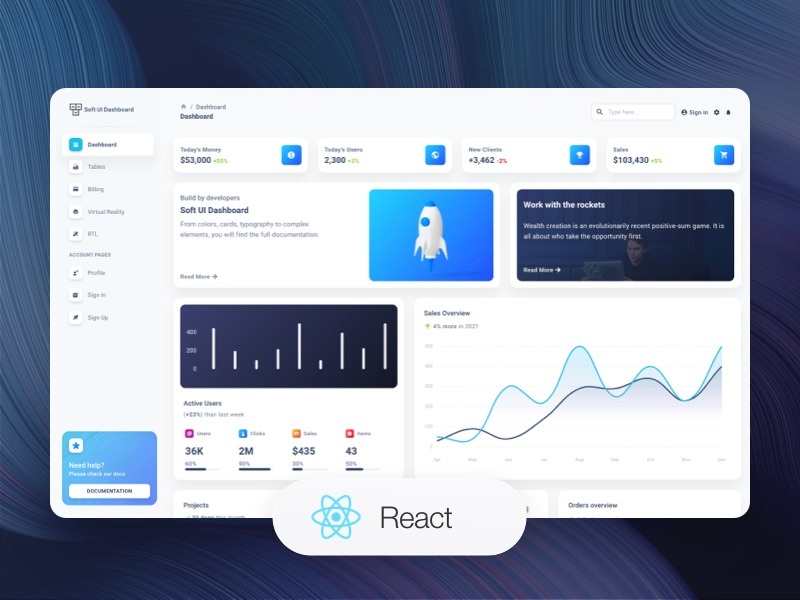
基于 Soft UI Dashboard React 模板构建,使用 Material UI 呈现 Soft UI 风格界面
React后台
shinobi-softui-react-dashboard — React 后台模板
作者 softwareshinobi
基于 Soft UI Dashboard React 模板搭建的 React 后台仪表盘项目,使用 Material UI 构建,包含路由、全局状态与多组示例页面。
看看你的网站会是什么样
浏览真实页面截图,比较内容排版与手机效果。点击下方缩略图切换,放大查看整页细节。
目前有 1 张原始预览,可打开完整图片查看设计细节。
截图用于了解视觉与布局,交互效果请以实际项目为准。
采集于 2026-10-13查看来源
值得关注的模板亮点
从已有项目资料中,快速了解它的特点。
使用 react-router-dom 管理路由,路由集中在 routes.js 中定义
通过 context.js 的自定义 Context 与 reducer 管理侧边导航、主题等全局状态
内置 Sidenav、Configurator、Navbar、Breadcrumbs、NotificationItem 等可复用组件
支持亮色/暗色主题与 RTL 布局,主题配置位于 assets/theme
附带 Dashboard、Tables、Billing、Profile、Sign In、Sign Up 等多个示例页面
模板详细介绍
这是一个 React 后台仪表盘项目,代码基于 Creative Tim 的 Soft UI Dashboard React 模板构建,采用 Material UI 作为样式与组件基础,整体呈现 Soft UI 风格的数据界面。项目在模板之上保留了完整的示例结构,可直接作为 React 后台开发的起点。
功能层面,项目使用 react-router-dom 管理页面导航,所有路由集中定义在 routes.js;通过 context.js 中的自定义 Context 与 reducer 管理全局状态,覆盖侧边导航配置、主题设置等。UI 组件来自 Soft UI Dashboard React 库,包含 Sidenav、Configurator、DefaultNavbar、DashboardNavbar、Breadcrumbs、NotificationItem 等可复用组件。主题支持亮色与暗色模式以及 RTL 布局,由 Context 与 MUI 的 ThemeProvider 控制,主题配置位于 assets/theme。
项目附带多个预置示例页面:Dashboard、Tables、Billing、Virtual Reality、RTL Support、Profile、Sign In、Sign Up。主要文件包括 App.js(路由、主题与全局状态)、routes.js(路由定义)、context.js(全局状态)、index.js(入口,在 BrowserRouter 与 SoftUIControllerProvider 内渲染 App),以及 components/、examples/、layouts/、assets/ 等目录。
限制方面,仓库未提供依赖清单核对,因此不列出具体框架版本号;README 中提到的模板版本号属于模板来源信息。项目定位为示例性后台界面,是否适合直接用于生产需自行评估。许可为 MIT,免费范围仅限该版本代码,演示图片、字体、图标等第三方素材需按各自许可单独核对,域名、托管、数据库等外部服务可能另行收费。
React后台
适合你的项目吗?
适用场景
- 作为 React 后台管理界面的起步模板,在此基础上替换为自有业务页面
- 参考其路由、Context 全局状态与主题切换的组织方式,学习仪表盘项目结构
- 直接复用 Sidenav、Navbar、Breadcrumbs 等布局组件搭建后台框架
- 利用预置的表格、账单、个人资料、登录注册页面快速搭建演示原型
适合人群
- 需要 React + Material UI 后台仪表盘起点的开发者
- 希望参考 Soft UI 风格数据界面实现的前端人员
- 需要亮色/暗色主题与 RTL 布局示例的项目
- 想研究路由与 Context 状态管理组织方式的学习者
上手与定制指南
结合仓库当前版本的说明,按下面的资料检查内容、配置与运行要求。
- 1
克隆仓库后执行 npm install 或 yarn install 安装依赖
- 2
执行 npm start 或 yarn start 启动开发服务器
- 3
新增或修改页面路由时编辑 routes.js
- 4
调整主题外观时修改 assets/theme 下的配置
- 5
使用演示图片、字体、图标等第三方素材前需核对各自许可
授权与来源资料
使用条件与限制
免费使用 · 保留许可声明本次收录的是公开仓库中采用 MIT 许可的免费版本;免费范围为该版本代码,不代表外部服务或第三方素材免费。
使用时需要遵守
- 允许免费使用、修改、商用和分发该版本代码。
- 分发代码副本或实质性部分时,保留原作者版权声明和完整 MIT 许可声明。
- 代码按现状提供;担保与责任限制以原许可证及适用法律为准。
额外费用与待核对事项
- 演示图片、字体、图标及其他第三方素材需按各自许可核对,不能仅凭代码的 MIT 许可判断。
- 域名、托管、数据库、支付或 AI 等外部服务可能另外收费。
- 项目基于 Creative Tim 的 Soft UI Dashboard React 模板构建,该模板版权归 Creative Tim 所有,使用时需保留其版权与许可声明。
查看原文依据
Permission is hereby granted, free of charge
许可证原文
https://github.com/softwareshinobi/shinobi-softui-react-dashboard/blob/production/license.mdhttps://github.com/softwareshinobi/shinobi-softui-react-dashboard/blob/production/readme.mdThis project utilizes the Soft UI Dashboard React template, which is copyrighted by Creative Tim.
README 原文
DeepSeek 根据仓库许可证和 README 整理 ·2026-10-13。结果仅覆盖已读取资料,依赖、图片、字体及后续条款变更以各自原文为准。
项目核对记录与介绍依据
模板资料
- 来源平台
- GitHub
- 资料与维护参考分
- 资料一般 · 74 / 100
- 技术栈
- React
- 网站类型
- 后台
这个分数如何计算
本站按许可资料(最高30分)、演示链接(12分)、预览图(10分)、Star数(15分)、记录的维护时间(15分)、描述完整度(8分)、功能记录(5分)和分类资料(5分)计算。它不是代码、安全或性能测试,也不是 Google 评分;有链接不代表已实测可用。
这个项目需要核对什么
- 记录的仓库更新时间
- 2025-02-23
- 截图检查日期
- 2026-10-13
已收录演示链接。请用你的内容与屏幕尺寸检查;有演示不代表表单、认证或支付已经可用。
目录记录的主要技术栈是 React。请通过依赖清单和锁文件核对实际版本与托管要求。这些说明基于收录资料,不代表代码审计或部署实测。
查看具体选型方法 →介绍的制作与核对状态
介绍由 AI 辅助整理目录与仓库资料。仓库作者不等于这篇介绍的审核者。
审核声明: [email protected] · 2026-10-13
查看当时使用的来源资料
SHA-256: ef66f77fef34185a99730b5c459041d72f0ef8ef09f7996193de38641002ac8f
2026-10-13T11:24:26.446Z
来源文件 / 仓库# Shinobi UI Dashboard React Project
Start your React Development with an Innovative Admin Template for MUI and React. If you like the look & feel of the hottest design trend right now, Soft UI, you will fall in love with this dashboard! It features a huge number of components built to fit together and look amazing.

This project is built using the Soft UI Dashboard React template, version 4.0.1, provided by Creative Tim. It offers a comprehensive and visually appealing dashboard interface with various components and functionalities.
## Project Overview
The codebase implements a React-based dashboard application with features like routing, state management, and a variety of pre-built UI components. It leverages Material UI for styling and provides a responsive layout adaptable to different screen sizes.
## Key Features
* **Routing:** Uses `react-router-dom` for navigation between different pages of the dashboard. All routes are defined in `routes.js`.
* **State Management:** Employs a custom context (`context.js`) and reducer for managing global application state, including sidenav configuration, theme settings, and more.
* **UI Components:** Includes a rich set of reusable components from the Soft UI Dashboard React library, such as:
* Sidenav (`examples/Sidenav`)
* Configurator (`examples/Configurator`)
* Navbar (`examples/Navbars/DefaultNavbar`, `examples/Navbars/DashboardNavbar`)
* Breadcrumbs (`examples/Breadcrumbs`)
* Notification Items (`examples/Items/NotificationItem`)
* **Theming:** Supports light and dark themes, as well as RTL layouts, managed through the context and MUI's `ThemeProvider`. Theme configurations are located in `assets/theme`.
* **Responsive Design:** Adapts to different screen sizes using media queries and responsive components.
* **Pre-built Pages:** Includes example pages for:
* Dashboard
* Tables
* Billing
* Virtual Reality
* RTL Support
* Profile
* Sign In
* Sign Up
## File Structure (Key Files)
* `App.js`: Main application component, handles routing, theme setup, and global state management.
* `routes.js`: Defines all the routes and their corresponding components.
* `context.js`: Implements the global state management using React's context API and a reducer.
* `index.js`: Entry point of the application, renders the `App` component within the `BrowserRouter` and `SoftUIControllerProvider`.
* `components/`: Contains reusable UI components.
* `examples/`: Contains example components like Navbars, Sidenav, etc.
* `layouts/`: Contains layout components for different pages.
* `assets/`: Contains static assets like images, themes, and fonts.
## Getting Started
1. **Clone the repository:** `git clone <repository_url>`
2. **Install dependencies:** `npm install` or `yarn install`
3. **Run the development server:** `npm start` or `yarn start`
## Technologies Used
* React
* Material UI
* React Router
* Stylis (for RTL support)
## Customization
* **Routes:** Add or modify routes in `routes.js`.
* **Components:** Create new components in the `components/` directory or customize existing ones.
* **Themes:** Modify the theme settings in `assets/theme` to change the look and feel of the dashboard.
* **State Management:** Adjust the global state and actions in `context.js` as needed.
## Copyright
This project utilizes the Soft UI Dashboard React template, which is copyrighted by Creative Tim. See the license information within the source code for details.
## Live Demo
View the live demo of this project at: [huracan.embanet.online](https://huracan.embanet.online).
看看同类模板
对比同技术栈与用途的模板,找到更适合的视觉与内容结构。
ant-design-pro
Ant Design Pro 是 Ant Design 官方推出的企业级中后台前端脚手架,基于 React 19、Umi Max 4 和 antd 6 构建,内置 TypeScript 支持。
React · 后台

coreui-free-react-admin-template
Free React Admin & Dashboard Template Built for AI-Assisted Development
React · 后台

fastapi-react
fastapi-react 是一个基于 Cookiecutter 的模板,用于快速搭建 FastAPI 与 React(TypeScript)的全栈项目。
React · 后台

react-antd-admin-template
一个基于React+Antd的后台管理模版,在线预览https://nlrx-wjc.github.io/react-antd-admin-template/
React · 后台

react-saas-template
🌊 Template for building an SaaS / admin website using React + Material-UI
React · 后台

react-material-admin
☄️React Material Admin is a React template built with Material-UI
React · 后台