一条命令生成完整的 1990 年代 Geocities 风格静态网站
HTML启动器
geocities-boilerplate — HTML 启动器模板
作者 sugardaddyapp
一个通过命令行生成 1990 年代 Geocities 风格纯静态个人网站的脚手架,输出 HTML、CSS 和原生 JavaScript,无需构建工具。
看看你的网站会是什么样
浏览真实页面截图,比较内容排版与手机效果。点击下方缩略图切换,放大查看整页细节。
全部页面与视图 2
截图用于了解视觉与布局,交互效果请以实际项目为准。
采集于 2026-10-03查看来源
值得关注的模板亮点
从已有项目资料中,快速了解它的特点。
输出为纯 HTML、CSS 和原生 JavaScript,无构建工具与运行时依赖
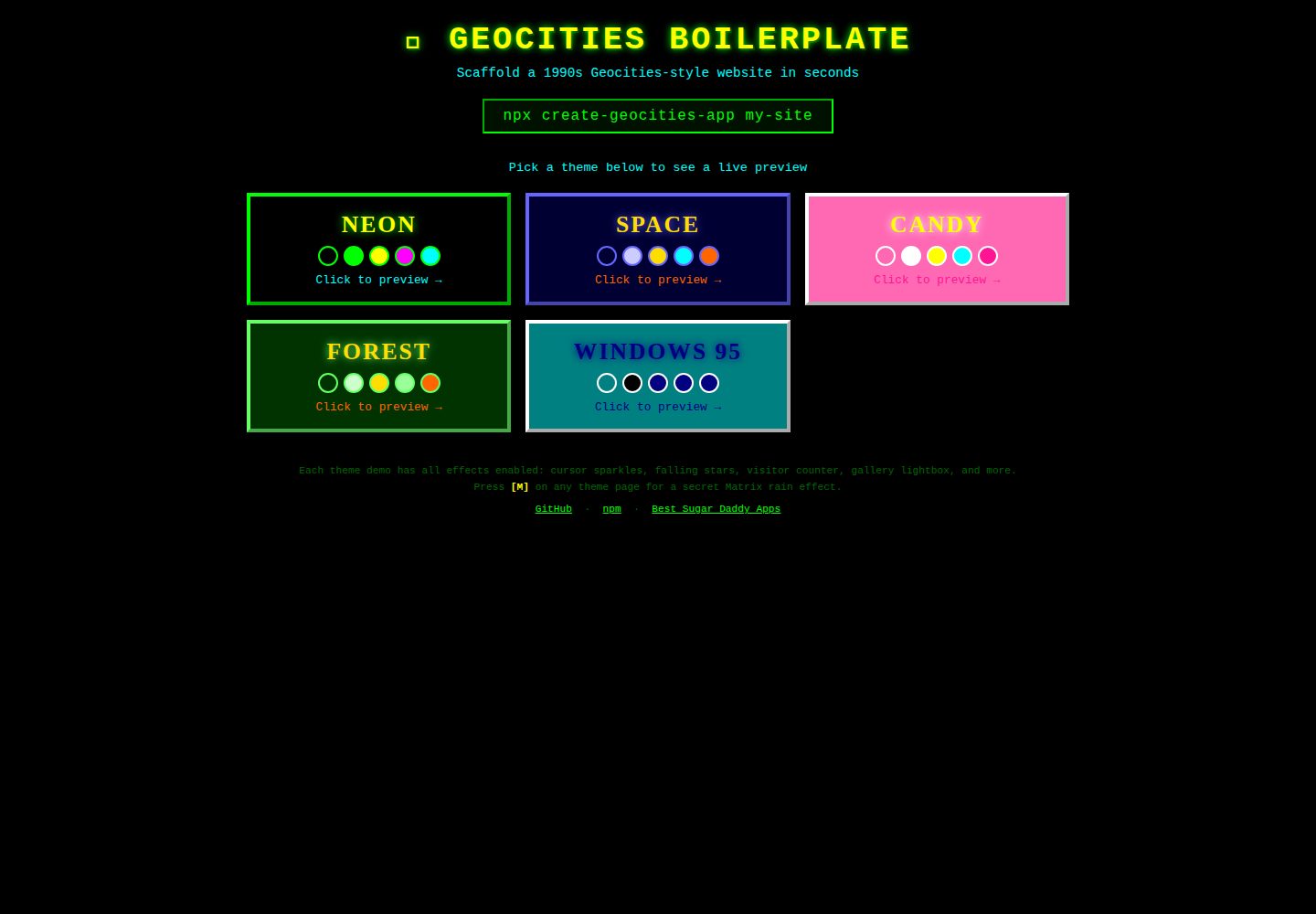
提供 5 种复古配色主题:neon、space、candy、forest、windows
可选附加页面:关于、相册、留言板、酷链接
包含光标特效、下落特效、访客计数器、8-bit 音乐、Matrix 雨等复古效果
支持 Node.js、Python、Ruby、Rust、PHP、Deno 和 Go 多种运行方式
模板详细介绍
geocities-boilerplate 是一个 CLI 工具,用于生成完整的 1990 年代 Geocities 风格静态个人网站。生成结果由纯 HTML、CSS 和原生 JavaScript 组成,不依赖构建工具、框架或运行时依赖,直接用浏览器打开 index.html 即可查看。
工具提供交互式设置,依次询问站点名称、作者名、配色主题、附加页面、光标特效、下落特效、欢迎弹窗、自动播放音乐以及访客计数器初始值。也可通过 --yes 跳过全部提示并使用默认值。生成器支持 Node.js/npm、Python/PyPI、Ruby/RubyGems、Rust/Cargo、PHP/Composer、Deno/JSR 和 Go 多种运行方式,所有变体接受相同的参数。
生成站点包含首页,以及可选的关于、相册、留言板和酷链接页面。首页含跑马灯横幅、彩虹标题、霓虹脉冲标题、What's New、施工中区块、侧边栏(导航、时钟、旋转地球、访客计数器、Web Ring)和页脚。相册页提供三列图片网格与灯箱查看器;留言板页提供表单和预置示例条目,提交为客户端行为,README 说明可接入 Formspree、Netlify Forms 等真实后端。
特效包括光标特效(Sparkle、Star Trail、Comet、Rainbow)、下落背景特效(Stars、Snow)、访客计数器、实时时钟、CSS 跑马灯、闪烁文本、彩虹标题、霓虹发光、旋转地球、施工中警示带、页面进入动画、Web Audio API 8-bit 音乐、按 M 键切换的 Matrix 雨、自定义滚动条和相册灯箱。
限制方面:README 提及 Formspree 表单服务,真实提交需配置服务端点,其使用额度与费用需单独核对;演示图片、字体、图标等第三方素材需按各自许可核对;域名、托管等外部服务可能另外收费。生成站点的托管可参考 README 中的 GitHub Pages 设置步骤。
HTML启动器
适合你的项目吗?
适用场景
- 快速搭建一个 1990 年代 Geocities 风格的个人主页
- 为复古网页设计教学或演示制作示例站点
- 生成纯静态站点并部署到 GitHub Pages 等静态托管服务
- 作为怀旧主题活动的宣传页面或趣味项目起点
适合人群
- 想快速获得复古风格静态网站原型的开发者
- 需要纯静态、无依赖站点用于教学或演示的人
- 对 1990 年代网页美学感兴趣的个人用户
上手与定制指南
结合仓库当前版本的说明,按下面的资料检查内容、配置与运行要求。
- 1
使用 npx create-geocities-app my-site 运行,随后在浏览器中打开 my-site/index.html
- 2
可通过 --yes 跳过交互提示并使用默认配置
- 3
留言板表单默认仅客户端提交,如需真实提交需自行配置 Formspree 或 Netlify Forms 等服务端点
- 4
演示图片、字体、图标等第三方素材需按各自许可核对
- 5
部署到 GitHub Pages 时,将生成目录内容推送到仓库并在 Settings → Pages 中选择分支和根目录
授权与来源资料
使用条件与限制
免费使用 · 保留许可声明本次收录的是公开仓库中采用 MIT 许可的免费版本;免费范围为该版本代码,不代表外部服务或第三方素材免费。
使用时需要遵守
- 允许免费使用、修改、商用和分发该版本代码。
- 分发代码副本或实质性部分时,保留原作者版权声明和完整 MIT 许可声明。
- 代码按现状提供;担保与责任限制以原许可证及适用法律为准。
额外费用与待核对事项
- 留言板表单默认仅客户端提交,不会真正保存数据;如需真实提交需自行接入 Formspree、Netlify Forms 等第三方服务,其账号、额度与费用需单独核对。
- 相册页预置的是占位图片,需自行替换;演示中的图片、字体、图标等第三方素材的许可与费用需单独核对。
- README 提及 Formspree 表单服务;真实提交需配置服务端点,其使用额度与费用需单独核对。
- 演示图片、字体、图标及其他第三方素材需按各自许可核对,不能仅凭代码的 MIT 许可判断。
- 域名、托管、数据库、支付或 AI 等外部服务可能另外收费。
查看原文依据
Permission is hereby granted, free of charge
许可证原文
Note explaining how to add a real backend (Formspree, Netlify Forms, etc.)
README 原文
https://github.com/sugardaddyapp/geocities-boilerplate/blob/main/LICENSEhttps://github.com/sugardaddyapp/geocities-boilerplate/blob/main/README.mdPlaceholder images pre-filled — replace with your own
README 原文
DeepSeek 根据仓库许可证和 README 整理 ·2026-10-04。结果仅覆盖已读取资料,依赖、图片、字体及后续条款变更以各自原文为准。
项目核对记录与介绍依据
模板资料
- 来源平台
- GitHub
- 资料与维护参考分
- 资料较完整 · 87 / 100
- 技术栈
- HTML
- 网站类型
- 启动器
这个分数如何计算
本站按许可资料(最高30分)、演示链接(12分)、预览图(10分)、Star数(15分)、记录的维护时间(15分)、描述完整度(8分)、功能记录(5分)和分类资料(5分)计算。它不是代码、安全或性能测试,也不是 Google 评分;有链接不代表已实测可用。
这个项目需要核对什么
- 记录的仓库更新时间
- 2026-05-11
- 截图检查日期
- 2026-10-04
已收录演示链接。请用你的内容与屏幕尺寸检查;有演示不代表表单、认证或支付已经可用。
目录记录的主要技术栈是 HTML。请通过依赖清单和锁文件核对实际版本与托管要求。这些说明基于收录资料,不代表代码审计或部署实测。
查看具体选型方法 →介绍的制作与核对状态
介绍由 AI 辅助整理目录与仓库资料。仓库作者不等于这篇介绍的审核者。
审核声明: [email protected] · 2026-10-04
查看当时使用的来源资料
SHA-256: f07e2b2b2faa95453d15f21fe23166892e5c6646bfbfef778d175e5fc6ae6a78
2026-10-04T01:03:27.686Z
来源文件 / 仓库# 🌐 geocities-boilerplate
> Scaffold a complete 1990s Geocities-themed static website in seconds.
[](https://www.npmjs.com/package/create-geocities-app)
[](https://www.npmjs.com/package/create-geocities-app)
[](https://opensource.org/licenses/MIT)
[](https://sugardaddyapp.github.io/geocities-boilerplate/)
```
██████╗ ███████╗ ██████╗ ██████╗██╗████████╗██╗███████╗███████╗
██╔════╝ ██╔════╝██╔═══██╗██╔════╝██║╚══██╔══╝██║██╔════╝██╔════╝
██║ ███╗█████╗ ██║ ██║██║ ██║ ██║ ██║█████╗ ███████╗
██║ ██║██╔══╝ ██║ ██║██║ ██║ ██║ ██║██╔══╝ ╚════██║
╚██████╔╝███████╗╚██████╔╝╚██████╗██║ ██║ ██║███████╗███████║
╚═════╝ ╚══════╝ ╚═════╝ ╚═════╝╚═╝ ╚═╝ ╚═╝╚══════╝╚══════╝
geocities-boilerplate ✨ Welcome to 1996 ✨
```
**[🌐 View Live Demo](https://sugardaddyapp.github.io/geocities-boilerplate/)**
---
## What is this?
`geocities-boilerplate` is a CLI tool that generates a fully self-contained, retro 1990s Geocities-style personal website. Think neon colors, blinking text, animated star trails, marquee banners, visitor counters, and guestbooks — all of it, generated instantly with a single command.
The generated site is **pure static HTML, CSS, and vanilla JavaScript**. No build tools, no frameworks, no dependencies. Just open `index.html` in any browser and relive the golden age of the web.
---
## Quick Start
```bash
npx create-geocities-app my-site
```
Then open `my-site/index.html` in your browser. That's it!
---
## Every Way to Run It
Pick your language or runtime — all produce the same site.
### Node.js / npm
```bash
# one-shot, no install
npx create-geocities-app my-site
# or install globally
npm install -g create-geocities-app
create-geocities-app my-site
```
### Python / PyPI
```bash
# one-shot with pipx (recommended)
pipx run create-geocities-app my-site
# or install permanently
pip install create-geocities-app
create-geocities-app my-site
```
### Ruby / RubyGems
```bash
gem install create-geocities-app
create-geocities-app my-site
```
### Rust / Cargo
```bash
cargo install create-geocities-app
create-geocities-app my-site
```
### PHP / Composer
```bash
# global install
composer global require geocities-app/create-geocities-app
create-geocities-app my-site
# or as a project scaffold
composer create-project geocities-app/create-geocities-app my-site
```
### Deno / JSR
```bash
# run without installing
deno run --allow-read --allow-write jsr:@geocities/create-app my-site
# or compile to a native binary first
deno compile --allow-read --allow-write --output create-geocities-app jsr:@geocities/create-app
./create-geocities-app my-site
```
### Go
```bash
# run without installing
go run github.com/sugardaddyapp/geocities-boilerplate/go@latest my-site
# or install the binary
go install github.com/sugardaddyapp/geocities-boilerplate/go@latest
create-geocities-app my-site
```
All variants accept the same flags:
| Flag | Meaning |
|------|---------|
| `my-site` | Output directory name (default: `my-geocities-site`) |
| `-y` / `--yes` | Skip all prompts and use defaults |
---
## Demo
**Live demo:** [https://sugardaddyapp.github.io/geocities-boilerplate/](https://sugardaddyapp.github.io/geocities-boilerplate/)
The demo is generated with all options enabled (neon theme, sparkle cursor, falling stars, all 5 pages). It is automatically rebuilt and deployed to GitHub Pages on every push to `main`.
---
## Interactive Setup
When you run `npx create-geocities-app my-site`, you'll be walked through a series of prompts:
| # | Prompt | Type | Description |
|---|--------|------|-------------|
| 1 | **Site name** | text | Your homepage title, e.g. `CoolDude's Homepage` |
| 2 | **Your name** | text | Displayed in headers, footers, and contact sections |
| 3 | **Color theme** | select | Choose from 5 retro color palettes (see below) |
| 4 | **Extra pages** | multi | About, Gallery, Guestbook, Cool Links |
| 5 | **Cursor effect** | select | Sparkle, Star Trail, Comet, Rainbow, or None |
| 6 | **Falling effect** | select | Stars, Snow, or None |
| 7 | **Welcome alert** | yes/no | Show a `alert()` greeting when the page loads |
| 8 | **Auto-play music** | yes/no | Play a Web Audio API 8-bit jingle on load |
| 9 | **Fake high count** | yes/no | Start visitor counter at ~10,000 (looks popular!) |
### Skip prompts (use all defaults)
```bash
npx create-geocities-app my-site --yes
```
---
## Generated Output
```
my-site/
├── index.html ← Homepage
├── about.html ← About Me (if selected)
├── gallery.html ← Photo Gallery with lightbox (if selected)
├── guestbook.html ← Guestbook (if selected)
├── links.html ← Cool Links (if selected)
├── css/
│ └── style.css ← Full retro stylesheet (theme-specific)
└── js/
└── main.js ← All JS effects (counter, cursor, music, etc.)
```
**Zero runtime dependencies** in the generated output. Every file is self-contained and works offline.
---
## Color Themes
Choose a theme during setup. Each theme controls background, text, link, and accent colors throughout the entire site.
| Theme | Background | Primary Text | Headings | Links | Feel |
|-------|-----------|--------------|----------|-------|------|
| `neon` | `#000000` | `#00FF00` | `#FFFF00` | `#FF00FF` | Hacker/Matrix vibes |
| `space` | `#000033` | `#CCCCFF` | `#FFDD00` | `#00FFFF` | Deep space explorer |
| `candy` | `#FF69B4` | `#FFFFFF` | `#FFFF00` | `#00FFFF` | Sweet and electric |
| `forest` | `#003300` | `#CCFFCC` | `#FFDD00` | `#99FF99` | Dark enchanted forest |
| `windows` | `#008080` | `#000000` | `#000080` | `#000080` | Classic Windows 95 |
---
## Pages
### 🏠 index.html — Homepage
Every generated site includes a homepage with:
- **Marquee banner** — scrolling welcome text (CSS animation, no deprecated `<marquee>` tag)
- **Rainbow animated site title** — CSS `hue-rotate` animation cycles through all colors
- **Neon-pulsing headings** — `text-shadow` breathes in and out
- **"What's New" section** — with blinking NEW badges
- **Under Construction section** — animated yellow/black caution tape
- **Sidebar** — navigation, live clock, spinning globe, visitor counter, web ring
- **Web ring widget** — retro navigation to prev/home/next sites
- **Footer** — "Best viewed in Netscape Navigator" badge, copyright
### 👤 about.html — About Me
- **Fun Facts list** — blinking star bullet points
- **Interests grid** — styled badge chips for hobbies
- **Favorites table** — a retro-styled table of favorite things (music, movies, games, etc.)
- **Contact section** — email and guestbook links
### 🖼️ gallery.html — Photo Gallery
- **Photo of the Month** spotlight at the top
- **3-column image grid** — each item has thick beveled Windows-95-style borders
- **Captions** in Comic Sans below each image
- **Lightbox viewer** — click any photo to open it full-size in an overlay; press ESC or click outside to close
- Placeholder images pre-filled — replace with your own
### 📖 guestbook.html — Guestbook
- **Sign form** — fields for name, email, website, location, and message
- **Fake previous entries** — pre-populated with period-authentic guestbook posts (fully editable)
- **Client-side submit** — shows a thank-you alert and resets the form
- Note explaining how to add a real backend (Formspree, Netlify Forms, etc.)
### 🔗 links.html — Cool Links
- Links organized into categories: Friends, Games, Web & Tech, Art, News
- **Blinking animated bullets** before each link
- Description text below each link
- "Request Link Exchange" email button
---
## Effects Reference
### Cursor Effects
| Effect | What it does |
|--------|-------------|
| **Sparkle** ✨ | Random glitter glyphs (`✦`, `✧`, `★`, `·`) spawn at your cursor and float upward |
| **Star Trail** ★ | Yellow ★ characters follow the cursor and fade out with a scale-down animation |
| **Comet** ☄️ | An orange-to-white horizontal streak trails behind cursor movement |
| **Rainbow** 🌈 | Colored dots cycle through the full hue spectrum as you move the cursor |
| **None** | No cursor effect |
### Falling Background Effects
| Effect | What it does |
|--------|-------------|
| **Stars** ⭐ | 60 colored star characters (`★`) fall from top of screen with random sizes, speeds, and drift |
| **Snow** ❄️ | 40 white circular snowflakes drift downward with random horizontal drift |
| **None** | No falling effect |
### Other Effects
| Effect | Details |
|--------|---------|
| **Visitor counter** | Odometer-style LCD digit boxes, animates on load, persists via `localStorage` |
| **Live clock** | `HH:MM:SS` display in the sidebar, updated every second |
| **Marquee banner** | CSS `@keyframes` scroll animation — pauses on hover |
| **Blinking text** | CSS `@keyframes blink` — used on NEW badges, bullet points, and decorations |
| **Rainbow headings** | CSS `filter: hue-rotate()` animation cycles through all colors |
| **Neon glow pulse** | `text-shadow` breathes in/out on all major headings |
| **Spinning globe** | 🌍 emoji spins continuously via CSS `rotate` animation |
| **Under construction** | Yellow/black diagonal-stripe caution tape with a spinning 🚧 icon |
| **Page entry animation** | Content fades and slides up on load |
| **8-bit music jingle** | Square-wave melody via Web Audio API — plays on first interaction; toggle with the PLAY/STOP button |
| **Matrix rain** | Press **M** on any page to toggle a green Matrix-style canvas rain effect |
| **Custom scrollbar** | Themed scrollbar matching the color palette (Chrome/Edge/Safari) |
| **Gallery lightbox** | Click-to-expand image viewer with caption, close button, and ESC key support |
---
## GitHub Pages Setup (for your generated site)
To host your generated site on GitHub Pages:
1. Create a new GitHub repository
2. Copy the contents of your generated folder into it
3. Push to `main`
4. Go to **Settings → Pages → Source → Deploy from a branch → main → / (root)**
5. Your site is live at `https://<username>.github.io/<repo-name>/`
---
## Project Structure (for contributors)
```
geocities-boilerplate/
├── .github/workflows/
│ └── deploy-demo.yml # Auto-deploys demo/ to GitHub Pages
├── bin/
│ └── cli.js # CLI entry point with ASCII banner
├── src/
│ ├── generator.js # Core: reads templates, interpolates vars, writes files
│ ├── prompts.js # Interactive prompts using `prompts` package
│ └── themes.js # 5 color palette definitions
├── templates/ # Source templates (shared across all ports)
│ ├── index.html
│ ├── about.html
│ ├── gallery.html
│ ├── guestbook.html
│ ├── links.html
│ ├── css/style.css
│ └── js/main.js
├── python/ # PyPI package (questionary, importlib.resources)
├── ruby/ # RubyGems gem (tty-prompt)
├── rust/ # Cargo crate (dialoguer, include_dir — single binary)
├── php/ # Packagist/Composer package (Symfony Console)
├── deno/ # JSR package (TypeScript, @std/fs)
├── go/ # Go module (charmbracelet/huh, go:embed — single binary)
├── demo/ # Pre-generated demo (not in npm bundle)
├── scripts/
│ └── build-demo.js # Regenerates demo/ with all options enabled
├── package.json
├── PLAN.md # Full project plan and design decisions
└── README.md
```
### Template Variables
Templates use `{{VARIABLE_NAME}}` placeholders that are replaced by the generator. Key variables:
| Variable | Description |
|----------|-------------|
| `{{SITE_NAME}}` | Site title from user prompt |
| `{{AUTHOR_NAME}}` | Author name from user prompt |
| `{{THEME_NAME}}` | Human-readable theme name |
| `{{BG}}`, `{{TEXT_COLOR}}`, etc. | Theme color values (CSS hex) |
| `{{CURSOR_EFFECT}}` | Selected cursor effect key |
| `{{FALLING_EFFECT}}` | Selected falling effect key |
| `{{WELCOME_ALERT}}` | `"true"` or `"false"` |
| `{{PLAY_MUSIC}}` | `"true"` or `"false"` |
| `{{FAKE_HIGH_COUNT}}` | `"true"` or `"false"` |
| `{{NAV_LINKS}}` | Generated navigation `<a>` tags based on selected pages |
| `{{YEAR}}` | Current year |
---
## Contributing
1. Fork the repo
2. Create a feature branch: `git checkout -b feat/my-awesome-feature`
3. Make changes in `templates/`, `src/`, or `bin/`
4. Test locally: `node bin/cli.js test-site --yes && open test-site/index.html`
5. Rebuild the demo: `npm run build:demo`
6. Open a pull request
### Ideas for contributions
- New color themes
- Additional page types (music page, art gallery, blog page)
- More cursor effects (pixel trail, fire cursor)
- Web component versions of the decorative elements
- A `--theme <name>` CLI flag to skip the theme prompt
---
## Local Development
```bash
# Clone
git clone https://github.com/sugardaddyapp/geocities-boilerplate.git
cd geocities-boilerplate
# Install
npm install
# Test the CLI
node bin/cli.js my-test-site
# Rebuild demo
npm run build:demo
# Open demo
open demo/index.html
```
---
## License
MIT © Jamey Baldwin
---
## Acknowledgements
- Inspired by the preserved [GeoCities archive](https://geocities.restorativland.org/) and [GifCities](https://gifcities.org/)
- Color palette ideas from the original GeoCities neighborhood aesthetics
- Built with ❤️ and an unhealthy amount of nostalgia for 1996
---
Also checkout my other projects:
[Best Sugar Daddy Apps](https://github.com/sugardaddyapp/bestsugardaddyapps/)
[Best Sugar Daddy Apps 2026](https://bestsugardaddyapps.com/)
[Best Sugar Daddy Apps NPM](https://www.npmjs.com/package/best-sugar-daddy-apps)
[Best Sugar Daddy Apps Socket](https://socket.dev/npm/package/best-sugar-daddy-apps)
*Best viewed in Netscape Navigator 4.0 at 800×600 resolution.*
看看同类模板
对比同技术栈与用途的模板,找到更适合的视觉与内容结构。

startbootstrap-simple-sidebar
An off canvas sidebar navigation Bootstrap HTML template created by Start Bootstrap
HTML · 启动器

adminkit
AdminKit is a free & open-source HTML dashboard & admin template based on Bootstrap 5
HTML · 后台

Landing-Page
Tailwind CSS Starter Template - Landing Page
HTML · 企业官网

light-bootstrap-dashboard
Light Bootstrap Dashboard is an admin dashboard template designed to be beautiful and simple.
HTML · 后台

sing-app
💥Free and open-source admin dashboard template built with Bootstrap 4.5 💥
HTML · 后台

startbootstrap-modern-business
A multipurpose Bootstrap full website template created by Start Bootstrap
HTML · 启动器