以 Next.js 复刻 Ghost 默认主题的博客前端
Next.jsReact博客启动器
nextjs-ghost-starter — Next.js 博客模板
作者 tewarig
将 Ghost 默认主题风格移植到 Next.js 的博客启动器,通过 Ghost Content API 拉取内容并支持 Netlify 部署。
看看你的网站会是什么样
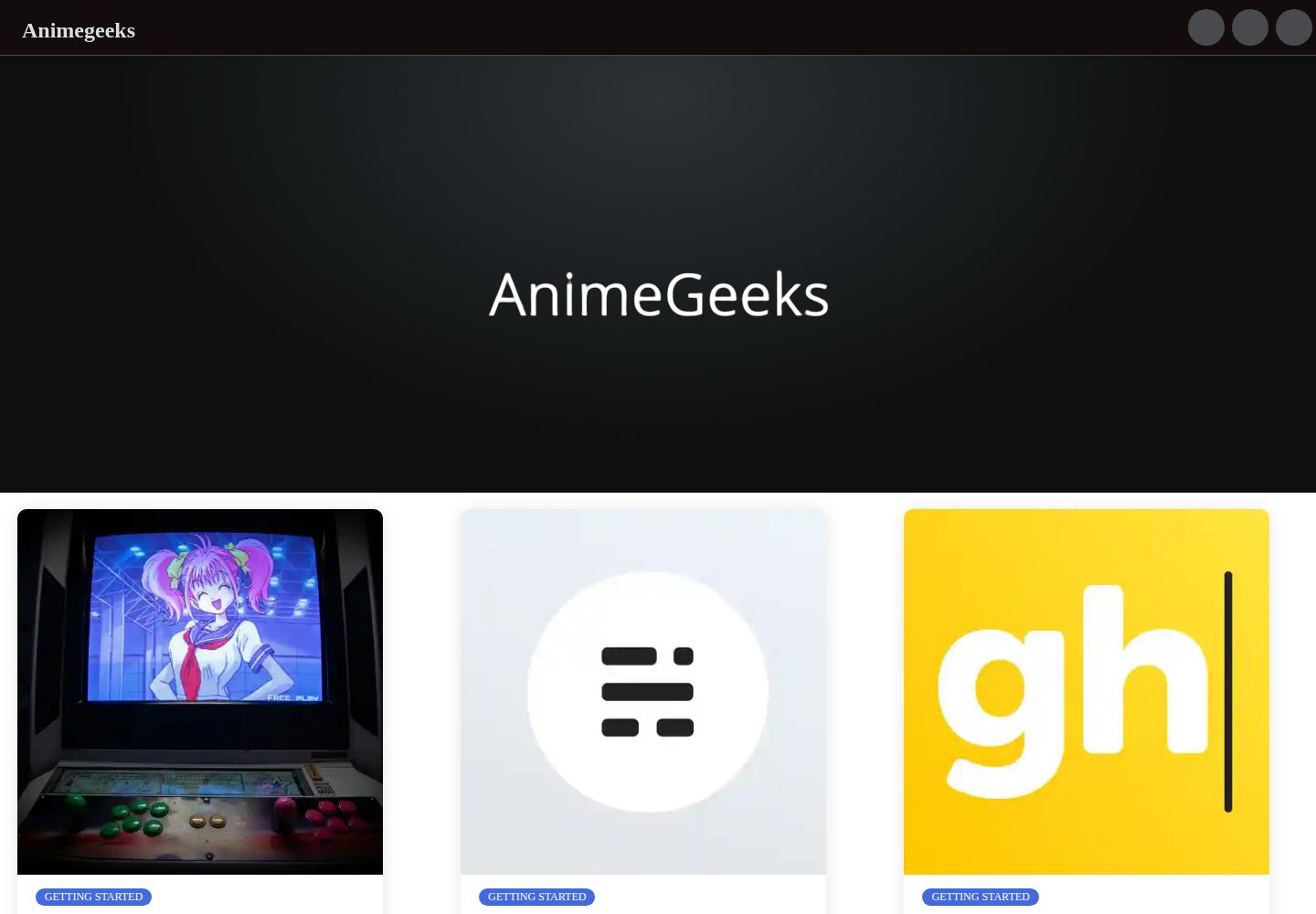
浏览真实页面截图,比较内容排版与手机效果。点击下方缩略图切换,放大查看整页细节。
全部页面与视图 2
截图用于了解视觉与布局,交互效果请以实际项目为准。
采集于 2026-10-12查看来源
值得关注的模板亮点
从已有项目资料中,快速了解它的特点。
内容来自 Ghost Content API,通过 apiUrl 与 contentkey 接入自有 Ghost 站点
默认指向一个公开的 Ghost 演示安装,可直接查看效果
README 提供 Netlify 一键部署按钮与 Ghost + Netlify 集成说明
采用 MIT 许可,可免费使用、修改、商用与分发
模板详细介绍
这是一个用 Next.js 复刻 Ghost 默认主题外观的博客启动器模板,项目自述为“Simple Ghost default theme for next.js”。它并不自带内容管理系统,而是作为前端读取 Ghost 站点的内容:默认会从 https://next-ghost-blog.herokuapp.com/ 这个 Ghost 安装拉取数据,要接入自己的站点需要修改 site-config 配置文件。
配置分三步:把 apiUrl 改成自己的 Ghost 站点地址(Ghost(Pro) 用户为以 .ghost.io 结尾的地址,自托管用户为访问站点的同一地址);把 contentkey 换成该 Ghost 站点对应的 Content API Key,该 Key 可在 Ghost 后台 Integrations 中新建集成获得;最后在 site-config.js 中配置期望的站点 URL,以便正确生成 canonical 等链接。README 说明该启动器默认使用的 Ghost 版本为 3.x,并给出了 Ghost <=3.0.0 的配置示例。
部署方面,README 提供了 Netlify 的一键部署按钮,并说明 Content API Key 通常不被视为敏感信息,多数人直接提交到配置文件;若不想入库,可改用 Netlify 的环境变量。部署后还可以配置 Ghost 与 Netlify 的集成,通过 deploy hook 在 Ghost 数据变化时触发 Netlify 重新构建。仓库未提供更多关于页面结构、组件划分或样式定制的说明。
Next.jsReact博客启动器
适合你的项目吗?
适用场景
- 已有 Ghost 站点,希望用 Next.js 重做前端展示层
- 想参考 Ghost 默认主题在 Next.js 中的实现方式
- 需要一个可部署到 Netlify、由 Ghost 数据触发重建的博客前端
适合人群
- 使用 Ghost 作为内容后台的开发者
- 熟悉 Next.js 与 React、愿意自行修改配置文件的团队
- 需要 MIT 许可下可自由修改的博客前端代码的项目
上手与定制指南
结合仓库当前版本的说明,按下面的资料检查内容、配置与运行要求。
- 1
修改 site-config 中的 apiUrl 为你的 Ghost 站点地址,Ghost(Pro) 为 .ghost.io 结尾地址,自托管为访问站点所用地址
- 2
在 Ghost 后台 Integrations 新建集成,获取 Content API Key 并填入 contentkey
- 3
在 site-config.js 中配置站点 URL,以便生成 canonical 等链接
- 4
README 说明默认使用的 Ghost 版本为 3.x,并给出 Ghost <=3.0.0 的配置示例
- 5
部署到 Netlify 可使用仓库中的部署按钮;如不想把 Key 写入仓库,可改用 Netlify 环境变量,并可通过 Ghost 的 deploy hook 触发重新构建
授权与来源资料
使用条件与限制
免费使用 · 保留许可声明本次收录的是公开仓库中采用 MIT 许可的免费版本;免费范围为该版本代码,不代表外部服务或第三方素材免费。
使用时需要遵守
- 允许免费使用、修改、商用和分发该版本代码。
- 分发代码副本或实质性部分时,保留原作者版权声明和完整 MIT 许可声明。
- 代码按现状提供;担保与责任限制以原许可证及适用法律为准。
额外费用与待核对事项
- 演示图片、字体、图标及其他第三方素材需按各自许可核对,不能仅凭代码的 MIT 许可判断。
- 域名、托管、数据库、支付或 AI 等外部服务可能另外收费。
- 默认从作者提供的公开 Ghost 演示站点拉取内容,需自行修改配置才能接入自有站点。
- 使用自有 Ghost 站点必须修改 site-config 配置文件并填入自己的凭据。
- 必须拥有 Ghost 站点并在 Ghost 后台创建集成以获取 Content API Key,属于外部服务依赖。
- 该启动器默认适配 Ghost 3.x 版本,其他版本可能不兼容。
- README 仅针对 Ghost 3.0.0 及更早版本给出配置示例,版本适用范围有限。
- 部署流程依赖 Netlify 账户,属于外部托管服务要求。
查看原文依据
Permission is hereby granted, free of charge
许可证原文
By default, the starter will populate content from a default Ghost install located at https://next-ghost-blog.herokuapp.com/ .
README 原文
To use your own install, you will need to edit the `site-config` config file with your credentials.
README 原文
Next, update the `contentkey` value to a key associated with the Ghost site. A key can be provided by creating an integration within Ghost Admin.
README 原文
The default Ghost version that is used for this starter is `3.x`.
README 原文
**Ghost <=3.0.0**
README 原文
https://github.com/tewarig/nextjs-ghost-starter/blob/master/LICENSEhttps://github.com/tewarig/nextjs-ghost-starter/blob/master/README.mdTo deploy to your Netlify account, hit the button below.
README 原文
DeepSeek 根据仓库许可证和 README 整理 ·2026-10-12。结果仅覆盖已读取资料,依赖、图片、字体及后续条款变更以各自原文为准。
项目核对记录与介绍依据
模板资料
- 来源平台
- GitHub
- 资料与维护参考分
- 资料一般 · 73 / 100
- 技术栈
- Next.js · React
- 网站类型
- 博客 · 启动器
这个分数如何计算
本站按许可资料(最高30分)、演示链接(12分)、预览图(10分)、Star数(15分)、记录的维护时间(15分)、描述完整度(8分)、功能记录(5分)和分类资料(5分)计算。它不是代码、安全或性能测试,也不是 Google 评分;有链接不代表已实测可用。
这个项目需要核对什么
- 记录的仓库更新时间
- 2021-02-18
- 截图检查日期
- 2026-10-12
已收录演示链接。请用你的内容与屏幕尺寸检查;有演示不代表表单、认证或支付已经可用。
目录记录的主要技术栈是 Next.js。请通过依赖清单和锁文件核对实际版本与托管要求。这些说明基于收录资料,不代表代码审计或部署实测。
查看具体选型方法 →介绍的制作与核对状态
介绍由 AI 辅助整理目录与仓库资料。仓库作者不等于这篇介绍的审核者。
审核声明: [email protected] · 2026-10-13
查看当时使用的来源资料
SHA-256: 28a2c3ff792738e15134401a59937734d66e905c5ce215b4518f234055c8d160
2026-10-12T16:07:32.423Z
来源文件 / 仓库# Nextjs-ghost-starter Simple Ghost default theme for next.js # Mobile and desktop preview <img src = "./ss/d1.png" > <hr /> <div class="row"> <img src = "./ss/m1.jpeg" height="300" width = "150" > <img src = "./ss/m2.jpeg" height="300" width = "150" > <img src = "./ss/m3.jpeg" height="300" width = "150" > </div> ## Getting Started By default, the starter will populate content from a default Ghost install located at https://next-ghost-blog.herokuapp.com/ . To use your own install, you will need to edit the `site-config` config file with your credentials. Change the `apiUrl` value to the URL of your Ghost site. For Ghost(Pro) customers, this is the Ghost URL ending in `.ghost.io`, and for people using the self-hosted version of Ghost, it's the same URL used to access your site. Next, update the `contentkey` value to a key associated with the Ghost site. A key can be provided by creating an integration within Ghost Admin. Navigate to Integrations and click "Add new integration". Name the integration appropriately and click create. Finally, configure your desired URL in `site-config.js`, so links (e. g. canonical links) are generated correctly. Y The default Ghost version that is used for this starter is `3.x`. **Ghost <=3.0.0** ``` const appUrl = "https://next-ghost-blog.herokuapp.com/"; const contentKey = "382362c8a9a611d23db0adefc1"; ``` # Deploying with Netlify To deploy to your Netlify account, hit the button below. [](https://app.netlify.com/start/deploy?repository=https://github.com/tewarig/nextjs-ghost-starter) Content API Keys are generally not considered to be sensitive information, they exist so that they can be changed in the event of abuse; so most people commit it directly to their config file. If you prefer to keep this information out of your repository you can remove this config and set [Netlify ENV variables](https://www.netlify.com/docs/continuous-deployment/#build-environment-variables) for production builds instead. Once deployed, you can set up a [Ghost + Netlify Integration](https://docs.ghost.org/integrations/netlify/) to use deploy hooks from Ghost to trigger Netlify rebuilds. That way, any time data changes in Ghost, your site will rebuild on Netlify.
看看同类模板
对比同技术栈与用途的模板,找到更适合的视觉与内容结构。

ai-website-cloner-template
Clone any website with one command using AI coding agents
Next.js · 启动器

Next.js SaaS Starter
Next.js SaaS Starter 是 Next.js 官方维护的 SaaS 起点模板,定位介于学习资源和可直接部署的脚手架之间。
Next.js · SaaS

Next.js Commerce
Next.js Commerce 是 Vercel 团队维护的电商启动模板,基于 Next.js App Router 构建,采用服务端渲染、React Server Components、Server Actions …
Next.js · 电商

Next-js-Boilerplate
Next-js-Boilerplate 是一个面向 Next.js 16、Tailwind CSS 4 和 TypeScript 的启动器,核心定位是开发者体验优先。
Next.js · 启动器

tailwind-nextjs-starter-blog
tailwind-nextjs-starter-blog 是一个面向个人技术博客的 Next.js 与 Tailwind CSS 启动模板,其 v2 版本基于 App Router 与 React Server Comp…
Next.js · 博客

next-forge
Production-grade Turborepo template for Next.js apps.
Next.js · 启动器