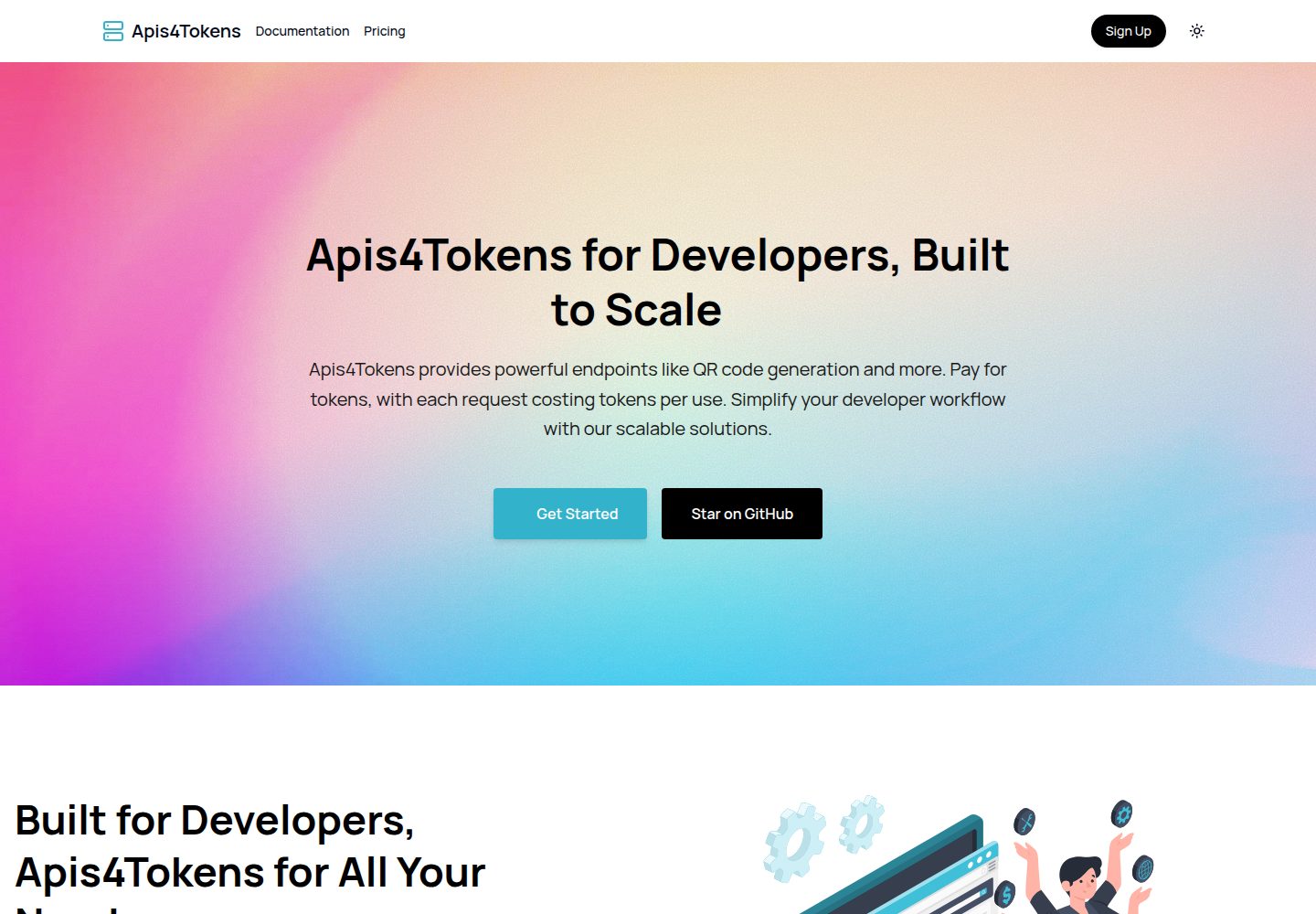
提供落地页、连接 Stripe Checkout 的定价页、用户仪表盘和文档页
Next.jsReact后台文档启动器
Apis4Tokens — Next.js 后台模板
作者 TheHalfTimePrince
基于 Next.js 的 API 市场起步模板,包含 Stripe 支付、JWT 认证、令牌计费、用户仪表盘与文档页,并提供一个用于创建新 API 端点的辅助函数。
看看你的网站会是什么样
浏览真实页面截图,比较内容排版与手机效果。点击下方缩略图切换,放大查看整页细节。
全部页面与视图 2
截图用于了解视觉与布局,交互效果请以实际项目为准。
采集于 2026-10-14查看来源
值得关注的模板亮点
从已有项目资料中,快速了解它的特点。
基于令牌的 API 计费:账户默认 1000 令牌,按端点设定的令牌成本扣减
apiTemplate 辅助函数用于创建新 API 端点,只需填写逻辑与令牌成本
邮箱/密码认证,JWT 存于 cookie,并有全局与局部中间件保护路由和 Server Actions
活动日志系统记录 API 使用与令牌消耗
技术栈为 Next.js、Postgres、Drizzle ORM、Stripe 和 shadcn/ui
模板详细介绍
Apis4Tokens 是一个用 Next.js 构建 API 市场的起步模板。README 说明它包含落地页、连接 Stripe Checkout 的定价页、用户仪表盘(管理 API Key 与令牌余额)、文档页,以及一个用于创建新 API 端点的辅助函数 apiTemplate——在端点中填写业务逻辑和令牌消耗量即可。模板采用基于令牌的 API 计费方式,账户默认有 1000 个令牌,每次调用按端点设定的令牌成本从余额中扣除,并有活动日志记录 API 使用与令牌消耗。认证方式为邮箱/密码,JWT 存储在 cookie 中,并提供全局中间件保护登录用户路由、局部中间件保护 Server Actions 或校验 Zod schema。技术栈方面,README 列出 Next.js、Postgres、Drizzle ORM、Stripe 和 shadcn/ui。部署说明覆盖使用 Coolify 的流程(推送代码、配置环境变量、运行迁移与种子、部署)以及部署后通过脚本设置 Stripe Webhook。README 未提供关于性能、并发能力、生产就绪程度或除上述内容之外的功能说明。
Next.js后台文档启动器
适合你的项目吗?
适用场景
- 搭建一个按令牌计费的 API 市场原型
- 为已有 API 服务添加令牌余额、API Key 与调用扣费机制
- 在 Next.js 项目中集成 Stripe Checkout 与 Webhook 的支付流程
- 为 API 产品提供用户仪表盘和 Markdown 文档页
适合人群
- 希望以 Next.js 起步构建 API 市场或 API 计费产品的开发者
- 需要参考邮箱/密码 JWT 认证与中间件保护路由实现的开发者
- 计划使用 Postgres、Drizzle 与 Stripe 组合的团队
上手与定制指南
结合仓库当前版本的说明,按下面的资料检查内容、配置与运行要求。
- 1
克隆仓库后运行 pnpm install,并用 pnpm db:setup 创建 .env 文件
- 2
依次运行 pnpm db:migrate 和 pnpm db:seed 完成数据库迁移与初始数据填充
- 3
用 pnpm dev 启动开发服务器,访问 http://localhost:3000
- 4
测试 Stripe 支付可使用卡号 4242 4242 4242 4242、任意未来日期和任意三位 CVC
- 5
部署到 Coolify 需配置 BASE_URL、STRIPE_SECRET_KEY、POSTGRES_URL、AUTH_SECRET 等环境变量,并在部署后运行 pnpm deployWebhook 设置 Stripe Webhook
授权与来源资料
使用条件与限制
免费使用 · 保留许可声明本次收录的是公开仓库中采用 MIT 许可的免费版本;免费范围为该版本代码,不代表外部服务或第三方素材免费。
使用时需要遵守
- 允许免费使用、修改、商用和分发该版本代码。
- 分发代码副本或实质性部分时,保留原作者版权声明和完整 MIT 许可声明。
- 代码按现状提供;担保与责任限制以原许可证及适用法律为准。
额外费用与待核对事项
- 演示图片、字体、图标及其他第三方素材需按各自许可核对,不能仅凭代码的 MIT 许可判断。
- 域名、托管、数据库、支付或 AI 等外部服务可能另外收费。
- 定价页依赖 Stripe Checkout,使用支付功能需要 Stripe 账户与相应密钥。
- 支付功能依赖第三方服务 Stripe,需自行注册并配置。
- 测试 API 端点需先注册账户并在仪表盘生成 API Key。
- 测试支付需使用 Stripe 测试卡信息,实际收款需配置真实 Stripe 账户。
- 部署到生产环境需自行安装或使用 Coolify 托管服务。
- 生产部署需配置 Stripe 生产密钥等环境变量。
- 生产部署需自备 Postgres 数据库并配置连接地址。
- 部署后需设置 Stripe Webhook 才能完成支付回调流程。
查看原文依据
Permission is hereby granted, free of charge
许可证原文
* Pricing page connected to Stripe Checkout
README 原文
* **Payments**: [Stripe](https://stripe.com/)
README 原文
To test the endpoint, create an account and generate an API key from the dashboard. Each account starts with 1000 tokens by default. You can make a request to the endpoint using `curl` like this:
README 原文
To test Stripe payments, use the following test card details:
README 原文
2. **Set up Coolify**: Install [Coolify]() on your server or use Coolify's managed service.
README 原文
* `STRIPE_SECRET_KEY`: Your Stripe production secret key.
README 原文
* `POSTGRES_URL`: Your production Postgres database URL.
README 原文
https://github.com/TheHalfTimePrince/Apis4Tokens/blob/main/LICENSEhttps://github.com/TheHalfTimePrince/Apis4Tokens/blob/main/README.mdAfter deployment, set up the Stripe webhook for the production environment. Use the following command:
README 原文
DeepSeek 根据仓库许可证和 README 整理 ·2026-10-14。结果仅覆盖已读取资料,依赖、图片、字体及后续条款变更以各自原文为准。
项目核对记录与介绍依据
模板资料
- 来源平台
- GitHub
- 资料与维护参考分
- 资料较完整 · 82 / 100
- 技术栈
- Next.js · React
- 网站类型
- 后台 · 文档 · 启动器
这个分数如何计算
本站按许可资料(最高30分)、演示链接(12分)、预览图(10分)、Star数(15分)、记录的维护时间(15分)、描述完整度(8分)、功能记录(5分)和分类资料(5分)计算。它不是代码、安全或性能测试,也不是 Google 评分;有链接不代表已实测可用。
这个项目需要核对什么
- 记录的仓库更新时间
- 2024-11-09
- 截图检查日期
- 2026-10-14
已收录演示链接。请用你的内容与屏幕尺寸检查;有演示不代表表单、认证或支付已经可用。
目录记录的主要技术栈是 Next.js。请通过依赖清单和锁文件核对实际版本与托管要求。这些说明基于收录资料,不代表代码审计或部署实测。
查看具体选型方法 →介绍的制作与核对状态
介绍由 AI 辅助整理目录与仓库资料。仓库作者不等于这篇介绍的审核者。
审核声明: codex-user-requested-batch-review-20261017 · 2026-10-16
查看当时使用的来源资料
SHA-256: c6c182d1bd7a7ef831665173f2a2b22a81ad7aadde2bc0d372aef84679dd4e75
2026-10-14T05:12:03.574Z
来源文件 / 仓库# Next.js APIs for Tokens SaaS Starter
This is a starter template for building an API marketplace using **Next.js**. It includes features for authentication, Stripe integration for payments, documentation page, and a dashboard for users to manage their API Keys and token balance. There is also a helper function to create new API endpoints, simply add the logic and the token cost.
## Features
* Landing Page (/)
* Pricing page connected to Stripe Checkout
* User dashboard for managing API tokens and creating custom endpoints
* Token-based system for API usage
* Email/password authentication with JWTs stored in cookies
* Global middleware to protect routes for logged-in users
* Local middleware for protecting Server Actions or validating Zod schemas
* Activity logging system for tracking API usage and token consumption
## Tech Stack
* **Framework**: [Next.js](https://nextjs.org/)
* **Database**: [Postgres](https://www.postgresql.org/)
* **ORM**: [Drizzle](https://orm.drizzle.team/)
* **Payments**: [Stripe](https://stripe.com/)
* **UI Library**: [shadcn/ui](https://ui.shadcn.com/)
## Getting Started
1. Clone the repository:
```bash
git clone [https://github.com/TheHalfTimePrince/Apis4Tokens](https://github.com/TheHalfTimePrince/Apis4Tokens)
cd Apis4Tokens
pnpm install
```
1. Use the included setup script to create your `.env` file:
```bash
pnpm db\:setup
```
1. Run the database migrations and seed the database with initial data:
```bash
pnpm db\:migrate
pnpm db\:seed
```
1. Start the Next.js development server:
```bash
pnpm dev
```
1. Open [http://localhost:3000](http://localhost:3000) to see the app.
## Creating an API Endpoint
To create a new API endpoint, use the `apiTemplate` function. Here's an example:
```typescript
// app/api/example/route.ts
import { NextRequest, NextResponse } from 'next/server';
import { apiTemplate } from '@/lib/easy-api-template';
async function exampleLogic(req: NextRequest) {
const message = "Hello from the API!";
return NextResponse.json({ message }, { status: 200 });
}
export const POST = apiTemplate({
tokenCost: 100, // Cost of this API call in tokens`
logic: exampleLogic,
});
```
This creates a new POST endpoint at `/api/example` that costs 100 tokens per call.
To test the endpoint, create an account and generate an API key from the dashboard. Each account starts with 1000 tokens by default. You can make a request to the endpoint using `curl` like this:
Copy code
```bash
`curl -X POST `[`https://yourdomain.com/api/example`](https://yourdomain.com/api/example)` -H "Authorization: Bearer <YOUR_API_KEY>"`
```
## Add Documentaiton
To add documentation for your new API, create a new markdown file in the `@/contents/docs` folder and explain how to use it.
The token usage will be deducted from the user's balance.
## Testing Payments
To test Stripe payments, use the following test card details:
* **Card Number**: 4242 4242 4242 4242
* **Expiration**: Any future date
* **CVC**: Any 3-digit number
## Going to Production
When you're ready to deploy your API marketplace to production, follow these steps:
### Deploy with Coolify
1. **Push your code to a Git repository**: This can be a public or private repository.
2. **Set up Coolify**: Install [Coolify]() on your server or use Coolify's managed service.
3. **Connect to your Git repository**: Once Coolify is installed, add your repository to Coolify by following the instructions in the platform's dashboard.
4. **Configure environment variables**: Add the necessary environment variables in Coolify's project settings. Make sure to include:
* `BASE_URL`: Your production domain.
* `STRIPE_SECRET_KEY`: Your Stripe production secret key.
* `POSTGRES_URL`: Your production Postgres database URL.
* `AUTH_SECRET`: A random string (use `openssl rand -base64 32` to generate one).
5. **Set up the database**: Use Coolify's database feature or your own managed Postgres instance. Make sure the database URL matches what’s in your `.env` file.
6. **Run database migrations**: In Coolify's dashboard, open the terminal and run:
```bash
pnpm db:migrate
pnpm db:seed
```
7. **Deploy the app**: Once everything is set up, click deploy in Coolify, and it will handle the rest.
### Set up the Stripe Webhook
After deployment, set up the Stripe webhook for the production environment. Use the following command:
```bash
pnpm deployWebhook
```
This script will create a webhook and update your `.env` file with the new `STRIPE_WEBHOOK_SECRET`.
## Scripts
* **pnpm db**: Create your `.env` file
* **pnpm db**: Run database migrations
* **pnpm db**: Seed the database with initial data
* **pnpm deployWebhook**: Deploy the Stripe webhook for production
看看同类模板
对比同技术栈与用途的模板,找到更适合的视觉与内容结构。

ai-website-cloner-template
Clone any website with one command using AI coding agents
Next.js · 启动器

Next.js SaaS Starter
Next.js SaaS Starter 是 Next.js 官方维护的 SaaS 起点模板,定位介于学习资源和可直接部署的脚手架之间。
Next.js · SaaS

Next.js Commerce
Next.js Commerce 是 Vercel 团队维护的电商启动模板,基于 Next.js App Router 构建,采用服务端渲染、React Server Components、Server Actions …
Next.js · 电商

Next-js-Boilerplate
Next-js-Boilerplate 是一个面向 Next.js 16、Tailwind CSS 4 和 TypeScript 的启动器,核心定位是开发者体验优先。
Next.js · 启动器

tailwind-nextjs-starter-blog
tailwind-nextjs-starter-blog 是一个面向个人技术博客的 Next.js 与 Tailwind CSS 启动模板,其 v2 版本基于 App Router 与 React Server Comp…
Next.js · 博客

next-forge
Production-grade Turborepo template for Next.js apps.
Next.js · 启动器