
基于 Next.js App Router,同时提供 TypeScript 与 JavaScript 两个版本
Next.jsReact后台启动器
materio-mui-nextjs-admin-template-free — Next.js 后台模板
作者 themeselection
Materio 免费版是基于 Next.js App Router 与 MUI 的后台管理模板,同时集成 Tailwind CSS,提供 TypeScript 与 JavaScript 两个版本。
看看你的网站会是什么样
浏览真实页面截图,比较内容排版与手机效果。点击下方缩略图切换,放大查看整页细节。
全部页面与视图 2
截图用于了解视觉与布局,交互效果请以实际项目为准。
采集于 2026-09-30查看来源
值得关注的模板亮点
从已有项目资料中,快速了解它的特点。
UI 使用 MUI,并集成 Tailwind CSS
内置 ESLint、Prettier 以及 VSCode 设置、扩展与自定义代码片段
支持绝对路径别名导入
包含 Blank、Full、Boxed 三种布局与一个仪表盘页面
附带账户设置、登录、注册、忘记密码、错误页与维护中页面
模板详细介绍
Materio 免费版是一个面向开发者的 Next.js 后台管理仪表盘模板,仓库同时提供 TypeScript 与 JavaScript 两个版本,安装时需进入对应目录。技术栈以 Next.js App Router 为基础,UI 层使用 MUI,并集成 Tailwind CSS,配套 ESLint、Prettier 与 VSCode 配置(Settings、Extensions、自定义代码片段),支持绝对路径别名导入。
模板内置的内容包括:Blank、Full、Boxed 三种布局,一个仪表盘页面,账户设置、登录、注册、忘记密码、错误页、维护中页面,以及 Iconify 图标、基础卡片和表单布局。免费版仅提供单一垂直菜单、默认皮肤、基础表格与一个图表库,页面数量为 6 个。
需要留意的是,README 中列出的高级表单与校验、表单向导、多套仪表盘、eCommerce/邮件/聊天/日历/发票/看板等应用、NextAuth 认证、RTL、Redux Toolkit、多语言、Starter-kit、自定义抽屉、高级表格与第二个图表库等均属于付费版本,不在本仓库范围内。
Next.jsReact后台启动器
适合你的项目吗?
适用场景
- 需要 Next.js 与 MUI 组合的后台管理界面起步项目
- 希望在同一仓库中对比 TypeScript 与 JavaScript 两种实现方式
- 需要登录、注册、忘记密码等基础账户页面的后台项目
- 需要 Blank、Full、Boxed 多种布局切换的管理界面
适合人群
- 熟悉 Next.js 与 React 的前端开发者
- 使用 MUI 或 Tailwind CSS 的后台项目
- 需要 TypeScript 或 JavaScript 版本二选一的后台起步项目
- 接受免费版功能范围、后续自行扩展的团队
上手与定制指南
结合仓库当前版本的说明,按下面的资料检查内容、配置与运行要求。
- 1
需要 Node.js LTS 版本(非 current 版本)与 npm
- 2
进入 typescript-version 或 javascript-version 目录后安装依赖,可使用 pnpm、yarn 或 npm,README 推荐 pnpm
- 3
将 .env.example 重命名为 .env
- 4
使用 pnpm dev、yarn dev 或 npm run dev 启动,默认访问 http://localhost:3000
- 5
免费版代码采用 MIT 许可,分发时需保留版权与许可声明;演示图片、字体、图标等第三方素材需单独核对许可
授权与来源资料
使用条件与限制
免费使用 · 保留许可声明本次收录的是公开仓库中采用 MIT 许可的免费版本;免费范围为该版本代码,不代表外部服务或第三方素材免费。
使用时需要遵守
- 允许免费使用、修改、商用和分发该版本代码。
- 分发代码副本或实质性部分时,保留原作者版权声明和完整 MIT 许可声明。
- 代码按现状提供;担保与责任限制以原许可证及适用法律为准。
额外费用与待核对事项
- MIT 许可本身不要求署名,但 README 明确要求在使用该免费模板的网站或项目页脚保留指向 ThemeSelection 的署名链接,属于项目方附加的署名请求。
- 免费版仅通过 GitHub issues 提供社区支持,专属技术支持需购买付费版,免费用户不应期待官方优先支持。
- 向仓库提交贡献即视为授予 ThemeSelection 非独占许可,其可在任意场景使用该贡献,贡献者需接受此条款。
- 贡献代码时若引入第三方内容,必须确保其采用开源许可,否则不应提交。
- 项目资料提及可选付费版本或功能;本次仅收录公开免费代码,不包含付费升级。
- 演示图片、字体、图标及其他第三方素材需按各自许可核对,不能仅凭代码的 MIT 许可判断。
- 域名、托管、数据库、支付或 AI 等外部服务可能另外收费。
查看原文依据
Permission is hereby granted, free of charge
许可证原文
We just need attribution from your end. Copy the link below and paste it in the footer of your web application or project.
README 原文
For free products, enjoy community support via GitHub issues. Upgrade to Premium for dedicated support from our expert team.
README 原文
When you contribute, you agree to give a non-exclusive license to ThemeSelection to use that contribution in any context as we (ThemeSelection) see appropriate.
README 原文
https://github.com/themeselection/materio-mui-nextjs-admin-template-free/blob/main/LICENSEhttps://github.com/themeselection/materio-mui-nextjs-admin-template-free/blob/main/README.mdIf you use content provided by another party, it must be appropriately licensed using an open source license.
README 原文
DeepSeek 根据仓库许可证和 README 整理 ·2026-09-30。结果仅覆盖已读取资料,依赖、图片、字体及后续条款变更以各自原文为准。
项目核对记录与介绍依据
模板资料
- 来源平台
- GitHub
- 资料与维护参考分
- 资料较完整 · 100 / 100
- 技术栈
- Next.js · React
- 网站类型
- 后台 · 启动器
这个分数如何计算
本站按许可资料(最高30分)、演示链接(12分)、预览图(10分)、Star数(15分)、记录的维护时间(15分)、描述完整度(8分)、功能记录(5分)和分类资料(5分)计算。它不是代码、安全或性能测试,也不是 Google 评分;有链接不代表已实测可用。
这个项目需要核对什么
- 记录的仓库更新时间
- 2026-03-20
- 截图检查日期
- 2026-09-30
已收录演示链接。请用你的内容与屏幕尺寸检查;有演示不代表表单、认证或支付已经可用。
目录记录的主要技术栈是 Next.js。请通过依赖清单和锁文件核对实际版本与托管要求。这些说明基于收录资料,不代表代码审计或部署实测。
查看具体选型方法 →介绍的制作与核对状态
介绍由 AI 辅助整理目录与仓库资料。仓库作者不等于这篇介绍的审核者。
已完成服务器许可规则与 AI 来源核对;未经过人工编辑审核。
查看当时使用的来源资料
SHA-256: 7c1519d6c637645d72e14d6a442987394c4cd2b50bea29304ee5add76caff5b7
2026-09-30T08:04:03.775Z
来源文件 / 仓库<p align="center"></p>
<p align="center">
<a href="https://themeselection.com/item/materio-free-mui-nextjs-admin-template" target="_blank">
<img src="https://cdn.themeselection.com/ts-assets/materio/logo/logo.png" alt="materio-logo" width="60px" height="auto">
</a>
</p>
<h1 align="center">
<a href="https://themeselection.com/item/materio-free-mui-nextjs-admin-template" target="_blank" align="center">
Materio - Free MUI NextJS Admin Template
</a>
</h1>
<p align="center">Most Powerful & Comprehensive Free MUI NextJS Admin Dashboard Template built for developers!</p>
<p align="center">
<a href="https://github.com/themeselection/materio-mui-nextjs-admin-template-free/blob/main/LICENSE">
<img src="https://img.shields.io/github/license/themeselection/materio-mui-nextjs-admin-template-free" alt="license">
</a>
<img alt="GitHub Workflow Status" src="https://img.shields.io/github/actions/workflow/status/themeselection/materio-mui-nextjs-admin-template-free/deploy-demos.yml">
<a href="https://github.com/themeselection/materio-mui-nextjs-admin-template-free/releases">
<img src="https://img.shields.io/github/release/themeselection/materio-mui-nextjs-admin-template-free.svg" alt="GitHub release">
</a>
<a href="https://twitter.com/Theme_Selection" target="_blank">
<img alt="Twitter Follow" src="https://img.shields.io/twitter/follow/Theme_Selection">
</a>
</p>
<kbd>[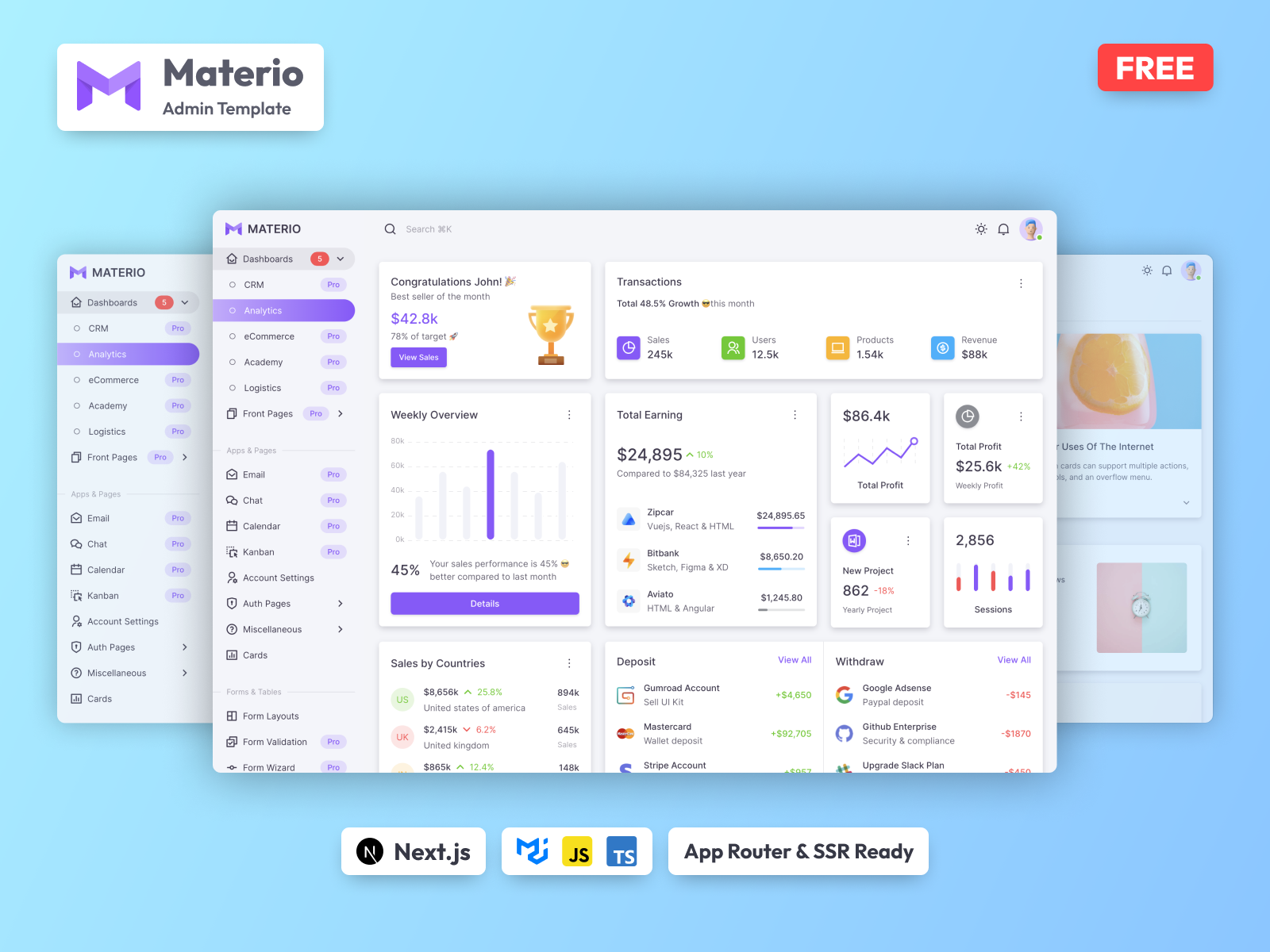](https://themeselection.com/item/materio-free-mui-nextjs-admin-template)</kbd>
## Introduction 🚀
If you're a developer looking for the most powerful and comprehensive [Free MUI NextJS Admin Dashboard Template](https://themeselection.com/item/materio-free-mui-nextjs-admin-template) built for developers, rich with features, and highly customizable, look no further than Materio. We've followed the highest industry standards to bring you the very best admin template that is not only easy to use but highly scalable. Offering ultimate convenience and flexibility, you'll be able to build any application you want with very little hassle.
Build premium quality applications with ease. Use one of the most innovative [NextJS admin templates](https://themeselection.com/item/category/next-js-admin-template) to create eye-catching, high-quality WebApps. Your apps will be completely responsive, ensuring they'll look stunning and function flawlessly on desktops, tablets, and mobile devices.
Materio provides a template with TypeScript and JavaScript.
[View Demo](https://demos.themeselection.com/materio-mui-nextjs-admin-template-free/demo)
## Features 📋
- ⚡ [Next.js](https://nextjs.org) with App Router support
- 💎 Integrated with [MUI](https://mui.com) & [Tailwind CSS](https://tailwindcss.com)
- ✅ [TypeScript](https://www.typescriptlang.org) & JavaScript Support
- 📏 Linter with [ESLint](https://eslint.org)
- 💖 Code Formatter with [Prettier](https://prettier.io)
- 🗂 VSCode configuration: Settings, Extensions and Custom Snippets
- 💡 Absolute Imports with aliases
- ☕ Minify HTML & CSS
- 💨 Live reload
- ✅ Cache busting
- 🛠️ Easy to customize
- 😎 SEO-friendly
- 🚀 Production-ready
## Requirements ✅
- Node.js LTS version (not current version)
- npm
## Installation ⚒️
Installing and running the template is super easy with Materio. Please follow these steps and you should be ready to rock 🤘:
1. Make sure you have installed Node.js (LTS). If Node.js is already installed in your system, make sure the installed version is LTS (and not the latest version)
2. Navigate to the `typescript-version` or `javascript-version` folder and run the following command to install our local dependencies listed in the `package.json` file. You can use `pnpm`, `yarn` or `npm` as per your preference
> It is recommended to use pnpm for better dependency management
```bash
# For pnpm (recommended)
pnpm install
# For yarn
yarn install
# For npm
npm install
```
3. Rename the `.env.example` file to `.env` file
4. Now, you are ready to start the server with the help of the command shown below. Open [http://localhost:3000](http://localhost:3000) to check your development 🚀.
```bash
# For pnpm (recommended)
pnpm dev
# For yarn
yarn dev
# For npm
npm run dev
```
## What's Included 📦
- Layouts
- Blank
- Full
- Boxed
- Dashboard
- Pages
- Account Settings
- Login
- Register
- Forgot Password
- Error
- Under Maintenance
- Iconify Icons
- Basic Cards
- Form Layouts
## What's in Premium Version 💎
| Materio Free Version | Materio Premium Version |
| ----------------------------------------------- | :------------------------------------------------ |
| [Demo](https://demos.themeselection.com/materio-mui-nextjs-admin-template-free/demo) | [Demo](https://demos.themeselection.com/materio-mui-nextjs-admin-template/demo-1) |
| [Download](https://themeselection.com/item/materio-free-mui-nextjs-admin-template) | [Purchase](https://themeselection.com/item/materio-free-mui-nextjs-admin-template) |
| Single vertical menu | Vertical (+ vertical collapsed) & Horizontal menu |
| Default skin | Default, bordered & semi-dark skin |
| 1 simple dashboard | 5 niche dashboards |
| - | 10 applications including eCommerce, academy, email, chat, calendar, invoice, kanban, etc. |
| Simple form layouts | Advanced form layouts, form validation & form wizard |
| Basic cards | Basic, advanced, statistics, charts, gamification & action cards |
| - | Quick search - quickly navigate between pages (with hotkey support) |
| Basic tables | Advanced tables |
| 1 chart library | 2 chart libraries |
| 6 pages | 35+ pages |
| Simple navbar & footer | Multiple navbar & footer options |
| - | Authentication using NextAuth |
| - | RTL (right-to-left) support |
| - | Redux toolkit |
| - | Multi-lingual support |
| - | Starter-kit |
| - | Customizer drawer to check options in live app |
| Limited customization | Endless customization possibilities |
| Regular support | Priority support |
## Documentation 📜
Check out our live [Documentation](https://demos.themeselection.com/materio-mui-nextjs-admin-template/documentation)
## Deployment 🚀
Check out our [Deployment docs](https://demos.themeselection.com/materio-mui-nextjs-admin-template/documentation/docs/guide/deployment)
## Browser Support 🖥️


*_It also supports other browser which implemented latest CSS standards_
## Contributing 🦸
Contributions are always welcome and recommended! Here is how:
* Fork the repository ([here is the guide](https://docs.github.com/en/get-started/quickstart/fork-a-repo)).
* Clone to your machine `git clone https://github.com/YOUR_USERNAME/REPO_NAME` Make your changes
* Create a pull request
### Contribution Requirements 🧰
* When you contribute, you agree to give a non-exclusive license to ThemeSelection to use that contribution in any context as we (ThemeSelection) see appropriate.
* If you use content provided by another party, it must be appropriately licensed using an open source license.
* Contributions are only accepted through GitHub pull requests.
* Finally, contributed code must work in all supported browsers (see above for browser support).
## Changelog 📆
Please refer to the [CHANGELOG](CHANGELOG.md) file. We will add a detailed release notes to each new release.
## Support 🧑🏻💻
For free products, enjoy community support via GitHub issues. Upgrade to Premium for dedicated support from our expert team.
## License ©
- Copyright © [ThemeSelection](https://themeselection.com/)
- Licensed under [MIT](LICENSE)
- All our free items are Open Source and licensed under MIT. You can use our free items for personal as well as commercial purposes. We just need attribution from your end. Copy the link below and paste it in the footer of your web application or project.
```html
<a href="https://themeselection.com/">ThemeSelection</a>
```
## Also Available In
<p>
<!-- Figma -->
<a href="https://themeselection.com/item/materio-figma-admin-dashboard-ui-kit" target="_blank"><picture><source width="auto" height="74px" media="(prefers-color-scheme: dark)" srcset="https://github.com/microsoft/vscode/assets/47495003/0318a6c8-4f9b-4cf6-af5e-d357f909ea2b"><source width="auto" height="74px" media="(prefers-color-scheme: light)" srcset="https://github.com/microsoft/vscode/assets/47495003/47f21dfe-c1fc-4a7d-859e-4d98f8cdded1"><img width="auto" height="74px" alt="html" src="https://github.com/microsoft/vscode/assets/47495003/47f21dfe-c1fc-4a7d-859e-4d98f8cdded1"></picture></img></a>
<!-- HTML -->
<a href="https://themeselection.com/item/materio-dashboard-pro-bootstrap" target="_blank"><picture><source width="auto" height="74px" media="(prefers-color-scheme: dark)" srcset="https://github.com/microsoft/vscode/assets/47495003/5fe77c46-2e4c-475a-8dec-e30e2badddee"><source width="auto" height="74px" media="(prefers-color-scheme: light)" srcset="https://github.com/microsoft/vscode/assets/47495003/3f5decd8-cd99-4ed3-aa76-528ca061385b"><img width="auto" height="74px" alt="html" src="https://github.com/microsoft/vscode/assets/47495003/3f5decd8-cd99-4ed3-aa76-528ca061385b"></picture></img></a>
<!-- HTML + Laravel -->
<a href="https://themeselection.com/item/materio-dashboard-pro-laravel" target="_blank"><picture><source width="auto" height="74px" media="(prefers-color-scheme: dark)" srcset="https://github.com/microsoft/vscode/assets/47495003/efe420e4-9863-41b7-9eda-47ea94f21a62"><source width="auto" height="74px" media="(prefers-color-scheme: light)" srcset="https://github.com/microsoft/vscode/assets/47495003/be3b86e0-4d5e-4736-bf89-4267fb4d6710"><img width="auto" height="74px" alt="html_laravel" src="https://github.com/microsoft/vscode/assets/47495003/be3b86e0-4d5e-4736-bf89-4267fb4d6710"></picture></img></a>
<!-- HTML + Django -->
<a href="https://themeselection.com/item/materio-dashboard-pro-django" target="_blank"><picture><source width="auto" height="74px" media="(prefers-color-scheme: dark)" srcset="https://github.com/microsoft/vscode/assets/47495003/3c87d33b-1223-4aaa-a652-388dcb714c98"><source width="auto" height="74px" media="(prefers-color-scheme: light)" srcset="https://github.com/microsoft/vscode/assets/47495003/51db1947-eac1-466f-87fd-5a209010fe9c"><img width="auto" height="74px" alt="html_django" src="https://github.com/microsoft/vscode/assets/47495003/51db1947-eac1-466f-87fd-5a209010fe9c"></picture></img></a>
<!-- .Net Core -->
<a href="https://themeselection.com/item/materio-aspnet-core-mvc-admin-template" target="_blank"><picture><source width="auto" height="74px" media="(prefers-color-scheme: dark)" srcset="https://github.com/microsoft/vscode/assets/47495003/6327fd7b-9c54-4189-a852-28551ad0e002"><source width="auto" height="74px" media="(prefers-color-scheme: light)" srcset="https://github.com/microsoft/vscode/assets/47495003/9856e9d5-021f-4573-902a-702e80dd0102"><img width="auto" height="74px" alt="net_core" src="https://github.com/microsoft/vscode/assets/47495003/9856e9d5-021f-4573-902a-702e80dd0102"></picture></img></a>
<!-- NextJS -->
<a href="https://themeselection.com/item/materio-mui-nextjs-admin-template" target="_blank"><picture><source width="auto" height="74px" media="(prefers-color-scheme: dark)" srcset="https://github.com/microsoft/vscode/assets/47495003/66344629-6d21-4f92-9078-f479b39cb34e"><source width="auto" height="74px" media="(prefers-color-scheme: light)" srcset="https://github.com/microsoft/vscode/assets/47495003/e1daf4e1-3fa5-4a44-969a-6143ddd67310"><img width="auto" height="74px" alt="next.js" src="https://github.com/microsoft/vscode/assets/47495003/e1daf4e1-3fa5-4a44-969a-6143ddd67310"></picture></img></a>
<!-- Vue -->
<a href="https://themeselection.com/item/materio-vuetify-vuejs-admin-template" target="_blank"><picture><source width="auto" height="74px" media="(prefers-color-scheme: dark)" srcset="https://github.com/microsoft/vscode/assets/47495003/881bbbb8-d1c9-421c-9bce-4ea43dfa9e6e"><source width="auto" height="74px" media="(prefers-color-scheme: light)" srcset="https://github.com/microsoft/vscode/assets/47495003/b02d6473-0345-42c2-be58-e648806104fa"><img width="auto" height="74px" alt="vue" src="https://github.com/microsoft/vscode/assets/47495003/b02d6473-0345-42c2-be58-e648806104fa"></picture></img></a>
<!-- Vue + Laravel -->
<a href="https://themeselection.com/item/materio-vuetify-vuejs-laravel-admin-template" target="_blank"><picture><source width="auto" height="74px" media="(prefers-color-scheme: dark)" srcset="https://github.com/microsoft/vscode/assets/47495003/20b6428e-3fa5-4f80-a389-9e4cd732c2de"><source width="auto" height="74px" media="(prefers-color-scheme: light)" srcset="https://github.com/microsoft/vscode/assets/47495003/3008d3eb-7b5b-4d9c-8563-837744a901da"><img width="auto" height="74px" alt="vue_laravel" src="https://github.com/microsoft/vscode/assets/47495003/3008d3eb-7b5b-4d9c-8563-837744a901da"></picture></img></a>
<!-- Nuxt -->
<a href="https://themeselection.com/item/materio-vuetify-nuxtjs-admin-template" target="_blank"><picture><source width="auto" height="74px" media="(prefers-color-scheme: dark)" srcset="https://github.com/microsoft/vscode/assets/47495003/d9d3cf2e-4dc5-49fe-b146-b80ef010cb57"><source width="auto" height="74px" media="(prefers-color-scheme: light)" srcset="https://github.com/microsoft/vscode/assets/47495003/f18ba562-6bba-4a55-83ac-962ecefa636f"><img width="auto" height="74px" alt="nuxt" src="https://github.com/microsoft/vscode/assets/47495003/f18ba562-6bba-4a55-83ac-962ecefa636f"></picture></img></a>
</p>
## Looking For Premium Admin Templates ?? 👀
**[ThemeSelection](https://themeselection.com/)** provides Selected high quality, modern design, professional and easy-to-use **Fully Coded Dashboard Templates & UI Kits** to create your applications faster!
- [Bootstrap Admin Templates](https://themeselection.com/item/category/bootstrap-admin-template/)
- [VueJS Admin Templates](https://themeselection.com/item/category/vuejs-admin-templates/)
- [Laravel Admin Templates](https://themeselection.com/item/category/laravel-admin-templates/)
- [Django Admin Templates](https://themeselection.com/item/category/django-admin-template/)
- [React (NextJS) Admin Templates](https://themeselection.com/item/category/next-js-admin-template/)
- [ASP.Net Core Admin Templates](https://themeselection.com/item/category/asp-net-dashboard/)
- [Free UI Kits](https://themeselection.com/item/category/free-ui-kits/)
If you want to [Download Free Admin Templates](https://themeselection.com/item/category/free-admin-templates/) like Materio then do visit [ThemeSelection](https://themeselection.com/).
## Useful Links 🎁
* [Vue CheatSheet](https://vue-cheatsheet.themeselection.com/)
* [Freebies](https://themeselection.com/item/category/free-admin-templates/)
* [Download Free Admin Templates](https://themeselection.com/item/category/free-admin-templates/)
* [Bootstrap 5 CheatSheet](https://bootstrap-cheatsheet.themeselection.com/)
## Social Media :earth_africa:
- [Twitter](https://twitter.com/Theme_Selection)
- [Facebook](https://www.facebook.com/ThemeSelections/)
- [Pinterest](https://pinterest.com/themeselect/)
- [Instagram](https://www.instagram.com/themeselection/)
- [Discord](https://discord.gg/kBHkY7DekX)
- [YouTube](https://www.youtube.com/channel/UCuryo5s0CW4aP83itLjIdZg)
看看同类模板
对比同技术栈与用途的模板,找到更适合的视觉与内容结构。

ai-website-cloner-template
Clone any website with one command using AI coding agents
Next.js · 启动器

Next.js SaaS Starter
Next.js SaaS Starter 是 Next.js 官方维护的 SaaS 起点模板,定位介于学习资源和可直接部署的脚手架之间。
Next.js · SaaS

Next.js Commerce
Next.js Commerce 是 Vercel 团队维护的电商启动模板,基于 Next.js App Router 构建,采用服务端渲染、React Server Components、Server Actions …
Next.js · 电商

Next-js-Boilerplate
Next-js-Boilerplate 是一个面向 Next.js 16、Tailwind CSS 4 和 TypeScript 的启动器,核心定位是开发者体验优先。
Next.js · 启动器

tailwind-nextjs-starter-blog
tailwind-nextjs-starter-blog 是一个面向个人技术博客的 Next.js 与 Tailwind CSS 启动模板,其 v2 版本基于 App Router 与 React Server Comp…
Next.js · 博客

next-forge
Production-grade Turborepo template for Next.js apps.
Next.js · 启动器