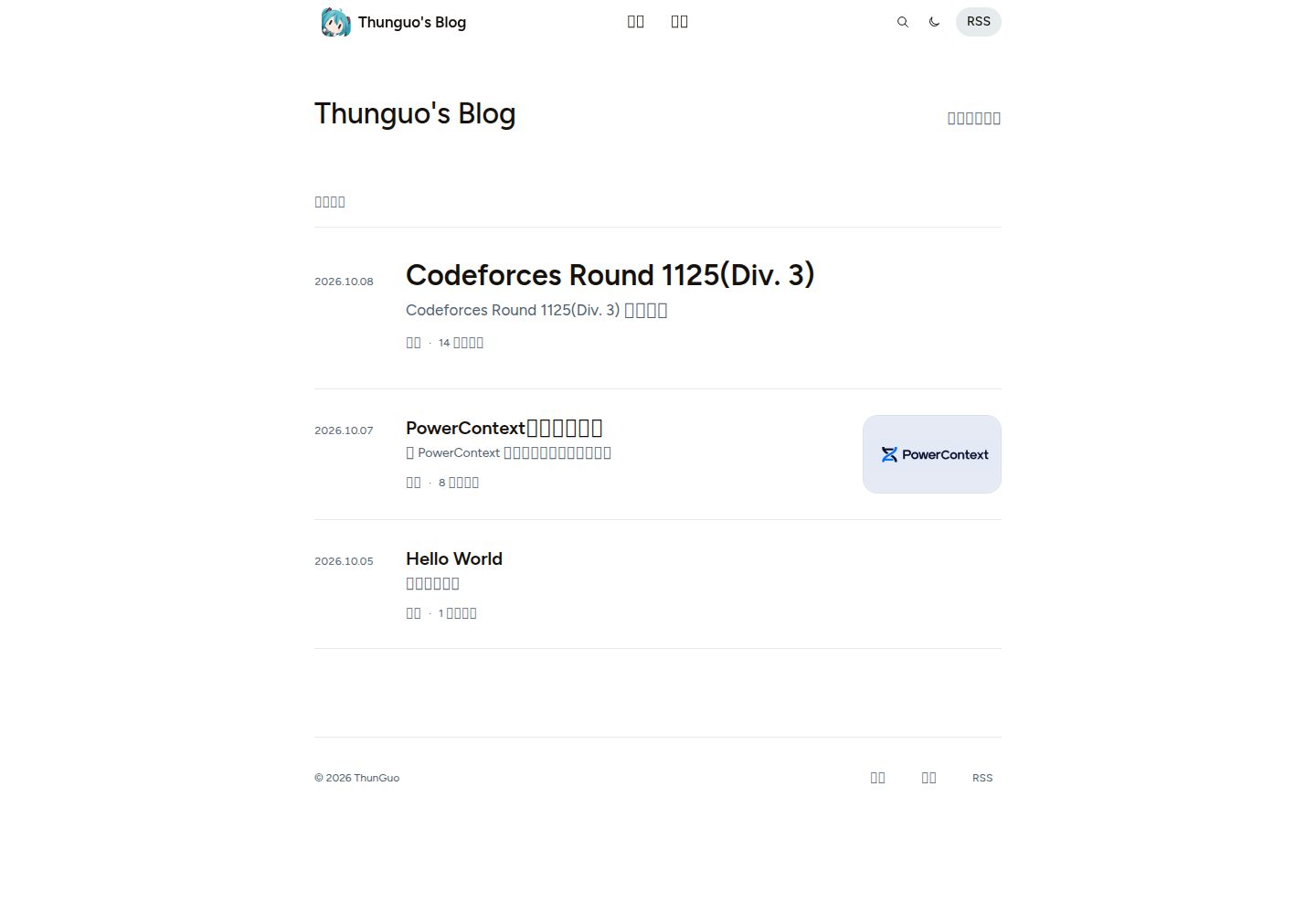
中英文文章共用一条时间线,可用 translationKey 关联译文并显示翻译链接
Hugo博客
hugo-astryx-theme — Hugo 博客模板
作者 thunguo
基于 Astryx 组件与官网视觉语言构建的 Hugo 博客主题,中英文文章共用一条时间线,支持全文搜索、文章大纲、摄影布局与明暗外观。
看看你的网站会是什么样
浏览真实页面截图,比较内容排版与手机效果。点击下方缩略图切换,放大查看整页细节。
全部页面与视图 3
截图用于了解视觉与布局,交互效果请以实际项目为准。
采集于 2026-10-07查看来源
值得关注的模板亮点
从已有项目资料中,快速了解它的特点。
实时全文搜索:搜索页随输入过滤、查询保留在 URL 中,返回时恢复
代码块支持 Chroma 高亮、语言标签、文件名、行号与复制
数学公式在构建时渲染,样式与字体自托管
可选 giscus 评论,样式与主题一致,默认关闭直至自行配置
附带 Hello World 文章与 GitHub Pages 工作流,可 fork 后直接发布
模板详细介绍
hugo-astryx-theme 是一个 Hugo 博客主题,使用 Astryx 组件并按 Astryx 官网的视觉语言进行独立改编,并非 Meta 官方主题。主题采用 Figtree 字体、宽松留白与中性底色,提供浅色和深色两种外观,把阅读焦点放在正文上。
内容组织方面,中英文文章进入同一条按时间排序的信息流,可通过 translationKey 关联互为译文的文章并显示翻译链接。内置文章类型标签(article、technical、technology、essay、research、photography、note 等),并允许在 params.astryx.postTypes 中新增或重命名。首页列出 mainSections 指定的全部匹配文章,不做分页;分页设置作用于 section、摄影与分类列表。
功能上包含响应式导航、实时全文搜索、可折叠文章大纲、摄影布局、带清晰脚注返回的阅读链接、保持阅读位置的图片预览,以及 Hugo Chroma 代码高亮(语言标签、文件名、行号、复制代码)。数学公式在构建时渲染,样式与字体自托管。评论为可选的 giscus,需自行配置仓库后才会启用。
仓库同时是一个可直接部署的博客:附带一篇 Hello World 文章和 GitHub Pages 工作流,构建使用提交在仓库中的 Astryx 资源。日常写作只需 Hugo,不要求 Node.js、pnpm、Go 或 Hugo Extended。主题也可复制到已有 Hugo 站点的 themes/hugo-astryx-theme/ 目录中单独使用。
限制与注意:这是独立改编版本,上游来源与许可见 NOTICE;演示图片、字体、图标等第三方素材需按各自许可核对,不能仅凭代码的 MIT 许可判断。搜索与归档索引属于工具页面而非文章;未创建对应页面时,主题中的相关链接会回退到首页信息流。
Hugo博客
适合你的项目吗?
适用场景
- 用 Hugo 搭建以文字为主的中英文双语个人博客
- 在 GitHub 上 fork 仓库并通过 GitHub Pages 发布,不安装本地工具
- 把主题复制进已有 Hugo 站点的 themes 目录中复用
- 发布带代码块、数学公式或摄影图片的文章
适合人群
- 希望文章按时间线统一呈现、不区分语言分栏的写作者
- 偏好浅色/深色外观与中性排版、重视正文可读性的博客
- 需要全文搜索、文章大纲与代码高亮的技术类博客
- 想在 GitHub 上零本地环境完成部署的 Hugo 用户
上手与定制指南
结合仓库当前版本的说明,按下面的资料检查内容、配置与运行要求。
- 1
本地预览需安装 Hugo 0.146.0 或更高版本,使用 hugo server --config hugo.toml,blog.toml -D 启动
- 2
fork 后在 Settings > Pages 将 Source 设为 GitHub Actions,再修改 blog.toml 中的 title 与 logo
- 3
hugo.toml 提供主题默认值,blog.toml 存放站点标识、导航与评论设置,不要在其中添加 theme 或 themesDir
- 4
单独安装主题时只复制 assets、layouts、static、i18n、archetypes 等主题文件,不要复制示例站的 content 与 blog.toml
- 5
评论默认关闭,需配置自己的 giscus 仓库后才会显示
授权与来源资料
使用条件与限制
免费使用 · 保留许可声明本次收录的是公开仓库中采用 MIT 许可的免费版本;免费范围为该版本代码,不代表外部服务或第三方素材免费。
使用时需要遵守
- 允许免费使用、修改、商用和分发该版本代码。
- 分发代码副本或实质性部分时,保留原作者版权声明和完整 MIT 许可声明。
- 代码按现状提供;担保与责任限制以原许可证及适用法律为准。
额外费用与待核对事项
- 演示图片、字体、图标及其他第三方素材需按各自许可核对,不能仅凭代码的 MIT 许可判断。
- 域名、托管、数据库、支付或 AI 等外部服务可能另外收费。
- 评论功能默认关闭,必须自行配置 giscus 仓库(repo、repoID、category、categoryID 四项均需从自己的 giscus 设置中获取)后才会显示。
- 启用评论需提供自己的 giscus 仓库与分类标识,属于外部服务依赖,需自行注册并安装 giscus App。
- 使用自定义评论样式时,部署主机必须为 /giscus/* 与 /fonts/* 返回 CORS 头;若主机无法提供,需改用 giscus 内置主题。
- 仅主题源码开发需要 Node.js 22+、pnpm 11 与 Hugo 0.146.0+;日常写作只需 Hugo,不要求这些工具。
- 本地预览与构建要求 Hugo 0.146.0 或更高版本,低于该版本无法使用。
- Astryx 及捆绑依赖保留各自许可,需查阅 NOTICE;代码的 MIT 许可不覆盖这些第三方组件。
- 内置 Figtree 字体适用 SIL Open Font License,使用字体需遵守该独立许可。
- 捆绑运行时依赖有各自的第三方许可,需查阅 THIRD_PARTY_LICENSES.txt 并遵守。
- 本项目是独立改编版本,并非 Meta 官方主题,不得以官方名义宣传或暗示官方背书。
- 在自带博客中不得添加 theme 或上级目录 themesDir 配置,否则会破坏模板解析。
- 单独安装主题时不得复制示例站的 content、blog.toml、开发依赖或构建产物到主题目录。
- 搜索在首次使用时下载静态 JSON 索引,大型站点需自行评估索引体积带来的加载开销。
- 正文中成对的美元符号可能被解析为行内公式,需用行内代码或 $ 转义以避免误渲染。
- 无效 LaTeX 或不支持的命令会导致构建失败,需按提示修正公式。
- fork 不会继承 Pages 等仓库设置,需在 fork 中手动将 Source 设为 GitHub Actions 并启用工作流。
查看原文依据
Permission is hereby granted, free of charge
许可证原文
Comments stay off until you configure your own giscus repository.
README 原文
The four repository/category values must come from your own giscus setup.
README 原文
Your public `/giscus/*` styles and `/fonts/*` files must return `Access-Control-Allow-Origin: *`.
README 原文
Theme source development needs **Node.js 22+**, **pnpm 11** and **Hugo 0.146.0+**.
README 原文
Install [Hugo](https://gohugo.io/installation/) **0.146.0 or later**.
README 原文
Astryx and bundled dependencies retain their licenses; see [NOTICE](NOTICE).
README 原文
Figtree's SIL Open Font License is included at [assets/fonts/OFL.txt](assets/fonts/OFL.txt).
README 原文
Bundled runtime dependency licenses are included in [THIRD_PARTY_LICENSES.txt](THIRD_PARTY_LICENSES.txt).
README 原文
This is an independent adaptation, not an official Meta theme.
README 原文
Do not add `theme` or a parent-directory `themesDir` to the bundled blog; it uses this repository's templates directly and works regardless of the checkout folder name.
README 原文
Do not copy the starter's `content/`, `blog.toml`, development dependencies or build output into the theme directory.
README 原文
Search downloads the static JSON index on first use; large sites should evaluate its size.
README 原文
Ordinary dollar amounts can be interpreted as inline formulas when `$` delimiters pair up.
README 原文
Invalid LaTeX or unsupported commands fail the build with the source location so you can fix the expression.
README 原文
https://github.com/thunguo/hugo-astryx-theme/blob/main/LICENSEhttps://github.com/thunguo/hugo-astryx-theme/blob/main/README.mdThese repository settings do not come with a fork.
README 原文
DeepSeek 根据仓库许可证和 README 整理 ·2026-10-07。结果仅覆盖已读取资料,依赖、图片、字体及后续条款变更以各自原文为准。
项目核对记录与介绍依据
模板资料
- 来源平台
- GitHub
- 资料与维护参考分
- 资料较完整 · 80 / 100
- 技术栈
- Hugo
- 网站类型
- 博客
这个分数如何计算
本站按许可资料(最高30分)、演示链接(12分)、预览图(10分)、Star数(15分)、记录的维护时间(15分)、描述完整度(8分)、功能记录(5分)和分类资料(5分)计算。它不是代码、安全或性能测试,也不是 Google 评分;有链接不代表已实测可用。
这个项目需要核对什么
- 记录的仓库更新时间
- 2026-10-07
- 截图检查日期
- 2026-10-07
已收录演示链接。请用你的内容与屏幕尺寸检查;有演示不代表表单、认证或支付已经可用。
目录记录的主要技术栈是 Hugo。请通过依赖清单和锁文件核对实际版本与托管要求。这些说明基于收录资料,不代表代码审计或部署实测。
查看具体选型方法 →介绍的制作与核对状态
介绍由 AI 辅助整理目录与仓库资料。仓库作者不等于这篇介绍的审核者。
审核声明: [email protected] · 2026-10-08
查看当时使用的来源资料
SHA-256: fe6d2137d6b93c1855d3e6929cf38ffedb40efed53d37aa600d242b2a52a20b7
2026-10-07T18:31:03.661Z
来源文件 / 仓库# Hugo Astryx Theme
**English** · [简体中文](README_CN.md)
[Introduction](#introduction) · [Screenshots](#screenshots) · [Quick start](#installation) · [Configuration](#configuration) · [Development](#development)
## Introduction
A quiet Hugo blog theme built with real [Astryx](https://astryx.atmeta.com/) components and the visual language of its official website. Figtree typography, generous spacing and neutral surfaces keep the focus on writing, with light and dark appearances.
- Chinese and English articles in one chronological feed, with optional translation links.
- Responsive navigation, live full-text search, article outlines and a photography layout.
- Reading links with clear footnote returns, and image previews that preserve your place.
- Hugo Chroma highlighting, language labels, filenames, line numbers and code copying.
- Mathematical formulas rendered at build time, with self-hosted styles and fonts.
- Optional [giscus](https://giscus.app/) comments styled to match the theme.
- Prebuilt assets and self-hosted fonts; everyday use requires only Hugo.
This is an independent adaptation, not an official Meta theme. See [NOTICE](NOTICE) for the upstream sources and licenses. This repository also works as a ready-to-deploy blog: it includes one Hello World article and a GitHub Pages workflow.
## Screenshots
Actual screenshots of the bundled blog, with its single Hello World article.

<details>
<summary>Dark mode, article layout, mobile view and search</summary>
| Dark mode | Article layout |
| --- | --- |
|  |  |
| Mobile view | Search |
| --- | --- |
| <img src="docs/images/mobile.png" alt="Homepage on a phone" width="260"> | <img src="docs/images/search.png" alt="Search dialog on a phone" width="260"> |
</details>
## Installation
### Fork and publish on GitHub Pages
You can complete setup entirely on GitHub; no local tools or custom secrets are required.
1. [Fork this repository](https://github.com/thunguo/hugo-astryx-theme/fork) and name your public repository `<your-lowercase-username>.github.io` for a personal homepage. A different name also works as a project site at `https://<username>.github.io/<repository>/`.
2. Open **Actions** in your fork and enable workflows if prompted.
3. In **Settings > Pages > Build and deployment**, set **Source** to **GitHub Actions**. These repository settings do not come with a fork.
4. Edit `title` near the top of [blog.toml](blog.toml). Replace [assets/images/logo.jpg](assets/images/logo.jpg), or change `params.astryx.logo` to your own image path. Commit your changes to the default branch.
5. Wait for the **GitHub Pages** workflow to finish. Its deployment summary links to your published blog. If you changed Pages settings after committing, use **Actions > GitHub Pages > Run workflow**.
The workflow builds with Hugo **0.167.0**, using the committed Astryx assets. It takes the public URL from GitHub Pages, so `baseURL` need not be edited for this setup. Every subsequent commit to the default branch publishes automatically; pull requests are built for validation and do not deploy.
The starter contains only one article: [content/posts/hello-world.md](content/posts/hello-world.md). Edit it or delete it when you add your writing. Search and archive index files are utility pages, not additional posts. Comments stay off until you configure your own giscus repository.
### Local preview and writing
Install [Hugo](https://gohugo.io/installation/) **0.146.0 or later**. Node.js, pnpm, Go and Hugo Extended are not required for normal blogging.
```sh
git clone https://github.com/thunguo/hugo-astryx-theme.git
cd hugo-astryx-theme
hugo server --config hugo.toml,blog.toml -D
```
Clone your fork instead of the upstream URL when writing your own blog. Open the address printed by Hugo, usually `http://localhost:1313/`. `-D` includes drafts in the preview.
```sh
hugo new content posts/my-first-post.md --config hugo.toml,blog.toml
hugo --config hugo.toml,blog.toml --minify
```
The archetype starts with `draft: true`; set it to `false` to publish. Production builds exclude drafts and future-dated posts. The output is `public/`, which stays out of Git. For another hosting service, set `baseURL` in `blog.toml` to your public address or pass `--baseURL` at build time.
The two configuration files have separate jobs: `hugo.toml` provides theme defaults, while `blog.toml` holds your site identity, navigation and comment settings. Do not add `theme` or a parent-directory `themesDir` to the bundled blog; it uses this repository's templates directly and works regardless of the checkout folder name.
### Use the theme in an existing Hugo site
Copy only the reusable theme files from a downloaded checkout into your site's `themes/hugo-astryx-theme/`:
```sh
mkdir -p themes/hugo-astryx-theme
cp -R /path/to/hugo-astryx-theme/assets /path/to/hugo-astryx-theme/layouts \
/path/to/hugo-astryx-theme/static /path/to/hugo-astryx-theme/i18n \
/path/to/hugo-astryx-theme/archetypes themes/hugo-astryx-theme/
cp /path/to/hugo-astryx-theme/hugo.toml /path/to/hugo-astryx-theme/theme.toml \
/path/to/hugo-astryx-theme/LICENSE /path/to/hugo-astryx-theme/NOTICE \
/path/to/hugo-astryx-theme/THIRD_PARTY_LICENSES.txt themes/hugo-astryx-theme/
```
Replace `/path/to/hugo-astryx-theme` with your checkout path. Copying the same files manually also works. Do not copy the starter's `content/`, `blog.toml`, development dependencies or build output into the theme directory. Then set `theme = 'hugo-astryx-theme'` in your site's configuration, using [blog.toml](blog.toml) as a reference for your own site settings. Keep your existing content and configure [search and archive pages](#content-and-navigation) if desired.
## Configuration
### Site settings
Edit [blog.toml](blog.toml) for the bundled blog, or your own site's Hugo configuration when installing the theme separately. `title` controls the navigation, browser title and homepage heading. An optional `params.astryx.intro` overrides only the homepage heading. Theme options belong under `[params.astryx]`:
| Option | Type | Default | Purpose |
| --- | --- | --- | --- |
| `uiLocale` | string | Hugo site language | Astryx control locale; use `en-US` or `zh-CN` and align it with the site language. |
| `intro` | string | site title | Optional homepage heading override. |
| `description` | string | unset | Homepage introduction; page metadata can fall back to Hugo's `params.description`. |
| `logo` | string | default Astryx mark | Image path or URL for the navigation logo and, when configured, favicon. |
| `mainSections` | string array | `['posts']` | Sections included in the homepage, archive and home RSS feed. |
| `showToc` | boolean | `true` | Include a collapsible article outline, initially closed. |
| `defaultMode` | string | `system` | Initial appearance: `system`, `light` or `dark`. A saved reader preference takes precedence. |
| `coverFallback` | string | unset | Set to `art` to generate Astryx pattern covers for posts without an image. |
| `postTypes` | string map | empty | Custom display labels for article types. |
Set the default author in `[params.astryx.author]` with `name = 'Your Name'`. Leave it empty to use the repository owner during GitHub Pages builds, or the site title locally. It supplies article bylines, the footer, author metadata and RSS creators. An article's `author` overrides its byline, structured metadata and RSS creator.
For a personal logo, put an image at `assets/images/logo.jpg` and set `logo = 'images/logo.jpg'`. Supported raster assets are converted to PNG at up to 128px wide; their aspect ratio is preserved. Static files, SVGs and remote images are used as supplied. The navigation displays a 32px rounded image.
Built-in `postType` labels include `article`, `technical`, `technology`, `essay`, `research`, `photography` and `note`. You can add or rename types:
```toml
[params.astryx.postTypes]
technical = 'Engineering'
reading = 'Reading notes'
```
A post with `postType: reading` then uses the custom label in the homepage filter. The homepage lists all matching posts; it is not paginated. Hugo's `pagination.pagerSize` applies to section, photography and taxonomy lists. An empty `mainSections` array falls back to `['posts']` rather than disabling the feed.
### Content and navigation
| Location | Use |
| --- | --- |
| `content/posts/` | Blog articles; included in the homepage by default. |
| `content/notes/` | Research notes, using the notes section layout. |
| `content/photos/` | Photography entries; add a `cover` image for the photo index. |
| `content/about/index.md` | An ordinary content page for your introduction. |
| `content/search/_index.md` | Standalone search page with `layout: search`. |
| `content/archives/_index.md` | Archive page with `layout: archives`. |
Other sections use the general article list layout. To include notes on the homepage, for example, set `mainSections = ['posts', 'notes']`.
The forkable starter already includes search and archive indexes. When installing only the theme, create those auxiliary pages yourself. For `content/search/_index.md`:
```yaml
---
title: Search
layout: search
---
```
For `content/archives/_index.md`:
```yaml
---
title: Archive
layout: archives
---
```
Without those pages, their existing theme links fall back to the homepage feed. Search excludes pages identified as `about`, `search` or `archives`; it includes other published articles across sections, regardless of `mainSections`.
The full search page filters as you type, keeps the query in the URL and restores it when navigating back. The search dialog's “All results” link carries your current query to that page. If search cannot load, the complete article list remains available.
Configure navigation with Hugo's `menus.main`. A `pageRef` follows the destination's permalink, including deployment subpaths:
```toml
[[menus.main]]
name = 'Writing'
pageRef = '/posts'
weight = 10
[[menus.main]]
name = 'About'
pageRef = '/about'
weight = 20
```
Create the referenced content before adding its menu entry. Add `content/notes/_index.md` and `content/photos/_index.md` to customize those sections' headings and descriptions. Tags use Hugo's `[taxonomies] tag = 'tags'`; the footer links to their index when tags exist.
### Article front matter
```yaml
---
title: A small, durable system
date: 2026-01-01
language: en
postType: technical
description: Notes on keeping a useful tool understandable.
tags: [engineering, notes]
draft: false
---
```
| Field | Type | Behavior |
| --- | --- | --- |
| `title`, `date`, `lastmod`, `draft`, `description`, `tags`, `slug` | Hugo standard fields | Title, publication/update dates, publication status, summary, tags and URL. |
| `language` | string | Article language, such as `en` or `zh-CN`; defaults to the UI/site language. |
| `postType` | string | Filter category; defaults to `article`. Custom types are supported. |
| `author` | string | Overrides the article byline, structured metadata and RSS creator. |
| `showToc` | boolean | Overrides the global outline setting, including explicit `false`. |
| `cover` | string | Page-bundle image, asset path, static path or remote image URL. |
| `coverAlt` | string | Image alternative text; defaults to the article title. |
| `coverCaption` | string | Caption below the article cover. |
| `coverArt` | boolean | Overrides the pattern-cover fallback; a real `cover` always takes precedence. |
| `translationKey` | string | Associates articles that are translations of one another. |
| `comments` | boolean | Enables/disables comments for this page when the global switch is on. |
| `giscusTerm` | string | Shared discussion identifier for `mapping = 'specific'`. |
| `giscusNumber` | number or string | Existing discussion number for `mapping = 'number'`. |
Keep an article and its images together in a leaf bundle:
```text
content/posts/my-article/
├── index.md
└── cover.jpg
```
Set `cover: cover.jpg` in that article. Site-wide images can live in `assets/images/` and use `cover: images/example.jpg`. Files in `static/images/` also work by path, but are not resized unless mounted as assets; add explicit `assets` and `static` asset mounts if you need that processing. Unset covers render as text entries by default.
Standalone Markdown image titles become captions, and clicking an image opens Astryx Lightbox when JavaScript is available:
```markdown

```
The viewer counts repeated links to the same image only once. If an image fails to load, you can retry, open the original or move to another photo. Closing the preview restores your reading position. Without JavaScript, the image link still opens the original file.
### Chinese and English content
The theme includes English and Simplified Chinese UI translations. Keep Hugo's site language, `params.astryx.uiLocale`, menu labels and site descriptions consistent.
The starter uses Simplified Chinese. For an English interface, replace its language block and update the existing `uiLocale` value:
```toml
defaultContentLanguage = 'en'
[languages.en]
locale = 'en-US'
[params.astryx]
uiLocale = 'en-US'
```
Merge these values into the existing configuration; do not duplicate the `[params.astryx]` table. Translate your menu labels and content page titles as needed. Article `language` remains independent of the UI. Chinese and English articles appear together in one chronological feed and search index.
To link two translations, give both the same `translationKey` and distinct slugs or bundle paths. Use filenames such as `article-en.md` and `article-zh.md`. Avoid `.en.md` / `.zh-cn.md` suffixes for this mixed-feed setup, since Hugo interprets those as multilingual-site files.
### Code blocks
Hugo Chroma highlights code at build time. Fences accept a filename, line numbers and highlighted lines:
````markdown
```python {filename="notes_to_json.py" linenos=true hl_lines="2-3"}
import json
data = {"title": "Reading notes"}
print(json.dumps(data))
```
````
Use `linenostart` to change the first line number. Global defaults belong under Hugo's `[markup.highlight]`. The theme uses CSS classes and inline line numbers so code and numbers scroll together; unsupported languages render as plain text. The copy button copies the original source without line numbers and requires JavaScript. The code itself remains readable without it. Code blocks and tables with horizontal overflow show a subtle edge hint and support keyboard scrolling.
Footnotes include a visible return link. Outline and footnote navigation keep the destination below the header and move keyboard focus with it; scrolling respects reduced-motion preferences.
### Mathematics
Write LaTeX directly in Markdown. Use `$...$` or `\(...\)` inline and `$$...$$` or `\[...\]` for a displayed block:
```markdown
The identity $e^{i\pi}+1=0$ holds, and \(a^2+b^2=c^2\).
$$
\int_0^1 x^2\,dx=\frac{1}{3}
$$
\[
\sum_{n=1}^{\infty}\frac{1}{n^2}=\frac{\pi^2}{6}
\]
```
Formulas render automatically when Hugo builds the site, using its built-in [`transform.ToMath`](https://gohugo.io/functions/transform/tomath/) with `htmlAndMathml` output. Formula pages load bundled KaTeX CSS and fonts from your own site; other pages omit these resources. Rendering needs no client-side JavaScript. MathML supports assistive technology, and long block formulas support horizontal scrolling and keyboard access. Daily writing still requires only Hugo **0.146.0+**.
Ordinary dollar amounts can be interpreted as inline formulas when `$` delimiters pair up. Put dollar text in inline code (for example, `` `$5` ``), or write `$5` in Markdown outside formulas.
To disable formula rendering site-wide, merge this into `blog.toml` or your site's configuration:
```toml
[markup.goldmark.extensions.passthrough]
enable = false
```
Invalid LaTeX or unsupported commands fail the build with the source location so you can fix the expression.
### Comments with giscus
Comments are disabled by default. Follow the [giscus setup page](https://giscus.app/) to select a public repository with Discussions enabled and the giscus App installed. Copy its generated repository and category identifiers into your configuration:
```toml
[params.astryx.comments]
enabled = true
sections = ['posts', 'notes']
repo = 'owner/repository'
repoID = 'COPY_FROM_GISCUS'
category = 'Announcements'
categoryID = 'COPY_FROM_GISCUS'
mapping = 'pathname'
strict = true
reactionsEnabled = true
emitMetadata = false
inputPosition = 'top'
loading = 'lazy'
lang = 'auto'
customTheme = true
```
The four repository/category values must come from your own giscus setup. When any is missing, Hugo warns and omits the comment area. No GitHub token is needed in the site configuration.
| Option | Type | Default | Purpose |
| --- | --- | --- | --- |
| `enabled` | boolean | `false` | Global switch; `false` also overrides a page's `comments: true`. |
| `sections` | string array | `['posts', 'notes']` | Sections that show comments by default. An empty array falls back to these defaults. |
| `repo`, `repoID`, `category`, `categoryID` | string | unset | All four are required; copy the names and IDs from giscus. |
| `mapping` | string | `pathname` | giscus mapping: `pathname`, `url`, `title`, `og:title`, `specific` or `number`. |
| `term` | number or string | unset | Site-wide fallback discussion number, used only with `mapping = 'number'`. |
| `strict` | boolean | `true` | Strict discussion matching. Explicit `false` is supported. |
| `reactionsEnabled` | boolean | `true` | Show reactions. Explicit `false` is supported. |
| `emitMetadata` | boolean | `false` | Let giscus send discussion metadata to the parent page. |
| `inputPosition` | string | `top` | Comment form placement: `top` or `bottom`. |
| `loading` | string | `lazy` | `lazy`: load near the section; `eager`: immediately; `manual`: after a button click. |
| `lang` | string | `auto` | Follow the UI language, or use a giscus language code. |
| `customTheme` | boolean | `true` | Use the bundled light/dark giscus styles. |
| `themeLight`, `themeDark` | string | bundled CSS URLs, or `light` / `dark` when custom styles are off | Override with public CSS URLs or built-in giscus theme names; these override `customTheme`. |
With the global switch enabled, `comments: false` disables a page; `comments: true` can enable a page outside the configured sections. Failed loads offer retry and a GitHub Discussions link.
For translated posts to share a discussion, use `mapping = 'specific'` and the same `giscusTerm` in both articles. Without an explicit term, the theme uses the article's `translationKey`, then its relative permalink. For an existing discussion, use `mapping = 'number'` and a page-level `giscusNumber`.
**Deploying the custom comment styles:** [giscus loads custom CSS inside its iframe](https://github.com/giscus/giscus/blob/main/ADVANCED-USAGE.md#data-theme). Your public `/giscus/*` styles and `/fonts/*` files must return `Access-Control-Allow-Origin: *`. Include your deployment prefix for subpath sites. Use a real public `baseURL` for production. For local preview, built-in styles via `customTheme = false` avoid requiring public CSS URLs. If your host cannot provide these headers, set `customTheme = false` to use giscus's built-in `light` and `dark` themes, or supply suitable `themeLight` / `themeDark` values.
## Development
Theme source development needs **Node.js 22+**, **pnpm 11** and **Hugo 0.146.0+**. Astryx Core and CLI are pinned to **0.6.5**. Run these commands in the theme repository, not in your consumer site:
```sh
pnpm install
pnpm prepare:theme
pnpm dev
```
The bundled blog runs at `http://localhost:1313/`. `pnpm build` only runs Hugo and writes to `public/`; `pnpm prepare:theme` explicitly regenerates the Astryx assets and component partials. After React or theme-source changes, run `pnpm prepare:theme` before previewing. Template, content and CSS edits reload through Hugo.
Hugo is resolved in this order: `HUGO_BINARY`, local `.tools/hugo`, then `hugo` on `PATH`. For example, `HUGO_BINARY=/path/to/hugo pnpm dev`. Local `.tools/` files are not part of the distributed theme.
| Source | Responsibility |
| --- | --- |
| `src/site-theme.mjs` | Adaptation of the official Astryx theme. |
| `scripts/render-ui.jsx` | Generates Hugo partials from real Astryx Core components. |
| `src/site-ui.jsx`, `src/app.jsx` | Interactive navigation, appearance and filters. |
| `src/search*.jsx`, `src/search.mjs` | Search dialog and local search data source. |
| `assets/css/theme.css` | Page composition and Markdown typography. |
After source changes, keep the generated `assets/css/generated/`, `assets/js/generated/`, `assets/fonts/` and `layouts/_partials/ui/` in the theme distribution. Search downloads the static JSON index on first use; large sites should evaluate its size.
```sh
pnpm build
pnpm check
pnpm exec playwright install chromium
pnpm test
```
Checks validate the single-post starter, renamed checkouts, deployment subpaths and theme reuse. Browser tests create temporary synthetic content under ignored `work/` and run on port 4174, covering both languages, search/history, mobile layouts, appearance, comments, code, galleries, footnotes and no-JavaScript reading. They do not add posts to the blog. To check a deployment prefix:
```sh
pnpm build --baseURL https://example.org/blog/
```
See [docs/design.md](docs/design.md) for the design rules and upstream reference files.
## License
Theme code is [MIT licensed](LICENSE). Astryx and bundled dependencies retain their licenses; see [NOTICE](NOTICE). Figtree's SIL Open Font License is included at [assets/fonts/OFL.txt](assets/fonts/OFL.txt). Bundled runtime dependency licenses are included in [THIRD_PARTY_LICENSES.txt](THIRD_PARTY_LICENSES.txt).
看看同类模板
对比同技术栈与用途的模板,找到更适合的视觉与内容结构。

hugo-PaperMod
PaperMod 是 Hugo 生态里知名度较高的主题之一,定位很明确:给博客和轻量作品集站点提供一套干净、响应式的阅读界面。
Hugo · 作品集

LoveIt
❤️A clean, elegant but advanced blog theme for Hugo 一个简洁、优雅且高效的 Hugo 主题
Hugo · 博客

hugo-coder
A minimalist blog theme for hugo.
Hugo · 博客

blowfish
Personal Website & Blog Theme for Hugo
Hugo · 博客

hugo-paper
🪺 A simple, clean, customizable Hugo theme
Hugo · 博客

hextra
Hextra 是一个 Hugo 主题,定位在文档站与博客之间:既提供侧边栏导航、目录、面包屑、分页这类文档站结构,也能承载博客内容。
Hugo · 文档