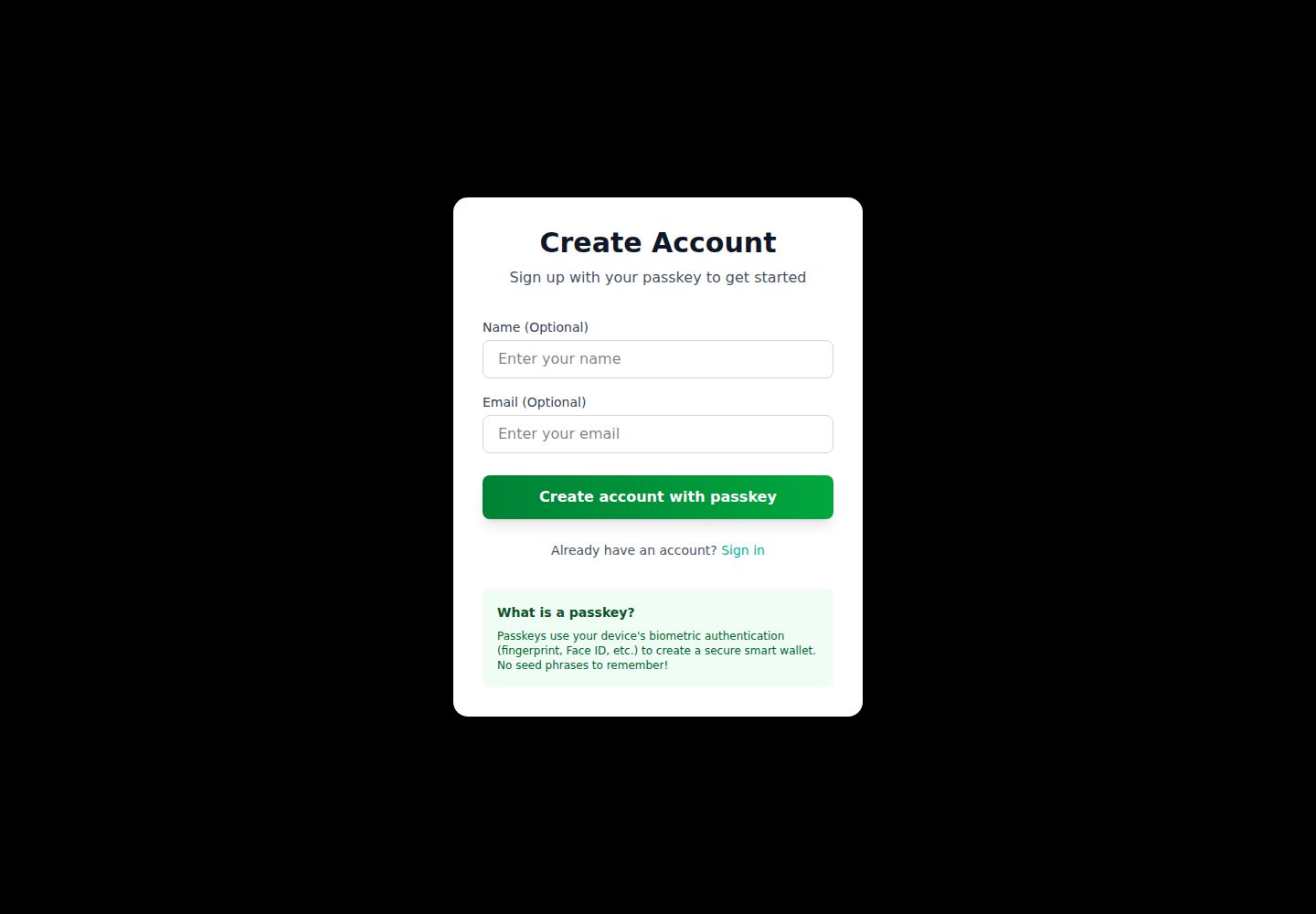
使用 LazorKit passkey 与 WebAuthn 生物识别完成注册
Next.jsReact启动器
Nextjs-Lazorkit-Starter-Template — Next.js 启动器模板
作者 Uche44
基于 Next.js 与 LazorKit 的 Web3 认证模板,使用 passkey 注册、签名登录、JWT 会话与 PostgreSQL 持久化,并包含 Solana 免 gas 转账与交易历史示例。
看看你的网站会是什么样
浏览真实页面截图,比较内容排版与手机效果。点击下方缩略图切换,放大查看整页细节。
全部页面与视图 2
截图用于了解视觉与布局,交互效果请以实际项目为准。
采集于 2026-10-14查看来源
值得关注的模板亮点
从已有项目资料中,快速了解它的特点。
登录通过签名消息的加密签名验证实现
JWT 会话存储在 httpOnly cookie 中
用户与交易数据经 Prisma 持久化到 PostgreSQL
提供受保护路由的服务端认证检查
包含免 gas 转账与交易历史示例
模板详细介绍
该模板面向 Solana dApp 的免密码认证场景,README 说明其使用 LazorKit passkey(WebAuthn)完成注册,登录时通过签名消息进行加密签名验证,会话以 JWT 形式存放在 httpOnly cookie 中。用户数据与交易记录通过 Prisma ORM 存入 PostgreSQL,并提供受保护路由的服务端认证检查。
功能层面包含注册、登录、仪表盘、免 gas 转账(示例为发送 0.00002 SOL)与交易历史,README 列出了对应的 API 端点(/api/auth/*、/api/transactions、/api/user/profile)以及 User 与 Transaction 的 Prisma 模型。技术栈为 Next.js App Router、React、TypeScript、Tailwind CSS、LazorKit SDK(@lazorkit/wallet)、Prisma 与 Solana Devnet。
使用前需准备 Node.js 18+、PostgreSQL 数据库与 npm/yarn,并配置 DATABASE_URL、JWT_SECRET、NEXT_PUBLIC_APP_URL 三个环境变量,随后执行 prisma generate 与 prisma migrate dev。README 还给出 Vercel、Railway、Netlify 的部署步骤与生产环境变量设置。README 未提供性能、并发能力或生产环境实际运行情况的说明。
Next.js启动器
适合你的项目吗?
适用场景
- 为 Solana dApp 添加免密码认证流程
- 在 Next.js 项目中集成 passkey 注册与签名登录
- 搭建带 PostgreSQL 持久化的用户与交易记录后端
- 参考免 gas 转账与交易历史页面的实现方式
适合人群
- 需要 Solana 免密码认证的 Web3 开发者
- 使用 Next.js App Router 与 TypeScript 的项目
- 已具备 PostgreSQL 数据库的团队
- 希望基于现成模板二次开发的开发者
上手与定制指南
结合仓库当前版本的说明,按下面的资料检查内容、配置与运行要求。
- 1
需 Node.js 18+ 与 PostgreSQL 数据库,并复制 .env.example 为 .env
- 2
配置 DATABASE_URL、JWT_SECRET(至少 32 字符)与 NEXT_PUBLIC_APP_URL
- 3
执行 npx prisma generate 与 npx prisma migrate dev --name init 初始化数据库
- 4
运行 npm run dev 启动开发服务器并访问 http://localhost:3000
- 5
部署到 Vercel 时需在平台设置环境变量并执行 npx prisma migrate deploy
授权与来源资料
使用条件与限制
免费使用 · 保留许可声明本次收录的是公开仓库中采用 MIT 许可的免费版本;免费范围为该版本代码,不代表外部服务或第三方素材免费。
使用时需要遵守
- 允许免费使用、修改、商用和分发该版本代码。
- 分发代码副本或实质性部分时,保留原作者版权声明和完整 MIT 许可声明。
- 代码按现状提供;担保与责任限制以原许可证及适用法律为准。
额外费用与待核对事项
- 演示图片、字体、图标及其他第三方素材需按各自许可核对,不能仅凭代码的 MIT 许可判断。
- 域名、托管、数据库、支付或 AI 等外部服务可能另外收费。
- 运行环境要求:需安装 Node.js 18 或更高版本。
- 必须自备 PostgreSQL 数据库(本地或托管),模板依赖数据库才能运行。
- 需配置 DATABASE_URL 连接字符串指向可用的 PostgreSQL 数据库。
- 需自行生成并配置至少 32 字符的 JWT_SECRET 密钥。
- 需配置 NEXT_PUBLIC_APP_URL 为应用实际访问地址。
- 快速上手推荐使用第三方托管 PostgreSQL 服务,可能涉及外部账号注册与服务条款。
- 区块链功能基于 Solana Devnet,非主网环境。
- 如需邮件验证功能,需接入 Resend、SendGrid 等第三方邮件服务。
查看原文依据
Permission is hereby granted, free of charge
许可证原文
- Node.js 18+ installed
README 原文
- PostgreSQL database (local or hosted - see setup options below)
README 原文
DATABASE_URL="postgresql://username:password@localhost:5432/lazorkit?schema=public"
README 原文
JWT_SECRET="your-super-secret-jwt-key-min-32-characters-long"
README 原文
NEXT_PUBLIC_APP_URL="http://localhost:3000"
README 原文
Use a free hosted PostgreSQL service:
README 原文
- **Blockchain**: Solana (Devnet)
README 原文
https://github.com/Uche44/Nextjs-Lazorkit-Starter-Template/blob/main/LICENSEhttps://github.com/Uche44/Nextjs-Lazorkit-Starter-Template/blob/main/README.md3. Send verification emails (use Resend, SendGrid, etc.)
README 原文
DeepSeek 根据仓库许可证和 README 整理 ·2026-10-14。结果仅覆盖已读取资料,依赖、图片、字体及后续条款变更以各自原文为准。
项目核对记录与介绍依据
模板资料
- 来源平台
- GitHub
- 资料与维护参考分
- 资料较完整 · 83 / 100
- 技术栈
- Next.js · React
- 网站类型
- 启动器
这个分数如何计算
本站按许可资料(最高30分)、演示链接(12分)、预览图(10分)、Star数(15分)、记录的维护时间(15分)、描述完整度(8分)、功能记录(5分)和分类资料(5分)计算。它不是代码、安全或性能测试,也不是 Google 评分;有链接不代表已实测可用。
这个项目需要核对什么
- 记录的仓库更新时间
- 2026-01-14
- 截图检查日期
- 2026-10-14
已收录演示链接。请用你的内容与屏幕尺寸检查;有演示不代表表单、认证或支付已经可用。
目录记录的主要技术栈是 Next.js。请通过依赖清单和锁文件核对实际版本与托管要求。这些说明基于收录资料,不代表代码审计或部署实测。
查看具体选型方法 →介绍的制作与核对状态
介绍由 AI 辅助整理目录与仓库资料。仓库作者不等于这篇介绍的审核者。
审核声明: codex-user-requested-batch-review-20261015 · 2026-10-15
查看当时使用的来源资料
SHA-256: cb70f533936bb382aae44fd80896e0175d1d098cac06d816c565a012d90973c4
2026-10-14T21:19:48.512Z
来源文件 / 仓库# LazorKit Next.js Authentication Template
A production-ready Next.js template for Web3 authentication using LazorKit passkeys, complete with database persistence and session management.
> **Perfect for**: Web3 developers who want to add secure, passwordless authentication to their Solana dApps without building from scratch.
## Features
- **Passkey Authentication**: WebAuthn-based signup with biometric authentication
- **Message Signing Login**: Cryptographic signature verification for secure login
- **Session Management**: JWT tokens stored in httpOnly cookies
- **Data Persistence**: All user data and transactions stored in PostgreSQL
- **Protected Routes**: Server-side authentication checks
**Transaction History**: Track all gasless transfers
- **Production Ready**: Clean code, no debug logs, fully typed with TypeScript
## Prerequisites
- Node.js 18+ installed
- PostgreSQL database (local or hosted - see setup options below)
- npm or yarn package manager
## Quick Start
### 1. Clone and Install
```bash
git clone <your-repo-url>
cd lazorkit
npm install
```
### 2. Set Up Environment Variables
Copy the example environment file and configure it:
```bash
cp .env.example .env
```
Edit `.env` with your actual values:
```env
# Database Connection
DATABASE_URL="postgresql://username:password@localhost:5432/lazorkit?schema=public"
# JWT Secret (generate a secure random string)
JWT_SECRET="your-super-secret-jwt-key-min-32-characters-long"
# App URL
NEXT_PUBLIC_APP_URL="http://localhost:3000"
```
**Generate a secure JWT secret:**
```bash
# On Linux/Mac
openssl rand -base64 32
# Or use Node.js
node -e "console.log(require('crypto').randomBytes(32).toString('base64'))"
```
### 3. Run Database Migrations
```bash
# Generate Prisma Client
npx prisma generate
# Run migrations to create database tables
npx prisma migrate dev --name init
# (Optional) Open Prisma Studio to view your database
npx prisma studio
```
### 4. Start Development Server
```bash
npm run dev
```
Visit `http://localhost:3000` to see the app!
## Database Setup Options
### Option 1: Local PostgreSQL
Install PostgreSQL locally and create a database:
```bash
# Create database
CREATE DATABASE lazorkit;
# Your DATABASE_URL will be:
DATABASE_URL="postgresql://your_username:your_password@localhost:5432/lazorkit"
```
### Option 2: Hosted Database (Recommended for Quick Start)
Use a free hosted PostgreSQL service:
- **[Supabase](https://supabase.com)**: Free tier with 500MB database
- **[Neon](https://neon.tech)**: Serverless Postgres with generous free tier
- **[Railway](https://railway.app)**: Easy deployment with PostgreSQL addon
After creating a database, copy the connection string to your `.env.local` file.
## Project Structure
```
├── app/
│ ├── api/
│ │ ├── auth/ # Authentication endpoints
│ │ ├── transactions/ # Transaction management
│ │ └── user/ # User profile
│ ├── signup/ # Signup page
│ ├── login/ # Login page
│ └── dashboard/ # Protected dashboard
├── components/
│ ├── protected-route.tsx
│ ├── gasless-transfer.tsx
│ ├── transaction-history.tsx
│ └── ...
├── contexts/
│ └── auth-context.tsx # Authentication state management
├── lib/
│ ├── prisma.ts # Prisma Client singleton
│ └── auth.ts # JWT and signature utilities
└── prisma/
└── schema.prisma # Database schema
```
## Usage Guide
### 1. Sign Up
1. Navigate to `/signup`
2. (Optional) Enter your name and email
3. Click "Create account with passkey"
4. Use your device's biometric authentication (fingerprint, Face ID, etc.)
5. You'll be automatically logged in and redirected to the dashboard
### 2. Login
1. Navigate to `/login`
2. Click "Sign in with passkey"
3. Sign the authentication message with your passkey
4. You'll be redirected to the dashboard
### 3. Dashboard
The dashboard displays:
- User information
- Wallet balance
- Gasless transfer functionality
- Message signing demo
- Transaction history
### 4. Gasless Transfers
1. From the dashboard, click "Send 0.00002 SOL (Gasless)"
2. The transaction is sent without requiring SOL for gas fees
3. Transaction is automatically saved to the database
4. View it in the transaction history table
## API Endpoints
### Authentication
- `POST /api/auth/signup` - Create new user account
- `POST /api/auth/login` - Authenticate existing user
- `POST /api/auth/logout` - Clear session
- `GET /api/auth/me` - Get current user
### Transactions
- `POST /api/transactions` - Save transaction
- `GET /api/transactions` - Get transaction history
### User Profile
- `GET /api/user/profile` - Get user profile
- `PUT /api/user/profile` - Update user profile
## Database Schema
### User Model
```prisma
model User {
id String @id @default(uuid())
smartWalletAddress String @unique
passkeyId String?
name String?
email String?
createdAt DateTime @default(now())
updatedAt DateTime @updatedAt
transactions Transaction[]
}
```
### Transaction Model
```prisma
model Transaction {
id String @id @default(uuid())
userId String
signature String @unique
type TransactionType @default(TRANSFER)
amount BigInt
recipient String
status TransactionStatus @default(PENDING)
createdAt DateTime @default(now())
user User @relation(fields: [userId], references: [id])
}
```
## Troubleshooting
### Database Connection Issues
If you see "Can't reach database server":
1. Verify your DATABASE_URL is correct
2. Ensure PostgreSQL is running
3. Check firewall settings
4. For hosted databases, verify IP whitelist settings
### Prisma Client Not Found
Run:
```bash
npx prisma generate
```
### Migration Errors
Reset the database (⚠️ deletes all data):
```bash
npx prisma migrate reset
```
## Security Notes
- JWT tokens are stored in httpOnly cookies (not accessible via JavaScript)
- Signatures are verified server-side using Solana's nacl library
- All API routes check authentication before processing requests
- Never commit `.env.local` to version control
## Tech Stack
- **Frontend**: Next.js 16 (App Router), React 19, TypeScript
- **Authentication**: LazorKit SDK (@lazorkit/wallet)
- **Database**: PostgreSQL with Prisma ORM
- **Blockchain**: Solana (Devnet)
- **Styling**: Tailwind CSS
## Learn More
- [LazorKit Documentation](https://docs.lazorkit.com)
- [Prisma Documentation](https://www.prisma.io/docs)
- [Next.js Documentation](https://nextjs.org/docs)
- [Solana Documentation](https://docs.solana.com)
## Customization Guide
### Branding
1. **Update App Name**: Search and replace "LazorKit" with your app name in:
- `README.md`
- `package.json` (name field)
- `app/login/page.tsx` and `app/signup/page.tsx` (UI text)
- `lib/auth.ts` (authentication message)
2. **Styling**: Modify Tailwind classes in components to match your brand colors
- Primary color: `purple-600` → your brand color
- Gradients: Update in login/signup pages
### Database Schema
To add custom fields to the User model:
1. Edit `prisma/schema.prisma`:
```prisma
model User {
// ... existing fields
bio String?
avatar String?
// Add your custom fields
}
```
2. Create and run migration:
```bash
npx prisma migrate dev --name add_custom_fields
```
### Adding New Features
**Example: Add user profile page**
1. Create API route: `app/api/user/profile/route.ts`
2. Create page: `app/profile/page.tsx`
3. Use `ProtectedRoute` component for authentication
4. Access user via `useAuth()` hook
## Deployment
### Deploy to Vercel (Recommended)
1. **Push to GitHub**:
```bash
git init
git add .
git commit -m "Initial commit"
git remote add origin <your-repo-url>
git push -u origin main
```
2. **Deploy on Vercel**:
- Go to [vercel.com](https://vercel.com)
- Import your GitHub repository
- Add environment variables:
- `DATABASE_URL`
- `JWT_SECRET`
- `NEXT_PUBLIC_APP_URL` (your Vercel URL)
- Deploy!
3. **Run migrations on production**:
```bash
# Install Vercel CLI
npm i -g vercel
# Run migration
vercel env pull .env.production
npx prisma migrate deploy
```
### Deploy to Other Platforms
**Railway**:
- Connect GitHub repo
- Add PostgreSQL addon (auto-sets DATABASE_URL)
- Add JWT_SECRET environment variable
- Deploy automatically
**Netlify**:
- Connect GitHub repo
- Set build command: `npm run build`
- Add environment variables
- Deploy
### Environment Variables for Production
Ensure these are set in your deployment platform:
```env
DATABASE_URL="your-production-postgres-url"
JWT_SECRET="your-production-jwt-secret"
NEXT_PUBLIC_APP_URL="https://your-domain.com"
NODE_ENV="production"
```
## Common Customizations
### Change Session Duration
Edit `lib/auth.ts`:
```typescript
const JWT_EXPIRES_IN = '30d'; // Change from '7d' to your preference
```
And `app/api/auth/login/route.ts`:
```typescript
maxAge: 60 * 60 * 24 * 30, // 30 days instead of 7
```
### Add Email Verification
1. Add `emailVerified` field to User model
2. Create verification token system
3. Send verification emails (use Resend, SendGrid, etc.)
4. Add verification check in protected routes
### Switch to Different Blockchain
To use a different blockchain (e.g., Ethereum):
1. Replace `@solana/web3.js` with your blockchain SDK
2. Update signature verification in `lib/auth.ts`
3. Modify wallet connection in `providers/wallet-provider.tsx`
4. Update LazorKit configuration if supported
## Contributing
Contributions are welcome! Please feel free to submit a Pull Request.
## License
MIT
看看同类模板
对比同技术栈与用途的模板,找到更适合的视觉与内容结构。

ai-website-cloner-template
Clone any website with one command using AI coding agents
Next.js · 启动器

Next.js SaaS Starter
Next.js SaaS Starter 是 Next.js 官方维护的 SaaS 起点模板,定位介于学习资源和可直接部署的脚手架之间。
Next.js · SaaS

Next.js Commerce
Next.js Commerce 是 Vercel 团队维护的电商启动模板,基于 Next.js App Router 构建,采用服务端渲染、React Server Components、Server Actions …
Next.js · 电商

Next-js-Boilerplate
Next-js-Boilerplate 是一个面向 Next.js 16、Tailwind CSS 4 和 TypeScript 的启动器,核心定位是开发者体验优先。
Next.js · 启动器

tailwind-nextjs-starter-blog
tailwind-nextjs-starter-blog 是一个面向个人技术博客的 Next.js 与 Tailwind CSS 启动模板,其 v2 版本基于 App Router 与 React Server Comp…
Next.js · 博客

next-forge
Production-grade Turborepo template for Next.js apps.
Next.js · 启动器