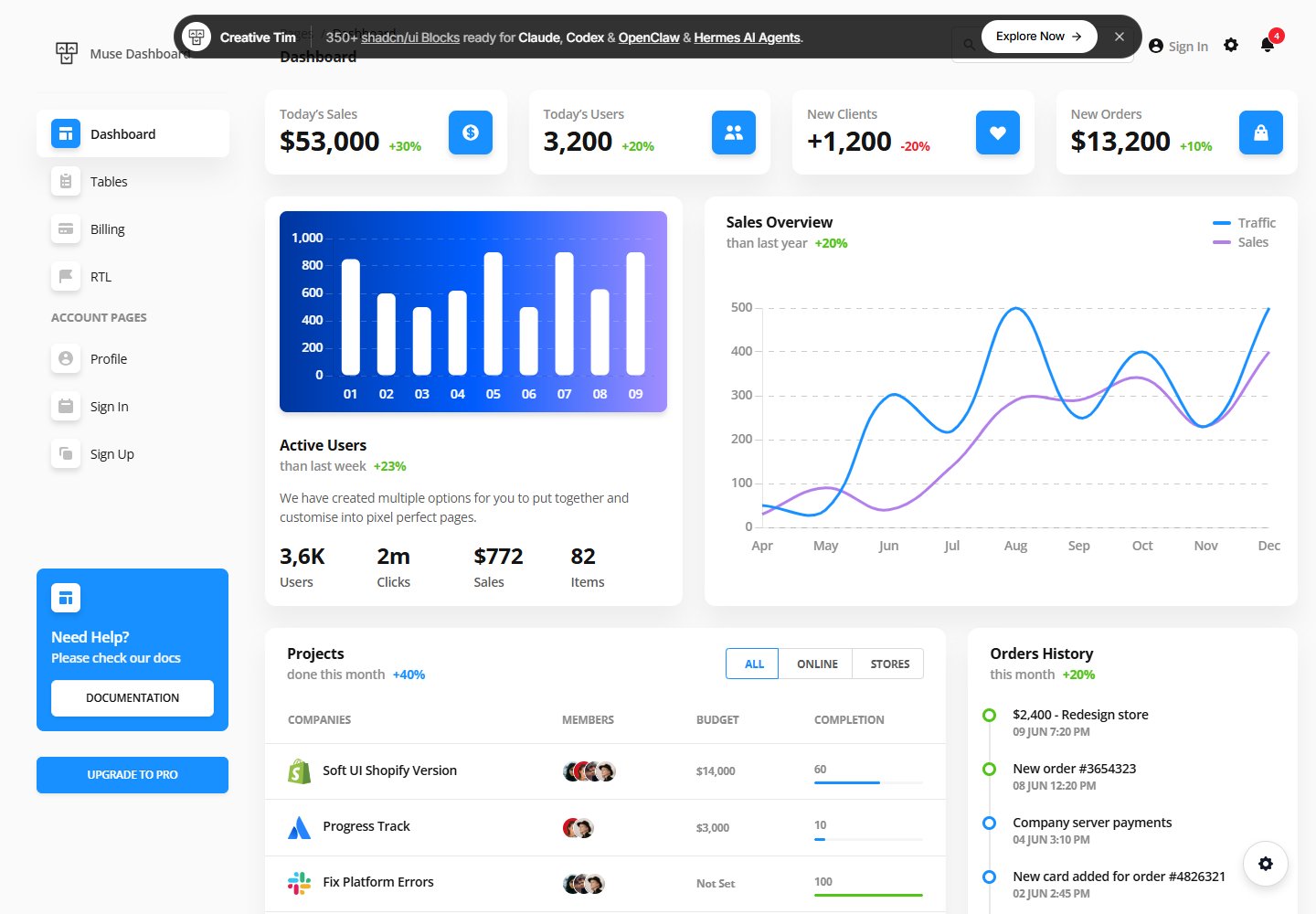
基于 Ant Design Vue 的管理后台模板,README 称包含超过 70 个前端元素
Vue后台
vue-antdv-dashboard-template — Vue 后台模板
作者 vnphu
Muse Vue Ant Design Dashboard 是一个基于 Ant Design Vue 的管理后台模板,包含大量前端组件与预置示例页面,源码以 Vue 单文件组件和 SCSS 组织。
看看你的网站会是什么样
浏览真实页面截图,比较内容排版与手机效果。点击下方缩略图切换,放大查看整页细节。
全部页面与视图 2
截图用于了解视觉与布局,交互效果请以实际项目为准。
采集于 2026-10-16查看来源
值得关注的模板亮点
从已有项目资料中,快速了解它的特点。
提供 Cards、Charts、Footers、Headers、Sidebars、Widgets 等分类组件目录
src/views 内含 404、Billing、Dashboard、Profile、RTL、Sign-In、Sign-Up、Tables 等页面
包含 Dashboard、DashboardRTL、Default 三种布局文件
样式使用 SCSS 组织,按 base、components、form、layouts、pages 分目录
README 列出浏览器支持目标为 Chrome、Firefox、Edge、Safari、Opera 的最后两个版本
模板详细介绍
该模板由 Creative Tim 发布,README 将其定位为 Ant Design Vue 管理后台仪表盘,包含大量组件,并提供了 Sign In、Profile 等示例页面。README 称其内置超过 70 个前端元素(按钮、输入框、导航栏、导航标签、卡片、提示等),组件可通过 SASS 文件和类修改配色。
项目结构在 README 中列出:src/components 下按 Cards、Charts、Footers、Headers、Sidebars、Widgets 分类,src/layouts 包含 Dashboard、DashboardRTL、Default,src/views 包含 404、Billing、Dashboard、Layout、Profile、RTL、Sign-In、Sign-Up、Tables,样式位于 src/scss,另有 router、plugins 与 main.js。README 提到使用了 Ant Design Vue,并给出在线文档与演示地址。
README 未说明具体依赖版本、构建工具配置细节、数据来源、接口对接方式、状态管理方案、测试或部署流程;除“最后两个版本”的浏览器支持目标外,也未提供性能、可访问性或生产就绪程度的说明。
Vue后台
适合你的项目吗?
适用场景
- 搭建需要 Ant Design Vue 组件风格的管理后台界面
- 参考预置的 Profile、Sign In、Sign Up 等页面结构进行页面开发
- 在 Dashboard 与 DashboardRTL 布局基础上调整左右方向布局
- 复用 Cards、Charts、Widgets 等组件组织仪表盘内容
适合人群
- 使用 Vue 与 Ant Design Vue 开发管理后台的开发者
- 需要现成组件与示例页面作为起点的前端项目
- 希望基于 SCSS 调整组件配色的团队
上手与定制指南
结合仓库当前版本的说明,按下面的资料检查内容、配置与运行要求。
- 1
README 的快速开始仅提供从 Creative Tim 下载的入口,未在仓库内给出完整克隆安装步骤
- 2
终端命令要求先从 Node.js 官网下载安装 Node.js
- 3
进入根目录后运行 npm install 安装本地依赖
- 4
README 未说明开发服务器启动、构建或部署命令,也未提供依赖版本清单
授权与来源资料
使用条件与限制
免费使用 · 保留许可声明本次收录的是公开仓库中采用 MIT 许可的免费版本;免费范围为该版本代码,不代表外部服务或第三方素材免费。
使用时需要遵守
- 允许免费使用、修改、商用和分发该版本代码。
- 分发代码副本或实质性部分时,保留原作者版权声明和完整 MIT 许可声明。
- 代码按现状提供;担保与责任限制以原许可证及适用法律为准。
额外费用与待核对事项
- 演示图片、字体、图标及其他第三方素材需按各自许可核对,不能仅凭代码的 MIT 许可判断。
- 域名、托管、数据库、支付或 AI 等外部服务可能另外收费。
- 快速开始仅提供从 Creative Tim 下载的入口,未在仓库内给出克隆安装步骤。
- 需先从 Node.js 官网下载并安装 Node.js。
- 需进入根目录运行 npm install 安装本地依赖。
- 官方仅支持 Chrome、Firefox、Edge、Safari、Opera 的最后两个版本。
- 集成相关问题需联系 Creative Tim,而非通过 GitHub Issue 提问。
- 版权归 Creative Tim 所有(2021)。
- 适用 Creative Tim 许可协议,需查阅其许可页面。
查看原文依据
Permission is hereby granted, free of charge
许可证原文
- Download from [Creative Tim](https://www.creative-tim.com/product/muse-vue-ant-design-dashboard?ref=readme-sud).
README 原文
1. Download and Install NodeJs from [NodeJs Official Page](https://nodejs.org/en/download/).
README 原文
2. Navigate to the root / directory and run npm install to install our local dependencies.
README 原文
At present, we officially aim to support the last two versions of the following browsers:
README 原文
If you have questions or need help integrating the product please [contact us](https://www.creative-tim.com/contact-us?ref=readme-sud) instead of opening an issue.
README 原文
- Copyright 2021 [Creative Tim](https://www.creative-tim.com?ref=readme-sud)
README 原文
https://github.com/vnphu/vue-antdv-dashboard-template/blob/main/LICENSEhttps://github.com/vnphu/vue-antdv-dashboard-template/blob/main/README.md- Creative Tim [license](https://www.creative-tim.com/license?ref=readme-sud)
README 原文
DeepSeek 根据仓库许可证和 README 整理 ·2026-10-13。结果仅覆盖已读取资料,依赖、图片、字体及后续条款变更以各自原文为准。
项目核对记录与介绍依据
模板资料
- 来源平台
- GitHub
- 资料与维护参考分
- 资料一般 · 65 / 100
- 技术栈
- Vue
- 网站类型
- 后台
这个分数如何计算
本站按许可资料(最高30分)、演示链接(12分)、预览图(10分)、Star数(15分)、记录的维护时间(15分)、描述完整度(8分)、功能记录(5分)和分类资料(5分)计算。它不是代码、安全或性能测试,也不是 Google 评分;有链接不代表已实测可用。
这个项目需要核对什么
- 记录的仓库更新时间
- 2022-07-04
- 截图检查日期
- 2026-10-16
已收录演示链接。请用你的内容与屏幕尺寸检查;有演示不代表表单、认证或支付已经可用。
目录记录的主要技术栈是 Vue。请通过依赖清单和锁文件核对实际版本与托管要求。这些说明基于收录资料,不代表代码审计或部署实测。
查看具体选型方法 →介绍的制作与核对状态
介绍由 AI 辅助整理目录与仓库资料。仓库作者不等于这篇介绍的审核者。
审核声明: codex-user-requested-batch-review-20261017 · 2026-10-16
查看当时使用的来源资料
SHA-256: 095045c9b319c38d0949f2ee30e332b56ad77a0c25e65748eaff7b395ad9550a
2026-10-13T10:23:39.692Z
来源文件 / 仓库# [Muse Vue Ant Design Dashboard](http://demos.creative-tim.com/muse-vue-ant-design-dashboard?ref=readme-sud) [](https://twitter.com/intent/tweet?url=https://www.creative-tim.com/product/muse-vue-ant-design-dashboard&text=Check%20Muse%20Vue%20Ant%20Design%20made%20by%20@CreativeTim%20#webdesign%20#dashboard%20#antdesign%20#vue%20https://www.creative-tim.com/product/muse-vue-ant-design-dashboard)  [](https://github.com/creativetimofficial/muse-vue-ant-design-dashboard/issues?q=is%3Aopen+is%3Aissue) [](https://github.com/creativetimofficial/muse-vue-ant-design-dashboard/issues?q=is%3Aissue+is%3Aclosed)  Muse - Vue Ant Design Dashboard is a beautiful Ant Design Vue admin dashboard with a large number of components, designed to look beautiful and organized Designed for those who like bold elements and beautiful websites. Made of hundred of elements, designed blocks and fully coded pages, Soft UI Dashboard is ready to help you create stunning websites and webapps. We created many examples for pages like Sign In, Profile and so on. Just choose between a Basic Design, an illustration or a cover and you are good to go! **Fully Coded Elements** Muse - Vue Ant Design Dashboard is built with over 70 frontend individual elements, like buttons, inputs, navbars, navtabs, cards or alerts, giving you the freedom of choosing and combining. All components can take variations in colour, that you can easily modify using SASS files and classes. You will save a lot of time going from prototyping to full-functional code, because all elements are implemented. View <a href="https://www.creative-tim.com/muse-vue-ant-design-dashboard/documentation/" target="_blank">all components here</a>. **Documentation built by Developers** Each element is well presented in a very complex documentation. You can read more about the <a href="https://www.creative-tim.com/muse-vue-ant-design-dashboard/documentation/" target="_blank">documentation here</a>. **Example Pages** If you want to get inspiration or just show something directly to your clients, you can jump start your development with our pre-built example pages. You will be able to quickly set up the basic structure for your web project. View <a href="https://www.creative-tim.com/muse-vue-ant-design-dashboard" target="_blank">example pages here</a>. **HELPFUL LINKS** - View <a href="https://github.com/creativetimofficial/muse-vue-ant-design-dashboard" target="_blank">Github Repository</a> - Check <a href="https://www.creative-tim.com/faq" target="_blank">FAQ Page</a> **Special thanks** During the development of this dashboard, we have used many existing resources from awesome developers. We want to thank them for providing their tools open source: - [Ant Design Vue](https://www.antdv.com/docs/vue/introduce/)- An enterprise-class UI design language for web applications Let us know your thoughts below. And good luck with development! ## Table of Contents * [Versions](#versions) * [Demo](#demo) * [Quick Start](#quick-start) * [Documentation](#documentation) * [File Structure](#file-structure) * [Browser Support](#browser-support) * [Resources](#resources) * [Reporting Issues](#reporting-issues) * [Technical Support or Questions](#technical-support-or-questions) * [Licensing](#licensing) * [Useful Links](#useful-links) ## Versions [<img src="https://s3.amazonaws.com/creativetim_bucket/github/html.png" width="60" height="60" />](https://www.creative-tim.com/product/muse-vue-ant-design-dashboard?ref=readme-sud) | HTML | | --- | | [](http://demos.creative-tim.com/muse-vue-ant-design-dashboard?ref=readme-sud) ## Demo - [Profile page](http://demos.creative-tim.com/muse-vue-ant-design-dashboard/profile?ref=readme-sud) - [Sign in page](http://demos.creative-tim.com/muse-vue-ant-design-dashboard/sign-in?ref=readme-sud) - [Sign up page](http://demos.creative-tim.com/muse-vue-ant-design-dashboard/sign-up?ref=readme-sud) [View More](http://demos.creative-tim.com/muse-vue-ant-design-dashboard). ## Quick start Quick start options: - Download from [Creative Tim](https://www.creative-tim.com/product/muse-vue-ant-design-dashboard?ref=readme-sud). ## Terminal Commands 1. Download and Install NodeJs from [NodeJs Official Page](https://nodejs.org/en/download/). 2. Navigate to the root / directory and run npm install to install our local dependencies. ## Documentation The documentation for the Muse Vue Ant Design Dashboard is hosted at our [website](http://demos.creative-tim.com/muse-vue-ant-design-dashboard/documentation?ref=readme-sud). ### What's included Within the download you'll find the following directories and files: ``` muse-vue-ant-design-dashboard ├── LICENSE ├── README.md ├── babel.config.js ├── gulpfile.js ├── package.json ├── public │ ├── imagesd │ └── index.html ├── src │ ├── App.vue │ ├── assets │ ├── components │ │ ├── Cards │ │ │ ├── CardAuthorTable.vue │ │ │ ├── CardBarChart.vue │ │ │ ├── CardBillingInfo.vue │ │ │ ├── CardConversations.vue │ │ │ ├── CardCredit.vue │ │ │ ├── CardInfo.vue │ │ │ ├── CardInfo2.vue │ │ │ ├── CardInvoices.vue │ │ │ ├── CardLineChart.vue │ │ │ ├── CardOrderHistory.vue │ │ │ ├── CardPaymentMethods.vue │ │ │ ├── CardPlatformSettings.vue │ │ │ ├── CardProfileInformation.vue │ │ │ ├── CardProject.vue │ │ │ ├── CardProjectTable.vue │ │ │ ├── CardProjectTable2.vue │ │ │ └── CardTransactions.vue │ │ ├── Charts │ │ │ ├── ChartBar.vue │ │ │ └── ChartLine.vue │ │ ├── Footers │ │ │ ├── DashboardFooter.vue │ │ │ └── DefaultFooter.vue │ │ ├── Headers │ │ │ ├── DashboardHeader.vue │ │ │ └── DefaultHeader.vue │ │ ├── Sidebars │ │ │ ├── DashboardSettingsDrawer.vue │ │ │ └── DashboardSidebar.vue │ │ └── Widgets │ │ ├── WidgetCounter.vue │ │ └── WidgetSalary.vue │ ├── layouts │ │ ├── Dashboard.vue │ │ ├── DashboardRTL.vue │ │ └── Default.vue │ ├── main.js │ ├── plugins │ │ └── click-away.js │ ├── router │ │ └── index.js │ ├── scss │ │ ├── app.scss │ │ ├── base │ │ │ ├── _override.scss │ │ │ ├── _typography.scss │ │ │ ├── _utilities.scss │ │ │ └── _variables.scss │ │ ├── components │ │ │ ├── _avatar.scss │ │ │ ├── _badge.scss │ │ │ ├── _button.scss │ │ │ ├── _card.scss │ │ │ ├── _chart.scss │ │ │ ├── _dropdown.scss │ │ │ ├── _list.scss │ │ │ ├── _progress.scss │ │ │ ├── _settings-drawer.scss │ │ │ ├── _space.scss │ │ │ ├── _table.scss │ │ │ ├── _tag.scss │ │ │ ├── _timeline.scss │ │ │ └── _widget.scss │ │ ├── form │ │ │ ├── _checkbox.scss │ │ │ └── _input.scss │ │ ├── layouts │ │ │ ├── _dashboard-rtl.scss │ │ │ ├── _dashboard.scss │ │ │ └── _default.scss │ │ └── pages │ │ ├── _profile.scss │ │ ├── _sign-in.scss │ │ └── _sign-up.scss │ └── views │ ├── 404.vue │ ├── Billing.vue │ ├── Dashboard.vue │ ├── Layout.vue │ ├── Profile.vue │ ├── RTL.vue │ ├── Sign-In.vue │ ├── Sign-Up.vue │ └── Tables.vue └── vue.config.js ``` ## Browser Support At present, we officially aim to support the last two versions of the following browsers: <img src="https://s3.amazonaws.com/creativetim_bucket/github/browser/chrome.png" width="64" height="64"> <img src="https://s3.amazonaws.com/creativetim_bucket/github/browser/firefox.png" width="64" height="64"> <img src="https://s3.amazonaws.com/creativetim_bucket/github/browser/edge.png" width="64" height="64"> <img src="https://s3.amazonaws.com/creativetim_bucket/github/browser/safari.png" width="64" height="64"> <img src="https://s3.amazonaws.com/creativetim_bucket/github/browser/opera.png" width="64" height="64"> ## Resources - [Live Preview](https://demos.creative-tim.com/muse-vue-ant-design-dashboard?ref=readme-sud) - [Download Page](https://www.creative-tim.com/product/muse-vue-ant-design-dashboard?ref=readme-sud) - Documentation is [here](https://demos.creative-tim.com/muse-vue-ant-design-dashboard/documentation?ref=readme-sud) - [License Agreement](https://www.creative-tim.com/license?ref=readme-sud) - [Support](https://www.creative-tim.com/contact-us?ref=readme-sud) - Issues: [Github Issues Page](https://github.com/creativetimofficial/muse-vue-ant-design-dashboard/issues) ## Reporting Issues We use GitHub Issues as the official bug tracker for the Muse Vue Ant Design Dashboard. Here are some advices for our users that want to report an issue: 1. Make sure that you are using the latest version of the Muse Vue Ant Design Dashboard. Check the CHANGELOG from your dashboard on our [website](https://www.creative-tim.com/product/muse-vue-ant-design-dashboard?ref=readme-sud). 2. Providing us reproducible steps for the issue will shorten the time it takes for it to be fixed. 3. Some issues may be browser specific, so specifying in what browser you encountered the issue might help. ## Technical Support or Questions If you have questions or need help integrating the product please [contact us](https://www.creative-tim.com/contact-us?ref=readme-sud) instead of opening an issue. ## Licensing - Copyright 2021 [Creative Tim](https://www.creative-tim.com?ref=readme-sud) - Creative Tim [license](https://www.creative-tim.com/license?ref=readme-sud) ## Useful Links - [More products](https://www.creative-tim.com/templates?ref=readme-sud) from Creative Tim - [Tutorials](https://www.youtube.com/channel/UCVyTG4sCw-rOvB9oHkzZD1w) - [Freebies](https://www.creative-tim.com/bootstrap-themes/free?ref=readme-sud) from Creative Tim - [Affiliate Program](https://www.creative-tim.com/affiliates/new?ref=readme-sud) (earn money) ##### Social Media Twitter: <https://twitter.com/CreativeTim> Facebook: <https://www.facebook.com/CreativeTim> Dribbble: <https://dribbble.com/creativetim> Instagram: <https://instagram.com/creativetimofficial>
看看同类模板
对比同技术栈与用途的模板,找到更适合的视觉与内容结构。

vuestic-admin
Vuestic Admin is an open-source, ready-to-use admin template suite designed for rapid development, easy mainte…
Vue · 后台

v3-admin-vite
v3-admin-vite 是一个主打 AI 编程友好体验的 Vue3 后台管理模板,基于 Vue3、Vite、TypeScript、Element Plus 构建。
Vue · 后台

vue-typescript-admin-template
vue-typescript-admin-template 是一套面向后台管理界面的前端解决方案,基于 Vue 2.6、TypeScript 和 Element UI 构建。
Vue · 后台

vue-antd-admin
Vue Antd Admin 是 Ant Design Pro 的 Vue 实现版本,目标是为中后台项目提供一套开箱即用的前端与设计解决方案。
Vue · 后台

coreui-free-vue-admin-template
Free Vue Admin & Dashboard Template Built for AI-Assisted Development
Vue · 后台
nova-admin
A simple and flexible admin template based on Vue3, Vite, TypeScript, NaiveUI
Vue · 后台