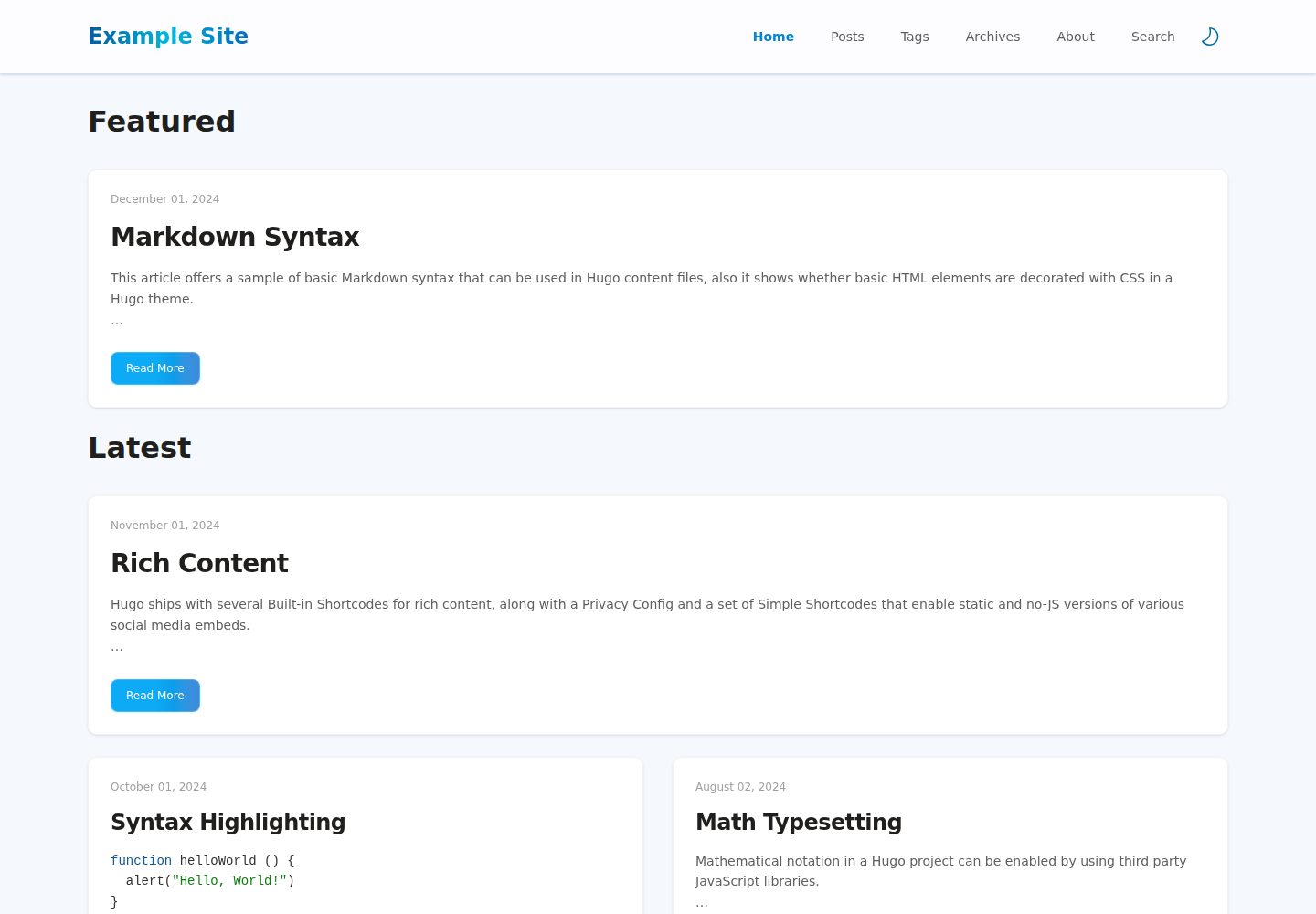
混合 Fluent Design 与 Tailwind CSS 的界面风格
Hugo博客
hugo-theme-fluidity — Hugo 博客模板
作者 wayjam
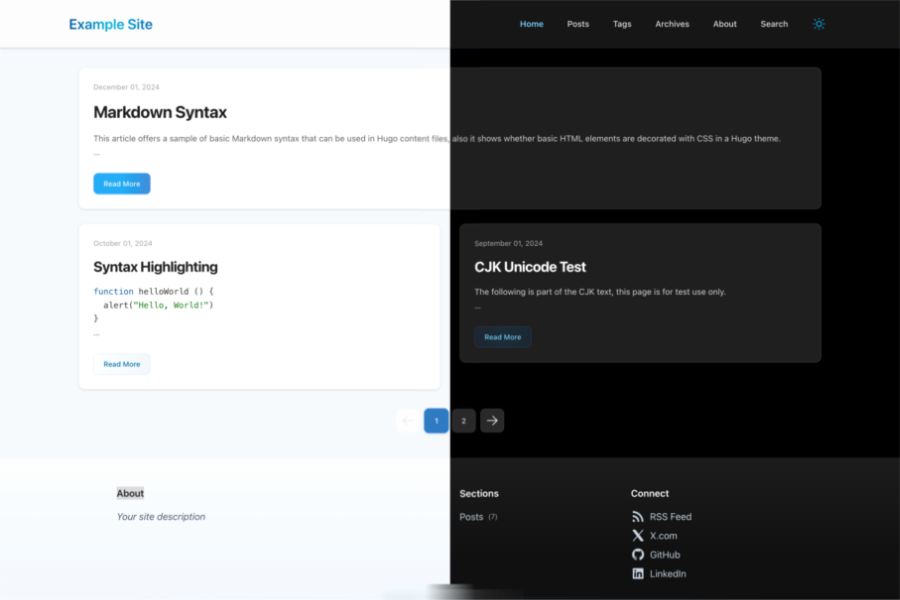
hugo-theme-fluidity 是 wayjam 开发的 Hugo 博客主题,采用 Fluent Design 与 Tailwind CSS,支持搜索、代码高亮、深色模式和响应式布局。
看看你的网站会是什么样
浏览真实页面截图,比较内容排版与手机效果。点击下方缩略图切换,放大查看整页细节。
全部页面与视图 3
截图用于了解视觉与布局,交互效果请以实际项目为准。
采集于 2026-10-03查看来源
值得关注的模板亮点
从已有项目资料中,快速了解它的特点。
支持 Google 或 PageFind 两种搜索提供方
内置代码高亮与归档页
提供深色模式
响应式布局,适配桌面与移动端
可通过 params.comment.thirdParty 注入第三方评论并同步深浅色
模板详细介绍
hugo-theme-fluidity 是一个面向 Hugo 的博客主题,仓库与演示站均公开。主题在视觉上混合了 Fluent Design 与 Tailwind CSS,页面随屏幕宽度自适应,并提供深色模式。
功能方面,主题内置搜索支持,可选用 Google 或 PageFind 作为搜索提供方;PageFind 需要额外安装 npm 包并在每次构建前运行。代码高亮与归档页也已包含。评论通过 params.comment.thirdParty 注入第三方脚本,README 给出的示例演示了如何让评论组件跟随主题的深色/浅色切换。
安装提供两种方式:Hugo Module 或 Git Submodule,两者都需要执行 hugo mod npm pack && npm update 处理前端依赖。站点配置可参考仓库中的 exampleSite/hugo.yaml;关于页、归档页和搜索页需要自行在 content 目录下创建对应页面。主题采用 MIT 许可,可免费使用、修改和分发,但演示图片、字体、图标等第三方素材需单独核对许可。
Hugo博客
适合你的项目吗?
适用场景
- 搭建个人技术博客或写作站点
- 需要深色模式与站内搜索的内容站
- 希望用 Tailwind CSS 定制前端样式的 Hugo 项目
- 需要归档页集中展示历史文章的博客
适合人群
- 使用 Hugo 建站的开发者
- 偏好 Tailwind CSS 工作流的用户
- 需要深色模式与搜索功能的博客作者
- 接受通过 npm 管理前端依赖的项目
上手与定制指南
结合仓库当前版本的说明,按下面的资料检查内容、配置与运行要求。
- 1
可通过 Hugo Module 或 Git Submodule 两种方式安装主题
- 2
安装后需执行 hugo mod npm pack && npm update 处理前端依赖
- 3
站点配置参考仓库中的 exampleSite/hugo.yaml
- 4
关于页、归档页、搜索页需在 content 目录下自行创建
- 5
使用 PageFind 搜索时需安装 pagefind 并在每次构建前运行 npx pagefind
授权与来源资料
使用条件与限制
免费使用 · 保留许可声明本次收录的是公开仓库中采用 MIT 许可的免费版本;免费范围为该版本代码,不代表外部服务或第三方素材免费。
使用时需要遵守
- 允许免费使用、修改、商用和分发该版本代码。
- 分发代码副本或实质性部分时,保留原作者版权声明和完整 MIT 许可声明。
- 代码按现状提供;担保与责任限制以原许可证及适用法律为准。
额外费用与待核对事项
- 使用 PageFind 搜索功能时,需额外安装 pagefind npm 包,并在每次构建前运行 npx pagefind,属于额外的外部依赖要求。
- 评论功能需自行注入第三方评论系统脚本,可能涉及外部服务、账号或 API 密钥,主题本身不提供评论后端。
- README 中的评论示例为通用脱敏示例,实际使用时需按所选第三方评论服务商的 API 替换脚本地址、初始化方法与配置字段。
- 演示图片、字体、图标及其他第三方素材需按各自许可核对,不能仅凭代码的 MIT 许可判断。
- 域名、托管、数据库、支付或 AI 等外部服务可能另外收费。
查看原文依据
Permission is hereby granted, free of charge
许可证原文
Install pagefind: `npm i pagefind`
README 原文
You can inject third-party comments via `params.comment.thirdParty`.
README 原文
https://github.com/wayjam/hugo-theme-fluidity/blob/main/LICENSEhttps://github.com/wayjam/hugo-theme-fluidity/blob/main/README.mdThis is a generic, desensitized example. Replace script URLs, init method, and config fields based on your provider's API.
README 原文
DeepSeek 根据仓库许可证和 README 整理 ·2026-10-03。结果仅覆盖已读取资料,依赖、图片、字体及后续条款变更以各自原文为准。
项目核对记录与介绍依据
模板资料
- 来源平台
- Hugo Themes
- 资料与维护参考分
- 资料较完整 · 87 / 100
- 技术栈
- Hugo
- 网站类型
- 博客
这个分数如何计算
本站按许可资料(最高30分)、演示链接(12分)、预览图(10分)、Star数(15分)、记录的维护时间(15分)、描述完整度(8分)、功能记录(5分)和分类资料(5分)计算。它不是代码、安全或性能测试,也不是 Google 评分;有链接不代表已实测可用。
这个项目需要核对什么
- 记录的仓库更新时间
- 2026-03-06
- 截图检查日期
- 2026-10-03
已收录演示链接。请用你的内容与屏幕尺寸检查;有演示不代表表单、认证或支付已经可用。
目录记录的主要技术栈是 Hugo。请通过依赖清单和锁文件核对实际版本与托管要求。这些说明基于收录资料,不代表代码审计或部署实测。
查看具体选型方法 →介绍的制作与核对状态
介绍由 AI 辅助整理目录与仓库资料。仓库作者不等于这篇介绍的审核者。
审核声明: [email protected] · 2026-10-04
查看当时使用的来源资料
SHA-256: 8c3606f7eeebd40557cb10461e8c4dd0d27c1a1a3111bfb3beeb514283ccdb0d
2026-10-03T23:37:50.761Z
来源文件 / 仓库# Theme Fluidity
[](https://themes.gohugo.io/hugo-theme-fluidity/)
[](https://gohugo.io/)


A fluid and responsive Hugo theme.
## Features
- Fluent Design mixed with [Tailwind CSS](https://tailwindcss.com/)
- Search Support
- Code Highlight
- Dark Mode
- Responsive
- Archive Page
Checkout [demo](https://wayjam.github.io/hugo-theme-fluidity/) now.
## Installation
### Hugo Module
> https://gohugo.io/hugo-modules/use-modules/
```bash
hugo mod init github.com/<your_user>/<your_project>
```
```yaml
module:
imports:
- path: github.com/wayjam/hugo-theme-fluidity
```
```bash
hugo mod npm pack && npm update
```
### Git Submodule
```bash
git submodule add https://github.com/wayjam/hugo-theme-fluidity.git themes/hugo-theme-fluidity
```
set theme in `hugo.yaml`
```yaml
theme: hugo-theme-fluidity
```
```bash
hugo mod npm pack && npm update
```
## Configuration
Site configuration see [exampleSite/hugo.yaml](exampleSite/hugo.yaml)
### About Page
Create a new page in the `content` directory, for example <exampleSite/content/about.md>
### Archives Page
Create a new page in the `content` directory, for example <exampleSite/content/archives/_index.md>
### Search Page
Create a new page in the `content` directory, for example <exampleSite/content/search/_index.md>
#### Google Search
```yaml
params:
search:
provider: google
```
#### PageFind
1. Step 1: Set the provider to pagefind
```yaml
params:
search:
provider: pagefind
```
2. Create a pagefind config file, for example <exampleSite/pagefind.yml>
3. Install pagefind: `npm i pagefind`
4. Run pagefind before every build: `npx pagefind`
### Third-party Comments (Dark/Light Sync)
You can inject third-party comments via `params.comment.thirdParty`.
```yaml
params:
comment:
disabled: false
thirdParty: |
<link href="https://your-cdn.example.com/comment.css" rel="stylesheet">
<script src="https://your-cdn.example.com/comment.js"></script>
<div id="comments"></div>
<script>
(() => {
const isDark = () => document.documentElement.classList.contains('dark')
// Replace with your comment system initializer
const comment = window.YourCommentSystem?.init({
el: '#comments',
pageKey: location.pathname,
pageTitle: document.title,
server: 'https://your-comment-server.example.com',
site: 'YOUR_SITE_NAME',
darkMode: isDark(),
})
const syncTheme = () => comment?.setDarkMode?.(isDark())
syncTheme()
const observer = new MutationObserver(syncTheme)
observer.observe(document.documentElement, {
attributes: true,
attributeFilter: ['class'],
})
})()
</script>
```
This is a generic, desensitized example. Replace script URLs, init method, and config fields based on your provider's API.
## Development
1. Install dependencies: `npm i`
2. Run the example:`./run_eample.sh`
## License
[MIT](LICENSE)看看同类模板
对比同技术栈与用途的模板,找到更适合的视觉与内容结构。

hugo-PaperMod
PaperMod 是 Hugo 生态里知名度较高的主题之一,定位很明确:给博客和轻量作品集站点提供一套干净、响应式的阅读界面。
Hugo · 作品集

LoveIt
❤️A clean, elegant but advanced blog theme for Hugo 一个简洁、优雅且高效的 Hugo 主题
Hugo · 博客

hugo-coder
A minimalist blog theme for hugo.
Hugo · 博客

blowfish
Personal Website & Blog Theme for Hugo
Hugo · 博客

hugo-paper
🪺 A simple, clean, customizable Hugo theme
Hugo · 博客

hextra
Hextra 是一个 Hugo 主题,定位在文档站与博客之间:既提供侧边栏导航、目录、面包屑、分页这类文档站结构,也能承载博客内容。
Hugo · 文档