采用 Pug 模板 + Sass 样式 + Gulp 构建的静态站点工作流
HTML启动器
simple-product_responsive-template — HTML 启动器模板
作者 website-templates
一个采用 MIT 许可的免费响应式产品展示网站模板,基于 HTML、Pug 与 Sass,通过 Gulp 构建,仓库已归档。
看看你的网站会是什么样
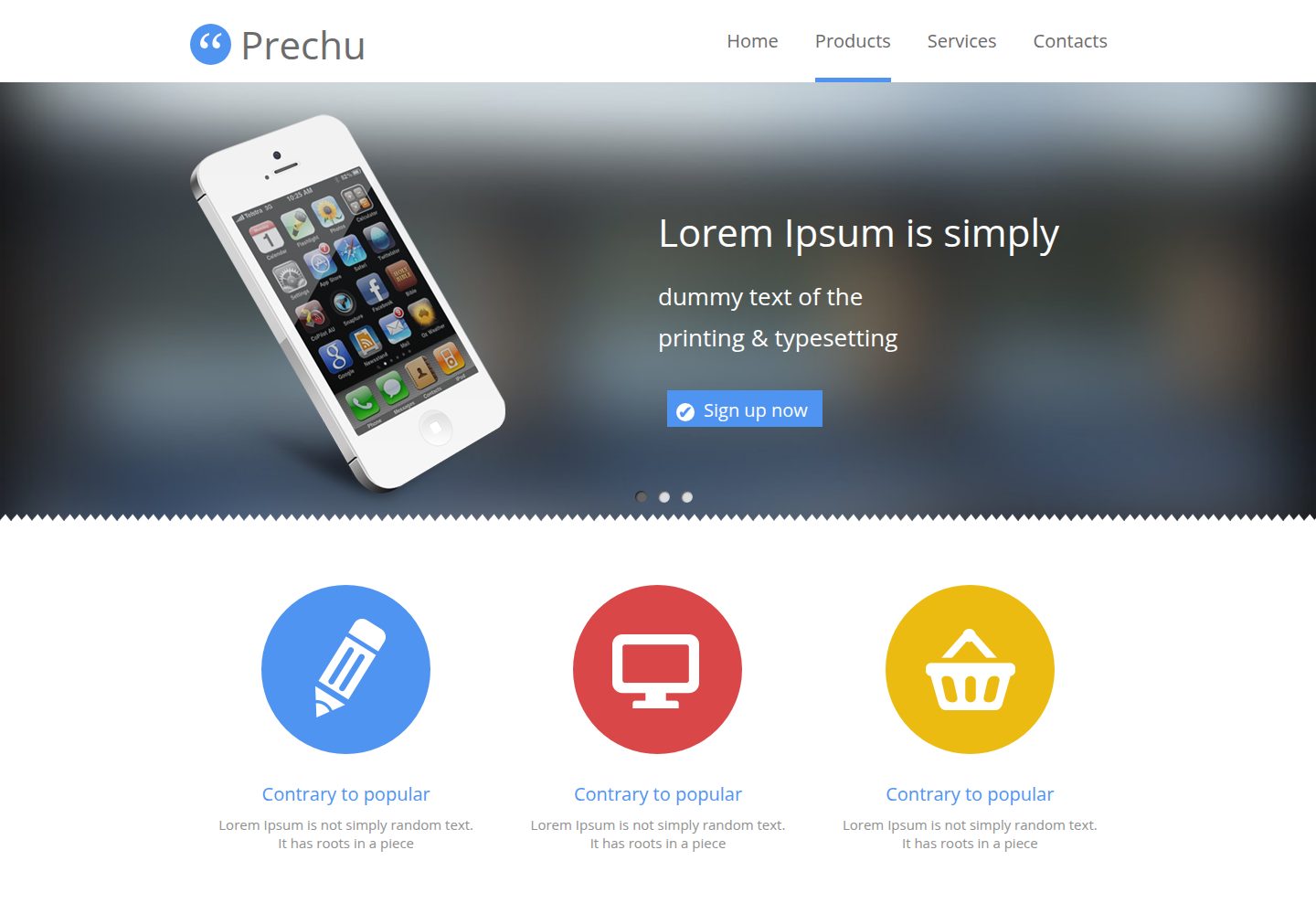
浏览真实页面截图,比较内容排版与手机效果。点击下方缩略图切换,放大查看整页细节。
全部页面与视图 2
截图用于了解视觉与布局,交互效果请以实际项目为准。
采集于 2026-10-03查看来源
值得关注的模板亮点
从已有项目资料中,快速了解它的特点。
页面数据集中在 dev/data/config.json,模板中以 config.key-name 引用
提供 dev、build、rebuild、server、cleanup 等 Gulp 任务
dev 任务集成 BrowserSync 静态服务器与实时刷新
构建产物输出到 build/,包含压缩后的 HTML、CSS、图片与字体
根目录提供 .editorconfig 统一代码风格
模板详细介绍
该模板是一个面向产品展示的响应式单页网站启动器,由 cssauthor 设计、Maxim Orlov 编写代码,仓库现处于 ARCHIVED(已归档)状态。源码位于 dev/ 目录,使用 Pug 编写页面模板、Sass 编写样式,页面数据通过 dev/data/config.json 以 config.key-name 的形式注入模板;构建产物输出到 build/ 目录,包含 index.html、page.html 以及压缩后的 CSS、图片和字体。
构建流程依赖 Node.js 与 Gulp,提供 cleanup、dev、build、rebuild、server 等任务:dev 会编译 Sass、添加浏览器前缀、合并媒体查询、编译 Pug、同步资源并启动带实时刷新的 BrowserSync 静态服务器;build 则对图片、样式和 HTML 做压缩。项目根目录包含 .editorconfig 用于统一缩进与空白风格。
使用限制方面:仓库已归档,不再维护更新;构建需要全局安装 gulp 与 npm;README 中给出的演示链接与仓库实际演示地址不一致,需以仓库主页的演示地址为准。模板代码采用 MIT 许可,但演示图片、字体、图标等第三方素材的许可需单独核对。
HTML启动器
适合你的项目吗?
适用场景
- 快速搭建产品展示型响应式单页网站
- 作为学习 Pug、Sass 与 Gulp 构建流程的示例项目
- 在已有静态站点基础上替换文案与图片做二次开发
适合人群
- 需要免费 MIT 许可静态模板的个人或小团队
- 熟悉 Node.js 与 Gulp 的前端开发者
- 希望用 Pug 与 Sass 组织页面结构的项目
上手与定制指南
结合仓库当前版本的说明,按下面的资料检查内容、配置与运行要求。
- 1
需先安装 Node.js,并全局安装 gulp 与 npm
- 2
在项目根目录运行 npm install 安装依赖
- 3
运行 gulp dev 启动开发服务器并监听文件变化
- 4
运行 gulp build 生成压缩后的生产文件到 build/ 目录
- 5
仓库已归档,README 中的演示链接与仓库实际演示地址不一致,请以仓库主页为准
授权与来源资料
使用条件与限制
免费使用 · 保留许可声明本次收录的是公开仓库中采用 MIT 许可的免费版本;免费范围为该版本代码,不代表外部服务或第三方素材免费。
使用时需要遵守
- 允许免费使用、修改、商用和分发该版本代码。
- 分发代码副本或实质性部分时,保留原作者版权声明和完整 MIT 许可声明。
- 代码按现状提供;担保与责任限制以原许可证及适用法律为准。
额外费用与待核对事项
- 使用前必须先在系统中全局安装 npm 与 gulp,否则无法运行构建任务。
- 需在项目根目录执行 npm install 安装依赖后才能开始开发。
- 开发与预览依赖 BrowserSync 静态服务器,需本地运行该服务才能使用实时刷新。
- 仓库已归档,不再维护更新,可能存在过时依赖或不再兼容的问题。
- 演示图片、字体、图标及其他第三方素材需按各自许可核对,不能仅凭代码的 MIT 许可判断。
- 域名、托管、数据库、支付或 AI 等外部服务可能另外收费。
查看原文依据
Permission is hereby granted, free of charge
许可证原文
Before start you need to have installed _npm_ , as well as _gulp_ globally.
README 原文
Install dependencies from `package.json` by running: `npm install`.
README 原文
This project uses BrowserSync as static server with enabled and configured live reload option.
README 原文
https://github.com/website-templates/simple-product_responsive-template/blob/master/LICENSE.mdhttps://github.com/website-templates/simple-product_responsive-template/blob/master/README.md# Free simple-product website template - ARCHIVED
README 原文
DeepSeek 根据仓库许可证和 README 整理 ·2026-10-03。结果仅覆盖已读取资料,依赖、图片、字体及后续条款变更以各自原文为准。
项目核对记录与介绍依据
模板资料
- 来源平台
- GitHub
- 资料与维护参考分
- 资料一般 · 72 / 100
- 技术栈
- HTML
- 网站类型
- 启动器
这个分数如何计算
本站按许可资料(最高30分)、演示链接(12分)、预览图(10分)、Star数(15分)、记录的维护时间(15分)、描述完整度(8分)、功能记录(5分)和分类资料(5分)计算。它不是代码、安全或性能测试,也不是 Google 评分;有链接不代表已实测可用。
这个项目需要核对什么
- 记录的仓库更新时间
- 2019-02-25
- 截图检查日期
- 2026-10-03
已收录演示链接。请用你的内容与屏幕尺寸检查;有演示不代表表单、认证或支付已经可用。
目录记录的主要技术栈是 HTML。请通过依赖清单和锁文件核对实际版本与托管要求。这些说明基于收录资料,不代表代码审计或部署实测。
查看具体选型方法 →介绍的制作与核对状态
介绍由 AI 辅助整理目录与仓库资料。仓库作者不等于这篇介绍的审核者。
已完成服务器许可规则与 AI 来源核对;未经过人工编辑审核。
查看当时使用的来源资料
SHA-256: c261ad178a29b54dfcdc2a30278fc5f902cca0239b4fd530ec2043e611f0899a
2026-10-03T04:46:24.788Z
来源文件 / 仓库# Free simple-product website template - ARCHIVED
Light and simple responsive website template,designed by [cssauthor](http://www.cssauthor.com/) and coded by [Maxim Orlov](https://github.com/orlovmax).
Demo: [http://website-templates.github.io/design-studio_one-page-template](http://website-templates.github.io/simple-product_responsive-template/)

Product mockup created with [http://frame.lab25.co.uk/](http://frame.lab25.co.uk/)
## Contents
- [Folder and file structure](#folder-and-file-structure)
- [Requirements:](#requirements)
- [Editorconfig](#editorconfig)
- [How to start](#how-to-start)
- [Site configuration](#site-configuration)
- [Tasks](#tasks)
- [Cleanup](#cleanup)
- [Dev](#dev)
- [Build](#build)
- [Rebuild](#rebuild)
- [Server](#server)
- [Sprite](#sprite)
- [Live reload](#live-reload)
- [License](#license)
## Folder and file structure
```
./
├── .editorconfig
├── gulpfile.js
├── package.json
├── README.md
|
├── gulp_tasks/ * gulp tasks
| ├── config/ * gulp tasks config
│ | ├── paths.js
│ | └── aliases.js
│ |
| └── task.js
|
├── screenshots/ * responsive test screenshots
|
├── dev/ * site source
│ ├── images/ * image sources
| │
│ ├── pug/ * templates
| | ├── blocks/ * blocks library
| │ | └── block.pug
| │ ├── helpers/ * helper mixins
| │ ├── vendor/ * third-party code
| │ ├── layouts/ * page layouts
| │ └── pages/ * main pages templates
| │
| ├── sass/ * sass preprocessor styles
| | ├── blocks/ * blocks library
| │ | └── block.sass
| │ ├── helpers/ * mixins and vars
| │ ├── vendor/ * third-party code
| │ ├── custom.sass
| │ ├── noscript.sass
| │ └── screen.sass
| │
│ ├── helpers/ * helper files
| | ├── favicon.ico
| | └── .htaccess
| │
│ ├── fonts/ * font sources
| │
│ └── data/ * configs and data for templates
│
└── build/ * built source
├── index.html
├── page.html
|
└── static/ * static assets
├── css/ * minified styles
|
├── images/ * minified images
|
└── fonts/ * @font-face-ready webfonts
```
## Requirements
- [Node.js](http://nodejs.org/)
- Build sytem: [Grunt](http://gruntjs.com/) or [Gulp](http://gulpjs.com/)
- Optionally:
* [Editorconfig](http://editorconfig.org/)
#### Editorconfig
This project has an .editorconfig file at the root. It describes indent style, trailing whitespaces etc. See more details [here](http://editorconfig.org/)
## How to start
If you haven't used [Gulp](http://gulpjs.com/) before, be sure to check out the [Getting Started]([https://github.com/gulpjs/gulp/blob/master/docs/README.md](https://gulpjs.com/docs/en/getting-started/quick-start)) guide, also check these [recips](https://github.com/gulpjs/gulp/tree/master/docs/recipes#recipes)
Before start you need to have installed _npm_ , as well as _gulp_ globally.
**A few simple steps to start:**
* Install dependencies from `package.json` by running: `npm install`.
* Run tasks from the list below and start devevelopment!
* Edit general settings in `dev/data/config.json` See [Site configuration](#site-configuration) section
## Site configuration
This boilerplate uses Pug templates with external data configs.
Main settings can be found in `dev/data/config.json` file. And they're available for usage in templates with `config.key-name`
## Tasks
Here comes groups ofgulp tasks with some explanations
#### Cleanup
Remove placeholders from work directories.
Gulp: `gulp cleanup`
* Remove gitkeep files
#### Dev
Dev task with static server.
Gulp: `gulp dev`
* Compile Sass stylesheets
* Add vendor prefixes in css
* Combine media queries in css files
* Compile Pug templates
* Sync helpers and other assets
* Sync images
* Run BrowserSync static server with live reload using
* Watch for changes and run dev task
#### Build
Build task.
Gulp: `gulp build`
* Minify images
* Minify stylesheets
* Minify html
* Run BrowserSync static server
#### Rebuild
Regenerate and build project by running all tasks.
Gulp: `gulp rebuild`
* Compile Sass stylesheets
* Add vendor prefixes in css
* Combine media queries in css files
* Compile Pug templates
* Sync helpers and other assets
* Sync images
* Minify images
* Minify stylesheets
* Minify html
#### Server
Run server without watching for changes.
Gulp: `gulp server`
* Run BrowserSync static server
## Live reload
This project uses BrowserSync as static server with enabled and configured live reload option.
## License
[MIT](https://github.com/website-templates/simple-product_responsive-template/blob/master/LICENSE.md)
看看同类模板
对比同技术栈与用途的模板,找到更适合的视觉与内容结构。

startbootstrap-simple-sidebar
An off canvas sidebar navigation Bootstrap HTML template created by Start Bootstrap
HTML · 启动器

adminkit
AdminKit is a free & open-source HTML dashboard & admin template based on Bootstrap 5
HTML · 后台

Landing-Page
Tailwind CSS Starter Template - Landing Page
HTML · 企业官网

light-bootstrap-dashboard
Light Bootstrap Dashboard is an admin dashboard template designed to be beautiful and simple.
HTML · 后台

sing-app
💥Free and open-source admin dashboard template built with Bootstrap 4.5 💥
HTML · 后台

startbootstrap-modern-business
A multipurpose Bootstrap full website template created by Start Bootstrap
HTML · 启动器