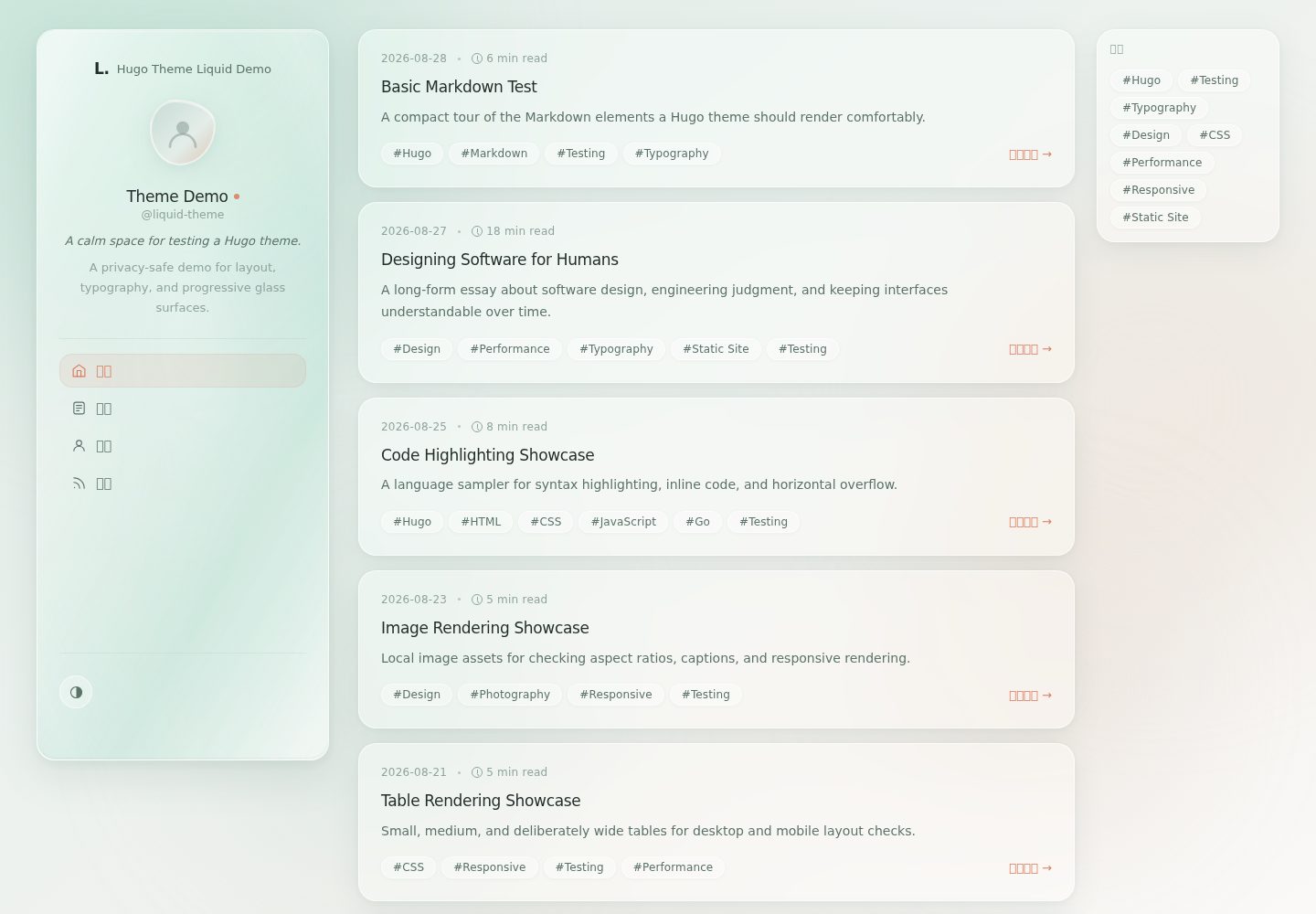
响应式首页、文章、章节、分类法与 404 布局
Hugo博客
hugo-theme-liquid — Hugo 博客模板
作者 wych
Hugo Theme Liquid 是一款基于 Hugo 的响应式博客主题,采用可读的编辑式排版,并在支持高级浏览器效果时渐进增强液态玻璃表面,不支持时回退到普通 CSS。
看看你的网站会是什么样
浏览真实页面截图,比较内容排版与手机效果。点击下方缩略图切换,放大查看整页细节。
全部页面与视图 3
截图用于了解视觉与布局,交互效果请以实际项目为准。
采集于 2026-10-12查看来源
值得关注的模板亮点
从已有项目资料中,快速了解它的特点。
Hugo 原生分页、目录、RSS 与 Markdown 渲染
浅色、深色与跟随系统三种外观模式,并持久化用户偏好
液态玻璃效果渐进增强,不可用时回退到普通 CSS
文章显示发布日期、最后修改日期、阅读时间、字数与上一篇/下一篇导航
语义化 HTML、键盘焦点样式、可访问控件,核心导航不依赖 JavaScript
模板详细介绍
Hugo Theme Liquid 是面向 Hugo 的博客主题,强调安静的阅读体验与响应式布局。它提供首页、文章、章节、分类法与 404 等页面布局,并集成 Hugo 原生的分页、目录、RSS 与 Markdown 渲染。文章可显示发布日期、最后修改日期、阅读时间、字数以及上一篇/下一篇导航。主题支持浅色、深色与跟随系统三种外观模式,并会记住用户选择。液态玻璃效果属于渐进增强:在 JavaScript 被禁用、浏览器缺少所需滤镜能力或选择较低质量时,页面仍使用普通 CSS 表面,核心内容不受影响。主题不依赖 React、Vue、Tailwind 或第三方运行时。使用前需注意 Hugo 版本要求(0.128.0 或更高),使用 Hugo Modules 或构建自带示例站点时需要 Go 1.18 或更高版本。
Hugo博客
适合你的项目吗?
适用场景
- 搭建以文字阅读为主的个人博客
- 需要分类与标签组织的技术文章站点
- 希望在不支持高级浏览器效果的设备上仍保持可读性的博客
- 使用 Hugo 并希望避免引入 React、Vue 或 Tailwind 的项目
适合人群
- 使用 Hugo 构建博客的开发者
- 重视排版可读性与渐进增强的站点作者
- 需要浅色/深色模式与基本 SEO 元数据的个人站点
上手与定制指南
结合仓库当前版本的说明,按下面的资料检查内容、配置与运行要求。
- 1
需要 Hugo 0.128.0 或更高版本,站点配置文件名为 hugo.yaml、hugo.toml 或位于 config/_default/*。
- 2
使用 Hugo Modules 或构建自带 exampleSite 时需要 Go 1.18 或更高版本。
- 3
可通过 Git submodule、本地复制或 Hugo Module 三种方式安装,并在站点配置中设置 theme: "hugo-theme-liquid"。
- 4
示例站点位于 exampleSite 目录,可运行 hugo server 本地预览,或使用 hugo --minify 构建生产版本。
- 5
演示图片、字体、图标等第三方素材需按各自许可核对,不能仅凭代码的 MIT 许可判断。
授权与来源资料
使用条件与限制
免费使用 · 保留许可声明本次收录的是公开仓库中采用 MIT 许可的免费版本;免费范围为该版本代码,不代表外部服务或第三方素材免费。
使用时需要遵守
- 允许免费使用、修改、商用和分发该版本代码。
- 分发代码副本或实质性部分时,保留原作者版权声明和完整 MIT 许可声明。
- 代码按现状提供;担保与责任限制以原许可证及适用法律为准。
额外费用与待核对事项
- 演示图片、字体、图标及其他第三方素材需按各自许可核对,不能仅凭代码的 MIT 许可判断。
- 域名、托管、数据库、支付或 AI 等外部服务可能另外收费。
- 使用该主题要求 Hugo 版本为 0.128.0 或更高,低于此版本无法使用。
- 使用 Hugo Modules 或构建自带示例站点时,需要 Go 1.18 或更高版本。
- 站点配置文件必须命名为 hugo.yaml、hugo.toml 或位于 config/_default/ 目录下。
查看原文依据
Permission is hereby granted, free of charge
许可证原文
- Hugo 0.128.0 or later
README 原文
- Go 1.18 or later when using Hugo Modules or building the included exampleSite
README 原文
https://github.com/wych/hugo-theme-liquid/blob/main/LICENSEhttps://github.com/wych/hugo-theme-liquid/blob/main/README.mdA Hugo site configuration file named hugo.yaml, hugo.toml, or config/_default/*
README 原文
DeepSeek 根据仓库许可证和 README 整理 ·2026-10-12。结果仅覆盖已读取资料,依赖、图片、字体及后续条款变更以各自原文为准。
项目核对记录与介绍依据
模板资料
- 来源平台
- GitHub
- 资料与维护参考分
- 资料较完整 · 80 / 100
- 技术栈
- Hugo
- 网站类型
- 博客
这个分数如何计算
本站按许可资料(最高30分)、演示链接(12分)、预览图(10分)、Star数(15分)、记录的维护时间(15分)、描述完整度(8分)、功能记录(5分)和分类资料(5分)计算。它不是代码、安全或性能测试,也不是 Google 评分;有链接不代表已实测可用。
这个项目需要核对什么
- 记录的仓库更新时间
- 2026-09-01
- 截图检查日期
- 2026-10-12
已收录演示链接。请用你的内容与屏幕尺寸检查;有演示不代表表单、认证或支付已经可用。
目录记录的主要技术栈是 Hugo。请通过依赖清单和锁文件核对实际版本与托管要求。这些说明基于收录资料,不代表代码审计或部署实测。
查看具体选型方法 →介绍的制作与核对状态
介绍由 AI 辅助整理目录与仓库资料。仓库作者不等于这篇介绍的审核者。
审核声明: [email protected] · 2026-10-13
查看当时使用的来源资料
SHA-256: 927ddbc4e5fec4237bb1a5bd22f29d9dc1d5d9817c817c218a98dffacbfc05c3
2026-10-12T07:08:05.952Z
来源文件 / 仓库# Hugo Theme Liquid
ENGLISH | [简体中文](README.zh-CN.md)
Hugo Theme Liquid is a quiet, responsive blog theme for Hugo. It combines a readable editorial layout with progressive liquid-glass surfaces that fall back to ordinary CSS when advanced browser effects are unavailable.
**Live demo:** [demo.liquid.wych.xyz](https://demo.liquid.wych.xyz)
## Features
- Responsive home, article, section, taxonomy, and 404 layouts
- Hugo-native pagination, table of contents, RSS, and Markdown rendering
- Categories and tags with configurable taxonomy names
- Article metadata: publication date, last modified date, reading time, word count, and previous/next navigation
- Light, Dark, and System appearance modes with persisted user preference
- Progressive Liquid Glass enhancement with CSS fallback, reduced-quality mode, and reduced-motion support
- Responsive code blocks, tables, images, long links, and long words
- Basic SEO metadata: title, description, canonical URL, Open Graph, and article metadata
- Semantic HTML, keyboard focus styles, accessible controls, and no-JavaScript core navigation
- No React, Vue, Tailwind, or third-party runtime dependency
## Requirements
- Hugo 0.128.0 or later
- A Hugo site configuration file named hugo.yaml, hugo.toml, or config/_default/*
- Go 1.18 or later when using Hugo Modules or building the included exampleSite
## Installation
### Git submodule
From an existing Hugo site:
~~~bash
git submodule add https://github.com/wych/hugo-theme-liquid themes/hugo-theme-liquid
~~~
Add the theme name to the site configuration:
~~~yaml
theme: "hugo-theme-liquid"
~~~
### Local copy
Copy this repository into your site's themes/ directory and set theme: "hugo-theme-liquid" in the site configuration.
### Hugo Module
From the root of an existing Hugo site, initialize the site as a Hugo Module:
~~~bash
hugo mod init github.com/your-account/your-site
~~~
Add the theme as a module import:
~~~yaml
module:
imports:
- path: github.com/wych/hugo-theme-liquid
~~~
Pin the release and tidy the module files:
~~~bash
hugo mod get github.com/wych/[email protected]
hugo mod tidy
~~~
Hugo Modules require Go 1.18 or later.
## Quick start
The included demo runs directly from this repository:
~~~bash
cd exampleSite
hugo server
~~~
Build the demo for production with:
~~~bash
hugo --minify
~~~
The exampleSite can be used to preview the current theme locally.
## Minimal site configuration
This is a starting point for a new Hugo site. Copy it into the site's configuration and add your own content.
~~~yaml
baseURL: "https://example.com/"
locale: "en-US"
title: "My Hugo site"
theme: "hugo-theme-liquid"
menu:
main:
- name: "Home"
url: "/"
weight: 10
params:
icon: home
- name: "Posts"
url: "/posts/"
weight: 20
params:
icon: article
taxonomies:
tag: tags
category: categories
pagination:
pagerSize: 10
path: page
markup:
tableOfContents:
startLevel: 2
endLevel: 3
outputs:
home:
- HTML
- RSS
params:
mainSection: "posts"
author: "Site Demo"
description: "A short description of my site."
appearance:
defaultTheme: auto
enableThemeToggle: true
home:
showProfile: true
showRecentPosts: true
recentPostsLimit: 10
article:
showToc: true
showReadingTime: true
showWordCount: true
showLastModified: true
showPrevNext: true
~~~
For a complete configuration example, see [exampleSite/hugo.yaml](exampleSite/hugo.yaml).
## Configuration
### Site identity and branding
The theme reads these values from params:
| Parameter | Purpose |
| --- | --- |
| author | Display name and SEO author value |
| handle | Optional handle below the display name |
| tagline | Optional profile tagline |
| bio | Optional profile biography |
| description | Site-wide SEO and RSS fallback description |
| copyright | Footer text |
| logo | Optional logo image path |
| logoText | Text mark used when no logo image is configured |
| avatar | Optional avatar image path |
| favicon | Optional favicon path |
| themeColor / themeColorDark | Browser theme colors for light and dark modes |
| image / images | Site-wide Open Graph image fallback |
github and email provide simple social-link fallbacks. For multiple links, use params.social:
~~~yaml
params:
social:
- name: "GitHub"
url: "https://github.com/"
icon: github
newTab: true
~~~
Leave these values empty or omit them if the site should not display social or email links.
### Home page and taxonomy
~~~yaml
params:
mainSection: "posts" # Takes precedence over mainSections when both exist.
mainSections: [posts] # Optional list of sections aggregated on the home page.
taxonomy:
tag: tags # Must match the site-level taxonomy name.
category: categories
tags: [] # Optional explicit home-page tag cloud.
home:
showProfile: true
showRecentPosts: true
recentPostsLimit: 0 # 0 uses pagination.pagerSize; positive values override it.
~~~
If params.tags is empty, the home page derives the tag cloud from existing taxonomy terms. The params.taxonomy.tag and params.taxonomy.category values allow custom taxonomy names.
### Article options
~~~yaml
params:
article:
showToc: true
showReadingTime: true
showWordCount: true
showLastModified: true
showPrevNext: true
~~~
The legacy params.toc.enabled, params.articleMeta.*, and params.colorScheme.* settings remain supported for compatibility. The newer article, appearance, and enableThemeToggle values take precedence when present.
### Liquid Glass
Liquid Glass is progressive enhancement. The readable CSS surface remains active when JavaScript is disabled, when the browser lacks the required filter capabilities, or when a lower quality is selected.
~~~yaml
params:
liquidGlass:
enabled: true
quality: auto # auto | full | reduced | css
articleQuality: reduced # full | reduced | css
fullComponents:
- navbar
mode: standard # standard | prominent
interaction: true
pauseOnScroll: true
displacementScale: 9
blurAmount: 0.5
saturation: 145
aberrationIntensity: 2
elasticity: 0.15
~~~
quality is the global quality ceiling. fullComponents is the allow-list for named full-quality components; the current theme names its desktop and mobile navigation navbar. articleQuality controls article cards independently. glass-heavy surfaces use the prominent visual mode. Conservative optical values are recommended for consistent performance across browsers.
### Appearance and accessibility
~~~yaml
params:
appearance:
defaultTheme: auto # auto | light | dark
enableThemeToggle: true
~~~
The theme follows prefers-color-scheme in auto mode and stores an explicit user choice in localStorage. prefers-reduced-motion: reduce disables or reduces decorative motion and advanced interaction without hiding core content.
## Content model
Create articles in a section listed by mainSection or mainSections, usually content/posts/:
~~~yaml
---
title: "A readable post"
date: 2026-01-01
description: "A short summary used by cards and metadata."
categories:
- Notes
tags:
- Hugo
- Writing
image: "cover.jpg" # Page-bundle resource or a path under static/.
draft: false
---
~~~
Markdown supports headings, paragraphs, emphasis, links, blockquotes, ordered and unordered lists, nested lists, inline code, fenced code blocks, tables, horizontal rules, and images. Start article body headings at level 2 when the template already provides the page title as the main h1.
Page-bundle images are resolved before static paths for article images and Open Graph metadata. Images remain constrained to the content width.
## License
Hugo Theme Liquid is released under the MIT License. See [LICENSE](LICENSE) for the full license text.
看看同类模板
对比同技术栈与用途的模板,找到更适合的视觉与内容结构。

hugo-PaperMod
PaperMod 是 Hugo 生态里知名度较高的主题之一,定位很明确:给博客和轻量作品集站点提供一套干净、响应式的阅读界面。
Hugo · 作品集

LoveIt
❤️A clean, elegant but advanced blog theme for Hugo 一个简洁、优雅且高效的 Hugo 主题
Hugo · 博客

hugo-coder
A minimalist blog theme for hugo.
Hugo · 博客

blowfish
Personal Website & Blog Theme for Hugo
Hugo · 博客

hugo-paper
🪺 A simple, clean, customizable Hugo theme
Hugo · 博客

hextra
Hextra 是一个 Hugo 主题,定位在文档站与博客之间:既提供侧边栏导航、目录、面包屑、分页这类文档站结构,也能承载博客内容。
Hugo · 文档