Jekyll 构建、Chirpy 主题的个人开发者博客
Jekyll博客
blog (xransum) — Jekyll 博客模板
作者 xransum
基于 Jekyll 与 Chirpy 主题的个人开发者博客模板,含脚本化本地开发、生产预览与 HTML 校验流程。
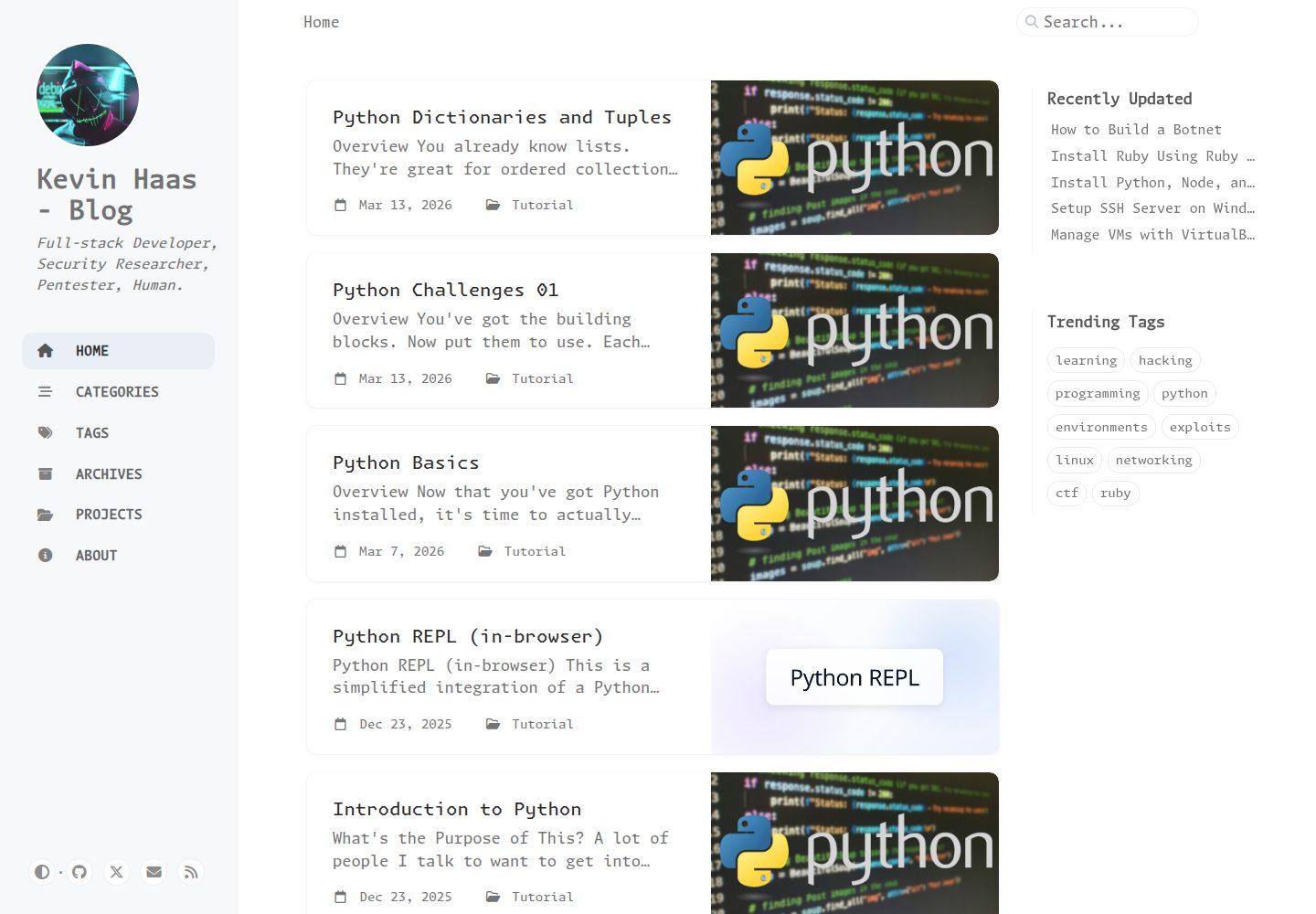
看看你的网站会是什么样
浏览真实页面截图,比较内容排版与手机效果。点击下方缩略图切换,放大查看整页细节。
全部页面与视图 3
截图用于了解视觉与布局,交互效果请以实际项目为准。
采集于 2026-10-03查看来源
值得关注的模板亮点
从已有项目资料中,快速了解它的特点。
提供 setup、run、run-prod、test、build 等脚本化命令
开发模式启用 LiveReload 与草稿,生产模式禁用草稿
test 脚本执行生产构建并用 htmlproofer 校验链接与 HTML
PyScript 编辑器起始代码存于 _data 数据文件,经 include 渲染
模板详细介绍
该模板是一个使用 Jekyll 构建、采用 Chirpy 主题的个人开发者博客,仓库所有者将其用于自己的站点(演示地址为 kevin-haas.com)。仓库以脚本封装常用流程:setup 安装 Ruby gems、Node 包并编译 assets/js/dist/ 下的 JS 资源;run 以开发模式启动本地服务并启用 LiveReload 与草稿;run-prod 以生产环境变量启动且禁用草稿,用于接近生产环境的本地预览;test 执行生产构建并运行 htmlproofer 校验链接与 HTML;build 仅重建 JS 资源。
内容组织上,模板将 PyScript 交互式编辑器的起始代码存放在 _data/python_training_editors.yml,并通过 _includes/embed/python-training/python-editor.html 渲染,以避免生产 HTML 处理改写编辑器空白。README 还给出基于 git 与 gh 的分支、提交、PR 与合并命令示例。仓库采用 MIT 许可,免费范围为该版本代码本身;演示图片、字体、图标等第三方素材需另行核对许可,域名、托管等外部服务可能产生费用。
Jekyll博客
适合你的项目吗?
适用场景
- 搭建个人开发者博客并发布文章与项目页面
- 在本地以开发模式撰写草稿并实时预览
- 在本地以生产环境配置预览接近线上的渲染结果
- 在提交前校验链接与 HTML 结构
- 在博客中嵌入 PyScript 交互式代码编辑器
适合人群
- 使用 Jekyll 与 Chirpy 主题的开发者博客
- 需要脚本化本地开发与校验流程的个人站点
- 希望以数据文件管理嵌入式代码片段的项目
上手与定制指南
结合仓库当前版本的说明,按下面的资料检查内容、配置与运行要求。
- 1
需预先安装 ruby、bundle、node 与 npm
- 2
克隆后运行 ./scripts/setup 安装依赖并编译 JS 资源
- 3
使用 ./scripts/run 启动开发服务器(默认 http://localhost:4000)
- 4
使用 ./scripts/run-prod 以生产配置本地预览
- 5
使用 ./scripts/test 执行生产构建与 htmlproofer 校验
授权与来源资料
使用条件与限制
免费使用 · 保留许可声明本次收录的是公开仓库中采用 MIT 许可的免费版本;免费范围为该版本代码,不代表外部服务或第三方素材免费。
使用时需要遵守
- 允许免费使用、修改、商用和分发该版本代码。
- 分发代码副本或实质性部分时,保留原作者版权声明和完整 MIT 许可声明。
- 代码按现状提供;担保与责任限制以原许可证及适用法律为准。
额外费用与待核对事项
- 使用该模板前需自行安装 Ruby、Bundler、Node.js 与 npm 等运行环境,否则无法执行 setup 与构建脚本。
- 首次使用需运行 ./scripts/setup 联网安装 Ruby gems 与 npm 依赖并编译 JS 资源,依赖安装依赖外部包源。
- 开发服务器默认监听本地 4000 端口并启用 LiveReload 与草稿,仅适合本地撰写预览。
- 生产预览模式会禁用草稿,草稿内容不会出现在该模式的渲染结果中。
- 校验脚本会执行生产构建并运行 htmlproofer,需依赖外部链接可访问,可能因网络或外链失效而报错。
- 嵌入式 PyScript 编辑器代码片段需按指定数据文件与 include 结构组织,偏离该结构可能导致生产 HTML 处理改写编辑器空白。
- 演示图片、字体、图标及其他第三方素材需按各自许可核对,不能仅凭代码的 MIT 许可判断。
- 域名、托管、数据库、支付或 AI 等外部服务可能另外收费。
查看原文依据
Permission is hereby granted, free of charge
许可证原文
Requires `ruby`, `bundle`, `node`, and `npm` to be installed.
README 原文
This installs Ruby gems via Bundler, installs Node packages via npm, and compiles the JS assets under `assets/js/dist/`.
README 原文
Starts Jekyll at `http://localhost:4000` with LiveReload and draft posts enabled.
README 原文
Starts Jekyll locally with `JEKYLL_ENV=production` and drafts disabled so rendered output matches the production environment much more closely.
README 原文
Does a production Jekyll build and runs `htmlproofer` to validate links and HTML.
README 原文
https://github.com/xransum/blog/blob/master/LICENSEhttps://github.com/xransum/blog/blob/master/README.mdInteractive PyScript editor snippets are stored in `_data/python_training_editors.yml`
README 原文
DeepSeek 根据仓库许可证和 README 整理 ·2026-10-03。结果仅覆盖已读取资料,依赖、图片、字体及后续条款变更以各自原文为准。
项目核对记录与介绍依据
模板资料
- 来源平台
- GitHub
- 资料与维护参考分
- 资料较完整 · 80 / 100
- 技术栈
- Jekyll
- 网站类型
- 博客
这个分数如何计算
本站按许可资料(最高30分)、演示链接(12分)、预览图(10分)、Star数(15分)、记录的维护时间(15分)、描述完整度(8分)、功能记录(5分)和分类资料(5分)计算。它不是代码、安全或性能测试,也不是 Google 评分;有链接不代表已实测可用。
这个项目需要核对什么
- 记录的仓库更新时间
- 2026-10-01
- 截图检查日期
- 2026-10-03
已收录演示链接。请用你的内容与屏幕尺寸检查;有演示不代表表单、认证或支付已经可用。
目录记录的主要技术栈是 Jekyll。请通过依赖清单和锁文件核对实际版本与托管要求。这些说明基于收录资料,不代表代码审计或部署实测。
查看具体选型方法 →介绍的制作与核对状态
介绍由 AI 辅助整理目录与仓库资料。仓库作者不等于这篇介绍的审核者。
审核声明: [email protected] · 2026-10-04
查看当时使用的来源资料
SHA-256: 01d9c4d4afdbf5427ed82b23cc347d85a6470db0e3b0c89429cf02c8162cf03a
2026-10-03T17:59:57.126Z
来源文件 / 仓库# Blog ## Setup Run this once after cloning, or any time dependencies change. Requires `ruby`, `bundle`, `node`, and `npm` to be installed. ```bash ./scripts/setup ``` This installs Ruby gems via Bundler, installs Node packages via npm, and compiles the JS assets under `assets/js/dist/`. ## Run the Dev Server ```bash ./scripts/run ``` Starts Jekyll at `http://localhost:4000` with LiveReload and draft posts enabled. Checks that deps are installed and assets are built before starting — if anything is missing it will point you back to `./scripts/setup`. This now runs with `JEKYLL_ENV=development` explicitly so local authoring mode is unambiguous. ## Run a Production-Parity Server ```bash ./scripts/run-prod ``` Starts Jekyll locally with `JEKYLL_ENV=production` and drafts disabled so rendered output matches the production environment much more closely. ## Test (HTML validation) ```bash ./scripts/test ``` Does a production Jekyll build and runs `htmlproofer` to validate links and HTML. Use this when you want the closest match to the GitHub Pages build pipeline. ## Python Training Editors Interactive PyScript editor snippets are stored in `_data/python_training_editors.yml` and rendered through `_includes/embed/python-training/python-editor.html`. This keeps starter code out of raw inline `<script type="py-editor">` tags so production HTML processing does not accidentally rewrite editor whitespace. ## Build Assets Only If you only need to rebuild JS assets (e.g. after pulling changes): ```bash ./scripts/build ``` ## Pushing Changes ### Committing Changes ```bash git add . git commit -m "Commit message" ``` ### Pushing Changes ```bash git switch --create my-changes master git push -u origin my-changes ``` ### Creating a Pull Request ```bash gh pr create --base master --head my-changes --fill gh pr status gh pr merge 6 --merge --delete-branch ``` ### Deleting a Branch ```bash git switch master git branch -d my-changes ```
看看同类模板
对比同技术栈与用途的模板,找到更适合的视觉与内容结构。

al-folio
al-folio 是一个面向学者与研究人员的 Jekyll 作品集主题,设计简洁、响应式,适合搭建个人学术主页。
Jekyll · 作品集

minimal-mistakes
:triangular_ruler: Jekyll theme for building a personal site, blog, project documentation, or portfolio.
Jekyll · 作品集

Beautiful Jekyll
Beautiful Jekyll 是一个在 Jekyll 生态中经过长期打磨的博客主题,由 Dean Attali 维护,自 2015 年起积累了超过 5 万用户。
Jekyll · 博客

jekyll-TeXt-theme
💎 🐳 A super customizable Jekyll theme for personal site, team site, blog, project, documentation, etc.
Jekyll · 博客

startbootstrap-clean-blog-jekyll
A Jekyll version of the Clean Blog theme by Start Bootstrap
Jekyll · 博客

So Simple
So Simple 是 Michael Rose 开发的 Jekyll 主题,定位清晰:为文字和图片提供一个干净、可读性强的展示框架。
Jekyll · 博客