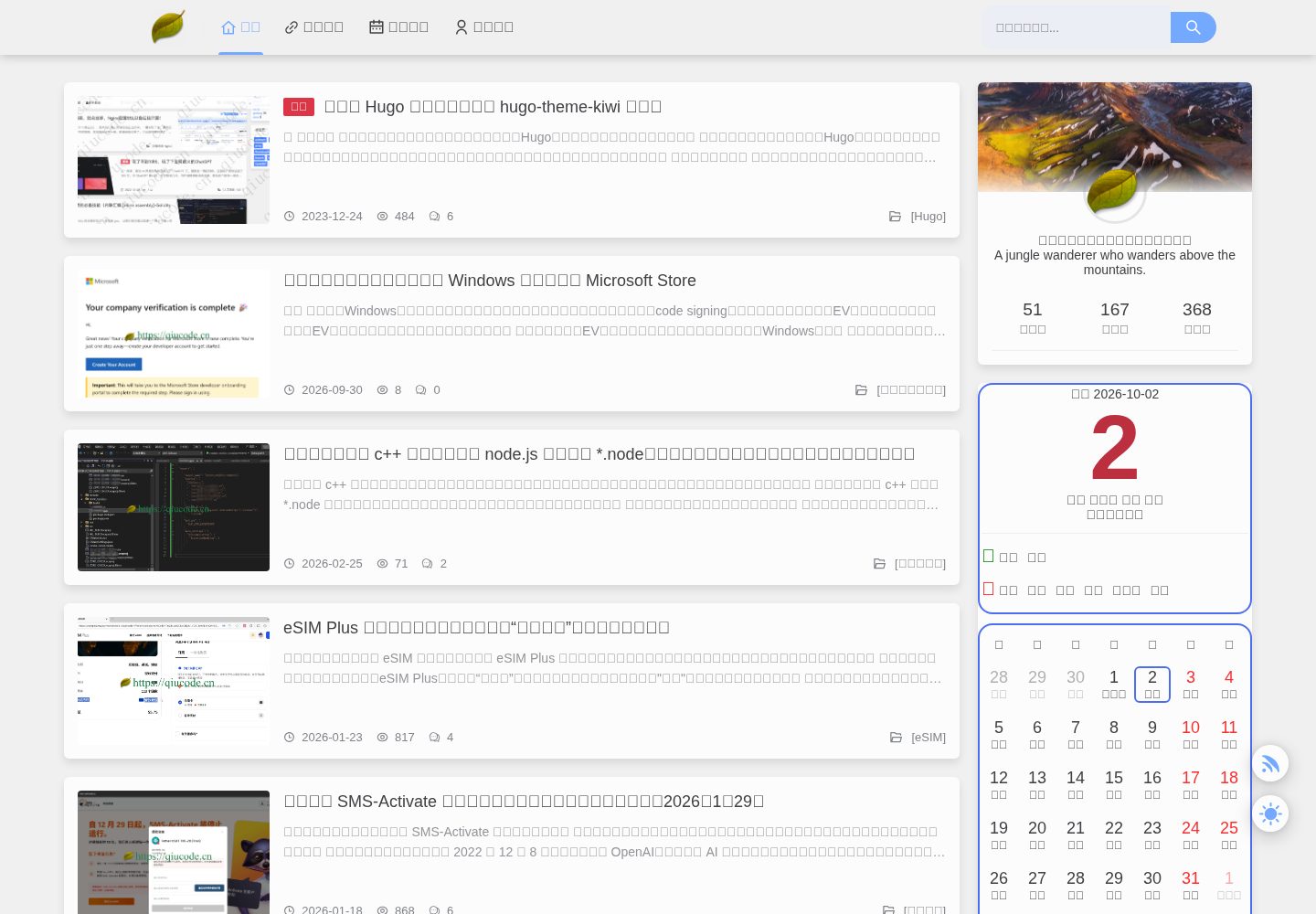
基于 Hugo 的静态博客主题,首页以图文列表形式展示文章
Hugo博客
hugo-theme-kiwi — Hugo 博客模板
作者 zhenqicai
hugo-theme-kiwi 是一个基于 Hugo 的个人博客主题,首页采用图文列表形式展示文章,仓库以 MIT 许可开放。
看看你的网站会是什么样
浏览真实页面截图,比较内容排版与手机效果。点击下方缩略图切换,放大查看整页细节。
全部页面与视图 3
截图用于了解视觉与布局,交互效果请以实际项目为准。
采集于 2026-10-02查看来源
值得关注的模板亮点
从已有项目资料中,快速了解它的特点。
提供 exampleSite 示例配置,可通过 Git submodule 引入已有站点
内置默认文章模板,可用 hugo new 命令快速创建文章
文章头部支持分类、标签、评论开关、目录开关与封面图等参数
README 提供中英文版本,并说明友链提交与使用反馈渠道
模板详细介绍
hugo-theme-kiwi 是作者 zhenqicai 为 Hugo 编写的个人博客主题,设计思路来自其自建站点「秋码记录」。主题偏好以图文列表呈现首页文章,适合个人写作与记录类博客。仓库提供中英文 README,包含快速开始、本地预览、主题更新、新建文章、文章头部参数说明以及友链提交方式。
使用上,主题通过 Git submodule 方式引入已有站点,示例站点配置位于 exampleSite/config.yaml,可复制到站点根目录作为起点。本地预览使用 hugo server,正式发布时用 hugo 生成静态文件再部署到 Nginx 等 Web 服务器。新建文章可用 hugo new posts/hello-world.md,主题已配置默认文章模板。
文章头部参数涵盖标题、描述、发布日期、最后修改日期、分类、标签、评论开关、访问地址、目录开关以及封面图路径、缩放比例、图注、替代文本和相对路径等字段。仓库未在 README 中列出依赖清单或框架版本,具体版本需以实际仓库文件为准。
Hugo博客
适合你的项目吗?
适用场景
- 搭建个人写作与记录类博客
- 为已有 Hugo 站点更换博客主题
- 参考其文章头部参数组织内容与封面图
- 通过示例站点配置快速启动本地预览
适合人群
- 使用 Hugo 并希望以图文列表展示文章的个人博主
- 需要中英文说明文档参考的 Hugo 用户
- 希望通过 Git submodule 管理主题版本的站点维护者
上手与定制指南
结合仓库当前版本的说明,按下面的资料检查内容、配置与运行要求。
- 1
需先安装 Git 与 Hugo Extended
- 2
在站点目录执行 git submodule add 将主题加入 themes/hugo-theme-kiwi
- 3
复制 exampleSite/config.yaml 到站点根目录,并备份原有 config.toml
- 4
用 hugo server 本地预览,正式发布时用 hugo 生成静态文件后部署到 Web 服务器
- 5
更新主题可在站点目录执行 git submodule update --remote
授权与来源资料
使用条件与限制
免费使用 · 保留许可声明本次收录的是公开仓库中采用 MIT 许可的免费版本;免费范围为该版本代码,不代表外部服务或第三方素材免费。
使用时需要遵守
- 允许免费使用、修改、商用和分发该版本代码。
- 分发代码副本或实质性部分时,保留原作者版权声明和完整 MIT 许可声明。
- 代码按现状提供;担保与责任限制以原许可证及适用法律为准。
额外费用与待核对事项
- 使用前需自行安装 Git 与 Hugo Extended,主题本身不包含运行环境。
- 推荐通过 Git submodule 方式引入主题,需具备 Git 子模块操作能力。
- hugo server 仅用于本地开发或预览,不可直接对外网开放访问。
- 正式发布需自行用 hugo 生成静态文件并部署到 Nginx 等 Web 服务器。
- 使用反馈与讨论可通过 QQ 群 616127224 参与,属可选渠道。
- 演示图片、字体、图标及其他第三方素材需按各自许可核对,不能仅凭代码的 MIT 许可判断。
- 域名、托管、数据库、支付或 AI 等外部服务可能另外收费。
查看原文依据
Permission is hereby granted, free of charge
许可证原文
please make sure that `Git` and `Hugo Extended` are installed on your computer
README 原文
you can reference this topic through `submodule` mode
README 原文
the `hugo server` command is only used for local development or preview
README 原文
you can use the `hugo` command to generate static files for the whole site, and then deploy them to a web server like `Nginx`
README 原文
https://github.com/zhenqicai/hugo-theme-kiwi/blob/main/LICENSEhttps://github.com/zhenqicai/hugo-theme-kiwi/blob/main/README.mdyou can also join the ```QQ group```: 616127224 for discussion
README 原文
DeepSeek 根据仓库许可证和 README 整理 ·2026-10-02。结果仅覆盖已读取资料,依赖、图片、字体及后续条款变更以各自原文为准。
项目核对记录与介绍依据
模板资料
- 来源平台
- GitHub
- 资料与维护参考分
- 资料较完整 · 83 / 100
- 技术栈
- Hugo
- 网站类型
- 博客
这个分数如何计算
本站按许可资料(最高30分)、演示链接(12分)、预览图(10分)、Star数(15分)、记录的维护时间(15分)、描述完整度(8分)、功能记录(5分)和分类资料(5分)计算。它不是代码、安全或性能测试,也不是 Google 评分;有链接不代表已实测可用。
这个项目需要核对什么
- 记录的仓库更新时间
- 2026-08-22
- 截图检查日期
- 2026-10-02
已收录演示链接。请用你的内容与屏幕尺寸检查;有演示不代表表单、认证或支付已经可用。
目录记录的主要技术栈是 Hugo。请通过依赖清单和锁文件核对实际版本与托管要求。这些说明基于收录资料,不代表代码审计或部署实测。
查看具体选型方法 →介绍的制作与核对状态
介绍由 AI 辅助整理目录与仓库资料。仓库作者不等于这篇介绍的审核者。
已完成服务器许可规则与 AI 来源核对;未经过人工编辑审核。
查看当时使用的来源资料
SHA-256: 50bc874904aad5a0d8f6ba4f640c1b998341a255e5e2f710689f90406c164d67
2026-10-02T10:22:51.203Z
来源文件 / 仓库[Chinese](https://github.com/zhenqicai/hugo-theme-kiwi/blob/main/README_zh.md) | [English](#)
<a title="Hugo kiwi site" href="https://qiucode.cn">
<img align="right" alt="NexT logo" width="266" src="https://qiucode.cn/static/front/images/qiu-logo.png">
</a>
## Hugo kiwi
«Hugo kiwi» is a fresh and not tacky [Hugo](https://gohugo.io) theme. Its design concept is derived from [Qiucode Record](https://qiucode.cn) (when not used Deployed with ```Hugo```, that is to say, the version built using cloud servers and self-built server programs). Of course, I personally prefer to display the homepage list with pictures and text.
## 👀 Online preview
[Qiucode Record](https://qiucode.cn) This theme is used now.
## 👣 Quick Start
Before using the `Hugo kiwi` theme, please make sure that `Git` and `Hugo Extended` are installed on your computer.
### 📐 Direct quote
If you already have a site, you can reference this topic through `submodule` mode, refer to the following command:
```shell
$ cd hugo-kiwi-exmaple
$ git submodule add https://github.com/zhenqicai/hugo-theme-kiwi.git themes/hugo-theme-kiwi
$ cp themes/hugo-theme-kiwi/exampleSite/config.yaml .
$ mv config.toml config.toml.backup
```
### 💻 Local preview
```shell
$ cd hugo-kiwi-exmaple
$ hugo server
```
Open the browser and enter http://127.0.0.1:1313/ in the address bar to check the theme effect. I wish you good luck! :tada::tada::tada:
> **Note**
> Please note that the `hugo server` command is only used for local development or preview when writing articles, and is not intended to directly open access to the external network. When officially released, you can use the `hugo` command to generate static files for the whole site, and then deploy them to a web server like `Nginx`.
### 🔄 Theme update
To subsequently update the theme, you only need to execute the following command in your site directory:
```shell
$ cd hugo-kiwi-exmaple
$ git submodule update --remote
```
## 📝 Post a new article
The theme has been configured with a default article template. It is recommended to use the following Hugo command to quickly create new articles:
```sh
$ hugo new posts/hello-world.md
```
> **Note**
> The `posts` path is a subfolder under the root directory of `content`, which can be adjusted according to your own file management form.
For an explanation of the functions of the parameters at the head of the article, please refer to the following:
```yml
---
# Article title
title: "{{ replace .Name "-" " " | title }}"
# Summary of article content
description: "{{ .Name }}"
# Publication date
date: {{ .Date }}
# Last modified date
lastmod: {{ .Date }}
# Classification
categories:
-
# Label
tags:
-
#Whether comments are enabled for the article
comment:
enable: true
#Address for external access
url: article/175
# Whether to display the directory
toc: true
# Article cover image related attributes
cover:
image: "" #Image path example: posts/tech/123/123.png
zoom: 50% # Image size, for example, filling in 50% means half the size of the original image
caption: "" #Description at the bottom of the picture
alt: ""
relative: false
---
```
## 🎉User Case
- [Qiucode Record](https://qiucode.cn)
If you are also using the `Hugo kiwi` theme, please submit it at the bottom of the [flinks.yaml](https://github.com/zhenqicai/hugo-theme-kiwi/tree/main/exampleSite/data/flinks.yaml) file The name, description, avatar, link and other information of your site. The specific format content is as follows:
```yaml
- name: Autumn code record
desc: A Java enthusiast who lives in the mountains
avatar: https://qiucode.cn/static/front/images/qiu-logo.png
link: https://qiucode.cn
```
## 🙋 Usage feedback
- Join [GitHub Discussions](https://github.com/zhenqicai/hugo-theme-kiwi/discussions) or [Gitter](https://github.com/zhenqicai/hugo-theme-kiwi/community) online discussions :beers:
- [GitHub Issues](https://github.com/zhenqicai/hugo-theme-kiwi/issues/new?labels=Bug&template=bug-report.md) Submit a bug report :bug:
- [GitHub Feature](https://github.com/zhenqicai/hugo-theme-kiwi/issues/new?labels=Feature+Request&template=feature-request.md) expresses ideas for new features :sparkles:
> Of course, you can also join the ```QQ group```: 616127224 for discussion.
看看同类模板
对比同技术栈与用途的模板,找到更适合的视觉与内容结构。

hugo-PaperMod
PaperMod 是 Hugo 生态里知名度较高的主题之一,定位很明确:给博客和轻量作品集站点提供一套干净、响应式的阅读界面。
Hugo · 作品集

LoveIt
❤️A clean, elegant but advanced blog theme for Hugo 一个简洁、优雅且高效的 Hugo 主题
Hugo · 博客

hugo-coder
A minimalist blog theme for hugo.
Hugo · 博客

blowfish
Personal Website & Blog Theme for Hugo
Hugo · 博客

hugo-paper
🪺 A simple, clean, customizable Hugo theme
Hugo · 博客

hextra
Hextra 是一个 Hugo 主题,定位在文档站与博客之间:既提供侧边栏导航、目录、面包屑、分页这类文档站结构,也能承载博客内容。
Hugo · 文档