Uses notion-to-jsx and notion-to-utils to render Notion content as JSX
Next.jsReactBlog
notion-to-jsx-template — Next.js Blog Template
By 01-binary
A Notion CMS blog template based on notion-to-jsx and notion-to-utils, using Next.js App Router, React 19, Tailwind CSS v4, and Jotai to read posts from a Notion database and render them as blog pages.
Explore the design
Compare the page layouts and mobile experience. Open any screenshot for a closer look.
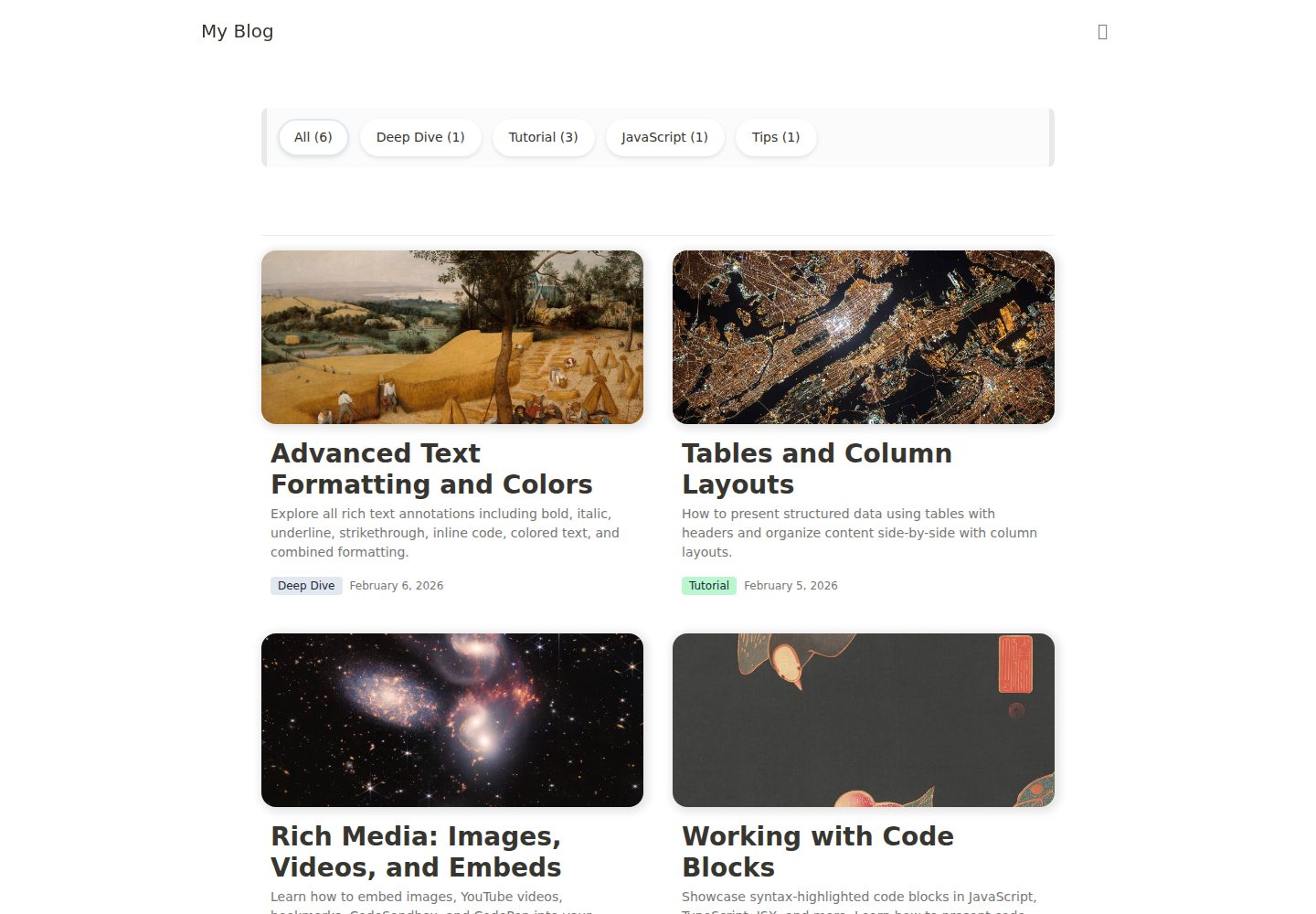
Desktop homepage1 / 3
Desktop captureTop of page
Actual screenshot captured by the server browser.
All pages & views 3
Screenshots show visual appearance; interactive behavior may differ.
Recorded 2026-10-14View source
What stands out
A quick read of the recorded project description.
Next.js App Router project structure, including homepage, post detail, RSS, and Sitemap routes
Supports category filtering, infinite scrolling, and three theme modes: Light / Dark / System
Built-in image blur placeholders, Table of Contents, and SEO metadata (OpenGraph, Twitter Card)
Centrally adjust site information and theme colors through site.config.ts and CSS variables
Template Details
This template is a Notion CMS blog template. Its core rendering depends on two npm packages, notion-to-jsx and notion-to-utils; the README points to their separate documentation site for detailed library information. On the technical stack side, the README explicitly lists Next.js 16 (App Router, React Compiler, use cache), React 19, Tailwind CSS v4, Jotai state management, and notion-to-jsx / notion-to-utils.
Before use, you need to prepare a database in Notion containing six properties: Name (title), Desc (rich_text), Slug (rich_text), Category (select), Date (date), and isPublished (checkbox). The README also provides a Notion template link that can be copied directly. Then create a Notion Integration and connect it to that database, copy the Internal Integration Secret, write NOTION_TOKEN and NOTION_DATABASE_ID into .env, and run pnpm install and pnpm dev.
For customization, the README states that blogName, author, homeTitle, seoDefaultDesc, url, github, and mail can be modified in site.config.ts; theme colors are adjusted through CSS variables in src/assets/styles/index.css; system fonts are used by default, and custom fonts require modifying the font-family in the same file. The project structure is given at the end of the README, including directories for the homepage, post detail page, RSS, Sitemap, shared components, and Provider. The README does not describe the template's testing, performance, or production-environment suitability.
Next.jsReactBlog
Is it right for your project?
Use Cases
- Build a personal blog using a Notion database as the content source
- A blog site that needs category filtering, infinite scrolling, and dark mode
- A site that uses Notion pages as the writing backend and relies on Next.js for rendering
- A blog project that needs RSS subscription and Sitemap output
Suitable For
- Front-end developers familiar with Next.js App Router and pnpm
- Individual bloggers who already use Notion to manage posts and want to use Notion directly as a CMS
- Users of a blog template who need customizable site information and theme colors
- Projects planned for deployment to Vercel with environment variables configured
Getting started & customization
Use these recorded setup notes alongside the repository instructions for your chosen version.
- 1
Create a database in Notion with the properties Name, Desc, Slug, Category, Date, and isPublished, or copy the template provided in the README
- 2
Create an Integration in Notion Integrations and connect it to the database via Share → Invite, then copy the Internal Integration Secret
- 3
Run cp .env.example .env and fill in NOTION_TOKEN and NOTION_DATABASE_ID
- 4
Run pnpm install and pnpm dev to start the development environment
- 5
When deploying to Vercel, set NOTION_TOKEN and NOTION_DATABASE_ID in Environment Variables
License & source material
Usage conditions & limitations
Free to use · keep license noticeThis entry covers the free version under the MIT license in the public repository; the free scope is the code of that version and does not mean that external services or third-party assets are free.
Must comply with when using
- Free use, modification, commercial use, and distribution of this version's code are permitted.
- When distributing copies or substantial portions of the code, retain the original author's copyright notice and the complete MIT license notice.
- The code is provided as is; warranties and limitations of liability are governed by the original license and applicable law.
Additional costs & items to verify
- Demo images, fonts, icons, and other third-party assets must be checked against their respective licenses and cannot be judged solely by the code's MIT license.
- External services such as domains, hosting, databases, payments, or AI may incur separate charges.
- Before use, you need to create a database in Notion containing the specified properties, or copy the Notion template link provided in the README.
- You need to create an Integration in Notion Integrations and connect that Integration to the target database.
- You need to copy the Notion Integration's Internal Integration Secret as the access credential.
- The NOTION_TOKEN environment variable must be configured with your own Notion integration token.
- The NOTION_DATABASE_ID environment variable must be configured with your own Notion database ID.
- When deploying to Vercel, NOTION_TOKEN and NOTION_DATABASE_ID must be set in the environment variables.
View Original Text Basis
Permission is hereby granted, free of charge
Original License Text
Create a Notion Database with the following properties, or [duplicate this template](https://likeable-eggnog-5b5.notion.site/3019c6bf2b1780d19126df1136126616?v=3019c6bf2b178094a9d1000c960bac28&pvs=73):
Original README
1. Create a new Integration at [Notion Integrations](https://www.notion.so/my-integrations)
Original README
3. Copy the Internal Integration Secret
Original README
NOTION_TOKEN=your_notion_token_here
Original README
NOTION_DATABASE_ID=your_database_id_here
Original README
https://github.com/01-binary/notion-to-jsx-template/blob/main/LICENSEhttps://github.com/01-binary/notion-to-jsx-template/blob/main/README.mdSet `NOTION_TOKEN` and `NOTION_DATABASE_ID` in Vercel Environment Variables.
Original README
Compiled by DeepSeek based on repository license and README ·2026-10-14. Results only cover the materials read; dependencies, images, fonts, and subsequent term changes are subject to their respective original texts.
Project checks & description sources
Template Information
- Source platforms
- GitHub
- Documentation and maintenance reference score
- More documented · 88 / 100
- Technologies
- Next.js · React
- Website type
- Blog
How this score is calculated
Our heuristic uses license records (up to 30), a demo link (12), a preview (10), stars (15), recorded maintenance (15), description completeness (8), feature records (5) and classification data (5). It is not a code, security or performance test, or a Google score. A link does not establish tested functionality.
What to verify for this project
- Repository update recorded
- 2026-04-15
- Screenshot last checked
- 2026-10-14
A demo link is listed. Check it with your own content and viewport sizes; its presence does not confirm that forms, authentication or payments work.
The catalog identifies Next.js as the primary stack. Check the actual dependency manifest and lockfile for versions and hosting requirements. These notes use recorded metadata, not a code audit or a deployment test.
Use a selection guide →How this description was prepared
AI-assisted description based on catalog records and repository material. Repository authors are not automatically the reviewers of this description.
Review declaration: codex-user-requested-batch-review-20261015 · 2026-10-15
Inspect the recorded source material
SHA-256: 3a04813264eadb3198efcd9ac46727132c281f6956e975605a9f17611e02ff49
2026-10-14T15:55:06.916Z
Source file / repository# notion-to-jsx Template
[English](#english) | [한국어](#한국어)
---
## English
A Notion CMS blog template built with [notion-to-jsx](https://www.npmjs.com/package/notion-to-jsx) and [notion-to-utils](https://www.npmjs.com/package/notion-to-utils). See the [documentation](https://notion-to-jsx-docs.vercel.app/) for library details.
### Tech Stack
- **Next.js 16** (App Router, React Compiler, `use cache`)
- **React 19**
- **Tailwind CSS v4**
- **Jotai** (State Management)
- **notion-to-jsx / notion-to-utils** (Notion Rendering)
### Quick Start
#### 1. Prepare Notion Database
Create a Notion Database with the following properties, or [duplicate this template](https://likeable-eggnog-5b5.notion.site/3019c6bf2b1780d19126df1136126616?v=3019c6bf2b178094a9d1000c960bac28&pvs=73):
| Property | Type | Description |
| ----------- | --------- | ------------------------ |
| Name | title | Post title |
| Desc | rich_text | Post description |
| Slug | rich_text | URL slug |
| Category | select | Category |
| Date | date | Published date |
| isPublished | checkbox | Publish flag (prod only) |
#### 2. Create Notion Integration
1. Create a new Integration at [Notion Integrations](https://www.notion.so/my-integrations)
2. Connect the Integration to your Database (Share → Invite)
3. Copy the Internal Integration Secret
#### 3. Set Environment Variables
```bash
cp .env.example .env
```
Open `.env` and fill in your values:
```
NOTION_TOKEN=your_notion_token_here
NOTION_DATABASE_ID=your_database_id_here
```
#### 4. Install & Run
```bash
pnpm install
pnpm dev
```
### Customization
#### Site Config
Edit `site.config.ts` to update your blog info:
```ts
export const siteConfig = {
blogName: 'My Blog',
author: 'Your Name',
homeTitle: 'My Blog',
seoDefaultDesc: 'A blog powered by Notion',
url: 'https://your-domain.com',
github: '',
mail: '',
};
```
#### Theme Colors
Customize the theme by editing CSS variables in `src/assets/styles/index.css`.
#### Fonts
System fonts are used by default. To use custom fonts, update `font-family` in `src/assets/styles/index.css`.
### Features
- Category filtering
- Infinite scroll
- Dark mode (Light / Dark / System)
- Image blur placeholder
- Table of Contents
- RSS feed (`/rss.xml`)
- Sitemap (`/sitemap.xml`)
- SEO metadata (OpenGraph, Twitter Card)
- Responsive design
### Deploy
[](https://vercel.com/new/clone?repository-url=https://github.com/01-binary/notion-to-jsx-template)
Set `NOTION_TOKEN` and `NOTION_DATABASE_ID` in Vercel Environment Variables.
---
## 한국어
[notion-to-jsx](https://www.npmjs.com/package/notion-to-jsx)와 [notion-to-utils](https://www.npmjs.com/package/notion-to-utils)를 활용한 Notion CMS 블로그 템플릿. 라이브러리에 대한 자세한 내용은 [문서](https://notion-to-jsx-docs.vercel.app/)를 참고하세요.
### 기술 스택
- **Next.js 16** (App Router, React Compiler, `use cache`)
- **React 19**
- **Tailwind CSS v4**
- **Jotai** (상태 관리)
- **notion-to-jsx / notion-to-utils** (Notion 렌더링)
### 빠른 시작
#### 1. Notion Database 준비
아래 속성을 가진 Notion Database를 생성하거나, [이 템플릿을 복제](https://likeable-eggnog-5b5.notion.site/3019c6bf2b1780d19126df1136126616?v=3019c6bf2b178094a9d1000c960bac28&pvs=73)하세요:
| Property | Type | Description |
| ----------- | --------- | ------------------ |
| Name | title | 포스트 제목 |
| Desc | rich_text | 포스트 설명 |
| Slug | rich_text | URL slug |
| Category | select | 카테고리 |
| Date | date | 작성일 |
| isPublished | checkbox | 게시 여부 (prod용) |
#### 2. Notion Integration 생성
1. [Notion Integrations](https://www.notion.so/my-integrations)에서 새 Integration 생성
2. Database에 Integration 연결 (Share → Invite)
3. Internal Integration Secret 복사
#### 3. 환경 변수 설정
```bash
cp .env.example .env
```
`.env` 파일을 열고 값을 입력하세요:
```
NOTION_TOKEN=your_notion_token_here
NOTION_DATABASE_ID=your_database_id_here
```
#### 4. 설치 및 실행
```bash
pnpm install
pnpm dev
```
### 커스터마이징
#### 사이트 설정
`site.config.ts`에서 블로그 기본 정보를 수정하세요:
```ts
export const siteConfig = {
blogName: 'My Blog',
author: 'Your Name',
homeTitle: 'My Blog',
seoDefaultDesc: 'A blog powered by Notion',
url: 'https://your-domain.com',
github: '',
mail: '',
};
```
#### 테마 색상
`src/assets/styles/index.css`에서 CSS 변수를 수정하여 테마를 커스터마이징할 수 있습니다.
#### 폰트
기본적으로 시스템 폰트를 사용합니다. 커스텀 폰트를 사용하려면 `src/assets/styles/index.css`의 `font-family`를 수정하세요.
### 기능
- 카테고리 필터링
- 무한 스크롤
- 다크 모드 (Light / Dark / System)
- 이미지 blur placeholder
- Table of Contents
- RSS 피드 (`/rss.xml`)
- 사이트맵 (`/sitemap.xml`)
- SEO 메타데이터 (OpenGraph, Twitter Card)
- 반응형 디자인
### 배포
[](https://vercel.com/new/clone?repository-url=https://github.com/01-binary/notion-to-jsx-template)
Vercel에 배포할 때 Environment Variables에 `NOTION_TOKEN`, `NOTION_DATABASE_ID`를 설정하세요.
---
## Project Structure
```
app/
├── (home)/ # Homepage (post list)
├── posts/[slug]/ # Post detail page
├── rss.xml/ # RSS feed
├── sitemap.xml/ # Sitemap
├── _components/ # Shared components (Header, Footer, Theme)
├── _providers/ # Context Providers
├── layout.tsx # Root layout
├── error.tsx # Error page
└── not-found.tsx # 404 page
src/
├── assets/styles/ # Global CSS
├── atoms/ # Jotai atoms
├── hooks/ # Shared hooks
├── interfaces/ # TypeScript types
├── lib/ # Environment variables, dayjs, etc.
└── utils/ # Utility functions
```
Explore similar templates
Compare previews and descriptions within the same stack and category.

tailwind-nextjs-starter-blog
A Next.js and Tailwind CSS blog starter template using Contentlayer for Markdown/MDX, with built-in SEO, code highlighting, and tags. It targets personal technical blogs and migration from Jekyll/Hugo to React, and supports one-click Vercel deployment.
Next.js · Blog

Nextjs-tailwindcss-blog-template
A Next.js blog styled with Tailwind CSS. The current branch processes Markdown with Velite; the earlier Contentlayer setup is retained in a separate historical branch.
Next.js · Blog

Next-js-Blog-Boilerplate
A blog starter built on Next.js 12 and Tailwind CSS 3, integrating TypeScript, ESLint, Prettier, and PostCSS.
Next.js · Blog

nextjs-blog-theme
A Next.js 15 and Tailwind CSS 4.x blog starter by Netlify, designed by Bejamas, with MDX support, dark/light theme switching, and environment-variable configuration. It includes a visual setup wizard for deploying to Netlify and manages content via local .mdx files.
Next.js · Blog

blog
A personal blog forked from Timlrx's tailwind-nextjs-starter-blog, built with Next.js, React, and Tailwind CSS. Content is stored as Markdown/MDX under data/, with site, author, navigation, and project data in separate files.
Next.js · Blog

tailnext
Tailnext is a free, open-source template built on the Next.js 14 App Router and Tailwind CSS, created by the onWidget team.
Next.js · Blog