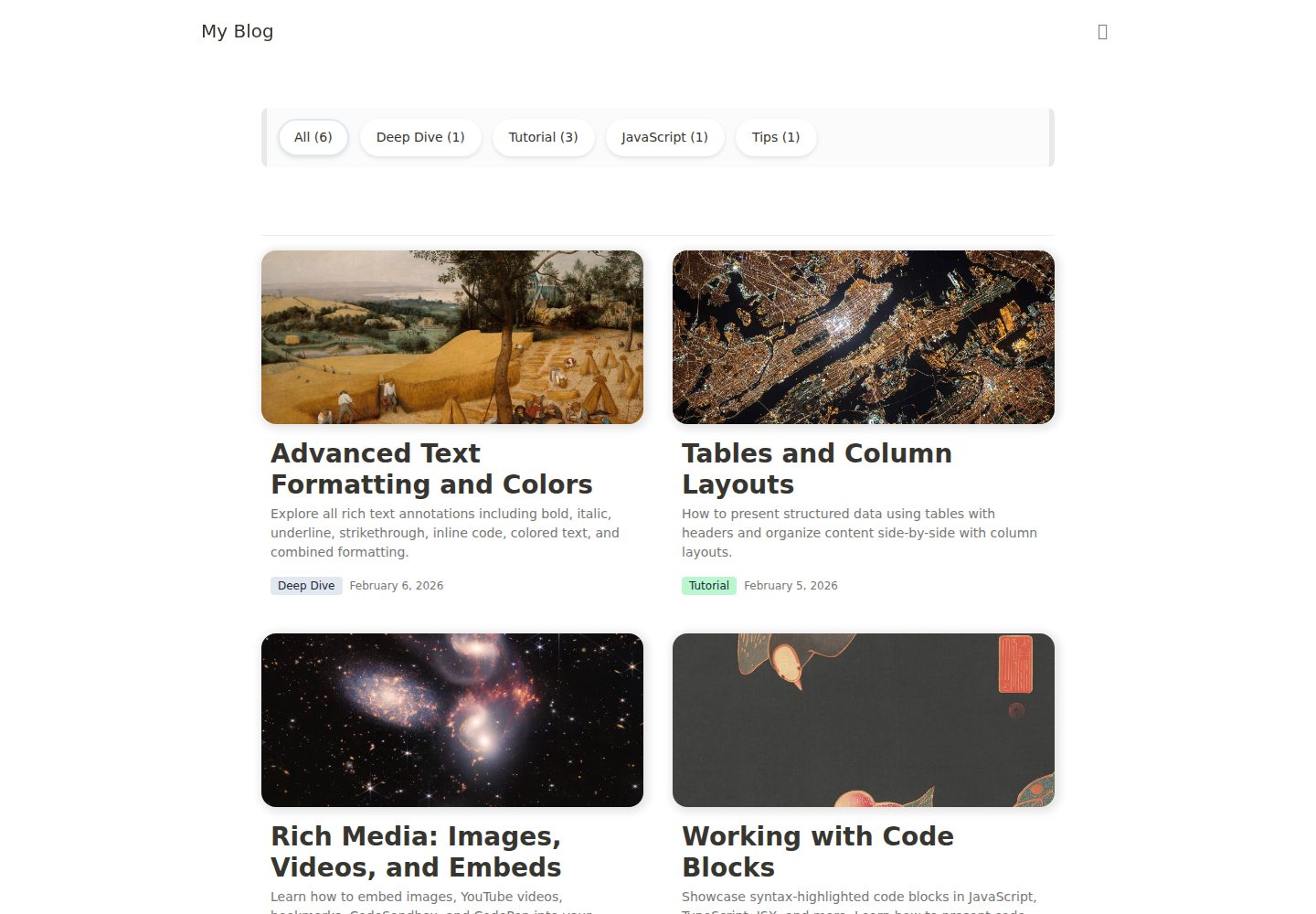
使用 notion-to-jsx 与 notion-to-utils 将 Notion 内容渲染为 JSX
Next.jsReact博客
notion-to-jsx-template — Next.js 博客模板
作者 01-binary
基于 notion-to-jsx 与 notion-to-utils 的 Notion CMS 博客模板,使用 Next.js App Router、React 19、Tailwind CSS v4 与 Jotai,从 Notion 数据库读取文章并渲染为博客页面。
看看你的网站会是什么样
浏览真实页面截图,比较内容排版与手机效果。点击下方缩略图切换,放大查看整页细节。
全部页面与视图 3
截图用于了解视觉与布局,交互效果请以实际项目为准。
采集于 2026-10-14查看来源
值得关注的模板亮点
从已有项目资料中,快速了解它的特点。
Next.js App Router 项目结构,含首页、文章详情、RSS、Sitemap 路由
支持分类过滤、无限滚动与 Light / Dark / System 三种主题模式
内置图片 blur 占位、目录(Table of Contents)与 SEO 元数据(OpenGraph、Twitter Card)
通过 site.config.ts 与 CSS 变量集中调整站点信息与主题颜色
模板详细介绍
该模板是一个 Notion CMS 博客模板,核心渲染依赖 notion-to-jsx 与 notion-to-utils 两个 npm 包,README 指向其独立文档站点获取库的详细信息。技术栈方面,README 明确列出 Next.js 16(App Router、React Compiler、use cache)、React 19、Tailwind CSS v4、Jotai 状态管理以及 notion-to-jsx / notion-to-utils。
使用前需要先在 Notion 中准备一个数据库,包含 Name(title)、Desc(rich_text)、Slug(rich_text)、Category(select)、Date(date)、isPublished(checkbox)六个属性,README 也提供了可直接复制的 Notion 模板链接。随后创建 Notion Integration 并连接到该数据库,复制 Internal Integration Secret,将 NOTION_TOKEN 与 NOTION_DATABASE_ID 写入 .env,再执行 pnpm install 与 pnpm dev。
自定义方面,README 说明可在 site.config.ts 中修改 blogName、author、homeTitle、seoDefaultDesc、url、github、mail;主题颜色通过 src/assets/styles/index.css 中的 CSS 变量调整;默认使用系统字体,自定义字体需修改同一文件中的 font-family。项目结构在 README 末尾给出,包含首页、文章详情页、RSS、Sitemap、共享组件与 Provider 等目录。README 未说明该模板的测试、性能或生产环境适用性。
Next.jsReact博客
适合你的项目吗?
适用场景
- 用 Notion 数据库作为内容源搭建个人博客
- 需要分类过滤、无限滚动和深色模式的博客站点
- 希望以 Notion 页面为写作后台、由 Next.js 负责渲染的站点
- 需要 RSS 订阅与 Sitemap 输出的博客项目
适合人群
- 熟悉 Next.js App Router 与 pnpm 的前端开发者
- 已使用 Notion 管理文章、希望直接以 Notion 为 CMS 的个人博主
- 需要可自定义站点信息与主题颜色的博客模板使用者
- 计划部署到 Vercel 并配置环境变量的项目
上手与定制指南
结合仓库当前版本的说明,按下面的资料检查内容、配置与运行要求。
- 1
在 Notion 创建含 Name、Desc、Slug、Category、Date、isPublished 属性的数据库,或复制 README 提供的模板
- 2
在 Notion Integrations 创建 Integration 并通过 Share → Invite 连接到数据库,复制 Internal Integration Secret
- 3
执行 cp .env.example .env,填写 NOTION_TOKEN 与 NOTION_DATABASE_ID
- 4
运行 pnpm install 与 pnpm dev 启动开发环境
- 5
部署到 Vercel 时需在 Environment Variables 中设置 NOTION_TOKEN 与 NOTION_DATABASE_ID
授权与来源资料
使用条件与限制
免费使用 · 保留许可声明本次收录的是公开仓库中采用 MIT 许可的免费版本;免费范围为该版本代码,不代表外部服务或第三方素材免费。
使用时需要遵守
- 允许免费使用、修改、商用和分发该版本代码。
- 分发代码副本或实质性部分时,保留原作者版权声明和完整 MIT 许可声明。
- 代码按现状提供;担保与责任限制以原许可证及适用法律为准。
额外费用与待核对事项
- 演示图片、字体、图标及其他第三方素材需按各自许可核对,不能仅凭代码的 MIT 许可判断。
- 域名、托管、数据库、支付或 AI 等外部服务可能另外收费。
- 使用前需在 Notion 中创建包含指定属性的数据库,或复制 README 提供的 Notion 模板链接。
- 需要在 Notion Integrations 创建 Integration,并将该 Integration 连接到目标数据库。
- 需要复制 Notion Integration 的 Internal Integration Secret 作为访问凭据。
- 必须配置 NOTION_TOKEN 环境变量,填入自己的 Notion 集成令牌。
- 必须配置 NOTION_DATABASE_ID 环境变量,填入自己的 Notion 数据库 ID。
- 部署到 Vercel 时需在环境变量中设置 NOTION_TOKEN 与 NOTION_DATABASE_ID。
查看原文依据
Permission is hereby granted, free of charge
许可证原文
Create a Notion Database with the following properties, or [duplicate this template](https://likeable-eggnog-5b5.notion.site/3019c6bf2b1780d19126df1136126616?v=3019c6bf2b178094a9d1000c960bac28&pvs=73):
README 原文
1. Create a new Integration at [Notion Integrations](https://www.notion.so/my-integrations)
README 原文
3. Copy the Internal Integration Secret
README 原文
NOTION_TOKEN=your_notion_token_here
README 原文
NOTION_DATABASE_ID=your_database_id_here
README 原文
https://github.com/01-binary/notion-to-jsx-template/blob/main/LICENSEhttps://github.com/01-binary/notion-to-jsx-template/blob/main/README.mdSet `NOTION_TOKEN` and `NOTION_DATABASE_ID` in Vercel Environment Variables.
README 原文
DeepSeek 根据仓库许可证和 README 整理 ·2026-10-14。结果仅覆盖已读取资料,依赖、图片、字体及后续条款变更以各自原文为准。
项目核对记录与介绍依据
模板资料
- 来源平台
- GitHub
- 资料与维护参考分
- 资料较完整 · 88 / 100
- 技术栈
- Next.js · React
- 网站类型
- 博客
这个分数如何计算
本站按许可资料(最高30分)、演示链接(12分)、预览图(10分)、Star数(15分)、记录的维护时间(15分)、描述完整度(8分)、功能记录(5分)和分类资料(5分)计算。它不是代码、安全或性能测试,也不是 Google 评分;有链接不代表已实测可用。
这个项目需要核对什么
- 记录的仓库更新时间
- 2026-04-15
- 截图检查日期
- 2026-10-14
已收录演示链接。请用你的内容与屏幕尺寸检查;有演示不代表表单、认证或支付已经可用。
目录记录的主要技术栈是 Next.js。请通过依赖清单和锁文件核对实际版本与托管要求。这些说明基于收录资料,不代表代码审计或部署实测。
查看具体选型方法 →介绍的制作与核对状态
介绍由 AI 辅助整理目录与仓库资料。仓库作者不等于这篇介绍的审核者。
审核声明: codex-user-requested-batch-review-20261015 · 2026-10-15
查看当时使用的来源资料
SHA-256: 3a04813264eadb3198efcd9ac46727132c281f6956e975605a9f17611e02ff49
2026-10-14T15:55:06.916Z
来源文件 / 仓库# notion-to-jsx Template
[English](#english) | [한국어](#한국어)
---
## English
A Notion CMS blog template built with [notion-to-jsx](https://www.npmjs.com/package/notion-to-jsx) and [notion-to-utils](https://www.npmjs.com/package/notion-to-utils). See the [documentation](https://notion-to-jsx-docs.vercel.app/) for library details.
### Tech Stack
- **Next.js 16** (App Router, React Compiler, `use cache`)
- **React 19**
- **Tailwind CSS v4**
- **Jotai** (State Management)
- **notion-to-jsx / notion-to-utils** (Notion Rendering)
### Quick Start
#### 1. Prepare Notion Database
Create a Notion Database with the following properties, or [duplicate this template](https://likeable-eggnog-5b5.notion.site/3019c6bf2b1780d19126df1136126616?v=3019c6bf2b178094a9d1000c960bac28&pvs=73):
| Property | Type | Description |
| ----------- | --------- | ------------------------ |
| Name | title | Post title |
| Desc | rich_text | Post description |
| Slug | rich_text | URL slug |
| Category | select | Category |
| Date | date | Published date |
| isPublished | checkbox | Publish flag (prod only) |
#### 2. Create Notion Integration
1. Create a new Integration at [Notion Integrations](https://www.notion.so/my-integrations)
2. Connect the Integration to your Database (Share → Invite)
3. Copy the Internal Integration Secret
#### 3. Set Environment Variables
```bash
cp .env.example .env
```
Open `.env` and fill in your values:
```
NOTION_TOKEN=your_notion_token_here
NOTION_DATABASE_ID=your_database_id_here
```
#### 4. Install & Run
```bash
pnpm install
pnpm dev
```
### Customization
#### Site Config
Edit `site.config.ts` to update your blog info:
```ts
export const siteConfig = {
blogName: 'My Blog',
author: 'Your Name',
homeTitle: 'My Blog',
seoDefaultDesc: 'A blog powered by Notion',
url: 'https://your-domain.com',
github: '',
mail: '',
};
```
#### Theme Colors
Customize the theme by editing CSS variables in `src/assets/styles/index.css`.
#### Fonts
System fonts are used by default. To use custom fonts, update `font-family` in `src/assets/styles/index.css`.
### Features
- Category filtering
- Infinite scroll
- Dark mode (Light / Dark / System)
- Image blur placeholder
- Table of Contents
- RSS feed (`/rss.xml`)
- Sitemap (`/sitemap.xml`)
- SEO metadata (OpenGraph, Twitter Card)
- Responsive design
### Deploy
[](https://vercel.com/new/clone?repository-url=https://github.com/01-binary/notion-to-jsx-template)
Set `NOTION_TOKEN` and `NOTION_DATABASE_ID` in Vercel Environment Variables.
---
## 한국어
[notion-to-jsx](https://www.npmjs.com/package/notion-to-jsx)와 [notion-to-utils](https://www.npmjs.com/package/notion-to-utils)를 활용한 Notion CMS 블로그 템플릿. 라이브러리에 대한 자세한 내용은 [문서](https://notion-to-jsx-docs.vercel.app/)를 참고하세요.
### 기술 스택
- **Next.js 16** (App Router, React Compiler, `use cache`)
- **React 19**
- **Tailwind CSS v4**
- **Jotai** (상태 관리)
- **notion-to-jsx / notion-to-utils** (Notion 렌더링)
### 빠른 시작
#### 1. Notion Database 준비
아래 속성을 가진 Notion Database를 생성하거나, [이 템플릿을 복제](https://likeable-eggnog-5b5.notion.site/3019c6bf2b1780d19126df1136126616?v=3019c6bf2b178094a9d1000c960bac28&pvs=73)하세요:
| Property | Type | Description |
| ----------- | --------- | ------------------ |
| Name | title | 포스트 제목 |
| Desc | rich_text | 포스트 설명 |
| Slug | rich_text | URL slug |
| Category | select | 카테고리 |
| Date | date | 작성일 |
| isPublished | checkbox | 게시 여부 (prod용) |
#### 2. Notion Integration 생성
1. [Notion Integrations](https://www.notion.so/my-integrations)에서 새 Integration 생성
2. Database에 Integration 연결 (Share → Invite)
3. Internal Integration Secret 복사
#### 3. 환경 변수 설정
```bash
cp .env.example .env
```
`.env` 파일을 열고 값을 입력하세요:
```
NOTION_TOKEN=your_notion_token_here
NOTION_DATABASE_ID=your_database_id_here
```
#### 4. 설치 및 실행
```bash
pnpm install
pnpm dev
```
### 커스터마이징
#### 사이트 설정
`site.config.ts`에서 블로그 기본 정보를 수정하세요:
```ts
export const siteConfig = {
blogName: 'My Blog',
author: 'Your Name',
homeTitle: 'My Blog',
seoDefaultDesc: 'A blog powered by Notion',
url: 'https://your-domain.com',
github: '',
mail: '',
};
```
#### 테마 색상
`src/assets/styles/index.css`에서 CSS 변수를 수정하여 테마를 커스터마이징할 수 있습니다.
#### 폰트
기본적으로 시스템 폰트를 사용합니다. 커스텀 폰트를 사용하려면 `src/assets/styles/index.css`의 `font-family`를 수정하세요.
### 기능
- 카테고리 필터링
- 무한 스크롤
- 다크 모드 (Light / Dark / System)
- 이미지 blur placeholder
- Table of Contents
- RSS 피드 (`/rss.xml`)
- 사이트맵 (`/sitemap.xml`)
- SEO 메타데이터 (OpenGraph, Twitter Card)
- 반응형 디자인
### 배포
[](https://vercel.com/new/clone?repository-url=https://github.com/01-binary/notion-to-jsx-template)
Vercel에 배포할 때 Environment Variables에 `NOTION_TOKEN`, `NOTION_DATABASE_ID`를 설정하세요.
---
## Project Structure
```
app/
├── (home)/ # Homepage (post list)
├── posts/[slug]/ # Post detail page
├── rss.xml/ # RSS feed
├── sitemap.xml/ # Sitemap
├── _components/ # Shared components (Header, Footer, Theme)
├── _providers/ # Context Providers
├── layout.tsx # Root layout
├── error.tsx # Error page
└── not-found.tsx # 404 page
src/
├── assets/styles/ # Global CSS
├── atoms/ # Jotai atoms
├── hooks/ # Shared hooks
├── interfaces/ # TypeScript types
├── lib/ # Environment variables, dayjs, etc.
└── utils/ # Utility functions
```
看看同类模板
对比同技术栈与用途的模板,找到更适合的视觉与内容结构。

tailwind-nextjs-starter-blog
tailwind-nextjs-starter-blog 是一个面向个人技术博客的 Next.js 与 Tailwind CSS 启动模板,其 v2 版本基于 App Router 与 React Server Comp…
Next.js · 博客

Nextjs-tailwindcss-blog-template
使用 Tailwind CSS 的 Next.js 博客。当前分支通过 Velite 处理 Markdown,早期 Contentlayer 实现保留在单独的历史分支中。
Next.js · 博客

Next-js-Blog-Boilerplate
Next-js-Blog-Boilerplate 是一套面向个人与技术博客的启动代码,基于 Next.js 12 与 Tailwind CSS 3 构建,同时集成了 TypeScript、ESLint、Prettier …
Next.js · 博客

nextjs-blog-theme
nextjs-blog-theme 是 Netlify 团队维护的一个博客启动模板,基于 Next.js 15(Pages Router)和 Tailwind CSS 4.x 构建,设计由 Bejamas 机构完成。
Next.js · 博客

blog
🚀 My personal blog made with Tailwind CSS and NextJS. Template from Timlrx. Feel free to fork, follow and use…
Next.js · 博客

tailnext
Tailnext 是一个基于 Next.js 14 App Router 和 Tailwind CSS 的免费开源模板,由 onWidget 团队创建并维护。
Next.js · 博客