
使用 Next.js 与 Tailwind CSS 构建的个人博客模板
Next.jsReact博客
Nextjs-tailwindcss-blog-template — Next.js 博客模板
作者 codebucks27
基于 Next.js 与 Tailwind CSS 的个人博客模板,使用 Velite 处理 Markdown 内容,包含首页、关于、联系与文章页面,MIT 许可,附 YouTube 教程。
看看你的网站会是什么样
浏览真实页面截图,比较内容排版与手机效果。点击下方缩略图切换,放大查看整页细节。
全部页面与视图 3
截图用于了解视觉与布局,交互效果请以实际项目为准。
采集于 2026-09-30查看来源
值得关注的模板亮点
从已有项目资料中,快速了解它的特点。
通过 Velite 处理 Markdown 文章内容,主分支已从 Contentlayer 迁移
包含首页、关于、联系与博客文章等页面
提供在线演示站点与配套 YouTube 教程链接
代码采用 MIT 许可,允许修改、商用与分发
README 记录了 2026 年依赖更新,包管理器改为 Bun
模板详细介绍
这是一个个人博客网站模板,仓库由 codebucks27 维护,采用 Next.js 与 Tailwind CSS 构建,并通过 Velite 处理 Markdown 文章内容。模板提供首页、关于页、联系页与博客文章等页面,演示站点已部署在 Vercel 上,仓库中附带 YouTube 教程链接,适合作为学习或搭建个人博客的起点。
仓库说明中提到,教程视频里使用的是 Contentlayer,但由于 Contentlayer 不再积极维护,当前主分支已改用 Velite.js;如需 Contentlayer 版本,可切换到 Contentlayer 分支。README 还记录了 2026 年的依赖更新:包管理器改为 Bun,并升级了 Next.js、React、Tailwind CSS、ESLint、Shiki 等依赖,Velite 改为通过 predev / prebuild 脚本运行,动态路由也做了异步 params 迁移。更新前的旧版本代码保留在 git 历史中,可检出对应提交使用。
使用范围上,代码采用 MIT 许可,允许免费使用、修改、商用与分发,但需保留版权声明与许可声明。模板中的演示图片来自 Unsplash,字体来自 Google Fonts,图标来自 Iconify,联系页动画来自 LottieFiles,这些第三方素材需按各自许可单独核对,不能仅凭代码的 MIT 许可判断。
Next.js博客
适合你的项目吗?
适用场景
- 搭建个人技术博客或写作站点
- 学习 Next.js 与 Tailwind CSS 的博客项目结构
- 参考 Velite 处理 Markdown 内容的实现方式
- 作为教程配套代码跟随视频逐步实现
适合人群
- 希望用 Next.js 搭建个人博客的开发者
- 正在学习 Next.js 与 Tailwind CSS 的前端学习者
- 需要 Markdown 驱动内容站点的个人作者
上手与定制指南
结合仓库当前版本的说明,按下面的资料检查内容、配置与运行要求。
- 1
当前主分支使用 Bun 作为包管理器,安装与运行命令为 bun install、bun dev、bun run build
- 2
Velite 通过 predev / prebuild 脚本运行,而非旧的 webpack 插件方式
- 3
如需 Contentlayer 版本,请切换到仓库的 Contentlayer 分支
- 4
如需更新前的旧依赖版本,可检出 2026 年更新前的 git 提交
- 5
演示图片、字体、图标与动画等第三方素材需按各自许可单独核对
授权与来源资料
使用条件与限制
免费使用 · 保留许可声明本次收录的是公开仓库中采用 MIT 许可的免费版本;免费范围为该版本代码,不代表外部服务或第三方素材免费。
使用时需要遵守
- 允许免费使用、修改、商用和分发该版本代码。
- 分发代码副本或实质性部分时,保留原作者版权声明和完整 MIT 许可声明。
- 代码按现状提供;担保与责任限制以原许可证及适用法律为准。
额外费用与待核对事项
- 主分支已从 Contentlayer 迁移到 Velite.js 处理 Markdown;若需 Contentlayer 版本,必须切换到仓库的 Contentlayer 分支,主分支不再包含该实现。
- 当前主分支要求使用 Bun 作为包管理器,安装、开发与构建命令分别为 bun install、bun dev、bun run build,使用 npm/yarn 可能无法按文档运行。
- Velite 通过 predev / prebuild 脚本运行,因为 Turbopack 不支持旧的 webpack 插件方式,构建流程依赖该脚本配置。
- 更新前的旧版本代码仅保留在 git 历史中,需检出指定提交(如 186f9ee)才能使用原 Next.js 15 + Tailwind v3 + ESLint 9 配置。
- 关于页的角色图片来自 Bing 搜索,属于第三方素材,需自行核对来源与授权,不能仅凭代码的 MIT 许可使用。
- 联系页的 Lottie 动画来自 LottieFiles,需按该平台许可单独核对使用条件。
- 字体来自 Google Fonts,需按字体各自的许可单独核对,不能仅凭代码的 MIT 许可判断。
- 图标来自 Iconify,需按图标集各自的许可单独核对使用条件。
- 博客中使用的图片均来自 Unsplash 等第三方来源,需按各自许可单独核对,不能仅凭代码的 MIT 许可使用。
- 演示图片、字体、图标及其他第三方素材需按各自许可核对,不能仅凭代码的 MIT 许可判断。
- 域名、托管、数据库、支付或 AI 等外部服务可能另外收费。
查看原文依据
Permission is hereby granted, free of charge
许可证原文
Since contentlayer is not actively maintained, I have switched to [Velite.js](https://velite.js.org/) for the markdown files.
README 原文
**Bun** is now the package manager (`bun install`, `bun dev`, `bun run build`).
README 原文
Velite now runs as a `predev` / `prebuild` script (Turbopack does not support the old custom webpack plugin).
README 原文
The pre-update code is preserved in git history — check out commit [`186f9ee`](https://github.com/codebucks27/Nextjs-tailwindcss-blog-template/commit/186f9ee)
README 原文
Character image in the About page created by using [Bing Search[(https://www.bing.com/).
README 原文
Lottie animation in the contact page: [from here](https://lottiefiles.com/animations/sloth-meditate-SzNofNFhYY)
README 原文
Fonts from https://fonts.google.com/
README 原文
Icons from https://iconify.design/
README 原文
https://github.com/codebucks27/Nextjs-tailwindcss-blog-template/blob/main/LICENSEhttps://github.com/codebucks27/Nextjs-tailwindcss-blog-template/blob/main/README.mdAll the images used in the blogs:
README 原文
DeepSeek 根据仓库许可证和 README 整理 ·2026-09-30。结果仅覆盖已读取资料,依赖、图片、字体及后续条款变更以各自原文为准。
项目核对记录与介绍依据
模板资料
- 来源平台
- GitHub
- 资料与维护参考分
- 资料较完整 · 91 / 100
- 技术栈
- Next.js · React
- 网站类型
- 博客
这个分数如何计算
本站按许可资料(最高30分)、演示链接(12分)、预览图(10分)、Star数(15分)、记录的维护时间(15分)、描述完整度(8分)、功能记录(5分)和分类资料(5分)计算。它不是代码、安全或性能测试,也不是 Google 评分;有链接不代表已实测可用。
这个项目需要核对什么
- 记录的仓库更新时间
- 2026-04-25
- 截图检查日期
- 2026-09-30
已收录演示链接。请用你的内容与屏幕尺寸检查;有演示不代表表单、认证或支付已经可用。
目录记录的主要技术栈是 Next.js。请通过依赖清单和锁文件核对实际版本与托管要求。这些说明基于收录资料,不代表代码审计或部署实测。
查看具体选型方法 →介绍的制作与核对状态
介绍由 AI 辅助整理目录与仓库资料。仓库作者不等于这篇介绍的审核者。
已完成服务器许可规则与 AI 来源核对;未经过人工编辑审核。
查看当时使用的来源资料
SHA-256: c5813f559d955c309aa1828a01db8e60d5ecebcd190693ebbfebcc8516a06f4e
2026-09-30T08:08:27.604Z
来源文件 / 仓库# Next.js Blog Tutorial: Build SEO Optimized Personal Blog with Next.js, Contentlayer, and Tailwind CSS 🔥    <br /> For Demo checkout following links👇: <br /> [Nextjs Personal Blog Website](https://create-blog-with-nextjs.vercel.app/) <br /> Starter Code Files👇: <br /> [Nextjs Personal Blog Website Starter Code](https://github.com/codebucks27/Nextjs-contentlayer-blog) <br /> If you want to learn how to create it please follow below tutorial👇: <br /> https://youtu.be/1QGLHOaRLwM <br /> [](https://youtu.be/1QGLHOaRLwM)<br /> --- ✨ Checkout my brand new Saas application -> [AI Headshot Generator](https://www.smartheadshots.ai) --- Checkout My Personal blog: [DevDreaming](https://devdreaming.com/)<br /> --- >### NOTE: In the youtube tutorial I have used contentlayer for the markdown files. Since contentlayer is not actively maintained, I have switched to [Velite.js](https://velite.js.org/) for the markdown files. If you want to checkout the contentlayer please switch to the [contentlayer](https://github.com/codebucks27/Nextjs-tailwindcss-blog-template/tree/Contentlayer) branch. --- ## 🚀 2026 Modernization Update The repo has been refreshed to run on the latest stable versions of every dependency. Highlights: - **Bun** is now the package manager (`bun install`, `bun dev`, `bun run build`). - **Next.js 16** with Turbopack as the default for dev and build. - **React 19**. - **Tailwind CSS v4** — CSS-first config in `src/app/globals.css` (`@theme`, `@custom-variant dark`, `@plugin`); `tailwind.config.js` removed and `@tailwindcss/postcss` replaces autoprefixer. - **ESLint 10 flat config** (`eslint.config.mjs`) with `next/core-web-vitals`. - **Shiki 4** + latest `rehype-pretty-code`, `velite`, `@supabase/supabase-js`, `react-hook-form`, `next-sitemap`, `sharp`, and all rehype/remark plugins. - Velite now runs as a `predev` / `prebuild` script (Turbopack does not support the old custom webpack plugin). - Async `params` migration applied to dynamic routes for Next 16. > **Looking for the old version?** The pre-update code is preserved in git history — check out commit [`186f9ee`](https://github.com/codebucks27/Nextjs-tailwindcss-blog-template/commit/186f9ee) (or any commit before this update) to use the original Next.js 15 + Tailwind v3 + ESLint 9 setup from the YouTube tutorial. --- ### ⭐DO NOT FORGET TO STAR THIS REPO⭐ ### Images of The Portfolio Website: #### Home 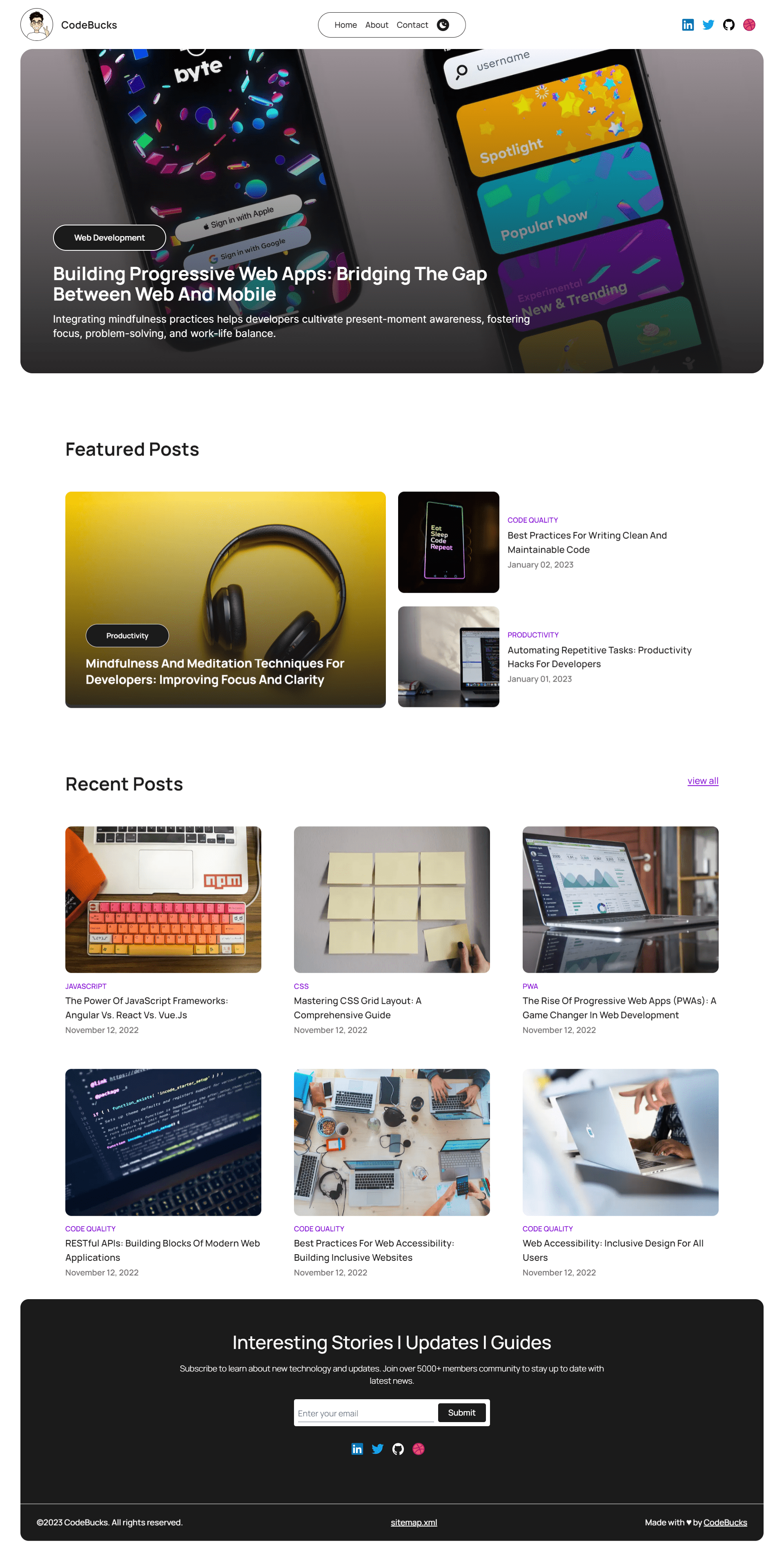 #### About  #### Contact  For more Images please check the [project images](https://github.com/codebucks27/Nextjs-contentlayer-blog/tree/main/project%20images) folder from this repo or check the demo link. ### Resources Used in This Project - Character image in the About page created by using [Bing Search[(https://www.bing.com/). - Lottie animation in the contact page: [from here](https://lottiefiles.com/animations/sloth-meditate-SzNofNFhYY) - Fonts from https://fonts.google.com/ <br /> - Icons from https://iconify.design/ <br /> ### All the images used in the blogs: - Photo by <a href="https://unsplash.com/@kmuza?utm_source=unsplash&utm_medium=referral&utm_content=creditCopyText">Carlos Muza</a> on <a href="https://unsplash.com/photos/hpjSkU2UYSU?utm_source=unsplash&utm_medium=referral&utm_content=creditCopyText">Unsplash</a> - Photo by <a href="https://unsplash.com/@marvelous?utm_source=unsplash&utm_medium=referral&utm_content=creditCopyText">Marvin Meyer</a> on <a href="https://unsplash.com/photos/SYTO3xs06fU?utm_source=unsplash&utm_medium=referral&utm_content=creditCopyText">Unsplash</a> - Photo by <a href="https://unsplash.com/@pinjasaur?utm_source=unsplash&utm_medium=referral&utm_content=creditCopyText">Paul Esch-Laurent</a> on <a href="https://unsplash.com/photos/oZMUrWFHOB4?utm_source=unsplash&utm_medium=referral&utm_content=creditCopyText">Unsplash</a> - Photo by <a href="https://unsplash.com/@kellysikkema?utm_source=unsplash&utm_medium=referral&utm_content=creditCopyText">Kelly Sikkema</a> on <a href="https://unsplash.com/photos/-1_RZL8BGBM?utm_source=unsplash&utm_medium=referral&utm_content=creditCopyText">Unsplash</a> - Photo by <a href="https://unsplash.com/@laurenmancke?utm_source=unsplash&utm_medium=referral&utm_content=creditCopyText">Lauren Mancke</a> on <a href="https://unsplash.com/photos/aOC7TSLb1o8?utm_source=unsplash&utm_medium=referral&utm_content=creditCopyText">Unsplash</a> - Photo by <a href="https://unsplash.com/@lucabravo?utm_source=unsplash&utm_medium=referral&utm_content=creditCopyText">Luca Bravo</a> on <a href="https://unsplash.com/photos/XJXWbfSo2f0?utm_source=unsplash&utm_medium=referral&utm_content=creditCopyText">Unsplash</a> - Photo by <a href="https://unsplash.com/@wocintechchat?utm_source=unsplash&utm_medium=referral&utm_content=creditCopyText">Christina @ wocintechchat.com</a> on <a href="https://unsplash.com/photos/OtHEYbQXLFU?utm_source=unsplash&utm_medium=referral&utm_content=creditCopyText">Unsplash</a> - Photo by <a href="https://unsplash.com/@cdx2?utm_source=unsplash&utm_medium=referral&utm_content=creditCopyText">C D-X</a> on <a href="https://unsplash.com/photos/PDX_a_82obo?utm_source=unsplash&utm_medium=referral&utm_content=creditCopyText">Unsplash</a> - Photo by <a href="https://unsplash.com/@charlesdeluvio?utm_source=unsplash&utm_medium=referral&utm_content=creditCopyText">charlesdeluvio</a> on <a href="https://unsplash.com/photos/cZr2sgaxy3Q?utm_source=unsplash&utm_medium=referral&utm_content=creditCopyText">Unsplash</a> - Photo by <a href="https://unsplash.com/@emilep?utm_source=unsplash&utm_medium=referral&utm_content=creditCopyText">Emile Perron</a> on <a href="https://unsplash.com/photos/xrVDYZRGdw4?utm_source=unsplash&utm_medium=referral&utm_content=creditCopyText">Unsplash</a> - Photo by <a href="https://unsplash.com/@synkevych?utm_source=unsplash&utm_medium=referral&utm_content=creditCopyText">Roman Synkevych</a> on <a href="https://unsplash.com/photos/vXInUOv1n84?utm_source=unsplash&utm_medium=referral&utm_content=creditCopyText">Unsplash</a> This is a [Next.js](https://nextjs.org/) project bootstrapped with [`create-next-app`](https://github.com/vercel/next.js/tree/canary/packages/create-next-app).
看看同类模板
对比同技术栈与用途的模板,找到更适合的视觉与内容结构。

tailwind-nextjs-starter-blog
tailwind-nextjs-starter-blog 是一个面向个人技术博客的 Next.js 与 Tailwind CSS 启动模板,其 v2 版本基于 App Router 与 React Server Comp…
Next.js · 博客

Next-js-Blog-Boilerplate
Next-js-Blog-Boilerplate 是一套面向个人与技术博客的启动代码,基于 Next.js 12 与 Tailwind CSS 3 构建,同时集成了 TypeScript、ESLint、Prettier …
Next.js · 博客

nextjs-blog-theme
nextjs-blog-theme 是 Netlify 团队维护的一个博客启动模板,基于 Next.js 15(Pages Router)和 Tailwind CSS 4.x 构建,设计由 Bejamas 机构完成。
Next.js · 博客

blog
🚀 My personal blog made with Tailwind CSS and NextJS. Template from Timlrx. Feel free to fork, follow and use…
Next.js · 博客

tailnext
Tailnext 是一个基于 Next.js 14 App Router 和 Tailwind CSS 的免费开源模板,由 onWidget 团队创建并维护。
Next.js · 博客

sylph
A minimal portfolio template.
Next.js · 作品集