Content is written in Obsidian by opening src/content/ directly as a vault, with no copy-pasting into the site project
AstroBlog
mycelium-theme — Astro Blog Template
By 0bserver07
A digital garden blog theme for Astro where content is written in Obsidian, supporting Wikilinks, backlinks, a D3 graph view, and growth status markers.
Explore the design
Compare the page layouts and mobile experience. Open any screenshot for a closer look.
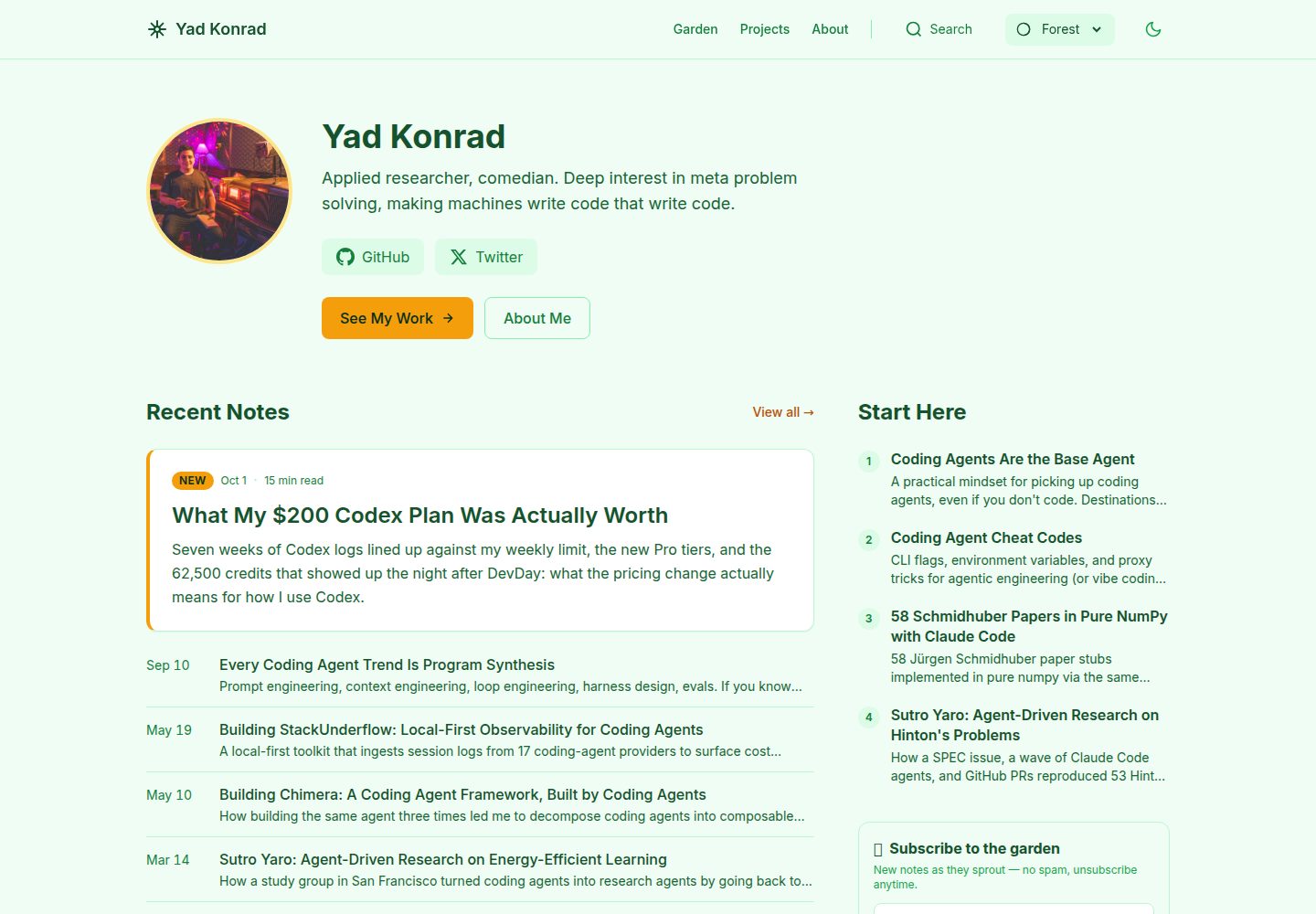
Desktop homepage1 / 3
Desktop captureTop of page
Actual screenshot captured by the server browser.
All pages & views 3
Screenshots show visual appearance; interactive behavior may differ.
Recorded 2026-10-02View source
What stands out
A quick read of the recorded project description.
Supports Wikilinks (with anchors), backlinks, and a D3-based graph view
Includes 7 color themes and 9 custom Obsidian plugins, plus 8 preconfigured community plugins
Provides seedling/budding/evergreen growth status, which can be calculated automatically from backlinks or specified manually
Theme files and user content are separated, with upstream updates pulled via npm run update-theme
Supports two ways to handle unpublished content: in-vault drafts with draft: true and out-of-vault drafts in the drafts/ directory
Template Details
mycelium-theme is a digital garden blog theme that combines Obsidian writing with Astro static site generation. Content sources live in the src/content/ directory; opening that directory in Obsidian makes it usable as a vault. The repository includes 9 custom plugins (theme switching, single-tag writing, initialization wizard, content templates, filename aliases, SEO panel, title display, interface customization, card view) and 8 community plugin configurations, including obsidian-git for version control.
The site side provides Wikilinks (with anchors), callout blocks, D3 graph visualization, a Ctrl+K command palette, backlinks, growth status (seedling/budding/evergreen), light and dark modes, RSS, sitemap, and OG image generation. Content types are divided into posts, pages, projects, and docs, with seven built-in color themes: Sage, Ocean, Sunset, Minimal, Nord, Rose, and Forest.
Theme files and user content are kept separate: src/components/, src/layouts/, src/pages/, and src/styles/ are considered upstream theme files, while src/content/posts/, pages/, projects/, and src/config.ts are maintained by the user, allowing upstream updates via npm run update-theme. Drafts are supported in two ways: posts with draft: true in frontmatter are visible in development mode and hidden at build time; posts placed in the top-level drafts/ directory do not enter the vault at all and are previewed only in development mode via /drafts-preview, producing no files at build time. The build output is static files, deployable to Netlify, Vercel, or GitHub Pages.
Limitations: the README requires Node 22.12+; third-party assets such as demo images, fonts, and icons require separate license verification; the repository has few stars and is a personally maintained theme.
AstroBlog
Is it right for your project?
Use Cases
- A digital garden for long-term note accumulation in Obsidian that is intended to be published publicly as a static site
- A knowledge-base blog that needs bidirectional links between notes and graph relationship display
- A personal site where the writing tool and the site build tool are separated and maintained independently
- A writing workflow that needs to distinguish drafts from published content and preview unfinished drafts during development
Suitable For
- Individual authors accustomed to writing in Obsidian and willing to adopt an Astro build workflow
- Blogs that need note-linking capabilities such as Wikilinks, backlinks, and graph views
- Sites that want content and theme code separated and can continuously receive upstream theme updates
- Users planning to deploy static output to Netlify, Vercel, or GitHub Pages
Getting started & customization
Use these recorded setup notes alongside the repository instructions for your chosen version.
- 1
Requires Node 22.12+; after cloning the repository, run npm install, npm run setup, and npm run dev (default localhost:4321)
- 2
Open the src/content/ directory in Obsidian rather than the repository root, and disable Restricted mode in settings to enable the preconfigured plugins
- 3
Site name, URL, author, and other information are modified in src/config.ts, or configured interactively via npm run setup
- 4
The build command is npm run build, with output to dist/; confirm draft status before publishing, as posts with draft: true will not enter the production build
- 5
Update the theme with npm run update-theme; avoid directly modifying theme files such as src/components/, src/layouts/, src/pages/, and src/styles/ to reduce conflicts
License & source material
Usage conditions & limitations
Free to use · keep license noticeThis entry covers the free version under the MIT license in the public repository; the free scope is the code of that version and does not mean external services or third-party assets are free.
Must comply with when using
- The code of this version may be used, modified, used commercially, and distributed free of charge.
- When distributing copies or substantial portions of the code, retain the original author's copyright notice and the full MIT license notice.
- The code is provided as is; warranties and limitations of liability are governed by the original license and applicable law.
Additional costs & items to verify
- Using this theme requires Node.js 22.12 or higher; environments below this version cannot install and build properly.
- Content writing depends on Obsidian, and the src/content/ directory must be opened as a vault; opening the repository root will prevent plugins from loading.
- Enabling the preconfigured Obsidian plugins requires disabling Restricted mode, i.e., allowing community plugins to run.
- When deploying to GitHub Pages, site must be set to the corresponding Pages address in src/config.ts, otherwise site links will be incorrect.
- To keep upstream updates pullable, theme files such as src/components/, src/layouts/, src/pages/, and src/styles/ should not be modified, otherwise merges will conflict.
- Demo images, fonts, icons, and other third-party assets must be checked against their respective licenses; they cannot be judged solely by the code's MIT license.
- External services such as domains, hosting, databases, payments, or AI may incur separate charges.
View Original Text Basis
Permission is hereby granted, free of charge
Original License Text
Requires **Node 22.12+** (Astro 7).
Original README
**Obsidian vault:** Open `src/content/` in Obsidian (not the repo root).
Original README
Settings > Community plugins > Turn off Restricted mode
Original README
Set `site` in `src/config.ts` to your GitHub Pages URL.
Original README
https://github.com/0bserver07/mycelium-theme/blob/master/LICENSEhttps://github.com/0bserver07/mycelium-theme/blob/master/README.mdTheme updates merge cleanly because you don't edit theme files.
Original README
Compiled by DeepSeek based on repository license and README ·2026-10-02. Results only cover the materials read; dependencies, images, fonts, and subsequent term changes are subject to their respective original texts.
Project checks & description sources
Template Information
- Source platforms
- GitHub
- Documentation and maintenance reference score
- More documented · 83 / 100
- Technologies
- Astro
- Website type
- Blog
How this score is calculated
Our heuristic uses license records (up to 30), a demo link (12), a preview (10), stars (15), recorded maintenance (15), description completeness (8), feature records (5) and classification data (5). It is not a code, security or performance test, or a Google score. A link does not establish tested functionality.
What to verify for this project
- Repository update recorded
- 2026-07-20
- Screenshot last checked
- 2026-10-02
A demo link is listed. Check it with your own content and viewport sizes; its presence does not confirm that forms, authentication or payments work.
The catalog identifies Astro as the primary stack. Check the actual dependency manifest and lockfile for versions and hosting requirements. These notes use recorded metadata, not a code audit or a deployment test.
Use a selection guide →How this description was prepared
AI-assisted description based on catalog records and repository material. Repository authors are not automatically the reviewers of this description.
Automatically checked against source and license rules; no manual editorial review.
Inspect the recorded source material
SHA-256: cadb4f2faae692184b8f3d305fb917922a2b83aa22e9d3d8d17dbaad0ca9e99d
2026-10-02T20:59:46.798Z
Source file / repository<p align="center">
<img src="assets/banner.svg" alt="mycelium - Write in Obsidian. Publish with Astro." width="100%">
</p>
<p align="center">
<strong>Write in Obsidian. Publish with Astro.</strong>
</p>
<p align="center">
<a href="https://yad.codes">Live Demo</a> ·
<a href="#quick-start">Quick Start</a> ·
<a href="#configuration">Configuration</a> ·
<a href="#writing-content">Writing Content</a> ·
<a href="#deploy">Deploy</a> ·
<a href="#receiving-theme-updates">Theme Updates</a>
</p>
<p align="center">
<img src="https://img.shields.io/badge/Astro-7-BC52EE?logo=astro&logoColor=white" alt="Astro 7">
<img src="https://img.shields.io/badge/Obsidian-Plugin_Ready-7C3AED?logo=obsidian&logoColor=white" alt="Obsidian">
<img src="https://img.shields.io/badge/Tailwind_CSS-4-06B6D4?logo=tailwindcss&logoColor=white" alt="Tailwind CSS">
<img src="https://img.shields.io/github/license/0bserver07/mycelium-theme" alt="License">
</p>
---
<p align="center">
<img src="assets/screenshot-home.png" alt="Mycelium theme - light mode" width="49%">
<img src="assets/screenshot-dark.png" alt="Mycelium theme - dark mode" width="49%">
</p>
<p align="center">
<img src="assets/screenshot-garden.png" alt="Garden view with growth indicators" width="80%">
</p>
## Why Mycelium
One repo, two tools. Write in Obsidian, publish with Astro, no copy-paste in between. Wikilinks (`[[links]]`), backlinks, and a D3 graph view all work without configuration. Theme and content stay in separate lanes, so `npm run update-theme` pulls upstream changes without touching your posts. 9 custom Obsidian plugins handle templates, SEO, theming, and focus mode.
## What You Get
7 color themes: Sage, Ocean, Sunset, Minimal, Nord, Rose, Forest.
9 custom Obsidian plugins -- mycelium-climate (theme switcher), mycelium-focus (single-tab writing), mycelium-garden (setup wizard), mycelium-spore (content templates), mycelium-trace (filename aliases), mycelium-signal (SEO panel), mycelium-label (title display), mycelium-prune (UI customization), mycelium-network (card view). 8 community plugins are also pre-configured, including obsidian-git for version control.
On the Astro side: wikilink support with anchors, callout blocks, D3 graph visualization, command palette (`Ctrl+K`), backlinks, growth indicators (seedling/budding/evergreen), dark/light mode, RSS feed, sitemap, OG image generation.
Four content types: posts, pages, projects, docs.
## Quick Start
Requires **Node 22.12+** (Astro 7).
```bash
git clone https://github.com/0bserver07/mycelium-theme my-garden
cd my-garden
npm install
npm run setup # Configure your site name, URL, git remote
npm run dev # Start dev server at localhost:4321
```
**Obsidian vault:** Open `src/content/` in Obsidian (not the repo root).
After opening in Obsidian:
1. Settings > Community plugins > Turn off Restricted mode
2. Plugins auto-enable
## Project Structure
```
mycelium-theme/
├── src/
│ ├── content/ <- Open this folder as your Obsidian vault
│ │ ├── .obsidian/ # Plugins & settings (pre-configured)
│ │ ├── posts/ # Blog posts
│ │ ├── pages/ # Static pages
│ │ ├── projects/ # Project showcases
│ │ └── docs/ # Documentation
│ ├── components/ # Astro UI components
│ ├── layouts/ # Page layouts
│ ├── pages/ # Route definitions
│ ├── styles/ # Global CSS (Tailwind)
│ ├── themes/ # Color theme definitions
│ ├── utils/ # Remark/Rehype plugins
│ └── config.ts # Site configuration
├── scripts/ # Setup, OG generation, theme update
└── package.json
```
## Deploy
Mycelium builds to static files. Deploy anywhere that serves HTML.
### Netlify
[](https://app.netlify.com/start/deploy?repository=https://github.com/0bserver07/mycelium-theme)
Or connect your repo in the Netlify dashboard. Build command: `npm run build`, publish directory: `dist/`.
### Vercel
```bash
npm i -g vercel
vercel
```
Or import the repo at [vercel.com/new](https://vercel.com/new). Framework preset: Astro.
### GitHub Pages
Add this workflow at `.github/workflows/deploy.yml`:
```yaml
name: Deploy to GitHub Pages
on:
push:
branches: [master]
jobs:
build:
runs-on: ubuntu-latest
steps:
- uses: actions/checkout@v4
- uses: actions/setup-node@v4
with:
node-version: 22
- run: npm ci
- run: npm run build
- uses: actions/upload-pages-artifact@v3
with:
path: dist/
deploy:
needs: build
runs-on: ubuntu-latest
permissions:
pages: write
id-token: write
environment:
name: github-pages
steps:
- uses: actions/deploy-pages@v4
```
Set `site` in `src/config.ts` to your GitHub Pages URL.
## Configuration
Edit `src/config.ts`:
```typescript
export const siteConfig = {
site: 'https://your-site.com',
name: 'My Digital Garden',
gardener: 'Your Name',
description: 'Your garden description',
// ...
};
```
Run `npm run setup` for an interactive walkthrough.
## Writing Content
Create files in `src/content/posts/` (or use the `mycelium-spore` plugin in Obsidian):
```yaml
---
title: My First Note
description: A brief description
growth: seedling
planted: 2025-12-16
lastTended: 2025-12-16
tags: [topic, subtopic]
draft: false
---
# Your Content
Use [[wikilinks]] to connect notes!
> [!tip] Pro Tip
> Callouts work like in Obsidian.
```
### Growth status
Growth auto-calculates from backlinks but can be set manually. Seedling means a new idea or rough draft, budding means it's developing with some connections, and evergreen means mature and well-connected.
## Commands
| Command | Action |
|---------|--------|
| `npm install` | Install dependencies |
| `npm run setup` | Configure site name, URL, socials |
| `npm run dev` | Development server (localhost:4321) |
| `npm run build` | Build to `./dist/` |
| `npm run preview` | Preview production build |
| `npm run generate-og` | Generate OG images for posts |
| `npm run update-theme` | Pull latest theme updates |
## Recommended Workflow
1. **Write** in Obsidian (`src/content/`)
2. **Preview** with `npm run dev`
3. **Commit** with obsidian-git or terminal
4. **Deploy** to Netlify/Vercel/GitHub Pages
## Receiving Theme Updates
Your garden receives upstream theme updates without losing your content:
```bash
npm run update-theme
```
The script automatically:
1. Adds the upstream remote (first time only)
2. Stashes your local changes
3. Fetches and merges theme updates
4. Restores your changes
### Manual Workflow
```bash
git remote add upstream https://github.com/0bserver07/mycelium-theme.git # first time
git stash push -u # Stash your changes (including untracked)
git fetch upstream # Get latest theme updates
git merge upstream/master # Merge theme updates
git stash pop # Restore your content
```
### Why This Works
The repo separates **theme files** from **user content**:
| Type | Files | Who Modifies |
|------|-------|--------------|
| **Theme** | `src/components/`, `src/layouts/`, `src/pages/`, `src/styles/` | Upstream only |
| **User Content** | `src/content/posts/`, `src/content/pages/`, `src/content/projects/` | You only |
| **User Config** | `src/config.ts` | You only |
| **Shared** | `src/content/.obsidian/` | Both (plugins update upstream) |
Theme updates merge cleanly because you don't edit theme files. Content conflicts are rare because upstream doesn't touch your posts.
## Draft Content
Two ways to keep work-in-progress out of production, depending on whether it
lives in your garden yet.
**In-vault drafts** -- a post in `src/content/posts/` with `draft: true` in its
frontmatter:
- **Dev** (`npm run dev`): visible, so you can preview while writing
- **Production** (`npm run build`): hidden -- not published
**Out-of-vault drafts** -- Markdown in the top-level `drafts/` folder, kept
entirely outside the Obsidian vault (so it never touches backlinks, the graph,
or search):
- Preview at **`/drafts-preview`** (index) or **`/drafts-preview/<file>`** while
running `npm run dev` -- rendered through the real `PostLayout`, so a draft
looks exactly like a published post.
- Emits **nothing** in `npm run build`: no HTML, no sitemap entry, no OG image.
The preview route returns an empty path list in production.
- Promote when ready: `git mv drafts/my-post.md src/content/posts/`.
See `drafts/README.md` for details. Relocate the folder by changing `DRAFTS_DIR`
in `src/content.config.ts`.
## Troubleshooting
### "No plugins found" in Obsidian
You opened the repo root. Close Obsidian, then open `src/content/` specifically.
### Tags/pages return 404 in dev
Check that your posts have `draft: false` or that you're testing with dev server (drafts visible in dev mode only).
### BRAT keeps downloading old plugins
Clear `src/content/.obsidian/plugins/obsidian42-brat/data.json` -- set `pluginList` and `themesList` to empty arrays.
### Merge conflicts on update
If you accidentally edited theme files, use:
```bash
git checkout --theirs src/components/ # Accept upstream theme changes
git add .
git commit -m "Resolve merge conflicts, accept upstream theme"
```
## Built With
- [Astro](https://astro.build) -- static site generator
- [Obsidian](https://obsidian.md) -- content authoring
- [Tailwind CSS](https://tailwindcss.com) -- styling
- [D3.js](https://d3js.org) -- graph visualization
- [Fuse.js](https://www.fusejs.io) -- fuzzy search
## Contributing
See [CONTRIBUTING.md](CONTRIBUTING.md) for guidelines.
## License
[MIT License](LICENSE)
Explore similar templates
Compare previews and descriptions within the same stack and category.

astrowind
AstroWind is a free, open-source Astro starter theme using Astro and Tailwind CSS, released under the MIT license.
Astro · Blog

astro-paper
AstroPaper is a minimal, responsive, accessible, and SEO-friendly Astro blog theme. Articles are stored as Markdown/MDX in src/content/posts/, with subdirectories affecting URLs.
Astro · Blog

fuwari
Fuwari is a static blog template built with Astro and Tailwind CSS for personal blogs. It manages posts as Markdown files in src/content/posts/, with frontmatter for title, date, description, cover, tags, categories, draft status, and language.
Astro · Blog

Firefly
Firefly is a clean personal blog theme forked from Astro and Fuwari, offering four background modes, single/double sidebar and list/grid layouts, Pagefind client-side full-text search, and a six-language UI.
Astro · Blog

astro-theme-cactus
Astro Cactus is an Astro-based blog and portfolio theme that uses Markdown/MDX content collections to manage posts, notes, and tags, with frontmatter type-checked by a schema.
Astro · Portfolio

astrofy
Astrofy is a free and open-source personal portfolio website template built with Astro and TailwindCSS, with built-in blog, CV timeline, project showcase, store, and RSS feed modules.
Astro · Portfolio