内容在 Obsidian 中撰写,直接打开 src/content/ 作为 vault,无需复制粘贴到站点工程
Astro博客
mycelium-theme — Astro 博客模板
作者 0bserver07
面向 Astro 的数字花园博客主题,内容在 Obsidian 中撰写,支持 Wikilinks、反向链接、D3 图谱视图与生长状态标记。
看看你的网站会是什么样
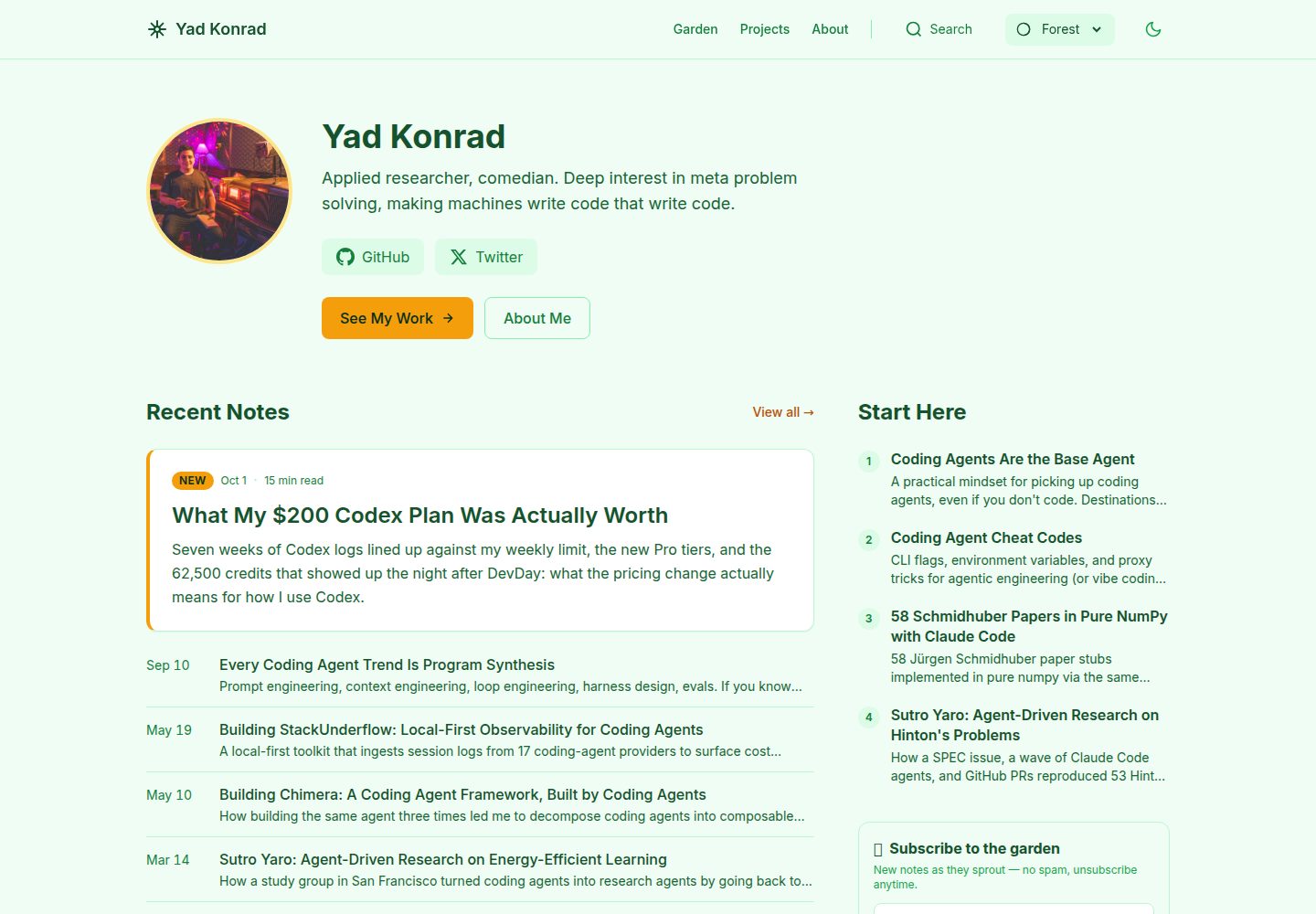
浏览真实页面截图,比较内容排版与手机效果。点击下方缩略图切换,放大查看整页细节。
全部页面与视图 3
截图用于了解视觉与布局,交互效果请以实际项目为准。
采集于 2026-10-02查看来源
值得关注的模板亮点
从已有项目资料中,快速了解它的特点。
支持 Wikilinks(含锚点)、反向链接与基于 D3 的图谱视图
内置 7 套配色主题与 9 个自定义 Obsidian 插件,另有 8 个社区插件预配置
提供 seedling/budding/evergreen 生长状态,可由反向链接自动计算或手动指定
主题文件与用户内容分离,通过 npm run update-theme 拉取上游更新
支持 draft: true 的库内草稿与 drafts/ 目录的库外草稿两种未发布内容处理方式
模板详细介绍
mycelium-theme 是一个把 Obsidian 写作与 Astro 静态站点生成结合起来的数字花园博客主题。内容源放在 src/content/ 目录,用 Obsidian 打开该目录即可作为 vault 使用,仓库内预置了 9 个自定义插件(主题切换、单标签写作、初始化向导、内容模板、文件名别名、SEO 面板、标题显示、界面定制、卡片视图)以及 8 个社区插件配置,其中包含用于版本控制的 obsidian-git。
站点侧提供 Wikilinks(含锚点)、callout 块、D3 图谱可视化、Ctrl+K 命令面板、反向链接、生长状态(seedling/budding/evergreen)、深浅色模式、RSS、站点地图与 OG 图片生成,内容类型分为 posts、pages、projects、docs 四类,并内置 Sage、Ocean、Sunset、Minimal、Nord、Rose、Forest 七套配色主题。
主题文件与用户内容分开放置:src/components/、src/layouts/、src/pages/、src/styles/ 视为上游主题文件,src/content/posts/、pages/、projects/ 与 src/config.ts 归使用者维护,因此可通过 npm run update-theme 拉取上游更新。草稿支持两种方式:frontmatter 中 draft: true 的稿件在开发模式可见、构建时隐藏;放在顶层 drafts/ 目录的稿件完全不进入 vault,仅在开发模式通过 /drafts-preview 预览,构建时不产出任何文件。构建结果为静态文件,可部署到 Netlify、Vercel 或 GitHub Pages。
限制方面:README 要求 Node 22.12+;演示图片、字体、图标等第三方素材需单独核对许可;仓库星标数较少,属于个人维护的主题。
Astro博客
适合你的项目吗?
适用场景
- 用 Obsidian 长期积累笔记,并希望以静态站点形式公开发布的数字花园
- 需要笔记之间双向链接与图谱关系展示的知识库型博客
- 希望写作工具与站点构建工具分离、各自独立维护的个人站点
- 需要区分草稿与已发布内容,并在开发阶段预览未完成稿件的写作流程
适合人群
- 习惯使用 Obsidian 写作、愿意接受 Astro 构建流程的个人作者
- 需要 Wikilinks、反向链接与图谱视图等笔记关联能力的博客
- 希望内容与主题代码分开、能持续接收上游主题更新的站点
- 计划将静态产物部署到 Netlify、Vercel 或 GitHub Pages 的用户
上手与定制指南
结合仓库当前版本的说明,按下面的资料检查内容、配置与运行要求。
- 1
环境要求 Node 22.12+,克隆仓库后执行 npm install、npm run setup 与 npm run dev(默认 localhost:4321)
- 2
在 Obsidian 中打开 src/content/ 目录而非仓库根目录,并在设置中关闭受限模式以启用预置插件
- 3
站点名称、URL、作者等信息在 src/config.ts 中修改,也可通过 npm run setup 交互式配置
- 4
构建命令为 npm run build,产物输出到 dist/;发布前确认草稿状态,draft: true 的稿件不会进入生产构建
- 5
更新主题使用 npm run update-theme,避免直接修改 src/components/、src/layouts/、src/pages/、src/styles/ 等主题文件以减少冲突
授权与来源资料
使用条件与限制
免费使用 · 保留许可声明本次收录的是公开仓库中采用 MIT 许可的免费版本;免费范围为该版本代码,不代表外部服务或第三方素材免费。
使用时需要遵守
- 允许免费使用、修改、商用和分发该版本代码。
- 分发代码副本或实质性部分时,保留原作者版权声明和完整 MIT 许可声明。
- 代码按现状提供;担保与责任限制以原许可证及适用法律为准。
额外费用与待核对事项
- 使用该主题需要 Node.js 22.12 或更高版本,低于此版本的运行环境无法正常安装与构建。
- 内容撰写依赖 Obsidian,且必须打开 src/content/ 目录作为 vault,打开仓库根目录会导致插件无法加载。
- 启用预置的 Obsidian 插件需要关闭受限模式(Restricted mode),即允许运行社区插件。
- 部署到 GitHub Pages 时必须在 src/config.ts 中把 site 设置为对应的 Pages 地址,否则站点链接不正确。
- 为保持可拉取上游更新,不应修改 src/components/、src/layouts/、src/pages/、src/styles/ 等主题文件,否则合并会产生冲突。
- 演示图片、字体、图标及其他第三方素材需按各自许可核对,不能仅凭代码的 MIT 许可判断。
- 域名、托管、数据库、支付或 AI 等外部服务可能另外收费。
查看原文依据
Permission is hereby granted, free of charge
许可证原文
Requires **Node 22.12+** (Astro 7).
README 原文
**Obsidian vault:** Open `src/content/` in Obsidian (not the repo root).
README 原文
Settings > Community plugins > Turn off Restricted mode
README 原文
Set `site` in `src/config.ts` to your GitHub Pages URL.
README 原文
https://github.com/0bserver07/mycelium-theme/blob/master/LICENSEhttps://github.com/0bserver07/mycelium-theme/blob/master/README.mdTheme updates merge cleanly because you don't edit theme files.
README 原文
DeepSeek 根据仓库许可证和 README 整理 ·2026-10-02。结果仅覆盖已读取资料,依赖、图片、字体及后续条款变更以各自原文为准。
项目核对记录与介绍依据
模板资料
- 来源平台
- GitHub
- 资料与维护参考分
- 资料较完整 · 83 / 100
- 技术栈
- Astro
- 网站类型
- 博客
这个分数如何计算
本站按许可资料(最高30分)、演示链接(12分)、预览图(10分)、Star数(15分)、记录的维护时间(15分)、描述完整度(8分)、功能记录(5分)和分类资料(5分)计算。它不是代码、安全或性能测试,也不是 Google 评分;有链接不代表已实测可用。
这个项目需要核对什么
- 记录的仓库更新时间
- 2026-07-20
- 截图检查日期
- 2026-10-02
已收录演示链接。请用你的内容与屏幕尺寸检查;有演示不代表表单、认证或支付已经可用。
目录记录的主要技术栈是 Astro。请通过依赖清单和锁文件核对实际版本与托管要求。这些说明基于收录资料,不代表代码审计或部署实测。
查看具体选型方法 →介绍的制作与核对状态
介绍由 AI 辅助整理目录与仓库资料。仓库作者不等于这篇介绍的审核者。
已完成服务器许可规则与 AI 来源核对;未经过人工编辑审核。
查看当时使用的来源资料
SHA-256: cadb4f2faae692184b8f3d305fb917922a2b83aa22e9d3d8d17dbaad0ca9e99d
2026-10-02T20:59:46.798Z
来源文件 / 仓库<p align="center">
<img src="assets/banner.svg" alt="mycelium - Write in Obsidian. Publish with Astro." width="100%">
</p>
<p align="center">
<strong>Write in Obsidian. Publish with Astro.</strong>
</p>
<p align="center">
<a href="https://yad.codes">Live Demo</a> ·
<a href="#quick-start">Quick Start</a> ·
<a href="#configuration">Configuration</a> ·
<a href="#writing-content">Writing Content</a> ·
<a href="#deploy">Deploy</a> ·
<a href="#receiving-theme-updates">Theme Updates</a>
</p>
<p align="center">
<img src="https://img.shields.io/badge/Astro-7-BC52EE?logo=astro&logoColor=white" alt="Astro 7">
<img src="https://img.shields.io/badge/Obsidian-Plugin_Ready-7C3AED?logo=obsidian&logoColor=white" alt="Obsidian">
<img src="https://img.shields.io/badge/Tailwind_CSS-4-06B6D4?logo=tailwindcss&logoColor=white" alt="Tailwind CSS">
<img src="https://img.shields.io/github/license/0bserver07/mycelium-theme" alt="License">
</p>
---
<p align="center">
<img src="assets/screenshot-home.png" alt="Mycelium theme - light mode" width="49%">
<img src="assets/screenshot-dark.png" alt="Mycelium theme - dark mode" width="49%">
</p>
<p align="center">
<img src="assets/screenshot-garden.png" alt="Garden view with growth indicators" width="80%">
</p>
## Why Mycelium
One repo, two tools. Write in Obsidian, publish with Astro, no copy-paste in between. Wikilinks (`[[links]]`), backlinks, and a D3 graph view all work without configuration. Theme and content stay in separate lanes, so `npm run update-theme` pulls upstream changes without touching your posts. 9 custom Obsidian plugins handle templates, SEO, theming, and focus mode.
## What You Get
7 color themes: Sage, Ocean, Sunset, Minimal, Nord, Rose, Forest.
9 custom Obsidian plugins -- mycelium-climate (theme switcher), mycelium-focus (single-tab writing), mycelium-garden (setup wizard), mycelium-spore (content templates), mycelium-trace (filename aliases), mycelium-signal (SEO panel), mycelium-label (title display), mycelium-prune (UI customization), mycelium-network (card view). 8 community plugins are also pre-configured, including obsidian-git for version control.
On the Astro side: wikilink support with anchors, callout blocks, D3 graph visualization, command palette (`Ctrl+K`), backlinks, growth indicators (seedling/budding/evergreen), dark/light mode, RSS feed, sitemap, OG image generation.
Four content types: posts, pages, projects, docs.
## Quick Start
Requires **Node 22.12+** (Astro 7).
```bash
git clone https://github.com/0bserver07/mycelium-theme my-garden
cd my-garden
npm install
npm run setup # Configure your site name, URL, git remote
npm run dev # Start dev server at localhost:4321
```
**Obsidian vault:** Open `src/content/` in Obsidian (not the repo root).
After opening in Obsidian:
1. Settings > Community plugins > Turn off Restricted mode
2. Plugins auto-enable
## Project Structure
```
mycelium-theme/
├── src/
│ ├── content/ <- Open this folder as your Obsidian vault
│ │ ├── .obsidian/ # Plugins & settings (pre-configured)
│ │ ├── posts/ # Blog posts
│ │ ├── pages/ # Static pages
│ │ ├── projects/ # Project showcases
│ │ └── docs/ # Documentation
│ ├── components/ # Astro UI components
│ ├── layouts/ # Page layouts
│ ├── pages/ # Route definitions
│ ├── styles/ # Global CSS (Tailwind)
│ ├── themes/ # Color theme definitions
│ ├── utils/ # Remark/Rehype plugins
│ └── config.ts # Site configuration
├── scripts/ # Setup, OG generation, theme update
└── package.json
```
## Deploy
Mycelium builds to static files. Deploy anywhere that serves HTML.
### Netlify
[](https://app.netlify.com/start/deploy?repository=https://github.com/0bserver07/mycelium-theme)
Or connect your repo in the Netlify dashboard. Build command: `npm run build`, publish directory: `dist/`.
### Vercel
```bash
npm i -g vercel
vercel
```
Or import the repo at [vercel.com/new](https://vercel.com/new). Framework preset: Astro.
### GitHub Pages
Add this workflow at `.github/workflows/deploy.yml`:
```yaml
name: Deploy to GitHub Pages
on:
push:
branches: [master]
jobs:
build:
runs-on: ubuntu-latest
steps:
- uses: actions/checkout@v4
- uses: actions/setup-node@v4
with:
node-version: 22
- run: npm ci
- run: npm run build
- uses: actions/upload-pages-artifact@v3
with:
path: dist/
deploy:
needs: build
runs-on: ubuntu-latest
permissions:
pages: write
id-token: write
environment:
name: github-pages
steps:
- uses: actions/deploy-pages@v4
```
Set `site` in `src/config.ts` to your GitHub Pages URL.
## Configuration
Edit `src/config.ts`:
```typescript
export const siteConfig = {
site: 'https://your-site.com',
name: 'My Digital Garden',
gardener: 'Your Name',
description: 'Your garden description',
// ...
};
```
Run `npm run setup` for an interactive walkthrough.
## Writing Content
Create files in `src/content/posts/` (or use the `mycelium-spore` plugin in Obsidian):
```yaml
---
title: My First Note
description: A brief description
growth: seedling
planted: 2025-12-16
lastTended: 2025-12-16
tags: [topic, subtopic]
draft: false
---
# Your Content
Use [[wikilinks]] to connect notes!
> [!tip] Pro Tip
> Callouts work like in Obsidian.
```
### Growth status
Growth auto-calculates from backlinks but can be set manually. Seedling means a new idea or rough draft, budding means it's developing with some connections, and evergreen means mature and well-connected.
## Commands
| Command | Action |
|---------|--------|
| `npm install` | Install dependencies |
| `npm run setup` | Configure site name, URL, socials |
| `npm run dev` | Development server (localhost:4321) |
| `npm run build` | Build to `./dist/` |
| `npm run preview` | Preview production build |
| `npm run generate-og` | Generate OG images for posts |
| `npm run update-theme` | Pull latest theme updates |
## Recommended Workflow
1. **Write** in Obsidian (`src/content/`)
2. **Preview** with `npm run dev`
3. **Commit** with obsidian-git or terminal
4. **Deploy** to Netlify/Vercel/GitHub Pages
## Receiving Theme Updates
Your garden receives upstream theme updates without losing your content:
```bash
npm run update-theme
```
The script automatically:
1. Adds the upstream remote (first time only)
2. Stashes your local changes
3. Fetches and merges theme updates
4. Restores your changes
### Manual Workflow
```bash
git remote add upstream https://github.com/0bserver07/mycelium-theme.git # first time
git stash push -u # Stash your changes (including untracked)
git fetch upstream # Get latest theme updates
git merge upstream/master # Merge theme updates
git stash pop # Restore your content
```
### Why This Works
The repo separates **theme files** from **user content**:
| Type | Files | Who Modifies |
|------|-------|--------------|
| **Theme** | `src/components/`, `src/layouts/`, `src/pages/`, `src/styles/` | Upstream only |
| **User Content** | `src/content/posts/`, `src/content/pages/`, `src/content/projects/` | You only |
| **User Config** | `src/config.ts` | You only |
| **Shared** | `src/content/.obsidian/` | Both (plugins update upstream) |
Theme updates merge cleanly because you don't edit theme files. Content conflicts are rare because upstream doesn't touch your posts.
## Draft Content
Two ways to keep work-in-progress out of production, depending on whether it
lives in your garden yet.
**In-vault drafts** -- a post in `src/content/posts/` with `draft: true` in its
frontmatter:
- **Dev** (`npm run dev`): visible, so you can preview while writing
- **Production** (`npm run build`): hidden -- not published
**Out-of-vault drafts** -- Markdown in the top-level `drafts/` folder, kept
entirely outside the Obsidian vault (so it never touches backlinks, the graph,
or search):
- Preview at **`/drafts-preview`** (index) or **`/drafts-preview/<file>`** while
running `npm run dev` -- rendered through the real `PostLayout`, so a draft
looks exactly like a published post.
- Emits **nothing** in `npm run build`: no HTML, no sitemap entry, no OG image.
The preview route returns an empty path list in production.
- Promote when ready: `git mv drafts/my-post.md src/content/posts/`.
See `drafts/README.md` for details. Relocate the folder by changing `DRAFTS_DIR`
in `src/content.config.ts`.
## Troubleshooting
### "No plugins found" in Obsidian
You opened the repo root. Close Obsidian, then open `src/content/` specifically.
### Tags/pages return 404 in dev
Check that your posts have `draft: false` or that you're testing with dev server (drafts visible in dev mode only).
### BRAT keeps downloading old plugins
Clear `src/content/.obsidian/plugins/obsidian42-brat/data.json` -- set `pluginList` and `themesList` to empty arrays.
### Merge conflicts on update
If you accidentally edited theme files, use:
```bash
git checkout --theirs src/components/ # Accept upstream theme changes
git add .
git commit -m "Resolve merge conflicts, accept upstream theme"
```
## Built With
- [Astro](https://astro.build) -- static site generator
- [Obsidian](https://obsidian.md) -- content authoring
- [Tailwind CSS](https://tailwindcss.com) -- styling
- [D3.js](https://d3js.org) -- graph visualization
- [Fuse.js](https://www.fusejs.io) -- fuzzy search
## Contributing
See [CONTRIBUTING.md](CONTRIBUTING.md) for guidelines.
## License
[MIT License](LICENSE)
看看同类模板
对比同技术栈与用途的模板,找到更适合的视觉与内容结构。

astrowind
⭕️ AstroWind: A free template using Astro v7 and Tailwind CSS v4. Astro starter theme.
Astro · 博客

astro-paper
A minimal, accessible and SEO-friendly Astro blog theme.
Astro · 博客

fuwari
✨A static blog template built with Astro.
Astro · 博客

Firefly
Firefly 是一款基于 Astro 的静态博客主题,由 CuteLeaf 在 saicaca 的 Fuwari 模板基础上二次开发,主打清新美观的视觉风格。
Astro · 博客

astro-theme-cactus
A simple Astro theme. Use it to create your blog or website.
Astro · 作品集

astrofy
Astrofy is a free and open-source template for your Personal Portfolio Website built with Astro and TailwindCS…
Astro · 作品集