
使用 Astro Content Collections 管理 Markdown 与 MDX 文章、笔记和标签,frontmatter 由 schema 做类型检查
Astro作品集博客工具站
astro-theme-cactus — Astro 作品集模板
作者 chrismwilliams
Astro Cactus 是一个基于 Astro 的博客与作品集主题,使用 Markdown/MDX 内容集合管理文章、笔记和标签,内置深色模式、RSS、站点地图与 Pagefind 静态搜索。
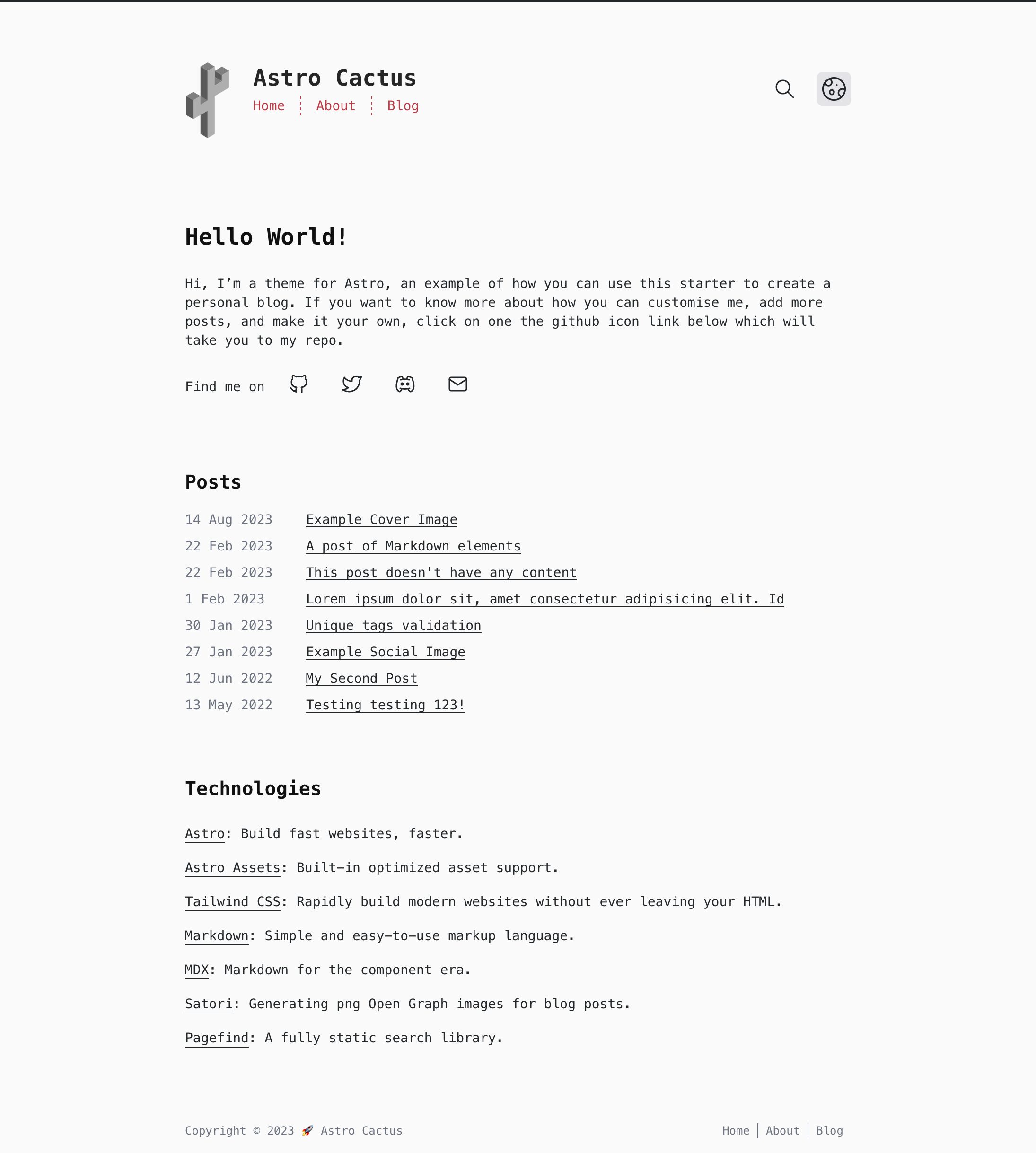
看看你的网站会是什么样
浏览真实页面截图,比较内容排版与手机效果。点击下方缩略图切换,放大查看整页细节。
全部页面与视图 3
截图用于了解视觉与布局,交互效果请以实际项目为准。
采集于 2026-09-28查看来源
值得关注的模板亮点
从已有项目资料中,快速了解它的特点。
内置深色与浅色模式,使用语义化 HTML 与响应式布局
集成 Pagefind 静态搜索,构建后通过 postbuild 脚本生成索引
自动生成 RSS、sitemap、robots.txt 与 web app manifest
通过 Satori 为每篇文章自动生成 OG 图片,也可在 frontmatter 中用 ogImage 覆盖
代码块由 Expressive Code 渲染,内置 dracula 与 github-light 两套主题
模板详细介绍
Astro Cactus 是 chrismwilliams 维护的 Astro 主题,定位为博客或作品集站点的基础模板。它使用 Astro 的 Content Collections 管理本地 Markdown 与 MDX 文件,文章、笔记和标签分别放在 src/content/post、src/content/note 与 src/content/tag 目录,文件名即作为 URL 中的 slug。主题通过 src/content.config.ts 中的 schema 对 frontmatter 做类型检查,文章必填 title、description 和 publishDate,可选 updatedDate、tags、coverImage、ogImage 与 draft;笔记必填 title 和 publishDate,description 可选。标签页支持用同名 Markdown 文件覆盖默认内容,但该标签名必须同时出现在某篇文章的 tags 中。
界面方面,主题提供深色与浅色两套模式,使用语义化 HTML,并包含响应式布局。代码块由 Expressive Code 渲染,内置 dracula 与 github-light 两套主题。社交链接在 src/components/SocialList.astro 中编辑,图标来自 Astro Icon。
站点配置集中在 src/site.config.ts,需要设置自己的域名;astro.config.ts 中可调整 web manifest 选项;public 目录下的 icon.svg 与 social-card.png 分别用于生成 favicon/manifest 图标和默认 og:image。样式与 Tailwind 主题在 src/styles/global.css 中修改。主题默认在 Base.astro 的 body 上使用 font-mono,可移除该变体以回退到 font-sans。
构建与搜索:pnpm dev 启动本地开发服务器,pnpm build 输出到 ./dist/,pnpm postbuild 运行 Pagefind 生成静态搜索索引,pnpm preview 本地预览构建结果。主题还包含自动生成的 RSS、sitemap、robots.txt、web app manifest,以及通过 Satori 生成每篇文章的 OG 图片;若 frontmatter 提供 ogImage,则跳过自动生成。
限制与注意:主题代码采用 MIT 许可,可免费使用、修改和商用,但演示图片、字体、图标等第三方素材需单独核对许可。Webmentions 需要接入 webmention.io 等外部服务。README 中提到的 Astro 与 Tailwind 版本号未在依赖清单中核对,此处不引用。
Astro作品集博客工具站
适合你的项目吗?
适用场景
- 搭建个人博客,用 Markdown/MDX 撰写文章并自动生成标签页与 RSS
- 创建作品集站点,展示项目介绍与关于页面
- 需要静态搜索的写作类站点,借助 Pagefind 在构建后生成搜索索引
- 希望文章分享到社交平台时自动带有 OG 图片的站点
适合人群
- 熟悉 Astro 与 Markdown/MDX 的开发者
- 需要博客或作品集基础模板并愿意按 src/site.config.ts 自行配置的个人
- 接受使用 MIT 许可代码、并能自行核对第三方素材许可的使用者
上手与定制指南
结合仓库当前版本的说明,按下面的资料检查内容、配置与运行要求。
- 1
通过 npm create astro@latest -- --template chrismwilliams/astro-theme-cactus 或 pnpm dlx create-astro --template chrismwilliams/astro-theme-cactus 创建项目
- 2
在 src/site.config.ts 中设置自己的域名等站点信息
- 3
替换 public 目录下的 icon.svg 与 social-card.png,并更新 astro.config.ts 中的 web manifest 选项
- 4
在 src/content/post、src/content/note 与 src/content/tag 目录中添加 .md/.mdx 文件,文件名将作为 URL slug
- 5
构建后运行 pnpm postbuild 以生成 Pagefind 静态搜索索引
授权与来源资料
使用条件与限制
免费使用 · 保留许可声明本次收录的是公开仓库中的免费 MIT 版本;免费范围为该版本代码,不代表外部服务或第三方素材免费。
使用时需要遵守
- 使用、修改或分发代码时,保留原作者版权声明和完整 MIT 许可证。
- 允许免费使用、修改及商用,也允许分发代码;分发时仍需随附版权与许可声明。
- 代码按现状提供,作者不承诺担保或承担使用责任。
额外费用与待核对事项
- Webmentions 功能依赖外部服务 webmention.io,需自行注册并配置该第三方服务才能接收站点提及,非本地开箱即用。
- 主题默认不支持子目录/基础路径部署(如 GitHub Pages 项目站点),所有内部链接为根绝对路径,不识别 base 配置,需自行改造。
- 部署到 Cloudflare Workers 时,OG 图片端点需要 Node 环境,可能出错,需额外添加 Wrangler 配置文件或使用 Cloudflare 适配器并设置 prerenderEnvironment 为 node。
- Pagefind 搜索仅在站点构建完成后生效,本地预览需先运行 build 再运行 postbuild,无法在开发服务器中直接使用。
- 演示图片、字体、图标及其他第三方素材需按各自许可核对,不能仅凭代码的 MIT 许可判断。
- 域名、托管、数据库、支付或 AI 等外部服务可能另外收费。
查看原文依据
Permission is hereby granted, free of charge
许可证原文
Webmentions](https://webmention.io/)
README 原文
This theme doesn't handle subdirectory/base-path deployments (e.g. GitHub Pages project sites) out of the box and will cause [issues](https://github.com/chrismwilliams/astro-theme-cactus/pull/480).
README 原文
If deploying via Cloudflare Workers, you may have [issues](https://github.com/chrismwilliams/astro-theme-cactus/issues/454) with regards to the OG image endpoints and it requiring a Node environment.
README 原文
https://github.com/chrismwilliams/astro-theme-cactus/blob/main/LICENSEhttps://github.com/chrismwilliams/astro-theme-cactus/blob/main/README.mdThis integration brings a static search feature for searching blog posts and notes. In its current form, pagefind only works once the site has been built.
README 原文
依据完整 MIT 许可证与仓库 README 核对 · 2026-09-28。结果仅覆盖已读取资料,依赖、图片、字体及后续条款变更以各自原文为准。
项目核对记录与介绍依据
模板资料
- 来源平台
- GitHub
- 资料与维护参考分
- 资料较完整 · 100 / 100
- 技术栈
- Astro
- 网站类型
- 作品集 · 博客 · 工具站
这个分数如何计算
本站按许可资料(最高30分)、演示链接(12分)、预览图(10分)、Star数(15分)、记录的维护时间(15分)、描述完整度(8分)、功能记录(5分)和分类资料(5分)计算。它不是代码、安全或性能测试,也不是 Google 评分;有链接不代表已实测可用。
这个项目需要核对什么
- 记录的仓库更新时间
- 2026-09-22
- 截图检查日期
- 2026-09-28
已收录演示链接。请用你的内容与屏幕尺寸检查;有演示不代表表单、认证或支付已经可用。
目录记录的主要技术栈是 Astro。请通过依赖清单和锁文件核对实际版本与托管要求。这些说明基于收录资料,不代表代码审计或部署实测。
查看具体选型方法 →介绍的制作与核对状态
介绍由 AI 辅助整理目录与仓库资料。仓库作者不等于这篇介绍的审核者。
已完成服务器许可规则与 AI 来源核对;未经过人工编辑审核。
查看当时使用的来源资料
SHA-256: 4608cd80ebd9083638393ebb55c8a6693aca8bebb1bfcad74d1975c6b5383482
2026-09-28T16:54:43.240Z
来源文件 / 仓库<div align="center">
<img alt="Astro Cactus logo" src="https://github.com/user-attachments/assets/92dfbabf-ca65-4bf6-991d-9a71e5319880" width="70" />
</div>
<h1 align="center">
Astro Cactus
</h1>
Astro Cactus is a simple opinionated starter built with [Astro](https://astro.build). Use it to create an easy-to-use blog or website.
## Table Of Contents
1. [Key Features](#key-features)
2. [Demo](#demo-)
3. [Quick start](#quick-start)
4. [Preview](#preview)
5. [Commands](#commands)
6. [Configure](#configure)
7. [Updating](#updating)
8. [Adding posts, notes, and tags](#adding-posts-notes-and-tags)
- [Post Frontmatter](#post-frontmatter)
- [Note Frontmatter](#note-frontmatter)
- [Tag Frontmatter](#tag-frontmatter)
- [Frontmatter Snippets](#frontmatter-snippets)
9. [Pagefind search](#pagefind-search)
10. [Analytics](#analytics)
11. [Deploy](#deploy)
12. [Acknowledgment](#acknowledgment)
## Key Features
- Astro v7 Fast 🚀
- Tailwind v4
- Accessible, semantic HTML markup
- Responsive & SEO-friendly
- Dark & Light mode
- MD & [MDX](https://docs.astro.build/en/guides/markdown-content/#mdx-only-features) posts & notes
- Includes [Admonitions](https://astro-cactus.chriswilliams.dev/posts/markdown-elements/admonitions/)
- [Satori](https://github.com/vercel/satori) for creating open graph png images
- [Automatic RSS feeds](https://docs.astro.build/en/guides/rss)
- [Webmentions](https://webmention.io/)
- Auto-generated:
- [sitemap](https://docs.astro.build/en/guides/integrations-guide/sitemap/)
- [robots.txt](https://github.com/alextim/astro-lib/blob/main/packages/astro-robots-txt/README.md)
- [web app manifest](https://github.com/alextim/astro-lib/blob/main/packages/astro-webmanifest/README.md)
- [Pagefind](https://pagefind.app/) static search library integration
- [Astro Icon](https://github.com/natemoo-re/astro-icon) svg icon component
- [Expressive Code](https://expressive-code.com/) code blocks and syntax highlighter
## Demo 💻
Check out the [Demo](https://astro-cactus.chriswilliams.dev/), hosted on Netlify
## Quick start
[Create a new repo](https://github.com/chrismwilliams/astro-theme-cactus/generate) from this template.
```bash
# npm 7+
npm create astro@latest -- --template chrismwilliams/astro-theme-cactus
# pnpm
pnpm dlx create-astro --template chrismwilliams/astro-theme-cactus
```
[](https://app.netlify.com/start/deploy?repository=https://github.com/chrismwilliams/astro-theme-cactus) [](https://vercel.com/new/clone?repository-url=https%3A%2F%2Fgithub.com%2Fchrismwilliams%2Fastro-theme-cactus&project-name=astro-theme-cactus)
## Preview

## Commands
Replace pnpm with your choice of npm / yarn
| Command | Action |
| :--------------- | :------------------------------------------------------------- |
| `pnpm install` | Installs dependencies |
| `pnpm dev` | Starts local dev server at `localhost:3000` |
| `pnpm build` | Build your production site to `./dist/` |
| `pnpm postbuild` | Pagefind script to build the static search of your blog posts |
| `pnpm preview` | Preview your build locally, before deploying |
| `pnpm sync` | Generate types based on your config in `src/content/config.ts` |
## Configure
- Edit the template's config file `src/site.config.ts`
- **Important**: set the url property with your own domain.
- Modify the settings for markdown code blocks, generated by [Expressive Code](https://expressive-code.com). Astro Cactus has both a dark (dracula) and light (github-light) theme. You can find more options [@ expressive-code](https://expressive-code.com/guides/themes/#available-themes).
- Update file `astro.config.ts`
- [astro-webmanifest options](https://github.com/alextim/astro-lib/blob/main/packages/astro-webmanifest/README.md)
- Replace & update files within the `/public` folder:
- icon.svg - used as the source to create favicons & manifest icons
- social-card.png - used as the default og:image
- Modify file `src/styles/global.css` with your own light and dark styles, and customise [Tailwind's theme settings](https://tailwindcss.com/docs/theme#customizing-your-theme).
- Edit social links in `src/components/SocialList.astro` to add/replace your media profile. Icons can be found @ [icones.js.org](https://icones.js.org/), per [Astro Icon's instructions](https://www.astroicon.dev/guides/customization/#find-an-icon-set).
- Create/edit posts & notes for your blog within `src/content/post/` & `src/content/note/` with .md/mdx file(s). See [below](#adding-posts-notes-and-tags) for more details.
- Read [this post](http://astro-cactus.chriswilliams.dev/posts/webmentions/) for adding webmentions to your site.
- Add any custom Tag pages for related blog posts in `/src/content/tag/`, ensuring that the file name is the same as the tag.
- OG Image:
- If you would like to change the style of the generated image the Satori library creates, open up `src/pages/og-image/_ogMarkup.ts` to the markup function where you can edit the html/tailwind-classes as necessary. You can use this [playground](https://og-playground.vercel.app/) to aid your design.
- You can also create your own og images and skip satori generating it for you by adding an ogImage property in the frontmatter with a link to the asset, an example can be found in `src/content/post/testing/social-image.md`. More info on frontmatter can be found [below](#post-frontmatter)
- Optional:
- Fonts: This theme sets the body element to the font family `font-mono`, in `src/layouts/Base.astro` on the `<body>`. You can change fonts by removing the variant `font-mono`, after which TailwindCSS will default to the `font-sans` [font family stack](https://tailwindcss.com/docs/font-family).
## Updating
If you've forked the template, you can [sync the fork](https://docs.github.com/en/pull-requests/collaborating-with-pull-requests/working-with-forks/syncing-a-fork) with your own project, remembering to **not** click Discard Changes as you will lose your own.
If you have a template repository, you can add this template as a remote, [as discussed here](https://stackoverflow.com/questions/56577184/github-pull-changes-from-a-template-repository).
## Adding posts, notes, and tags
This theme uses [Content Collections](https://docs.astro.build/en/guides/content-collections/) to organise local Markdown and MDX files, as well as type-checking frontmatter with a schema -> `src/content.config.ts`.
Adding a post/note/tag is as simple as adding your .md(x) files to either `src/content/post`, `src/content/note`, and `src/content/tag` folders, the filename of which will be used as the slug/url.
The Tag collection allows you to override the content for generated tag pages. For example the template includes `src/content/tag/test.md` which overrides the content shown in `your-domain.com/tags/test`.
> **Note**
> For a tag page to work, the file name (`src/content/tag/*`) must also be in a post's [tags frontmatter.](#post-frontmatter)
The posts/notes/tags included with this template are there as an example of how to structure your frontmatter. Additionally, the [Astro docs](https://docs.astro.build/en/guides/markdown-content/) has a detailed section on markdown pages.
### Post Frontmatter
| Property (\* required) | Description |
| ---------------------- | ------------------------------------------------------------------------------------------------------------------------------------------------------------------------------------------------------------------------------------------------------------------------------------------------------------ |
| title \* | Self explanatory. Used as the text link to the post, the h1 on the posts' page, and the pages title property. Has a max length of 60 chars, set in `src/content/config.ts` |
| description \* | Similar to above, used as the seo description property. Has a min length of 50 and a max length of 160 chars, set in the post schema. |
| publishDate \* | Again pretty simple. To change the date format/locale, currently **en-GB**, update the date option in `src/site.config.ts`. Note you can also pass additional options to the component `<FormattedDate>` if required. |
| updatedDate | This is an optional date representing when a post has been updated, in the same format as the publishDate. |
| tags | Tags are optional with any created post. Any new tag(s) will be shown in `your-domain.com/posts` & `your-domain.com/tags`, and generate the page(s) `your-domain.com/tags/[yourTag]` |
| coverImage | This is an optional object that will add a cover image to the top of a post. Include both a `src`: "_path-to-image_" and `alt`: "_image alt_". You can view an example in `src/content/post/testing/cover-image/index.md`. |
| ogImage | This is an optional property. An OG Image will be generated automatically for every post where this property **isn't** provided. If you would like to create your own for a specific post, include this property and a link to your image, the theme will then skip automatically generating one. |
| draft | This is an optional property as it is set to false by default in the schema. By adding true, the post will be filtered out of the production build in a number of places, inc. getAllPosts() calls, og-images, rss feeds, and generated page[s]. You can view an example in `src/content/post/testing/draft-post.md` |
### Note Frontmatter
| Property (\* required) | Description |
| ---------------------- | --------------------------------------------------------------------------------------------------------------------- |
| title \* | Used as the link text to the note, the pages title property, and the h1 of said note page. Has a max length 60 chars. |
| description | Optional. Used for the head meta description property. |
| publishDate \* | ISO 8601 format with offsets allowed. |
### Tag Frontmatter
| Property (\* required) | Description |
| ---------------------- | ------------------------------------------------------------------------------------------------------- |
| title | Optional. Used as the h1 on the tags' page, and the pages title property. Has a max length of 60 chars. |
| description | Optional. Used for the head meta description and the first paragraph under the h1. |
### Frontmatter snippets
Astro Cactus includes a helpful VSCode snippet which creates a frontmatter 'stub' for posts and note's, found here -> `.vscode/post.code-snippets`. Start typing the word `frontmatter` on your newly created .md(x) file to trigger it. Visual Studio Code snippets appear in IntelliSense via (⌃Space) on mac, (Ctrl+Space) on windows.
## Pagefind search
This integration brings a static search feature for searching blog posts and notes. In its current form, pagefind only works once the site has been built. This theme adds a postbuild script that should be run after Astro has built the site. You can preview locally by running both build && postbuild.
Search results only includes pages from posts and notes. If you would like to include other/all your pages, remove/re-locate the attribute `data-pagefind-body` to the article tag found in `src/layouts/BlogPost.astro` and `src/components/note/Note.astro`.
It also allows you to filter posts by tags added in the frontmatter of blog posts. If you would rather remove this, remove the data attribute `data-pagefind-filter="tag"` from the link in `src/components/blog/Masthead.astro`.
If you would rather not include this integration, simply remove the component `src/components/Search.astro`, and uninstall both `@pagefind/default-ui` & `pagefind` from package.json. You will also need to remove the postbuild script from here as well.
You can reduce the initial css payload of your css, [as demonstrated here](https://github.com/chrismwilliams/astro-theme-cactus/pull/145#issue-1943779868), by lazy loading the web components styles.
## Analytics
You may want to track the number of visitors you receive to your blog/website in order to understand trends and popular posts/pages you've created. There are a number of providers out there one could use, including web hosts such as [vercel](https://vercel.com/analytics), [netlify](https://www.netlify.com/products/analytics/), and [cloudflare](https://www.cloudflare.com/web-analytics/).
This theme/template doesn't include a specific solution due to there being a number of use cases and/or options which some people may or may not use.
You may be asked to included a snippet inside the **HEAD** tag of your website when setting it up, which can be found in `src/layouts/Base.astro`. Alternatively, you can add the snippet in `src/components/BaseHead.astro`.
## Deploy
For guidence, the [Astro docs](https://docs.astro.build/en/guides/deploy/) has a great breakdown of how to deploy your own Astro site on various platforms and their idiosyncrasies.
By default, the theme prerenders all pages and endpoints, with the [`'static'` output](https://docs.astro.build/en/reference/configuration-reference/#output), and the [`'./dist'`](https://docs.astro.build/en/reference/configuration-reference/#outdir) output directory.
You do not need to add any adapter to use this theme.
### Cloudflare Workers
If deploying via Cloudflare Workers, you may have [issues](https://github.com/chrismwilliams/astro-theme-cactus/issues/454) with regards to the OG image endpoints and it requiring a Node environment. To solve this, you will need to add a [Wrangler configuration file](https://developers.cloudflare.com/workers/framework-guides/web-apps/astro/#if-you-have-a-static-site) for a static build.
```jsonc
{
"name": "astro-cactus",
// Set this to today's date
"compatibility_date": "2026-05-11",
"assets": {
"directory": "./dist",
"not_found_handling": "404-page"
}
}
```
If you are intending to use the [Clouflare adapter](https://docs.astro.build/en/guides/integrations-guide/cloudflare/), please set the [`prerenderEnvironment`](https://docs.astro.build/en/guides/integrations-guide/cloudflare/#prerenderenvironment) to `'node'`, and follow the [Cloudflare docs](https://developers.cloudflare.com/workers/framework-guides/web-apps/astro/#if-your-site-uses-on-demand-rendering).
> Please note the `nodejs_compat` flag, and the main entry point which is incorrect on Cloudflare's docs at the time of writing.
```jsonc
{
"name": "astro-cactus",
"main": "@astrojs/cloudflare/entrypoints/server",
// Set this to today's date
"compatibility_date": "2026-05-11",
"compatibility_flags": ["global_fetch_strictly_public", "nodejs_compat"],
"assets": {
"binding": "ASSETS",
"directory": "./dist",
"not_found_handling": "404-page"
},
"observability": {
"enabled": true
}
}
```
### Subdirectory deployment
This theme doesn't handle subdirectory/base-path deployments (e.g. GitHub Pages project sites) out of the box and will cause [issues](https://github.com/chrismwilliams/astro-theme-cactus/pull/480).
All internal links are root-absolute and don't take into account `base` path values.
See Astro's docs on [base](https://docs.astro.build/en/reference/configuration-reference/#base) and [internal linking](https://docs.astro.build/en/guides/deploy/github/#how-to-deploy) if you require this.
## Acknowledgment
This theme was inspired by [Hexo Theme Cactus](https://github.com/probberechts/hexo-theme-cactus)
## License
MIT
看看同类模板
对比同技术栈与用途的模板,找到更适合的视觉与内容结构。

astrowind
⭕️ AstroWind: A free template using Astro v7 and Tailwind CSS v4. Astro starter theme.
Astro · 博客

astro-paper
A minimal, accessible and SEO-friendly Astro blog theme.
Astro · 博客

fuwari
✨A static blog template built with Astro.
Astro · 博客

Firefly
Firefly 是一款基于 Astro 的静态博客主题,由 CuteLeaf 在 saicaca 的 Fuwari 模板基础上二次开发,主打清新美观的视觉风格。
Astro · 博客

astrofy
Astrofy is a free and open-source template for your Personal Portfolio Website built with Astro and TailwindCS…
Astro · 作品集
accessible-astro-starter
Accessible Astro Starter 是一个以无障碍为核心理念的 Astro 6 启动模板,由 incluud 团队维护。
Astro · 博客