Built with Astro static generation, with no CSS or UI framework dependencies
AstroBlog
astro-plain — Astro Blog Template
By aaakul
A minimalist multilingual static blog template built on Astro, with no CSS or UI framework dependencies, featuring built-in Chinese, English, and Japanese routing, offline full-text search, and MDX writing components.
Explore the design
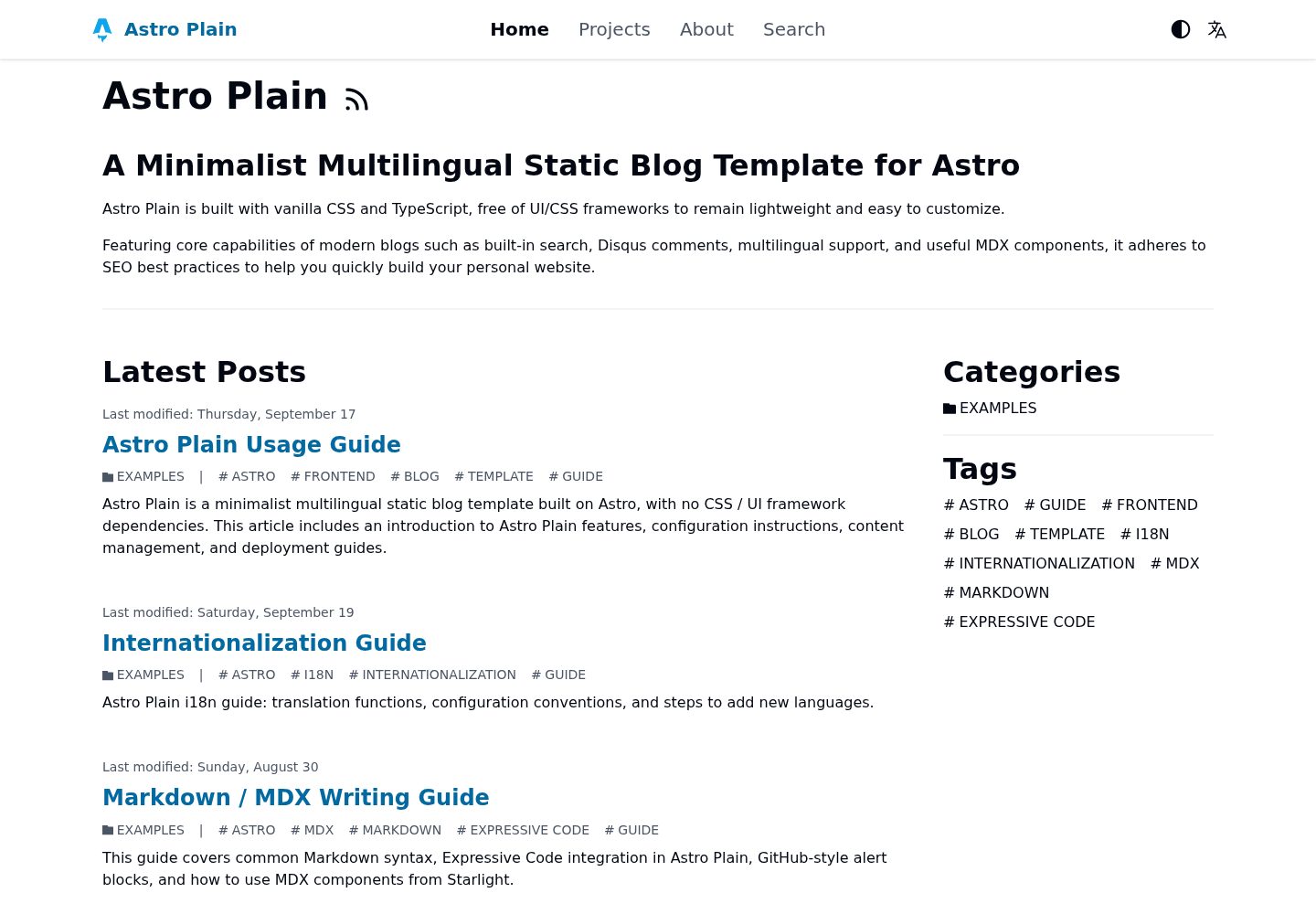
Compare the page layouts and mobile experience. Open any screenshot for a closer look.
Desktop homepage1 / 3
Desktop captureTop of page
Actual screenshot captured by the server browser.
All pages & views 3
Screenshots show visual appearance; interactive behavior may differ.
Recorded 2026-10-02View source
What stands out
A quick read of the recorded project description.
Built-in routing for Simplified Chinese, English, and Japanese, with automatic language redirection
Automatically generates hreflang, x-default, Open Graph, sitemap, robots.txt, and per-language RSS
Integrates Pagefind offline full-text search with no additional configuration
Supports Markdown and MDX, with built-in components such as file trees, step-by-step instructions, tabs, and GitHub-style callouts
Disqus comments and Microsoft Clarity analytics can be enabled via configuration
Template Details
astro-plain is a blog template built with Astro static generation (SSG), positioned as minimalist, multilingual, and free of CSS/UI framework dependencies. It includes three sets of translations—Simplified Chinese, English, and Japanese—and uses ts-intl-astro to implement multilingual static routing by subpath, such as /zh-Hans/, /en-US/, and /ja-JP/, with automatic redirection based on a language preference cookie or browser language. The template automatically generates multilingual SEO tags (hreflang, x-default, Open Graph), a sitemap, robots.txt, and language-specific RSS feeds.
On the writing side, it uses Astro Content Layer and Zod to define type-safe content collections, supports Markdown and MDX, provides code highlighting via Expressive Code, and includes built-in MDX components such as file trees, step-by-step instructions, tabs, and GitHub-style callouts. Search uses Pagefind offline full-text search with no additional configuration required. The template also reserves toggles for Disqus comments and Microsoft Clarity analytics.
For content organization, articles go in src/content/blog/, authors go in src/content/author/<language code>/, project showcases go in src/content/project/, and homepage Hero content goes in src/content/mdx/<language code>/hero.mdx. Multilingual articles are linked by the same translationKey, which the template uses to generate language switch links and hreflang tags. Adding a new language requires modifying languageNameMap in site.config.ts, adding a dictionary under i18n/messages/, registering it in i18n/index.ts, and creating author files for the corresponding language.
The build output is pure static files, with the output directory being dist, deployable to any static hosting. The README provides deployment steps using Cloudflare Pages as an example. Note that Pagefind relies on build artifacts to generate its index; before using search in the development environment for the first time, a build must be run first, and the development server will not automatically rebuild the index after articles are added or modified.
AstroBlog
Is it right for your project?
Use Cases
- Personal blogs that need to publish content in Chinese, English, and Japanese simultaneously
- Blog projects that want pure static output and deployment to static hosting platforms
- Sites that prefer Markdown/MDX writing and need type-safe content collections
- Blogs that need offline full-text search without introducing an external search service
- Developers who want to build a multilingual content site with minimal dependencies
Suitable For
- Personal technical blog authors
- Developers who need multilingual content sites
- Users who prefer minimalist templates with no UI framework dependencies
- Static site projects using Astro that want to get started quickly
Getting started & customization
Use these recorded setup notes alongside the repository instructions for your chosen version.
- 1
After cloning the repository, install dependencies with npm, pnpm, or bun, then run the dev script to start the development server at the default address http://127.0.0.1:4321
- 2
Pagefind relies on static build artifacts to generate its index; before using search in the development environment for the first time, a build must be run first, and the development server will not automatically rebuild the index after articles are added or modified
- 3
Core site configuration is in site.config.ts, where you can set the default language, site URL, subpath prefix, posts per page, navigation links, OG image, and crawler toggles
- 4
The site title and description must be modified in i18n/messages/*.ts under common.header_title, common.site_title, and common.site_description
- 5
The build output directory is dist, deployable to static hosting platforms; the README uses Cloudflare Pages as an example, requiring the build command npm run build and output directory dist, and configuring environment variables such as SITE_URL as needed
License & source material
Usage conditions & limitations
Free to use · keep license noticeThis entry covers the free version in the public repository under the MIT license; the free scope is the code of this version and does not mean that external services or third-party assets are free.
Must comply with when using
- The code of this version may be used, modified, used commercially, and distributed for free.
- When distributing copies or substantial portions of the code, retain the original author's copyright notice and the complete MIT license notice.
- The code is provided as is; warranties and limitations of liability are governed by the original license and applicable law.
Additional costs & items to verify
- Disqus comments and Microsoft Clarity analytics are optional external services, disabled by default; enabling them requires registering accounts for the respective services and configuring a shortname or projectId, and may be subject to third-party terms of service and fees.
- Pagefind offline search relies on static build artifacts to generate its index: before using search in the development environment for the first time, a build must be run first, and the development server will not automatically rebuild the index after articles are added or modified.
- The README uses Cloudflare Pages as an example for deployment, requiring a Cloudflare account and connecting a GitHub repository; using this hosting service is subject to its terms and may involve account and external service costs.
- Demo images, fonts, icons, and other third-party assets must be checked against their respective licenses and cannot be judged solely by the code's MIT license.
- External services such as domains, hosting, databases, payments, or AI may incur additional charges.
View Original Text Basis
Permission is hereby granted, free of charge
Original License Text
Support for [Disqus](https://disqus.com/) comment system and [Microsoft Clarity](https://clarity.microsoft.com/) site analytics.
Original README
`Pagefind` relies on static build output to generate its index. You must run the build command at least once before using it in the development environment for the first time.
Original README
https://github.com/aaakul/astro-plain/blob/main/LICENSEhttps://github.com/aaakul/astro-plain/blob/main/README.mdLog in to the [Cloudflare Dashboard](https://dash.cloudflare.com), click **Compute -> Workers and Pages -> Create Application -> Continue to Pages**, and connect your GitHub repository.
Original README
Compiled by DeepSeek based on repository license and README ·2026-10-02. Results only cover the materials read; dependencies, images, fonts, and subsequent term changes are subject to their respective original texts.
Project checks & description sources
Template Information
- Source platforms
- Astro Themes
- Documentation and maintenance reference score
- More documented · 83 / 100
- Technologies
- Astro
- Website type
- Blog
How this score is calculated
Our heuristic uses license records (up to 30), a demo link (12), a preview (10), stars (15), recorded maintenance (15), description completeness (8), feature records (5) and classification data (5). It is not a code, security or performance test, or a Google score. A link does not establish tested functionality.
What to verify for this project
- Repository update recorded
- 2026-09-20
- Screenshot last checked
- 2026-10-02
A demo link is listed. Check it with your own content and viewport sizes; its presence does not confirm that forms, authentication or payments work.
The catalog identifies Astro as the primary stack. Check the actual dependency manifest and lockfile for versions and hosting requirements. These notes use recorded metadata, not a code audit or a deployment test.
Use a selection guide →How this description was prepared
AI-assisted description based on catalog records and repository material. Repository authors are not automatically the reviewers of this description.
Automatically checked against source and license rules; no manual editorial review.
Inspect the recorded source material
SHA-256: 8a8d3ce544ec42ecea4a9a530a33cb398ab6fd509ee7e811fd5ab7cae9e7eb85
2026-10-02T09:03:27.050Z
Source file / repository# Astro Plain

A minimalist multilingual static blog template built on [Astro](https://astro.build/), with no CSS / UI framework dependencies.
[View Live Demo](https://astro-plain-demo.pages.dev) · [Lighthouse 100/100 Report](https://pagespeed.web.dev/analysis/https-astro-plain-demo-pages-dev-en-US-blog-sample-intro/koeoulhg15?form_factor=mobile)
[简体中文](/README.zh-Hans.md) | [日本語](/README.ja-JP.md)
## Features
- **High-Performance Minimal Architecture**: Built on [Astro](https://astro.build/) Static Site Generation (SSG), with no CSS / UI framework dependencies. Achieves a perfect 100/100 Lighthouse score across all categories.
- **Internationalization (i18n) & SEO**:
- Built-in Simplified Chinese, English, and Japanese translations, powered by [`ts-intl-astro`](https://github.com/aaakul/ts-intl).
- Subpath-based static multilingual routing (e.g., `/zh-Hans/`, `/en-US/`, `/ja-JP/`).
- Smart language redirect: automatically selects the site language based on language preference cookie or browser language.
- Automatic generation of multilingual SEO tags (`hreflang` / `x-default` / Open Graph).
- Automatic generation of sitemap, `robots.txt`, and per-language RSS feeds.
- **Offline Full-Text Search**: Integrated [Pagefind](https://pagefind.app/) static search engine, zero configuration required.
- **Modern Markdown / MDX Writing Experience**:
- Type-safe content collections based on Zod and [Astro Content Layer](https://docs.astro.build/en/guides/content-collections/).
- Code highlighting powered by [Expressive Code](https://expressive-code.com/).
- Built-in utility MDX components: file tree ([`FileTree`](https://starlight.astro.build/en/guides/components/#file-tree)), step-by-step instructions ([`Steps`](https://starlight.astro.build/en/guides/components/#steps)), tabs ([`Tabs`](https://starlight.astro.build/en/guides/components/#tabs)), and GitHub-style alert blockquotes ([`remark-github-blockquote-alert`](https://github.com/jaywcjlove/remark-github-blockquote-alert))
.
- **Other Features**: Support for [Disqus](https://disqus.com/) comment system and [Microsoft Clarity](https://clarity.microsoft.com/) site analytics.
## Getting Started
### Installation
1. Clone the repository:
```bash
git clone https://github.com/Aaakul/astro-plain.git
cd astro-plain
```
2. Install dependencies:
```bash
# npm
npm install
# pnpm
pnpm install
# bun
bun install
```
3. Start the development server:
```bash
# npm
npm run dev
# pnpm
pnpm run dev
# bun
bun --bun run dev
```
The development server runs at `http://127.0.0.1:4321` by default.
> [!NOTE]
> `Pagefind` relies on static build output to generate its index. You must run the build command at least once before using it in the development environment for the first time.
> After adding or modifying posts, the dev server will not automatically regenerate the search index.
## Configuration
### Site Configuration
The core configuration file is `site.config.ts`, with key options as follows:
| Option | Description | Default |
| :---------------- | :------------------------------------------------------------------------------- | :------------------------ |
| `defaultLanguage` | Default language code | `"zh-Hans"` |
| `siteUrl` | Site URL (can also be set via environment variable `SITE_URL`) | `"http://127.0.0.1:4321"` |
| `basePath` | Subpath deployment prefix (can also be set via environment variable `BASE_PATH`) | `""` |
| `languageNameMap` | Mapping of language codes to display names | See config file |
| `postsPerPage` | Number of posts per page in the blog list | `5` |
| `navLinks` | Top navigation bar links | See config file |
| `ogImage` | Default social sharing image (OG Image), recommended size 1200x630 | `"/static/images/og.jpg"` |
| `allowRobots` | Whether to allow crawlers | `true` |
| `disqus` | Disqus comments (`enable` + `shortname`) | Disabled |
| `clarity` | Microsoft Clarity (`enable` + `projectId`) | Disabled |
### Environment Variables
Refer to the comments in `.env.example` to create a `.env` file, where you can set `SITE_URL`, `BASE_PATH`, as well as Disqus and Clarity services.
### Modifying Site Title and Description
Modify the following fields in the translation files `i18n/messages/*.ts`:
- `common.header_title`
- `common.site_title`
- `common.site_description`
### Replacing Favicons and Images
Replace the following files:
- `public/favicon.ico`
- `public/favicon.svg`
- `public/apple-touch-icon.png`
- `public/static/images/og.jpg`
- `src/assets/*`
## Content Creation
Content files are located in `src/content/`, with schemas defined in `src/content.config.ts`.
### Hero Section
Corresponding files are located at `src/content/mdx/<language-code>/hero.mdx`.
### Posts (`src/content/blog/`)
Both Markdown and MDX formats are supported. Post Frontmatter example:
```yaml
---
title: "Post Title" # Required
translationKey: "unique-key" # Required: used to associate posts across different language versions
language: "zh-Hans" # Required: language code, must be declared in languageNameMap
date: "2026-08-30T10:00:00Z" # Required: ISO 8601 format
summary: "Post summary" # Optional: used for list display and SEO
lastmod: "2026-08-30T12:00:00Z" # Optional: last modified date
isCanonical: true # Optional: set as canonical language version (generates x-default/canonical)
draft: false # Optional: drafts are excluded from builds
authors: ["default"] # Optional: author list
categories: ["Tech"] # Optional
tags: ["Astro"] # Optional
image: "@/assets/banner.jpg" # Optional: post cover image
enableComments: false # Optional: whether to enable comments, defaults to true
---
```
> [!NOTE]
> Multilingual association (`translationKey`): For the same post in different languages, declare the same `translationKey` in their respective Frontmatter, and the template will automatically generate language switcher links and hreflang tags.
### Authors (`src/content/author/<language-code>/`)
The default author file is `default.mdx`. Example:
```yaml
---
name: "Author Name" # Required
language: "zh-Hans" # Required
avatar: "@/assets/avatar.svg"
occupation: "Occupation"
company: "Company Name"
email: "[email protected]"
link:
github: "https://github.com/username"
---
```
### Project Showcase (`src/content/project/`)
```yaml
---
name: "Astro Plain" # Required: project title
language: "zh-Hans" # Required: language code
website: "https://example.com"
image: "@/assets/project-preview.png"
link:
github: "https://github.com/Aaakul/astro-plain"
---
Body content...
```
### Adding a New Language
1. Add the language code to `languageNameMap` in `site.config.ts` (e.g., `"fr-FR": "Français"`).
2. Create the corresponding translation dictionary file under `i18n/messages/` (e.g., `fr-FR.ts`).
3. Import and register the dictionary in `createI18n` in `i18n/index.ts`.
4. Create an author file containing at least `default.mdx` under `src/content/author/<language-code>/`.
## Deployment
The project outputs pure static files upon build completion, with the output directory being `dist`.
### Example: Cloudflare Pages
1. Fork this repository to your own GitHub account.
2. Log in to the [Cloudflare Dashboard](https://dash.cloudflare.com), click **Compute -> Workers and Pages -> Create Application -> Continue to Pages**, and connect your GitHub repository.
3. Configure build settings:
- **Build command**:
```bash
npm run build
```
- **Build output directory**: `dist`
- **Environment variables**: Set `SITE_URL` to the domain after deployment (e.g., `https://example.pages.dev`), and configure Disqus and Clarity variables as needed.
4. Save and deploy. Any subsequent push to the `main` branch will automatically trigger a new build and deployment.
## License
This project is open-sourced under the MIT License. Stars, PRs, and Issues are welcome.
Explore similar templates
Compare previews and descriptions within the same stack and category.

astrowind
AstroWind is a free, open-source Astro starter theme using Astro and Tailwind CSS, released under the MIT license.
Astro · Blog

astro-paper
AstroPaper is a minimal, responsive, accessible, and SEO-friendly Astro blog theme. Articles are stored as Markdown/MDX in src/content/posts/, with subdirectories affecting URLs.
Astro · Blog

fuwari
Fuwari is a static blog template built with Astro and Tailwind CSS for personal blogs. It manages posts as Markdown files in src/content/posts/, with frontmatter for title, date, description, cover, tags, categories, draft status, and language.
Astro · Blog

Firefly
Firefly is a clean personal blog theme forked from Astro and Fuwari, offering four background modes, single/double sidebar and list/grid layouts, Pagefind client-side full-text search, and a six-language UI.
Astro · Blog

astro-theme-cactus
Astro Cactus is an Astro-based blog and portfolio theme that uses Markdown/MDX content collections to manage posts, notes, and tags, with frontmatter type-checked by a schema.
Astro · Portfolio

astrofy
Astrofy is a free and open-source personal portfolio website template built with Astro and TailwindCSS, with built-in blog, CV timeline, project showcase, store, and RSS feed modules.
Astro · Portfolio