基于 Astro 静态生成,不依赖任何 CSS 或 UI 框架
Astro博客
astro-plain — Astro 博客模板
作者 aaakul
基于 Astro 的极简多语言静态博客模板,不依赖任何 CSS 或 UI 框架,内置中英日三语路由、离线全文搜索与 MDX 写作组件。
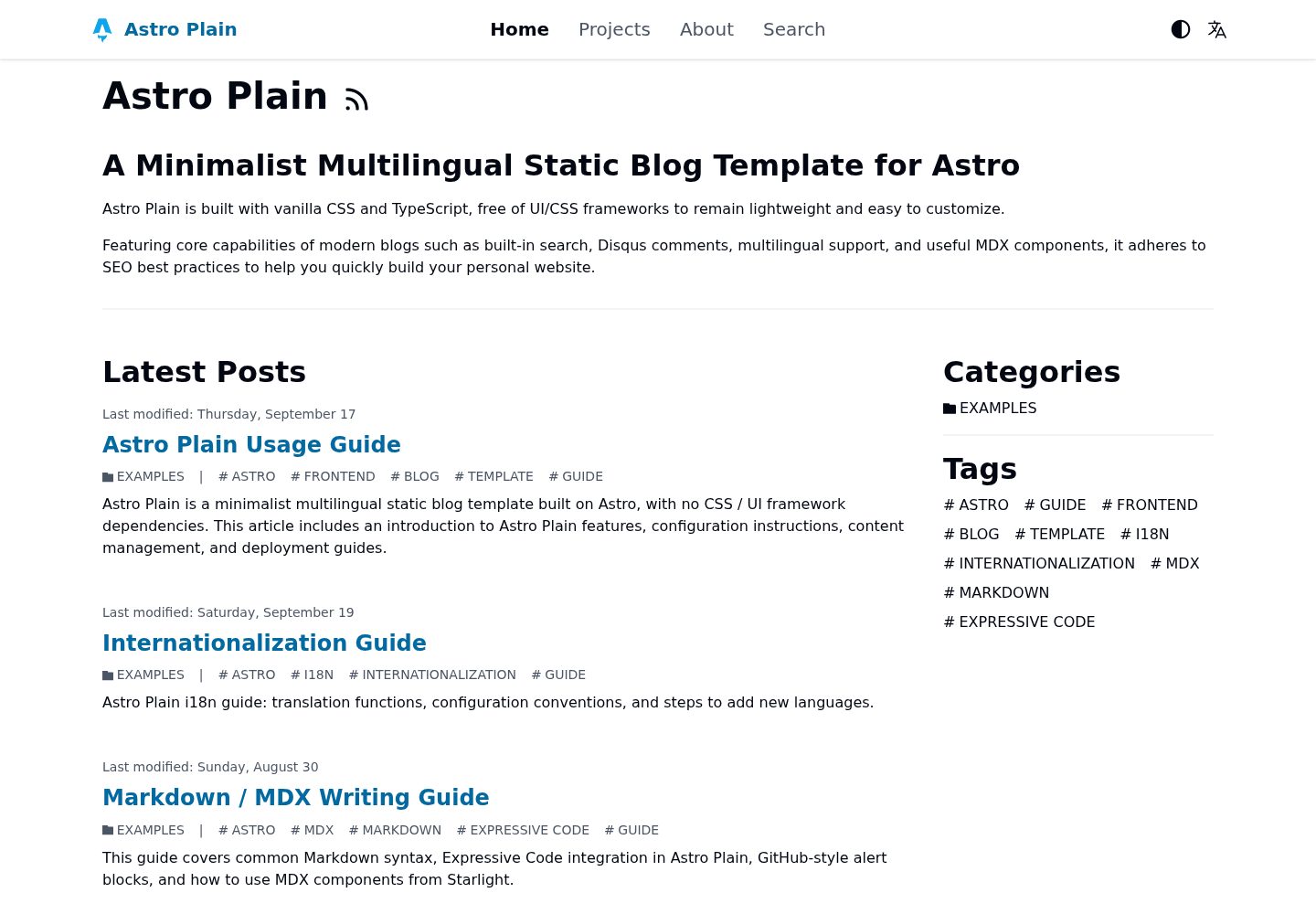
看看你的网站会是什么样
浏览真实页面截图,比较内容排版与手机效果。点击下方缩略图切换,放大查看整页细节。
全部页面与视图 3
截图用于了解视觉与布局,交互效果请以实际项目为准。
采集于 2026-10-02查看来源
值得关注的模板亮点
从已有项目资料中,快速了解它的特点。
内置简体中文、英语、日语三语路由与语言自动跳转
自动生成 hreflang、x-default、Open Graph、站点地图、robots.txt 和分语言 RSS
集成 Pagefind 离线全文搜索,无需额外配置
支持 Markdown 与 MDX,内置文件树、分步说明、标签页、GitHub 风格提示块等组件
可通过配置启用 Disqus 评论和 Microsoft Clarity 统计
模板详细介绍
astro-plain 是一个用 Astro 静态生成(SSG)构建的博客模板,定位是极简、多语言、无 CSS/UI 框架依赖。它自带简体中文、英语和日语三套翻译,通过 ts-intl-astro 实现按子路径区分的多语言静态路由,例如 /zh-Hans/、/en-US/、/ja-JP/,并可根据语言偏好 cookie 或浏览器语言自动跳转。模板会自动生成多语言 SEO 标签(hreflang、x-default、Open Graph)、站点地图、robots.txt 以及按语言区分的 RSS 订阅源。
写作侧使用 Astro Content Layer 与 Zod 定义类型安全的内容集合,支持 Markdown 和 MDX,代码高亮由 Expressive Code 提供,并内置文件树、分步说明、标签页和 GitHub 风格提示块等 MDX 组件。搜索使用 Pagefind 离线全文搜索,无需额外配置。模板还预留了 Disqus 评论和 Microsoft Clarity 统计的开关。
内容组织上,文章放在 src/content/blog/,作者放在 src/content/author/<语言代码>/,项目展示放在 src/content/project/,首页 Hero 内容放在 src/content/mdx/<语言代码>/hero.mdx。多语言文章通过相同的 translationKey 关联,模板据此生成语言切换链接和 hreflang 标签。新增语言需要修改 site.config.ts 的 languageNameMap、在 i18n/messages/ 下新增词典、在 i18n/index.ts 注册,并创建对应语言的作者文件。
构建产物为纯静态文件,输出目录是 dist,可部署到任意静态托管。README 以 Cloudflare Pages 为例给出部署步骤。需要注意的是,Pagefind 依赖构建产物生成索引,首次在开发环境使用搜索前必须先执行一次构建,且新增或修改文章后开发服务器不会自动重建索引。
Astro博客
适合你的项目吗?
适用场景
- 需要同时以中文、英文、日文发布内容的个人博客
- 希望使用纯静态输出并部署到静态托管平台的博客项目
- 偏好 Markdown/MDX 写作并需要类型安全内容集合的站点
- 需要离线全文搜索而不引入外部搜索服务的博客
- 想以最小依赖搭建多语言内容站点的开发者
适合人群
- 个人技术博客作者
- 需要多语言内容站点的开发者
- 偏好极简、无 UI 框架依赖模板的用户
- 使用 Astro 并希望快速起步的静态站点项目
上手与定制指南
结合仓库当前版本的说明,按下面的资料检查内容、配置与运行要求。
- 1
克隆仓库后使用 npm、pnpm 或 bun 安装依赖,再运行 dev 脚本启动开发服务器,默认地址为 http://127.0.0.1:4321
- 2
Pagefind 依赖静态构建产物生成索引,首次在开发环境使用搜索前必须先执行一次构建,且新增或修改文章后开发服务器不会自动重建索引
- 3
站点核心配置在 site.config.ts,可设置默认语言、站点 URL、子路径前缀、每页文章数、导航链接、OG 图片和爬虫开关等
- 4
站点标题与描述需在 i18n/messages/*.ts 中修改 common.header_title、common.site_title、common.site_description
- 5
构建输出目录为 dist,可部署到静态托管平台;README 以 Cloudflare Pages 为例,需设置构建命令 npm run build 和输出目录 dist,并按需配置 SITE_URL 等环境变量
授权与来源资料
使用条件与限制
免费使用 · 保留许可声明本次收录的是公开仓库中采用 MIT 许可的免费版本;免费范围为该版本代码,不代表外部服务或第三方素材免费。
使用时需要遵守
- 允许免费使用、修改、商用和分发该版本代码。
- 分发代码副本或实质性部分时,保留原作者版权声明和完整 MIT 许可声明。
- 代码按现状提供;担保与责任限制以原许可证及适用法律为准。
额外费用与待核对事项
- Disqus 评论与 Microsoft Clarity 统计为可选外部服务,默认关闭;启用需自行注册对应服务账号并配置 shortname 或 projectId,可能受第三方服务条款与费用约束。
- Pagefind 离线搜索依赖静态构建产物生成索引:首次在开发环境使用搜索前必须先执行一次构建,且新增或修改文章后开发服务器不会自动重建索引。
- README 以 Cloudflare Pages 为例部署,需登录 Cloudflare 账号并连接 GitHub 仓库;使用该托管服务需遵守其条款,可能涉及账号与外部服务成本。
- 演示图片、字体、图标及其他第三方素材需按各自许可核对,不能仅凭代码的 MIT 许可判断。
- 域名、托管、数据库、支付或 AI 等外部服务可能另外收费。
查看原文依据
Permission is hereby granted, free of charge
许可证原文
Support for [Disqus](https://disqus.com/) comment system and [Microsoft Clarity](https://clarity.microsoft.com/) site analytics.
README 原文
`Pagefind` relies on static build output to generate its index. You must run the build command at least once before using it in the development environment for the first time.
README 原文
https://github.com/aaakul/astro-plain/blob/main/LICENSEhttps://github.com/aaakul/astro-plain/blob/main/README.mdLog in to the [Cloudflare Dashboard](https://dash.cloudflare.com), click **Compute -> Workers and Pages -> Create Application -> Continue to Pages**, and connect your GitHub repository.
README 原文
DeepSeek 根据仓库许可证和 README 整理 ·2026-10-02。结果仅覆盖已读取资料,依赖、图片、字体及后续条款变更以各自原文为准。
项目核对记录与介绍依据
模板资料
- 来源平台
- Astro Themes
- 资料与维护参考分
- 资料较完整 · 83 / 100
- 技术栈
- Astro
- 网站类型
- 博客
这个分数如何计算
本站按许可资料(最高30分)、演示链接(12分)、预览图(10分)、Star数(15分)、记录的维护时间(15分)、描述完整度(8分)、功能记录(5分)和分类资料(5分)计算。它不是代码、安全或性能测试,也不是 Google 评分;有链接不代表已实测可用。
这个项目需要核对什么
- 记录的仓库更新时间
- 2026-09-20
- 截图检查日期
- 2026-10-02
已收录演示链接。请用你的内容与屏幕尺寸检查;有演示不代表表单、认证或支付已经可用。
目录记录的主要技术栈是 Astro。请通过依赖清单和锁文件核对实际版本与托管要求。这些说明基于收录资料,不代表代码审计或部署实测。
查看具体选型方法 →介绍的制作与核对状态
介绍由 AI 辅助整理目录与仓库资料。仓库作者不等于这篇介绍的审核者。
已完成服务器许可规则与 AI 来源核对;未经过人工编辑审核。
查看当时使用的来源资料
SHA-256: 8a8d3ce544ec42ecea4a9a530a33cb398ab6fd509ee7e811fd5ab7cae9e7eb85
2026-10-02T09:03:27.050Z
来源文件 / 仓库# Astro Plain

A minimalist multilingual static blog template built on [Astro](https://astro.build/), with no CSS / UI framework dependencies.
[View Live Demo](https://astro-plain-demo.pages.dev) · [Lighthouse 100/100 Report](https://pagespeed.web.dev/analysis/https-astro-plain-demo-pages-dev-en-US-blog-sample-intro/koeoulhg15?form_factor=mobile)
[简体中文](/README.zh-Hans.md) | [日本語](/README.ja-JP.md)
## Features
- **High-Performance Minimal Architecture**: Built on [Astro](https://astro.build/) Static Site Generation (SSG), with no CSS / UI framework dependencies. Achieves a perfect 100/100 Lighthouse score across all categories.
- **Internationalization (i18n) & SEO**:
- Built-in Simplified Chinese, English, and Japanese translations, powered by [`ts-intl-astro`](https://github.com/aaakul/ts-intl).
- Subpath-based static multilingual routing (e.g., `/zh-Hans/`, `/en-US/`, `/ja-JP/`).
- Smart language redirect: automatically selects the site language based on language preference cookie or browser language.
- Automatic generation of multilingual SEO tags (`hreflang` / `x-default` / Open Graph).
- Automatic generation of sitemap, `robots.txt`, and per-language RSS feeds.
- **Offline Full-Text Search**: Integrated [Pagefind](https://pagefind.app/) static search engine, zero configuration required.
- **Modern Markdown / MDX Writing Experience**:
- Type-safe content collections based on Zod and [Astro Content Layer](https://docs.astro.build/en/guides/content-collections/).
- Code highlighting powered by [Expressive Code](https://expressive-code.com/).
- Built-in utility MDX components: file tree ([`FileTree`](https://starlight.astro.build/en/guides/components/#file-tree)), step-by-step instructions ([`Steps`](https://starlight.astro.build/en/guides/components/#steps)), tabs ([`Tabs`](https://starlight.astro.build/en/guides/components/#tabs)), and GitHub-style alert blockquotes ([`remark-github-blockquote-alert`](https://github.com/jaywcjlove/remark-github-blockquote-alert))
.
- **Other Features**: Support for [Disqus](https://disqus.com/) comment system and [Microsoft Clarity](https://clarity.microsoft.com/) site analytics.
## Getting Started
### Installation
1. Clone the repository:
```bash
git clone https://github.com/Aaakul/astro-plain.git
cd astro-plain
```
2. Install dependencies:
```bash
# npm
npm install
# pnpm
pnpm install
# bun
bun install
```
3. Start the development server:
```bash
# npm
npm run dev
# pnpm
pnpm run dev
# bun
bun --bun run dev
```
The development server runs at `http://127.0.0.1:4321` by default.
> [!NOTE]
> `Pagefind` relies on static build output to generate its index. You must run the build command at least once before using it in the development environment for the first time.
> After adding or modifying posts, the dev server will not automatically regenerate the search index.
## Configuration
### Site Configuration
The core configuration file is `site.config.ts`, with key options as follows:
| Option | Description | Default |
| :---------------- | :------------------------------------------------------------------------------- | :------------------------ |
| `defaultLanguage` | Default language code | `"zh-Hans"` |
| `siteUrl` | Site URL (can also be set via environment variable `SITE_URL`) | `"http://127.0.0.1:4321"` |
| `basePath` | Subpath deployment prefix (can also be set via environment variable `BASE_PATH`) | `""` |
| `languageNameMap` | Mapping of language codes to display names | See config file |
| `postsPerPage` | Number of posts per page in the blog list | `5` |
| `navLinks` | Top navigation bar links | See config file |
| `ogImage` | Default social sharing image (OG Image), recommended size 1200x630 | `"/static/images/og.jpg"` |
| `allowRobots` | Whether to allow crawlers | `true` |
| `disqus` | Disqus comments (`enable` + `shortname`) | Disabled |
| `clarity` | Microsoft Clarity (`enable` + `projectId`) | Disabled |
### Environment Variables
Refer to the comments in `.env.example` to create a `.env` file, where you can set `SITE_URL`, `BASE_PATH`, as well as Disqus and Clarity services.
### Modifying Site Title and Description
Modify the following fields in the translation files `i18n/messages/*.ts`:
- `common.header_title`
- `common.site_title`
- `common.site_description`
### Replacing Favicons and Images
Replace the following files:
- `public/favicon.ico`
- `public/favicon.svg`
- `public/apple-touch-icon.png`
- `public/static/images/og.jpg`
- `src/assets/*`
## Content Creation
Content files are located in `src/content/`, with schemas defined in `src/content.config.ts`.
### Hero Section
Corresponding files are located at `src/content/mdx/<language-code>/hero.mdx`.
### Posts (`src/content/blog/`)
Both Markdown and MDX formats are supported. Post Frontmatter example:
```yaml
---
title: "Post Title" # Required
translationKey: "unique-key" # Required: used to associate posts across different language versions
language: "zh-Hans" # Required: language code, must be declared in languageNameMap
date: "2026-08-30T10:00:00Z" # Required: ISO 8601 format
summary: "Post summary" # Optional: used for list display and SEO
lastmod: "2026-08-30T12:00:00Z" # Optional: last modified date
isCanonical: true # Optional: set as canonical language version (generates x-default/canonical)
draft: false # Optional: drafts are excluded from builds
authors: ["default"] # Optional: author list
categories: ["Tech"] # Optional
tags: ["Astro"] # Optional
image: "@/assets/banner.jpg" # Optional: post cover image
enableComments: false # Optional: whether to enable comments, defaults to true
---
```
> [!NOTE]
> Multilingual association (`translationKey`): For the same post in different languages, declare the same `translationKey` in their respective Frontmatter, and the template will automatically generate language switcher links and hreflang tags.
### Authors (`src/content/author/<language-code>/`)
The default author file is `default.mdx`. Example:
```yaml
---
name: "Author Name" # Required
language: "zh-Hans" # Required
avatar: "@/assets/avatar.svg"
occupation: "Occupation"
company: "Company Name"
email: "[email protected]"
link:
github: "https://github.com/username"
---
```
### Project Showcase (`src/content/project/`)
```yaml
---
name: "Astro Plain" # Required: project title
language: "zh-Hans" # Required: language code
website: "https://example.com"
image: "@/assets/project-preview.png"
link:
github: "https://github.com/Aaakul/astro-plain"
---
Body content...
```
### Adding a New Language
1. Add the language code to `languageNameMap` in `site.config.ts` (e.g., `"fr-FR": "Français"`).
2. Create the corresponding translation dictionary file under `i18n/messages/` (e.g., `fr-FR.ts`).
3. Import and register the dictionary in `createI18n` in `i18n/index.ts`.
4. Create an author file containing at least `default.mdx` under `src/content/author/<language-code>/`.
## Deployment
The project outputs pure static files upon build completion, with the output directory being `dist`.
### Example: Cloudflare Pages
1. Fork this repository to your own GitHub account.
2. Log in to the [Cloudflare Dashboard](https://dash.cloudflare.com), click **Compute -> Workers and Pages -> Create Application -> Continue to Pages**, and connect your GitHub repository.
3. Configure build settings:
- **Build command**:
```bash
npm run build
```
- **Build output directory**: `dist`
- **Environment variables**: Set `SITE_URL` to the domain after deployment (e.g., `https://example.pages.dev`), and configure Disqus and Clarity variables as needed.
4. Save and deploy. Any subsequent push to the `main` branch will automatically trigger a new build and deployment.
## License
This project is open-sourced under the MIT License. Stars, PRs, and Issues are welcome.
看看同类模板
对比同技术栈与用途的模板,找到更适合的视觉与内容结构。

astrowind
⭕️ AstroWind: A free template using Astro v7 and Tailwind CSS v4. Astro starter theme.
Astro · 博客

astro-paper
A minimal, accessible and SEO-friendly Astro blog theme.
Astro · 博客

fuwari
✨A static blog template built with Astro.
Astro · 博客

Firefly
Firefly 是一款基于 Astro 的静态博客主题,由 CuteLeaf 在 saicaca 的 Fuwari 模板基础上二次开发,主打清新美观的视觉风格。
Astro · 博客

astro-theme-cactus
A simple Astro theme. Use it to create your blog or website.
Astro · 作品集

astrofy
Astrofy is a free and open-source template for your Personal Portfolio Website built with Astro and TailwindCS…
Astro · 作品集