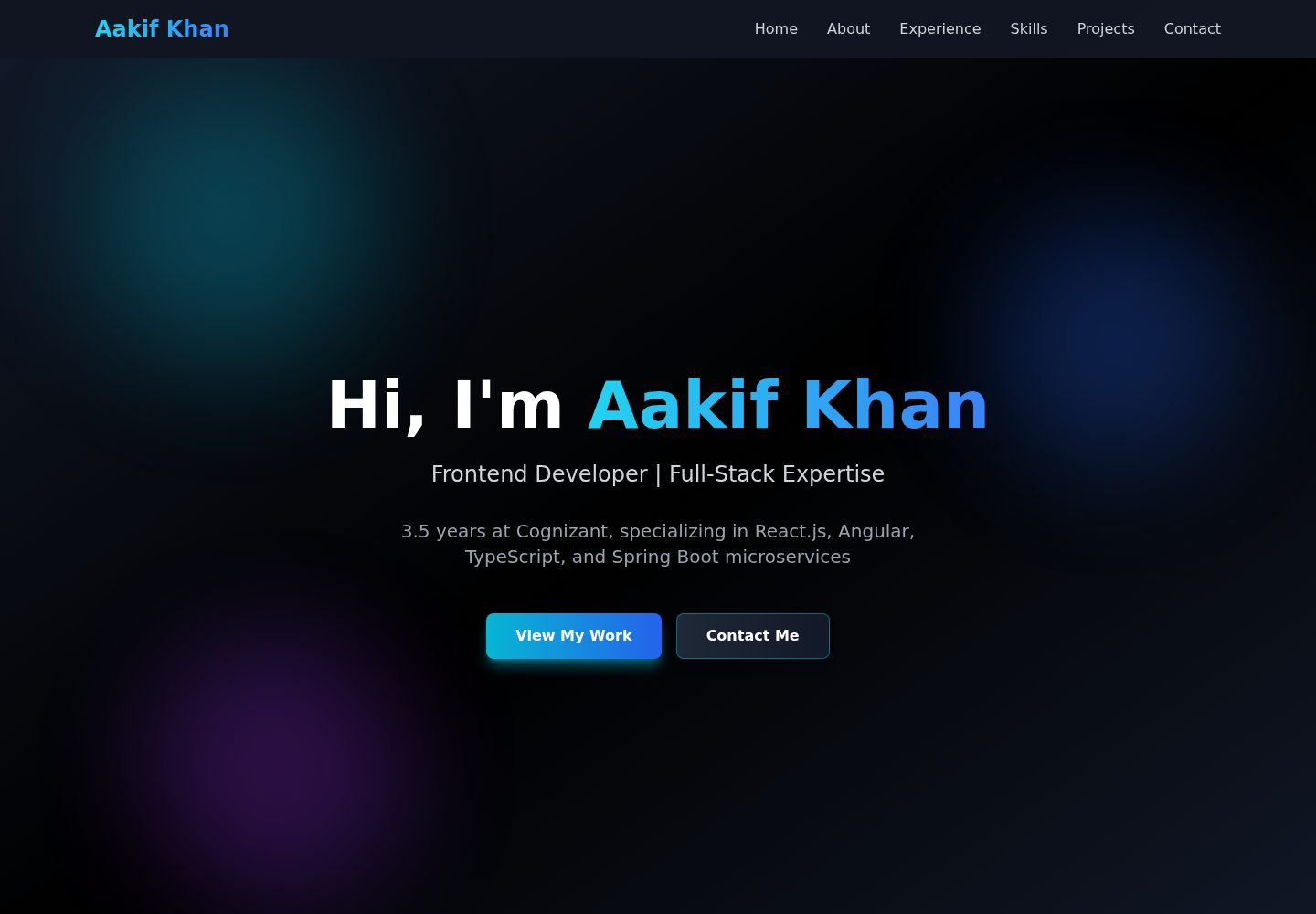
Single-page portfolio structure with navigation, Hero, About, Experience, Skills, Projects, contact form, and footer components
Next.jsReactPortfolio
portfolio-app — Next.js Portfolio Template
By aakif123
A personal portfolio website template built with Next.js and TypeScript, using a dark theme. It includes navigation, Hero, About, Experience, Skills, Projects, contact form, and footer sections, styled with Tailwind CSS and custom CSS animations. The contact form submits via Web3Forms.
Explore the design
Compare the page layouts and mobile experience. Open any screenshot for a closer look.
Desktop homepage1 / 2
Desktop captureTop of page
Actual screenshot captured by the server browser.
All pages & views 2
Screenshots show visual appearance; interactive behavior may differ.
Recorded 2026-10-13View source
What stands out
A quick read of the recorded project description.
Dark theme with cyan and blue gradient accents, using the Poppins font
Custom CSS animations: fade-in, move-up, and background blob movement in the Hero section
Skills section displays proficiency with progress bars; experience cards expand on hover to show responsibilities and skill details
Contact form submits via Web3Forms, with form validation and loading, success, and failure states
Portfolio data is centralized in src/lib/data.ts for easy replacement with personal content
Template Details
This is a Next.js template for building a personal portfolio page. The repository is aakif123/portfolio-app and is MIT licensed. The page is organized as a single-page layout with sections: fixed navigation bar, full-screen Hero, About, Experience, Skills, Projects, contact form, and footer. Each section is implemented as a separate component under src/components, and portfolio data is centralized in src/lib/data.ts.
Visually, it uses a dark background with cyan/blue gradient accents, the Poppins font from Google Fonts, and animations including custom CSS fade-in, move-up, and background blob movement, as well as skill progress bars and experience cards that expand on hover. The contact form integrates Web3Forms, with submission states for loading, success, and failure.
Before use, note: the template content is sample data, including experience, skill percentages, project entries, and Unsplash placeholder images, which need to be replaced with your own information. The Web3Forms access key for the contact form is hardcoded in the code and should be replaced with your own key. A personal photo must be placed as public/profile.jpg. The README mentions that Framer Motion and EmailJS are installed but used sparingly or not enabled; the actual contact form solution in effect is Web3Forms. The repository does not provide environment variable configuration, and deployment instructions use Vercel as an example.
Next.jsPortfolio
Is it right for your project?
Use Cases
- Building a single-page portfolio website for a developer or designer
- As a starting point for practicing or modifying Next.js App Router and Tailwind CSS
- When you need a portfolio page with a contact form and want to use a third-party form service to receive emails
Suitable For
- Developers familiar with Next.js and TypeScript who can replace the sample data in the components themselves
- Those who want to quickly obtain a dark-themed portfolio page structure and then adjust styles as needed
- Users who accept using an external form service such as Web3Forms to handle contact form submissions
Getting started & customization
Use these recorded setup notes alongside the repository instructions for your chosen version.
- 1
After cloning the repository, run npm install, then start the local development server with npm run dev (default http://localhost:3000)
- 2
Name your personal photo profile.jpg and place it in the public directory; the README recommends a square image of 800x800
- 3
Replace the experience, skills, and project data in src/lib/data.ts, as well as the Unsplash placeholder images used in the projects section
- 4
The Web3Forms access key for the contact form is written in the code; replace it with your own key and confirm the receiving email
- 5
The README states that no environment variables are currently required; if switching to EmailJS, you need to configure its Service ID, Template ID, and Public Key yourself
License & source material
Usage conditions & limitations
Free to use · keep license noticeThis entry covers the free version from the public repository under the MIT license; the free scope is the code of this version and does not imply that external services or third-party assets are free.
Must comply with when using
- You are allowed to use, modify, commercially use, and distribute the code of this version for free.
- When distributing copies or substantial portions of the code, retain the original author's copyright notice and the full MIT license notice.
- The code is provided as is; warranties and limitations of liability are governed by the original license and applicable law.
Additional costs & items to verify
- Demo images, fonts, icons, and other third-party assets must be checked against their respective licenses; they cannot be judged solely by the code's MIT license.
- External services such as domains, hosting, databases, payments, or AI may incur additional charges.
- The contact form relies on the third-party service Web3Forms, and the author's access key and receiving email are hardcoded in the code; users must replace them with their own key and email, otherwise form submissions will be sent to the author's email.
- If switching to the EmailJS solution, you need to register an EmailJS account and obtain credentials such as Service ID, Template ID, and Public Key yourself.
- The projects section uses Unsplash placeholder images, which need to be replaced; using these images may involve third-party asset licensing issues.
- The acknowledgments section states that the project placeholder images come from Unsplash and are third-party assets, whose license is independent of the project code license.
- Before use, you need to prepare and place a personal photo as public/profile.jpg; the template itself does not include this image.
View Original Text Basis
Permission is hereby granted, free of charge
Original License Text
- **Access Key**: `6ef92cff-a83c-43fa-833b-9b387ba60caf` - **Email**: [email protected] - **Features**: Unlimited submissions, no signup required
Original README
### Alternative: EmailJS (Installed but not active) To switch to EmailJS: 1. Sign up at [emailjs.com](https://www.emailjs.com) 2. Get Service ID, Template ID, Public Key
Original README
- Project image (Unsplash placeholders)
Original README
- Unsplash for project placeholder images
Original README
https://github.com/aakif123/portfolio-app/blob/master/LICENSEhttps://github.com/aakif123/portfolio-app/blob/master/README.md- Place your photo as `profile.jpg` in the `public/` folder
Original README
Compiled by DeepSeek based on repository license and README ·2026-10-13. Results only cover the materials read; dependencies, images, fonts, and subsequent term changes are subject to their respective original texts.
Project checks & description sources
Template Information
- Source platforms
- GitHub
- Documentation and maintenance reference score
- More documented · 80 / 100
- Technologies
- Next.js · React
- Website type
- Portfolio
How this score is calculated
Our heuristic uses license records (up to 30), a demo link (12), a preview (10), stars (15), recorded maintenance (15), description completeness (8), feature records (5) and classification data (5). It is not a code, security or performance test, or a Google score. A link does not establish tested functionality.
What to verify for this project
- Repository update recorded
- 2026-05-01
- Screenshot last checked
- 2026-10-13
A demo link is listed. Check it with your own content and viewport sizes; its presence does not confirm that forms, authentication or payments work.
The catalog identifies Next.js as the primary stack. Check the actual dependency manifest and lockfile for versions and hosting requirements. These notes use recorded metadata, not a code audit or a deployment test.
Use a selection guide →How this description was prepared
AI-assisted description based on catalog records and repository material. Repository authors are not automatically the reviewers of this description.
Review declaration: [email protected] · 2026-10-13
Inspect the recorded source material
SHA-256: 9f7d6c7b9741d87f22eb572a0b265ede5f640977522ccc302abed8995fe7472a
2026-10-13T06:55:37.645Z
Source file / repository# Aakif Khan - Portfolio Website A modern, responsive portfolio website built with Next.js 14, TypeScript, and Tailwind CSS, featuring dark theme, smooth animations, and a professional contact form. 🌐 **Live Demo**: [aakif-khan-portfolio.vercel.app](https://aakif-khan-portfolio.vercel.app/) 📧 **Email**: [email protected] 💼 **LinkedIn**: [linkedin.com/in/aakifkhan1299](https://linkedin.com/in/aakifkhan1299) 👨💻 **GitHub**: [github.com/aakifkhan1299](https://github.com/aakifkhan1299) --- ## 🚀 Technologies Used ### Frontend Framework - **Next.js 14.2.35** - React framework with App Router - **React 18.3.0** - UI library - **TypeScript 5.4.0** - Type safety ### Styling & UI - **Tailwind CSS 3.4.0** - Utility-first CSS framework - **Poppins Font** - Google Fonts integration - **Custom CSS Animations** - Fade-in, slide-up, blob animations ### Additional Libraries - **Framer Motion 11.0.0** - Animation library (installed, minimal usage) - **EmailJS** - Email service integration (installed) - **Web3Forms** - Contact form backend (active implementation) ### Development Tools - **ESLint** - Code linting - **PostCSS** - CSS processing - **Git** - Version control - **Vercel** - Deployment platform --- ## 📋 Features ### Core Features ✅ **Fully Responsive Design** - Mobile-first approach, works on all devices ✅ **Dark Theme** - Black gradients with cyan/blue accents ✅ **Smooth Animations** - Custom CSS and Framer Motion animations ✅ **SEO Optimized** - Meta tags, semantic HTML ✅ **Fast Performance** - Next.js optimization, lazy loading ✅ **Contact Form** - Web3Forms integration with email notifications ✅ **Professional Typography** - Poppins font family ### Interactive Elements - Smooth scroll navigation - Hover effects on all interactive elements - Animated background blobs in Hero section - Expandable experience cards (hover to reveal details) - Progress bars for skills - Glowing border effects on profile image - Mobile-friendly hamburger menu --- ## 📄 Section Breakdown ### 1. **Navbar** (`src/components/Navbar.tsx`) **Technologies**: React, TypeScript, Smooth Scrolling **Features**: - Fixed top navigation with blur effect on scroll - Smooth scroll to sections - Mobile hamburger menu with animations - Clickable logo to return to hero section - Responsive design (desktop menu + mobile menu) - Gradient text for brand name - Border animation on scroll **Sections**: Home, About, Experience, Skills, Projects, Contact --- ### 2. **Hero Section** (`src/components/Hero.tsx`) **Technologies**: React, TypeScript, Custom CSS Animations **Features**: - Full-screen landing section - Animated background with 3 moving blob gradients - Gradient text for name (cyan to blue) - Two CTA buttons: - "View My Work" - Scrolls to Projects - "Contact Me" - Scrolls to Contact form - Centered layout with professional typography - Custom blob animation (7s infinite loop) **Animations**: - Fade-in animation for heading - Slide-up animation for text and buttons - Moving blob background (cyan, blue, purple) --- ### 3. **About Section** (`src/components/About.tsx`) **Technologies**: React, TypeScript, Next.js Image Component **Features**: - Profile picture with animated glowing border - Two-column layout (image + content) - Professional bio text - Three key statistics: - 3.5+ Years Experience - 30% Performance Boost - 10K+ Daily Users - Gradient card background - Pulsing glow effect on profile image **Profile Image**: - Location: `public/profile.jpg` - Circular frame with border - Cyan-to-blue animated glow - Hover effect increases glow intensity - Next.js Image component for optimization --- ### 4. **Experience Section** (`src/components/Experience.tsx`) **Technologies**: React, TypeScript, Framer Motion (minimal), CSS Transitions **Features**: - Two-column grid layout (responsive to single column on mobile) - Expandable cards on hover - Each card shows: - **Initial State**: Role, Company, Duration, Limited skills (first 5) - **Hover State**: Full responsibilities list, All skills - Smooth height and opacity transitions - Border color change on hover (gray to cyan) - Scale effect on hover (1.02x) - "Hover to see details" indicator **Data Structure** (`src/lib/data.ts`): ```typescript { title: string company: string duration: string responsibilities: string[] technologies: string[] } ``` **Experience Cards**: 1. **Software Developer** - Cognizant (Oct 2022 - Present) 2. **Software Engineer Intern** - Cognizant (Mar 2022 - Sep 2022) --- ### 5. **Skills Section** (`src/components/Skills.tsx`) **Technologies**: React, TypeScript, CSS Grid **Features**: - Three categories: Frontend, Backend, Tools - Animated progress bars showing proficiency levels - 18 skills total: - **Frontend**: JavaScript (95%), TypeScript (92%), React.js (95%), Angular (90%), HTML5 (98%), CSS3 (95%), Context API (90%), React Hooks (93%) - **Backend**: Java (85%), Spring Boot (83%), Microservices (80%), REST APIs (90%), MySQL (82%), Oracle (78%) - **Tools**: Git (88%), Agile/SDLC (90%), AWS Basics (70%), CI/CD (75%) - Gradient backgrounds for each category - Smooth animation on scroll into view **Progress Bar Animation**: - Fills from left to right based on skill level - Cyan-to-blue gradient fill - Percentage displayed on right side --- ### 6. **Projects Section** (`src/components/Projects.tsx`) **Technologies**: React, TypeScript, Next.js Image Component **Features**: - Grid layout (3 columns on desktop, responsive) - 6 featured projects with: - Project image (Unsplash placeholders) - Title and description - Technology tags - External links (GitHub, Live Demo) - Hover effects: - Scale transform - Border color change (gray to cyan) - Shadow glow increase - Card-based design with gradients **Projects Listed**: 1. Enterprise Airline Reservation System 2. Enterprise React Dashboard 3. Angular Component Library 4. Microservices Integration Platform 5. Performance Optimization Suite 6. Responsive E-Commerce Platform --- ### 7. **Contact Section** (`src/components/Contact.tsx`) **Technologies**: React, TypeScript, Web3Forms API **Features**: - Professional contact form with 3 fields: - Name (required) - Email (required, email validation) - Message (required, textarea) - Form validation - Loading state during submission - Success/Error messages - Web3Forms integration (unlimited free submissions) - Gradient button with hover effects - Glass-morphism card design **Web3Forms Configuration**: - Access Key: `6ef92cff-a83c-43fa-833b-9b387ba60caf` - Email destination: [email protected] - API endpoint: `https://api.web3forms.com/submit` **Form States**: - Idle (ready to submit) - Loading (animated "Sending...") - Success (green notification) - Error (red notification) --- ### 8. **Footer** (`src/components/Footer.tsx`) **Technologies**: React, TypeScript, SVG Icons **Features**: - Three-column layout: - **Column 1**: Brand name, tagline, location - **Column 2**: Quick links to sections - **Column 3**: Social media icons - Real SVG logos for: - GitHub - LinkedIn - Gmail - Phone - Hover effects on icons (gray to cyan) - Copyright notice with current year - Built with technology mention - Dark background with gradient **Social Links**: - GitHub: [github.com/aakifkhan1299](https://github.com/aakifkhan1299) - LinkedIn: [linkedin.com/in/aakifkhan1299](https://linkedin.com/in/aakifkhan1299) - Email: [email protected] - Phone: +91 9596 318 292 --- ## 🎨 Design System ### Color Palette - **Primary**: Cyan (#06B6D4) - **Secondary**: Blue (#3B82F6) - **Accent**: Purple (#9333EA) - **Background**: Black (#000000) to Gray (#1A1A1A) gradients - **Text**: White (#FFFFFF), Gray (#E5E5E5), Gray-300 (#D1D5DB) - **Borders**: Gray-700 (#374151), Gray-800 (#1F2937) ### Typography - **Font Family**: Poppins (Google Fonts) - **Weights**: 300 (Light), 400 (Regular), 500 (Medium), 600 (Semi-Bold), 700 (Bold), 800 (Extra-Bold) - **Headings**: Bold with gradient text effect - **Body**: Regular weight, gray color ### Spacing - **Section Padding**: `py-10` (reduced from py-20) - **Container**: Max-width 7xl (1280px) - **Grid Gaps**: 4-6 units (1rem - 1.5rem) ### Animations ```css /* Fade In */ @keyframes fade-in { from { opacity: 0; } to { opacity: 1; } } /* Slide Up */ @keyframes slide-up { from { transform: translateY(50px); opacity: 0; } to { transform: translateY(0); opacity: 1; } } /* Blob Movement */ @keyframes blob { 0%, 100% { transform: translate(0, 0) scale(1); } 33% { transform: translate(30px, -50px) scale(1.1); } 66% { transform: translate(-20px, 20px) scale(0.9); } } ``` --- ## 📦 Project Structure ``` portfolio-app/ ├── public/ │ ├── profile.jpg # Your profile picture │ └── assets/ # Other static assets ├── src/ │ ├── app/ │ │ ├── globals.css # Global styles, Tailwind, Poppins font │ │ ├── layout.tsx # Root layout, metadata │ │ └── page.tsx # Main page, imports all components │ ├── components/ │ │ ├── Navbar.tsx # Navigation with smooth scroll │ │ ├── Hero.tsx # Landing section with animated blobs │ │ ├── About.tsx # Bio with profile picture │ │ ├── Experience.tsx # Work history with expandable cards │ │ ├── Skills.tsx # Tech skills with progress bars │ │ ├── Projects.tsx # Portfolio projects grid │ │ ├── Contact.tsx # Contact form with Web3Forms │ │ └── Footer.tsx # Footer with social links │ ├── lib/ │ │ └── data.ts # All portfolio data (projects, skills, experience) │ ├── styles/ │ │ └── components.css # Component-specific styles │ └── types/ │ └── index.ts # TypeScript type definitions ├── .gitignore # Git ignore file (includes node_modules) ├── LICENSE # MIT License ├── next.config.js # Next.js configuration ├── package.json # Dependencies and scripts ├── postcss.config.js # PostCSS configuration ├── tailwind.config.js # Tailwind CSS configuration ├── tsconfig.json # TypeScript configuration └── README.md # This file ``` --- ## 🛠️ Setup Instructions ### Prerequisites - Node.js 18+ installed - npm or yarn package manager - Git ### Installation 1. **Clone the repository** ```bash git clone https://github.com/aakif123/portfolio-app.git cd portfolio-app ``` 2. **Install dependencies** ```bash npm install ``` 3. **Add your profile picture** - Place your photo as `profile.jpg` in the `public/` folder - Recommended size: 800x800px (square) - Format: JPG or PNG 4. **Run development server** ```bash npm run dev ``` 5. **Open in browser** ``` http://localhost:3000 ``` ### Build for Production ```bash npm run build npm start ``` --- ## 🚀 Deployment ### Vercel Deployment (Recommended) 1. **Push to GitHub** ```bash git add . git commit -m "Initial commit" git push origin master ``` 2. **Deploy on Vercel** - Go to [vercel.com](https://vercel.com) - Import your GitHub repository - Vercel auto-detects Next.js settings - Click "Deploy" 3. **Automatic Updates** - Every push to master triggers auto-deployment - Preview deployments for pull requests ### Environment Variables No environment variables needed for current setup. Web3Forms access key is embedded in code. --- ## 📧 Contact Form Setup ### Current Setup: Web3Forms (Active) - **Access Key**: `6ef92cff-a83c-43fa-833b-9b387ba60caf` - **Email**: [email protected] - **Features**: Unlimited submissions, no signup required - **API**: `https://api.web3forms.com/submit` ### Alternative: EmailJS (Installed but not active) To switch to EmailJS: 1. Sign up at [emailjs.com](https://www.emailjs.com) 2. Get Service ID, Template ID, Public Key 3. Uncomment EmailJS code in `Contact.tsx` 4. Replace placeholder IDs with your actual IDs --- ## 🎯 Performance Optimizations - ✅ Next.js App Router for optimal performance - ✅ Next.js Image component for automatic image optimization - ✅ Lazy loading for images - ✅ Minimal JavaScript bundle - ✅ Tailwind CSS purging unused styles - ✅ Fast Font loading (Google Fonts) - ✅ Smooth scrolling instead of page navigation --- ## 📝 Customization Guide ### Update Personal Information Edit `src/lib/data.ts`: - Projects array - Skills array - Experiences array ### Change Colors Edit `tailwind.config.js`: ```javascript colors: { primary: '#06B6D4', // Cyan accent: '#9333EA', // Purple } ``` ### Modify Sections Each section is a standalone component in `src/components/` - Import/export from `src/app/page.tsx` ### Update Contact Email Change in two places: 1. `src/components/Contact.tsx` - Web3Forms setup 2. `src/components/Footer.tsx` - Email link --- ## 📄 License MIT License - See [LICENSE](LICENSE) file for details Copyright (c) 2026 Aakif Khan --- ## 🤝 Contact & Support **Aakif Khan** - 📧 Email: [email protected] - 💼 LinkedIn: [linkedin.com/in/aakifkhan1299](https://linkedin.com/in/aakifkhan1299) - 👨💻 GitHub: [github.com/aakifkhan1299](https://github.com/aakifkhan1299) - 📱 Phone: +91 9596 318 292 - 📍 Location: Bengaluru, Karnataka, India --- ## 🙏 Acknowledgments - Next.js Team for the amazing framework - Tailwind CSS for the utility-first CSS framework - Web3Forms for the contact form service - Unsplash for project placeholder images - Google Fonts for Poppins typography --- **Built with ❤️ using Next.js, TypeScript, and Tailwind CSS** Contributions are welcome! Please feel free to submit a pull request or open an issue for any suggestions or improvements. ## License This project is licensed under the MIT License. See the LICENSE file for details.
Explore similar templates
Compare previews and descriptions within the same stack and category.

react-resume-template
A personal resume website template for software developers, built with Next.js, React, and TypeScript and styled with Tailwind CSS. Site content is driven by a single data file at /src/data/data.tsx, with types in dataDef.ts and images in src/images/.
Next.js · Portfolio

nxt-lnk
nxt-lnk is a Next.js-based bio link page template that manages personal information and links via BioData.js and LinksData.js, positioned as a self-hosted alternative to Linktree. It groups links by type, supports enabling/disabling individual links, and offers hexagonal or oval avatars.
Next.js · Portfolio

sylph
Sylph is a minimal portfolio and blog template built on Next.js, supporting MDX/Markdown writing, light/dark themes, and automatic OG image generation. It includes sitemap, robots.txt, metadata, and syntax highlighting, with automatic blog timestamps.
Next.js · Portfolio

sleek-portfolio
A modern, responsive portfolio template built with Next.js 15, TypeScript, Tailwind CSS, and Shadcn UI. It includes an MDX blog, project showcase, work experience timeline, and a contact form that receives messages via Telegram Bot.
Next.js · Portfolio

research-website-template
A React + Next.js template for research personal websites, aimed at PhD students and researchers. It centralizes publications, projects, and other content in src/data as arrays of objects, with optional fields automatically generating UI components.
Next.js · Portfolio

shadcn-portfolio
A developer portfolio template built with Next.js 15, shadcn/ui, Tailwind CSS, and Framer Motion, featuring an MDX blog, light and dark modes, responsive design, and SEO meta tags.
Next.js · Portfolio