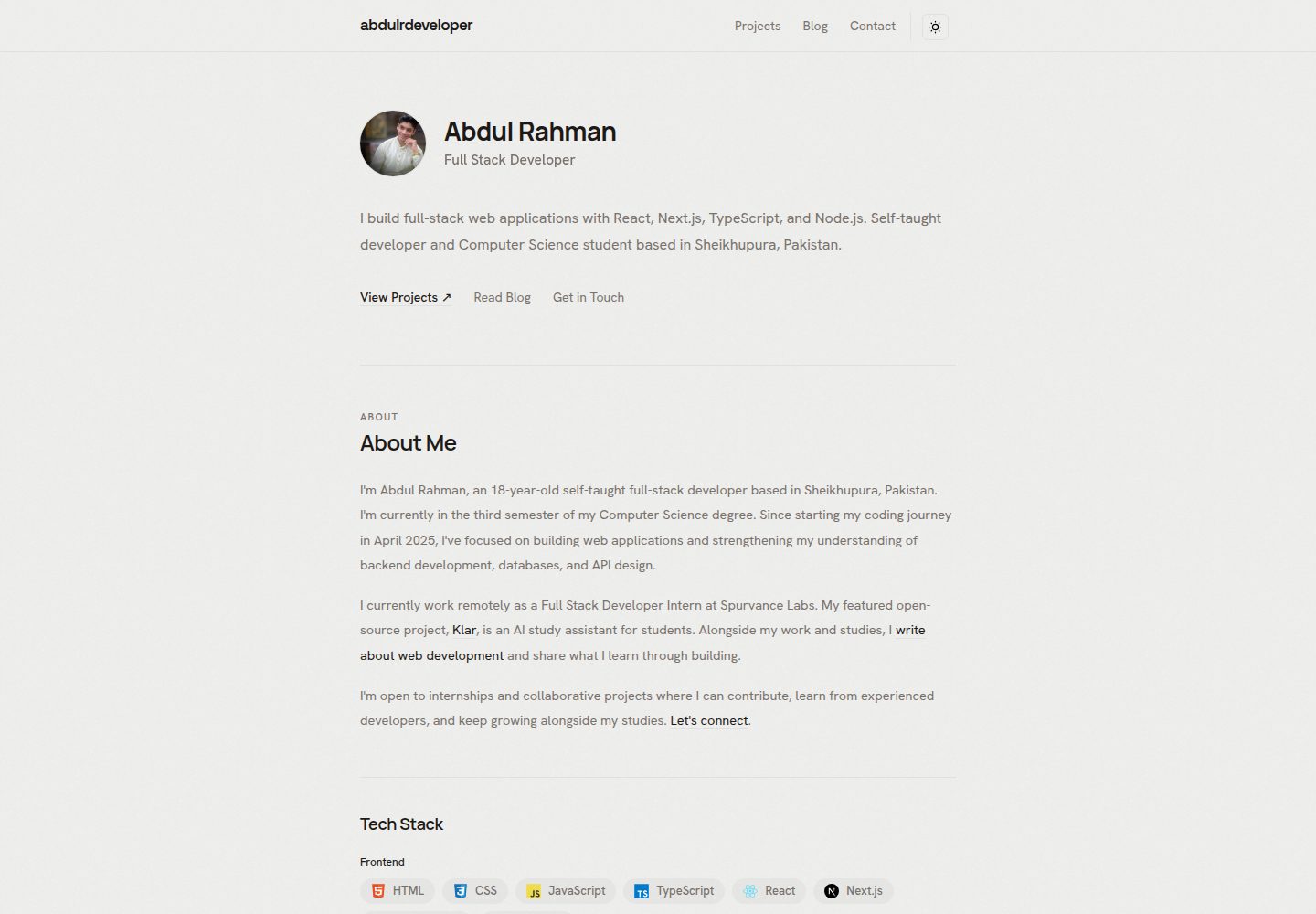
Built with Next.js, TypeScript, and Tailwind CSS, with content edited through local TypeScript files
Next.jsReactPortfolioBlog
abdul-portfolio-tamplate — Next.js Portfolio Template
By abdulrdeveloper
A developer portfolio template built with Next.js, TypeScript, and Tailwind CSS. Content is edited through local TypeScript files, static export is supported, and it includes projects, blog previews, and GitHub activity display.
Explore the design
Compare the page layouts and mobile experience. Open any screenshot for a closer look.
Desktop homepage1 / 3
Desktop captureTop of page
Actual screenshot captured by the server browser.
All pages & views 3
Screenshots show visual appearance; interactive behavior may differ.
Recorded 2026-10-20View source
What stands out
A quick read of the recorded project description.
Includes an introduction, skills, experience, education, a project collection with detail pages, and external blog previews
Supports light and dark themes and responsive layouts
Displays live GitHub follower counts and a contribution calendar without a token
Supports static export without an application backend or database
Includes built-in page metadata, social share cards, structured data, a sitemap, and a robots file
Template Details
This template is aimed at developers who want to present projects, experience, education, and technical articles. Pages include an introduction, skills, experience, education, a project collection with detail pages, external blog post previews, social links, contact details, a PDF CV link, and live GitHub follower counts and a contribution calendar. The stack is Next.js, React, TypeScript, and Tailwind CSS; theme switching uses next-themes, and content is stored in local TypeScript files. A static export runs at build time, so no application backend or database is needed, and no API keys or environment files are required.
Before use, replace the sample identity, bio, projects, skills, experience, education, blog previews, avatar, icons, CV, and share image with your own content, and set the deployment domain in utils/site.ts. Project entries generate /projects/[slug] detail pages; blog previews must be maintained manually, and publishing an external article does not sync automatically. GitHub activity loads in the browser and refreshes every 24 hours; provider caching and rate limits may affect the displayed data.
To deploy, run npm ci, npm run lint, and npm run build, publish the out/ directory to a static host, and configure clean URLs and a 404 page. The template uses root-relative URLs and is configured by default for deployment at the domain root; deploying to a repository subdirectory requires additional configuration. The repository does not include a hosted deployment workflow; the Vercel configuration specifies the build and output directories through vercel.json. The README does not document specific configuration steps for other hosting platforms.
Next.jsReactPortfolioBlog
Is it right for your project?
Use Cases
- A developer creating a personal portfolio site to present projects, experience, and education
- Aggregating external blog posts as previews on a personal site
- Deploying a portfolio statically without maintaining a backend service
- Showing GitHub follower counts and a contribution calendar on the portfolio page
Suitable For
- Developers with a basic knowledge of Next.js and TypeScript who are willing to edit content files manually
- Portfolio projects that need static export and deployment to a static hosting platform
- Personal sites that centralize projects, blog previews, and profile information
Getting started & customization
Use these recorded setup notes alongside the repository instructions for your chosen version.
- 1
Use Node.js 20.9 or later and npm; run npm ci to install dependencies and npm run dev to start the development server
- 2
Edit files such as utils/site.ts, utils/profile.ts, utils/projects.ts, and utils/blog.ts to replace the sample content
- 3
Replace public/avatar.png, public/favicon.png, public/Abdul_Rahman_CV.pdf, and the assets in public/assets/
- 4
Set the deployment domain and GitHub profile URL in utils/site.ts, and search the source for leftover sample identity information
- 5
After running npm run build, publish the out/ directory to a static host and configure clean URLs and a 404 page
License & source material
Usage conditions & limitations
Free to use · keep license noticeThis listing covers the free version under the MIT license in the public repository; the free scope is that version's code and does not mean external services or third-party assets are free.
Must comply with when using
- The code of this version may be used, modified, used commercially, and distributed free of charge.
- When distributing copies or substantial portions of the code, retain the original author's copyright notice and the full MIT license notice.
- The code is provided as is; warranties and limitations of liability are governed by the original license and applicable law.
Additional costs & items to verify
- Demo images, fonts, icons, and other third-party assets must be checked against their respective licenses and cannot be judged solely by the code's MIT license.
- External services such as domains, hosting, databases, payments, or AI may incur separate charges.
- Downloading Google Fonts during dependency installation and builds requires network access; no API keys, database, or environment files are required.
- GitHub follower data comes from GitHub, and contribution data comes from a separate third-party contribution calendar provider.
- Activity data loads in the browser and refreshes every 24 hours; provider caching and rate limits may affect the displayed data.
- The template uses root-relative URLs and is configured by default for deployment at the domain root; deploying to a repository subdirectory requires additional configuration.
- The repository does not include a hosted deployment workflow; domain, HTTPS, redirects, and caching must be managed on the chosen host, and content edits require a rebuild and redeploy.
- You must set your own domain and identity before deployment; Search Console verification is not preconfigured.
- Blog post previews must be maintained manually; publishing an article externally does not update the portfolio automatically.
- Technology icons retain the existing license notices of Devicon and Simple Icons.
- Sample personal content must be replaced, and third-party logos and asset rights must be respected when creating the portfolio.
- Editing the share SVG does not automatically regenerate the corresponding PNG.
View Original Text Basis
Permission is hereby granted, free of charge
Original License Text
No API keys, database, or environment file are required. Installing dependencies and downloading Google fonts during builds requires network access.
Original README
The template fetches public follower data from GitHub and contribution data from a separate contribution-calendar provider.
Original README
Activity loads in the browser and refreshes every 24 hours while the page remains open. Loading, unavailable, and failed-refresh states are included. Provider caching and rate limits can affect the displayed data.
Original README
The template uses root-relative URLs and is configured for deployment at a domain root. Hosting under a repository subdirectory requires additional configuration.
Original README
The repository does not include a hosting deployment workflow. For other hosts, configure the build command and output directory explicitly. Manage the domain, HTTPS, redirects, and caching in the chosen host. Rebuild and redeploy after editing local content, metadata, images, or the CV.
Original README
Set your own domain and identity before deployment. Search Console verification is not preconfigured.
Original README
Article previews are maintained manually; publishing an article elsewhere does not automatically update the portfolio.
Original README
Technology icons retain their existing [Devicon](public/assets/tech/LICENSE.devicon) and [Simple Icons](public/assets/tech/LICENSE.simple-icons) notices.
Original README
Replace the example personal content and respect third-party logo and asset rights when creating your own portfolio.
Original README
https://github.com/abdulrdeveloper/abdul-portfolio-tamplate/blob/main/LICENSEhttps://github.com/abdulrdeveloper/abdul-portfolio-tamplate/blob/main/README.mdEditing the sharing SVG does not automatically regenerate its PNG.
Original README
Compiled by DeepSeek based on repository license and README ·2026-10-20. Results only cover the materials read; dependencies, images, fonts, and subsequent term changes are subject to their respective original texts.
Project checks & description sources
Template Information
- Source platforms
- GitHub
- Documentation and maintenance reference score
- More documented · 85 / 100
- Technologies
- Next.js · React
- Website type
- Portfolio · Blog
How this score is calculated
Our heuristic uses license records (up to 30), a demo link (12), a preview (10), stars (15), recorded maintenance (15), description completeness (8), feature records (5) and classification data (5). It is not a code, security or performance test, or a Google score. A link does not establish tested functionality.
What to verify for this project
- Repository update recorded
- 2026-10-20
- Screenshot last checked
- 2026-10-20
A demo link is listed. Check it with your own content and viewport sizes; its presence does not confirm that forms, authentication or payments work.
The catalog identifies Next.js as the primary stack. Check the actual dependency manifest and lockfile for versions and hosting requirements. These notes use recorded metadata, not a code audit or a deployment test.
Use a selection guide →How this description was prepared
AI-assisted description based on catalog records and repository material. Repository authors are not automatically the reviewers of this description.
Review declaration: codex-user-requested-batch-review-20261021 · 2026-10-21
Inspect the recorded source material
SHA-256: 86edebddb654068d5fcf4a91b8ad67285e8da08e4e8126673c37b99f4bb19380
2026-10-20T09:55:44.803Z
Source file / repository# Developer Portfolio Template A customizable portfolio template for developers who want to showcase their projects, experience, education, and technical writing. Built with **Next.js, TypeScript, and Tailwind CSS**, with static export support and editable content files. The included profile demonstrates the template. Replace it with your own details before publishing. ## Features - Responsive layouts with light and dark themes. - Introduction, skills, experience, and education sections. - Project collection with individual project pages. - Blog previews linking to externally published articles. - Live GitHub follower count and contribution calendar. - Social links, contact information, and a PDF CV link. - Page metadata, social sharing cards, structured data, sitemap, and robots file. - Keyboard focus indicators, skip navigation, and reduced-motion handling. - Static deployment without an application backend or database. ## Tech stack | Area | Technology | | --- | --- | | Framework | Next.js 16 and React 19 | | Language | TypeScript | | Styling | Tailwind CSS 4 | | Themes | next-themes | | Content | Local TypeScript files | | Deployment | Static export | ## Quick start Use Node.js **20.9 or newer** and npm. Fork this repository, then clone your fork. Alternatively, clone the template directly: ```bash git clone https://github.com/abdulrdeveloper/abdul-portfolio-tamplate.git cd abdul-portfolio-tamplate npm ci npm run dev ``` Open [localhost:3000](http://localhost:3000). No API keys, database, or environment file are required. Installing dependencies and downloading Google fonts during builds requires network access. ## Make it yours | Update | File or directory | | --- | --- | | Name, handle, role, location, domain, email, navigation, and social links | [`utils/site.ts`](utils/site.ts) | | Biography facts, featured-project reference, skills, experience, and education | [`utils/profile.ts`](utils/profile.ts) | | Projects, technologies, features, and demo/source links | [`utils/projects.ts`](utils/projects.ts) | | Blog previews and external article links | [`utils/blog.ts`](utils/blog.ts) | | All homepage sections: text, markup, spacing, and order | [`app/page.tsx`](app/page.tsx) | | Complete header: brand, navigation, theme button and provider | [`components/Header.tsx`](components/Header.tsx) | | Live GitHub stats and calendar | [`components/GitHubActivity.tsx`](components/GitHubActivity.tsx) | | Common shell, fonts, footer, and default metadata | [`app/layout.tsx`](app/layout.tsx) | | Profile photo | `public/avatar.png` | | Favicon | `public/favicon.png` | | CV | `public/Abdul_Rahman_CV.pdf` | | Project and organization logos | `public/assets/` | | Social sharing artwork | `public/og-image.svg` and `public/og-image.png` | ### Personalization checklist - Replace the example identity, biography, contact links, and CV. - Add only your own projects, skills, education, and experience. - Remove unused sections from [`app/page.tsx`](app/page.tsx). - Set your deployed domain in `utils/site.ts`. - Update your GitHub profile URL to load your activity. - Replace the avatar, favicon, logos, and sharing artwork. - Review page descriptions and structured data. Identity fields use the shared site configuration. - Search the source for `Abdul Rahman`, `abdulrdeveloper`, and `Spurvance` to catch remaining example content. Shared names, handle, role, location, contact labels, and metadata identity fields use `utils/site.ts`. Biography facts and the About section's featured-project reference use `utils/profile.ts`; the project name and URL come from `utils/projects.ts`. Review the introductory paragraphs in `app/page.tsx`, page descriptions, artwork, CV, and documentation when personalizing the template. This repository uses npm. Keep `package-lock.json` in sync with dependency changes and use `npm ci` for reproducible installation. Editing the sharing SVG does not automatically regenerate its PNG. ### Projects Edit `utils/projects.ts` to add or remove projects. Each project entry generates a detail page at `/projects/[slug]`. Update its description, technologies, features, logo, demo URL, and source URL. Rebuild after changing project entries. ### Blog previews Edit `utils/blog.ts` with your article titles, descriptions, publication dates, and URLs. Entries are sorted newest first. The homepage shows the latest three, while `/blog` lists all previews. Full articles open on your external blog. Article previews are maintained manually; publishing an article elsewhere does not automatically update the portfolio. ### CV Replace `public/Abdul_Rahman_CV.pdf` with your own document. If you rename it, update the CV link in `utils/site.ts`. ## GitHub integration The template fetches public follower data from GitHub and contribution data from a separate contribution-calendar provider. The username is derived from your GitHub URL in `utils/site.ts`. No token is required. Activity loads in the browser and refreshes every 24 hours while the page remains open. Loading, unavailable, and failed-refresh states are included. Provider caching and rate limits can affect the displayed data. ## Routes | Route | Content | | --- | --- | | `/` | Main portfolio | | `/projects` | Project collection | | `/projects/[slug]` | Project details | | `/blog` | External article previews | | `/robots.txt` | Crawler rules | | `/sitemap.xml` | Generated sitemap | ## Commands | Command | Purpose | | --- | --- | | `npm run dev` | Start the development server | | `npm run lint` | Run ESLint | | `npm run build` | Check TypeScript, build, and export the site | ## SEO configuration The template includes default and page-specific metadata, canonical URLs, social sharing metadata, and JSON-LD structured data. Review: - [`app/layout.tsx`](app/layout.tsx) for default metadata. - Project and blog pages for page-specific metadata. - [`utils/seo.tsx`](utils/seo.tsx) for structured data. - [`app/sitemap.ts`](app/sitemap.ts) and [`app/robots.ts`](app/robots.ts) for crawl configuration. Set your own domain and identity before deployment. Search Console verification is not preconfigured. ## Deploy ```bash npm ci npm run lint npm run build ``` Publish the contents of **`out/`** to a static host. Configure the host to resolve clean URLs to their exported HTML files and serve `404.html` with a 404 status for unknown routes. Include all generated assets. The template uses root-relative URLs and is configured for deployment at a domain root. Hosting under a repository subdirectory requires additional configuration. For Vercel, [vercel.json](vercel.json) explicitly selects the Other preset, installs with `npm ci`, builds with `npm run build`, and publishes `out/` with clean URLs. This deploys the Next.js static export and overrides a stale output directory such as `dist` in project settings. Set Vercel's Root Directory to the folder containing `package.json` and `vercel.json`, and deploy a commit that includes this configuration. The repository does not include a hosting deployment workflow. For other hosts, configure the build command and output directory explicitly. Manage the domain, HTTPS, redirects, and caching in the chosen host. Rebuild and redeploy after editing local content, metadata, images, or the CV. No running Next.js server or `npm start` command is required. ## Structure ```text app/ Pages; homepage sections live together in app/page.tsx components/ Flat folder for the header, GitHub activity, and reused UI utils/ Clearly named content files, helpers, and SEO schemas services/ External GitHub and contribution-calendar requests public/ Images, icons, logos, and CV types/ Shared content types and the CSS import declaration ``` ### How the files connect `app/layout.tsx` supplies the header, theme provider, fonts, footer, and default metadata to every page. `app/page.tsx` contains the homepage section functions in display order. It imports editable data from `utils/`, reused UI from `components/`, and the browser-only GitHub activity component. The header's navigation and theme controls stay together in `components/Header.tsx`. Project and blog routes reuse the same project grid, article cards, and content files as the homepage. `components/GitHubActivity.tsx` calls `services/github.ts` for live data. `utils/seo.tsx` supplies structured data; sitemap and robots remain in `app/` so Next.js generates their routes. The homepage and page metadata stay server-rendered and statically exported. Browser state, effects, and theme interactions remain in client components. ## Contributing and support See [CONTRIBUTING.md](CONTRIBUTING.md) for contribution guidance. For usage questions or reproducible bugs, search or open an issue in [this repository](https://github.com/abdulrdeveloper/abdul-portfolio-tamplate/issues), including your Node.js version, command, expected result, and redacted error output. Follow the [Code of Conduct](CODE_OF_CONDUCT.md). Report vulnerabilities privately using [SECURITY.md](SECURITY.md). When publishing your own fork, update the documentation’s repository links and maintainer contacts too. ## License The template code is available under the [MIT License](LICENSE). You can use, modify, and redistribute it, including commercially, while preserving the required copyright and license notice. Technology icons retain their existing [Devicon](public/assets/tech/LICENSE.devicon) and [Simple Icons](public/assets/tech/LICENSE.simple-icons) notices. Replace the example personal content and respect third-party logo and asset rights when creating your own portfolio.
Explore similar templates
Compare previews and descriptions within the same stack and category.

tailwind-nextjs-starter-blog
A Next.js and Tailwind CSS blog starter template using Contentlayer for Markdown/MDX, with built-in SEO, code highlighting, and tags. It targets personal technical blogs and migration from Jekyll/Hugo to React, and supports one-click Vercel deployment.
Next.js · Blog

react-resume-template
A personal resume website template for software developers, built with Next.js, React, and TypeScript and styled with Tailwind CSS. Site content is driven by a single data file at /src/data/data.tsx, with types in dataDef.ts and images in src/images/.
Next.js · Portfolio

Nextjs-tailwindcss-blog-template
A Next.js blog styled with Tailwind CSS. The current branch processes Markdown with Velite; the earlier Contentlayer setup is retained in a separate historical branch.
Next.js · Blog

Next-js-Blog-Boilerplate
A blog starter built on Next.js 12 and Tailwind CSS 3, integrating TypeScript, ESLint, Prettier, and PostCSS.
Next.js · Blog

nextjs-blog-theme
A Next.js 15 and Tailwind CSS 4.x blog starter by Netlify, designed by Bejamas, with MDX support, dark/light theme switching, and environment-variable configuration. It includes a visual setup wizard for deploying to Netlify and manages content via local .mdx files.
Next.js · Blog

blog
A personal blog forked from Timlrx's tailwind-nextjs-starter-blog, built with Next.js, React, and Tailwind CSS. Content is stored as Markdown/MDX under data/, with site, author, navigation, and project data in separate files.
Next.js · Blog