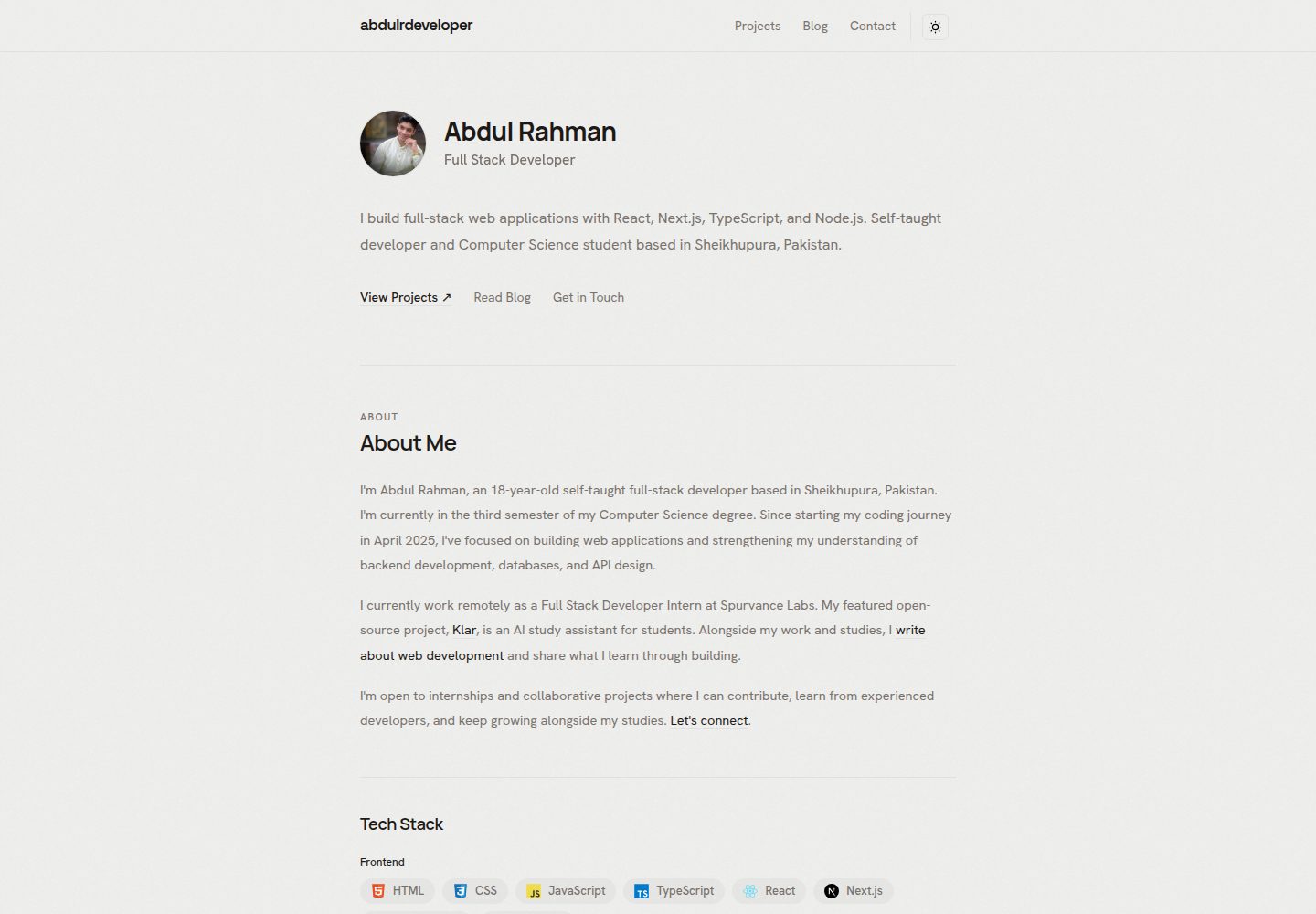
基于 Next.js、TypeScript 和 Tailwind CSS,内容通过本地 TypeScript 文件编辑
Next.jsReact作品集博客
abdul-portfolio-tamplate — Next.js 作品集模板
作者 abdulrdeveloper
一个基于 Next.js、TypeScript 和 Tailwind CSS 的开发者作品集模板,内容通过本地 TypeScript 文件编辑,支持静态导出,包含项目、博客预览和 GitHub 活动展示。
看看你的网站会是什么样
浏览真实页面截图,比较内容排版与手机效果。点击下方缩略图切换,放大查看整页细节。
全部页面与视图 3
截图用于了解视觉与布局,交互效果请以实际项目为准。
采集于 2026-10-20查看来源
值得关注的模板亮点
从已有项目资料中,快速了解它的特点。
包含介绍、技能、经历、教育、项目集合与详情页、外部博客预览
支持浅色与深色主题,以及响应式布局
展示实时 GitHub 关注者数和贡献日历,无需令牌
支持静态导出,无需应用后端或数据库
内置页面元数据、社交分享卡片、结构化数据、站点地图和 robots 文件
模板详细介绍
该模板面向希望展示项目、经历、教育背景和技术文章的开发者。页面包含介绍、技能、经历、教育、项目集合与详情页、外部博客文章预览、社交链接、联系方式、PDF CV 链接,以及实时 GitHub 关注者数和贡献日历。技术栈为 Next.js、React、TypeScript 和 Tailwind CSS,主题切换使用 next-themes,内容存储在本地 TypeScript 文件中。构建时执行静态导出,无需应用后端或数据库,也不需要 API 密钥或环境文件。
使用前需要将示例身份、简介、项目、技能、经历、教育、博客预览、头像、图标、CV 和分享图替换为自己的内容,并在 utils/site.ts 中设置部署域名。项目条目会生成 /projects/[slug] 详情页,博客预览需手动维护,发布外部文章不会自动同步。GitHub 活动在浏览器中加载并每 24 小时刷新,提供方缓存和速率限制可能影响显示数据。
部署时运行 npm ci、npm run lint 和 npm run build,将 out/ 目录发布到静态主机,并配置干净 URL 和 404 页面。模板使用根相对 URL,默认部署在域名根目录,部署到仓库子目录需要额外配置。仓库不包含托管部署工作流,Vercel 配置通过 vercel.json 指定构建和输出目录。README 未说明其他托管平台的具体配置步骤。
Next.jsReact作品集博客
适合你的项目吗?
适用场景
- 开发者创建个人作品集网站,展示项目、经历和教育背景
- 需要将外部博客文章以预览形式聚合到个人站点
- 希望以静态方式部署作品集,不维护后端服务
- 在作品集页面展示 GitHub 关注者数和贡献日历
适合人群
- 具备 Next.js 和 TypeScript 基础、愿意手动编辑内容文件的开发者
- 需要静态导出并部署到静态托管平台的作品集项目
- 希望集中管理项目、博客预览和个人资料信息的个人网站
上手与定制指南
结合仓库当前版本的说明,按下面的资料检查内容、配置与运行要求。
- 1
使用 Node.js 20.9 或更高版本和 npm,运行 npm ci 安装依赖,npm run dev 启动开发服务器
- 2
编辑 utils/site.ts、utils/profile.ts、utils/projects.ts、utils/blog.ts 等文件替换示例内容
- 3
替换 public/avatar.png、public/favicon.png、public/Abdul_Rahman_CV.pdf 和 public/assets/ 中的资源
- 4
在 utils/site.ts 中设置部署域名和 GitHub 个人资料 URL,并搜索源码中残留的示例身份信息
- 5
运行 npm run build 后将 out/ 目录发布到静态主机,并配置干净 URL 和 404 页面
授权与来源资料
使用条件与限制
免费使用 · 保留许可声明本次收录的是公开仓库中采用 MIT 许可的免费版本;免费范围为该版本代码,不代表外部服务或第三方素材免费。
使用时需要遵守
- 允许免费使用、修改、商用和分发该版本代码。
- 分发代码副本或实质性部分时,保留原作者版权声明和完整 MIT 许可声明。
- 代码按现状提供;担保与责任限制以原许可证及适用法律为准。
额外费用与待核对事项
- 演示图片、字体、图标及其他第三方素材需按各自许可核对,不能仅凭代码的 MIT 许可判断。
- 域名、托管、数据库、支付或 AI 等外部服务可能另外收费。
- 安装依赖和构建时下载 Google 字体需要网络访问;无需 API 密钥、数据库或环境文件。
- GitHub 关注者数据来自 GitHub,贡献数据来自单独的贡献日历第三方提供方。
- 活动数据在浏览器加载并每 24 小时刷新;提供方缓存和速率限制可能影响显示数据。
- 模板使用根相对 URL,默认配置为部署在域名根目录;部署到仓库子目录需要额外配置。
- 仓库不包含托管部署工作流;域名、HTTPS、重定向和缓存需在所选主机上管理,编辑内容后需重新构建部署。
- 部署前需设置自己的域名和身份;Search Console 验证未预配置。
- 博客文章预览需手动维护,在外部发布文章不会自动更新作品集。
- 技术图标保留 Devicon 和 Simple Icons 的既有许可声明。
- 需替换示例个人内容,并在创建作品集时尊重第三方徽标和资源权利。
- 编辑分享 SVG 不会自动重新生成对应的 PNG。
查看原文依据
Permission is hereby granted, free of charge
许可证原文
No API keys, database, or environment file are required. Installing dependencies and downloading Google fonts during builds requires network access.
README 原文
The template fetches public follower data from GitHub and contribution data from a separate contribution-calendar provider.
README 原文
Activity loads in the browser and refreshes every 24 hours while the page remains open. Loading, unavailable, and failed-refresh states are included. Provider caching and rate limits can affect the displayed data.
README 原文
The template uses root-relative URLs and is configured for deployment at a domain root. Hosting under a repository subdirectory requires additional configuration.
README 原文
The repository does not include a hosting deployment workflow. For other hosts, configure the build command and output directory explicitly. Manage the domain, HTTPS, redirects, and caching in the chosen host. Rebuild and redeploy after editing local content, metadata, images, or the CV.
README 原文
Set your own domain and identity before deployment. Search Console verification is not preconfigured.
README 原文
Article previews are maintained manually; publishing an article elsewhere does not automatically update the portfolio.
README 原文
Technology icons retain their existing [Devicon](public/assets/tech/LICENSE.devicon) and [Simple Icons](public/assets/tech/LICENSE.simple-icons) notices.
README 原文
Replace the example personal content and respect third-party logo and asset rights when creating your own portfolio.
README 原文
https://github.com/abdulrdeveloper/abdul-portfolio-tamplate/blob/main/LICENSEhttps://github.com/abdulrdeveloper/abdul-portfolio-tamplate/blob/main/README.mdEditing the sharing SVG does not automatically regenerate its PNG.
README 原文
DeepSeek 根据仓库许可证和 README 整理 ·2026-10-20。结果仅覆盖已读取资料,依赖、图片、字体及后续条款变更以各自原文为准。
项目核对记录与介绍依据
模板资料
- 来源平台
- GitHub
- 资料与维护参考分
- 资料较完整 · 85 / 100
- 技术栈
- Next.js · React
- 网站类型
- 作品集 · 博客
这个分数如何计算
本站按许可资料(最高30分)、演示链接(12分)、预览图(10分)、Star数(15分)、记录的维护时间(15分)、描述完整度(8分)、功能记录(5分)和分类资料(5分)计算。它不是代码、安全或性能测试,也不是 Google 评分;有链接不代表已实测可用。
这个项目需要核对什么
- 记录的仓库更新时间
- 2026-10-20
- 截图检查日期
- 2026-10-20
已收录演示链接。请用你的内容与屏幕尺寸检查;有演示不代表表单、认证或支付已经可用。
目录记录的主要技术栈是 Next.js。请通过依赖清单和锁文件核对实际版本与托管要求。这些说明基于收录资料,不代表代码审计或部署实测。
查看具体选型方法 →介绍的制作与核对状态
介绍由 AI 辅助整理目录与仓库资料。仓库作者不等于这篇介绍的审核者。
审核声明: codex-user-requested-batch-review-20261021 · 2026-10-21
查看当时使用的来源资料
SHA-256: 86edebddb654068d5fcf4a91b8ad67285e8da08e4e8126673c37b99f4bb19380
2026-10-20T09:55:44.803Z
来源文件 / 仓库# Developer Portfolio Template A customizable portfolio template for developers who want to showcase their projects, experience, education, and technical writing. Built with **Next.js, TypeScript, and Tailwind CSS**, with static export support and editable content files. The included profile demonstrates the template. Replace it with your own details before publishing. ## Features - Responsive layouts with light and dark themes. - Introduction, skills, experience, and education sections. - Project collection with individual project pages. - Blog previews linking to externally published articles. - Live GitHub follower count and contribution calendar. - Social links, contact information, and a PDF CV link. - Page metadata, social sharing cards, structured data, sitemap, and robots file. - Keyboard focus indicators, skip navigation, and reduced-motion handling. - Static deployment without an application backend or database. ## Tech stack | Area | Technology | | --- | --- | | Framework | Next.js 16 and React 19 | | Language | TypeScript | | Styling | Tailwind CSS 4 | | Themes | next-themes | | Content | Local TypeScript files | | Deployment | Static export | ## Quick start Use Node.js **20.9 or newer** and npm. Fork this repository, then clone your fork. Alternatively, clone the template directly: ```bash git clone https://github.com/abdulrdeveloper/abdul-portfolio-tamplate.git cd abdul-portfolio-tamplate npm ci npm run dev ``` Open [localhost:3000](http://localhost:3000). No API keys, database, or environment file are required. Installing dependencies and downloading Google fonts during builds requires network access. ## Make it yours | Update | File or directory | | --- | --- | | Name, handle, role, location, domain, email, navigation, and social links | [`utils/site.ts`](utils/site.ts) | | Biography facts, featured-project reference, skills, experience, and education | [`utils/profile.ts`](utils/profile.ts) | | Projects, technologies, features, and demo/source links | [`utils/projects.ts`](utils/projects.ts) | | Blog previews and external article links | [`utils/blog.ts`](utils/blog.ts) | | All homepage sections: text, markup, spacing, and order | [`app/page.tsx`](app/page.tsx) | | Complete header: brand, navigation, theme button and provider | [`components/Header.tsx`](components/Header.tsx) | | Live GitHub stats and calendar | [`components/GitHubActivity.tsx`](components/GitHubActivity.tsx) | | Common shell, fonts, footer, and default metadata | [`app/layout.tsx`](app/layout.tsx) | | Profile photo | `public/avatar.png` | | Favicon | `public/favicon.png` | | CV | `public/Abdul_Rahman_CV.pdf` | | Project and organization logos | `public/assets/` | | Social sharing artwork | `public/og-image.svg` and `public/og-image.png` | ### Personalization checklist - Replace the example identity, biography, contact links, and CV. - Add only your own projects, skills, education, and experience. - Remove unused sections from [`app/page.tsx`](app/page.tsx). - Set your deployed domain in `utils/site.ts`. - Update your GitHub profile URL to load your activity. - Replace the avatar, favicon, logos, and sharing artwork. - Review page descriptions and structured data. Identity fields use the shared site configuration. - Search the source for `Abdul Rahman`, `abdulrdeveloper`, and `Spurvance` to catch remaining example content. Shared names, handle, role, location, contact labels, and metadata identity fields use `utils/site.ts`. Biography facts and the About section's featured-project reference use `utils/profile.ts`; the project name and URL come from `utils/projects.ts`. Review the introductory paragraphs in `app/page.tsx`, page descriptions, artwork, CV, and documentation when personalizing the template. This repository uses npm. Keep `package-lock.json` in sync with dependency changes and use `npm ci` for reproducible installation. Editing the sharing SVG does not automatically regenerate its PNG. ### Projects Edit `utils/projects.ts` to add or remove projects. Each project entry generates a detail page at `/projects/[slug]`. Update its description, technologies, features, logo, demo URL, and source URL. Rebuild after changing project entries. ### Blog previews Edit `utils/blog.ts` with your article titles, descriptions, publication dates, and URLs. Entries are sorted newest first. The homepage shows the latest three, while `/blog` lists all previews. Full articles open on your external blog. Article previews are maintained manually; publishing an article elsewhere does not automatically update the portfolio. ### CV Replace `public/Abdul_Rahman_CV.pdf` with your own document. If you rename it, update the CV link in `utils/site.ts`. ## GitHub integration The template fetches public follower data from GitHub and contribution data from a separate contribution-calendar provider. The username is derived from your GitHub URL in `utils/site.ts`. No token is required. Activity loads in the browser and refreshes every 24 hours while the page remains open. Loading, unavailable, and failed-refresh states are included. Provider caching and rate limits can affect the displayed data. ## Routes | Route | Content | | --- | --- | | `/` | Main portfolio | | `/projects` | Project collection | | `/projects/[slug]` | Project details | | `/blog` | External article previews | | `/robots.txt` | Crawler rules | | `/sitemap.xml` | Generated sitemap | ## Commands | Command | Purpose | | --- | --- | | `npm run dev` | Start the development server | | `npm run lint` | Run ESLint | | `npm run build` | Check TypeScript, build, and export the site | ## SEO configuration The template includes default and page-specific metadata, canonical URLs, social sharing metadata, and JSON-LD structured data. Review: - [`app/layout.tsx`](app/layout.tsx) for default metadata. - Project and blog pages for page-specific metadata. - [`utils/seo.tsx`](utils/seo.tsx) for structured data. - [`app/sitemap.ts`](app/sitemap.ts) and [`app/robots.ts`](app/robots.ts) for crawl configuration. Set your own domain and identity before deployment. Search Console verification is not preconfigured. ## Deploy ```bash npm ci npm run lint npm run build ``` Publish the contents of **`out/`** to a static host. Configure the host to resolve clean URLs to their exported HTML files and serve `404.html` with a 404 status for unknown routes. Include all generated assets. The template uses root-relative URLs and is configured for deployment at a domain root. Hosting under a repository subdirectory requires additional configuration. For Vercel, [vercel.json](vercel.json) explicitly selects the Other preset, installs with `npm ci`, builds with `npm run build`, and publishes `out/` with clean URLs. This deploys the Next.js static export and overrides a stale output directory such as `dist` in project settings. Set Vercel's Root Directory to the folder containing `package.json` and `vercel.json`, and deploy a commit that includes this configuration. The repository does not include a hosting deployment workflow. For other hosts, configure the build command and output directory explicitly. Manage the domain, HTTPS, redirects, and caching in the chosen host. Rebuild and redeploy after editing local content, metadata, images, or the CV. No running Next.js server or `npm start` command is required. ## Structure ```text app/ Pages; homepage sections live together in app/page.tsx components/ Flat folder for the header, GitHub activity, and reused UI utils/ Clearly named content files, helpers, and SEO schemas services/ External GitHub and contribution-calendar requests public/ Images, icons, logos, and CV types/ Shared content types and the CSS import declaration ``` ### How the files connect `app/layout.tsx` supplies the header, theme provider, fonts, footer, and default metadata to every page. `app/page.tsx` contains the homepage section functions in display order. It imports editable data from `utils/`, reused UI from `components/`, and the browser-only GitHub activity component. The header's navigation and theme controls stay together in `components/Header.tsx`. Project and blog routes reuse the same project grid, article cards, and content files as the homepage. `components/GitHubActivity.tsx` calls `services/github.ts` for live data. `utils/seo.tsx` supplies structured data; sitemap and robots remain in `app/` so Next.js generates their routes. The homepage and page metadata stay server-rendered and statically exported. Browser state, effects, and theme interactions remain in client components. ## Contributing and support See [CONTRIBUTING.md](CONTRIBUTING.md) for contribution guidance. For usage questions or reproducible bugs, search or open an issue in [this repository](https://github.com/abdulrdeveloper/abdul-portfolio-tamplate/issues), including your Node.js version, command, expected result, and redacted error output. Follow the [Code of Conduct](CODE_OF_CONDUCT.md). Report vulnerabilities privately using [SECURITY.md](SECURITY.md). When publishing your own fork, update the documentation’s repository links and maintainer contacts too. ## License The template code is available under the [MIT License](LICENSE). You can use, modify, and redistribute it, including commercially, while preserving the required copyright and license notice. Technology icons retain their existing [Devicon](public/assets/tech/LICENSE.devicon) and [Simple Icons](public/assets/tech/LICENSE.simple-icons) notices. Replace the example personal content and respect third-party logo and asset rights when creating your own portfolio.
看看同类模板
对比同技术栈与用途的模板,找到更适合的视觉与内容结构。

tailwind-nextjs-starter-blog
tailwind-nextjs-starter-blog 是一个面向个人技术博客的 Next.js 与 Tailwind CSS 启动模板,其 v2 版本基于 App Router 与 React Server Comp…
Next.js · 博客

react-resume-template
A personal resume website template built with React.js, Typescript, Next.js, and styled with Tailwind css
Next.js · 作品集

Nextjs-tailwindcss-blog-template
使用 Tailwind CSS 的 Next.js 博客。当前分支通过 Velite 处理 Markdown,早期 Contentlayer 实现保留在单独的历史分支中。
Next.js · 博客

Next-js-Blog-Boilerplate
Next-js-Blog-Boilerplate 是一套面向个人与技术博客的启动代码,基于 Next.js 12 与 Tailwind CSS 3 构建,同时集成了 TypeScript、ESLint、Prettier …
Next.js · 博客

nextjs-blog-theme
nextjs-blog-theme 是 Netlify 团队维护的一个博客启动模板,基于 Next.js 15(Pages Router)和 Tailwind CSS 4.x 构建,设计由 Bejamas 机构完成。
Next.js · 博客

blog
🚀 My personal blog made with Tailwind CSS and NextJS. Template from Timlrx. Feel free to fork, follow and use…
Next.js · 博客