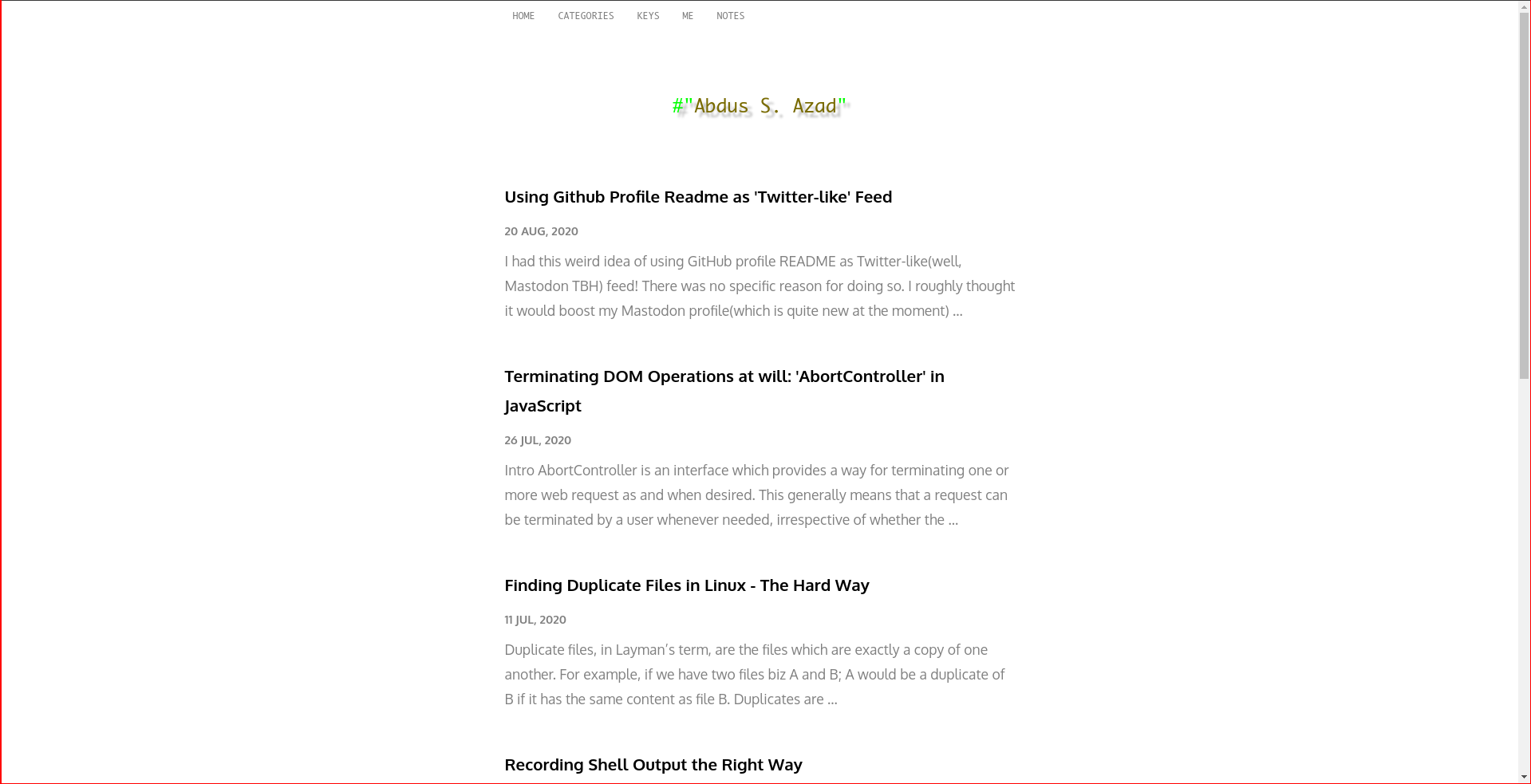
Clean interface with minimal JavaScript and CSS, aimed at minimal blogs
HugoBlog
hugo-theme-fiber — Hugo Blog Template
By abdus
hugo-theme-fiber is a Hugo theme for minimal blogs, offering a clean interface with minimal JavaScript and CSS, plus built-in SEO, code copying, and note annotation features.
Explore the design
Compare the page layouts and mobile experience. Open any screenshot for a closer look.
Author preview
Author-provided preview
Preview provided in the project README.
One original preview is available. Open the full image to inspect the design.
Screenshots show visual appearance; interactive behavior may differ.
Recorded 2026-10-02View source
What stands out
A quick read of the recorded project description.
Built-in basic SEO and a small amount of JSON-LD data from Schema.org
Provides asciinema and caniuse shortcodes for embedding terminal recordings and compatibility data
Code blocks support one-click copying without breaking indentation
Content in the content/notes directory applies rough-annotations effects
Frontmatter supports meta.image and meta.description, with default fallbacks
Template Details
hugo-theme-fiber is a Hugo blog theme released by author abdus, with the repository described as "Minimal Hugo theme for blog websites" and licensed under MIT. The theme emphasizes a clean reading interface built with minimal JavaScript and CSS, making it suitable for text-focused blog sites.
In terms of content organization, the theme distinguishes between regular posts and Notes. Notes are placed in the content/notes directory and apply rough-annotations effects, highlighting key points in notes through tags such as strong, em, and strikethrough. The homepage can list content from specified sections via the mainSections parameter in config.toml, or you can place custom content directly in content/_index.md; both approaches can be used simultaneously.
The theme provides several writing and reading aids: for SEO, it includes basic SEO and a small amount of JSON-LD data from Schema.org; shortcodes support embedding AsciiNema recordings and displaying the latest compatibility data from caniuse.com; code blocks support one-click copying without breaking indentation; meta.image and meta.description in frontmatter are used to customize a post's description and meta image, falling back to /images/default-meta-image.png and .Summary when absent.
Before use, configuration must be adjusted according to the README: code highlighting must have class enabled (noClasses = false), otherwise class-dependent features will not work; menu items must be defined in menu.main in config.toml; the site title is controlled by params.title. The theme can be installed via Git submodule or by downloading it directly into the themes/ directory. The repository was last updated in 2021 and has few stars; the README does not provide further information about compatibility, maintenance status, or production suitability.
HugoBlog
Is it right for your project?
Use Cases
- Building a text-focused personal blog with a clean interface and small script and style footprint
- Embedding terminal recordings (asciinema) or caniuse compatibility data in articles
- Maintaining note-type content with highlighted key points, using strong, em, and strikethrough to mark important items
- Needing basic SEO metadata and JSON-LD data, and customizing post descriptions and meta images via frontmatter
Suitable For
- Bloggers who build sites with Hugo and prefer a minimal style
- Writers who need a Notes content type and annotation effects
- Developers who want to use shortcodes such as asciinema and caniuse in articles
- Users who accept manually editing config.toml to configure menus, homepage lists, and code highlighting
Getting started & customization
Use these recorded setup notes alongside the repository instructions for your chosen version.
- 1
There are two installation methods: add the theme using a Git submodule, or download and extract it directly to SITE_ROOT/themes/hugo-theme-fiber/
- 2
Code highlighting requires setting markup.highlight.noClasses = false in config.toml and enabling codeFences, otherwise class-dependent features will not work
- 3
The homepage list requires specifying sections in params.mainSections in config.toml, or placing custom content in content/_index.md
- 4
Menu items must be defined individually in menu.main in config.toml; the site title is controlled by params.title
- 5
Notes content requires first creating the content/notes directory, then generating it with hugo new notes/filename.md; the archetype includes usage instructions for annotations
License & source material
Usage conditions & limitations
Free to use · keep license noticeThis entry covers the free version in the public repository under the MIT license; the free scope is the code of that version and does not mean external services or third-party assets are free.
Must comply with when using
- You may use, modify, commercialize, and distribute the code of this version for free.
- When distributing copies or substantial portions of the code, retain the original author's copyright notice and the full MIT license notice.
- The code is provided as is; warranties and limitations of liability are governed by the original license and applicable law.
Additional costs & items to verify
- The caniuse shortcode fetches the latest compatibility data from caniuse.com, which is an external service dependency; offline or when the site is unreachable, the shortcode cannot display data properly.
- The asciinema shortcode requires referencing the id of a public asciinema cast, i.e., it depends on external public recordings on the asciinema platform; you must prepare that external resource yourself.
- Before use, code block class must be enabled in config.toml (noClasses = false), otherwise class-dependent features will not work; this is a necessary configuration prerequisite.
- Demo images, fonts, icons, and other third-party assets must be checked against their respective licenses; the code's MIT license alone is not sufficient to judge them.
- External services such as domains, hosting, databases, payments, or AI may incur additional charges.
View Original Text Basis
Permission is hereby granted, free of charge
Original License Text
This shortcode shows latest data from [caniuse.com](https://caniuse.com) website.
Original README
Embed an AsciiNema Cast. Shortcode to use: `{{< asciinema id="id of a public cast" >}}`
Original README
https://github.com/abdus/hugo-theme-fiber/blob/master/LICENSEhttps://github.com/abdus/hugo-theme-fiber/blob/master/README.mdYou need to trun on classes for codeblocks.
Original README
Compiled by DeepSeek based on repository license and README ·2026-10-02. Results only cover the materials read; dependencies, images, fonts, and subsequent term changes are subject to their respective original texts.
Project checks & description sources
Template Information
- Source platforms
- GitHub
- Documentation and maintenance reference score
- Partly documented · 56 / 100
- Technologies
- Hugo
- Website type
- Blog
How this score is calculated
Our heuristic uses license records (up to 30), a demo link (12), a preview (10), stars (15), recorded maintenance (15), description completeness (8), feature records (5) and classification data (5). It is not a code, security or performance test, or a Google score. A link does not establish tested functionality.
What to verify for this project
- Repository update recorded
- 2021-07-23
- Screenshot last checked
- 2026-10-02
No demo link is recorded. Use the repository instructions to evaluate the project locally; the screenshot alone cannot establish interactive behavior.
The catalog identifies Hugo as the primary stack. Check the actual dependency manifest and lockfile for versions and hosting requirements. These notes use recorded metadata, not a code audit or a deployment test.
Use a selection guide →How this description was prepared
AI-assisted description based on catalog records and repository material. Repository authors are not automatically the reviewers of this description.
Automatically checked against source and license rules; no manual editorial review.
Inspect the recorded source material
SHA-256: eab442376772de3a2a6c76761f75a7d34fbad8310953e63390c1a697d04d530f
2026-10-02T17:08:14.970Z
Source file / repository<p align="center">
<img src="https://i.imgur.com/WXrwYMu.png?cachebuster" alt="hugo theme fiber" />
</p>
<p align="center">
<img
src="https://img.shields.io/github/repo-size/abdus/hugo-theme-fiber"
alt="github repo size"
/>
<img
alt="GitHub last commit"
src="https://img.shields.io/github/last-commit/abdus/hugo-theme-fiber"
/>
<img
alt="GitHub"
src="https://img.shields.io/github/license/abdus/hugo-theme-fiber"
/>
<img
alt="GitHub commits since latest release (by SemVer including pre-releases)"
src="https://img.shields.io/github/commits-since/abdus/hugo-theme-fiber/latest?include_prereleases"
/>
</p>
A Hugo theme for the minimalists. Fiber uses minimum JavaScript and CSS to
so that you site could load faster! Also posses a clean UI which is great for
eyes!!
## [Table of Contents](#table-of-contents)
- [Installation](#installation)
- [Using Submodule](#using-submodule)
- [Directly downloading theme](#directly-downloading-theme)
- [Features](#features)
- [SEO Ready](#seo-ready)
- [Shortcodes](#shortcodes)
- [ASCIINema](#asciinema)
- [Can I Use](#can-i-use)
- [Click to Copy Code](#click-to-copy-code)
- [Beautiful Notes](#beautiful-notes)
- [Screenshots](#screenshots)
- [Theme Set-up](#theme-set-up)
- [Listing content in Homepage](#listing-content-in-homepage)
- [List of blogs, notes etc](#list-of-blogs--notes-etc)
- [Listing custom content](#listing-custom-content)
- [Code Highlighting](#code-highlighting)
- [Menu Items](#menu-items)
- [Site Title](#site-title)
- [Writing Content](#writing-content)
- [Writing Notes](#writing-notes)
- [Frontmatter](#frontmatter)
## Installation
There are two ways this theme could be used with any Hugo-based sites.
1. Using Git Submodules(recommended)
2. Directly downloading theme to `<hugo-site-root>/themes/`
#### Using Submodule
1. Create your site using `hugo new site SITE_NAME`
2. `cd` to `SITE_NAME`
3. Initialize a git repo: `git init`. This is needed because we have to add a git submodule.
4. Add submodule by runing `git submodule add [email protected]:abdus/hugo-theme-fiber.git themes/hugo-theme-fiber`
5. Now, start Hugo server locally using `hugo serve`
If there is an update in theme repository, you can pull them using `git submodule update --remote`
#### Directly downloading theme
> Use this method if you cannot use Git for some reason.
1. Download [this](https://github.com/abdus/hugo-theme-fiber) and extract its
content to `SITE_ROOT/themes/hugo-theme-fiber/`.
2. Start hugo locally by executing `hugo serve` from terminal.
## Features
### SEO Ready
This theme is loaded with basic SEO as well as with minimal JSON-LD data
from Schema.org
### Shortcodes
Apart from out-of-the-box shortcodes, it does have a few other useful shortcodes
which can be proven helpful at times.
#### ASCIINema
Embed an AsciiNema Cast. Shortcode to use: `{{< asciinema id="id of a public cast" >}}`
#### Can I Use
This shortcode shows latest data from [caniuse.com](https://caniuse.com) website.
Useful for web developers. Example:
```html
{{< caniuse feature="abortcontroller" periods="future_1,current,past_1,past_2"
>}}
```
### Click to Copy Code
Visitors of the website can copy content of any codeblock with just one click.
This will not break code indentations!
### Beautiful Notes
Anything you put inside `content/notes`, would get rough-annotations. This makes
it easier to recognize important things from notes.
Rough Annotations are controlled using tags like `strong`, `em` and `strikethrough`.
To generate a new `notes` entry, first you must create directory `content/notes`.
Then use `hugo new notes/file-name.md` to generate a Note. This file would
contain information about how to annotate things with above mentioned tags.
## Screenshots
<p align="center">
<img src="https://i.imgur.com/k0Pmjoh.png" />
<img src="https://i.imgur.com/lnSBRYD.png" />
</p>
## Theme Set-up
### Listing content in Homepage
Homepage can be configured in two different ways. You can either list your
favorite/most-important section from`content` directory.
Or place custom content inside it.
Or you can do both! Make sure to create a file `content/_index.md` that have
a property `title` inside fromtmatter. This `title` property is useful for
SEO. Example:
```markdown
---
title: "Welcome to my Homepage"
---
<!-- content goes here -->
```
#### List of blogs, notes etc
In order to create a listing of content in homepage, you need to set a
variable called `mainSections` in `config.toml` file. Example:
```toml
[params]
mainSections = ["posts"]
```
#### Listing custom content
To list custom content, simply place them inside `content/_index.md` with
appropriate frontmatter.
### Code Highlighting
By default, Hugo would not use any classes. But this would not work for this
theme as some of the features depends on that.
You need to trun on classes for codeblocks. Here's how you'd do it:
```toml
# file: config.toml
[markup]
[markup.highlight]
codeFences = true
noClasses = false
```
### Menu Items
By default, there's only one menu item in top menu. To add more items in there,
one needs to define menu items inside `config.toml`. Following is an example
from my [site's](https://abdus.xyz) `config.toml`:
```toml
[menu]
[[menu.main]]
identifier = "me"
name = "Me"
url = "/me/"
weight = 10
[[menu.main]]
identifier = "keys"
name = "keys"
url = "/keys/"
weight = 10
[[menu.main]]
identifier = "categories"
name = "categories"
url = "/categories"
weight = 10
[[menu.main]]
identifier = "notes"
name = "notes"
url = "/notes/"
weight = 10
```
### Site Title
Site title is controlled by following params in `config.toml`:
```toml
[params]
title = "abdus.xyz"
mainSections = ["posts"]
```
## Writing Content
### Writing Notes
`Notes` is a special kind hard-coded in this theme. Contents of this kind would
get rough-annotations(which makes it easier to manage notes).
Generate a notes page using command `hugo new notes/your-filename.md` to
learn how to use rough-annotations within notes' page.
Archetype for kind Notes is included.
### Frontmatter
This theme uses frontmatter to handle custom post description and meta image
for SEO. If it can't find `meta.image` and `meta.description`, it will fallback
to `/images/default-meta-image.png` and `.Summary` respectively.
Use these two fields in frontmatter like this:
```markdown
---
...
...
meta:
image: "https://example.com/some-image.png"
description: "your custom desc"
...
...
---
<!-- content goes here -->
```
Explore similar templates
Compare previews and descriptions within the same stack and category.

hugo-PaperMod
A fast, clean, responsive Hugo theme for blogs and lightweight portfolios, with three layout modes (Regular, Home-Info, Profile), automatic and manual light/dark themes, Fuse.js client-side search, multilingual support, and built-in Open Graph, Twitter Cards, and Schema.org data.
Hugo · Portfolio

LoveIt
LoveIt is a clean, elegant, and feature-rich Hugo blog theme derived from LeaveIt and KeepIt, MIT-licensed. It offers light/dark modes, responsive layout, multilingual support, and search via Lunr.js or Algolia.
Hugo · Blog

hugo-coder
hugo-coder is a minimalist Hugo blog theme maintained by luizdepra under the MIT license. It provides a clean, text-focused blog appearance, configuration documentation in the docs directory, and a complete exampleSite with hugo.toml.
Hugo · Blog

blowfish
Blowfish is a Hugo personal website and blog theme built with Tailwind CSS 4, focused on lightness, simplicity, and content-first presentation.
Hugo · Blog

hugo-paper
hugo-paper is a simple, clean, and customizable Hugo blog theme configured through config.toml or hugo.toml.
Hugo · Blog

hextra
Hextra is a Hugo theme for documentation and blog sites, built on Hugo and Tailwind CSS with design referencing Nextra.
Hugo · Documentation