以较少的 JavaScript 和 CSS 实现简洁界面,面向极简博客
Hugo博客
hugo-theme-fiber — Hugo 博客模板
作者 abdus
hugo-theme-fiber 是一个面向极简博客的 Hugo 主题,通过较少的 JavaScript 与 CSS 提供简洁界面,并内置 SEO、代码复制、笔记批注等写作辅助功能。
看看你的网站会是什么样
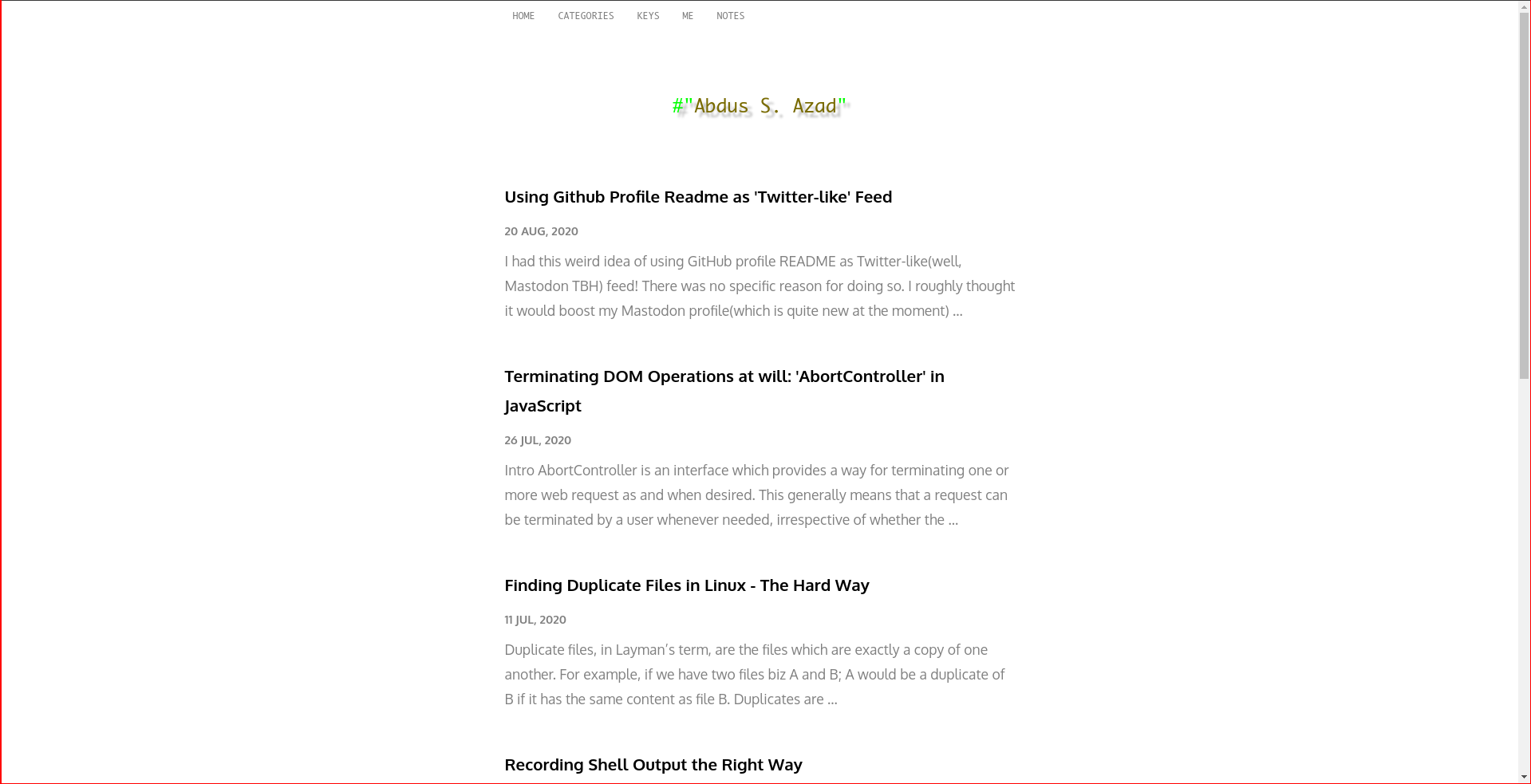
浏览真实页面截图,比较内容排版与手机效果。点击下方缩略图切换,放大查看整页细节。
目前有 1 张原始预览,可打开完整图片查看设计细节。
截图用于了解视觉与布局,交互效果请以实际项目为准。
采集于 2026-10-02查看来源
值得关注的模板亮点
从已有项目资料中,快速了解它的特点。
内置基础 SEO 与来自 Schema.org 的少量 JSON-LD 数据
提供 asciinema 与 caniuse 短代码,便于嵌入终端录制和兼容性数据
代码块支持一键复制且不破坏缩进
content/notes 目录下的内容会应用 rough-annotations 批注效果
frontmatter 支持 meta.image 与 meta.description,并有默认回退值
模板详细介绍
hugo-theme-fiber 是作者 abdus 发布的 Hugo 博客主题,仓库描述为「Minimal Hugo theme for blog websites」,采用 MIT 许可。主题强调用较少的 JavaScript 和 CSS 构建简洁的阅读界面,适合以文字为主的博客站点。
在内容组织上,主题区分普通文章与 Notes 两种内容类型。Notes 放在 content/notes 目录下,会应用 rough-annotations 效果,通过 strong、em、strikethrough 等标签突出笔记中的重点。首页可以通过 config.toml 中的 mainSections 参数列出指定 section 的内容,也可以直接在 content/_index.md 中放置自定义内容,两种方式可以同时使用。
主题提供若干写作与阅读辅助功能:SEO 方面包含基础 SEO 与来自 Schema.org 的少量 JSON-LD 数据;短代码支持嵌入 AsciiNema 录制以及展示 caniuse.com 的最新兼容性数据;代码块支持一键复制且不破坏缩进;frontmatter 中的 meta.image 与 meta.description 用于自定义文章的描述与元图片,缺省时回退到 /images/default-meta-image.png 与 .Summary。
使用前需要按 README 说明调整配置:代码高亮必须开启 class(noClasses = false),否则依赖 class 的功能无法工作;菜单项需要在 config.toml 的 menu.main 中定义;站点标题由 params.title 控制。主题可通过 Git submodule 或直接下载到 themes/ 目录两种方式安装。仓库最近更新于 2021 年,star 数较少,README 未提供更多关于兼容性、维护状态或生产环境适用性的说明。
Hugo博客
适合你的项目吗?
适用场景
- 搭建以文字为主的个人博客,希望界面简洁、脚本与样式体积较小
- 在文章中嵌入终端录制(asciinema)或 caniuse 兼容性数据
- 维护带重点标注的笔记类内容,使用 strong、em、strikethrough 标记要点
- 需要基础 SEO 元信息与 JSON-LD 数据,并通过 frontmatter 自定义文章描述与元图片
适合人群
- 使用 Hugo 构建站点、偏好极简风格的博客作者
- 需要 Notes 内容类型与批注效果的写作者
- 希望在文章中使用 asciinema、caniuse 等短代码的开发者
- 接受手动编辑 config.toml 完成菜单、首页列表与代码高亮配置的用户
上手与定制指南
结合仓库当前版本的说明,按下面的资料检查内容、配置与运行要求。
- 1
安装方式有两种:使用 Git submodule 添加主题,或直接下载并解压到 SITE_ROOT/themes/hugo-theme-fiber/
- 2
代码高亮需在 config.toml 中设置 markup.highlight.noClasses = false 并启用 codeFences,否则依赖 class 的功能无法工作
- 3
首页列表需在 config.toml 的 params.mainSections 中指定 section,或在 content/_index.md 中放置自定义内容
- 4
菜单项需在 config.toml 的 menu.main 中逐项定义,站点标题由 params.title 控制
- 5
Notes 内容需先创建 content/notes 目录,再用 hugo new notes/文件名.md 生成,archetype 中包含批注用法说明
授权与来源资料
使用条件与限制
免费使用 · 保留许可声明本次收录的是公开仓库中采用 MIT 许可的免费版本;免费范围为该版本代码,不代表外部服务或第三方素材免费。
使用时需要遵守
- 允许免费使用、修改、商用和分发该版本代码。
- 分发代码副本或实质性部分时,保留原作者版权声明和完整 MIT 许可声明。
- 代码按现状提供;担保与责任限制以原许可证及适用法律为准。
额外费用与待核对事项
- caniuse 短代码会从 caniuse.com 网站获取最新兼容性数据,属于外部服务依赖;离线或无法访问该站点时该短代码无法正常显示数据。
- asciinema 短代码需要引用一个公开的 asciinema cast 的 id,即依赖 asciinema 平台上的外部公开录制内容,需自行准备该外部资源。
- 使用前必须在 config.toml 中开启代码块 class(noClasses = false),否则依赖 class 的功能无法工作,属于必要的配置前提。
- 演示图片、字体、图标及其他第三方素材需按各自许可核对,不能仅凭代码的 MIT 许可判断。
- 域名、托管、数据库、支付或 AI 等外部服务可能另外收费。
查看原文依据
Permission is hereby granted, free of charge
许可证原文
This shortcode shows latest data from [caniuse.com](https://caniuse.com) website.
README 原文
Embed an AsciiNema Cast. Shortcode to use: `{{< asciinema id="id of a public cast" >}}`
README 原文
https://github.com/abdus/hugo-theme-fiber/blob/master/LICENSEhttps://github.com/abdus/hugo-theme-fiber/blob/master/README.mdYou need to trun on classes for codeblocks.
README 原文
DeepSeek 根据仓库许可证和 README 整理 ·2026-10-02。结果仅覆盖已读取资料,依赖、图片、字体及后续条款变更以各自原文为准。
项目核对记录与介绍依据
模板资料
- 来源平台
- GitHub
- 资料与维护参考分
- 资料一般 · 56 / 100
- 技术栈
- Hugo
- 网站类型
- 博客
这个分数如何计算
本站按许可资料(最高30分)、演示链接(12分)、预览图(10分)、Star数(15分)、记录的维护时间(15分)、描述完整度(8分)、功能记录(5分)和分类资料(5分)计算。它不是代码、安全或性能测试,也不是 Google 评分;有链接不代表已实测可用。
这个项目需要核对什么
- 记录的仓库更新时间
- 2021-07-23
- 截图检查日期
- 2026-10-02
目前没有记录演示链接。请依据仓库说明在本地评估;仅凭截图无法确认交互行为。
目录记录的主要技术栈是 Hugo。请通过依赖清单和锁文件核对实际版本与托管要求。这些说明基于收录资料,不代表代码审计或部署实测。
查看具体选型方法 →介绍的制作与核对状态
介绍由 AI 辅助整理目录与仓库资料。仓库作者不等于这篇介绍的审核者。
已完成服务器许可规则与 AI 来源核对;未经过人工编辑审核。
查看当时使用的来源资料
SHA-256: eab442376772de3a2a6c76761f75a7d34fbad8310953e63390c1a697d04d530f
2026-10-02T17:08:14.970Z
来源文件 / 仓库<p align="center">
<img src="https://i.imgur.com/WXrwYMu.png?cachebuster" alt="hugo theme fiber" />
</p>
<p align="center">
<img
src="https://img.shields.io/github/repo-size/abdus/hugo-theme-fiber"
alt="github repo size"
/>
<img
alt="GitHub last commit"
src="https://img.shields.io/github/last-commit/abdus/hugo-theme-fiber"
/>
<img
alt="GitHub"
src="https://img.shields.io/github/license/abdus/hugo-theme-fiber"
/>
<img
alt="GitHub commits since latest release (by SemVer including pre-releases)"
src="https://img.shields.io/github/commits-since/abdus/hugo-theme-fiber/latest?include_prereleases"
/>
</p>
A Hugo theme for the minimalists. Fiber uses minimum JavaScript and CSS to
so that you site could load faster! Also posses a clean UI which is great for
eyes!!
## [Table of Contents](#table-of-contents)
- [Installation](#installation)
- [Using Submodule](#using-submodule)
- [Directly downloading theme](#directly-downloading-theme)
- [Features](#features)
- [SEO Ready](#seo-ready)
- [Shortcodes](#shortcodes)
- [ASCIINema](#asciinema)
- [Can I Use](#can-i-use)
- [Click to Copy Code](#click-to-copy-code)
- [Beautiful Notes](#beautiful-notes)
- [Screenshots](#screenshots)
- [Theme Set-up](#theme-set-up)
- [Listing content in Homepage](#listing-content-in-homepage)
- [List of blogs, notes etc](#list-of-blogs--notes-etc)
- [Listing custom content](#listing-custom-content)
- [Code Highlighting](#code-highlighting)
- [Menu Items](#menu-items)
- [Site Title](#site-title)
- [Writing Content](#writing-content)
- [Writing Notes](#writing-notes)
- [Frontmatter](#frontmatter)
## Installation
There are two ways this theme could be used with any Hugo-based sites.
1. Using Git Submodules(recommended)
2. Directly downloading theme to `<hugo-site-root>/themes/`
#### Using Submodule
1. Create your site using `hugo new site SITE_NAME`
2. `cd` to `SITE_NAME`
3. Initialize a git repo: `git init`. This is needed because we have to add a git submodule.
4. Add submodule by runing `git submodule add [email protected]:abdus/hugo-theme-fiber.git themes/hugo-theme-fiber`
5. Now, start Hugo server locally using `hugo serve`
If there is an update in theme repository, you can pull them using `git submodule update --remote`
#### Directly downloading theme
> Use this method if you cannot use Git for some reason.
1. Download [this](https://github.com/abdus/hugo-theme-fiber) and extract its
content to `SITE_ROOT/themes/hugo-theme-fiber/`.
2. Start hugo locally by executing `hugo serve` from terminal.
## Features
### SEO Ready
This theme is loaded with basic SEO as well as with minimal JSON-LD data
from Schema.org
### Shortcodes
Apart from out-of-the-box shortcodes, it does have a few other useful shortcodes
which can be proven helpful at times.
#### ASCIINema
Embed an AsciiNema Cast. Shortcode to use: `{{< asciinema id="id of a public cast" >}}`
#### Can I Use
This shortcode shows latest data from [caniuse.com](https://caniuse.com) website.
Useful for web developers. Example:
```html
{{< caniuse feature="abortcontroller" periods="future_1,current,past_1,past_2"
>}}
```
### Click to Copy Code
Visitors of the website can copy content of any codeblock with just one click.
This will not break code indentations!
### Beautiful Notes
Anything you put inside `content/notes`, would get rough-annotations. This makes
it easier to recognize important things from notes.
Rough Annotations are controlled using tags like `strong`, `em` and `strikethrough`.
To generate a new `notes` entry, first you must create directory `content/notes`.
Then use `hugo new notes/file-name.md` to generate a Note. This file would
contain information about how to annotate things with above mentioned tags.
## Screenshots
<p align="center">
<img src="https://i.imgur.com/k0Pmjoh.png" />
<img src="https://i.imgur.com/lnSBRYD.png" />
</p>
## Theme Set-up
### Listing content in Homepage
Homepage can be configured in two different ways. You can either list your
favorite/most-important section from`content` directory.
Or place custom content inside it.
Or you can do both! Make sure to create a file `content/_index.md` that have
a property `title` inside fromtmatter. This `title` property is useful for
SEO. Example:
```markdown
---
title: "Welcome to my Homepage"
---
<!-- content goes here -->
```
#### List of blogs, notes etc
In order to create a listing of content in homepage, you need to set a
variable called `mainSections` in `config.toml` file. Example:
```toml
[params]
mainSections = ["posts"]
```
#### Listing custom content
To list custom content, simply place them inside `content/_index.md` with
appropriate frontmatter.
### Code Highlighting
By default, Hugo would not use any classes. But this would not work for this
theme as some of the features depends on that.
You need to trun on classes for codeblocks. Here's how you'd do it:
```toml
# file: config.toml
[markup]
[markup.highlight]
codeFences = true
noClasses = false
```
### Menu Items
By default, there's only one menu item in top menu. To add more items in there,
one needs to define menu items inside `config.toml`. Following is an example
from my [site's](https://abdus.xyz) `config.toml`:
```toml
[menu]
[[menu.main]]
identifier = "me"
name = "Me"
url = "/me/"
weight = 10
[[menu.main]]
identifier = "keys"
name = "keys"
url = "/keys/"
weight = 10
[[menu.main]]
identifier = "categories"
name = "categories"
url = "/categories"
weight = 10
[[menu.main]]
identifier = "notes"
name = "notes"
url = "/notes/"
weight = 10
```
### Site Title
Site title is controlled by following params in `config.toml`:
```toml
[params]
title = "abdus.xyz"
mainSections = ["posts"]
```
## Writing Content
### Writing Notes
`Notes` is a special kind hard-coded in this theme. Contents of this kind would
get rough-annotations(which makes it easier to manage notes).
Generate a notes page using command `hugo new notes/your-filename.md` to
learn how to use rough-annotations within notes' page.
Archetype for kind Notes is included.
### Frontmatter
This theme uses frontmatter to handle custom post description and meta image
for SEO. If it can't find `meta.image` and `meta.description`, it will fallback
to `/images/default-meta-image.png` and `.Summary` respectively.
Use these two fields in frontmatter like this:
```markdown
---
...
...
meta:
image: "https://example.com/some-image.png"
description: "your custom desc"
...
...
---
<!-- content goes here -->
```
看看同类模板
对比同技术栈与用途的模板,找到更适合的视觉与内容结构。

hugo-PaperMod
PaperMod 是 Hugo 生态里知名度较高的主题之一,定位很明确:给博客和轻量作品集站点提供一套干净、响应式的阅读界面。
Hugo · 作品集

LoveIt
❤️A clean, elegant but advanced blog theme for Hugo 一个简洁、优雅且高效的 Hugo 主题
Hugo · 博客

hugo-coder
A minimalist blog theme for hugo.
Hugo · 博客

blowfish
Personal Website & Blog Theme for Hugo
Hugo · 博客

hugo-paper
🪺 A simple, clean, customizable Hugo theme
Hugo · 博客

hextra
Hextra 是一个 Hugo 主题,定位在文档站与博客之间:既提供侧边栏导航、目录、面包屑、分页这类文档站结构,也能承载博客内容。
Hugo · 文档