A responsive single-page website template based on Bootstrap 4
HTMLStarter
bootstrapProject — HTML Starter Template
By adaashong
A single-page responsive website template based on the Bootstrap 4 Layouts course examples, offering multiple layout examples for getting started.
Explore the design
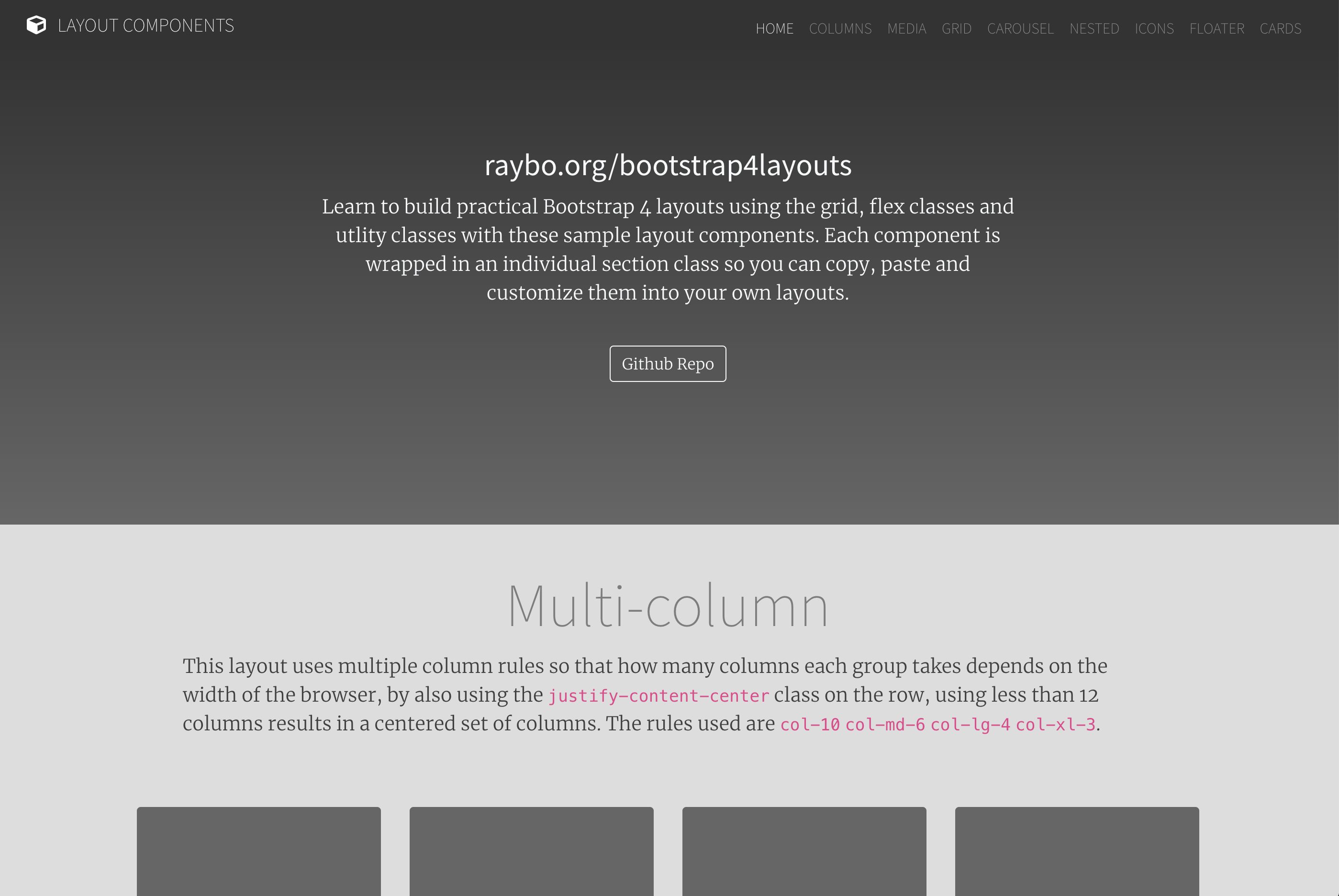
Compare the page layouts and mobile experience. Open any screenshot for a closer look.
Author preview
Author-provided previewTop of page
Preview provided in the project README.
One original preview is available. Open the full image to inspect the design.
Screenshots show visual appearance; interactive behavior may differ.
Recorded 2026-10-02View source
What stands out
A quick read of the recorded project description.
Provides eight layout examples: Column Based, Media, Grid, Carousel, Nested, Icons, Floater, and Cards
Each layout is wrapped in a separate <article> with a page- prefixed id for easy targeting
Most layouts include an optional <header>, and the structure is relatively straightforward
The README invites new layouts via Pull Request
Template Details
This is an HTML template for building Bootstrap 4 responsive websites, derived from the examples used by the author in the LinkedIn Learning course "Bootstrap 4 Layouts: Responsive Single-Page Design." The repository is organized as a single page, with each layout placed in a separate <article> tag and given an id prefixed with page-; except for the Floater layout, most layouts also include an optional <header>.
The template provides the following layouts: Column Based, Media, Grid, Carousel, Nested, Icons, Floater, and Cards. Each layout demonstrates a different aspect of the Bootstrap layout system; for example, the Floater layout combines row, align-items-center, justify-content-center, and grid classes such as col-8 col-md-4 and col-10 col-md-6 to place text and image side by side.
The repository itself is a starter template, and the README invites contributions of additional layouts via Pull Request; it does not describe a build process, dependency management, or deployment method. Demo images are referenced from external domains and should be replaced or their licensing verified.
HTMLStarter
Is it right for your project?
Use Cases
- When you need a Bootstrap 4 single-page site starter skeleton
- When you want to study Bootstrap grid and layout class combinations through examples
- When choosing ready-made layout structures for different content blocks (text-image, cards, carousel, icons)
Suitable For
- Developers familiar with HTML and Bootstrap basics who want to quickly build a responsive single page
- Those who need to reference various layout approaches for teaching or self-study
- Contributors planning to add custom layouts to the existing template and submit a PR
Getting started & customization
Use these recorded setup notes alongside the repository instructions for your chosen version.
- 1
The repository is a static HTML template; simply open or deploy the HTML files to view the layouts
- 2
Demo images reference external domains (such as planetoftheweb.com); it is recommended to replace them with your own assets before use
- 3
The code uses the BSD-2-Clause license; when distributing, you must retain the copyright notice, the two conditions, and the disclaimer
- 4
Third-party assets such as images, fonts, and icons require separate license verification and cannot be judged solely by the code license
License & source material
Usage conditions & limitations
Free to use · keep license noticeThis entry covers the free version under the BSD-2-Clause license in the public repository; the free scope applies to that version's code and does not imply that external services or third-party assets are free.
Must comply with when using
- Free use, modification, commercial use, and distribution in source or binary form are permitted.
- Source distributions must retain the copyright notice, the two conditions, and the disclaimer; binary distributions must reproduce these in the documentation or accompanying materials.
- The code is provided as is; warranties and liability limitations are governed by the original license and applicable law.
Additional costs & items to verify
- The template originates from the author's paid LinkedIn Learning course examples and is provided only as companion code; using the template itself does not require purchasing the course, but accessing the course instruction requires a separate LinkedIn Learning subscription.
- The example layouts reference SVG assets from the external domain planetoftheweb.com, and the README does not state their license; before use, replace them with your own assets or independently verify the authorization for those external assets, as the code license does not cover these images.
- Demo images, fonts, icons, and other third-party assets must be checked against their respective licenses and cannot be judged solely by the code's BSD-2-Clause license.
- External services such as domains, hosting, databases, payments, or AI may incur additional charges.
View Original Text Basis
Redistribution and use in source and binary forms, with or without modification, are permitted
Original License Text
It's based on a course I built for LinkedIn learning called [Bootstrap 4 Layouts: Responsive Single-Page Design]
Original README
https://github.com/adaashong/bootstrapProject/blob/master/LICENSEhttps://github.com/adaashong/bootstrapProject/blob/master/README.md<img class="layout-image img-fluid" src="http://planetoftheweb.com/i/phone.svg" alt="Photo Sample">
Original README
Compiled by DeepSeek based on repository license and README ·2026-10-02. Results only cover the materials read; dependencies, images, fonts, and subsequent term changes are subject to their respective original texts.
Project checks & description sources
Template Information
- Source platforms
- GitHub
- Documentation and maintenance reference score
- Less documented · 53 / 100
- Technologies
- HTML
- Website type
- Starter
How this score is calculated
Our heuristic uses license records (up to 30), a demo link (12), a preview (10), stars (15), recorded maintenance (15), description completeness (8), feature records (5) and classification data (5). It is not a code, security or performance test, or a Google score. A link does not establish tested functionality.
What to verify for this project
- Repository update recorded
- 2022-05-19
- Screenshot last checked
- 2026-10-02
No demo link is recorded. Use the repository instructions to evaluate the project locally; the screenshot alone cannot establish interactive behavior.
The catalog identifies HTML as the primary stack. Check the actual dependency manifest and lockfile for versions and hosting requirements. These notes use recorded metadata, not a code audit or a deployment test.
Use a selection guide →How this description was prepared
AI-assisted description based on catalog records and repository material. Repository authors are not automatically the reviewers of this description.
Automatically checked against source and license rules; no manual editorial review.
Inspect the recorded source material
SHA-256: c4c95720940cb12704faac984a25284350e56401128646b0e1137a5773f5b72e
2026-10-02T08:42:39.901Z
Source file / repository

# Bootstrap 4 layouts
This repository is a template for building responsive websites for Bootstrap 4. It provides a quick template for getting started with different layouts. It's based on a course I built for LinkedIn learning called [Bootstrap 4 Layouts: Responsive Single-Page Design](https://www.linkedin.com/learning/bootstrap-4-layouts-responsive-single-page-design/creating-a-bootstrap-4-layout?u=104). If you want to see a demo of the layouts, check out: [raybo.org/bootstrap4layouts/](http://www.raybo.org/bootstrap4layouts/)
There are several different layouts available:
- Column Based
- Media
- Grid
- Carousel
- Nested
- Icons
- Floater
- Cards
## Structure of Layouts
Each is designed to showcase a different aspect of how Bootstrap Layouts work. Here's a code sample from the Floater Layout:
```
<article id="page-floater" class="page-section vertical-padding">
<section class="layout-floater container text-reverse">
<div class="row align-items-center justify-content-center">
<div class="col-8 col-md-4 img-container">
<img class="layout-image img-fluid" src="http://planetoftheweb.com/i/phone.svg" alt="Photo Sample">
</div>
<div class="col-10 col-md-6 align-self-center">
<div class="my-5 text-center text-md-left pl-md-5">
<h2 class="layout-title">Floater Title</h2>
<p class="layout-text ">Lorem ipsum dolor sit amet, consectetur adipisicing elit. Officiis fuga ex delectus sunt natus doloremque praesentium
aspernatur, totam tempora officia, sed fugit? Libero voluptatem nulla mollitia, amet dolor iste magni.</p>
</div>
</div>
</div>
</section>
</article>
```
Each layout is in it's own `<article>` tag, which begins a layout and has an id with the `page-` prefix.
Most layouts (not the floater layout) also have an optional `<header>`. They sholuld be self explanatory.
I'd love to see some Pull Requests with additional layouts.
Explore similar templates
Compare previews and descriptions within the same stack and category.

startbootstrap-simple-sidebar
A Bootstrap off-canvas sidebar navigation HTML starter template from Start Bootstrap. It provides directly editable HTML and CSS in the dist directory, while the source uses Pug, SCSS, and JavaScript with npm build scripts for live preview and compilation.
HTML · Starter

adminkit
AdminKit is a free, MIT-licensed HTML admin and dashboard template built on Bootstrap 5. The free version includes 15 demo pages, 1 plugin, and 1 color scheme, with hundreds of UI components, forms, tables, charts, and icons.
HTML · Admin dashboard

Landing-Page
A general-purpose landing page HTML template maintained by Tailwind Toolbox, written in pure HTML and loading the complete Tailwind CSS via CDN.
HTML · Corporate Website

light-bootstrap-dashboard
Light Bootstrap Dashboard is a free, MIT-licensed admin dashboard template from Creative Tim, built on Bootstrap with a responsive static HTML structure.
HTML · Admin dashboard

sing-app
Sing App Lite is a free, open-source admin dashboard template from Flatlogic, built with Bootstrap 4.5 and SCSS. It provides a responsive layout, dashboard examples, typography, tables, notifications, basic charts, icons, maps, and a hover sidebar, along with styled Bootstrap components.
HTML · Admin dashboard

startbootstrap-modern-business
Modern Business is a multipurpose Bootstrap full-site HTML template from Start Bootstrap with 17 standalone pages covering home, about, services, portfolio, pricing, blog, FAQ, and contact.
HTML · Starter