Uses Next.js App Router, React 19, TypeScript and Tailwind CSS 4
Next.jsReactPortfolioBlog
paperframe — Next.js Portfolio Template
By Afeng01
Paperframe is an editorial-style personal site template built on Next.js App Router, Tailwind CSS and local MDX, offering a content-first public shell that suits setting up structure before migrating real content.
Explore the design
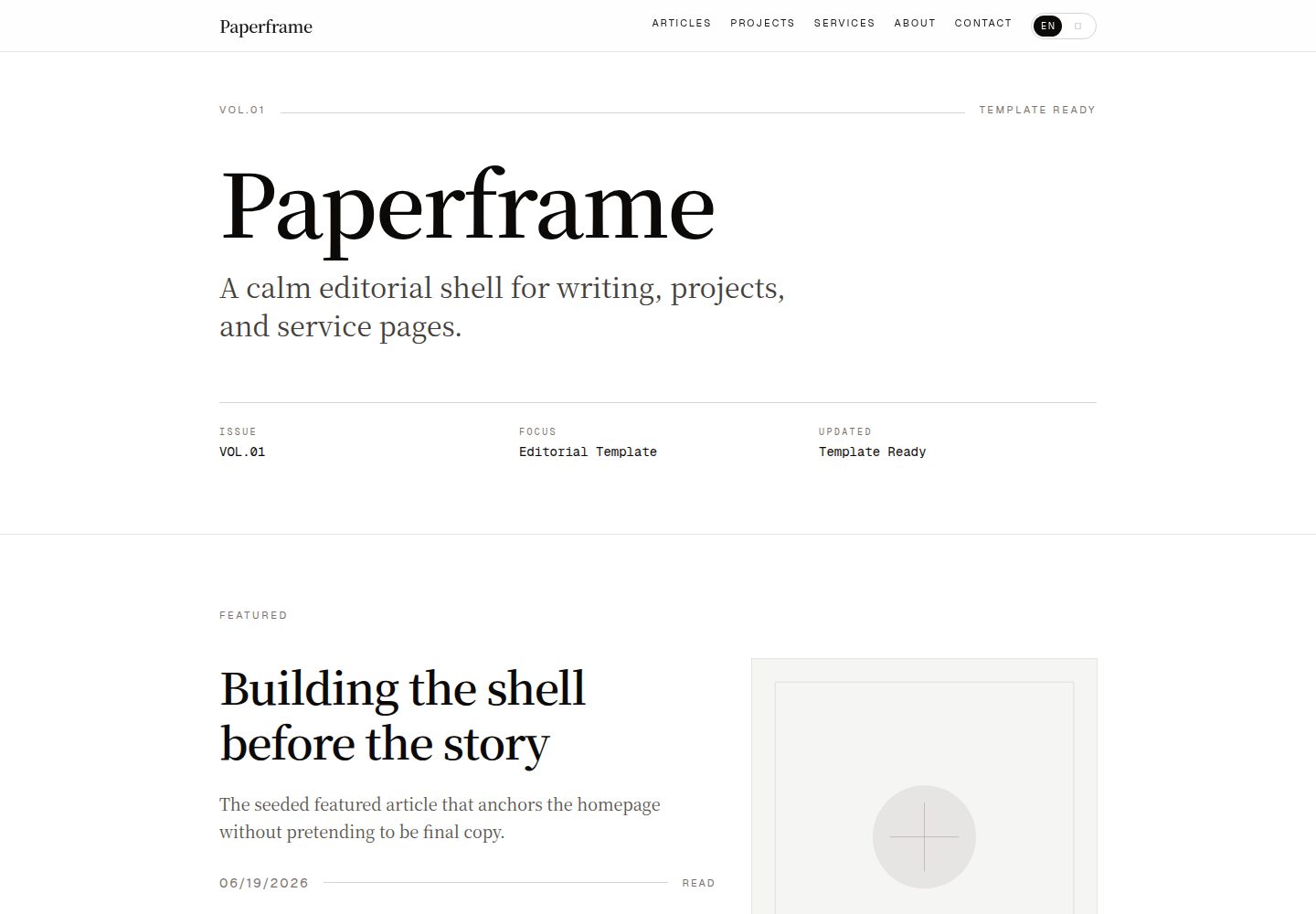
Compare the page layouts and mobile experience. Open any screenshot for a closer look.
Desktop homepage1 / 2
Desktop captureTop of page
Actual screenshot captured by the server browser.
All pages & views 2
Screenshots show visual appearance; interactive behavior may differ.
Recorded 2026-10-14View source
What stands out
A quick read of the recorded project description.
Local MDX content, validated with gray-matter and Zod
Server-rendered MDX via next-mdx-remote/rsc
Includes list and detail routes for articles, projects and services
Automatically generates sitemap.xml, robots.txt, several share images and a web manifest
Provides dev and start scripts with a fixed host and port, and cleans up leftover processes from the same repository
Template Details
Paperframe is an editorial-style personal site template built with Next.js App Router, Tailwind CSS and local MDX collections. It targets users who want their public site to read more like a small publication than a generic startup landing page, and suits building a calm, content-first personal site, or writers, designers and developers who want a public shell in place before migrating real content. The template provides routes such as /, /about, /articles, /articles/[slug], /projects, /projects/[slug], /services and /services/[slug], and generates sitemap.xml, robots.txt, app icons, Apple icons, Open Graph images, Twitter images and a web manifest. The README states explicitly that the template does not include authentication, a CMS, database statistics, utility pages, newsletter flows, comments or real content migration; these belong to a later product stage. The template and the real site should remain two separate repositories: the template stays generic, easy to fork and easy to preview, while the real site is free to become specific.
Next.jsReactPortfolioBlog
Is it right for your project?
Use Cases
- Building a content-first public personal site shell for writers, designers or developers
- Establishing a stable publishing structure before migrating real content
- Projects that prefer keeping content in local files rather than starting from a CMS
- Editorial-style sites that need article, project and service display pages
Suitable For
- Users building a calm, content-first personal site
- Writers, designers and developers who want a public shell before migrating real content
- Users who prefer managing content in local files rather than starting with a CMS
- Developers who need a reusable, easy-to-fork template repository
Getting started & customization
Use these recorded setup notes alongside the repository instructions for your chosen version.
- 1
Create a repository from the GitHub template: gh repo create your-site --public --template Afeng01/paperframe --clone, then npm install and npm run dev
- 2
The default dev address is http://127.0.0.1:4321
- 3
Import the repository on Vercel, keep main as the production branch, and set NEXT_PUBLIC_SITE_URL to the production demo domain
- 4
If NEXT_PUBLIC_SITE_URL is not set, the template falls back to Vercel system environment variables, so canonical URLs, sitemap.xml, robots.txt and share images point to the current deployment
- 5
Prioritize customizing src/lib/site-config.ts, src/content/site.ts, src/content/about.mdx and the MDX files under articles, projects and services
License & source material
Usage conditions & limitations
Free to use · keep license noticeThis entry covers the free version under the MIT license in the public repository; the free scope is that version's code and does not mean external services or third-party assets are free.
Must comply with when using
- You may use, modify, commercialize and distribute this version's code for free.
- When distributing copies or substantial portions of the code, retain the original author's copyright notice and the full MIT license notice.
- The code is provided as is; warranties and limitations of liability are governed by the original license and applicable law.
Additional costs & items to verify
- Demo images, fonts, icons and other third-party assets must be checked against their own licenses; the code's MIT license alone cannot determine this.
- External services such as domains, hosting, databases, payments or AI may incur separate charges.
- When deploying on Vercel, set the NEXT_PUBLIC_SITE_URL environment variable for production, otherwise it falls back to Vercel system environment variables.
- npm run dev intentionally uses the webpack dev server rather than the default Turbopack, because webpack is more stable when local MDX is rendered via next-mdx-remote/rsc.
- npm run dev:raw and npm run start:raw are only used when the unwrapped Next.js commands are explicitly needed.
- npm run dev and npm run start intentionally pin the repository to a single host and port, and shut down leftover Paperframe next processes from the same repository before starting a new instance.
View Original Text Basis
Permission is hereby granted, free of charge
Original License Text
3. Add `NEXT_PUBLIC_SITE_URL` for the production environment.
Original README
`npm run dev` intentionally uses the webpack dev server instead of the default
Original README
template. `npm run dev:raw` and `npm run start:raw` are available only when you
Original README
https://github.com/Afeng01/paperframe/blob/main/LICENSEhttps://github.com/Afeng01/paperframe/blob/main/README.md`npm run dev` and `npm run start` intentionally keep the repo on a single fixed
Original README
Compiled by DeepSeek based on repository license and README ·2026-10-14. Results only cover the materials read; dependencies, images, fonts, and subsequent term changes are subject to their respective original texts.
Project checks & description sources
Template Information
- Source platforms
- GitHub
- Documentation and maintenance reference score
- More documented · 85 / 100
- Technologies
- Next.js · React
- Website type
- Portfolio · Blog
How this score is calculated
Our heuristic uses license records (up to 30), a demo link (12), a preview (10), stars (15), recorded maintenance (15), description completeness (8), feature records (5) and classification data (5). It is not a code, security or performance test, or a Google score. A link does not establish tested functionality.
What to verify for this project
- Repository update recorded
- 2026-06-21
- Screenshot last checked
- 2026-10-14
A demo link is listed. Check it with your own content and viewport sizes; its presence does not confirm that forms, authentication or payments work.
The catalog identifies Next.js as the primary stack. Check the actual dependency manifest and lockfile for versions and hosting requirements. These notes use recorded metadata, not a code audit or a deployment test.
Use a selection guide →How this description was prepared
AI-assisted description based on catalog records and repository material. Repository authors are not automatically the reviewers of this description.
Review declaration: codex-user-requested-batch-review-20261017 · 2026-10-16
Inspect the recorded source material
SHA-256: 2f9856f18997ce29b8730e2fc9de500cde101dfca5ff53a2eb1407d9e068a7f3
2026-10-14T20:43:57.831Z
Source file / repository# Paperframe Editorial-style personal site template built with Next.js App Router, Tailwind CSS, and local MDX collections.  Live demo: [paperframe-chi.vercel.app](https://paperframe-chi.vercel.app) Paperframe is designed for people who want a public site that feels more like a small publication than a generic startup landing page. ## Who this is for - people building a calm, content-first personal site - writers, designers, and builders who want a public shell before real content migration - anyone who wants to keep content in local files instead of starting with a CMS Paperframe is a template repository, not a finished personal brand site. The point is to give you a stable publication shell first, then let the real voice, portfolio, and public proof replace the seeded content. ## 3-minute start Use the GitHub template directly: ```bash gh repo create your-site --public --template Afeng01/paperframe --clone cd your-site npm install npm run dev ``` Default dev URL: ```text http://127.0.0.1:4321 ``` `npm run dev` and `npm run start` intentionally keep the repo on a single fixed host and port, and shut down leftover Paperframe `next` processes from the same repo before starting a fresh instance. If you prefer the GitHub UI, click `Use this template`, create a new repository, then clone that new repository locally. ## Live demo on Vercel The template repo itself should also have a public demo deployment. Why: - GitHub shows the source - Vercel shows the actual reading experience Recommended setup for `Afeng01/paperframe`: 1. Import the GitHub repository into Vercel. 2. Keep `main` as the production branch. 3. Add `NEXT_PUBLIC_SITE_URL` for the production environment. 4. Set that variable to the production demo domain, for example `https://paperframe.vercel.app` or your connected custom domain. 5. After the first production deploy, paste the demo URL into the GitHub repository Homepage field and add a `Live demo` link near the top of this README. If `NEXT_PUBLIC_SITE_URL` is not set, the template falls back to Vercel system environment variables so canonical URLs, `sitemap.xml`, `robots.txt`, and share images still point at the active deployment instead of `example.com`. ## Included surfaces - `/` - `/about` - `/articles` - `/articles/[slug]` - `/projects` - `/projects/[slug]` - `/services` - `/services/[slug]` - generated `sitemap.xml` - generated `robots.txt` - generated app icon, Apple icon, Open Graph image, Twitter image, and web manifest ## Deliberately not included - auth - CMS - database-backed stats - tool pages - newsletter flows - comments - real content migration Those belong in the next product phase, not in the base template. ## Template vs. real site Keep them as two separate repositories. - `paperframe`: the reusable upstream template - `paperframe-demo`: the Vercel deployment of the template repo with seeded content - `your-site`: your actual public website with real copy, assets, and domain settings That split matters because template work and personal-site work move at different speeds. The template should stay generic, documented, easy to fork, and easy to preview. Your real site should be free to become specific, messy, and personal. If you want a concrete migration sequence, read [docs/template-playbook.md](docs/template-playbook.md). ## Stack - Next.js App Router - React 19 - TypeScript - Tailwind CSS 4 - local MDX content - `gray-matter` + Zod content validation - `next-mdx-remote/rsc` for server-rendered MDX ## Local commands ```bash npm run dev npm run dev:raw npm run lint npm run typecheck npm run build npm run start npm run start:raw ``` `npm run dev` intentionally uses the webpack dev server instead of the default Turbopack path because this project renders local MDX through `next-mdx-remote/rsc`, and that combination is more stable in webpack for this template. `npm run dev:raw` and `npm run start:raw` are available only when you explicitly want the unwrapped Next.js commands. ## What to customize first 1. `src/lib/site-config.ts` 2. `src/content/site.ts` 3. `src/content/about.mdx` 4. `src/content/articles/*.mdx` 5. `src/content/projects/*.mdx` 6. `src/content/services/*.mdx` If you only change those files, the rest of the UI should remain stable. ## Repository presentation checklist Before publishing your fork or your derived real site, replace: - the repo description and topics on GitHub - `docs/assets/template-preview.svg` if the README hero should reflect your brand - `docs/assets/github-social-preview.png` in GitHub `Settings -> Social preview` - placeholder MDX entries under `src/content/**` ## Structure ```text src/app/ Routes, metadata files, generated web assets src/components/ Presentational UI src/content/ Local source content src/lib/content/ MDX loading, validation, and selectors src/lib/site-config.ts Template-level metadata and public defaults public/images/ Local seed imagery docs/assets/ Repo preview assets ``` Responsibility split: - `src/app/**`: routes, metadata, special files, and page composition - `src/components/**`: reusable UI sections and detail/list templates - `src/content/**`: editable public content - `src/lib/content/**`: parsing, validation, sorting, and selectors - `src/lib/site-config.ts`: site URL, brand name, SEO defaults, and social metadata ## Publishing checklist Before making the repo public, replace the default template values in `src/lib/site-config.ts`, swap the sample MDX content, and update the preview image in `docs/assets/template-preview.svg`. Recommended next steps: - deploy the template repo to Vercel and expose a stable demo URL - add a real domain - update the generated share image styling if your brand is very different - replace the seed SVGs in `public/images/` - add LICENSE metadata on GitHub and enable Template Repository ## Notes - Seed content is intentional. It proves the data contract without forcing you to rewrite components later. - The current route set is intentionally content-first. Tooling pages and live product surfaces should be added as a separate phase. - The original design direction was informed by the public structure and rhythm of [erlich.fun](https://erlich.fun/), but this repo is now packaged as a reusable standalone template rather than a one-off replica shell.
Explore similar templates
Compare previews and descriptions within the same stack and category.

tailwind-nextjs-starter-blog
A Next.js and Tailwind CSS blog starter template using Contentlayer for Markdown/MDX, with built-in SEO, code highlighting, and tags. It targets personal technical blogs and migration from Jekyll/Hugo to React, and supports one-click Vercel deployment.
Next.js · Blog

react-resume-template
A personal resume website template for software developers, built with Next.js, React, and TypeScript and styled with Tailwind CSS. Site content is driven by a single data file at /src/data/data.tsx, with types in dataDef.ts and images in src/images/.
Next.js · Portfolio

Nextjs-tailwindcss-blog-template
A Next.js blog styled with Tailwind CSS. The current branch processes Markdown with Velite; the earlier Contentlayer setup is retained in a separate historical branch.
Next.js · Blog

Next-js-Blog-Boilerplate
A blog starter built on Next.js 12 and Tailwind CSS 3, integrating TypeScript, ESLint, Prettier, and PostCSS.
Next.js · Blog

nextjs-blog-theme
A Next.js 15 and Tailwind CSS 4.x blog starter by Netlify, designed by Bejamas, with MDX support, dark/light theme switching, and environment-variable configuration. It includes a visual setup wizard for deploying to Netlify and manages content via local .mdx files.
Next.js · Blog

blog
A personal blog forked from Timlrx's tailwind-nextjs-starter-blog, built with Next.js, React, and Tailwind CSS. Content is stored as Markdown/MDX under data/, with site, author, navigation, and project data in separate files.
Next.js · Blog