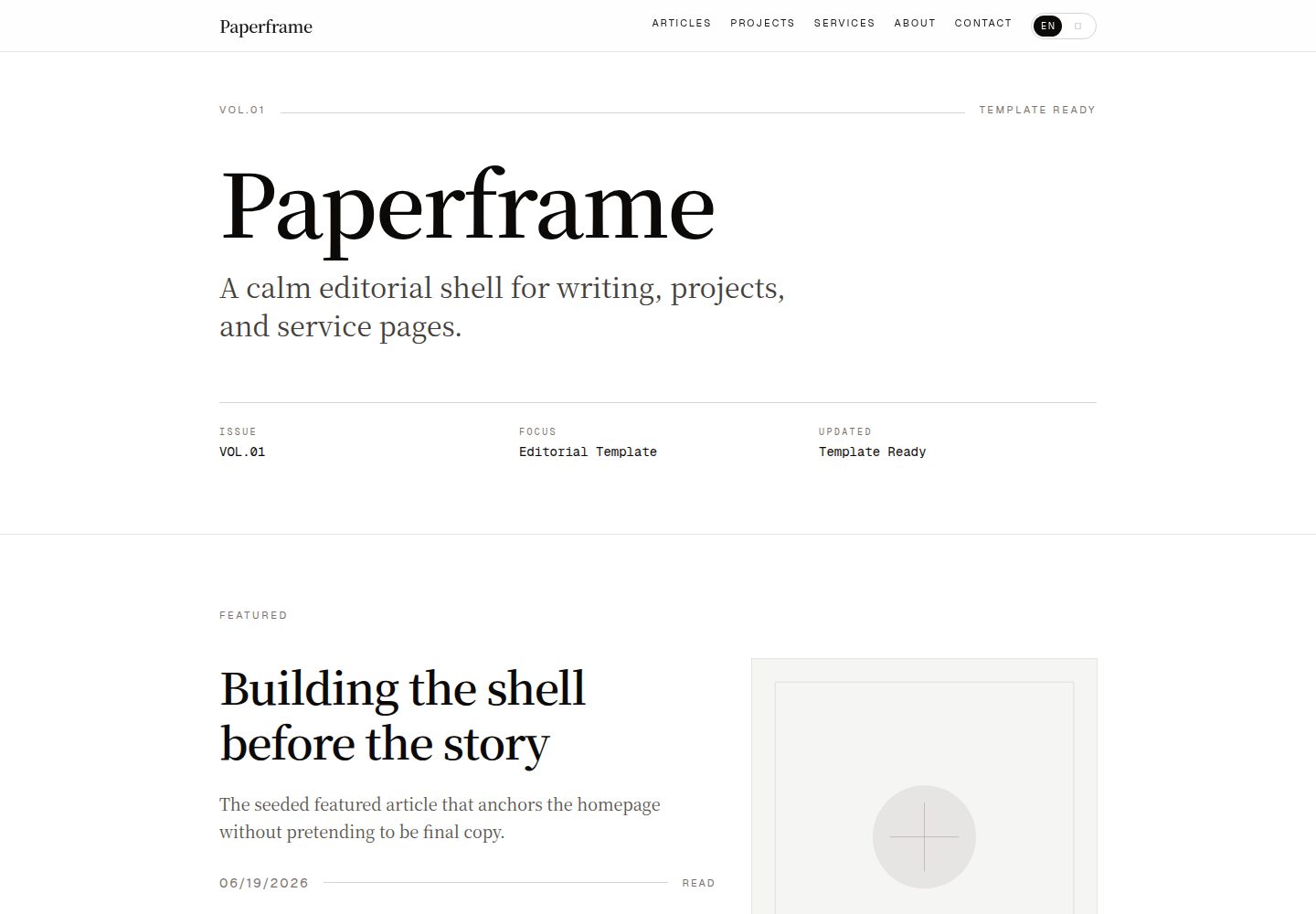
使用 Next.js App Router、React 19、TypeScript 和 Tailwind CSS 4
Next.jsReact作品集博客
paperframe — Next.js 作品集模板
作者 Afeng01
Paperframe 是一个基于 Next.js App Router、Tailwind CSS 和本地 MDX 的编辑风格个人站点模板,提供内容优先的公开外壳,适合先搭建结构再迁移真实内容。
看看你的网站会是什么样
浏览真实页面截图,比较内容排版与手机效果。点击下方缩略图切换,放大查看整页细节。
全部页面与视图 2
截图用于了解视觉与布局,交互效果请以实际项目为准。
采集于 2026-10-14查看来源
值得关注的模板亮点
从已有项目资料中,快速了解它的特点。
本地 MDX 内容,通过 gray-matter 与 Zod 进行内容验证
使用 next-mdx-remote/rsc 实现服务端渲染 MDX
包含文章、项目、服务等列表与详情路由
自动生成 sitemap.xml、robots.txt 及多种分享图片和 web manifest
提供固定主机和端口的开发与启动脚本,并清理同仓库残留进程
模板详细介绍
Paperframe 是一个编辑风格的个人站点模板,使用 Next.js App Router、Tailwind CSS 和本地 MDX 集合构建。它面向希望公开站点更像小型出版物而非通用创业公司落地页的用户,适合构建平静、内容优先的个人站点,或希望在迁移真实内容前先拥有公开外壳的写作者、设计师和开发者。模板提供 /、/about、/articles、/articles/[slug]、/projects、/projects/[slug]、/services、/services/[slug] 等路由,并生成 sitemap.xml、robots.txt、应用图标、Apple 图标、Open Graph 图片、Twitter 图片和 web manifest。README 明确说明该模板不包含认证、CMS、数据库统计、工具页面、新闻通讯流程、评论和真实内容迁移,这些属于后续产品阶段。模板与真实站点应保持为两个独立仓库,模板保持通用、易 fork 和易预览,真实站点则自由具体化。
Next.jsReact作品集博客
适合你的项目吗?
适用场景
- 为写作者、设计师或开发者搭建内容优先的个人公开站点外壳
- 在迁移真实内容前先建立稳定的发布结构
- 希望将内容保存在本地文件而非从 CMS 开始的项目
- 需要文章、项目和服务展示页面的编辑风格站点
适合人群
- 构建平静、内容优先个人站点的用户
- 希望先有公开外壳再迁移真实内容的写作者、设计师和开发者
- 偏好本地文件管理内容而非初始使用 CMS 的用户
- 需要可复用、易 fork 的模板仓库的开发者
上手与定制指南
结合仓库当前版本的说明,按下面的资料检查内容、配置与运行要求。
- 1
使用 GitHub 模板创建仓库:gh repo create your-site --public --template Afeng01/paperframe --clone,然后 npm install 和 npm run dev
- 2
默认开发地址为 http://127.0.0.1:4321
- 3
在 Vercel 导入仓库,保持 main 为生产分支,并设置 NEXT_PUBLIC_SITE_URL 为生产演示域名
- 4
若未设置 NEXT_PUBLIC_SITE_URL,模板会回退到 Vercel 系统环境变量,使 canonical URL、sitemap.xml、robots.txt 和分享图片指向当前部署
- 5
优先自定义 src/lib/site-config.ts、src/content/site.ts、src/content/about.mdx 以及 articles、projects、services 下的 MDX 文件
授权与来源资料
使用条件与限制
免费使用 · 保留许可声明本次收录的是公开仓库中采用 MIT 许可的免费版本;免费范围为该版本代码,不代表外部服务或第三方素材免费。
使用时需要遵守
- 允许免费使用、修改、商用和分发该版本代码。
- 分发代码副本或实质性部分时,保留原作者版权声明和完整 MIT 许可声明。
- 代码按现状提供;担保与责任限制以原许可证及适用法律为准。
额外费用与待核对事项
- 演示图片、字体、图标及其他第三方素材需按各自许可核对,不能仅凭代码的 MIT 许可判断。
- 域名、托管、数据库、支付或 AI 等外部服务可能另外收费。
- 在 Vercel 部署时需为生产环境设置 NEXT_PUBLIC_SITE_URL 环境变量,否则将回退到 Vercel 系统环境变量。
- npm run dev 有意使用 webpack 开发服务器而非默认的 Turbopack,因为本地 MDX 通过 next-mdx-remote/rsc 渲染时 webpack 更稳定。
- npm run dev:raw 和 npm run start:raw 仅在明确需要未包装的 Next.js 命令时使用。
- npm run dev 和 npm run start 有意将仓库固定在单一主机和端口,并在启动新实例前关闭同仓库残留的 Paperframe next 进程。
查看原文依据
Permission is hereby granted, free of charge
许可证原文
3. Add `NEXT_PUBLIC_SITE_URL` for the production environment.
README 原文
`npm run dev` intentionally uses the webpack dev server instead of the default
README 原文
template. `npm run dev:raw` and `npm run start:raw` are available only when you
README 原文
https://github.com/Afeng01/paperframe/blob/main/LICENSEhttps://github.com/Afeng01/paperframe/blob/main/README.md`npm run dev` and `npm run start` intentionally keep the repo on a single fixed
README 原文
DeepSeek 根据仓库许可证和 README 整理 ·2026-10-14。结果仅覆盖已读取资料,依赖、图片、字体及后续条款变更以各自原文为准。
项目核对记录与介绍依据
模板资料
- 来源平台
- GitHub
- 资料与维护参考分
- 资料较完整 · 85 / 100
- 技术栈
- Next.js · React
- 网站类型
- 作品集 · 博客
这个分数如何计算
本站按许可资料(最高30分)、演示链接(12分)、预览图(10分)、Star数(15分)、记录的维护时间(15分)、描述完整度(8分)、功能记录(5分)和分类资料(5分)计算。它不是代码、安全或性能测试,也不是 Google 评分;有链接不代表已实测可用。
这个项目需要核对什么
- 记录的仓库更新时间
- 2026-06-21
- 截图检查日期
- 2026-10-14
已收录演示链接。请用你的内容与屏幕尺寸检查;有演示不代表表单、认证或支付已经可用。
目录记录的主要技术栈是 Next.js。请通过依赖清单和锁文件核对实际版本与托管要求。这些说明基于收录资料,不代表代码审计或部署实测。
查看具体选型方法 →介绍的制作与核对状态
介绍由 AI 辅助整理目录与仓库资料。仓库作者不等于这篇介绍的审核者。
审核声明: codex-user-requested-batch-review-20261017 · 2026-10-16
查看当时使用的来源资料
SHA-256: 2f9856f18997ce29b8730e2fc9de500cde101dfca5ff53a2eb1407d9e068a7f3
2026-10-14T20:43:57.831Z
来源文件 / 仓库# Paperframe Editorial-style personal site template built with Next.js App Router, Tailwind CSS, and local MDX collections.  Live demo: [paperframe-chi.vercel.app](https://paperframe-chi.vercel.app) Paperframe is designed for people who want a public site that feels more like a small publication than a generic startup landing page. ## Who this is for - people building a calm, content-first personal site - writers, designers, and builders who want a public shell before real content migration - anyone who wants to keep content in local files instead of starting with a CMS Paperframe is a template repository, not a finished personal brand site. The point is to give you a stable publication shell first, then let the real voice, portfolio, and public proof replace the seeded content. ## 3-minute start Use the GitHub template directly: ```bash gh repo create your-site --public --template Afeng01/paperframe --clone cd your-site npm install npm run dev ``` Default dev URL: ```text http://127.0.0.1:4321 ``` `npm run dev` and `npm run start` intentionally keep the repo on a single fixed host and port, and shut down leftover Paperframe `next` processes from the same repo before starting a fresh instance. If you prefer the GitHub UI, click `Use this template`, create a new repository, then clone that new repository locally. ## Live demo on Vercel The template repo itself should also have a public demo deployment. Why: - GitHub shows the source - Vercel shows the actual reading experience Recommended setup for `Afeng01/paperframe`: 1. Import the GitHub repository into Vercel. 2. Keep `main` as the production branch. 3. Add `NEXT_PUBLIC_SITE_URL` for the production environment. 4. Set that variable to the production demo domain, for example `https://paperframe.vercel.app` or your connected custom domain. 5. After the first production deploy, paste the demo URL into the GitHub repository Homepage field and add a `Live demo` link near the top of this README. If `NEXT_PUBLIC_SITE_URL` is not set, the template falls back to Vercel system environment variables so canonical URLs, `sitemap.xml`, `robots.txt`, and share images still point at the active deployment instead of `example.com`. ## Included surfaces - `/` - `/about` - `/articles` - `/articles/[slug]` - `/projects` - `/projects/[slug]` - `/services` - `/services/[slug]` - generated `sitemap.xml` - generated `robots.txt` - generated app icon, Apple icon, Open Graph image, Twitter image, and web manifest ## Deliberately not included - auth - CMS - database-backed stats - tool pages - newsletter flows - comments - real content migration Those belong in the next product phase, not in the base template. ## Template vs. real site Keep them as two separate repositories. - `paperframe`: the reusable upstream template - `paperframe-demo`: the Vercel deployment of the template repo with seeded content - `your-site`: your actual public website with real copy, assets, and domain settings That split matters because template work and personal-site work move at different speeds. The template should stay generic, documented, easy to fork, and easy to preview. Your real site should be free to become specific, messy, and personal. If you want a concrete migration sequence, read [docs/template-playbook.md](docs/template-playbook.md). ## Stack - Next.js App Router - React 19 - TypeScript - Tailwind CSS 4 - local MDX content - `gray-matter` + Zod content validation - `next-mdx-remote/rsc` for server-rendered MDX ## Local commands ```bash npm run dev npm run dev:raw npm run lint npm run typecheck npm run build npm run start npm run start:raw ``` `npm run dev` intentionally uses the webpack dev server instead of the default Turbopack path because this project renders local MDX through `next-mdx-remote/rsc`, and that combination is more stable in webpack for this template. `npm run dev:raw` and `npm run start:raw` are available only when you explicitly want the unwrapped Next.js commands. ## What to customize first 1. `src/lib/site-config.ts` 2. `src/content/site.ts` 3. `src/content/about.mdx` 4. `src/content/articles/*.mdx` 5. `src/content/projects/*.mdx` 6. `src/content/services/*.mdx` If you only change those files, the rest of the UI should remain stable. ## Repository presentation checklist Before publishing your fork or your derived real site, replace: - the repo description and topics on GitHub - `docs/assets/template-preview.svg` if the README hero should reflect your brand - `docs/assets/github-social-preview.png` in GitHub `Settings -> Social preview` - placeholder MDX entries under `src/content/**` ## Structure ```text src/app/ Routes, metadata files, generated web assets src/components/ Presentational UI src/content/ Local source content src/lib/content/ MDX loading, validation, and selectors src/lib/site-config.ts Template-level metadata and public defaults public/images/ Local seed imagery docs/assets/ Repo preview assets ``` Responsibility split: - `src/app/**`: routes, metadata, special files, and page composition - `src/components/**`: reusable UI sections and detail/list templates - `src/content/**`: editable public content - `src/lib/content/**`: parsing, validation, sorting, and selectors - `src/lib/site-config.ts`: site URL, brand name, SEO defaults, and social metadata ## Publishing checklist Before making the repo public, replace the default template values in `src/lib/site-config.ts`, swap the sample MDX content, and update the preview image in `docs/assets/template-preview.svg`. Recommended next steps: - deploy the template repo to Vercel and expose a stable demo URL - add a real domain - update the generated share image styling if your brand is very different - replace the seed SVGs in `public/images/` - add LICENSE metadata on GitHub and enable Template Repository ## Notes - Seed content is intentional. It proves the data contract without forcing you to rewrite components later. - The current route set is intentionally content-first. Tooling pages and live product surfaces should be added as a separate phase. - The original design direction was informed by the public structure and rhythm of [erlich.fun](https://erlich.fun/), but this repo is now packaged as a reusable standalone template rather than a one-off replica shell.
看看同类模板
对比同技术栈与用途的模板,找到更适合的视觉与内容结构。

tailwind-nextjs-starter-blog
tailwind-nextjs-starter-blog 是一个面向个人技术博客的 Next.js 与 Tailwind CSS 启动模板,其 v2 版本基于 App Router 与 React Server Comp…
Next.js · 博客

react-resume-template
A personal resume website template built with React.js, Typescript, Next.js, and styled with Tailwind css
Next.js · 作品集

Nextjs-tailwindcss-blog-template
使用 Tailwind CSS 的 Next.js 博客。当前分支通过 Velite 处理 Markdown,早期 Contentlayer 实现保留在单独的历史分支中。
Next.js · 博客

Next-js-Blog-Boilerplate
Next-js-Blog-Boilerplate 是一套面向个人与技术博客的启动代码,基于 Next.js 12 与 Tailwind CSS 3 构建,同时集成了 TypeScript、ESLint、Prettier …
Next.js · 博客

nextjs-blog-theme
nextjs-blog-theme 是 Netlify 团队维护的一个博客启动模板,基于 Next.js 15(Pages Router)和 Tailwind CSS 4.x 构建,设计由 Bejamas 机构完成。
Next.js · 博客

blog
🚀 My personal blog made with Tailwind CSS and NextJS. Template from Timlrx. Feel free to fork, follow and use…
Next.js · 博客