Astro static site shell, no adapter by default, connect deployment targets as needed
AstroStarter
astro-tailwind-daisyui-starter — Astro Starter Template
By aholbreich
A minimal Astro-based starter integrating Tailwind CSS, DaisyUI, and Alpine JS, with built-in blog content collections, SEO metadata, sitemap, and dark mode toggle.
Explore the design
Compare the page layouts and mobile experience. Open any screenshot for a closer look.
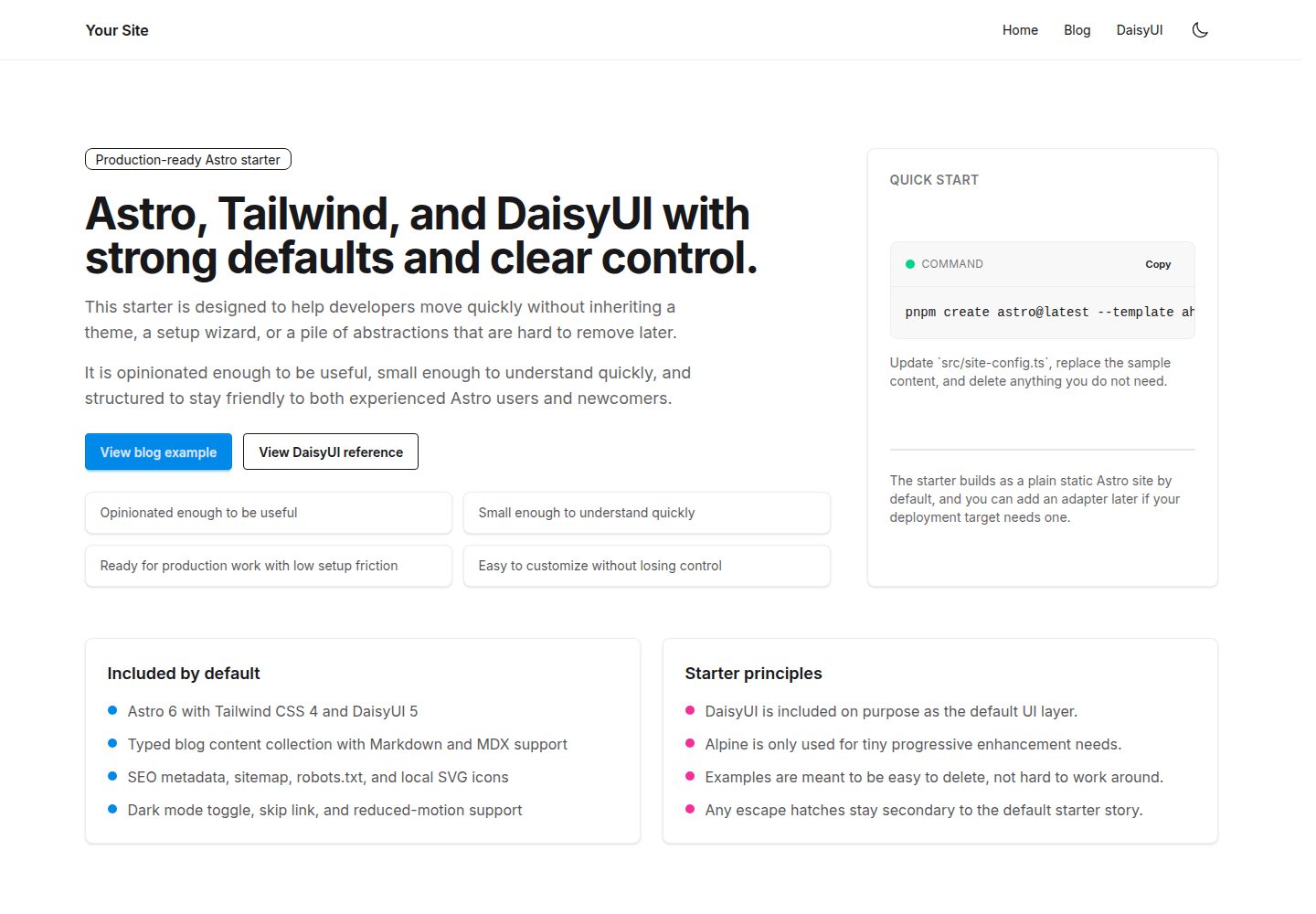
Desktop homepage1 / 3
Desktop captureTop of page
Actual screenshot captured by the server browser.
All pages & views 3
Screenshots show visual appearance; interactive behavior may differ.
Recorded 2026-10-03View source
What stands out
A quick read of the recorded project description.
Tailwind CSS and DaisyUI as the default styling and UI layers
Alpine JS used only for minor client-side progressive enhancement
Typed blog content collections supporting Markdown and MDX with example posts
Built-in SEO metadata component, sitemap, and robots.txt
Dark mode toggle, skip links, and reduced motion accessibility basics
Template Details
This is a starter template for Astro, with the repository name astro-tailwind-daisyui-starter, licensed under MIT. It combines a site shell, styling layer, and a small amount of client-side interactivity: Astro handles pages and content workflows, Tailwind CSS handles styling, DaisyUI serves as the default UI layer, and Alpine JS is used only for minor progressive enhancement. The template outputs a static site by default and does not include a deployment adapter; add one for your target platform when needed.
For content, the template includes typed blog content collections supporting Markdown and MDX, along with example posts demonstrating images, video embeds, and code blocks. Site configuration is centralized in src/site-config.ts, theme tokens in src/styles/theme.css, and the HTML shell, metadata defaults, and theme bootstrapping in src/layouts/Layout.astro. SEO-related features include a metadata component, sitemap, and robots.txt; fonts are registered via the Astro Fonts API with a local Inter variable font mapped to Tailwind's sans font token.
The template explicitly does not include authentication, a database or API layer, analytics tracking, multiple UI frameworks, a large component library, or a multi-option generator at install time. It is also not a theme, landing page kit, or page builder. Before use, set public environment variables such as PUBLIC_SITE_URL and PUBLIC_TWITTER_HANDLE, and confirm the final site URL in astro.config.mjs. Third-party assets such as demo images, fonts, and icons must be checked separately under their respective licenses.
AstroStarter
Is it right for your project?
Use Cases
- Need a clearly structured Astro project starting point where example content can be quickly removed
- Building a static site with a blog or article content collection
- Using Tailwind CSS and DaisyUI component styles together in Astro
- Configuring SEO metadata, sitemap, and robots.txt for a site
- Sites needing dark mode toggle and basic accessibility support
Suitable For
- Developers familiar with or willing to use Astro, Tailwind CSS, and DaisyUI
- Those who want to start a project from a starter with default configuration but not overly complex
- Static site projects requiring blog content collections and basic SEO configuration
- Teams preferring to add deployment adapters on demand and keep the template portable
Getting started & customization
Use these recorded setup notes alongside the repository instructions for your chosen version.
- 1
Use pnpm create astro@latest --template aholbreich/astro-tailwind-daisyui-starter or clone the repository and run pnpm install and pnpm dev
- 2
Astro 6 requires Node 22.12.0 or newer; the repository includes a corresponding .nvmrc
- 3
Set PUBLIC_SITE_URL and PUBLIC_TWITTER_HANDLE in .env, and confirm the site URL in astro.config.mjs
- 4
The default build is a static site; add the corresponding adapter if SSR or platform features are needed
- 5
Third-party assets such as demo images, fonts, and icons must be checked under their respective licenses
License & source material
Usage conditions & limitations
Free to use · keep license noticeThis entry covers the free version under the MIT license in the public repository; the free scope is the code of this version and does not imply that external services or third-party assets are free.
Must comply with when using
- Free use, modification, commercial use, and distribution of this version's code are permitted.
- When distributing copies or substantial portions of the code, retain the original author's copyright notice and the full MIT license notice.
- The code is provided as is; warranties and limitations of liability are governed by the original license and applicable law.
Additional costs & items to verify
- Using this template requires Node.js 22.12.0 or higher; environments below this version cannot build or develop properly.
- Before use, public environment variables such as PUBLIC_SITE_URL and PUBLIC_TWITTER_HANDLE must be configured in .env, otherwise site metadata, sitemap, and social information will be incomplete.
- The template outputs only a static site by default; if the target platform requires SSR, edge runtime, or platform-specific image services, you must add the corresponding deployment adapter yourself.
- Demo images, fonts, icons, and other third-party assets must be checked under their respective licenses; they cannot be judged solely by the code's MIT license.
- External services such as domain, hosting, database, payment, or AI may incur additional charges.
View Original Text Basis
Permission is hereby granted, free of charge
Original License Text
Astro 6 requires Node `22.12.0` or newer.
Original README
Set your public site metadata in `.env`: ```bash PUBLIC_SITE_URL=https://example.com PUBLIC_TWITTER_HANDLE=@yourhandle ```
Original README
https://github.com/aholbreich/astro-tailwind-daisyui-starter/blob/main/LICENSEhttps://github.com/aholbreich/astro-tailwind-daisyui-starter/blob/main/README.mdAdd a deployment adapter only if your target platform or runtime needs one.
Original README
Compiled by DeepSeek based on repository license and README ·2026-10-03. Results only cover the materials read; dependencies, images, fonts, and subsequent term changes are subject to their respective original texts.
Project checks & description sources
Template Information
- Source platforms
- Astro Themes
- Documentation and maintenance reference score
- More documented · 87 / 100
- Technologies
- Astro
- Website type
- Starter
How this score is calculated
Our heuristic uses license records (up to 30), a demo link (12), a preview (10), stars (15), recorded maintenance (15), description completeness (8), feature records (5) and classification data (5). It is not a code, security or performance test, or a Google score. A link does not establish tested functionality.
What to verify for this project
- Repository update recorded
- 2026-05-04
- Screenshot last checked
- 2026-10-03
A demo link is listed. Check it with your own content and viewport sizes; its presence does not confirm that forms, authentication or payments work.
The catalog identifies Astro as the primary stack. Check the actual dependency manifest and lockfile for versions and hosting requirements. These notes use recorded metadata, not a code audit or a deployment test.
Use a selection guide →How this description was prepared
AI-assisted description based on catalog records and repository material. Repository authors are not automatically the reviewers of this description.
Review declaration: [email protected] · 2026-10-04
Inspect the recorded source material
SHA-256: 31b754a9f0e8b19aa2c8e6801ff1191cebb5ae735ce3cd36c5efa1a4d1f87063
2026-10-03T13:43:06.507Z
Source file / repository# astro-tailwind-daisyui-starter > A production-ready Astro starter with Tailwind CSS 4, DaisyUI 5, blog support, SEO basics, and optional Alpine JS for tiny progressive enhancement. [Live Demo](https://astro-start-tailwind.vercel.app/) · [Report a bug](https://github.com/aholbreich/astro-tailwind-daisyui-starter/issues/new?template=bug_report.md) · [Request a feature](https://github.com/aholbreich/astro-tailwind-daisyui-starter/issues/new?template=feature_request.md) ## Quickstart ```bash pnpm create astro@latest --template aholbreich/astro-tailwind-daisyui-starter ``` Or clone directly: ```bash git clone https://github.com/aholbreich/astro-tailwind-daisyui-starter.git my-project cd my-project pnpm install pnpm dev ``` ## What this is This repository is a production-ready Astro starter. It is opinionated enough to be useful, but small enough to understand quickly. It offers strong defaults and a small number of focused escape hatches. It is meant to be friendly to both experienced developers and newcomers who want a clear starting point they can control. It keeps the stack focused on purpose: - Astro 6 for the site shell and content-first workflow - Tailwind CSS 4 for styling - DaisyUI 5 as the default UI layer - Alpine JS only where a few lines of client-side behavior are useful The goal is simple: start quickly, keep control, and ship without unnecessary setup friction. ### Choose this if - You want a clean Astro starter with strong defaults instead of a blank repo. - You want DaisyUI included on purpose. - You want blog/content support, sitemap, SEO basics, icons, dark mode, and accessibility basics already wired up. - You want example pages and components that are easy to delete. - You want something production-usable immediately without becoming a large scaffolding system. ### Skip this if - You want a theme, landing page kit, or large component gallery. - You want a generator with many install-time choices. - You want auth, database, API, CMS, or app-style state management included from the start. ## Included - Astro 6 - Tailwind CSS 4 via `@tailwindcss/vite` - DaisyUI 5 as the default UI layer - Alpine JS for small enhancements only - Typed blog content collection with Markdown and MDX support - Tailwind Typography plugin for blog/article content - SEO meta component, sitemap, and `robots.txt` - `astro-icon` with local SVG icons - Inter configured through Astro 6's fonts API with a checked-in local variable font - Dark mode toggle with no flash on first paint - Accessibility basics including skip link and reduced-motion support - Static output by default, adapter-free until you actually need one - GitHub Actions CI for `astro check` and build ## Intentionally not included - A theme or page builder - A large starter option matrix - Authentication - Database or API layer - Analytics or tracking - Multiple UI frameworks - A heavy component library beyond DaisyUI ## Commands | Command | Action | | :------------------- | :------------------------------------------ | | `pnpm install` | Install dependencies | | `pnpm dev` | Start the dev server on `localhost:4321` | | `pnpm check` | Run `astro check` | | `pnpm build` | Build the production site | | `pnpm preview` | Preview the production build locally | | `pnpm astro ...` | Run Astro CLI commands | | `pnpm release:minor` | Guarded local release flow for a minor version | Astro 6 requires Node `22.12.0` or newer. The repository includes an `.nvmrc` with that baseline. Set your public site metadata in `.env`: ```bash PUBLIC_SITE_URL=https://example.com PUBLIC_TWITTER_HANDLE=@yourhandle ``` Astro validates these values in `astro.config.mjs`, then the starter reuses them in `src/site-config.ts` for sitemap, canonical URLs, and social metadata. ## Starter shape This starter is meant to be understandable at a glance: - One site config file: `src/site-config.ts` - One base layout: `src/layouts/Layout.astro` - A small set of components you can keep or delete - A minimal blog collection in `src/content/blog/` - A single DaisyUI reference page you can keep, adapt, or delete ## Project structure ```text / ├── .github/ │ ├── ISSUE_TEMPLATE/ │ └── workflows/ ├── public/ ├── scripts/ │ └── release.mjs ├── src/ │ ├── components/ │ ├── content/ │ │ └── blog/ │ ├── icons/ │ ├── layouts/ │ ├── pages/ │ ├── styles/ │ ├── content.config.ts │ └── site-config.ts ├── astro.config.mjs ├── package.json └── tsconfig.json ``` ## Main customization points ### `src/site-config.ts` Update the site title, description, navigation, footer text, and social metadata. The production URL and default Twitter handle come from validated public env vars so they stay aligned with Astro's `site` config. ### `src/styles/theme.css` Adjust DaisyUI and theme tokens. If you want to move away from DaisyUI later, this is one of the main files you will touch. ### Fonts The starter uses Astro 6's fonts API end to end: - `astro.config.mjs` registers the local Inter variable font and exposes `--font-inter` - `src/layouts/Layout.astro` loads it with `<Font cssVariable="--font-inter" />` - `src/styles/fonts.css` maps that variable to Tailwind's `--font-sans` That means Tailwind utilities and DaisyUI components both inherit the same font without extra component-level setup. This separation is intentional: - Astro handles font sourcing, optimization, and the CSS variable - Tailwind uses that variable as the shared sans-serif token - DaisyUI inherits the Tailwind font token through the normal component styles ### `src/layouts/Layout.astro` Update the HTML shell, view transitions, metadata defaults, and theme bootstrapping. ### `astro.config.mjs` Set the final `site` URL. Add a deployment adapter only if your target platform or runtime needs one. ## Blog support Posts live in `src/content/blog/`. The included sample posts are meant to show real Markdown/MDX usage, including images, video embeds, and code blocks. Add a post like this: ```md --- title: My first post description: A short summary shown in listings and meta tags. pubDate: 2024-06-01 draft: false --- Your content here. ``` ## Deployment The starter builds as a plain static Astro site by default. That keeps the template portable and easier to understand. If you later need platform-specific SSR, image services, edge runtime support, or other adapter features, add the relevant adapter for your deployment target at that point. Set `site` in `astro.config.mjs` to your production URL so sitemap and canonical URLs are correct. ## Contributing See [CONTRIBUTING.md](./CONTRIBUTING.md). ## Release flow This repository uses semver. ```bash pnpm release:patch pnpm release:minor pnpm release:major git push && git push --tags ``` The local release script checks that: - you are on `main` - the working tree is clean - `CHANGELOG.md` still has an `Unreleased` section - `pnpm check` passes - `pnpm build` passes It then asks for confirmation and runs `pnpm version` for you. The pushed tag triggers the GitHub release workflow. ## License [MIT](./LICENSE)
Explore similar templates
Compare previews and descriptions within the same stack and category.

astrowind
AstroWind is a free, open-source Astro starter theme using Astro and Tailwind CSS, released under the MIT license.
Astro · Blog
accessible-astro-starter
An accessibility-focused Astro 6 starter template with WCAG 2.2 AA practices, Tailwind CSS 4, TypeScript, Prettier, ESLint, form validation, blog and portfolio examples, and preference toggles for dark mode, high contrast, and reduced motion.
Astro · Blog

astro-erudite
astro-erudite is an opinionated, unstyled static blog template built with Astro and native CSS, with no UI or CSS framework and minimal dependencies.
Astro · Portfolio

astro-shopify
A lightweight Shopify headless ecommerce starter template built with Astro and Svelte, integrating the Shopify Storefront API for product and inventory data, with built-in cart state management and basic add-to-cart and checkout flow.
Astro · E-commerce

brutal
Brutal is a neobrutalism Astro starter theme from ElianCodes, derived from the author's personal site and generalized. It includes a Markdown blog collection, build-time RSS and sitemap, image optimization, Tailwind CSS styling, and Biome checks, with no JavaScript by default.
Astro · Starter

qwind
Qwind is a free and open-source website template built on Qwik and Tailwind CSS, featuring directory-based routing via QwikCity, a Markdown blog, dark mode, and static deployment configuration.
Astro · Tool Site