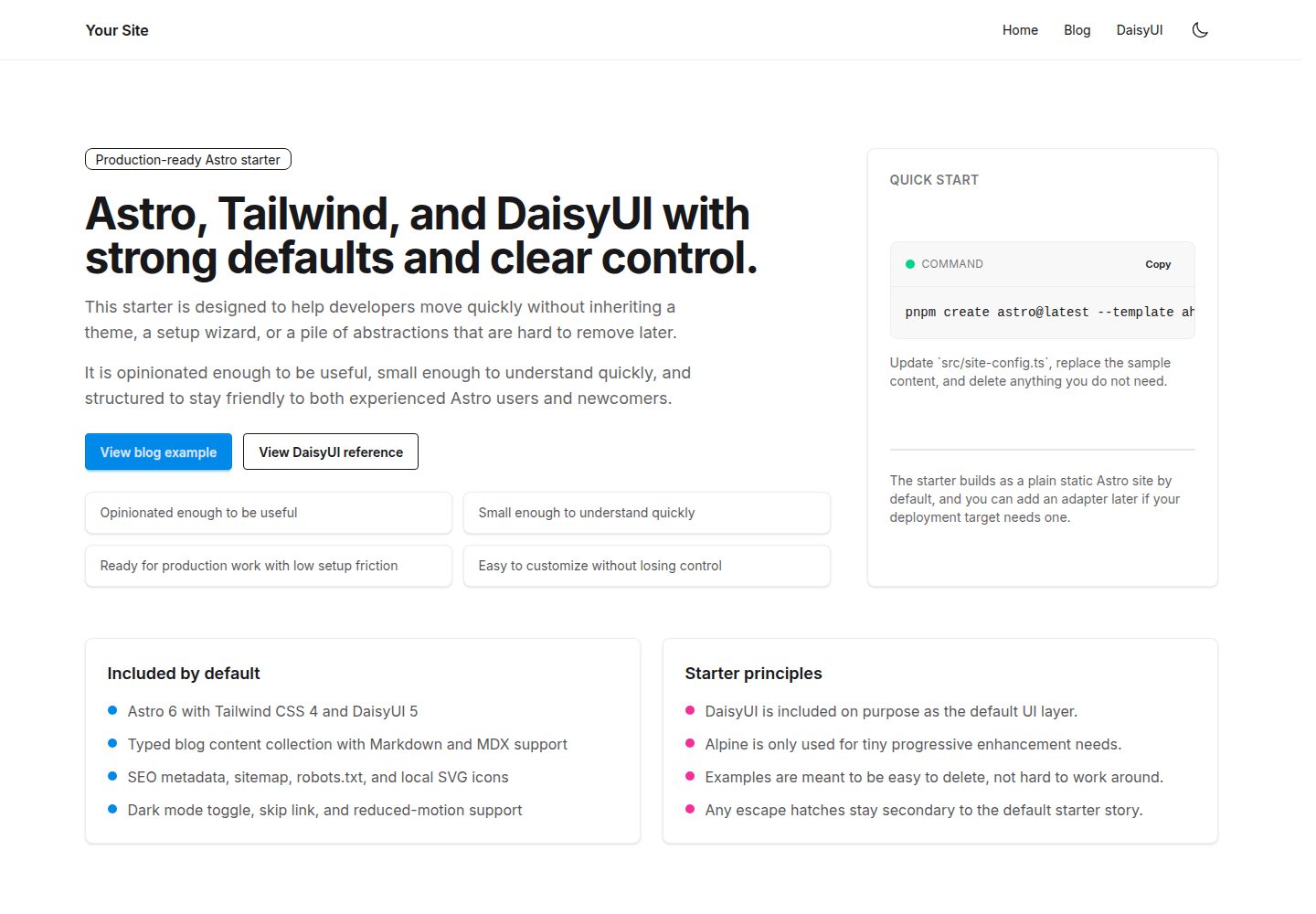
Astro 静态站点外壳,默认无适配器,按需接入部署目标
Astro启动器
astro-tailwind-daisyui-starter — Astro 启动器模板
作者 aholbreich
基于 Astro 的极简启动器,集成 Tailwind CSS、DaisyUI、Alpine JS,并内置博客内容集合、SEO 元信息、站点地图与深色模式切换。
看看你的网站会是什么样
浏览真实页面截图,比较内容排版与手机效果。点击下方缩略图切换,放大查看整页细节。
全部页面与视图 3
截图用于了解视觉与布局,交互效果请以实际项目为准。
采集于 2026-10-03查看来源
值得关注的模板亮点
从已有项目资料中,快速了解它的特点。
Tailwind CSS 与 DaisyUI 作为默认样式与 UI 层
Alpine JS 仅用于少量客户端渐进增强
类型化博客内容集合,支持 Markdown 与 MDX 及示例文章
内置 SEO 元信息组件、站点地图与 robots.txt
深色模式切换、跳转链接与减少动态效果等无障碍基础
模板详细介绍
这是一个面向 Astro 的启动器模板,仓库名为 astro-tailwind-daisyui-starter,采用 MIT 许可。它把站点外壳、样式层与少量客户端交互组合在一起:Astro 负责页面与内容工作流,Tailwind CSS 负责样式,DaisyUI 作为默认 UI 层,Alpine JS 仅用于少量渐进增强。模板默认输出静态站点,不预置部署适配器,需要时再按目标平台添加。
内容方面,模板内置类型化的博客内容集合,支持 Markdown 与 MDX,并附带示例文章展示图片、视频嵌入和代码块用法。站点配置集中在 src/site-config.ts,主题令牌在 src/styles/theme.css,HTML 外壳、元信息默认值与主题引导在 src/layouts/Layout.astro。SEO 相关包含元信息组件、站点地图和 robots.txt;字体通过 Astro 字体 API 注册本地 Inter 可变字体,并映射到 Tailwind 的 sans 字体令牌。
模板明确不包含认证、数据库或 API 层、分析追踪、多 UI 框架、大型组件库以及安装时的多选项生成器。它也不是主题、落地页套件或页面构建器。使用前需要设置 PUBLIC_SITE_URL 与 PUBLIC_TWITTER_HANDLE 等公开环境变量,并在 astro.config.mjs 中确认最终 site URL。演示图片、字体、图标等第三方素材需按各自许可单独核对。
Astro启动器
适合你的项目吗?
适用场景
- 需要一个结构清晰、可快速删除示例内容的 Astro 项目起点
- 搭建带博客或文章内容集合的静态站点
- 在 Astro 中同时使用 Tailwind CSS 与 DaisyUI 组件样式
- 为站点配置 SEO 元信息、站点地图与 robots.txt
- 需要深色模式切换与基础无障碍支持的站点
适合人群
- 熟悉或愿意使用 Astro、Tailwind CSS 与 DaisyUI 的开发者
- 希望从有默认配置但不过度复杂的启动器开始项目的人
- 需要博客内容集合与基础 SEO 配置的静态站点项目
- 偏好按需添加部署适配器、保持模板可移植性的团队
上手与定制指南
结合仓库当前版本的说明,按下面的资料检查内容、配置与运行要求。
- 1
使用 pnpm create astro@latest --template aholbreich/astro-tailwind-daisyui-starter 或克隆仓库后执行 pnpm install 与 pnpm dev
- 2
Astro 6 要求 Node 22.12.0 或更新版本,仓库包含对应 .nvmrc
- 3
在 .env 中设置 PUBLIC_SITE_URL 与 PUBLIC_TWITTER_HANDLE,并在 astro.config.mjs 中确认 site URL
- 4
默认构建为静态站点,如需 SSR 或平台特性再添加对应适配器
- 5
演示图片、字体、图标等第三方素材需按各自许可核对
授权与来源资料
使用条件与限制
免费使用 · 保留许可声明本次收录的是公开仓库中采用 MIT 许可的免费版本;免费范围为该版本代码,不代表外部服务或第三方素材免费。
使用时需要遵守
- 允许免费使用、修改、商用和分发该版本代码。
- 分发代码副本或实质性部分时,保留原作者版权声明和完整 MIT 许可声明。
- 代码按现状提供;担保与责任限制以原许可证及适用法律为准。
额外费用与待核对事项
- 使用该模板需要 Node.js 22.12.0 或更高版本,低于此版本的运行环境无法正常构建或开发。
- 使用前必须在 .env 中配置 PUBLIC_SITE_URL 与 PUBLIC_TWITTER_HANDLE 等公开环境变量,否则站点元数据、站点地图与社交信息不完整。
- 模板默认仅输出静态站点,若目标平台需要 SSR、边缘运行时或平台特定图像服务,需自行添加对应部署适配器。
- 演示图片、字体、图标及其他第三方素材需按各自许可核对,不能仅凭代码的 MIT 许可判断。
- 域名、托管、数据库、支付或 AI 等外部服务可能另外收费。
查看原文依据
Permission is hereby granted, free of charge
许可证原文
Astro 6 requires Node `22.12.0` or newer.
README 原文
Set your public site metadata in `.env`: ```bash PUBLIC_SITE_URL=https://example.com PUBLIC_TWITTER_HANDLE=@yourhandle ```
README 原文
https://github.com/aholbreich/astro-tailwind-daisyui-starter/blob/main/LICENSEhttps://github.com/aholbreich/astro-tailwind-daisyui-starter/blob/main/README.mdAdd a deployment adapter only if your target platform or runtime needs one.
README 原文
DeepSeek 根据仓库许可证和 README 整理 ·2026-10-03。结果仅覆盖已读取资料,依赖、图片、字体及后续条款变更以各自原文为准。
项目核对记录与介绍依据
模板资料
- 来源平台
- Astro Themes
- 资料与维护参考分
- 资料较完整 · 87 / 100
- 技术栈
- Astro
- 网站类型
- 启动器
这个分数如何计算
本站按许可资料(最高30分)、演示链接(12分)、预览图(10分)、Star数(15分)、记录的维护时间(15分)、描述完整度(8分)、功能记录(5分)和分类资料(5分)计算。它不是代码、安全或性能测试,也不是 Google 评分;有链接不代表已实测可用。
这个项目需要核对什么
- 记录的仓库更新时间
- 2026-05-04
- 截图检查日期
- 2026-10-03
已收录演示链接。请用你的内容与屏幕尺寸检查;有演示不代表表单、认证或支付已经可用。
目录记录的主要技术栈是 Astro。请通过依赖清单和锁文件核对实际版本与托管要求。这些说明基于收录资料,不代表代码审计或部署实测。
查看具体选型方法 →介绍的制作与核对状态
介绍由 AI 辅助整理目录与仓库资料。仓库作者不等于这篇介绍的审核者。
审核声明: [email protected] · 2026-10-04
查看当时使用的来源资料
SHA-256: 31b754a9f0e8b19aa2c8e6801ff1191cebb5ae735ce3cd36c5efa1a4d1f87063
2026-10-03T13:43:06.507Z
来源文件 / 仓库# astro-tailwind-daisyui-starter > A production-ready Astro starter with Tailwind CSS 4, DaisyUI 5, blog support, SEO basics, and optional Alpine JS for tiny progressive enhancement. [Live Demo](https://astro-start-tailwind.vercel.app/) · [Report a bug](https://github.com/aholbreich/astro-tailwind-daisyui-starter/issues/new?template=bug_report.md) · [Request a feature](https://github.com/aholbreich/astro-tailwind-daisyui-starter/issues/new?template=feature_request.md) ## Quickstart ```bash pnpm create astro@latest --template aholbreich/astro-tailwind-daisyui-starter ``` Or clone directly: ```bash git clone https://github.com/aholbreich/astro-tailwind-daisyui-starter.git my-project cd my-project pnpm install pnpm dev ``` ## What this is This repository is a production-ready Astro starter. It is opinionated enough to be useful, but small enough to understand quickly. It offers strong defaults and a small number of focused escape hatches. It is meant to be friendly to both experienced developers and newcomers who want a clear starting point they can control. It keeps the stack focused on purpose: - Astro 6 for the site shell and content-first workflow - Tailwind CSS 4 for styling - DaisyUI 5 as the default UI layer - Alpine JS only where a few lines of client-side behavior are useful The goal is simple: start quickly, keep control, and ship without unnecessary setup friction. ### Choose this if - You want a clean Astro starter with strong defaults instead of a blank repo. - You want DaisyUI included on purpose. - You want blog/content support, sitemap, SEO basics, icons, dark mode, and accessibility basics already wired up. - You want example pages and components that are easy to delete. - You want something production-usable immediately without becoming a large scaffolding system. ### Skip this if - You want a theme, landing page kit, or large component gallery. - You want a generator with many install-time choices. - You want auth, database, API, CMS, or app-style state management included from the start. ## Included - Astro 6 - Tailwind CSS 4 via `@tailwindcss/vite` - DaisyUI 5 as the default UI layer - Alpine JS for small enhancements only - Typed blog content collection with Markdown and MDX support - Tailwind Typography plugin for blog/article content - SEO meta component, sitemap, and `robots.txt` - `astro-icon` with local SVG icons - Inter configured through Astro 6's fonts API with a checked-in local variable font - Dark mode toggle with no flash on first paint - Accessibility basics including skip link and reduced-motion support - Static output by default, adapter-free until you actually need one - GitHub Actions CI for `astro check` and build ## Intentionally not included - A theme or page builder - A large starter option matrix - Authentication - Database or API layer - Analytics or tracking - Multiple UI frameworks - A heavy component library beyond DaisyUI ## Commands | Command | Action | | :------------------- | :------------------------------------------ | | `pnpm install` | Install dependencies | | `pnpm dev` | Start the dev server on `localhost:4321` | | `pnpm check` | Run `astro check` | | `pnpm build` | Build the production site | | `pnpm preview` | Preview the production build locally | | `pnpm astro ...` | Run Astro CLI commands | | `pnpm release:minor` | Guarded local release flow for a minor version | Astro 6 requires Node `22.12.0` or newer. The repository includes an `.nvmrc` with that baseline. Set your public site metadata in `.env`: ```bash PUBLIC_SITE_URL=https://example.com PUBLIC_TWITTER_HANDLE=@yourhandle ``` Astro validates these values in `astro.config.mjs`, then the starter reuses them in `src/site-config.ts` for sitemap, canonical URLs, and social metadata. ## Starter shape This starter is meant to be understandable at a glance: - One site config file: `src/site-config.ts` - One base layout: `src/layouts/Layout.astro` - A small set of components you can keep or delete - A minimal blog collection in `src/content/blog/` - A single DaisyUI reference page you can keep, adapt, or delete ## Project structure ```text / ├── .github/ │ ├── ISSUE_TEMPLATE/ │ └── workflows/ ├── public/ ├── scripts/ │ └── release.mjs ├── src/ │ ├── components/ │ ├── content/ │ │ └── blog/ │ ├── icons/ │ ├── layouts/ │ ├── pages/ │ ├── styles/ │ ├── content.config.ts │ └── site-config.ts ├── astro.config.mjs ├── package.json └── tsconfig.json ``` ## Main customization points ### `src/site-config.ts` Update the site title, description, navigation, footer text, and social metadata. The production URL and default Twitter handle come from validated public env vars so they stay aligned with Astro's `site` config. ### `src/styles/theme.css` Adjust DaisyUI and theme tokens. If you want to move away from DaisyUI later, this is one of the main files you will touch. ### Fonts The starter uses Astro 6's fonts API end to end: - `astro.config.mjs` registers the local Inter variable font and exposes `--font-inter` - `src/layouts/Layout.astro` loads it with `<Font cssVariable="--font-inter" />` - `src/styles/fonts.css` maps that variable to Tailwind's `--font-sans` That means Tailwind utilities and DaisyUI components both inherit the same font without extra component-level setup. This separation is intentional: - Astro handles font sourcing, optimization, and the CSS variable - Tailwind uses that variable as the shared sans-serif token - DaisyUI inherits the Tailwind font token through the normal component styles ### `src/layouts/Layout.astro` Update the HTML shell, view transitions, metadata defaults, and theme bootstrapping. ### `astro.config.mjs` Set the final `site` URL. Add a deployment adapter only if your target platform or runtime needs one. ## Blog support Posts live in `src/content/blog/`. The included sample posts are meant to show real Markdown/MDX usage, including images, video embeds, and code blocks. Add a post like this: ```md --- title: My first post description: A short summary shown in listings and meta tags. pubDate: 2024-06-01 draft: false --- Your content here. ``` ## Deployment The starter builds as a plain static Astro site by default. That keeps the template portable and easier to understand. If you later need platform-specific SSR, image services, edge runtime support, or other adapter features, add the relevant adapter for your deployment target at that point. Set `site` in `astro.config.mjs` to your production URL so sitemap and canonical URLs are correct. ## Contributing See [CONTRIBUTING.md](./CONTRIBUTING.md). ## Release flow This repository uses semver. ```bash pnpm release:patch pnpm release:minor pnpm release:major git push && git push --tags ``` The local release script checks that: - you are on `main` - the working tree is clean - `CHANGELOG.md` still has an `Unreleased` section - `pnpm check` passes - `pnpm build` passes It then asks for confirmation and runs `pnpm version` for you. The pushed tag triggers the GitHub release workflow. ## License [MIT](./LICENSE)
看看同类模板
对比同技术栈与用途的模板,找到更适合的视觉与内容结构。

astrowind
⭕️ AstroWind: A free template using Astro v7 and Tailwind CSS v4. Astro starter theme.
Astro · 博客
accessible-astro-starter
Accessible Astro Starter 是一个以无障碍为核心理念的 Astro 6 启动模板,由 incluud 团队维护。
Astro · 博客

astro-erudite
An opinionated, unstyled static blogging template built with Astro and native CSS.
Astro · 作品集

astro-shopify
astro-shopify 是一个面向开发者的轻量级电商启动模板,用于构建基于 Shopify 的无头店面。
Astro · 电商

brutal
A neobrutalism Astro starter theme
Astro · 启动器

qwind
⭕️ Qwind: A template to make your website using Qwik + Tailwind CSS.
Astro · 工具站