Built with Next.js 14 App Router, TypeScript, and Tailwind CSS
Next.jsReactCorporate Website
growthly-digital-agency-nextjs-template — Next.js Business Template
By ahsanhabibleon
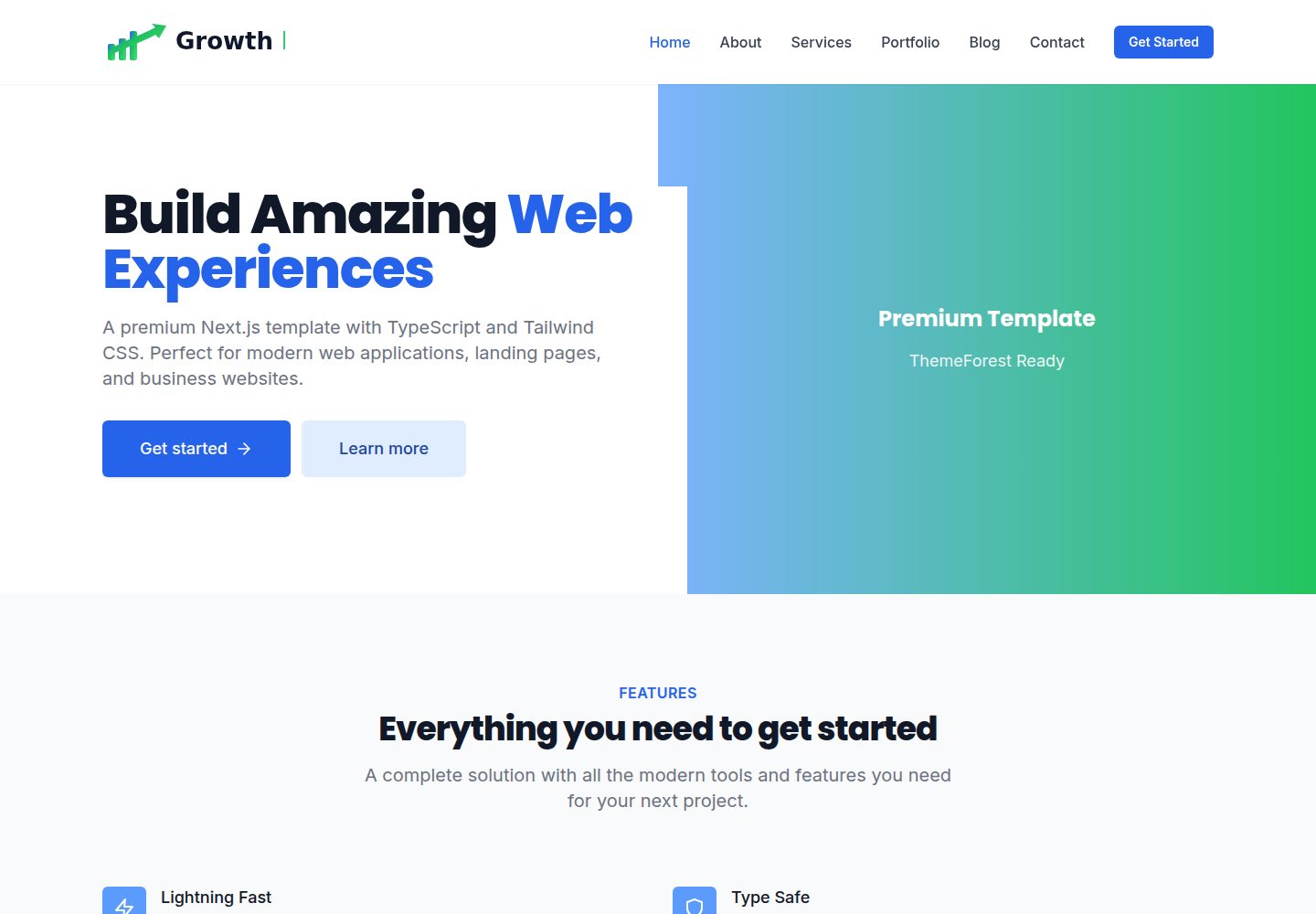
A digital agency website template built on Next.js App Router, TypeScript, and Tailwind CSS, including pages such as Home, About, Services, Portfolio, Blog, and Contact, plus reusable components.
Explore the design
Compare the page layouts and mobile experience. Open any screenshot for a closer look.
Desktop homepage1 / 3
Desktop captureTop of page
Actual screenshot captured by the server browser.
All pages & views 3
Screenshots show visual appearance; interactive behavior may differ.
Recorded 2026-10-13View source
What stands out
A quick read of the recorded project description.
Includes more than 10 pre-built pages: Home, About, Services, Portfolio, Blog, Contact, and more
Provides more than 20 reusable components, organized by layout, sections, and ui
Built-in responsive navigation and mobile menu, plus a contact form with validation
README mentions support for dark mode, custom animations, and SEO optimization configuration
Provides instructions for customizing Tailwind colors and fonts, as well as production build commands
Template Details
This template is a Next.js project for building a digital agency or corporate site. The README states it is built with Next.js 14 (App Router), TypeScript, and Tailwind CSS, and uses a mobile-first responsive design. The project includes more than 10 pre-built pages covering Home, About, Services, Portfolio, Blog, and Contact; it also provides more than 20 reusable components, including Header, Footer, Hero, Features, Stats, Testimonials, CTA, and more, as well as a contact form with validation and mobile menu navigation. The directory structure is organized by app/, components/ (layout, sections, ui), lib/, types/, and public/, making it easy to replace content by section. The README also mentions support for dark mode, custom animations, and SEO-related configuration, but does not provide specific implementation details or a list of third-party dependencies. Installation steps are to clone the repository, run npm/yarn/pnpm install, then run the dev script and view at localhost:3000; production builds use build and start. The README does not explain data sources, CMS integration, form submission backend, or specific deployment platform configuration; these parts need to be added by the user.
Next.jsCorporate website
Is it right for your project?
Use Cases
- Build a multi-page official website for a digital agency or service-oriented company
- Quickly replace brand copy and visual styles based on the existing page structure
- Use as a component and directory structure reference for Next.js + TypeScript + Tailwind projects
- Run locally and further develop the contact form, portfolio, or blog list pages
Suitable For
- Front-end developers familiar with Next.js and TypeScript
- Design or development teams needing a multi-page corporate site starting point
- Projects that want to organize page sections in a componentized way
Getting started & customization
Use these recorded setup notes alongside the repository instructions for your chosen version.
- 1
After cloning or downloading the repository, run npm install (or yarn/pnpm install) in the project directory to install dependencies
- 2
Run npm run dev (or the corresponding package manager command) to start the development server, and visit http://localhost:3000
- 3
For production builds, use npm run build, then run npm start
- 4
Environment variables such as NEXT_PUBLIC_SITE_URL can be set via .env.local
- 5
Colors are adjusted in tailwind.config.ts, and fonts are configured in app/layout.tsx
License & source material
Usage conditions & limitations
Free to use · keep license noticeThis entry covers the free version under the MIT license in a public repository; the free scope is the code of that version and does not mean external services or third-party assets are free.
Must comply with when using
- The code of this version may be used, modified, used commercially, and distributed for free.
- When distributing copies or substantial portions of the code, retain the original author's copyright notice and the full MIT license notice.
- The code is provided as is; warranties and limitations of liability are governed by the original license and applicable law.
Additional costs & items to verify
- Demo images, fonts, icons, and other third-party assets must be checked against their respective licenses and cannot be judged solely by the code's MIT license.
- External services such as domains, hosting, databases, payments, or AI may incur additional charges.
View Original Text Basis
Compiled by DeepSeek based on repository license and README ·2026-10-13. Results only cover the materials read; dependencies, images, fonts, and subsequent term changes are subject to their respective original texts.
Project checks & description sources
Template Information
- Source platforms
- GitHub
- Documentation and maintenance reference score
- More documented · 80 / 100
- Technologies
- Next.js · React
- Website type
- Corporate Website
How this score is calculated
Our heuristic uses license records (up to 30), a demo link (12), a preview (10), stars (15), recorded maintenance (15), description completeness (8), feature records (5) and classification data (5). It is not a code, security or performance test, or a Google score. A link does not establish tested functionality.
What to verify for this project
- Repository update recorded
- 2026-02-12
- Screenshot last checked
- 2026-10-13
A demo link is listed. Check it with your own content and viewport sizes; its presence does not confirm that forms, authentication or payments work.
The catalog identifies Next.js as the primary stack. Check the actual dependency manifest and lockfile for versions and hosting requirements. These notes use recorded metadata, not a code audit or a deployment test.
Use a selection guide →How this description was prepared
AI-assisted description based on catalog records and repository material. Repository authors are not automatically the reviewers of this description.
Review declaration: codex-user-requested-batch-review-20261017 · 2026-10-16
Inspect the recorded source material
SHA-256: 0d6ec83531e21740d2a0e77d71850265548a4787c684430e1e9be2235cfebb47
2026-10-13T17:45:16.579Z
Source file / repository# Premium Next.js Template
A professional, production-ready Next.js template built with TypeScript and Tailwind CSS. Perfect for creating modern web applications, landing pages, and business websites.
## 🚀 Features
- **Next.js 14** - Latest version with App Router
- **TypeScript** - Full type safety
- **Tailwind CSS** - Utility-first CSS framework
- **Responsive Design** - Mobile-first approach
- **Modern UI Components** - Pre-built, reusable components
- **SEO Optimized** - Built-in SEO best practices
- **Performance** - Optimized for speed and performance
- **ThemeForest Ready** - Prepared for ThemeForest submission
## 📦 What's Included
- ✅ 10+ Pre-built Pages (Home, About, Services, Portfolio, Blog, Contact)
- ✅ 20+ Reusable Components (Header, Footer, Hero, Features, etc.)
- ✅ Responsive Navigation with Mobile Menu
- ✅ Contact Form with Validation
- ✅ Modern Design System
- ✅ Custom Animations
- ✅ Dark Mode Support Ready
- ✅ Clean Code Structure
- ✅ Comprehensive Documentation
## 🛠️ Installation
1. **Clone or download the template**
```bash
# If using git
git clone <repository-url>
cd nextjs-premium-template
```
2. **Install dependencies**
```bash
npm install
# or
yarn install
# or
pnpm install
```
3. **Run the development server**
```bash
npm run dev
# or
yarn dev
# or
pnpm dev
```
4. **Open your browser**
Navigate to [http://localhost:3000](http://localhost:3000)
## 📁 Project Structure
```
nextjs-premium-template/
├── app/ # Next.js App Router
│ ├── about/
│ │ └── page.tsx # About page
│ ├── blog/
│ │ └── page.tsx # Blog listing page
│ ├── contact/
│ │ └── page.tsx # Contact page
│ ├── portfolio/
│ │ └── page.tsx # Portfolio page
│ ├── services/
│ │ └── page.tsx # Services page
│ ├── globals.css # Global styles
│ ├── layout.tsx # Root layout
│ └── page.tsx # Home page
│
├── components/ # React components
│ ├── layout/ # Layout components
│ │ ├── Header.tsx # Site header/navigation
│ │ └── Footer.tsx # Site footer
│ ├── sections/ # Page sections
│ │ ├── Hero.tsx # Hero section
│ │ ├── Features.tsx # Features section
│ │ ├── Stats.tsx # Statistics section
│ │ ├── Testimonials.tsx # Testimonials section
│ │ └── CTA.tsx # Call-to-action section
│ └── ui/ # Reusable UI components
│
├── lib/ # Utility functions
│ └── utils.ts # Helper functions
│
├── types/ # TypeScript type definitions
│ └── index.ts # Shared types
│
├── public/ # Static assets
│ ├── images/ # Image assets
│ ├── icons/ # Icon files
│ └── fonts/ # Custom fonts (if any)
│
├── styles/ # Additional styles (if needed)
│
├── package.json # Dependencies and scripts
├── tsconfig.json # TypeScript config
├── tailwind.config.ts # Tailwind CSS config
├── next.config.js # Next.js config
└── README.md # This file
```
## 🎨 Customization
### Colors
Edit `tailwind.config.ts` to customize the color scheme:
```typescript
colors: {
primary: {
// Your primary colors
},
secondary: {
// Your secondary colors
},
}
```
### Fonts
Fonts are configured in `app/layout.tsx`. You can change them by:
1. Importing a new font from `next/font/google`
2. Adding it to the `variable` prop
3. Using it in your Tailwind config
### Components
Components are organized in the `components/` directory:
- **layout/**: Site-wide layout components (Header, Footer)
- **sections/**: Page section components (Hero, Features, etc.)
- **ui/**: Small, reusable UI components
All components are fully customizable and follow React best practices.
## 📄 Pages
- **Home** (`/`) - Landing page with hero, features, stats, testimonials
- **About** (`/about`) - About page with company information
- **Services** (`/services`) - Services showcase page
- **Portfolio** (`/portfolio`) - Portfolio/projects gallery
- **Blog** (`/blog`) - Blog listing page
- **Contact** (`/contact`) - Contact form page
## 🔧 Configuration
### Environment Variables
Create a `.env.local` file for environment-specific variables:
```env
NEXT_PUBLIC_SITE_URL=https://yourdomain.com
```
### Next.js Config
The `next.config.js` file includes basic configuration. You can extend it based on your needs.
## 📱 Browser Support
- Chrome (latest)
- Firefox (latest)
- Safari (latest)
- Edge (latest)
## 📝 License
This template is licensed under the MIT License. See LICENSE file for details.
## 🆘 Support
For support, email [email protected] or open an issue in the repository.
## 🙏 Credits
- [Next.js](https://nextjs.org/)
- [React](https://reactjs.org/)
- [Tailwind CSS](https://tailwindcss.com/)
- [React Icons](https://react-icons.github.io/react-icons/)
## 📈 ThemeForest Submission Checklist
- ✅ Clean, professional design
- ✅ Responsive layout
- ✅ Well-documented code
- ✅ Multiple page templates
- ✅ Reusable components
- ✅ SEO optimized
- ✅ Performance optimized
- ✅ Cross-browser compatible
- ✅ Easy to customize
- ✅ Production ready
## 🚀 Build for Production
```bash
npm run build
npm start
```
## 📄 Documentation
For detailed documentation, please refer to the inline code comments and component documentation.
---
**Made with ❤️ for ThemeForest**
Explore similar templates
Compare previews and descriptions within the same stack and category.

SaaS-Boilerplate
SaaS-Boilerplate is an open-source SaaS starter template built with Next.js App Router, React 19, TypeScript, Tailwind CSS, and Shadcn UI.
Next.js · SaaS

Next-JS-Landing-Page-Starter-Template
A free Next.js landing page starter template written in Tailwind CSS and TypeScript, featuring built-in navbar, hero, features, CTA banner, and footer sections.
Next.js · Corporate Website

next-saas-starter
A free Next.js SaaS marketing landing page template from Blazity, using static generation and styled-components with no extra UI library.
Next.js · SaaS

startup-nextjs
Startup is a free, MIT-licensed Next.js template from NextJSTemplates for SaaS startups and corporate landing pages.
Next.js · SaaS

shadcn-landing-page
A Next.js landing page template built with Shadcn, TypeScript, and Tailwind, converted from a Shadcn-Vue version. It includes sections such as Navbar, mobile Sidebar, Hero, Pricing, FAQ, and Footer, and highlights responsive design, navigation, and dark mode.
Next.js · Corporate Website

shadcn-dashboard-landing-template
An open-source admin dashboard and marketing landing page template built on shadcn/ui and Tailwind CSS, with both Vite + React and Next.js versions in one repository.
Next.js · Admin dashboard