使用 Next.js 14 App Router、TypeScript 与 Tailwind CSS 构建
Next.jsReact企业官网
growthly-digital-agency-nextjs-template — Next.js 企业官网模板
作者 ahsanhabibleon
基于 Next.js App Router、TypeScript 与 Tailwind CSS 的数字机构网站模板,包含首页、关于、服务、作品集、博客和联系等页面及可复用组件。
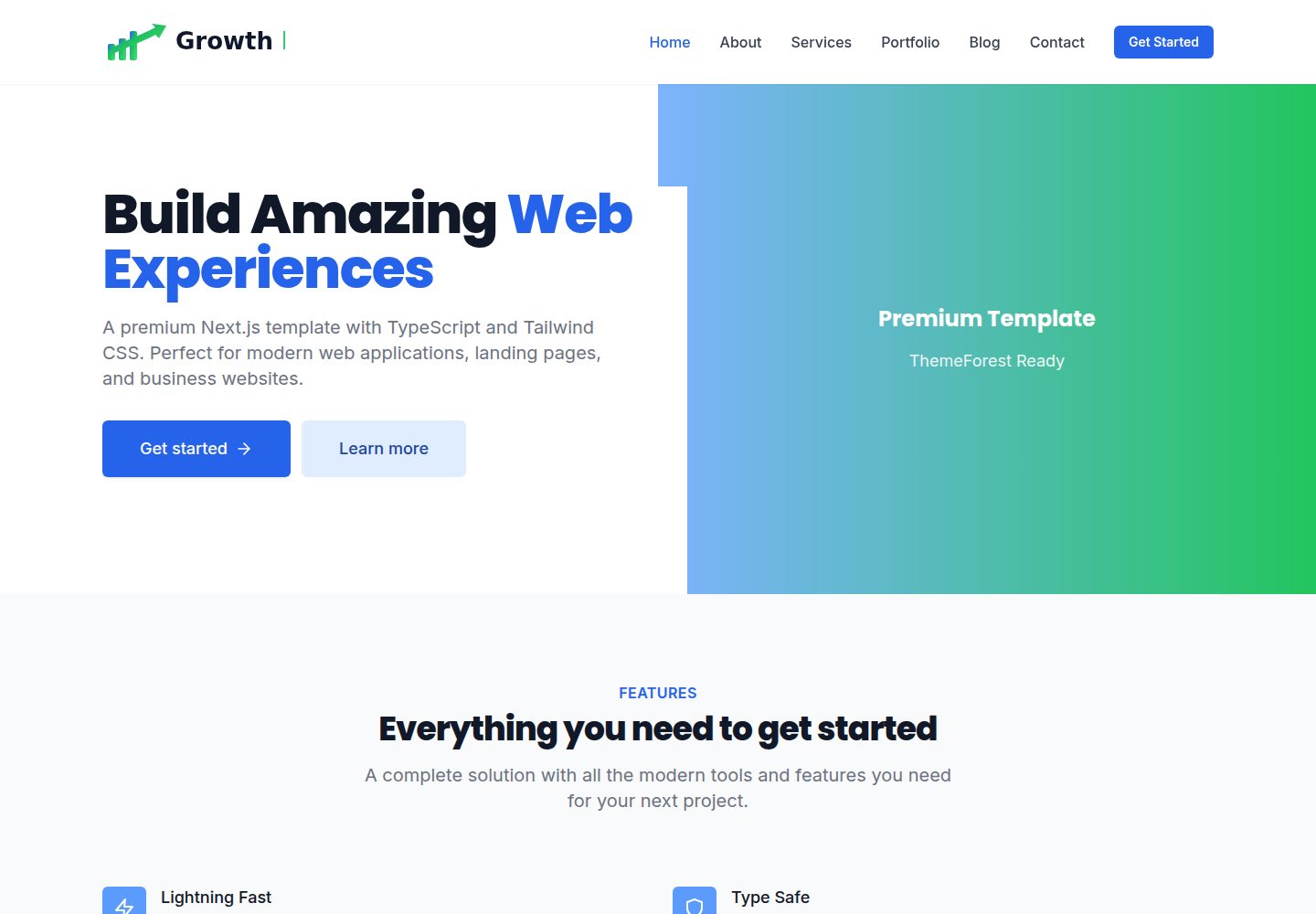
看看你的网站会是什么样
浏览真实页面截图,比较内容排版与手机效果。点击下方缩略图切换,放大查看整页细节。
全部页面与视图 3
截图用于了解视觉与布局,交互效果请以实际项目为准。
采集于 2026-10-13查看来源
值得关注的模板亮点
从已有项目资料中,快速了解它的特点。
包含 10 多个预建页面:首页、About、Services、Portfolio、Blog、Contact 等
提供 20 多个可复用组件,按 layout、sections、ui 分类组织
内置响应式导航与移动端菜单,以及带验证的联系表单
README 提到支持深色模式、自定义动画与 SEO 优化配置
提供 Tailwind 颜色与字体自定义说明,以及生产构建命令
模板详细介绍
该模板是一个面向数字机构或企业站点搭建的 Next.js 项目,README 说明其使用 Next.js 14(App Router)、TypeScript 和 Tailwind CSS 构建,并采用移动优先的响应式设计。项目内置 10 个以上预建页面,覆盖首页、About、Services、Portfolio、Blog、Contact;同时提供 20 多个可复用组件,包括 Header、Footer、Hero、Features、Stats、Testimonials、CTA 等,以及带验证的联系表单和移动端菜单导航。目录结构按 app/、components/(layout、sections、ui)、lib/、types/、public/ 组织,便于按区块替换内容。README 还提到支持深色模式、自定义动画和 SEO 相关配置,但未给出具体实现细节或第三方依赖清单。安装步骤为克隆仓库后执行 npm/yarn/pnpm install,再运行 dev 脚本并在 localhost:3000 查看;生产构建使用 build 与 start。README 未说明数据来源、CMS 集成、表单提交后端或部署平台的具体配置,这些部分需要自行补充。
Next.js企业官网
适合你的项目吗?
适用场景
- 为数字机构或服务型企业搭建多页官网
- 基于现有页面结构快速替换品牌文案与视觉样式
- 用作 Next.js + TypeScript + Tailwind 项目的组件与目录结构参考
- 在本地运行并二次开发联系表单、作品集或博客列表页面
适合人群
- 熟悉 Next.js 与 TypeScript 的前端开发者
- 需要多页面企业站点起点的设计或开发团队
- 希望以组件化方式组织页面区块的项目
上手与定制指南
结合仓库当前版本的说明,按下面的资料检查内容、配置与运行要求。
- 1
克隆或下载仓库后,在项目目录执行 npm install(或 yarn/pnpm install)安装依赖
- 2
运行 npm run dev(或对应包管理器命令)启动开发服务器,访问 http://localhost:3000
- 3
生产构建使用 npm run build,随后执行 npm start
- 4
可通过 .env.local 设置 NEXT_PUBLIC_SITE_URL 等环境变量
- 5
颜色在 tailwind.config.ts 中调整,字体在 app/layout.tsx 中配置
授权与来源资料
使用条件与限制
免费使用 · 保留许可声明本次收录的是公开仓库中采用 MIT 许可的免费版本;免费范围为该版本代码,不代表外部服务或第三方素材免费。
使用时需要遵守
- 允许免费使用、修改、商用和分发该版本代码。
- 分发代码副本或实质性部分时,保留原作者版权声明和完整 MIT 许可声明。
- 代码按现状提供;担保与责任限制以原许可证及适用法律为准。
额外费用与待核对事项
- 演示图片、字体、图标及其他第三方素材需按各自许可核对,不能仅凭代码的 MIT 许可判断。
- 域名、托管、数据库、支付或 AI 等外部服务可能另外收费。
查看原文依据
DeepSeek 根据仓库许可证和 README 整理 ·2026-10-13。结果仅覆盖已读取资料,依赖、图片、字体及后续条款变更以各自原文为准。
项目核对记录与介绍依据
模板资料
- 来源平台
- GitHub
- 资料与维护参考分
- 资料较完整 · 80 / 100
- 技术栈
- Next.js · React
- 网站类型
- 企业官网
这个分数如何计算
本站按许可资料(最高30分)、演示链接(12分)、预览图(10分)、Star数(15分)、记录的维护时间(15分)、描述完整度(8分)、功能记录(5分)和分类资料(5分)计算。它不是代码、安全或性能测试,也不是 Google 评分;有链接不代表已实测可用。
这个项目需要核对什么
- 记录的仓库更新时间
- 2026-02-12
- 截图检查日期
- 2026-10-13
已收录演示链接。请用你的内容与屏幕尺寸检查;有演示不代表表单、认证或支付已经可用。
目录记录的主要技术栈是 Next.js。请通过依赖清单和锁文件核对实际版本与托管要求。这些说明基于收录资料,不代表代码审计或部署实测。
查看具体选型方法 →介绍的制作与核对状态
介绍由 AI 辅助整理目录与仓库资料。仓库作者不等于这篇介绍的审核者。
审核声明: codex-user-requested-batch-review-20261017 · 2026-10-16
查看当时使用的来源资料
SHA-256: 0d6ec83531e21740d2a0e77d71850265548a4787c684430e1e9be2235cfebb47
2026-10-13T17:45:16.579Z
来源文件 / 仓库# Premium Next.js Template
A professional, production-ready Next.js template built with TypeScript and Tailwind CSS. Perfect for creating modern web applications, landing pages, and business websites.
## 🚀 Features
- **Next.js 14** - Latest version with App Router
- **TypeScript** - Full type safety
- **Tailwind CSS** - Utility-first CSS framework
- **Responsive Design** - Mobile-first approach
- **Modern UI Components** - Pre-built, reusable components
- **SEO Optimized** - Built-in SEO best practices
- **Performance** - Optimized for speed and performance
- **ThemeForest Ready** - Prepared for ThemeForest submission
## 📦 What's Included
- ✅ 10+ Pre-built Pages (Home, About, Services, Portfolio, Blog, Contact)
- ✅ 20+ Reusable Components (Header, Footer, Hero, Features, etc.)
- ✅ Responsive Navigation with Mobile Menu
- ✅ Contact Form with Validation
- ✅ Modern Design System
- ✅ Custom Animations
- ✅ Dark Mode Support Ready
- ✅ Clean Code Structure
- ✅ Comprehensive Documentation
## 🛠️ Installation
1. **Clone or download the template**
```bash
# If using git
git clone <repository-url>
cd nextjs-premium-template
```
2. **Install dependencies**
```bash
npm install
# or
yarn install
# or
pnpm install
```
3. **Run the development server**
```bash
npm run dev
# or
yarn dev
# or
pnpm dev
```
4. **Open your browser**
Navigate to [http://localhost:3000](http://localhost:3000)
## 📁 Project Structure
```
nextjs-premium-template/
├── app/ # Next.js App Router
│ ├── about/
│ │ └── page.tsx # About page
│ ├── blog/
│ │ └── page.tsx # Blog listing page
│ ├── contact/
│ │ └── page.tsx # Contact page
│ ├── portfolio/
│ │ └── page.tsx # Portfolio page
│ ├── services/
│ │ └── page.tsx # Services page
│ ├── globals.css # Global styles
│ ├── layout.tsx # Root layout
│ └── page.tsx # Home page
│
├── components/ # React components
│ ├── layout/ # Layout components
│ │ ├── Header.tsx # Site header/navigation
│ │ └── Footer.tsx # Site footer
│ ├── sections/ # Page sections
│ │ ├── Hero.tsx # Hero section
│ │ ├── Features.tsx # Features section
│ │ ├── Stats.tsx # Statistics section
│ │ ├── Testimonials.tsx # Testimonials section
│ │ └── CTA.tsx # Call-to-action section
│ └── ui/ # Reusable UI components
│
├── lib/ # Utility functions
│ └── utils.ts # Helper functions
│
├── types/ # TypeScript type definitions
│ └── index.ts # Shared types
│
├── public/ # Static assets
│ ├── images/ # Image assets
│ ├── icons/ # Icon files
│ └── fonts/ # Custom fonts (if any)
│
├── styles/ # Additional styles (if needed)
│
├── package.json # Dependencies and scripts
├── tsconfig.json # TypeScript config
├── tailwind.config.ts # Tailwind CSS config
├── next.config.js # Next.js config
└── README.md # This file
```
## 🎨 Customization
### Colors
Edit `tailwind.config.ts` to customize the color scheme:
```typescript
colors: {
primary: {
// Your primary colors
},
secondary: {
// Your secondary colors
},
}
```
### Fonts
Fonts are configured in `app/layout.tsx`. You can change them by:
1. Importing a new font from `next/font/google`
2. Adding it to the `variable` prop
3. Using it in your Tailwind config
### Components
Components are organized in the `components/` directory:
- **layout/**: Site-wide layout components (Header, Footer)
- **sections/**: Page section components (Hero, Features, etc.)
- **ui/**: Small, reusable UI components
All components are fully customizable and follow React best practices.
## 📄 Pages
- **Home** (`/`) - Landing page with hero, features, stats, testimonials
- **About** (`/about`) - About page with company information
- **Services** (`/services`) - Services showcase page
- **Portfolio** (`/portfolio`) - Portfolio/projects gallery
- **Blog** (`/blog`) - Blog listing page
- **Contact** (`/contact`) - Contact form page
## 🔧 Configuration
### Environment Variables
Create a `.env.local` file for environment-specific variables:
```env
NEXT_PUBLIC_SITE_URL=https://yourdomain.com
```
### Next.js Config
The `next.config.js` file includes basic configuration. You can extend it based on your needs.
## 📱 Browser Support
- Chrome (latest)
- Firefox (latest)
- Safari (latest)
- Edge (latest)
## 📝 License
This template is licensed under the MIT License. See LICENSE file for details.
## 🆘 Support
For support, email [email protected] or open an issue in the repository.
## 🙏 Credits
- [Next.js](https://nextjs.org/)
- [React](https://reactjs.org/)
- [Tailwind CSS](https://tailwindcss.com/)
- [React Icons](https://react-icons.github.io/react-icons/)
## 📈 ThemeForest Submission Checklist
- ✅ Clean, professional design
- ✅ Responsive layout
- ✅ Well-documented code
- ✅ Multiple page templates
- ✅ Reusable components
- ✅ SEO optimized
- ✅ Performance optimized
- ✅ Cross-browser compatible
- ✅ Easy to customize
- ✅ Production ready
## 🚀 Build for Production
```bash
npm run build
npm start
```
## 📄 Documentation
For detailed documentation, please refer to the inline code comments and component documentation.
---
**Made with ❤️ for ThemeForest**
看看同类模板
对比同技术栈与用途的模板,找到更适合的视觉与内容结构。

SaaS-Boilerplate
🚀🎉📚 SaaS Boilerplate built with Next.js + Tailwind CSS + Shadcn UI + TypeScript. ⚡️ Full-stack React applic…
Next.js · SaaS

Next-JS-Landing-Page-Starter-Template
🚀 Free NextJS Landing Page Template written in Tailwind CSS 3 and TypeScript ⚡️ Made with developer experienc…
Next.js · 企业官网

next-saas-starter
⚡️ Free Next.js responsive landing page template for SaaS products made using JAMStack architecture.
Next.js · SaaS

startup-nextjs
Startup is free Next.js template for SaaS startups comes with all the essential pages, components, and section…
Next.js · SaaS

shadcn-landing-page
New design 🎉 Nextjs + Shadcn + TypeScript + Tailwind. Landing page template ease-to-use
Next.js · 企业官网

shadcn-dashboard-landing-template
Accelerate your development with a sleek, open-source admin dashboard and landing page built on Vite-React, Ne…
Next.js · 后台