Content separated from core code: the site/ directory holds posts, projects, images, and site configuration, making it easy to replace core files to update the template
AstroSveltePortfolioBlog
spaceship — Astro Portfolio Template
By alec-c4
Spaceship is a blog and portfolio template built with Astro and Svelte, licensed under MIT, with content separated from core code for easy updates.
Explore the design
Compare the page layouts and mobile experience. Open any screenshot for a closer look.
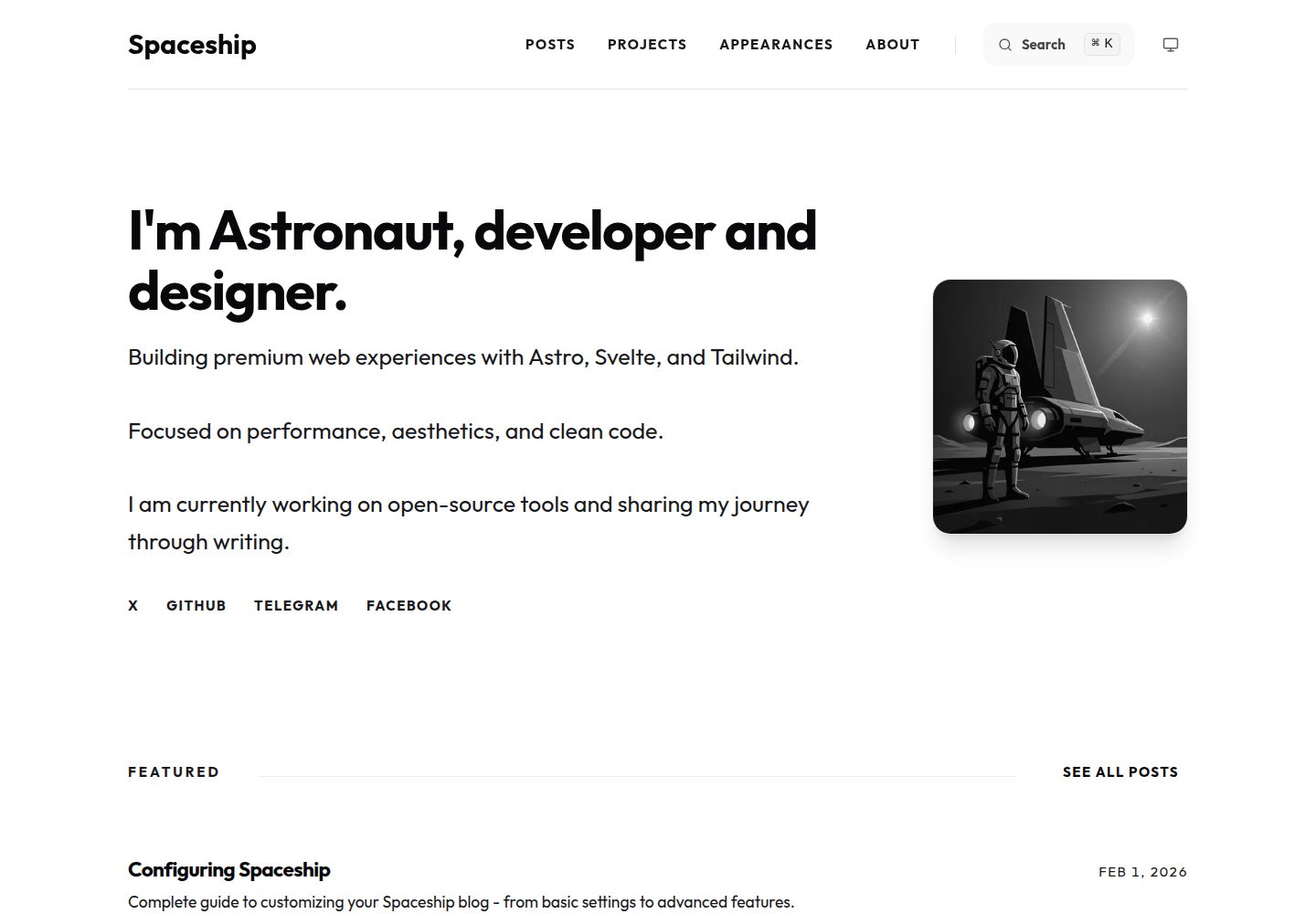
Desktop homepage1 / 3
Desktop captureTop of page
Actual screenshot captured by the server browser.
All pages & views 3
Screenshots show visual appearance; interactive behavior may differ.
Recorded 2026-10-02View source
What stands out
A quick read of the recorded project description.
Supports Markdown and MDX, allows embedding Svelte components in articles, and provides series, draft mode, scheduled publishing, and per-article CTA and comment toggles
Built-in client-side search covering post titles and descriptions
SEO support includes JSON-LD, canonical, robots meta, dynamic OG images, RSS, and sitemap
Markdown enhancements include Shiki highlighting, automatic table of contents, heading anchors, Mermaid diagrams, and emoji shortcodes
Comments are based on Giscus for GitHub Discussions, with configurable theme and language
Template Details
Spaceship is a blog and portfolio template for developers and designers, built with Astro, Svelte 5 Runes, and Tailwind CSS. It separates site data from the core engine: personal content, images, and site configuration go in the site/ directory, while directories like src/ are updatable core code. The template includes content collections for posts, projects, and an about page, supports Markdown and MDX, and allows embedding Svelte components in articles.
Blog features include series grouping with automatic navigation, draft mode, filtering by publish date, per-article toggles for CTA and comments, and Giscus-based GitHub Discussions comments. Search is client-side and covers post titles and descriptions. SEO provides JSON-LD structured data, canonical links, robots meta, dynamic OG images, RSS, and sitemap. Markdown enhancements include Shiki syntax highlighting, automatic table of contents, heading anchors, Mermaid diagrams, and emoji shortcodes, plus support for linking articles to translations.
The site is statically generated (SSG) by default and can be deployed to Vercel, Netlify, Cloudflare Pages, or GitHub Pages; for dynamic features, it can be switched to SSR via an Astro adapter. Node.js and pnpm are required, configuration is centralized in site/config.ts, and external services like comments and analytics require your own credentials. Licenses for third-party assets such as demo images, fonts, and icons must be checked separately; the MIT license for the code does not cover these assets.
AstroSveltePortfolioBlog
Is it right for your project?
Use Cases
- Building a personal tech blog that needs writing features like series, drafts, and scheduled publishing
- Creating portfolio pages to showcase projects, sharing the same content collections as the blog
- Wanting to manage site data separately from template core code so the template can be updated by replacing core files
- Needing SEO basics such as RSS, sitemap, structured data, and dynamic OG images
- Using GitHub Discussions as the comment system and wanting per-article control over comments
Suitable For
- Developers familiar with Astro and Svelte who are willing to maintain the site through configuration files
- Individual developers or designers who need a blog and portfolio combined into one static site
- Users planning to deploy to Vercel, Netlify, Cloudflare Pages, or GitHub Pages
- Authors who want to write in Markdown/MDX and embed interactive components in articles
Getting started & customization
Use these recorded setup notes alongside the repository instructions for your chosen version.
- 1
Requires Node.js (LTS recommended) and pnpm; after cloning the repository, run pnpm install to install dependencies
- 2
Use pnpm dev for development and pnpm build for production builds
- 3
Site information, homepage display counts, CTA, comments, and analytics are configured in site/config.ts
- 4
The comment feature requires obtaining repoId and categoryId from giscus.app and filling them into the configuration; it is disabled by default
- 5
Third-party assets such as demo images, fonts, and icons must be checked under their respective licenses; external services may charge separately
License & source material
Usage conditions & limitations
Free to use · keep license noticeThis entry covers the free version under the MIT license in the public repository; the free scope is the code of this version and does not imply that external services or third-party assets are free.
Must comply with when using
- You may use, modify, commercialize, and distribute the code of this version for free.
- When distributing copies or substantial portions of the code, retain the original author's copyright notice and the full MIT license notice.
- The code is provided as is; warranties and limitations of liability are governed by the original license and applicable law.
Additional costs & items to verify
- The comment feature relies on Giscus and the external GitHub Discussions service; you must obtain repoId and categoryId from giscus.app and fill them into the configuration. It is disabled by default; you must register and configure this third-party service before using comments.
- Site analytics relies on the external Google Analytics service; you must apply for a GA4 measurement ID and fill it into site/config.ts. Using this feature is subject to Google's terms of service.
- Enabling comments requires visiting giscus.app to obtain configuration parameters; this is an external service dependency and may be subject to its availability and terms.
- Dynamic features such as SSR require additionally installing and configuring an Astro adapter (Vercel, Netlify, Cloudflare, Node.js) and may involve accounts and fees with the corresponding hosting platform.
- Demo images, fonts, icons, and other third-party assets must be checked under their respective licenses; they cannot be judged solely by the code's MIT license.
- External services such as domain, hosting, database, payment, or AI may incur additional charges.
View Original Text Basis
Permission is hereby granted, free of charge
Original License Text
Comments configuration (GitHub Discussions via Giscus)
Original README
googleAnalyticsId: 'G-XXXXXXXXXX', // Offloaded via Partytown
Original README
Get settings from [giscus.app](https://giscus.app)
Original README
https://github.com/alec-c4/spaceship/blob/master/LICENSEhttps://github.com/alec-c4/spaceship/blob/master/README.mdIf you need dynamic features, install the appropriate adapter:
Original README
Compiled by DeepSeek based on repository license and README ·2026-10-02. Results only cover the materials read; dependencies, images, fonts, and subsequent term changes are subject to their respective original texts.
Project checks & description sources
Template Information
- Source platforms
- GitHub
- Documentation and maintenance reference score
- More documented · 92 / 100
- Technologies
- Astro · Svelte
- Website type
- Portfolio · Blog
How this score is calculated
Our heuristic uses license records (up to 30), a demo link (12), a preview (10), stars (15), recorded maintenance (15), description completeness (8), feature records (5) and classification data (5). It is not a code, security or performance test, or a Google score. A link does not establish tested functionality.
What to verify for this project
- Repository update recorded
- 2026-09-10
- Screenshot last checked
- 2026-10-02
A demo link is listed. Check it with your own content and viewport sizes; its presence does not confirm that forms, authentication or payments work.
The catalog identifies Astro as the primary stack. Check the actual dependency manifest and lockfile for versions and hosting requirements. These notes use recorded metadata, not a code audit or a deployment test.
Use a selection guide →How this description was prepared
AI-assisted description based on catalog records and repository material. Repository authors are not automatically the reviewers of this description.
Automatically checked against source and license rules; no manual editorial review.
Inspect the recorded source material
SHA-256: ddf27021a3428bc8238439cc57ccebcd7fb8d9f1b626c59bbbff7266a48fcca0
2026-10-02T10:36:17.392Z
Source file / repository# Spaceship 🚀
**Spaceship** is a high-performance, premium blog and portfolio template built with **Astro 5**, **Svelte 5 Runes**, and **Tailwind CSS 4**. It is designed for developers and designers who want a modern, ultra-fast, and SEO-optimized web experience.
## ✨ Features
- **🚀 High Performance**: Built with Astro for lightning-fast speeds and minimal JavaScript.
- **⚡ Optimizations**:
- **Partytown**: Google Analytics is offloaded to web workers.
- **Loading Indicator**: Smooth progress bar for better navigation UX.
- **🎨 Modern Design**: Clean aesthetics with dark mode support and fluid typography.
- **Svelte 5 Runes**: Leveraging the latest Svelte reactivity system (`$state`, `$derived`, `$props`).
- **Tailwind CSS 4**: Next-gen CSS framework for high performance and zero-runtime.
- **📝 Interactive Blog**:
- **MDX Support**: Embed Svelte components directly in your posts.
- **Series Support**: Group related posts into a series with automatic navigation.
- **Draft Mode**: Hide draft posts in production, visible in development.
- **Publication Date Filtering**: Schedule posts with future dates.
- **Customizable CTA**: Add call-to-action blocks at the end of posts.
- **Per-Post Controls**: Toggle CTA and comments individually per post.
- **💬 Comments System**:
- **GitHub Discussions**: Powered by Giscus for privacy-friendly comments.
- **Fully Customizable**: Configure theme, language, and behavior.
- **Per-Post Toggle**: Enable/disable comments on individual posts.
- **🔍 Advanced Search**: Fast, client-side search across all post titles and descriptions.
- **📊 Robust SEO**:
- **JSON-LD Support**: Automatic structured data for WebSite, BlogPosting, Person, and Breadcrumbs.
- **Canonical URLs**: Built-in support for canonical links and robots meta tags.
- **Dynamic OG Images**: Automatically generated social preview images for every post.
- **RSS Feed & Sitemap**: Ready-to-use RSS and sitemap generation.
- **✍️ Enhanced Markdown**:
- **Shiki Syntax Highlighting**: Includes line highlights, diffs, and word highlighting.
- **Auto-generated TOC**: Interactive table of contents with scroll spying.
- **Heading Anchor Links**: Clickable links for sharing specific sections.
- **Mermaid Diagrams**: Support for flowcharts and diagrams directly in markdown.
- **Emoji Support**: Native emoji shortcodes (`:rocket:`, etc.).
- **Multi-language Support**: Link posts to their translated versions (e.g. English <-> Russian) with automatic flag indicators.
- **🧹 Modular Architecture**: Well-organized components and content collections.
## 🛠️ Tech Stack
- **Framework**: [Astro 5](https://astro.build/)
- **UI Components**: [Svelte 5](https://svelte.dev/)
- **Styling**: [Tailwind CSS 4](https://tailwindcss.com/)
- **Content**: Markdown & MDX
- **Optimization**: Sharp, Shiki, Partytown
- **Icons**: Lucide & custom SVGs
## 🚀 Getting Started
### Prerequisites
- [Node.js](https://nodejs.org/) (LTS recommended)
- [pnpm](https://pnpm.io/) (This project is configured for pnpm)
### Installation
1. Clone the repository:
```bash
git clone https://github.com/alec-c4/spaceship.git
cd spaceship
```
2. Install dependencies:
```bash
pnpm install
```
3. Start the development server:
```bash
pnpm dev
```
4. Build for production:
```bash
pnpm build
```
## 📂 Project Structure
Spaceship uses an **"Updatable Content"** architecture. All your personal data is separated from the core template code, allowing you to update the engine easily.
```text
/
├── site/ # 🟢 YOUR DATA (Keep this!)
│ ├── assets/ # Your personal images (favicon, profile)
│ ├── content/ # Your posts, projects, and bio
│ └── config.ts # Your site configuration
├── src/ # ⚙️ Core Engine (Updateable)
│ ├── components/ # UI components
│ ├── layouts/ # Page templates
│ ├── lib/ # Logic and utilities
│ └── pages/ # Routes
├── public/ # Static files
├── astro.config.mjs # Astro settings
└── package.json
```
## 📖 Content Management
### ✍️ Adding Content
Manage your content in `site/content/`.
- **Posts**: `site/content/posts/`
- **Projects**: `site/content/projects/`
- **About**: `site/content/about/index.md` (Your CV/Bio)
### 📝 Creating Content
Spaceship includes tools to make content creation faster:
- **VS Code Snippets**: Open any markdown file and type `post`, `project`, or `appearance` then press **Tab** to generate the frontmatter automatically.
- **Templates**: Reference files named `_template.md` are available in each content folder as examples.
- **Dev Container**: A pre-configured development environment is included (`.devcontainer/`) with all necessary extensions and tools.
### 🔧 Configuration
All site-wide settings are in `site/config.ts`:
```typescript
export const SITE = {
author: 'Your Name',
title: 'Your Blog',
desc: 'Your description',
website: 'https://yourdomain.com',
// Homepage configuration
featuredPostsCount: 1, // Number of featured posts to show
latestPostsCount: 3, // Number of latest posts to show
// CTA block configuration
cta: {
enabled: true,
filePath: 'site/cta.md', // Markdown file with CTA content
},
// Comments configuration (GitHub Discussions via Giscus)
comments: {
enabled: false, // Set to true after configuring
repo: 'username/repo',
repoId: '', // Get from https://giscus.app
categoryId: '', // Get from https://giscus.app
// ... more options
},
// Analytics
googleAnalyticsId: 'G-XXXXXXXXXX', // Offloaded via Partytown
};
```
## 📚 Documentation
Comprehensive guides are available as blog posts in your installation:
- **[How to Publish Posts](docs/how-to-publish-posts.md)** - Complete guide to creating posts, frontmatter options, images, and advanced features
- **[Configuring Spaceship](docs/configuring-spaceship.md)** - All configuration options, deployment, and customization
### Quick Links
- **Creating Posts**: `site/content/posts/your-post.md`
- **Adding Projects**: `site/content/projects/your-project.md`
- **Customizing CTA**: Edit `site/cta.md`
- **Configuring Comments**: Get settings from [giscus.app](https://giscus.app)
- **Analytics**: Add your GA4 ID to `site/config.ts`
## ☁️ Deployment
Spaceship is a static site by default (SSG), but can be easily converted to SSR using Astro Adapters.
### Static Hosting (Recommended)
You can deploy to **Vercel**, **Netlify**, **Cloudflare Pages**, or **GitHub Pages** without any extra configuration. Just push your code.
### SSR & Advanced Features
If you need dynamic features, install the appropriate adapter:
- **Vercel**: `pnpm astro add vercel`
- **Netlify**: `pnpm astro add netlify`
- **Cloudflare**: `pnpm astro add cloudflare`
- **Node.js**: `pnpm astro add node` (For VPS/Docker)
More details: [Astro Deployment Guide](https://docs.astro.build/en/guides/deploy/)
## � Updating
Spaceship is designed with a "core vs content" separation. This makes updating to new versions straightforward:
1. **Keep your `site/` folder**: This contains all your posts, projects, assets, and configuration.
2. **Download the latest version** of Spaceship.
3. **Replace the core files** in your project with the new ones:
- `src/` (The engine)
- `public/` (Static assets shell)
- `astro.config.mjs` (Main configuration)
- `package.json` & `pnpm-lock.yaml` (Dependencies)
- `tsconfig.json` (Tooling config)
4. **Run `pnpm install`** to update dependencies.
5. **Verify**: Your content in `site/` will automatically be picked up by the new engine.
## �📜 License
MIT License © [Alexey Poimtsev](https://github.com/alec-c4)
Explore similar templates
Compare previews and descriptions within the same stack and category.

astrowind
AstroWind is a free, open-source Astro starter theme using Astro and Tailwind CSS, released under the MIT license.
Astro · Blog

astro-paper
AstroPaper is a minimal, responsive, accessible, and SEO-friendly Astro blog theme. Articles are stored as Markdown/MDX in src/content/posts/, with subdirectories affecting URLs.
Astro · Blog

fuwari
Fuwari is a static blog template built with Astro and Tailwind CSS for personal blogs. It manages posts as Markdown files in src/content/posts/, with frontmatter for title, date, description, cover, tags, categories, draft status, and language.
Astro · Blog

Firefly
Firefly is a clean personal blog theme forked from Astro and Fuwari, offering four background modes, single/double sidebar and list/grid layouts, Pagefind client-side full-text search, and a six-language UI.
Astro · Blog

astro-theme-cactus
Astro Cactus is an Astro-based blog and portfolio theme that uses Markdown/MDX content collections to manage posts, notes, and tags, with frontmatter type-checked by a schema.
Astro · Portfolio

astrofy
Astrofy is a free and open-source personal portfolio website template built with Astro and TailwindCSS, with built-in blog, CV timeline, project showcase, store, and RSS feed modules.
Astro · Portfolio