内容与核心代码分离,site/ 目录存放文章、项目、图片和站点配置,便于替换核心文件更新模板
AstroSvelte作品集博客
spaceship — Astro 作品集模板
作者 alec-c4
Spaceship 是一个基于 Astro 与 Svelte 的博客和作品集模板,采用 MIT 许可,内容与核心代码分离,便于更新。
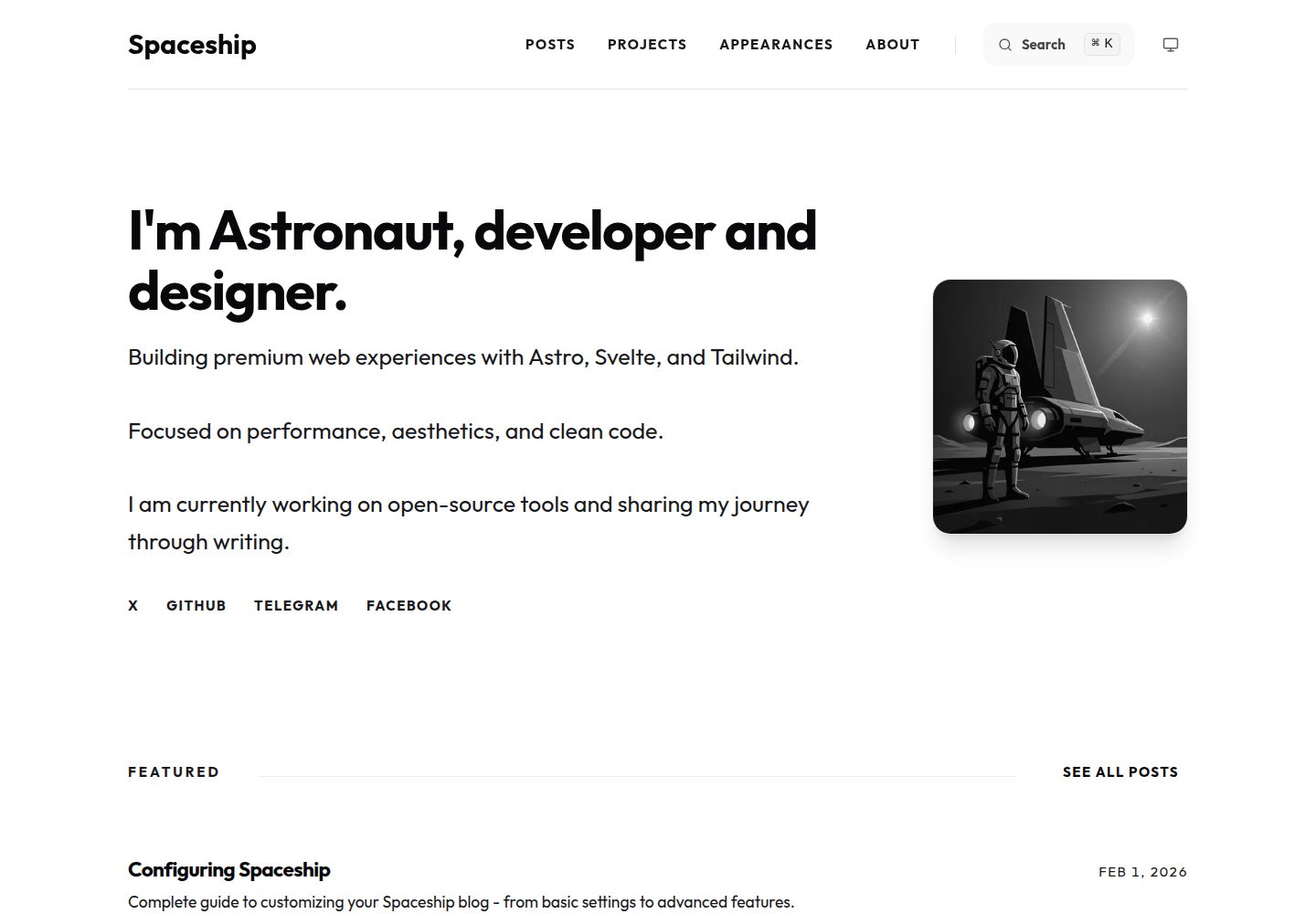
看看你的网站会是什么样
浏览真实页面截图,比较内容排版与手机效果。点击下方缩略图切换,放大查看整页细节。
全部页面与视图 3
截图用于了解视觉与布局,交互效果请以实际项目为准。
采集于 2026-10-02查看来源
值得关注的模板亮点
从已有项目资料中,快速了解它的特点。
支持 Markdown 与 MDX,可在文章中嵌入 Svelte 组件,并提供系列文章、草稿模式、定时发布和每篇文章独立的 CTA 与评论开关
内置客户端搜索,覆盖文章标题与描述
SEO 支持 JSON-LD、canonical、robots meta、动态 OG 图片、RSS 与 sitemap
Markdown 增强包括 Shiki 高亮、自动目录、标题锚点、Mermaid 图表和 emoji 短代码
评论基于 Giscus 的 GitHub Discussions,可配置主题与语言
模板详细介绍
Spaceship 是一个面向开发者与设计师的博客和作品集模板,使用 Astro、Svelte 5 Runes 和 Tailwind CSS 构建。它把站点数据与核心引擎分开:个人内容、图片和站点配置放在 site/ 目录,src/ 等目录属于可更新的核心代码。模板内置文章、项目、关于页面等内容集合,支持 Markdown 与 MDX,可在文章中嵌入 Svelte 组件。
博客功能包括系列文章分组与自动导航、草稿模式、按发布日期过滤、每篇文章可单独开关的 CTA 与评论,以及基于 Giscus 的 GitHub Discussions 评论。搜索为客户端实现,覆盖文章标题与描述。SEO 方面提供 JSON-LD 结构化数据、canonical 链接、robots meta、动态 OG 图片、RSS 与 sitemap。Markdown 增强包括 Shiki 语法高亮、自动生成目录、标题锚点、Mermaid 图表和 emoji 短代码,并支持把文章链接到翻译版本。
站点默认是静态生成(SSG),可部署到 Vercel、Netlify、Cloudflare Pages 或 GitHub Pages;如需动态功能,可通过 Astro 适配器转为 SSR。使用前需要 Node.js 与 pnpm,配置集中在 site/config.ts,评论、分析等外部服务需自行填写对应凭据。演示图片、字体、图标等第三方素材的许可需单独核对,代码的 MIT 许可不覆盖这些素材。
AstroSvelte作品集博客
适合你的项目吗?
适用场景
- 搭建个人技术博客,需要文章系列、草稿和定时发布等写作功能
- 制作用于展示项目的作品集页面,与博客共用同一套内容集合
- 希望把站点数据与模板核心代码分开管理,以便后续替换核心文件更新模板
- 需要 RSS、sitemap、结构化数据和动态 OG 图片等 SEO 基础能力
- 使用 GitHub Discussions 作为评论系统,并希望按文章控制评论开关
适合人群
- 熟悉 Astro 与 Svelte、愿意通过配置文件维护站点的开发者
- 需要博客与作品集合并为一个静态站点的个人开发者或设计师
- 计划部署到 Vercel、Netlify、Cloudflare Pages 或 GitHub Pages 的用户
- 希望用 Markdown/MDX 写作并在文章中嵌入交互组件的作者
上手与定制指南
结合仓库当前版本的说明,按下面的资料检查内容、配置与运行要求。
- 1
需要 Node.js(建议 LTS)和 pnpm,克隆仓库后执行 pnpm install 安装依赖
- 2
开发使用 pnpm dev,生产构建使用 pnpm build
- 3
站点信息、首页展示数量、CTA、评论和分析等配置集中在 site/config.ts
- 4
评论功能需先在 giscus.app 获取 repoId 与 categoryId 并填入配置,默认关闭
- 5
演示图片、字体、图标等第三方素材需按各自许可单独核对,外部服务可能另行收费
授权与来源资料
使用条件与限制
免费使用 · 保留许可声明本次收录的是公开仓库中采用 MIT 许可的免费版本;免费范围为该版本代码,不代表外部服务或第三方素材免费。
使用时需要遵守
- 允许免费使用、修改、商用和分发该版本代码。
- 分发代码副本或实质性部分时,保留原作者版权声明和完整 MIT 许可声明。
- 代码按现状提供;担保与责任限制以原许可证及适用法律为准。
额外费用与待核对事项
- 评论功能依赖 Giscus 与 GitHub Discussions 外部服务,需在 giscus.app 获取 repoId 与 categoryId 并填入配置,默认关闭;使用评论前须自行注册并配置该第三方服务。
- 站点分析依赖 Google Analytics 外部服务,需自行申请 GA4 测量 ID 并填入 site/config.ts,使用该功能即受 Google 服务条款约束。
- 启用评论需访问 giscus.app 获取配置参数,属于外部服务依赖,可能受其可用性与条款限制。
- SSR 等动态功能需额外安装并配置 Astro 适配器(Vercel、Netlify、Cloudflare、Node.js),可能涉及对应托管平台的账号与费用。
- 演示图片、字体、图标及其他第三方素材需按各自许可核对,不能仅凭代码的 MIT 许可判断。
- 域名、托管、数据库、支付或 AI 等外部服务可能另外收费。
查看原文依据
Permission is hereby granted, free of charge
许可证原文
Comments configuration (GitHub Discussions via Giscus)
README 原文
googleAnalyticsId: 'G-XXXXXXXXXX', // Offloaded via Partytown
README 原文
Get settings from [giscus.app](https://giscus.app)
README 原文
https://github.com/alec-c4/spaceship/blob/master/LICENSEhttps://github.com/alec-c4/spaceship/blob/master/README.mdIf you need dynamic features, install the appropriate adapter:
README 原文
DeepSeek 根据仓库许可证和 README 整理 ·2026-10-02。结果仅覆盖已读取资料,依赖、图片、字体及后续条款变更以各自原文为准。
项目核对记录与介绍依据
模板资料
- 来源平台
- GitHub
- 资料与维护参考分
- 资料较完整 · 92 / 100
- 技术栈
- Astro · Svelte
- 网站类型
- 作品集 · 博客
这个分数如何计算
本站按许可资料(最高30分)、演示链接(12分)、预览图(10分)、Star数(15分)、记录的维护时间(15分)、描述完整度(8分)、功能记录(5分)和分类资料(5分)计算。它不是代码、安全或性能测试,也不是 Google 评分;有链接不代表已实测可用。
这个项目需要核对什么
- 记录的仓库更新时间
- 2026-09-10
- 截图检查日期
- 2026-10-02
已收录演示链接。请用你的内容与屏幕尺寸检查;有演示不代表表单、认证或支付已经可用。
目录记录的主要技术栈是 Astro。请通过依赖清单和锁文件核对实际版本与托管要求。这些说明基于收录资料,不代表代码审计或部署实测。
查看具体选型方法 →介绍的制作与核对状态
介绍由 AI 辅助整理目录与仓库资料。仓库作者不等于这篇介绍的审核者。
已完成服务器许可规则与 AI 来源核对;未经过人工编辑审核。
查看当时使用的来源资料
SHA-256: ddf27021a3428bc8238439cc57ccebcd7fb8d9f1b626c59bbbff7266a48fcca0
2026-10-02T10:36:17.392Z
来源文件 / 仓库# Spaceship 🚀
**Spaceship** is a high-performance, premium blog and portfolio template built with **Astro 5**, **Svelte 5 Runes**, and **Tailwind CSS 4**. It is designed for developers and designers who want a modern, ultra-fast, and SEO-optimized web experience.
## ✨ Features
- **🚀 High Performance**: Built with Astro for lightning-fast speeds and minimal JavaScript.
- **⚡ Optimizations**:
- **Partytown**: Google Analytics is offloaded to web workers.
- **Loading Indicator**: Smooth progress bar for better navigation UX.
- **🎨 Modern Design**: Clean aesthetics with dark mode support and fluid typography.
- **Svelte 5 Runes**: Leveraging the latest Svelte reactivity system (`$state`, `$derived`, `$props`).
- **Tailwind CSS 4**: Next-gen CSS framework for high performance and zero-runtime.
- **📝 Interactive Blog**:
- **MDX Support**: Embed Svelte components directly in your posts.
- **Series Support**: Group related posts into a series with automatic navigation.
- **Draft Mode**: Hide draft posts in production, visible in development.
- **Publication Date Filtering**: Schedule posts with future dates.
- **Customizable CTA**: Add call-to-action blocks at the end of posts.
- **Per-Post Controls**: Toggle CTA and comments individually per post.
- **💬 Comments System**:
- **GitHub Discussions**: Powered by Giscus for privacy-friendly comments.
- **Fully Customizable**: Configure theme, language, and behavior.
- **Per-Post Toggle**: Enable/disable comments on individual posts.
- **🔍 Advanced Search**: Fast, client-side search across all post titles and descriptions.
- **📊 Robust SEO**:
- **JSON-LD Support**: Automatic structured data for WebSite, BlogPosting, Person, and Breadcrumbs.
- **Canonical URLs**: Built-in support for canonical links and robots meta tags.
- **Dynamic OG Images**: Automatically generated social preview images for every post.
- **RSS Feed & Sitemap**: Ready-to-use RSS and sitemap generation.
- **✍️ Enhanced Markdown**:
- **Shiki Syntax Highlighting**: Includes line highlights, diffs, and word highlighting.
- **Auto-generated TOC**: Interactive table of contents with scroll spying.
- **Heading Anchor Links**: Clickable links for sharing specific sections.
- **Mermaid Diagrams**: Support for flowcharts and diagrams directly in markdown.
- **Emoji Support**: Native emoji shortcodes (`:rocket:`, etc.).
- **Multi-language Support**: Link posts to their translated versions (e.g. English <-> Russian) with automatic flag indicators.
- **🧹 Modular Architecture**: Well-organized components and content collections.
## 🛠️ Tech Stack
- **Framework**: [Astro 5](https://astro.build/)
- **UI Components**: [Svelte 5](https://svelte.dev/)
- **Styling**: [Tailwind CSS 4](https://tailwindcss.com/)
- **Content**: Markdown & MDX
- **Optimization**: Sharp, Shiki, Partytown
- **Icons**: Lucide & custom SVGs
## 🚀 Getting Started
### Prerequisites
- [Node.js](https://nodejs.org/) (LTS recommended)
- [pnpm](https://pnpm.io/) (This project is configured for pnpm)
### Installation
1. Clone the repository:
```bash
git clone https://github.com/alec-c4/spaceship.git
cd spaceship
```
2. Install dependencies:
```bash
pnpm install
```
3. Start the development server:
```bash
pnpm dev
```
4. Build for production:
```bash
pnpm build
```
## 📂 Project Structure
Spaceship uses an **"Updatable Content"** architecture. All your personal data is separated from the core template code, allowing you to update the engine easily.
```text
/
├── site/ # 🟢 YOUR DATA (Keep this!)
│ ├── assets/ # Your personal images (favicon, profile)
│ ├── content/ # Your posts, projects, and bio
│ └── config.ts # Your site configuration
├── src/ # ⚙️ Core Engine (Updateable)
│ ├── components/ # UI components
│ ├── layouts/ # Page templates
│ ├── lib/ # Logic and utilities
│ └── pages/ # Routes
├── public/ # Static files
├── astro.config.mjs # Astro settings
└── package.json
```
## 📖 Content Management
### ✍️ Adding Content
Manage your content in `site/content/`.
- **Posts**: `site/content/posts/`
- **Projects**: `site/content/projects/`
- **About**: `site/content/about/index.md` (Your CV/Bio)
### 📝 Creating Content
Spaceship includes tools to make content creation faster:
- **VS Code Snippets**: Open any markdown file and type `post`, `project`, or `appearance` then press **Tab** to generate the frontmatter automatically.
- **Templates**: Reference files named `_template.md` are available in each content folder as examples.
- **Dev Container**: A pre-configured development environment is included (`.devcontainer/`) with all necessary extensions and tools.
### 🔧 Configuration
All site-wide settings are in `site/config.ts`:
```typescript
export const SITE = {
author: 'Your Name',
title: 'Your Blog',
desc: 'Your description',
website: 'https://yourdomain.com',
// Homepage configuration
featuredPostsCount: 1, // Number of featured posts to show
latestPostsCount: 3, // Number of latest posts to show
// CTA block configuration
cta: {
enabled: true,
filePath: 'site/cta.md', // Markdown file with CTA content
},
// Comments configuration (GitHub Discussions via Giscus)
comments: {
enabled: false, // Set to true after configuring
repo: 'username/repo',
repoId: '', // Get from https://giscus.app
categoryId: '', // Get from https://giscus.app
// ... more options
},
// Analytics
googleAnalyticsId: 'G-XXXXXXXXXX', // Offloaded via Partytown
};
```
## 📚 Documentation
Comprehensive guides are available as blog posts in your installation:
- **[How to Publish Posts](docs/how-to-publish-posts.md)** - Complete guide to creating posts, frontmatter options, images, and advanced features
- **[Configuring Spaceship](docs/configuring-spaceship.md)** - All configuration options, deployment, and customization
### Quick Links
- **Creating Posts**: `site/content/posts/your-post.md`
- **Adding Projects**: `site/content/projects/your-project.md`
- **Customizing CTA**: Edit `site/cta.md`
- **Configuring Comments**: Get settings from [giscus.app](https://giscus.app)
- **Analytics**: Add your GA4 ID to `site/config.ts`
## ☁️ Deployment
Spaceship is a static site by default (SSG), but can be easily converted to SSR using Astro Adapters.
### Static Hosting (Recommended)
You can deploy to **Vercel**, **Netlify**, **Cloudflare Pages**, or **GitHub Pages** without any extra configuration. Just push your code.
### SSR & Advanced Features
If you need dynamic features, install the appropriate adapter:
- **Vercel**: `pnpm astro add vercel`
- **Netlify**: `pnpm astro add netlify`
- **Cloudflare**: `pnpm astro add cloudflare`
- **Node.js**: `pnpm astro add node` (For VPS/Docker)
More details: [Astro Deployment Guide](https://docs.astro.build/en/guides/deploy/)
## � Updating
Spaceship is designed with a "core vs content" separation. This makes updating to new versions straightforward:
1. **Keep your `site/` folder**: This contains all your posts, projects, assets, and configuration.
2. **Download the latest version** of Spaceship.
3. **Replace the core files** in your project with the new ones:
- `src/` (The engine)
- `public/` (Static assets shell)
- `astro.config.mjs` (Main configuration)
- `package.json` & `pnpm-lock.yaml` (Dependencies)
- `tsconfig.json` (Tooling config)
4. **Run `pnpm install`** to update dependencies.
5. **Verify**: Your content in `site/` will automatically be picked up by the new engine.
## �📜 License
MIT License © [Alexey Poimtsev](https://github.com/alec-c4)
看看同类模板
对比同技术栈与用途的模板,找到更适合的视觉与内容结构。

astrowind
⭕️ AstroWind: A free template using Astro v7 and Tailwind CSS v4. Astro starter theme.
Astro · 博客

astro-paper
A minimal, accessible and SEO-friendly Astro blog theme.
Astro · 博客

fuwari
✨A static blog template built with Astro.
Astro · 博客

Firefly
Firefly 是一款基于 Astro 的静态博客主题,由 CuteLeaf 在 saicaca 的 Fuwari 模板基础上二次开发,主打清新美观的视觉风格。
Astro · 博客

astro-theme-cactus
A simple Astro theme. Use it to create your blog or website.
Astro · 作品集

astrofy
Astrofy is a free and open-source template for your Personal Portfolio Website built with Astro and TailwindCS…
Astro · 作品集