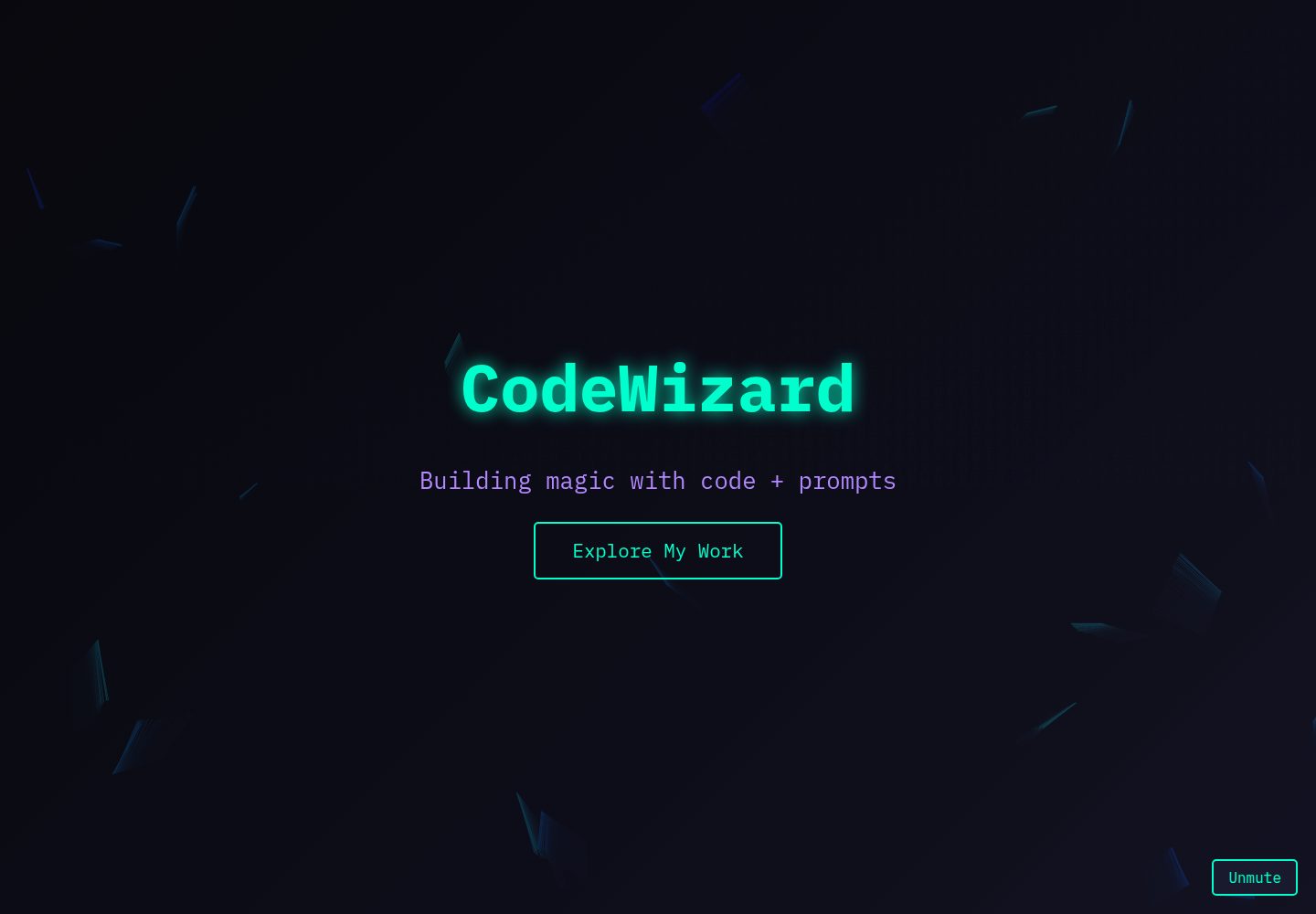
Dark-themed single-page portfolio blending vaporwave and terminal UI styles
HTMLPortfolio
CodeWizard — HTML Portfolio Template
By ALEVOLDON
CodeWizard is a single-page personal portfolio website for programmers and prompt engineers, featuring a dark theme that blends vaporwave and terminal UI elements, using neon colors, a grid layout, and 3D cubes to present personal introduction, projects, prompt library, and contact information.
Explore the design
Compare the page layouts and mobile experience. Open any screenshot for a closer look.
Desktop homepage1 / 2
Desktop captureTop of page
Actual screenshot captured by the server browser.
All pages & views 2
Screenshots show visual appearance; interactive behavior may differ.
Recorded 2026-10-13View source
What stands out
A quick read of the recorded project description.
Neon green, cyber purple, and magenta color scheme with IBM Plex Mono monospace font
Canvas code rain and curved geometric line animations in the Hero section
Rotating 3D cubes rendered with Three.js for avatar and social icons
Project cards lift and rotate on hover, prompt library has terminal-style sliding effect
Custom scrollbar, section fade-in and move-up animations, and toggleable ambient audio track
Template Details
CodeWizard is a single-page personal website built with HTML, positioned as a portfolio for programmers and prompt engineers. The page uses a dark theme with a base of black, charcoal, and deep blue, accented by neon green, cyber purple, and magenta. It uses the IBM Plex Mono monospace font, presenting an overall visual style that mixes terminal and vaporwave aesthetics.
The page contains five main sections: the Hero section displays a name and tagline with a neon glow and provides a button to jump to Projects; the About section is a brief self-introduction accompanied by a 250×250 pixel rotating 3D cube as an avatar; the Projects section arranges project cards in a grid, with cards lifting and rotating on hover; the Prompt Library section lists prompt examples in a terminal style with a sliding effect on hover; the Contact section uses rotating 3D cubes in different colors to carry Twitter, GitHub, and Email links.
In terms of animation, the site uses smooth scrolling, fade-in and move-up effects for sections, neon text and button glows, curved geometric lines in the Hero area, and a code rain background; the scrollbar is a custom thin bar with a neon green thumb and purple hover. The page also includes an ambient background audio track and a mute/unmute button.
Technically, the structure uses HTML5, styling and animations use CSS3, JavaScript handles Canvas animations (code rain, Hero lines), Three.js renders the 3D cubes, and IntersectionObserver triggers section animations when scrolling into the viewport. External resources depend on IBM Plex Mono from Google Fonts and Three.js from a CDN.
Regarding usage limitations, audio autoplay may be blocked by the browser and requires the user to click the unmute button; on low-end devices, the number of lines or code rain frequency can be reduced; loading Three.js and fonts requires an internet connection. The project is under the MIT license, allowing free use, modification, commercial use, and distribution of this version of the code, but third-party assets such as demo images, fonts, and icons must be checked against their respective licenses, and external services like domains and hosting may incur additional costs.
HTMLPortfolio
Is it right for your project?
Use Cases
- Programmers or prompt engineers building a single-page personal portfolio
- Showcasing AI prompt examples and personal project collections
- As a visual reference for a dark terminal-style personal homepage
- For learning how to combine Canvas animations and Three.js cubes in a single page
Suitable For
- Developers who need a single-page personal portfolio
- Users who prefer dark, neon, and terminal visual styles
- Those who want to showcase prompt engineering-related content
- Users who can accept loading Three.js and Google Fonts over the internet
Getting started & customization
Use these recorded setup notes alongside the repository instructions for your chosen version.
- 1
Save the code as index.html in a project folder
- 2
Prepare an ambient audio track named ambient-bg.mp3 in the same directory, or modify the path in the audio tag
- 3
In the contact section, replace href="#" with actual Twitter, GitHub, and Email links
- 4
Open index.html in a modern browser and maintain an internet connection to load Three.js and fonts
- 5
Audio autoplay may be blocked by the browser and requires triggering playback via the unmute button
License & source material
Usage conditions & limitations
Free to use · keep license noticeThis entry covers the free version under the MIT license from a public repository; the free scope is the code of this version and does not imply that external services or third-party assets are free.
Must comply with when using
- Free use, modification, commercial use, and distribution of this version of the code are permitted.
- When distributing copies or substantial portions of the code, retain the original author's copyright notice and the full MIT license notice.
- The code is provided as-is; warranties and limitations of liability are governed by the original license and applicable law.
Additional costs & items to verify
- Demo images, fonts, icons, and other third-party assets must be checked against their respective licenses and cannot be judged solely by the code's MIT license.
- External services such as domains, hosting, databases, payments, or AI may incur additional costs.
- Using this template requires an internet connection to load Three.js and Google Fonts from CDNs; in an offline environment, the 3D cubes and fonts will not load properly.
- Autoplay of the ambient background audio track may be blocked by the browser and requires the user to click the "Unmute" button; automatic sound on page open cannot be guaranteed.
- The template itself does not include a background audio track; you need to download an mp3 file from third-party sources such as Freesound or Epidemic Sound and verify its licensing and fees yourself.
- The social links in the contact section default to placeholder href="#" and must be manually replaced with actual Twitter, GitHub, and Email addresses for proper navigation.
- Animation performance may be insufficient on low-end devices; you may need to reduce the number of Hero lines or lower the code rain frequency to ensure smoothness.
View Original Text Basis
Permission is hereby granted, free of charge
Original License Text
Ensure an internet connection for loading Three.js and the font.
Original README
**Audio Autoplay**: May be blocked by browsers until user interaction. The "Unmute" button addresses this.
Original README
Download an ambient track in `.mp3` format (e.g., from Freesound or Epidemic Sound).
Original README
In the `<section class="contact">` section, replace `href="#"` with your actual social profile URLs (Twitter, GitHub, Email).
Original README
https://github.com/ALEVOLDON/CodeWizard/blob/main/LICENSEhttps://github.com/ALEVOLDON/CodeWizard/blob/main/README.mdon low-end devices, reduce the number of lines or `code-rain` frequency.
Original README
Compiled by DeepSeek based on repository license and README ·2026-10-13. Results only cover the materials read; dependencies, images, fonts, and subsequent term changes are subject to their respective original texts.
Project checks & description sources
Template Information
- Source platforms
- GitHub
- Documentation and maintenance reference score
- Partly documented · 74 / 100
- Technologies
- HTML
- Website type
- Portfolio
How this score is calculated
Our heuristic uses license records (up to 30), a demo link (12), a preview (10), stars (15), recorded maintenance (15), description completeness (8), feature records (5) and classification data (5). It is not a code, security or performance test, or a Google score. A link does not establish tested functionality.
What to verify for this project
- Repository update recorded
- 2025-03-24
- Screenshot last checked
- 2026-10-13
A demo link is listed. Check it with your own content and viewport sizes; its presence does not confirm that forms, authentication or payments work.
The catalog identifies HTML as the primary stack. Check the actual dependency manifest and lockfile for versions and hosting requirements. These notes use recorded metadata, not a code audit or a deployment test.
Use a selection guide →How this description was prepared
AI-assisted description based on catalog records and repository material. Repository authors are not automatically the reviewers of this description.
Review declaration: [email protected] · 2026-10-13
Inspect the recorded source material
SHA-256: 7b672e0b21748cbc99076ed9bd285599bd81d8b154943017e7fcd22557e5274b
2026-10-13T02:34:14.733Z
Source file / repository# CodeWizard Personal Website ## Project Overview This project is a modern, minimalist personal website for a coder and prompt engineer, designed with a dark theme and a futuristic aesthetic. The design blends vaporwave and terminal UI elements, featuring a clean grid layout, smooth animations, and a strong atmospheric vibe. It reflects a tech-savvy style with neon accents and subtle 3D effects. ## Main Sections 1. **Hero Section** - Name: "CodeWizard" with a neon glow effect. - Tagline: "Building magic with code + prompts". - Glowing CTA button with a smooth transition to the "Projects" section. 2. **About Section** - Brief, punchy bio. - Rotating 3D cube as an avatar (250x250px). 3. **Projects Section** - Grid of projects with interactive 3D cards (lift and rotate on hover). - Examples: "AI Terminal", "Neon Grid", "PromptCraft". 4. **Prompt Library** - List of prompt examples styled like a terminal, with a slide effect on hover. 5. **Contact Section** - Social links as rotating 3D cubes (Twitter, GitHub, Email) with unique colors. ## Design Features - **Color Palette**: Black (`#0a0a0f`), charcoal (`#1a1a2e`), dark blue (`#0f0f1a`), with neon green (`#00ffcc`), cyber purple (`#b388ff`), and magenta (`#ff007a`) accents. - **Typography**: `IBM Plex Mono` — a monospaced font for a terminal vibe. - **Animations**: - Smooth scrolling across the site (`scroll-behavior: smooth`). - Section fade-in with an upward slide (`fadeInUp`). - Neon text and button glow (`glow`). - Chaotic, bending geometric lines in the hero section. - Subtle code rain background (`code-rain`). - **Scrollbar**: Custom, slim, with a neon green thumb and purple hover effect. - **Audio**: Ambient background track with a toggle button (Mute/Unmute). ## Technologies Used - **HTML5**: Site structure. - **CSS3**: Styling, animations, and custom scrollbar. - **JavaScript**: - `Canvas` for animations (code rain, hero lines). - `Three.js` for 3D cubes (avatar and social icons). - `IntersectionObserver` for section animations on scroll. - **External Resources**: - Google Fonts (`IBM Plex Mono`). - Three.js (CDN: `https://cdnjs.cloudflare.com/ajax/libs/three.js/r134/three.min.js`). ## Setup and Configuration 1. **Clone or Save the File**: Save the code as `index.html` in your project folder. 2. **Add Audio File**: - Download an ambient track in `.mp3` format (e.g., from Freesound or Epidemic Sound). - Place it in the same folder as `index.html` under the name `ambient-bg.mp3`. - Alternatively, update the path in `<source src="ambient-bg.mp3" type="audio/mpeg">`. 3. **Configure Links**: - In the `<section class="contact">` section, replace `href="#"` with your actual social profile URLs (Twitter, GitHub, Email). 4. **Open in Browser**: - Open `index.html` in a modern browser (Chrome, Firefox, Edge). - Ensure an internet connection for loading Three.js and the font. ## Potential Enhancements - **Smooth Parallax**: Use a JS library (e.g., `parallax.js`) for advanced parallax effects. - **Textures**: Add noise or holographic effects to the background with CSS filters. - **Interactivity**: Introduce hover effects for hero lines or mouse-driven cube controls. - **Cross-Browser Scrollbar**: Use `SimpleBar` for consistent scrollbar styling across all browsers. ## Notes - **Audio Autoplay**: May be blocked by browsers until user interaction. The "Unmute" button addresses this. - **Performance**: Animations are optimized, but on low-end devices, reduce the number of lines or `code-rain` frequency. --- Created using Grok 3 by xAI, March 2025.
Explore similar templates
Compare previews and descriptions within the same stack and category.

simplefolio
Simplefolio is a minimal single-page portfolio template for developers, built with HTML, Bootstrap, SCSS, and Parcel under the MIT license. It includes Hero, About, Projects, Contact, and Footer sections, with content edited in /src/index.html and theme colors controlled by two SCSS variables.
HTML · Portfolio

Freelancer
A bright, single-page Bootstrap portfolio template for freelancers, designers, and small studios. It includes a responsive portfolio grid with modal detail windows and an SB Forms contact form that requires an API token.
HTML · Portfolio

Resume
A single-page resume and CV template from Start Bootstrap, built on Bootstrap with a fixed sidebar and content sections.
HTML · Portfolio

Creative
A single-page marketing template by Start Bootstrap for creative agencies and product services, built on Bootstrap with SCSS, featuring a portfolio grid and call-to-action sections. It includes pre-set SB Forms markers for form integration and npm build scripts for source customization.
HTML · Corporate Website

Grayscale
A dark single-page Bootstrap template from Start Bootstrap for photography, events and brand storytelling, with a large hero and clearly separated sections.
HTML · Corporate Website

startbootstrap-stylish-portfolio
A one-page Bootstrap portfolio theme from Start Bootstrap with multiple content sections and an off-canvas navigation menu. Basic use means editing HTML/CSS under dist and opening index.html; advanced use relies on npm with Pug and SCSS build scripts.
HTML · Portfolio