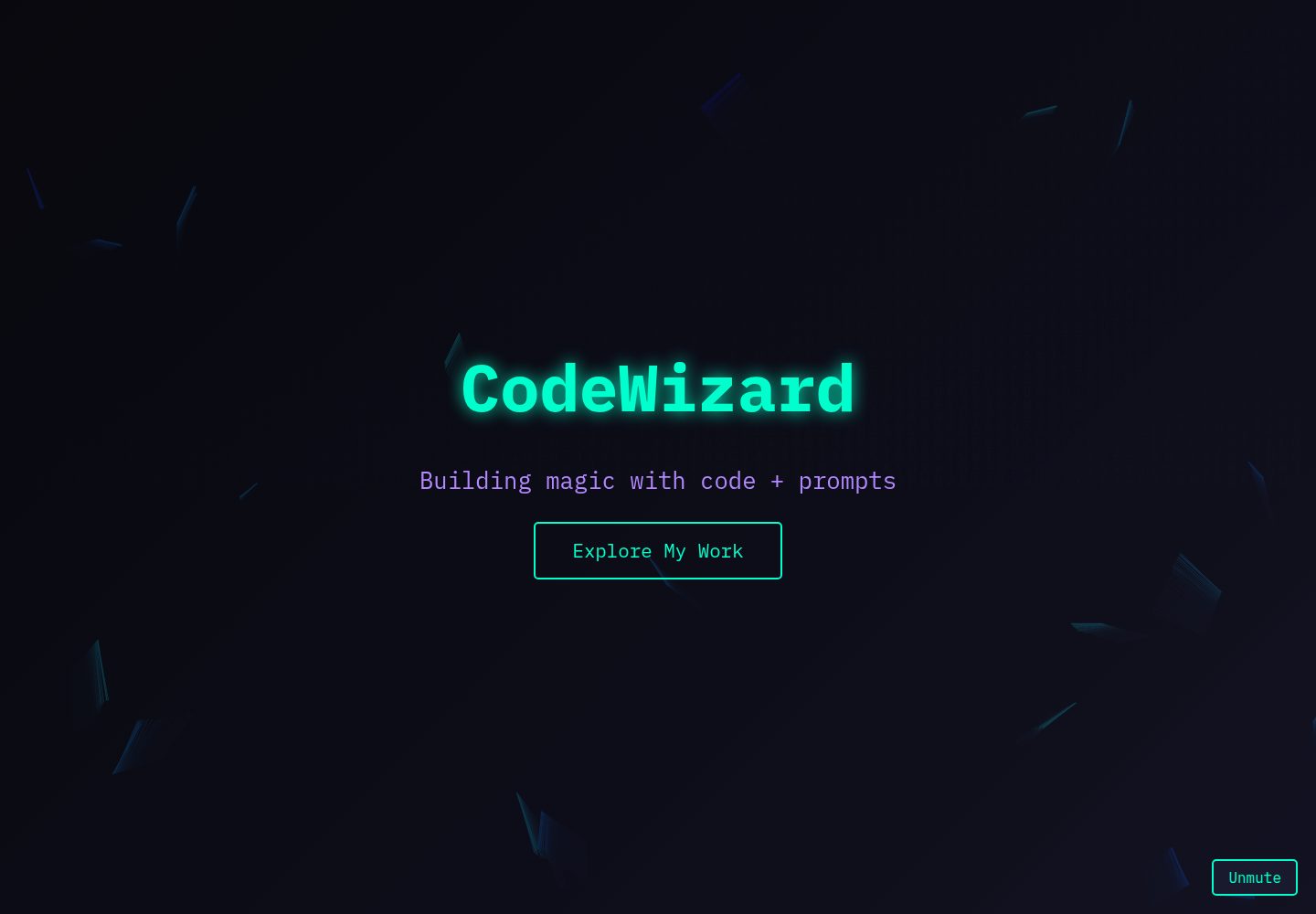
深色主题单页作品集,融合蒸汽波与终端界面风格
HTML作品集
CodeWizard — HTML 作品集模板
作者 ALEVOLDON
CodeWizard 是一个面向程序员与提示词工程师的单页个人作品集网站,采用深色主题,融合蒸汽波与终端界面元素,用霓虹配色、网格布局和 3D 立方体呈现个人介绍、项目、提示词库与联系方式。
看看你的网站会是什么样
浏览真实页面截图,比较内容排版与手机效果。点击下方缩略图切换,放大查看整页细节。
全部页面与视图 2
截图用于了解视觉与布局,交互效果请以实际项目为准。
采集于 2026-10-13查看来源
值得关注的模板亮点
从已有项目资料中,快速了解它的特点。
霓虹绿、赛博紫、品红配色,搭配 IBM Plex Mono 等宽字体
Canvas 代码雨与 Hero 区弯曲几何线条动画
Three.js 渲染的旋转 3D 立方体,用于头像和社交图标
项目卡片悬停抬升旋转,提示词库终端样式滑动效果
自定义滚动条、区块淡入上移动画与可切换环境音轨
模板详细介绍
CodeWizard 是一个用 HTML 构建的单页个人网站,定位为程序员与提示词工程师的作品集。页面采用深色主题,配色以黑色、炭灰和深蓝为底,搭配霓虹绿、赛博紫和品红点缀,字体使用 IBM Plex Mono 等宽字体,整体呈现终端与蒸汽波混合的视觉风格。
页面包含五个主要区块:Hero 区展示带霓虹光晕的名称与标语,并提供跳转到 Projects 的按钮;About 区是一段简短自我介绍,配一个 250×250 像素的旋转 3D 立方体作为头像;Projects 区以网格排列项目卡片,悬停时卡片会抬升并旋转;Prompt Library 区以终端样式列出提示词示例,悬停有滑动效果;Contact 区用不同颜色的旋转 3D 立方体承载 Twitter、GitHub 和 Email 链接。
动效方面,站点使用平滑滚动、区块淡入上移、霓虹文字与按钮辉光、Hero 区弯曲几何线条以及代码雨背景;滚动条为自定义细条样式,霓虹绿滑块配紫色悬停。页面还包含一条环境背景音轨和静音/取消静音按钮。
技术实现上,结构使用 HTML5,样式与动画使用 CSS3,JavaScript 负责 Canvas 动画(代码雨、Hero 线条)、Three.js 渲染 3D 立方体,以及 IntersectionObserver 触发滚动进入视口时的区块动画。外部资源依赖 Google Fonts 的 IBM Plex Mono 和 CDN 上的 Three.js。
使用限制方面,音频自动播放可能被浏览器阻止,需要用户点击取消静音按钮;低端设备上可减少线条数量或代码雨频率;加载 Three.js 和字体需要联网。项目采用 MIT 许可,可免费使用、修改、商用和分发该版本代码,但演示图片、字体、图标等第三方素材需按各自许可核对,域名、托管等外部服务可能另外收费。
HTML作品集
适合你的项目吗?
适用场景
- 程序员或提示词工程师搭建个人作品集单页
- 展示 AI 提示词示例与个人项目集合
- 作为深色终端风格个人主页的视觉参考
- 用于学习 Canvas 动画与 Three.js 立方体在单页中的组合
适合人群
- 需要单页个人作品集的开发者
- 偏好深色、霓虹与终端视觉风格的用户
- 想展示提示词工程相关内容的人
- 能接受联网加载 Three.js 与 Google Fonts 的使用者
上手与定制指南
结合仓库当前版本的说明,按下面的资料检查内容、配置与运行要求。
- 1
将代码保存为 index.html 放在项目文件夹中
- 2
准备名为 ambient-bg.mp3 的环境音轨放在同目录,或修改 audio 标签中的路径
- 3
在 contact 区块把 href="#" 替换为实际的 Twitter、GitHub 和 Email 链接
- 4
用现代浏览器打开 index.html,并保持联网以加载 Three.js 和字体
- 5
音频自动播放可能被浏览器阻止,需通过取消静音按钮触发播放
授权与来源资料
使用条件与限制
免费使用 · 保留许可声明本次收录的是公开仓库中采用 MIT 许可的免费版本;免费范围为该版本代码,不代表外部服务或第三方素材免费。
使用时需要遵守
- 允许免费使用、修改、商用和分发该版本代码。
- 分发代码副本或实质性部分时,保留原作者版权声明和完整 MIT 许可声明。
- 代码按现状提供;担保与责任限制以原许可证及适用法律为准。
额外费用与待核对事项
- 演示图片、字体、图标及其他第三方素材需按各自许可核对,不能仅凭代码的 MIT 许可判断。
- 域名、托管、数据库、支付或 AI 等外部服务可能另外收费。
- 使用该模板时需保持联网,以便从 CDN 加载 Three.js 和 Google Fonts 字体;离线环境下 3D 立方体与字体将无法正常加载。
- 环境背景音轨的自动播放可能被浏览器阻止,需用户点击“Unmute”按钮后才能播放,无法保证打开页面即自动出声。
- 模板本身不附带背景音轨,需自行从 Freesound 或 Epidemic Sound 等第三方来源下载 mp3 文件,并自行确认其授权与费用。
- 联系区社交链接默认占位为 href="#",需手动替换为实际的 Twitter、GitHub 和 Email 地址后才能正常跳转。
- 在低端设备上动画性能可能不足,需自行减少 Hero 线条数量或降低代码雨频率以保证流畅度。
查看原文依据
Permission is hereby granted, free of charge
许可证原文
Ensure an internet connection for loading Three.js and the font.
README 原文
**Audio Autoplay**: May be blocked by browsers until user interaction. The "Unmute" button addresses this.
README 原文
Download an ambient track in `.mp3` format (e.g., from Freesound or Epidemic Sound).
README 原文
In the `<section class="contact">` section, replace `href="#"` with your actual social profile URLs (Twitter, GitHub, Email).
README 原文
https://github.com/ALEVOLDON/CodeWizard/blob/main/LICENSEhttps://github.com/ALEVOLDON/CodeWizard/blob/main/README.mdon low-end devices, reduce the number of lines or `code-rain` frequency.
README 原文
DeepSeek 根据仓库许可证和 README 整理 ·2026-10-13。结果仅覆盖已读取资料,依赖、图片、字体及后续条款变更以各自原文为准。
项目核对记录与介绍依据
模板资料
- 来源平台
- GitHub
- 资料与维护参考分
- 资料一般 · 74 / 100
- 技术栈
- HTML
- 网站类型
- 作品集
这个分数如何计算
本站按许可资料(最高30分)、演示链接(12分)、预览图(10分)、Star数(15分)、记录的维护时间(15分)、描述完整度(8分)、功能记录(5分)和分类资料(5分)计算。它不是代码、安全或性能测试,也不是 Google 评分;有链接不代表已实测可用。
这个项目需要核对什么
- 记录的仓库更新时间
- 2025-03-24
- 截图检查日期
- 2026-10-13
已收录演示链接。请用你的内容与屏幕尺寸检查;有演示不代表表单、认证或支付已经可用。
目录记录的主要技术栈是 HTML。请通过依赖清单和锁文件核对实际版本与托管要求。这些说明基于收录资料,不代表代码审计或部署实测。
查看具体选型方法 →介绍的制作与核对状态
介绍由 AI 辅助整理目录与仓库资料。仓库作者不等于这篇介绍的审核者。
审核声明: [email protected] · 2026-10-13
查看当时使用的来源资料
SHA-256: 7b672e0b21748cbc99076ed9bd285599bd81d8b154943017e7fcd22557e5274b
2026-10-13T02:34:14.733Z
来源文件 / 仓库# CodeWizard Personal Website ## Project Overview This project is a modern, minimalist personal website for a coder and prompt engineer, designed with a dark theme and a futuristic aesthetic. The design blends vaporwave and terminal UI elements, featuring a clean grid layout, smooth animations, and a strong atmospheric vibe. It reflects a tech-savvy style with neon accents and subtle 3D effects. ## Main Sections 1. **Hero Section** - Name: "CodeWizard" with a neon glow effect. - Tagline: "Building magic with code + prompts". - Glowing CTA button with a smooth transition to the "Projects" section. 2. **About Section** - Brief, punchy bio. - Rotating 3D cube as an avatar (250x250px). 3. **Projects Section** - Grid of projects with interactive 3D cards (lift and rotate on hover). - Examples: "AI Terminal", "Neon Grid", "PromptCraft". 4. **Prompt Library** - List of prompt examples styled like a terminal, with a slide effect on hover. 5. **Contact Section** - Social links as rotating 3D cubes (Twitter, GitHub, Email) with unique colors. ## Design Features - **Color Palette**: Black (`#0a0a0f`), charcoal (`#1a1a2e`), dark blue (`#0f0f1a`), with neon green (`#00ffcc`), cyber purple (`#b388ff`), and magenta (`#ff007a`) accents. - **Typography**: `IBM Plex Mono` — a monospaced font for a terminal vibe. - **Animations**: - Smooth scrolling across the site (`scroll-behavior: smooth`). - Section fade-in with an upward slide (`fadeInUp`). - Neon text and button glow (`glow`). - Chaotic, bending geometric lines in the hero section. - Subtle code rain background (`code-rain`). - **Scrollbar**: Custom, slim, with a neon green thumb and purple hover effect. - **Audio**: Ambient background track with a toggle button (Mute/Unmute). ## Technologies Used - **HTML5**: Site structure. - **CSS3**: Styling, animations, and custom scrollbar. - **JavaScript**: - `Canvas` for animations (code rain, hero lines). - `Three.js` for 3D cubes (avatar and social icons). - `IntersectionObserver` for section animations on scroll. - **External Resources**: - Google Fonts (`IBM Plex Mono`). - Three.js (CDN: `https://cdnjs.cloudflare.com/ajax/libs/three.js/r134/three.min.js`). ## Setup and Configuration 1. **Clone or Save the File**: Save the code as `index.html` in your project folder. 2. **Add Audio File**: - Download an ambient track in `.mp3` format (e.g., from Freesound or Epidemic Sound). - Place it in the same folder as `index.html` under the name `ambient-bg.mp3`. - Alternatively, update the path in `<source src="ambient-bg.mp3" type="audio/mpeg">`. 3. **Configure Links**: - In the `<section class="contact">` section, replace `href="#"` with your actual social profile URLs (Twitter, GitHub, Email). 4. **Open in Browser**: - Open `index.html` in a modern browser (Chrome, Firefox, Edge). - Ensure an internet connection for loading Three.js and the font. ## Potential Enhancements - **Smooth Parallax**: Use a JS library (e.g., `parallax.js`) for advanced parallax effects. - **Textures**: Add noise or holographic effects to the background with CSS filters. - **Interactivity**: Introduce hover effects for hero lines or mouse-driven cube controls. - **Cross-Browser Scrollbar**: Use `SimpleBar` for consistent scrollbar styling across all browsers. ## Notes - **Audio Autoplay**: May be blocked by browsers until user interaction. The "Unmute" button addresses this. - **Performance**: Animations are optimized, but on low-end devices, reduce the number of lines or `code-rain` frequency. --- Created using Grok 3 by xAI, March 2025.
看看同类模板
对比同技术栈与用途的模板,找到更适合的视觉与内容结构。

simplefolio
⚡️ A minimal portfolio template for Developers
HTML · 作品集

Freelancer
Freelancer 是 Start Bootstrap 出品的单页作品集模板,专为自由职业者、设计师和小型工作室设计。 页面结构清晰,包含多个内容区块、响应式作品集网格,每个作品项目配有模态窗口展示详情。
HTML · 作品集

Resume
Resume 是 Start Bootstrap 推出的简历与 CV 主题,基于 Bootstrap 构建,采用固定侧边栏加内容区块的结构。
HTML · 作品集

Creative
Creative 是 Start Bootstrap 团队维护的一款单页营销模板,定位明确:为创意机构或产品服务提供一个以作品展示和行动号召为核心的落地页。
HTML · 企业官网

Grayscale
Grayscale 是 Start Bootstrap 出品的深色系单页 HTML 模板,基于 Bootstrap 构建。 它的视觉重心放在大尺寸首屏和清晰的内容分区上,整体氛围偏暗,适合摄影、活动或品牌叙事类网站。
HTML · 企业官网

startbootstrap-stylish-portfolio
Stylish Portfolio 是 Start Bootstrap 维护的单页作品集主题,基于 Bootstrap 构建,采用多个内容区块加离屏导航菜单的结构。
HTML · 作品集