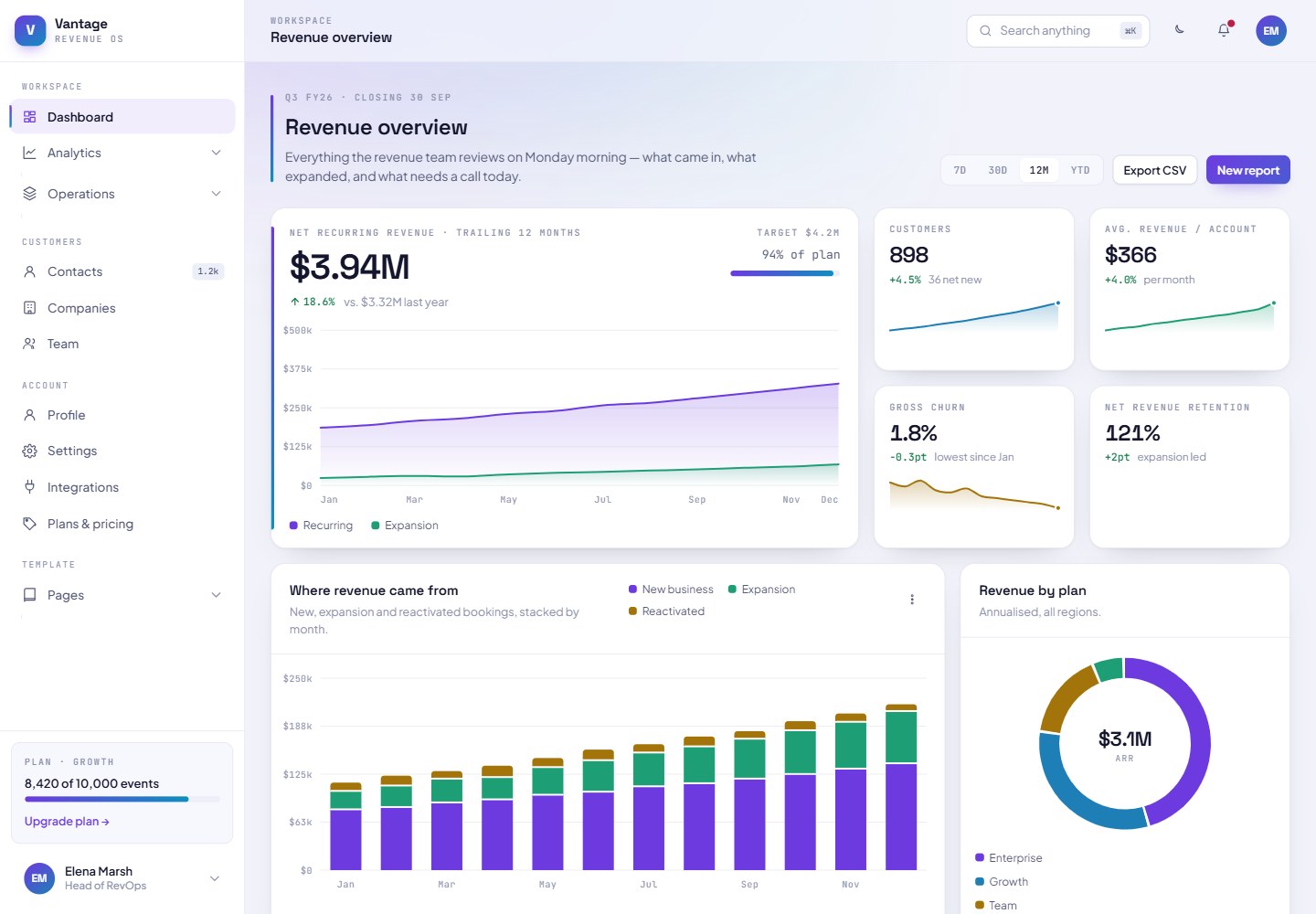
20 pages, all reachable from the left sidebar and its collapsible dropdown menus
HTMLAdmin dashboard
Template-Dashboard-TailwindCSS — HTML Admin dashboard Template
By AlexIA-24
A dark-first dashboard template built with pure HTML, Tailwind CSS and vanilla JavaScript, containing 20 pages, light and dark themes, and a chart library written from scratch in SVG, with no framework, dependencies or build step.
Explore the design
Compare the page layouts and mobile experience. Open any screenshot for a closer look.
Desktop homepage1 / 2
Desktop captureTop of page
Rendered from the fixed source checkout.
All pages & views 2
Screenshots show visual appearance; interactive behavior may differ.
Recorded 2026-10-16View source
What stands out
A quick read of the recorded project description.
Light and dark themes, fully driven by CSS custom properties
Seven SVG chart primitives with hover tooltips and crosshairs
⌘K command palette, drag-and-drop board, and a data table with sorting, filtering and pagination
Sidebar, top bar and footer rendered uniformly by shell.js, with navigation edited in a single array
Fonts Space Grotesk, Plus Jakarta Sans and JetBrains Mono from Google Fonts
Template Details
The template is built around Vantage, a fictional revenue operations platform, and its 20 pages share the same fictional company data rather than placeholder content. Pages are organized through a left sidebar and its collapsible dropdown menus, grouped into four sections: Workspace (Dashboard, Reports under Analytics, Products, Crypto treasury, and Tasks, Projects, Board, Data table under Operations), Customers (Contacts, Companies, Team), Account (Profile, Settings, Integrations, Plans & pricing) and Template (Components, Sign in, Sign up, Reset password, 404).
The template includes light and dark themes driven by CSS custom properties, seven SVG chart primitives (area chart, bar chart, ranked bar chart, donut chart, progress ring, sparkline, heatmap) with hover tooltips and crosshairs; it also provides a ⌘K command palette, a drag-and-drop board, a data table with sorting, filtering, selection and pagination, and forms with inline validation. The sidebar, top bar and footer are rendered on every page by assets/js/shell.js, so navigation only needs to be edited in one array. Fonts are Space Grotesk, Plus Jakarta Sans and JetBrains Mono from Google Fonts.
The README states clearly that pages load Tailwind through the Play CDN, which suits a template scenario where you want to open and edit immediately, but is not suitable for production because it sends the compiler to every visitor and outputs warnings in the console. Before going live, you need to install Tailwind and build a static stylesheet, replace the CDN script tag, and move the theme.extend block from boot.js to tailwind.config.js, while keeping the first four lines of boot.js to avoid a color flash on load. The data in assets/js/data.js is fictional and should be replaced before use.
HTMLAdmin dashboard
Is it right for your project?
Use Cases
- Quickly building dashboard interface prototypes for revenue operations or SaaS products
- Admin interfaces that need light and dark theme switching with chart colors redrawn per theme
- Static template scenarios where you want to open index.html and edit directly without a build step
- Deploying a purely static dashboard demo on GitHub Pages with relative paths
Suitable For
- Developers who need a dashboard template in pure HTML, Tailwind CSS and vanilla JavaScript
- Demo or prototype projects that want fictional but complete data content as interface filler
- Static sites that need an editable navigation array and centralized page shell management
- Scenarios used only for local preview or prototype validation before replacing data and completing the Tailwind build
Getting started & customization
Use these recorded setup notes alongside the repository instructions for your chosen version.
- 1
Clone the repository and open index.html in a browser; all paths are relative, and it can also run directly on GitHub Pages (Settings → Pages, choose the branch and the / root directory).
- 2
Pages load Tailwind through the Play CDN, and the README states this is not suitable for production; before going live, build a static stylesheet with npx tailwindcss -i ./assets/css/app.css -o ./assets/css/build.css --minify and replace the CDN script tag.
- 3
Move the theme.extend block from assets/js/boot.js to tailwind.config.js, and keep the first four lines of boot.js to avoid a color flash on load.
- 4
The dataset in assets/js/data.js is fictional and should be replaced with real data before use.
- 5
To change navigation, edit the NAV array at the top of assets/js/shell.js; to add a page, copy an existing page, change the data-page-title and data-page-section attributes on the body, and add an entry to NAV.
License & source material
Usage conditions & limitations
Free to use · keep license noticeThis listing covers the free version under the MIT license in the public repository; the free scope is the code of that version and does not mean external services or third-party assets are free.
Must comply with when using
- You may use, modify, commercialize and distribute the code of this version for free.
- When distributing copies or substantial portions of the code, retain the original author's copyright notice and the full MIT license notice.
- The code is provided as is; warranties and limitations of liability are governed by the original license and applicable law.
Additional costs & items to verify
- Demo images, fonts, icons and other third-party assets must be checked against their respective licenses and cannot be judged solely by the code's MIT license.
- External services such as domains, hosting, databases, payments or AI may incur separate charges.
- Pages compile utility classes in the browser through the Tailwind Play CDN, and the README states clearly that this is not suitable for production because it sends the compiler to every visitor and outputs warnings in the console.
- Before going live, you need to install Tailwind yourself and build a static stylesheet, replace the CDN script tag, and move the theme.extend block from boot.js to tailwind.config.js.
- The dataset in assets/js/data.js is fictional and should be replaced with real data before use.
- The fonts Space Grotesk, Plus Jakarta Sans and JetBrains Mono are all loaded from Google Fonts and are external service dependencies.
- The five categorical chart colors have been validated for color vision deficiency separation and 3:1 contrast; if you replace them with your own brand colors, you must check them yourself rather than judging by eye.
- The template is designed by Studio Alpix, and the fonts come from Google Fonts; the corresponding attribution and source information must retain.
View Original Text Basis
Permission is hereby granted, free of charge
Original License Text
The pages load Tailwind from the Play CDN, which compiles utilities in the browser. That is right for a template you can open and edit immediately, and wrong for production — it ships the compiler to every visitor and logs a warning to the console.
Original README
Install Tailwind and build a static stylesheet with `npx tailwindcss -i ./assets/css/app.css -o ./assets/css/build.css --minify`, replace the `cdn.tailwindcss.com` script tag with a link to `build.css`, and move the `theme.extend` block out of `assets/js/boot.js` into `tailwind.config.js`. Keep the first four lines of `boot.js` where they are — they apply the stored theme before first paint, which is what prevents a flash of the wrong colours on load.
Original README
The dataset in `assets/js/data.js` is fiction. Replace it with your own before anyone reads a number off these charts.
Original README
Type is Space Grotesk for display and metrics, Plus Jakarta Sans for reading, JetBrains Mono for data and axis labels. All three load from Google Fonts.
Original README
The five categorical chart colours are validated against both surfaces for colour-vision-deficiency separation and 3:1 contrast. If you swap them for your own brand, check the replacements rather than trusting the eye.
Original README
https://github.com/AlexIA-24/Template-Dashboard-TailwindCSS/blob/main/LICENSEhttps://github.com/AlexIA-24/Template-Dashboard-TailwindCSS/blob/main/README.mdDesigned by [Studio Alpix](https://studio-alpix.com/). Typefaces from [Google Fonts](https://fonts.google.com).
Original README
Compiled by DeepSeek based on repository license and README ·2026-10-15. Results only cover the materials read; dependencies, images, fonts, and subsequent term changes are subject to their respective original texts.
Project checks & description sources
Template Information
- Source platforms
- GitHub
- Documentation and maintenance reference score
- Partly documented · 68 / 100
- Technologies
- HTML
- Website type
- Admin dashboard
How this score is calculated
Our heuristic uses license records (up to 30), a demo link (12), a preview (10), stars (15), recorded maintenance (15), description completeness (8), feature records (5) and classification data (5). It is not a code, security or performance test, or a Google score. A link does not establish tested functionality.
What to verify for this project
- Repository update recorded
- 2026-08-03
- Screenshot last checked
- 2026-10-16
No demo link is recorded. Use the repository instructions to evaluate the project locally; the screenshot alone cannot establish interactive behavior.
The catalog identifies HTML as the primary stack. Check the actual dependency manifest and lockfile for versions and hosting requirements. These notes use recorded metadata, not a code audit or a deployment test.
Use a selection guide →How this description was prepared
AI-assisted description based on catalog records and repository material. Repository authors are not automatically the reviewers of this description.
Review declaration: codex-user-requested-batch-review-20261017 · 2026-10-16
Inspect the recorded source material
SHA-256: 243555f53500fac2d1a6915c449d447edcd94ef6f342475c72ef88668e877db0
2026-10-15T10:13:13.937Z
Source file / repository# Template-Dashboard-TailwindCSS [English](#english) · [Français](#francais) <img width="1342" height="881" alt="template-dashboard" src="https://github.com/user-attachments/assets/5bcb6438-4138-4631-a4a9-ca6951d408e7" /> <img width="1647" height="822" alt="template-saas-light" src="https://github.com/user-attachments/assets/224ea81b-166d-410d-bf10-f5bd6812a42d" /> <a id="english"></a> ## English A dark-first dashboard template built with plain HTML, Tailwind CSS and vanilla JavaScript. Twenty pages, a light and a dark theme, and a chart library written from scratch in SVG. No framework, no dependencies, no build step. The template is grounded in a fictional product — Vantage, a revenue operations platform — so every page carries real content instead of placeholder boxes. The same company closes the same quarter across all twenty pages. ### Preview Clone the repository and open `index.html` in a browser. That is the whole setup. Everything is static and every path is relative, so it also runs from GitHub Pages without changes: in Settings → Pages, pick your branch and the `/` root. ### What's inside Twenty pages, all reachable from the left sidebar and its collapsible dropdowns. **Workspace** — Dashboard, and dropdowns for Analytics (Reports, Products, Crypto treasury) and Operations (Tasks, Projects, Board, Data table). **Customers** — Contacts, Companies, Team. **Account** — Profile, Settings, Integrations, Plans & pricing. **Template** — Components, Sign in, Sign up, Reset password, 404. Beyond the pages: a light and dark theme driven entirely by CSS custom properties, seven SVG chart primitives (area, bars, ranked bars, donut, progress ring, sparkline, heatmap) with hover tooltips and crosshairs, a command palette on ⌘K, a drag-and-drop kanban, a sortable and filterable data table with selection and pagination, and forms with inline validation. The sidebar, top bar and footer are rendered by `assets/js/shell.js` on every page, so navigation is edited in one array rather than in twenty files. Type is Space Grotesk for display and metrics, Plus Jakarta Sans for reading, JetBrains Mono for data and axis labels. All three load from Google Fonts. ### Before you ship this The pages load Tailwind from the Play CDN, which compiles utilities in the browser. That is right for a template you can open and edit immediately, and wrong for production — it ships the compiler to every visitor and logs a warning to the console. Install Tailwind and build a static stylesheet with `npx tailwindcss -i ./assets/css/app.css -o ./assets/css/build.css --minify`, replace the `cdn.tailwindcss.com` script tag with a link to `build.css`, and move the `theme.extend` block out of `assets/js/boot.js` into `tailwind.config.js`. Keep the first four lines of `boot.js` where they are — they apply the stored theme before first paint, which is what prevents a flash of the wrong colours on load. The dataset in `assets/js/data.js` is fiction. Replace it with your own before anyone reads a number off these charts. ### Customising Every colour is a CSS custom property declared on `:root` in `assets/css/app.css`, overridden under `.dark`. Change `--brand` and `--brand-2` and the whole template follows, including the logo, the buttons and the gradient rail. Nothing is hard-coded to one theme — the SVG charts reference `var(--c1)` through `var(--c5)`, so switching theme repaints them without a redraw. The five categorical chart colours are validated against both surfaces for colour-vision-deficiency separation and 3:1 contrast. If you swap them for your own brand, check the replacements rather than trusting the eye. To change the navigation, edit the `NAV` array at the top of `assets/js/shell.js`. To add a page, copy any existing one, change the `data-page-title` and `data-page-section` attributes on `<body>`, and add an entry to `NAV`. Open `components.html` first. It shows every token, control and chart the template is built from, in both themes. <br> <a id="francais"></a> ## Français Un template de dashboard sombre par défaut, construit en HTML, Tailwind CSS et JavaScript natif. Vingt pages, un thème clair et un thème sombre, et une librairie de graphiques écrite entièrement en SVG. Aucun framework, aucune dépendance, aucune étape de build. Le template s'appuie sur un produit fictif — Vantage, une plateforme de revenue operations — pour que chaque page porte du contenu réel plutôt que des blocs de remplissage. La même entreprise clôture le même trimestre sur les vingt pages. ### Aperçu Clonez le dépôt et ouvrez `index.html` dans un navigateur. C'est toute l'installation. Tout est statique et tous les chemins sont relatifs, donc le template fonctionne aussi sur GitHub Pages sans modification : dans Settings → Pages, choisissez votre branche et la racine `/`. ### Ce qu'il contient Vingt pages, toutes accessibles depuis le menu latéral gauche et ses dropdowns. **Workspace** — Dashboard, plus les dropdowns Analytics (Reports, Products, Crypto treasury) et Operations (Tasks, Projects, Board, Data table). **Customers** — Contacts, Companies, Team. **Account** — Profile, Settings, Integrations, Plans & pricing. **Template** — Components, Sign in, Sign up, Reset password, 404. Au-delà des pages : un thème clair et sombre piloté uniquement par variables CSS, sept primitives de graphiques SVG (aire, barres, barres classées, donut, anneau de progression, sparkline, heatmap) avec tooltips et crosshair au survol, une palette de commandes sur ⌘K, un kanban en glisser-déposer, une table de données triable et filtrable avec sélection et pagination, et des formulaires à validation inline. Le menu latéral, la barre supérieure et le footer sont générés par `assets/js/shell.js` sur chaque page : la navigation s'édite dans un seul tableau plutôt que dans vingt fichiers. La typographie associe Space Grotesk pour les titres et les chiffres, Plus Jakarta Sans pour la lecture, JetBrains Mono pour les données et les axes. Les trois se chargent depuis Google Fonts. ### Avant de mettre en ligne Les pages chargent Tailwind depuis le Play CDN, qui compile les utilitaires dans le navigateur. C'est pratique pour un template qu'on ouvre et modifie immédiatement, et inadapté à la production : le compilateur est envoyé à chaque visiteur et un avertissement s'affiche en console. Installez Tailwind et compilez une feuille de style statique avec `npx tailwindcss -i ./assets/css/app.css -o ./assets/css/build.css --minify`, remplacez la balise `cdn.tailwindcss.com` par un lien vers `build.css`, et déplacez le bloc `theme.extend` de `assets/js/boot.js` vers `tailwind.config.js`. Laissez les quatre premières lignes de `boot.js` en place : elles appliquent le thème enregistré avant le premier rendu, ce qui évite un flash de couleurs au chargement. Le jeu de données dans `assets/js/data.js` est fictif. Remplacez-le par le vôtre avant que quiconque lise un chiffre sur ces graphiques. ### Personnaliser Chaque couleur est une variable CSS déclarée sur `:root` dans `assets/css/app.css`, redéfinie sous `.dark`. Changez `--brand` et `--brand-2` et tout le template suit, logo, boutons et rail dégradé compris. Rien n'est figé sur un seul thème : les graphiques SVG référencent `var(--c1)` à `var(--c5)`, donc basculer le thème les repeint sans les redessiner. Les cinq couleurs de série sont validées sur les deux fonds pour la séparation en cas de déficience de la vision des couleurs et pour un contraste d'au moins 3:1. Si vous les remplacez par celles de votre marque, vérifiez-les plutôt que de vous fier à l'œil. Pour modifier la navigation, éditez le tableau `NAV` en haut de `assets/js/shell.js`. Pour ajouter une page, dupliquez-en une, changez les attributs `data-page-title` et `data-page-section` sur `<body>`, et ajoutez une entrée dans `NAV`. Ouvrez `components.html` en premier. Il présente tous les tokens, contrôles et graphiques qui composent le template, dans les deux thèmes. <br> --- Designed by [Studio Alpix](https://studio-alpix.com/). Typefaces from [Google Fonts](https://fonts.google.com). MIT
Explore similar templates
Compare previews and descriptions within the same stack and category.

AdminLTE
An HTML admin dashboard built with Bootstrap 5 and vanilla JavaScript. Astro builds the documentation; React, Vue and Angular editions live in separate repositories.
HTML · Admin dashboard

gentelella
Gentelella v4 is a free, open-source admin dashboard template maintained by Colorlib, built with vanilla JavaScript, SCSS, and Vite 8 without Bootstrap or jQuery.
HTML · Admin dashboard

coreui-free-bootstrap-admin-template
A free Bootstrap admin template maintained by CoreUI, built on CoreUI's own UI component library. It provides compiled HTML pages and Pug template source code, covering dashboards, authentication, forms, components, icons, and error pages.
HTML · Admin dashboard

dashboards
A collection of responsive dashboard HTML templates open-sourced by Keen IO, built on CSS Grid, offering multiple prebuilt admin data interface layouts.
HTML · Admin dashboard

SB Admin 2
SB Admin 2 is a classic Bootstrap admin template from Start Bootstrap, offering dashboards, charts, tables, and common management pages.
HTML · Admin dashboard

Adminator-admin-dashboard
Adminator 4 is a vanilla HTML, CSS and JavaScript admin dashboard template with a CSS-variable token design system, built-in light and dark themes, no jQuery or Bootstrap dependency, and 18 pages covering dashboards, mail, calendar, charts, forms, tables and error pages.
HTML · Admin dashboard