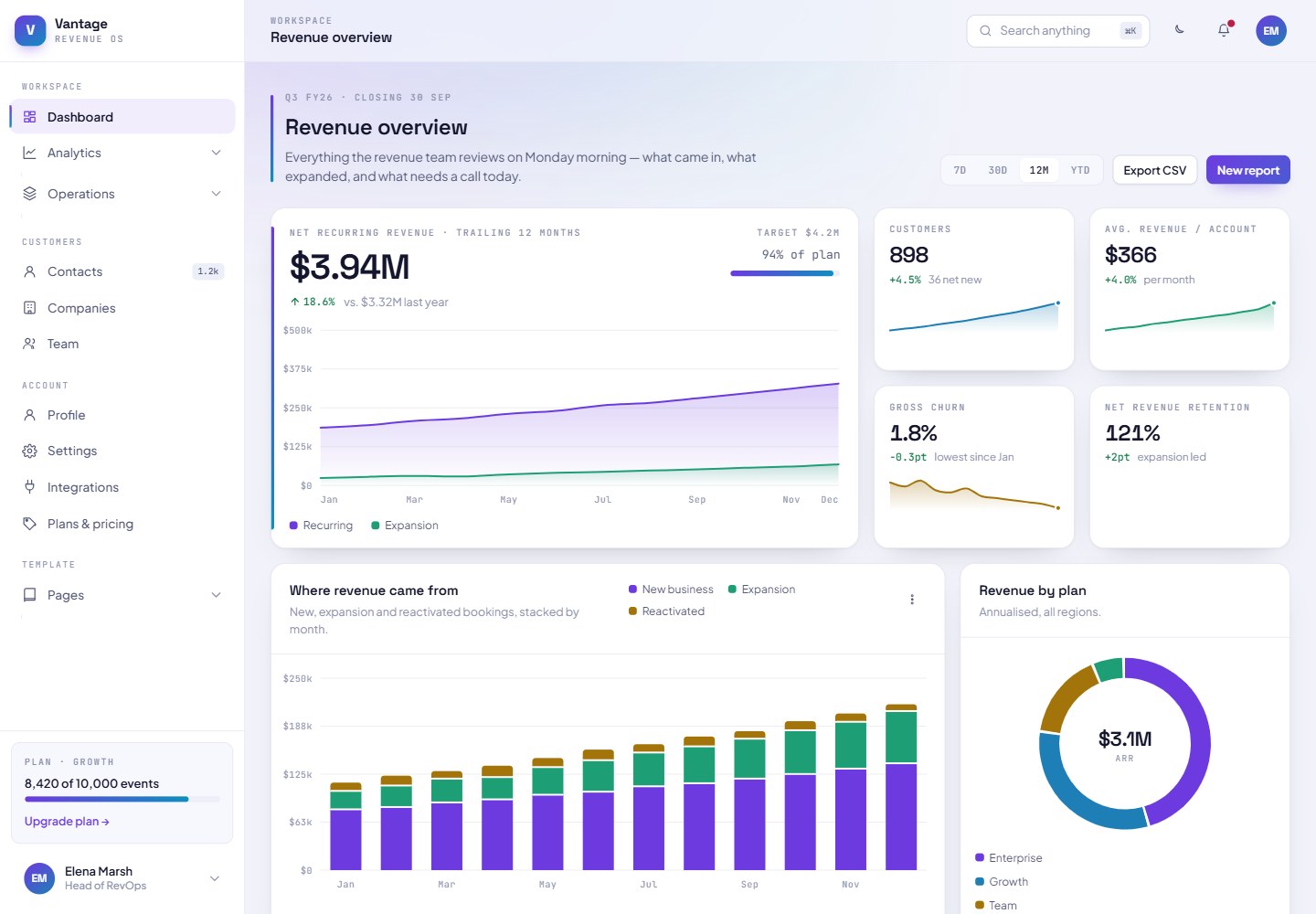
二十个页面,全部可从左侧边栏及其可折叠下拉菜单访问
HTML后台
Template-Dashboard-TailwindCSS — HTML 后台模板
作者 AlexIA-24
一个以深色为主的仪表盘模板,使用纯 HTML、Tailwind CSS 和原生 JavaScript 构建,包含二十个页面、明暗两套主题,以及用 SVG 从零编写的图表库,无需框架、依赖或构建步骤。
看看你的网站会是什么样
浏览真实页面截图,比较内容排版与手机效果。点击下方缩略图切换,放大查看整页细节。
全部页面与视图 2
截图用于了解视觉与布局,交互效果请以实际项目为准。
采集于 2026-10-16查看来源
值得关注的模板亮点
从已有项目资料中,快速了解它的特点。
明暗两套主题,完全由 CSS 自定义属性驱动
七种 SVG 图表原语,带悬停提示与十字准线
⌘K 命令面板、拖放看板、可排序筛选并带分页的数据表格
侧边栏、顶栏和页脚由 shell.js 统一渲染,导航只需编辑一个数组
使用 Google Fonts 的 Space Grotesk、Plus Jakarta Sans 和 JetBrains Mono
模板详细介绍
该模板基于虚构的营收运营平台 Vantage 构建,二十个页面共享同一套虚构公司数据,而非占位内容。页面通过左侧边栏及其可折叠下拉菜单组织,分为 Workspace(Dashboard、Analytics 下的 Reports、Products、Crypto treasury,Operations 下的 Tasks、Projects、Board、Data table)、Customers(Contacts、Companies、Team)、Account(Profile、Settings、Integrations、Plans & pricing)和 Template(Components、Sign in、Sign up、Reset password、404)四组。
模板包含由 CSS 自定义属性驱动的明暗两套主题、七种 SVG 图表原语(面积图、条形图、排名条形图、环形图、进度环、迷你趋势图、热力图),支持悬停提示与十字准线;还提供 ⌘K 命令面板、拖放看板、可排序筛选并带选择与分页的数据表格,以及带内联验证的表单。侧边栏、顶栏和页脚由 assets/js/shell.js 在每个页面渲染,导航只需在一个数组中编辑。字体使用 Google Fonts 的 Space Grotesk、Plus Jakarta Sans 和 JetBrains Mono。
README 明确指出:页面通过 Play CDN 加载 Tailwind,适合即开即改的模板场景,但不适合生产环境,因为会把编译器发送给每个访客并在控制台输出警告。上线前需安装 Tailwind 并构建静态样式表,替换 CDN 脚本标签,并将 theme.extend 块从 boot.js 移至 tailwind.config.js,同时保留 boot.js 前四行以避免加载时颜色闪烁。assets/js/data.js 中的数据为虚构内容,使用前应替换。
HTML后台
适合你的项目吗?
适用场景
- 快速搭建营收运营或 SaaS 类产品的仪表盘界面原型
- 需要明暗主题切换且图表颜色随主题重绘的后台界面
- 希望直接打开 index.html 即可编辑、无需构建步骤的静态模板场景
- 在 GitHub Pages 上以相对路径部署纯静态仪表盘演示
适合人群
- 需要纯 HTML、Tailwind CSS 和原生 JavaScript 仪表盘模板的开发者
- 希望以虚构但完整的数据内容作为界面填充的演示或原型项目
- 需要可编辑导航数组、集中管理页面外壳的静态站点
- 在替换数据与完成 Tailwind 构建前仅用于本地预览或原型验证的场景
上手与定制指南
结合仓库当前版本的说明,按下面的资料检查内容、配置与运行要求。
- 1
克隆仓库并在浏览器中打开 index.html 即可,所有路径均为相对路径,也可直接在 GitHub Pages 上运行(Settings → Pages 选择分支和 / 根目录)。
- 2
页面通过 Play CDN 加载 Tailwind,README 说明这不适合生产环境,上线前需用 npx tailwindcss -i ./assets/css/app.css -o ./assets/css/build.css --minify 构建静态样式表并替换 CDN 脚本标签。
- 3
将 theme.extend 块从 assets/js/boot.js 移至 tailwind.config.js,并保留 boot.js 前四行以避免加载时颜色闪烁。
- 4
assets/js/data.js 中的数据集为虚构内容,使用前应替换为真实数据。
- 5
修改导航请编辑 assets/js/shell.js 顶部的 NAV 数组;添加页面可复制现有页面,修改 body 上的 data-page-title 和 data-page-section 属性,并在 NAV 中增加条目。
授权与来源资料
使用条件与限制
免费使用 · 保留许可声明本次收录的是公开仓库中采用 MIT 许可的免费版本;免费范围为该版本代码,不代表外部服务或第三方素材免费。
使用时需要遵守
- 允许免费使用、修改、商用和分发该版本代码。
- 分发代码副本或实质性部分时,保留原作者版权声明和完整 MIT 许可声明。
- 代码按现状提供;担保与责任限制以原许可证及适用法律为准。
额外费用与待核对事项
- 演示图片、字体、图标及其他第三方素材需按各自许可核对,不能仅凭代码的 MIT 许可判断。
- 域名、托管、数据库、支付或 AI 等外部服务可能另外收费。
- 页面通过 Tailwind Play CDN 在浏览器中编译工具类,README 明确说明这不适合生产环境,会向每位访客发送编译器并在控制台输出警告。
- 上线前需自行安装 Tailwind 并构建静态样式表,替换 CDN 脚本标签,并把 theme.extend 块从 boot.js 移到 tailwind.config.js。
- assets/js/data.js 中的数据集为虚构内容,使用前应替换为真实数据。
- 字体 Space Grotesk、Plus Jakarta Sans 和 JetBrains Mono 均从 Google Fonts 加载,属于外部服务依赖。
- 五个分类图表颜色已针对色觉缺陷分离和 3:1 对比度验证;若替换为自有品牌色,需自行检查而非凭肉眼判断。
- 模板由 Studio Alpix 设计,字体来自 Google Fonts,需保留相应署名与来源信息。
查看原文依据
Permission is hereby granted, free of charge
许可证原文
The pages load Tailwind from the Play CDN, which compiles utilities in the browser. That is right for a template you can open and edit immediately, and wrong for production — it ships the compiler to every visitor and logs a warning to the console.
README 原文
Install Tailwind and build a static stylesheet with `npx tailwindcss -i ./assets/css/app.css -o ./assets/css/build.css --minify`, replace the `cdn.tailwindcss.com` script tag with a link to `build.css`, and move the `theme.extend` block out of `assets/js/boot.js` into `tailwind.config.js`. Keep the first four lines of `boot.js` where they are — they apply the stored theme before first paint, which is what prevents a flash of the wrong colours on load.
README 原文
The dataset in `assets/js/data.js` is fiction. Replace it with your own before anyone reads a number off these charts.
README 原文
Type is Space Grotesk for display and metrics, Plus Jakarta Sans for reading, JetBrains Mono for data and axis labels. All three load from Google Fonts.
README 原文
The five categorical chart colours are validated against both surfaces for colour-vision-deficiency separation and 3:1 contrast. If you swap them for your own brand, check the replacements rather than trusting the eye.
README 原文
https://github.com/AlexIA-24/Template-Dashboard-TailwindCSS/blob/main/LICENSEhttps://github.com/AlexIA-24/Template-Dashboard-TailwindCSS/blob/main/README.mdDesigned by [Studio Alpix](https://studio-alpix.com/). Typefaces from [Google Fonts](https://fonts.google.com).
README 原文
DeepSeek 根据仓库许可证和 README 整理 ·2026-10-15。结果仅覆盖已读取资料,依赖、图片、字体及后续条款变更以各自原文为准。
项目核对记录与介绍依据
模板资料
- 来源平台
- GitHub
- 资料与维护参考分
- 资料一般 · 68 / 100
- 技术栈
- HTML
- 网站类型
- 后台
这个分数如何计算
本站按许可资料(最高30分)、演示链接(12分)、预览图(10分)、Star数(15分)、记录的维护时间(15分)、描述完整度(8分)、功能记录(5分)和分类资料(5分)计算。它不是代码、安全或性能测试,也不是 Google 评分;有链接不代表已实测可用。
这个项目需要核对什么
- 记录的仓库更新时间
- 2026-08-03
- 截图检查日期
- 2026-10-16
目前没有记录演示链接。请依据仓库说明在本地评估;仅凭截图无法确认交互行为。
目录记录的主要技术栈是 HTML。请通过依赖清单和锁文件核对实际版本与托管要求。这些说明基于收录资料,不代表代码审计或部署实测。
查看具体选型方法 →介绍的制作与核对状态
介绍由 AI 辅助整理目录与仓库资料。仓库作者不等于这篇介绍的审核者。
审核声明: codex-user-requested-batch-review-20261017 · 2026-10-16
查看当时使用的来源资料
SHA-256: 243555f53500fac2d1a6915c449d447edcd94ef6f342475c72ef88668e877db0
2026-10-15T10:13:13.937Z
来源文件 / 仓库# Template-Dashboard-TailwindCSS [English](#english) · [Français](#francais) <img width="1342" height="881" alt="template-dashboard" src="https://github.com/user-attachments/assets/5bcb6438-4138-4631-a4a9-ca6951d408e7" /> <img width="1647" height="822" alt="template-saas-light" src="https://github.com/user-attachments/assets/224ea81b-166d-410d-bf10-f5bd6812a42d" /> <a id="english"></a> ## English A dark-first dashboard template built with plain HTML, Tailwind CSS and vanilla JavaScript. Twenty pages, a light and a dark theme, and a chart library written from scratch in SVG. No framework, no dependencies, no build step. The template is grounded in a fictional product — Vantage, a revenue operations platform — so every page carries real content instead of placeholder boxes. The same company closes the same quarter across all twenty pages. ### Preview Clone the repository and open `index.html` in a browser. That is the whole setup. Everything is static and every path is relative, so it also runs from GitHub Pages without changes: in Settings → Pages, pick your branch and the `/` root. ### What's inside Twenty pages, all reachable from the left sidebar and its collapsible dropdowns. **Workspace** — Dashboard, and dropdowns for Analytics (Reports, Products, Crypto treasury) and Operations (Tasks, Projects, Board, Data table). **Customers** — Contacts, Companies, Team. **Account** — Profile, Settings, Integrations, Plans & pricing. **Template** — Components, Sign in, Sign up, Reset password, 404. Beyond the pages: a light and dark theme driven entirely by CSS custom properties, seven SVG chart primitives (area, bars, ranked bars, donut, progress ring, sparkline, heatmap) with hover tooltips and crosshairs, a command palette on ⌘K, a drag-and-drop kanban, a sortable and filterable data table with selection and pagination, and forms with inline validation. The sidebar, top bar and footer are rendered by `assets/js/shell.js` on every page, so navigation is edited in one array rather than in twenty files. Type is Space Grotesk for display and metrics, Plus Jakarta Sans for reading, JetBrains Mono for data and axis labels. All three load from Google Fonts. ### Before you ship this The pages load Tailwind from the Play CDN, which compiles utilities in the browser. That is right for a template you can open and edit immediately, and wrong for production — it ships the compiler to every visitor and logs a warning to the console. Install Tailwind and build a static stylesheet with `npx tailwindcss -i ./assets/css/app.css -o ./assets/css/build.css --minify`, replace the `cdn.tailwindcss.com` script tag with a link to `build.css`, and move the `theme.extend` block out of `assets/js/boot.js` into `tailwind.config.js`. Keep the first four lines of `boot.js` where they are — they apply the stored theme before first paint, which is what prevents a flash of the wrong colours on load. The dataset in `assets/js/data.js` is fiction. Replace it with your own before anyone reads a number off these charts. ### Customising Every colour is a CSS custom property declared on `:root` in `assets/css/app.css`, overridden under `.dark`. Change `--brand` and `--brand-2` and the whole template follows, including the logo, the buttons and the gradient rail. Nothing is hard-coded to one theme — the SVG charts reference `var(--c1)` through `var(--c5)`, so switching theme repaints them without a redraw. The five categorical chart colours are validated against both surfaces for colour-vision-deficiency separation and 3:1 contrast. If you swap them for your own brand, check the replacements rather than trusting the eye. To change the navigation, edit the `NAV` array at the top of `assets/js/shell.js`. To add a page, copy any existing one, change the `data-page-title` and `data-page-section` attributes on `<body>`, and add an entry to `NAV`. Open `components.html` first. It shows every token, control and chart the template is built from, in both themes. <br> <a id="francais"></a> ## Français Un template de dashboard sombre par défaut, construit en HTML, Tailwind CSS et JavaScript natif. Vingt pages, un thème clair et un thème sombre, et une librairie de graphiques écrite entièrement en SVG. Aucun framework, aucune dépendance, aucune étape de build. Le template s'appuie sur un produit fictif — Vantage, une plateforme de revenue operations — pour que chaque page porte du contenu réel plutôt que des blocs de remplissage. La même entreprise clôture le même trimestre sur les vingt pages. ### Aperçu Clonez le dépôt et ouvrez `index.html` dans un navigateur. C'est toute l'installation. Tout est statique et tous les chemins sont relatifs, donc le template fonctionne aussi sur GitHub Pages sans modification : dans Settings → Pages, choisissez votre branche et la racine `/`. ### Ce qu'il contient Vingt pages, toutes accessibles depuis le menu latéral gauche et ses dropdowns. **Workspace** — Dashboard, plus les dropdowns Analytics (Reports, Products, Crypto treasury) et Operations (Tasks, Projects, Board, Data table). **Customers** — Contacts, Companies, Team. **Account** — Profile, Settings, Integrations, Plans & pricing. **Template** — Components, Sign in, Sign up, Reset password, 404. Au-delà des pages : un thème clair et sombre piloté uniquement par variables CSS, sept primitives de graphiques SVG (aire, barres, barres classées, donut, anneau de progression, sparkline, heatmap) avec tooltips et crosshair au survol, une palette de commandes sur ⌘K, un kanban en glisser-déposer, une table de données triable et filtrable avec sélection et pagination, et des formulaires à validation inline. Le menu latéral, la barre supérieure et le footer sont générés par `assets/js/shell.js` sur chaque page : la navigation s'édite dans un seul tableau plutôt que dans vingt fichiers. La typographie associe Space Grotesk pour les titres et les chiffres, Plus Jakarta Sans pour la lecture, JetBrains Mono pour les données et les axes. Les trois se chargent depuis Google Fonts. ### Avant de mettre en ligne Les pages chargent Tailwind depuis le Play CDN, qui compile les utilitaires dans le navigateur. C'est pratique pour un template qu'on ouvre et modifie immédiatement, et inadapté à la production : le compilateur est envoyé à chaque visiteur et un avertissement s'affiche en console. Installez Tailwind et compilez une feuille de style statique avec `npx tailwindcss -i ./assets/css/app.css -o ./assets/css/build.css --minify`, remplacez la balise `cdn.tailwindcss.com` par un lien vers `build.css`, et déplacez le bloc `theme.extend` de `assets/js/boot.js` vers `tailwind.config.js`. Laissez les quatre premières lignes de `boot.js` en place : elles appliquent le thème enregistré avant le premier rendu, ce qui évite un flash de couleurs au chargement. Le jeu de données dans `assets/js/data.js` est fictif. Remplacez-le par le vôtre avant que quiconque lise un chiffre sur ces graphiques. ### Personnaliser Chaque couleur est une variable CSS déclarée sur `:root` dans `assets/css/app.css`, redéfinie sous `.dark`. Changez `--brand` et `--brand-2` et tout le template suit, logo, boutons et rail dégradé compris. Rien n'est figé sur un seul thème : les graphiques SVG référencent `var(--c1)` à `var(--c5)`, donc basculer le thème les repeint sans les redessiner. Les cinq couleurs de série sont validées sur les deux fonds pour la séparation en cas de déficience de la vision des couleurs et pour un contraste d'au moins 3:1. Si vous les remplacez par celles de votre marque, vérifiez-les plutôt que de vous fier à l'œil. Pour modifier la navigation, éditez le tableau `NAV` en haut de `assets/js/shell.js`. Pour ajouter une page, dupliquez-en une, changez les attributs `data-page-title` et `data-page-section` sur `<body>`, et ajoutez une entrée dans `NAV`. Ouvrez `components.html` en premier. Il présente tous les tokens, contrôles et graphiques qui composent le template, dans les deux thèmes. <br> --- Designed by [Studio Alpix](https://studio-alpix.com/). Typefaces from [Google Fonts](https://fonts.google.com). MIT
看看同类模板
对比同技术栈与用途的模板,找到更适合的视觉与内容结构。

AdminLTE
基于 HTML、Bootstrap 5 和原生 JavaScript 的管理后台模板。Astro 用于构建文档;React、Vue 与 Angular 版本分别位于其他仓库。
HTML · 后台

gentelella
Free admin dashboard template — vanilla JS, SCSS, Vite 8. No Bootstrap, no jQuery.
HTML · 后台

coreui-free-bootstrap-admin-template
Free Bootstrap Admin & Dashboard Template Built for AI-Assisted Development
HTML · 后台

dashboards
Responsive dashboard templates 📊✨
HTML · 后台

SB Admin 2
SB Admin 2 是 Start Bootstrap 推出的开源后台模板,基于 Bootstrap 构建,整体风格偏向经典管理界面。
HTML · 后台

Adminator-admin-dashboard
Adminator is easy to use and well design admin dashboard template with dark mode for web apps, websites, servi…
HTML · 后台