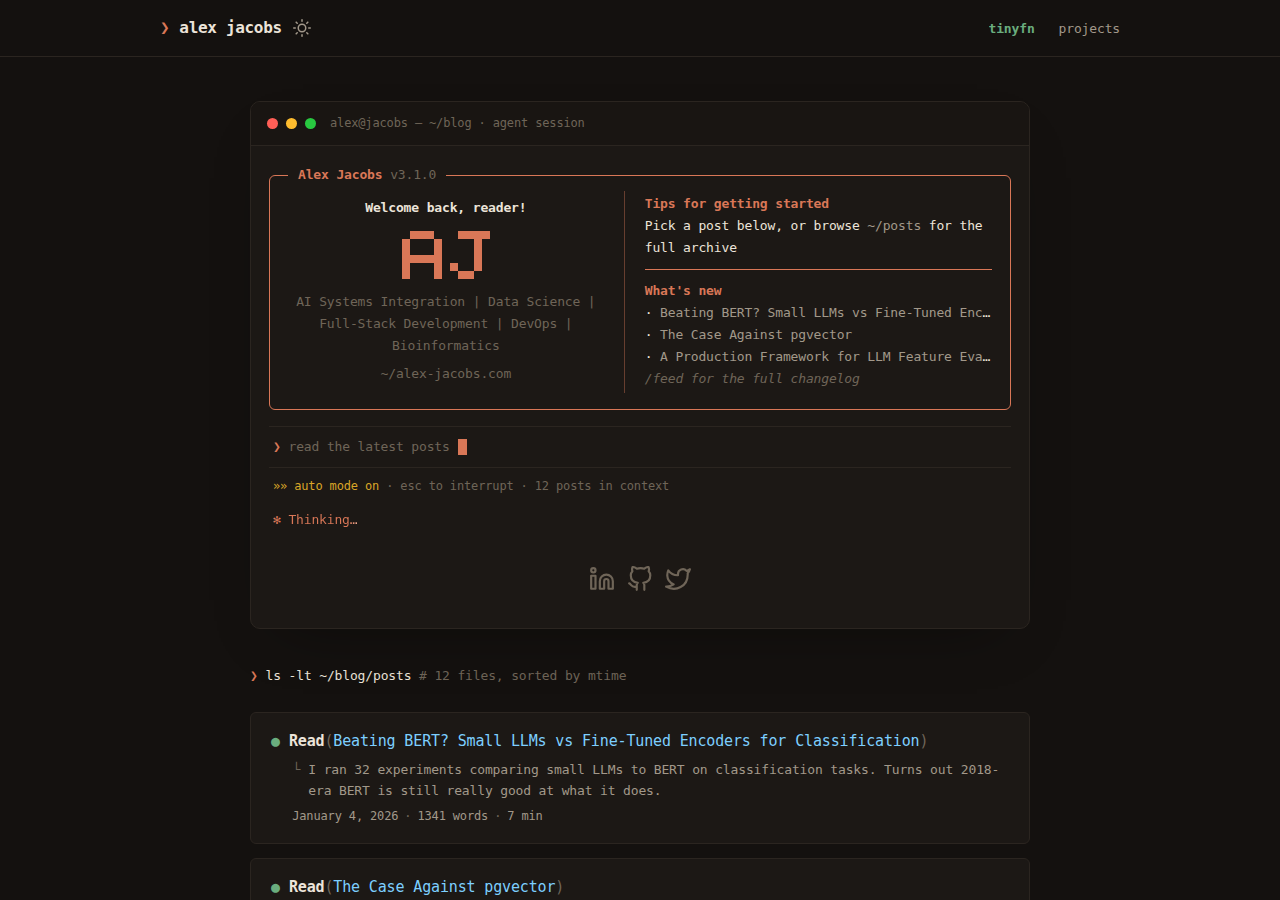
Three independently selectable redesigns, all integrated by copying assets/ and layouts/ files without modifying the theme source
HugoBlogDocumentation
papermod-themes — Hugo Blog Template
By alexjacobs08
Three drop-in redesigns for PaperModX and PaperMod Hugo blogs: agent session, docs minimal, and the editor.
Explore the design
Compare the page layouts and mobile experience. Open any screenshot for a closer look.
Author preview
Author-provided previewTop of page
Preview provided in the project README.
One original preview is available. Open the full image to inspect the design.
Screenshots show visual appearance; interactive behavior may differ.
Recorded 2026-10-12View source
What stands out
A quick read of the recorded project description.
agent session uses a Claude Code / OpenCode terminal style, with tool-call-style article entries and terminal-window single pages
docs minimal is Geist/Vercel-style monochrome minimalism, with thin-line row indexes and monospaced dates, aimed at defaultTheme: auto
the editor simulates a Tokyo Night IDE, with an editor tab bar, file-tree article list, and fixed status bar
Syntax highlighting is based on class-based chroma, requires pygmentsUseClasses: true, and requires Hugo extended
Template Details
This repository provides three interface redesigns for Hugo blogs, targeting PaperModX and largely compatible with the original PaperMod (with additional notes in the README). Each design is not a theme branch or patch but a set of files that can be copied directly into a site: PaperMod(X) concatenates the contents of assets/css/extended/ after its own styles, and site-level layouts/ overrides the theme's corresponding files. The author uses these two mechanisms to achieve the replacement.
The three designs have clearly distinct styles. agent session simulates a Claude Code / OpenCode terminal interface, including a welcome box hero, pixel letter combinations, article entries presented as Read(title) tool calls, terminal-window-style single pages, a blinking input cursor, and a Thinking… animation. It uses warm gruvbox syntax colors, is primarily dark mode, and also offers a warm cream light mode. docs minimal follows Geist/Vercel-style monochrome minimalism, using Geist and Geist Mono fonts, uppercase micro labels, thin-line row-based article indexes, and monospaced numeric dates, paired with GitHub light/dark syntax themes, aimed at defaultTheme: auto, with full support in both modes. the editor turns the blog into an IDE: editor tab bar, a welcome.md hero presented as line-numbered Markdown source, file-tree-style article list, fixed status bar, and syntax colors of Tokyo Night and Tokyo Night Light.
Installation is uniform: merge and copy the assets/ and layouts/ from the chosen design directory into the Hugo site root. It is recommended to set defaultTheme (the first two lean dark, docs minimal prefers auto) and keep pygmentsUseClasses: true, because the syntax colors are based on class-based chroma. Uninstalling means deleting the copied files. The README states that no JavaScript is required, and existing features such as search, table of contents, archives, tags, cover images, and theme switching continue to work. Each design supports both light and dark modes.
Limitations and prerequisites: Hugo extended is required (because SCSS is used), and the author notes testing on Hugo 0.101+. Syntax highlighting must be in class form; on the original PaperMod, chroma classes are available but you may need to wire up the chroma CSS yourself. Third-party assets such as demo images, fonts, and icons must be checked separately under their respective licenses; the MIT license covers only the code itself.
HugoBlogDocumentation
Is it right for your project?
Use Cases
- Changing the visual style of an existing PaperModX or PaperMod blog without forking or modifying the theme
- Quickly comparing terminal, minimal docs, and IDE interface styles before deciding which to adopt
- Needing a blog appearance that does not rely on JavaScript and keeps existing features such as search and table of contents working
Suitable For
- Site authors using Hugo and PaperModX (or the original PaperMod) to build blogs
- Developers willing to manually copy assets/ and layouts/ files and merge them into the site directory themselves
- Projects that need both dark and light modes and accept class-based chroma syntax highlighting
Getting started & customization
Use these recorded setup notes alongside the repository instructions for your chosen version.
- 1
Choose one design from the repository and merge-copy its assets/ and layouts/ directories into the Hugo site root; do not replace the original folders wholesale
- 2
Adjust the configuration as recommended: set defaultTheme: dark for agent session and the editor, and auto is preferred for docs minimal; keep pygmentsUseClasses: true (or markup.highlight.noClasses: false)
- 3
Hugo extended is required (because SCSS is used); the author notes testing on Hugo 0.101+
- 4
On the original PaperMod, chroma classes are also available, but you may need to configure how the chroma CSS is wired in yourself
- 5
To uninstall, delete the copied files; third-party assets such as demo images, fonts, and icons must be checked separately under their respective licenses
License & source material
Usage conditions & limitations
Free to use · keep license noticeThis entry covers the free version in a public repository under the MIT license; the free scope is the code of that version and does not mean external services or third-party assets are free.
Must comply with when using
- The code of this version may be used, modified, used commercially, and distributed for free.
- When distributing copies or substantial portions of the code, retain the original author's copyright notice and the full MIT license notice.
- The code is provided as is; warranties and limitations of liability are governed by the original license and applicable law.
Additional costs & items to verify
- Demo images, fonts, icons, and other third-party assets must be checked under their respective licenses and cannot be judged solely by the code's MIT license.
- External services such as domains, hosting, databases, payments, or AI may incur separate charges.
- Using these templates requires Hugo extended (because SCSS is used); the author notes testing on Hugo 0.101+, and non-extended versions cannot build properly.
- Syntax highlighting depends on class-based chroma, and pygmentsUseClasses: true (or markup.highlight.noClasses: false) must be kept, otherwise the colors will not take effect.
- On the original PaperMod, chroma classes are available, but you may need to wire in the chroma CSS yourself according to your configuration; out-of-the-box operation is not guaranteed.
- The author hopes users will link back to alex-jacobs.com or this repository somewhere on their site; this is a requested attribution, not a mandatory license condition.
View Original Text Basis
Permission is hereby granted, free of charge
Original License Text
**Hugo extended** required (SCSS). Tested on Hugo 0.101+.
Original README
Keep `pygmentsUseClasses: true` (or `markup.highlight.noClasses: false`).
Original README
On stock PaperMod, chroma classes also work — you may need to ship your own chroma CSS wiring depending on your setup.
Original README
https://github.com/alexjacobs08/papermod-themes/blob/main/LICENSEhttps://github.com/alexjacobs08/papermod-themes/blob/main/README.mdIf you use one of these, a link back to [alex-jacobs.com](https://alex-jacobs.com/) or this repo somewhere on your site is appreciated.
Original README
Compiled by DeepSeek based on repository license and README ·2026-10-12. Results only cover the materials read; dependencies, images, fonts, and subsequent term changes are subject to their respective original texts.
Project checks & description sources
Template Information
- Source platforms
- GitHub
- Documentation and maintenance reference score
- Partly documented · 73 / 100
- Technologies
- Hugo
- Website type
- Blog · Documentation
How this score is calculated
Our heuristic uses license records (up to 30), a demo link (12), a preview (10), stars (15), recorded maintenance (15), description completeness (8), feature records (5) and classification data (5). It is not a code, security or performance test, or a Google score. A link does not establish tested functionality.
What to verify for this project
- Repository update recorded
- 2026-07-18
- Screenshot last checked
- 2026-10-12
No demo link is recorded. Use the repository instructions to evaluate the project locally; the screenshot alone cannot establish interactive behavior.
The catalog identifies Hugo as the primary stack. Check the actual dependency manifest and lockfile for versions and hosting requirements. These notes use recorded metadata, not a code audit or a deployment test.
Use a selection guide →How this description was prepared
AI-assisted description based on catalog records and repository material. Repository authors are not automatically the reviewers of this description.
Review declaration: [email protected] · 2026-10-13
Inspect the recorded source material
SHA-256: c09a7ddfc928b132985390711fd8045a4350c77d5fe28840740693d967074f78
2026-10-12T09:31:00.642Z
Source file / repository# papermod-themes
Three drop-in redesigns for Hugo blogs running [PaperModX](https://github.com/reorx/hugo-PaperModX/) (and mostly stock [PaperMod](https://github.com/adityatelange/hugo-PaperMod) — see [notes](#notes)).
No theme surgery, no forks: each design is a set of files you copy into your site. PaperMod(X) concatenates anything in `assets/css/extended/` after its own styles, and site-level `layouts/` override the theme's — that's the whole mechanism.
**Live demos** (on [alex-jacobs.com](https://alex-jacobs.com/), switchable via URL param):
| design | vibe | demo |
|---|---|---|
| **agent session** | Claude Code / OpenCode terminal aesthetic — warm dark, orange accent, tool-call post list, session composer | [?design=claude](https://alex-jacobs.com/?design=claude) |
| **docs minimal** | Geist/Vercel-style monochrome minimalism — hairlines, tight type, zero chrome | [?design=geist](https://alex-jacobs.com/?design=geist) |
| **the editor** | Tokyo Night IDE — editor tab bar, file-explorer post list, VS Code status bar | [?design=ide](https://alex-jacobs.com/?design=ide) |
## agent session

The blog as a Claude Code session. Welcome-box hero with pixel monogram, `Read(title)` tool-call post entries, terminal-window single posts, blinking composer caret, animated *Thinking…* shimmer. Warm gruvbox syntax theme. Best in dark mode, ships with a warm cream light mode too.
[Install →](agent-session/)
## docs minimal

Monochrome docs aesthetic. Geist + Geist Mono, uppercase micro-labels, post index as hairline rows with tabular dates, GitHub light/dark syntax themes. Built for `defaultTheme: auto` — both modes are first-class.
[Install →](docs-minimal/)
## the editor

The blog as an IDE. Editor tab bar (`alex-jacobs.md`, `projects.yaml`), `welcome.md` hero rendered as line-numbered markdown source, posts as a file-explorer tree, fixed status bar (`git:(main)` · `Ln 1, Col 1` · `UTF-8` · `Markdown` · `✓ Prettier`). Tokyo Night + Tokyo Night Light syntax themes.
[Install →](the-editor/)
## Install (any design)
1. Pick a design folder above.
2. Copy its `assets/` and `layouts/` trees into your Hugo site root (merge, don't replace your whole folders).
3. Recommended config tweaks:
```yaml
params:
defaultTheme: dark # for agent session / the editor; docs minimal prefers auto
pygmentsUseClasses: true # required — the syntax themes are class-based chroma
```
4. `hugo server` and enjoy.
Uninstall = delete the files you copied. Nothing else is touched.
## Notes
- **Syntax highlighting** is class-based chroma. Keep `pygmentsUseClasses: true` (or `markup.highlight.noClasses: false`). The palettes drop into `assets/css/lib/chroma-{dark,light}.css`, which PaperModX's `highlight.scss` imports automatically. On stock PaperMod, chroma classes also work — you may need to ship your own chroma CSS wiring depending on your setup.
- **Hugo extended** required (SCSS). Tested on Hugo 0.101+.
- Everything degrades gracefully: no JS required, and stock features (search, ToC, archives, tags, covers, theme toggle) keep working.
- Each design supports both dark and light mode via the PaperMod(X) theme toggle.
## Credits
Made by [Alex Jacobs](https://alex-jacobs.com/). The terminal components in *agent session* were inspired by [brainless](https://brainless.swerdlow.dev/). Tokyo Night palette by [folke](https://github.com/folke/tokyonight.nvim).
If you use one of these, a link back to [alex-jacobs.com](https://alex-jacobs.com/) or this repo somewhere on your site is appreciated.
## License
[MIT](LICENSE)
Explore similar templates
Compare previews and descriptions within the same stack and category.

hugo-PaperMod
A fast, clean, responsive Hugo theme for blogs and lightweight portfolios, with three layout modes (Regular, Home-Info, Profile), automatic and manual light/dark themes, Fuse.js client-side search, multilingual support, and built-in Open Graph, Twitter Cards, and Schema.org data.
Hugo · Portfolio

hugo-book
Hugo Book is a Hugo documentation theme that aims to make documentation sites as simple as a plain book. It emphasizes clean, lightweight, mobile-friendly, and zero initial configuration, and comes with an example site that doubles as documentation.
Hugo · Documentation

LoveIt
LoveIt is a clean, elegant, and feature-rich Hugo blog theme derived from LeaveIt and KeepIt, MIT-licensed. It offers light/dark modes, responsive layout, multilingual support, and search via Lunr.js or Algolia.
Hugo · Blog

hugo-coder
hugo-coder is a minimalist Hugo blog theme maintained by luizdepra under the MIT license. It provides a clean, text-focused blog appearance, configuration documentation in the docs directory, and a complete exampleSite with hugo.toml.
Hugo · Blog

docsy
Docsy is a Hugo theme for technical documentation sites, governed by the Linux Foundation and licensed under Apache-2.0. It provides simple navigation and site structure for open source project and product documentation.
Hugo · Documentation

blowfish
Blowfish is a Hugo personal website and blog theme built with Tailwind CSS 4, focused on lightness, simplicity, and content-first presentation.
Hugo · Blog