三套可独立选用的重设计,均以复制 assets/ 与 layouts/ 文件的方式接入,不改动主题源码
Hugo博客文档
papermod-themes — Hugo 博客模板
作者 alexjacobs08
为 PaperModX 与 PaperMod Hugo 博客准备的三套可复制式重设计:agent session、docs minimal 与 the editor。
看看你的网站会是什么样
浏览真实页面截图,比较内容排版与手机效果。点击下方缩略图切换,放大查看整页细节。
目前有 1 张原始预览,可打开完整图片查看设计细节。
截图用于了解视觉与布局,交互效果请以实际项目为准。
采集于 2026-10-12查看来源
值得关注的模板亮点
从已有项目资料中,快速了解它的特点。
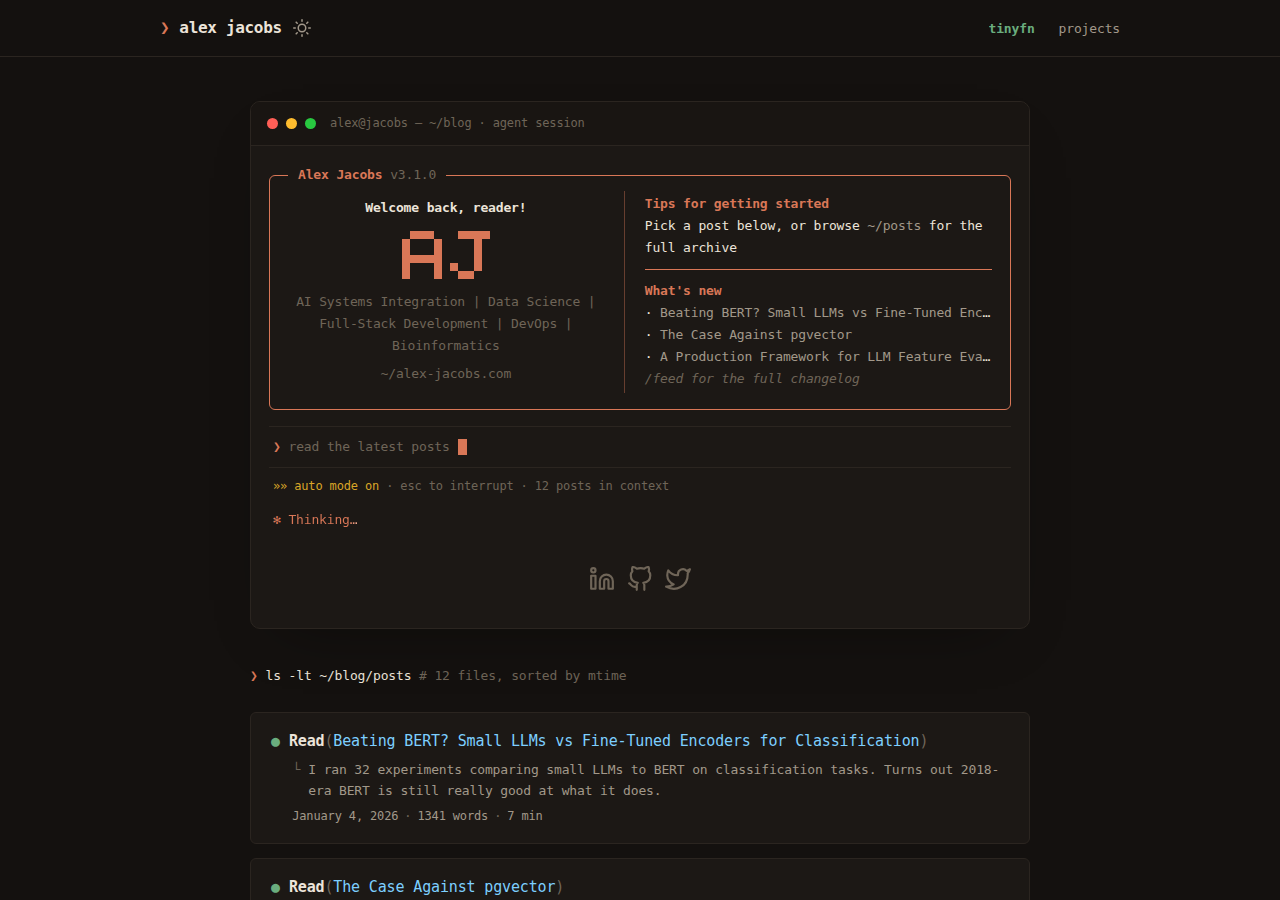
agent session 采用 Claude Code / OpenCode 终端风格,含工具调用式文章条目与终端窗口单篇页面
docs minimal 为 Geist/Vercel 式单色极简,细线行索引与等宽日期,面向 defaultTheme: auto
the editor 模拟 Tokyo Night IDE,含编辑器标签栏、文件树文章列表与固定状态栏
语法高亮基于 class 的 chroma,需保持 pygmentsUseClasses: true,并要求 Hugo extended
模板详细介绍
这个仓库提供三套针对 Hugo 博客的界面重设计,目标主题是 PaperModX,也基本兼容原版 PaperMod(README 中另有说明)。每套设计不是主题分支或补丁,而是一组可直接复制进站点的文件:PaperMod(X) 会把 assets/css/extended/ 中的内容拼接在自身样式之后,站点级 layouts/ 又会覆盖主题的对应文件,作者正是利用这两个机制实现替换。
三套设计风格差异明确。agent session 模拟 Claude Code / OpenCode 终端界面,包含欢迎框 hero、像素字母组合、以 Read(title) 工具调用形式呈现的文章条目、终端窗口式单篇页面、闪烁输入光标与 Thinking… 动画,使用暖色 gruvbox 语法配色,以深色模式为主,同时提供暖奶油色浅色模式。docs minimal 走 Geist/Vercel 式单色极简,使用 Geist 与 Geist Mono 字体、大写微型标签、细线行式文章索引与等宽数字日期,配 GitHub 明暗语法主题,面向 defaultTheme: auto,两种模式都完整支持。the editor 把博客做成 IDE:编辑器标签栏、以行号 Markdown 源码呈现的 welcome.md hero、文件树式文章列表、固定状态栏,语法配色为 Tokyo Night 与 Tokyo Night Light。
安装方式统一:把所选设计目录下的 assets/ 与 layouts/ 合并复制到 Hugo 站点根目录,建议设置 defaultTheme(前两套偏深色,docs minimal 偏好 auto)并保持 pygmentsUseClasses: true,因为语法配色基于 class 的 chroma。卸载即删除复制的文件。README 说明无需 JavaScript,搜索、目录、归档、标签、封面、主题切换等原有功能继续可用,每套设计都支持明暗两种模式。
限制与前提:需要 Hugo extended(因为使用 SCSS),作者标注在 Hugo 0.101+ 上测试过;语法高亮必须是 class 形式,原版 PaperMod 上 chroma 类可用但可能需要自行接好 chroma CSS;演示图片、字体、图标等第三方素材需按各自许可单独核对,MIT 许可只覆盖代码本身。
Hugo博客文档
适合你的项目吗?
适用场景
- 为已有的 PaperModX 或 PaperMod 博客更换视觉风格,而不想 fork 或修改主题
- 想快速对比终端风、极简文档风与 IDE 风三种界面,再决定采用哪一种
- 需要一个不依赖 JavaScript、原有搜索与目录等功能仍可用的博客外观方案
适合人群
- 使用 Hugo 与 PaperModX(或原版 PaperMod)搭建博客的站点作者
- 愿意手动复制 assets/ 与 layouts/ 文件、自行合并到站点目录的开发者
- 需要同时提供深色与浅色模式、并接受 class 形式 chroma 语法高亮的项目
上手与定制指南
结合仓库当前版本的说明,按下面的资料检查内容、配置与运行要求。
- 1
从仓库中选定一套设计,把它的 assets/ 与 layouts/ 目录合并复制到 Hugo 站点根目录,不要整体替换原有文件夹
- 2
按建议调整配置:agent session 与 the editor 设 defaultTheme: dark,docs minimal 偏好 auto;并保持 pygmentsUseClasses: true(或 markup.highlight.noClasses: false)
- 3
需要 Hugo extended 版本(因使用 SCSS),作者标注在 Hugo 0.101+ 上测试过
- 4
原版 PaperMod 上 chroma 类同样可用,但可能需要自行配置 chroma CSS 的接入方式
- 5
卸载时删除所复制的文件即可;演示图片、字体、图标等第三方素材需按各自许可另行核对
授权与来源资料
使用条件与限制
免费使用 · 保留许可声明本次收录的是公开仓库中采用 MIT 许可的免费版本;免费范围为该版本代码,不代表外部服务或第三方素材免费。
使用时需要遵守
- 允许免费使用、修改、商用和分发该版本代码。
- 分发代码副本或实质性部分时,保留原作者版权声明和完整 MIT 许可声明。
- 代码按现状提供;担保与责任限制以原许可证及适用法律为准。
额外费用与待核对事项
- 演示图片、字体、图标及其他第三方素材需按各自许可核对,不能仅凭代码的 MIT 许可判断。
- 域名、托管、数据库、支付或 AI 等外部服务可能另外收费。
- 使用这些模板需要 Hugo extended 版本(因使用 SCSS),作者标注在 Hugo 0.101+ 上测试过;非 extended 版本无法正常构建。
- 语法高亮依赖 class 形式的 chroma,必须保持 pygmentsUseClasses: true(或 markup.highlight.noClasses: false),否则配色无法生效。
- 在原版 PaperMod 上 chroma 类虽可用,但可能需要根据自身配置自行接入 chroma CSS,不能保证开箱即用。
- 作者希望使用者在站点某处回链到 alex-jacobs.com 或本仓库,属于请求性署名,非强制许可条件。
查看原文依据
Permission is hereby granted, free of charge
许可证原文
**Hugo extended** required (SCSS). Tested on Hugo 0.101+.
README 原文
Keep `pygmentsUseClasses: true` (or `markup.highlight.noClasses: false`).
README 原文
On stock PaperMod, chroma classes also work — you may need to ship your own chroma CSS wiring depending on your setup.
README 原文
https://github.com/alexjacobs08/papermod-themes/blob/main/LICENSEhttps://github.com/alexjacobs08/papermod-themes/blob/main/README.mdIf you use one of these, a link back to [alex-jacobs.com](https://alex-jacobs.com/) or this repo somewhere on your site is appreciated.
README 原文
DeepSeek 根据仓库许可证和 README 整理 ·2026-10-12。结果仅覆盖已读取资料,依赖、图片、字体及后续条款变更以各自原文为准。
项目核对记录与介绍依据
模板资料
- 来源平台
- GitHub
- 资料与维护参考分
- 资料一般 · 73 / 100
- 技术栈
- Hugo
- 网站类型
- 博客 · 文档
这个分数如何计算
本站按许可资料(最高30分)、演示链接(12分)、预览图(10分)、Star数(15分)、记录的维护时间(15分)、描述完整度(8分)、功能记录(5分)和分类资料(5分)计算。它不是代码、安全或性能测试,也不是 Google 评分;有链接不代表已实测可用。
这个项目需要核对什么
- 记录的仓库更新时间
- 2026-07-18
- 截图检查日期
- 2026-10-12
目前没有记录演示链接。请依据仓库说明在本地评估;仅凭截图无法确认交互行为。
目录记录的主要技术栈是 Hugo。请通过依赖清单和锁文件核对实际版本与托管要求。这些说明基于收录资料,不代表代码审计或部署实测。
查看具体选型方法 →介绍的制作与核对状态
介绍由 AI 辅助整理目录与仓库资料。仓库作者不等于这篇介绍的审核者。
审核声明: [email protected] · 2026-10-13
查看当时使用的来源资料
SHA-256: c09a7ddfc928b132985390711fd8045a4350c77d5fe28840740693d967074f78
2026-10-12T09:31:00.642Z
来源文件 / 仓库# papermod-themes
Three drop-in redesigns for Hugo blogs running [PaperModX](https://github.com/reorx/hugo-PaperModX/) (and mostly stock [PaperMod](https://github.com/adityatelange/hugo-PaperMod) — see [notes](#notes)).
No theme surgery, no forks: each design is a set of files you copy into your site. PaperMod(X) concatenates anything in `assets/css/extended/` after its own styles, and site-level `layouts/` override the theme's — that's the whole mechanism.
**Live demos** (on [alex-jacobs.com](https://alex-jacobs.com/), switchable via URL param):
| design | vibe | demo |
|---|---|---|
| **agent session** | Claude Code / OpenCode terminal aesthetic — warm dark, orange accent, tool-call post list, session composer | [?design=claude](https://alex-jacobs.com/?design=claude) |
| **docs minimal** | Geist/Vercel-style monochrome minimalism — hairlines, tight type, zero chrome | [?design=geist](https://alex-jacobs.com/?design=geist) |
| **the editor** | Tokyo Night IDE — editor tab bar, file-explorer post list, VS Code status bar | [?design=ide](https://alex-jacobs.com/?design=ide) |
## agent session

The blog as a Claude Code session. Welcome-box hero with pixel monogram, `Read(title)` tool-call post entries, terminal-window single posts, blinking composer caret, animated *Thinking…* shimmer. Warm gruvbox syntax theme. Best in dark mode, ships with a warm cream light mode too.
[Install →](agent-session/)
## docs minimal

Monochrome docs aesthetic. Geist + Geist Mono, uppercase micro-labels, post index as hairline rows with tabular dates, GitHub light/dark syntax themes. Built for `defaultTheme: auto` — both modes are first-class.
[Install →](docs-minimal/)
## the editor

The blog as an IDE. Editor tab bar (`alex-jacobs.md`, `projects.yaml`), `welcome.md` hero rendered as line-numbered markdown source, posts as a file-explorer tree, fixed status bar (`git:(main)` · `Ln 1, Col 1` · `UTF-8` · `Markdown` · `✓ Prettier`). Tokyo Night + Tokyo Night Light syntax themes.
[Install →](the-editor/)
## Install (any design)
1. Pick a design folder above.
2. Copy its `assets/` and `layouts/` trees into your Hugo site root (merge, don't replace your whole folders).
3. Recommended config tweaks:
```yaml
params:
defaultTheme: dark # for agent session / the editor; docs minimal prefers auto
pygmentsUseClasses: true # required — the syntax themes are class-based chroma
```
4. `hugo server` and enjoy.
Uninstall = delete the files you copied. Nothing else is touched.
## Notes
- **Syntax highlighting** is class-based chroma. Keep `pygmentsUseClasses: true` (or `markup.highlight.noClasses: false`). The palettes drop into `assets/css/lib/chroma-{dark,light}.css`, which PaperModX's `highlight.scss` imports automatically. On stock PaperMod, chroma classes also work — you may need to ship your own chroma CSS wiring depending on your setup.
- **Hugo extended** required (SCSS). Tested on Hugo 0.101+.
- Everything degrades gracefully: no JS required, and stock features (search, ToC, archives, tags, covers, theme toggle) keep working.
- Each design supports both dark and light mode via the PaperMod(X) theme toggle.
## Credits
Made by [Alex Jacobs](https://alex-jacobs.com/). The terminal components in *agent session* were inspired by [brainless](https://brainless.swerdlow.dev/). Tokyo Night palette by [folke](https://github.com/folke/tokyonight.nvim).
If you use one of these, a link back to [alex-jacobs.com](https://alex-jacobs.com/) or this repo somewhere on your site is appreciated.
## License
[MIT](LICENSE)
看看同类模板
对比同技术栈与用途的模板,找到更适合的视觉与内容结构。

hugo-PaperMod
PaperMod 是 Hugo 生态里知名度较高的主题之一,定位很明确:给博客和轻量作品集站点提供一套干净、响应式的阅读界面。
Hugo · 作品集

hugo-book
Hugo Book 是一个面向文档场景的 Hugo 主题,定位很直接:把文档站点做得像一本朴素的书。
Hugo · 文档

LoveIt
❤️A clean, elegant but advanced blog theme for Hugo 一个简洁、优雅且高效的 Hugo 主题
Hugo · 博客

hugo-coder
A minimalist blog theme for hugo.
Hugo · 博客

docsy
Hugo theme for open source documentation
Hugo · 文档

blowfish
Personal Website & Blog Theme for Hugo
Hugo · 博客