Static site generation based on Eleventy, with Netlify CMS for managing page content
EleventyStarter
jamstack-starter — Eleventy Starter Template
By aliblackwell
A JAMstack starter based on Eleventy and Netlify CMS, aimed at small business websites, with built-in baseline configuration for accessibility, privacy, and CMS page management.
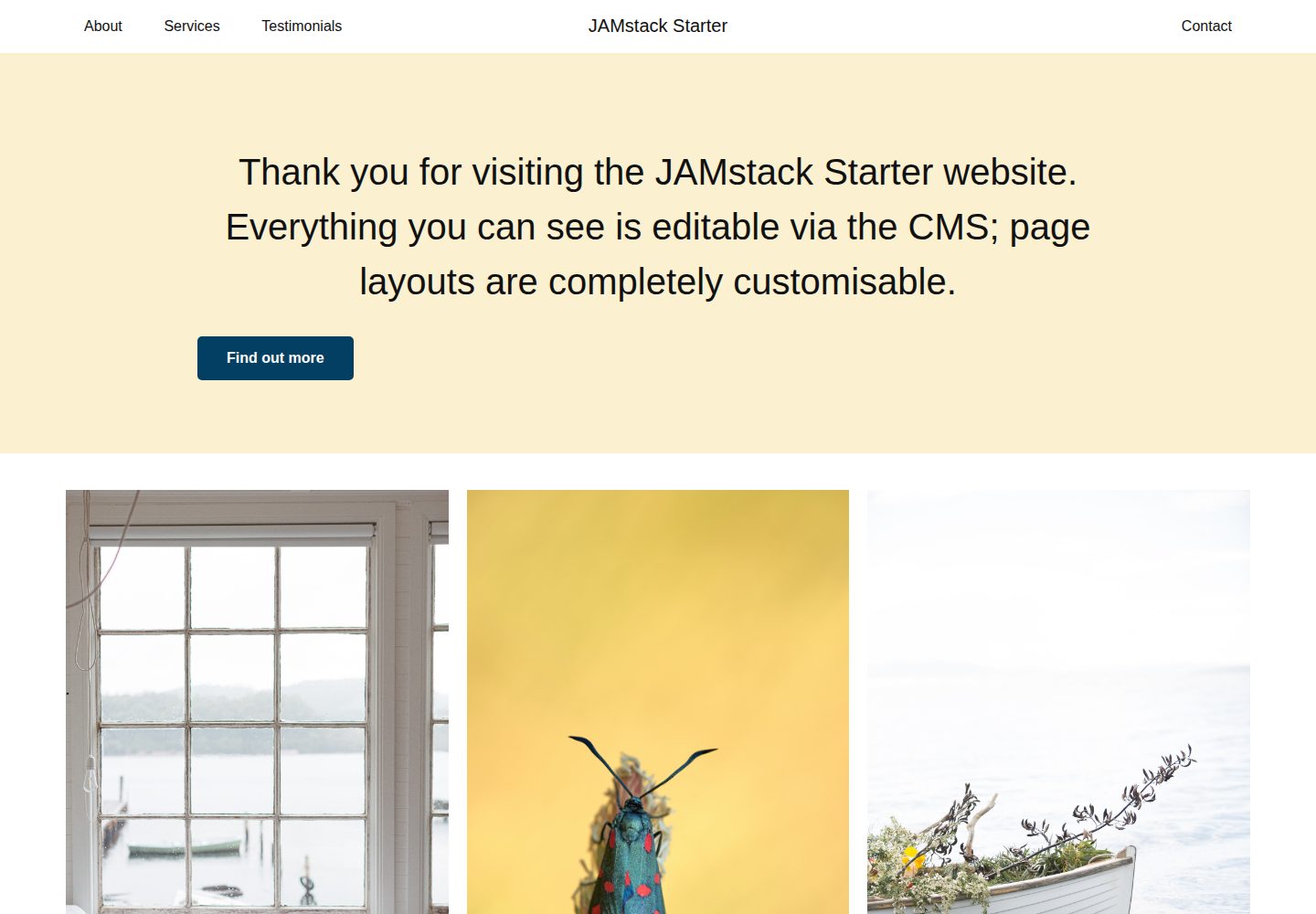
Explore the design
Compare the page layouts and mobile experience. Open any screenshot for a closer look.
Desktop homepage1 / 3
Desktop captureTop of page
Actual screenshot captured by the server browser.
All pages & views 3
Screenshots show visual appearance; interactive behavior may differ.
Recorded 2026-10-12View source
What stands out
A quick read of the recorded project description.
Built-in accessibility and privacy baseline: claims WCAG 2.1 and GDPR compliance, with no cookie notice required
Provides a component library, classless CSS default styles, light and dark themes, and multiple menu layouts
Includes local development support for Netlify Functions and forms, run via Netlify Dev
Comes with basic unit tests, Prettier formatting, and pre-commit lint configuration
The README notes that features such as Sendgrid email, Stripe payments, and privacy analytics are still in development
Template Details
jamstack-starter is a JAMstack starter for small business website projects, created by maintainer Alasdair Blackwell to deliver custom, accessible, CMS-enabled websites on a limited budget. The project is based on the Eleventy static site generator and integrates Netlify CMS for page content management, while using Netlify Dev to run Functions and forms locally. The README states that its goals include mobile optimization, accessibility, privacy protection, and making it easy to remove unneeded code.
Functionally, the starter provides CMS-customizable pages, custom forms, multiple menu and layout options, light and dark themes, a component library, classless CSS default styles, Prettier formatting, pre-commit linting, and basic unit tests plus Netlify Functions examples. The README also lists Sendgrid email sending, Stripe payments (with privacy protection enabled), and privacy-friendly analytics, but explicitly notes that some features are still in development. For accessibility, it claims WCAG 2.1 compliance; for privacy, it claims GDPR compliance with no cookie notice required.
Regarding usage constraints, before local development you must first deploy the site to Netlify and configure authentication. The CMS uses GitHub as the default backend authentication, requiring you to change the repository URL in admin/config.yml, create an OAuth App on GitHub, and install an OAuth provider on Netlify. If you need another backend (such as Git Gateway), you must configure it separately by referring to the Netlify CMS documentation. The project uses the MIT license, and the code may be used, modified, commercialized, and distributed for free, but third-party assets such as demo images, fonts, and icons require separate license verification, and external services such as domains, hosting, databases, payments, or AI may incur additional costs.
EleventyStarter
Is it right for your project?
Use Cases
- Building a static website with CMS editing support for a small business on a limited budget
- Website projects that need an accessibility and privacy compliance baseline (WCAG 2.1, GDPR)
- Quickly starting a new project on Netlify using Eleventy and Netlify CMS
- A JAMstack development environment that needs to run Netlify Functions and forms locally
Suitable For
- Developers familiar with the Eleventy and Netlify workflow
- Developers or agencies that need to deliver CMS-manageable websites for small business clients
- Website projects that value accessibility and privacy defaults
Getting started & customization
Use these recorded setup notes alongside the repository instructions for your chosen version.
- 1
Before local development, you must first deploy the site to Netlify and complete authentication configuration.
- 2
The CMS uses GitHub authentication by default; you need to change the repository URL in website/admin/config.yml, create an OAuth App on GitHub, and install an OAuth provider on Netlify.
- 3
After cloning the repository, run npm install to install dependencies.
- 4
For the local CMS, use Netlify CMS's local Git repository testing feature; run npm run local-cms, and in another terminal run npm start to launch Netlify Dev.
- 5
To run only the site itself, you can use npm run site:serve; see the scripts section of package.json for all available commands.
License & source material
Usage conditions & limitations
Free to use · keep license noticeThis entry covers the free version under the MIT license in the public repository; the free scope is the code of that version and does not mean external services or third-party assets are free.
Must comply with when using
- You may use, modify, commercialize, and distribute the code of this version for free.
- When distributing copies or substantial portions of the code, retain the original author's copyright notice and the full MIT license notice.
- The code is provided as is; warranties and limitations of liability are governed by the original license and applicable law.
Additional costs & items to verify
- Demo images, fonts, icons, and other third-party assets must be checked against their respective licenses and cannot be judged solely by the code's MIT license.
- External services such as domains, hosting, databases, payments, or AI may incur additional charges.
- Before local development, you must first deploy the site to Netlify and complete authentication configuration; it cannot be run locally directly without deployment.
- The CMS uses GitHub accounts for authentication by default, so you need a GitHub account and OAuth configuration to log in to the admin.
- Before use, you must manually change the repository URL in website/admin/config.yml to your own repository.
- You need to create an OAuth App on GitHub and configure the callback URL, which involves external accounts and manual configuration steps.
- You need to install an OAuth provider in the Netlify site settings and enter the GitHub Client ID and Secret.
- The README explicitly notes that some features (such as Sendgrid email, Stripe payments, and privacy analytics) are still in development and not yet complete.
- If you need a backend other than GitHub (such as Git Gateway), you must configure it yourself by referring to the Netlify CMS documentation; it is not provided by default.
View Original Text Basis
Permission is hereby granted, free of charge
Original License Text
__You must deploy the site to Netlify and configure authentication before attempting to work locally.__
Original README
The CMS has been configured to use Github for authentication.
Original README
1. Edit line 3 of `website/admin/config.yml` replacing the repo with your repo.
Original README
2. In Github, go to `Settings > Developer Settings > OAuth Apps > New OAuth App`.
Original README
3. In Netlify, go to `[Your new site] > Settings > Access Control > OAuth > Install provider` and add the Client ID and Secret from step 2.
Original README
*Some of these features are works in progress!
Original README
https://github.com/aliblackwell/jamstack-starter/blob/master/LICENSEhttps://github.com/aliblackwell/jamstack-starter/blob/master/README.md(To implement alternative backends, including [Git Gateway](https://www.netlifycms.org/docs/git-gateway-backend/), Netlify's own open source authentication service that plays nicely with [Netlify Identity](https://docs.netlify.com/visitor-access/identity/), please [read the Netlify CMS docs](https://www.netlifycms.org/docs/backends-overview/).)
Original README
Compiled by DeepSeek based on repository license and README ·2026-10-12. Results only cover the materials read; dependencies, images, fonts, and subsequent term changes are subject to their respective original texts.
Project checks & description sources
Template Information
- Source platforms
- GitHub
- Documentation and maintenance reference score
- More documented · 80 / 100
- Technologies
- Eleventy
- Website type
- Starter
How this score is calculated
Our heuristic uses license records (up to 30), a demo link (12), a preview (10), stars (15), recorded maintenance (15), description completeness (8), feature records (5) and classification data (5). It is not a code, security or performance test, or a Google score. A link does not establish tested functionality.
What to verify for this project
- Repository update recorded
- 2026-02-05
- Screenshot last checked
- 2026-10-12
A demo link is listed. Check it with your own content and viewport sizes; its presence does not confirm that forms, authentication or payments work.
The catalog identifies Eleventy as the primary stack. Check the actual dependency manifest and lockfile for versions and hosting requirements. These notes use recorded metadata, not a code audit or a deployment test.
Use a selection guide →How this description was prepared
AI-assisted description based on catalog records and repository material. Repository authors are not automatically the reviewers of this description.
Review declaration: [email protected] · 2026-10-13
Inspect the recorded source material
SHA-256: 89f70d566412341a87516179a9662242453e3c25f598ae2a9a3932e2b99205b9
2026-10-12T21:07:55.461Z
Source file / repository[](https://app.netlify.com/sites/jamstack-blaster/deploys) # JAMstack starter This project exists to provide an accessible, mobile-optimised, delete key friendly starter for your next web project. It exists so that the maintainer, Alasdair Blackwell, can produce bespoke, high quality, accessible, CMS-enabled websites for small businesses with limited budgets. With its strong foundations in accessibility and privacy, and its scaffolding, tools and pre-fabricated components that implement best practice techniques, JAMstack starter will make your life and the lives of your clients and their users easier and more enjoyable. ## [Demo Site](https://jamstack-blaster.netlify.app/) ## Features ### For your users * 100% customisable pages via CMS * Custom forms * Choice of menus and layouts * Sendgrid for sending emails* * Stripe for handling payments (with privacy protection enabled)* * WCAG(2.1) Compliance * GDPR Compliance - no cookie notice needed ### For developers * [Eleventy](https://www.11ty.dev/) static site generator * [Netlify CMS](https://www.netlifycms.org/) * Privacy-friendly analytics* * [Netlify Dev](https://www.netlify.com/products/dev/) for local functions and forms * Work with a local git repository * Starter unit tests* * Starter Netlify Functions * Starter CMS with site options and dynamic page layouts * Component library* * No-class CSS with sensible defaults* * Prettier code formatting * Pre-commit linting * Light and dark theme support *Some of these features are works in progress! ## Use it for your projects [](https://app.netlify.com/start/deploy?repository=https://github.com/aliblackwell/jamstack-starter) The button above will clone this repository to your account and deploy it to Netlify. The CMS has been configured to use Github for authentication. (To implement alternative backends, including [Git Gateway](https://www.netlifycms.org/docs/git-gateway-backend/), Netlify's own open source authentication service that plays nicely with [Netlify Identity](https://docs.netlify.com/visitor-access/identity/), please [read the Netlify CMS docs](https://www.netlifycms.org/docs/backends-overview/).) To enable logging into the CMS with your Github account at https://[your-project-name].netlify.app/admin, do the following: 1. Edit line 3 of `website/admin/config.yml` replacing the repo with your repo. 2. In Github, go to `Settings > Developer Settings > OAuth Apps > New OAuth App`. The Authorization callback URL should be `https://api.netlify.com/auth/done`. (From [OAuth Netlify Docs](https://docs.netlify.com/visitor-access/oauth-provider-tokens/#setup-and-settings)) 3. In Netlify, go to `[Your new site] > Settings > Access Control > OAuth > Install provider` and add the Client ID and Secret from step 2. You will now be able to login. ## Working locally __You must deploy the site to Netlify and configure authentication before attempting to work locally.__ ### 1. Clone your repository `git clone https://github.com/[your-github-username]/jamstack-starter.git your-project-name` ### 2. Change into that directory `cd your-project-name` ### 3. Install dependencies `npm install` ### 4. Setup the CMS to talk to your local repo We have implemented a Netlify CMS beta feature ([docs](https://www.netlifycms.org/docs/beta-features/#working-with-a-local-git-repository)) that lets you work with a local repository instead of having to pull the whole time. In your current terminal run: `npm run local-cms` Open another terminal and run the project: `npm start` This command runs the full `netlify dev` command which spins up and proxies any functions you've added to the `functions` directory at the root of the project, as well as setting up a hot reloading server for the site itself. You may prefer to just run the site itself at the beginning and you can do this with: `npm run site:serve` You can browse all available commands in the scripts section of `package.json` ## Contributing [](code_of_conduct.md) It would be wonderful for you to contribute code and ideas. Pull requests are welcome. ## Inspiration and credit * [Eleventy Netlify Boilerplate](https://github.com/danurbanowicz/eleventy-netlify-boilerplate) by Dan Urbanowicz * [Accessibility For Everyone](https://laurakalbag.com/book/) by Laura Kalbag * [Inclusive Components](https://inclusive-components.design/) (the book) by Heydon Pickering * [MVP.css](https://andybrewer.github.io/mvp/) by Andy Brewer * [unDraw Illustrations](https://undraw.co/) by Katerina Limpitsouni
Explore similar templates
Compare previews and descriptions within the same stack and category.

eleventy-base-blog
The officially maintained Eleventy blog starter template, MIT licensed, includes posts, tag pages, archives, an about page, a 404 page, an Atom feed, and sitemap.xml, with per-page CSS bundling, syntax highlighting, and image optimization.
Eleventy · Blog

eleventy-garden
An Eleventy-based digital garden starter template for building a personal knowledge site organized through hyperlinks. It supports Roam-style double-bracket links, backlink display, and hover cards for backlinks.
Eleventy · Starter

eleventastic
Eleventastic is an Eleventy starter kit by Max Böck, used as the base for new 11ty projects. It integrates Sass, Webpack, SVG icon sprites, critical CSS, and HTML minification into the 11ty build without external steps.
Eleventy · Starter

neat-starter
An Eleventy-based static site starter template integrating Netlify CMS, Alpine.js, and Tailwind CSS. It provides a ready-to-run example site, a one-click Netlify deploy button, and an MIT-licensed codebase.
Eleventy · Starter

Eleventy-Starter-Boilerplate
An Eleventy-based blog starter template with Tailwind CSS, Webpack, PostCSS, ESLint, and Prettier, optional Netlify CMS, and built-in SEO metadata, sitemap, and 404 page.
Eleventy · Blog

eleventy-plus-vite
A static site starter combining Eleventy and Vite, with a live-reloading development server, Vite-based production post-processing, a PostCSS pipeline with Autoprefixer and cssnano, critical CSS inlining and asynchronous CSS loading, a web font loading strategy example, fluid typography, basic dark mode, an…
Eleventy · Starter