基于 Eleventy 的静态站点生成,配合 Netlify CMS 管理页面内容
Eleventy启动器
jamstack-starter — Eleventy 启动器模板
作者 aliblackwell
基于 Eleventy 与 Netlify CMS 的 JAMstack 启动器,面向小型企业网站,内置无障碍、隐私与 CMS 页面管理的基础配置。
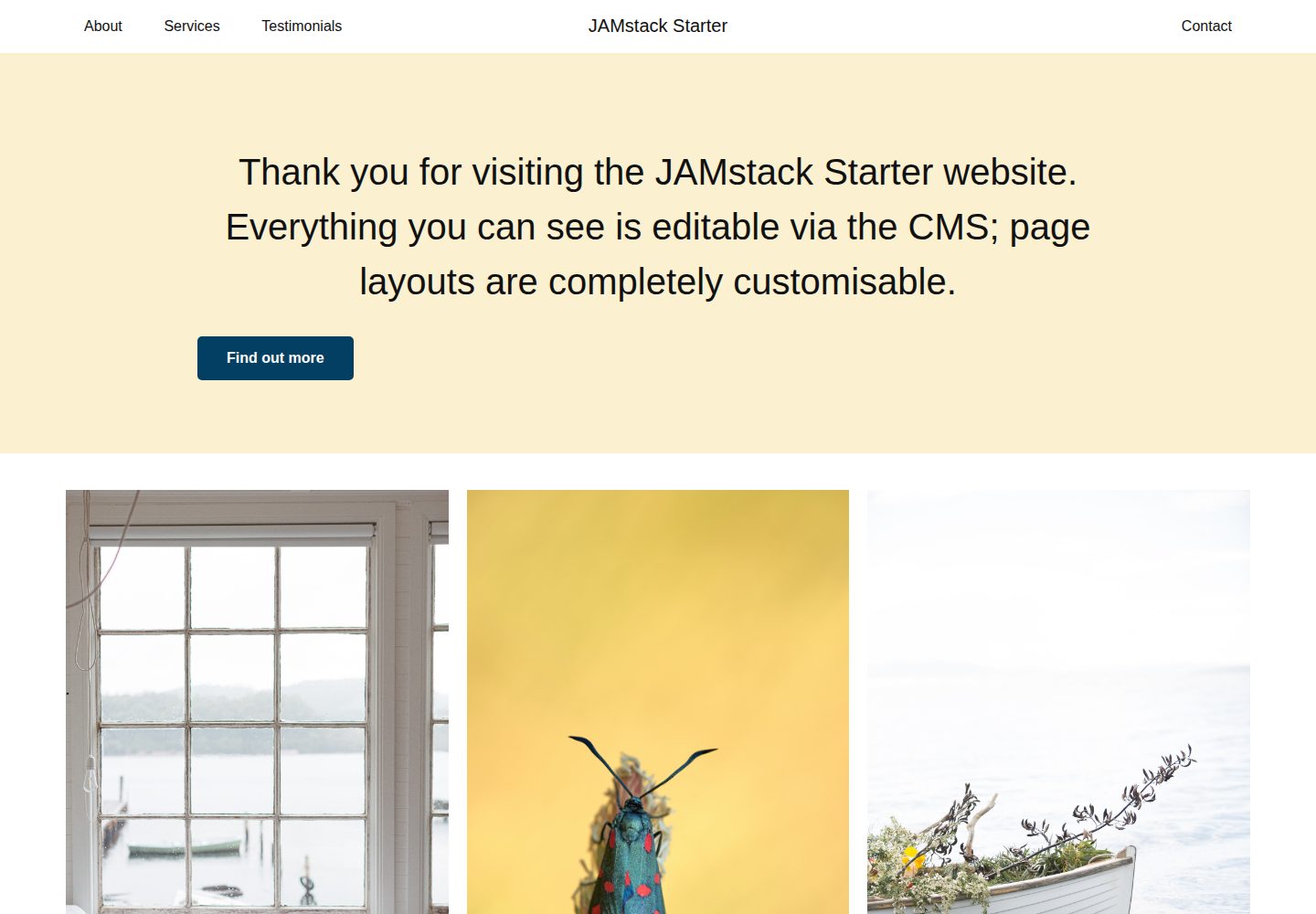
看看你的网站会是什么样
浏览真实页面截图,比较内容排版与手机效果。点击下方缩略图切换,放大查看整页细节。
全部页面与视图 3
截图用于了解视觉与布局,交互效果请以实际项目为准。
采集于 2026-10-12查看来源
值得关注的模板亮点
从已有项目资料中,快速了解它的特点。
内置无障碍与隐私基础:声称符合 WCAG 2.1 与 GDPR,无需 Cookie 提示
提供组件库、无类名 CSS 默认样式、明暗主题和多种菜单布局
包含 Netlify Functions 与表单的本地开发支持,通过 Netlify Dev 运行
附带基础单元测试、Prettier 格式化与提交前 lint 配置
README 标注 Sendgrid 邮件、Stripe 支付和隐私分析等功能仍在开发中
模板详细介绍
jamstack-starter 是一个面向小型企业网站项目的 JAMstack 启动器,由维护者 Alasdair Blackwell 创建,用于以有限预算交付定制、无障碍且支持 CMS 的网站。项目基于 Eleventy 静态站点生成器,并集成 Netlify CMS 提供页面内容管理,同时使用 Netlify Dev 在本地运行 Functions 与表单。README 说明其目标包括移动端优化、可访问性、隐私保护以及便于删除不需要的代码。
功能层面,启动器提供 CMS 可自定义页面、自定义表单、多种菜单与布局选择、明暗主题、组件库、无类名 CSS 默认样式、Prettier 格式化、提交前 lint 以及基础单元测试和 Netlify Functions 示例。README 同时列出 Sendgrid 邮件发送、Stripe 支付(启用隐私保护)和隐私友好分析,但明确标注部分功能仍处于开发中。无障碍方面声称符合 WCAG 2.1,隐私方面声称符合 GDPR 且无需 Cookie 提示。
使用限制方面,本地开发前必须先将站点部署到 Netlify 并配置认证。CMS 默认使用 GitHub 作为后端认证,需修改 admin/config.yml 中的仓库地址,并在 GitHub 创建 OAuth App、在 Netlify 安装 OAuth 提供方。若需其他后端(如 Git Gateway),需参考 Netlify CMS 文档另行配置。项目采用 MIT 许可,代码可免费使用、修改、商用和分发,但演示图片、字体、图标等第三方素材需单独核对许可,域名、托管、数据库、支付或 AI 等外部服务可能产生额外费用。
Eleventy启动器
适合你的项目吗?
适用场景
- 为预算有限的小型企业搭建支持 CMS 编辑的静态网站
- 需要无障碍与隐私合规基础(WCAG 2.1、GDPR)的网站项目
- 在 Netlify 上使用 Eleventy 与 Netlify CMS 快速启动新项目
- 需要本地运行 Netlify Functions 和表单的 JAMstack 开发环境
适合人群
- 熟悉 Eleventy 与 Netlify 工作流的开发者
- 需要为小型企业客户交付可 CMS 管理网站的开发者或代理
- 重视无障碍与隐私默认配置的网站项目
上手与定制指南
结合仓库当前版本的说明,按下面的资料检查内容、配置与运行要求。
- 1
本地开发前必须先将站点部署到 Netlify 并完成认证配置。
- 2
CMS 默认使用 GitHub 认证,需修改 website/admin/config.yml 中的仓库地址,并在 GitHub 创建 OAuth App、在 Netlify 安装 OAuth 提供方。
- 3
克隆仓库后运行 npm install 安装依赖。
- 4
本地 CMS 使用 Netlify CMS 的本地 Git 仓库测试功能,需运行 npm run local-cms,另开终端运行 npm start 启动 Netlify Dev。
- 5
仅运行站点本身可使用 npm run site:serve,全部可用命令见 package.json 的 scripts 部分。
授权与来源资料
使用条件与限制
免费使用 · 保留许可声明本次收录的是公开仓库中采用 MIT 许可的免费版本;免费范围为该版本代码,不代表外部服务或第三方素材免费。
使用时需要遵守
- 允许免费使用、修改、商用和分发该版本代码。
- 分发代码副本或实质性部分时,保留原作者版权声明和完整 MIT 许可声明。
- 代码按现状提供;担保与责任限制以原许可证及适用法律为准。
额外费用与待核对事项
- 演示图片、字体、图标及其他第三方素材需按各自许可核对,不能仅凭代码的 MIT 许可判断。
- 域名、托管、数据库、支付或 AI 等外部服务可能另外收费。
- 本地开发前必须先将站点部署到 Netlify 并完成认证配置,无法在未部署的情况下直接本地运行。
- CMS 默认使用 GitHub 账号进行认证,需要拥有 GitHub 账号并配置 OAuth 才能登录后台。
- 使用前必须手动修改 website/admin/config.yml 中的仓库地址,替换为自己的仓库。
- 需在 GitHub 创建 OAuth App 并配置回调地址,涉及外部账号与手动配置步骤。
- 需在 Netlify 站点设置中安装 OAuth 提供方并填入 GitHub 的 Client ID 与 Secret。
- README 明确标注部分功能(如 Sendgrid 邮件、Stripe 支付、隐私分析等)仍处于开发中,尚未完成。
- 若需使用 GitHub 以外的后端(如 Git Gateway),需自行参考 Netlify CMS 文档另行配置,默认不提供。
查看原文依据
Permission is hereby granted, free of charge
许可证原文
__You must deploy the site to Netlify and configure authentication before attempting to work locally.__
README 原文
The CMS has been configured to use Github for authentication.
README 原文
1. Edit line 3 of `website/admin/config.yml` replacing the repo with your repo.
README 原文
2. In Github, go to `Settings > Developer Settings > OAuth Apps > New OAuth App`.
README 原文
3. In Netlify, go to `[Your new site] > Settings > Access Control > OAuth > Install provider` and add the Client ID and Secret from step 2.
README 原文
*Some of these features are works in progress!
README 原文
https://github.com/aliblackwell/jamstack-starter/blob/master/LICENSEhttps://github.com/aliblackwell/jamstack-starter/blob/master/README.md(To implement alternative backends, including [Git Gateway](https://www.netlifycms.org/docs/git-gateway-backend/), Netlify's own open source authentication service that plays nicely with [Netlify Identity](https://docs.netlify.com/visitor-access/identity/), please [read the Netlify CMS docs](https://www.netlifycms.org/docs/backends-overview/).)
README 原文
DeepSeek 根据仓库许可证和 README 整理 ·2026-10-12。结果仅覆盖已读取资料,依赖、图片、字体及后续条款变更以各自原文为准。
项目核对记录与介绍依据
模板资料
- 来源平台
- GitHub
- 资料与维护参考分
- 资料较完整 · 80 / 100
- 技术栈
- Eleventy
- 网站类型
- 启动器
这个分数如何计算
本站按许可资料(最高30分)、演示链接(12分)、预览图(10分)、Star数(15分)、记录的维护时间(15分)、描述完整度(8分)、功能记录(5分)和分类资料(5分)计算。它不是代码、安全或性能测试,也不是 Google 评分;有链接不代表已实测可用。
这个项目需要核对什么
- 记录的仓库更新时间
- 2026-02-05
- 截图检查日期
- 2026-10-12
已收录演示链接。请用你的内容与屏幕尺寸检查;有演示不代表表单、认证或支付已经可用。
目录记录的主要技术栈是 Eleventy。请通过依赖清单和锁文件核对实际版本与托管要求。这些说明基于收录资料,不代表代码审计或部署实测。
查看具体选型方法 →介绍的制作与核对状态
介绍由 AI 辅助整理目录与仓库资料。仓库作者不等于这篇介绍的审核者。
审核声明: [email protected] · 2026-10-13
查看当时使用的来源资料
SHA-256: 89f70d566412341a87516179a9662242453e3c25f598ae2a9a3932e2b99205b9
2026-10-12T21:07:55.461Z
来源文件 / 仓库[](https://app.netlify.com/sites/jamstack-blaster/deploys) # JAMstack starter This project exists to provide an accessible, mobile-optimised, delete key friendly starter for your next web project. It exists so that the maintainer, Alasdair Blackwell, can produce bespoke, high quality, accessible, CMS-enabled websites for small businesses with limited budgets. With its strong foundations in accessibility and privacy, and its scaffolding, tools and pre-fabricated components that implement best practice techniques, JAMstack starter will make your life and the lives of your clients and their users easier and more enjoyable. ## [Demo Site](https://jamstack-blaster.netlify.app/) ## Features ### For your users * 100% customisable pages via CMS * Custom forms * Choice of menus and layouts * Sendgrid for sending emails* * Stripe for handling payments (with privacy protection enabled)* * WCAG(2.1) Compliance * GDPR Compliance - no cookie notice needed ### For developers * [Eleventy](https://www.11ty.dev/) static site generator * [Netlify CMS](https://www.netlifycms.org/) * Privacy-friendly analytics* * [Netlify Dev](https://www.netlify.com/products/dev/) for local functions and forms * Work with a local git repository * Starter unit tests* * Starter Netlify Functions * Starter CMS with site options and dynamic page layouts * Component library* * No-class CSS with sensible defaults* * Prettier code formatting * Pre-commit linting * Light and dark theme support *Some of these features are works in progress! ## Use it for your projects [](https://app.netlify.com/start/deploy?repository=https://github.com/aliblackwell/jamstack-starter) The button above will clone this repository to your account and deploy it to Netlify. The CMS has been configured to use Github for authentication. (To implement alternative backends, including [Git Gateway](https://www.netlifycms.org/docs/git-gateway-backend/), Netlify's own open source authentication service that plays nicely with [Netlify Identity](https://docs.netlify.com/visitor-access/identity/), please [read the Netlify CMS docs](https://www.netlifycms.org/docs/backends-overview/).) To enable logging into the CMS with your Github account at https://[your-project-name].netlify.app/admin, do the following: 1. Edit line 3 of `website/admin/config.yml` replacing the repo with your repo. 2. In Github, go to `Settings > Developer Settings > OAuth Apps > New OAuth App`. The Authorization callback URL should be `https://api.netlify.com/auth/done`. (From [OAuth Netlify Docs](https://docs.netlify.com/visitor-access/oauth-provider-tokens/#setup-and-settings)) 3. In Netlify, go to `[Your new site] > Settings > Access Control > OAuth > Install provider` and add the Client ID and Secret from step 2. You will now be able to login. ## Working locally __You must deploy the site to Netlify and configure authentication before attempting to work locally.__ ### 1. Clone your repository `git clone https://github.com/[your-github-username]/jamstack-starter.git your-project-name` ### 2. Change into that directory `cd your-project-name` ### 3. Install dependencies `npm install` ### 4. Setup the CMS to talk to your local repo We have implemented a Netlify CMS beta feature ([docs](https://www.netlifycms.org/docs/beta-features/#working-with-a-local-git-repository)) that lets you work with a local repository instead of having to pull the whole time. In your current terminal run: `npm run local-cms` Open another terminal and run the project: `npm start` This command runs the full `netlify dev` command which spins up and proxies any functions you've added to the `functions` directory at the root of the project, as well as setting up a hot reloading server for the site itself. You may prefer to just run the site itself at the beginning and you can do this with: `npm run site:serve` You can browse all available commands in the scripts section of `package.json` ## Contributing [](code_of_conduct.md) It would be wonderful for you to contribute code and ideas. Pull requests are welcome. ## Inspiration and credit * [Eleventy Netlify Boilerplate](https://github.com/danurbanowicz/eleventy-netlify-boilerplate) by Dan Urbanowicz * [Accessibility For Everyone](https://laurakalbag.com/book/) by Laura Kalbag * [Inclusive Components](https://inclusive-components.design/) (the book) by Heydon Pickering * [MVP.css](https://andybrewer.github.io/mvp/) by Andy Brewer * [unDraw Illustrations](https://undraw.co/) by Katerina Limpitsouni
看看同类模板
对比同技术栈与用途的模板,找到更适合的视觉与内容结构。

eleventy-base-blog
A starter repository for a blog web site using the Eleventy static site generator.
Eleventy · 博客

eleventy-garden
:seedling: A starter site for building a mind garden with eleventy
Eleventy · 启动器

eleventastic
An Eleventy Starter Kit
Eleventy · 启动器

neat-starter
Starter Template for Netlify CMS, Eleventy, Alpine JS & Tailwind CSS
Eleventy · 启动器

Eleventy-Starter-Boilerplate
🚀 Eleventy Starter is production-ready with SEO-friendly for quickly starting a blog. ⚡ Built with Eleventy, …
Eleventy · 博客

eleventy-plus-vite
A clean and fast Eleventy Starter Project with Vite
Eleventy · 启动器