
Eleventy 官方维护的博客起步仓库,采用 MIT 许可,可免费使用、修改、商用和分发
Eleventy博客工具站启动器
eleventy-base-blog — Eleventy 博客模板
作者 11ty
Eleventy 官方维护的博客起步模板,用 Eleventy 静态站点生成器搭建,包含文章、标签页、归档、Atom 订阅与 sitemap 等基础结构。
看看你的网站会是什么样
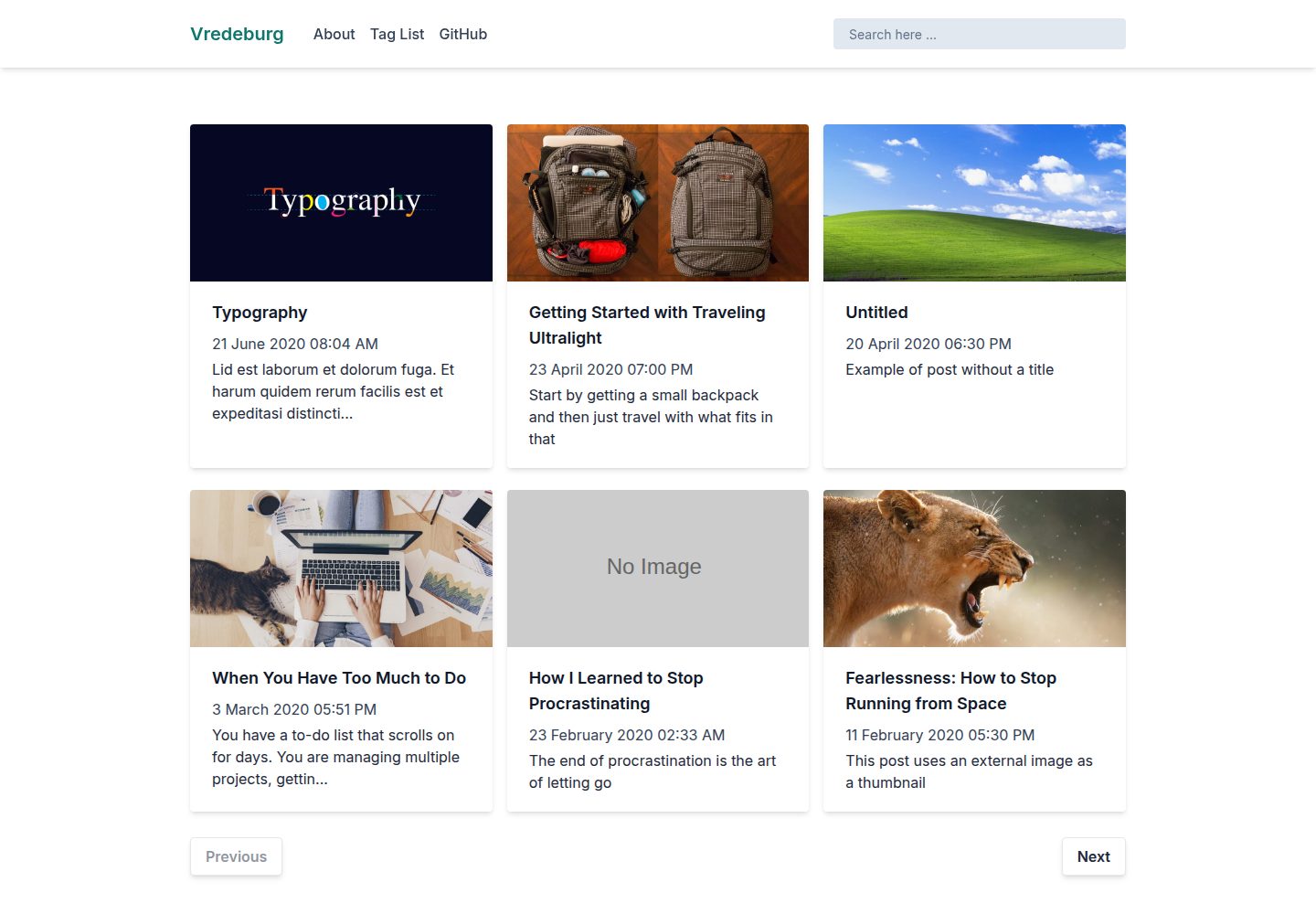
浏览真实页面截图,比较内容排版与手机效果。点击下方缩略图切换,放大查看整页细节。
全部页面与视图 3
截图用于了解视觉与布局,交互效果请以实际项目为准。
采集于 2026-10-02查看来源
值得关注的模板亮点
从已有项目资料中,快速了解它的特点。
包含文章列表、单篇文章、归档、关于、标签页、404 页面、Atom 订阅源与 sitemap.xml 等基础页面
内容为预渲染静态输出,默认不依赖 JavaScript 运行,支持通过 --serve 本地开发并热重载
内置图片优化,自动输出现代图片格式、srcset、宽高属性与懒加载,减少布局偏移
支持草稿标记(draft: true),草稿仅在本地开发时包含,完整构建时排除
提供 Netlify、Vercel、Cloudflare Pages、GitHub Pages 与 Stackblitz 的部署示例链接
模板详细介绍
这是 Eleventy 官方仓库中的博客起步项目,用于演示如何用 Eleventy 构建博客站点。模板提供文章列表、单篇文章页、归档页、关于页、标签页、404 页面、Atom 订阅源和 sitemap.xml 等基础内容结构,并包含按页拆分的 CSS 打包、内置语法高亮和图片优化等构建能力。内容以预渲染静态页面输出,默认不依赖 JavaScript 运行。
使用方式为克隆仓库后安装依赖,通过 npx @11ty/eleventy 生成到 _site 目录,或用 --serve 启动本地开发服务器并支持热重载。站点选项与元数据在 eleventy.config.js 和 _data/metadata.js 中配置;文章放在 content/blog/ 下,通过 posts 标签归入集合,也可放在其他目录。导航项通过 front matter 中的 eleventyNavigation 键添加。草稿内容用 draft: true 标记,仅在 --serve/--watch 时包含,完整构建时排除。
模板采用 MIT 许可,可免费使用、修改、商用和分发,分发时需保留版权与许可声明。演示图片、字体、图标等第三方素材需另行核对各自许可;域名、托管等外部服务可能产生费用。模板本身不包含评论、搜索、后台管理等超出起步范围的功能。
Eleventy博客工具站启动器
适合你的项目吗?
适用场景
- 从零搭建个人博客或技术写作站点,直接以该模板作为内容与页面结构的起点
- 学习 Eleventy 的集合、数据级联、布局、导航插件与图片插件等基础用法
- 需要静态输出、无客户端 JavaScript 依赖的轻量博客站点
- 作为团队内部博客或文档站的基础骨架,再按需增删页面与样式
适合人群
- 使用 Eleventy 并希望从官方起步模板开始搭建博客的开发者
- 偏好静态站点生成、内容以 Markdown 等模板格式撰写的写作者
- 需要文章、标签、归档、订阅源等基础博客结构,但不要求评论或后台管理的项目
- 计划部署到 Netlify、Vercel、Cloudflare Pages 或 GitHub Pages 的站点
上手与定制指南
结合仓库当前版本的说明,按下面的资料检查内容、配置与运行要求。
- 1
克隆仓库后运行 npm install 安装依赖,再用 npx @11ty/eleventy 生成到 _site 目录,或用 npx @11ty/eleventy --serve 启动本地开发服务器
- 2
站点选项与元数据在 eleventy.config.js 和 _data/metadata.js 中配置,可按需修改
- 3
文章默认放在 content/blog/ 下,但也可放在其他目录,只需带 posts 标签即可进入博客文章集合
- 4
顶部导航通过 front matter 中的 eleventyNavigation 键添加,示例见 content/index.njk 与 content/about/index.md
- 5
若站点启用内容安全策略(CSP),需在 base.njk 中改用外部样式表链接,或配置 style-src: 'unsafe-inline'
授权与来源资料
使用条件与限制
免费使用 · 保留许可声明本次收录的是公开仓库中采用 MIT 许可的免费版本;免费范围为该版本代码,不代表外部服务或第三方素材免费。
使用时需要遵守
- 允许免费使用、修改、商用和分发该版本代码。
- 分发代码副本或实质性部分时,保留原作者版权声明和完整 MIT 许可声明。
- 代码按现状提供;担保与责任限制以原许可证及适用法律为准。
额外费用与待核对事项
- 若站点启用内容安全策略(CSP),需二选一:在 base.njk 中移除内联样式并改用外部样式表链接,或配置服务器 style-src: 'unsafe-inline'(安全性较低)。
- 标记 draft: true 的草稿内容仅在 --serve/--watch 本地开发时包含,完整构建时会被排除,不会出现在生产输出中。
- 演示图片、字体、图标及其他第三方素材需按各自许可核对,不能仅凭代码的 MIT 许可判断。
- 域名、托管、数据库、支付或 AI 等外部服务可能另外收费。
查看原文依据
Permission is hereby granted, free of charge
许可证原文
If your site enforces a [Content Security Policy](https://developer.mozilla.org/en-US/docs/Web/HTTP/CSP) (as public-facing sites should), you have a few choices (pick one):
README 原文
https://github.com/11ty/eleventy-base-blog/blob/main/LICENSEhttps://github.com/11ty/eleventy-base-blog/blob/main/README.mdDrafts are **only** included during `--serve`/`--watch` and are excluded from full builds.
README 原文
DeepSeek 根据仓库许可证和 README 整理 ·2026-10-02。结果仅覆盖已读取资料,依赖、图片、字体及后续条款变更以各自原文为准。
项目核对记录与介绍依据
模板资料
- 来源平台
- GitHub
- 资料与维护参考分
- 资料较完整 · 100 / 100
- 技术栈
- Eleventy
- 网站类型
- 博客 · 工具站 · 启动器
这个分数如何计算
本站按许可资料(最高30分)、演示链接(12分)、预览图(10分)、Star数(15分)、记录的维护时间(15分)、描述完整度(8分)、功能记录(5分)和分类资料(5分)计算。它不是代码、安全或性能测试,也不是 Google 评分;有链接不代表已实测可用。
这个项目需要核对什么
- 记录的仓库更新时间
- 2026-10-01
- 截图检查日期
- 2026-10-02
已收录演示链接。请用你的内容与屏幕尺寸检查;有演示不代表表单、认证或支付已经可用。
目录记录的主要技术栈是 Eleventy。请通过依赖清单和锁文件核对实际版本与托管要求。这些说明基于收录资料,不代表代码审计或部署实测。
查看具体选型方法 →介绍的制作与核对状态
介绍由 AI 辅助整理目录与仓库资料。仓库作者不等于这篇介绍的审核者。
已完成服务器许可规则与 AI 来源核对;未经过人工编辑审核。
查看当时使用的来源资料
SHA-256: 5b19ce46e5d9bcd55b467fb41c439abc533fc113251992341f85a2686e204d12
2026-10-02T11:07:01.486Z
来源文件 / 仓库# eleventy-base-blog v9
A starter repository showing how to build a blog with the [Eleventy](https://www.11ty.dev/) site generator (using the [v3.0 release](https://github.com/11ty/eleventy/releases/tag/v3.0.0)).
## Getting Started
* [Want a more generic/detailed getting started guide?](https://www.11ty.dev/docs/getting-started/)
1. Make a directory and navigate to it:
```
mkdir my-blog-name
cd my-blog-name
```
2. Clone this Repository
```
git clone https://github.com/11ty/eleventy-base-blog.git .
```
_Optional:_ Review `eleventy.config.js` and `_data/metadata.js` to configure the site’s options and data.
3. Install dependencies
```
npm install
```
4. Run Eleventy
Generate a production-ready build to the `_site` folder:
```
npx @11ty/eleventy
```
Or build and host on a local development server:
```
npx @11ty/eleventy --serve
```
Or you can run [debug mode](https://www.11ty.dev/docs/debugging/) to see all the internals.
## Features
- Using [Eleventy v3](https://github.com/11ty/eleventy/releases/tag/v3.0.0) with zero-JavaScript output.
- Content is exclusively pre-rendered (this is a static site).
- Can easily [deploy to a subfolder without changing any content](https://www.11ty.dev/docs/plugins/html-base/)
- All URLs are decoupled from the content’s location on the file system.
- Configure templates via the [Eleventy Data Cascade](https://www.11ty.dev/docs/data-cascade/)
- **Performance focused**: four-hundos Lighthouse score out of the box!
- _0 Cumulative Layout Shift_
- _0ms Total Blocking Time_
- Local development live reload provided by [Eleventy Dev Server](https://www.11ty.dev/docs/dev-server/).
- Content-driven [navigation menu](https://www.11ty.dev/docs/plugins/navigation/)
- Fully automated [Image optimization](https://www.11ty.dev/docs/plugins/image/)
- Zero-JavaScript output.
- Support for modern image formats automatically (e.g. AVIF and WebP)
- Processes images on-request during `--serve` for speedy local builds.
- Prefers `<img>` markup if possible (single image format) but switches automatically to `<picture>` for multiple image formats.
- Automated `<picture>` syntax markup with `srcset` and optional `sizes`
- Includes `width`/`height` attributes to avoid [content layout shift](https://web.dev/cls/).
- Includes `loading="lazy"` for native lazy loading without JavaScript.
- Includes [`decoding="async"`](https://developer.mozilla.org/en-US/docs/Web/API/HTMLImageElement/decoding)
- Images can be co-located with blog post files.
- Per page CSS bundles [via `eleventy-plugin-bundle`](https://github.com/11ty/eleventy-plugin-bundle).
- Built-in [syntax highlighter](https://www.11ty.dev/docs/plugins/syntaxhighlight/) (zero-JavaScript output).
- Draft content: use `draft: true` to mark any template as a draft. Drafts are **only** included during `--serve`/`--watch` and are excluded from full builds. This is driven by the `addPreprocessor` configuration API in `eleventy.config.js`. Schema validator will show an error if non-boolean value is set in data cascade.
- Blog Posts
- Automated next/previous links
- Accessible deep links to headings
- Generated Pages
- Home, Archive, and About pages.
- [Atom feed included (with easy one-line swap to use RSS or JSON)](https://www.11ty.dev/docs/plugins/rss/)
- `sitemap.xml`
- Zero-maintenance tag pages ([View on the Demo](https://eleventy-base-blog.netlify.app/tags/))
- Content not found (404) page
## Demos
- [Netlify](https://eleventy-base-blog.netlify.app/)
- [Vercel](https://demo-base-blog.11ty.dev/)
- [Cloudflare Pages](https://eleventy-base-blog-d2a.pages.dev/)
- [GitHub Pages](https://11ty.github.io/eleventy-base-blog/)
## Deploy this to your own site
Deploy this Eleventy site in just a few clicks on these services:
- Read more about [Deploying an Eleventy project](https://www.11ty.dev/docs/deployment/) to the web.
- [Deploy this to **Netlify**](https://app.netlify.com/start/deploy?repository=https://github.com/11ty/eleventy-base-blog)
- [Deploy this to **Vercel**](https://vercel.com/import/project?template=11ty%2Feleventy-base-blog)
- Look in `.github/workflows/gh-pages.yml.sample` for information on [Deploying to **GitHub Pages**](https://www.11ty.dev/docs/deployment/#deploy-an-eleventy-project-to-git-hub-pages).
- [Try it out on **Stackblitz**](https://stackblitz.com/github/11ty/eleventy-base-blog)
### Implementation Notes
- `content/about/index.md` is an example of a content page.
- `content/blog/` has the blog posts but really they can live in any directory. They need only the `posts` tag to be included in the blog posts [collection](https://www.11ty.dev/docs/collections/).
- Use the `eleventyNavigation` key (via the [Eleventy Navigation plugin](https://www.11ty.dev/docs/plugins/navigation/)) in your front matter to add a template to the top level site navigation. This is in use on `content/index.njk` and `content/about/index.md`.
- Content can be in _any template format_ (blog posts needn’t exclusively be markdown, for example). Configure your project’s supported templates in `eleventy.config.js` -> `templateFormats`.
- The `public` folder in your input directory will be copied to the output folder (via `addPassthroughCopy` in the `eleventy.config.js` file). This means `./public/css/*` will live at `./_site/css/*` after your build completes.
- This project uses three [Eleventy Layouts](https://www.11ty.dev/docs/layouts/):
- `_includes/layouts/base.njk`: the top level HTML structure
- `_includes/layouts/home.njk`: the home page template (wrapped into `base.njk`)
- `_includes/layouts/post.njk`: the blog post template (wrapped into `base.njk`)
- `_includes/postslist.njk` is a Nunjucks include and is a reusable component used to display a list of all the posts. `content/index.njk` has an example of how to use it.
#### Content Security Policy
If your site enforces a [Content Security Policy](https://developer.mozilla.org/en-US/docs/Web/HTTP/CSP) (as public-facing sites should), you have a few choices (pick one):
1. In `base.njk`, remove `<style>{% getBundle "css" %}</style>` and uncomment `<link rel="stylesheet" href="{% getBundleFileUrl "css" %}">`
2. Configure the server with the CSP directive `style-src: 'unsafe-inline'` (less secure).
看看同类模板
对比同技术栈与用途的模板,找到更适合的视觉与内容结构。

eleventy-garden
:seedling: A starter site for building a mind garden with eleventy
Eleventy · 启动器

eleventastic
An Eleventy Starter Kit
Eleventy · 启动器

neat-starter
Starter Template for Netlify CMS, Eleventy, Alpine JS & Tailwind CSS
Eleventy · 启动器

Eleventy-Starter-Boilerplate
🚀 Eleventy Starter is production-ready with SEO-friendly for quickly starting a blog. ⚡ Built with Eleventy, …
Eleventy · 博客

eleventy-plus-vite
A clean and fast Eleventy Starter Project with Vite
Eleventy · 启动器
vredeburg
A simple starter project to create a blog using Eleventy and Tailwind CSS
Eleventy · 博客