
CSS 管线:Sass 编译并配合 CleanCSS 优化,入口为 src/assets/styles/main.scss
Eleventy启动器
eleventastic — Eleventy 启动器模板
作者 maxboeck
Eleventastic 是 Max Böck 维护的 Eleventy 启动器,内置 Sass、Webpack、SVG 图标雪碧图、关键 CSS 与 HTML 压缩等构建流程,全部通过 11ty 运行,适合作为新 11ty 项目的起点。
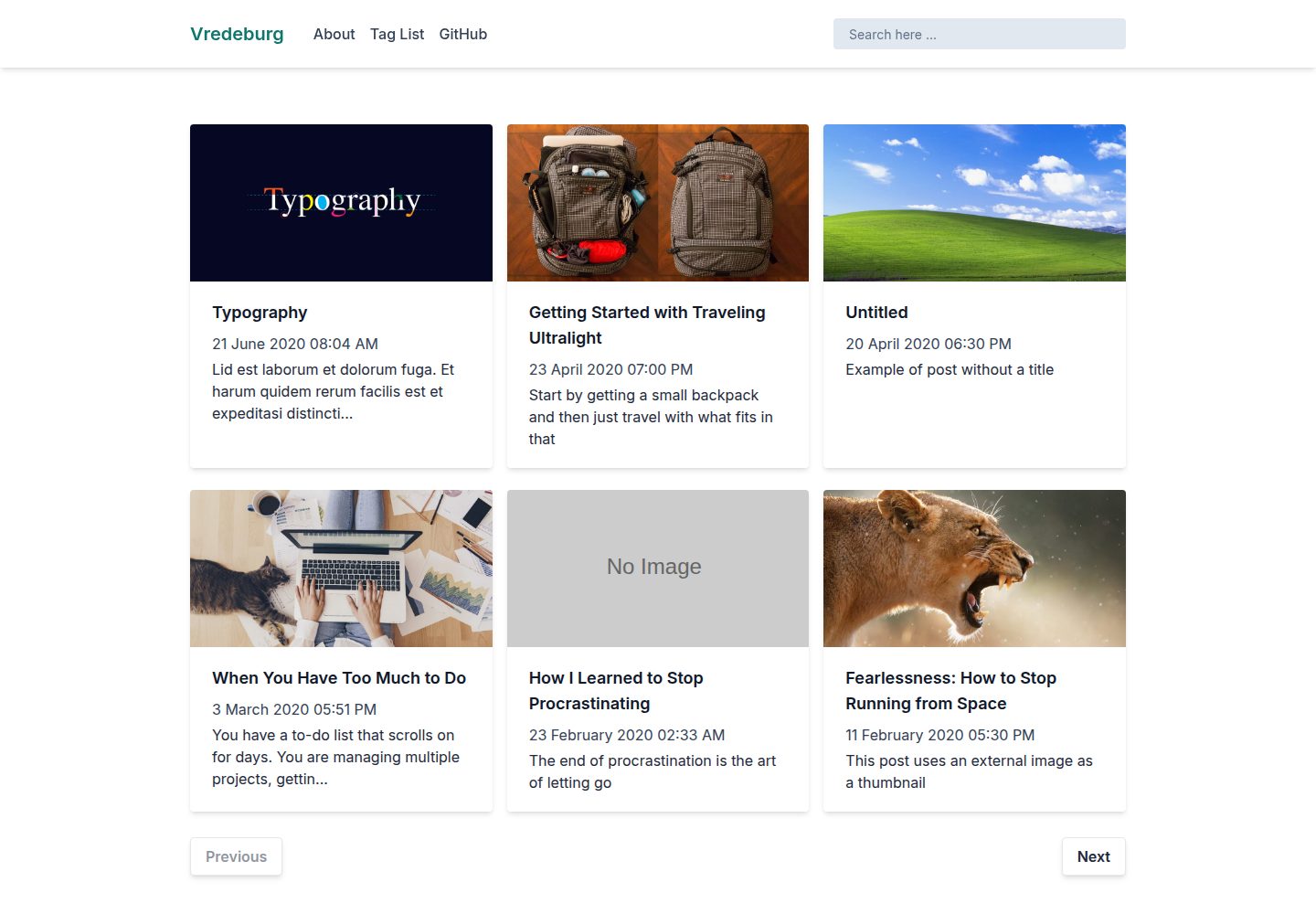
看看你的网站会是什么样
浏览真实页面截图,比较内容排版与手机效果。点击下方缩略图切换,放大查看整页细节。
全部页面与视图 3
截图用于了解视觉与布局,交互效果请以实际项目为准。
采集于 2026-09-30查看来源
值得关注的模板亮点
从已有项目资料中,快速了解它的特点。
JS 打包:支持 ES6 语法,经 Babel 转译为 ES5 并由 Webpack 打包压缩
SVG 图标雪碧图:src/assets/icons 中的 SVG 自动合并为 symbol 雪碧图,可用 {% icon "name" %} 短代码调用
关键 CSS:使用 critical 包在首页 head 中内联关键样式
HTML 压缩:构建时对 HTML 进行压缩
无外部构建:所有处理都通过 11ty 运行
模板详细介绍
Eleventastic 是一个基于 Eleventy 的启动器(Starter Kit),作者将其作为自己所有新 11ty 项目的基础模板。仓库提供演示站点,并附带 Netlify 部署状态徽章与一键部署按钮。
构建流程方面,模板把 CSS、JS、SVG 图标、关键 CSS 和 HTML 压缩都整合进 11ty 的构建过程,不依赖外部构建步骤。样式使用 Sass,入口为 src/assets/styles/main.scss,输出到 dist/assets/styles/main.css;JavaScript 支持 ES6 语法,入口为 src/assets/scripts/main.js,经 Babel 转译为 ES5 并由 Webpack 打包压缩,输出到 dist/assets/scripts/main.js。放入 src/assets/icons 的 SVG 文件会被合并为 symbol 雪碧图,文件名作为 symbol 标识,可在模板中用 {% icon "github" %} 这样的短代码调用。关键 CSS 目前只在首页 head 中内联,通过 critical 包在自动转换中完成。
使用方式为在项目根目录执行 npm install 安装依赖,npm start 启动开发服务器并支持实时刷新,npm run build 生成生产构建。模板采用 MIT 许可,允许免费使用、修改、商用和分发,但演示图片、字体、图标等第三方素材需单独核对许可,域名、托管等外部服务也可能产生费用。
Eleventy启动器
适合你的项目吗?
适用场景
- 作为新的 Eleventy 项目起点,直接在其基础上开发
- 需要 Sass 编译、Webpack 打包和 SVG 图标雪碧图的 11ty 站点
- 希望把 CSS、JS、图标、关键 CSS 和 HTML 压缩统一交给 11ty 构建流程的项目
- 通过 Netlify 一键部署按钮快速创建并部署模板分支
适合人群
- 使用 Eleventy 并希望获得预设构建管线的开发者
- 需要 Sass、Webpack 与 SVG 图标雪碧图开箱配置的 11ty 项目
- 接受 MIT 许可并会自行核对第三方素材授权的使用者
- 偏好通过 npm 脚本进行开发与生产构建的工作流
上手与定制指南
结合仓库当前版本的说明,按下面的资料检查内容、配置与运行要求。
- 1
在项目根目录运行 npm install 安装依赖
- 2
运行 npm start 启动开发服务器并启用实时刷新
- 3
运行 npm run build 生成生产构建
- 4
SVG 图标放入 src/assets/icons,文件名即 symbol 标识,模板中用 {% icon "name" %} 调用
- 5
关键 CSS 目前仅内联在首页 head 中,其他页面不会自动内联
授权与来源资料
使用条件与限制
免费使用 · 保留许可声明本次收录的是公开仓库中采用 MIT 许可的免费版本;免费范围为该版本代码,不代表外部服务或第三方素材免费。
使用时需要遵守
- 允许免费使用、修改、商用和分发该版本代码。
- 分发代码副本或实质性部分时,保留原作者版权声明和完整 MIT 许可声明。
- 代码按现状提供;担保与责任限制以原许可证及适用法律为准。
额外费用与待核对事项
- 关键 CSS 目前仅在首页 head 中内联,其他页面不会自动内联关键样式,需自行处理。
- 一键部署按钮面向 Netlify 平台,使用该部署方式需注册 Netlify 账号并可能受其服务条款与费用约束。
- 演示图片、字体、图标及其他第三方素材需按各自许可核对,不能仅凭代码的 MIT 许可判断。
- 域名、托管、数据库、支付或 AI 等外部服务可能另外收费。
查看原文依据
Permission is hereby granted, free of charge
许可证原文
Currently, critical CSS will only be inlined in the head of the homepage.
README 原文
https://github.com/maxboeck/eleventastic/blob/master/LICENSEhttps://github.com/maxboeck/eleventastic/blob/master/README.mdDeploy a fork of this template to Netlify
README 原文
DeepSeek 根据仓库许可证和 README 整理 ·2026-10-01。结果仅覆盖已读取资料,依赖、图片、字体及后续条款变更以各自原文为准。
项目核对记录与介绍依据
模板资料
- 来源平台
- GitHub
- 资料与维护参考分
- 资料一般 · 68 / 100
- 技术栈
- Eleventy
- 网站类型
- 启动器
这个分数如何计算
本站按许可资料(最高30分)、演示链接(12分)、预览图(10分)、Star数(15分)、记录的维护时间(15分)、描述完整度(8分)、功能记录(5分)和分类资料(5分)计算。它不是代码、安全或性能测试,也不是 Google 评分;有链接不代表已实测可用。
这个项目需要核对什么
- 记录的仓库更新时间
- 2023-03-04
- 截图检查日期
- 2026-10-01
已收录演示链接。请用你的内容与屏幕尺寸检查;有演示不代表表单、认证或支付已经可用。
目录记录的主要技术栈是 Eleventy。请通过依赖清单和锁文件核对实际版本与托管要求。这些说明基于收录资料,不代表代码审计或部署实测。
查看具体选型方法 →介绍的制作与核对状态
介绍由 AI 辅助整理目录与仓库资料。仓库作者不等于这篇介绍的审核者。
已完成服务器许可规则与 AI 来源核对;未经过人工编辑审核。
查看当时使用的来源资料
SHA-256: 6da892cea7346133e6e1a7c4b3923d5ecf57eea990ba37eb45eee8cda45865e5
2026-10-01T14:51:38.765Z
来源文件 / 仓库# Eleventastic
A simple Eleventy Starter Kit, my base for all new 11ty projects. ([Demo Site](https://eleventastic.netlify.com))
[](https://app.netlify.com/sites/eleventastic/deploys)
## Features
* CSS Pipeline (Sass, CleanCSS)
* JS Bundling (Webpack)
* SVG Icon Sprite Generation
* Critical CSS
* HTML Minification
* No external builds, everything runs through 11ty
## Getting Started
To install the necessary packages, run this command in the root folder of the site:
```sh
npm install
```
### Commands
* Run `npm start` for a development server and live reloading
* Run `npm run build` to generate a production build
## Deploy a fork of this template to Netlify
[](https://app.netlify.com/start/deploy?repository=https://github.com/maxboeck/eleventastic)
## CSS
Styling works with Sass. The main index file is in `src/assets/styles/main.scss`. Import any SCSS code you want in there; it will be processed and optimized. The output is in `dist/assets/styles/main.css`
## JS
Javascript can be written in ES6 syntax. The main index file is in `src/assets/scripts/main.js`. It will be transpiled to ES5 with babel, bundled together with webpack, and minified in production. The output is in `dist/assets/scripts/main.js`
## SVG Icons
All SVG files added to `src/assets/icons` will be bundled into a `symbol` sprite file. The SVG filename will then be used as the symbol identifier and the icon can be used as a shortcode.
For example, if you have a `github.svg` file in that folder, you can display it anywhere by using `{% icon "github" %}` in your templates.
## Critical CSS
Currently, critical CSS will only be inlined in the head of the homepage. This is done by using the [critical](https://github.com/addyosmani/critical) package in an automatic transform.
## Credits
My heartfelt thanks to these people, whom I shamelessly copied ideas from:
* Phil Hawksworth: [EleventyOne](https://github.com/philhawksworth/eleventyone)
* Mike Riethmuller: [Supermaya](https://github.com/MadeByMike/supermaya)
* Zach Leatherman: [zachleat.com](https://github.com/zachleat/zachleat.com)
看看同类模板
对比同技术栈与用途的模板,找到更适合的视觉与内容结构。

eleventy-base-blog
A starter repository for a blog web site using the Eleventy static site generator.
Eleventy · 博客

eleventy-garden
:seedling: A starter site for building a mind garden with eleventy
Eleventy · 启动器

neat-starter
Starter Template for Netlify CMS, Eleventy, Alpine JS & Tailwind CSS
Eleventy · 启动器

Eleventy-Starter-Boilerplate
🚀 Eleventy Starter is production-ready with SEO-friendly for quickly starting a blog. ⚡ Built with Eleventy, …
Eleventy · 博客

eleventy-plus-vite
A clean and fast Eleventy Starter Project with Vite
Eleventy · 启动器
vredeburg
A simple starter project to create a blog using Eleventy and Tailwind CSS
Eleventy · 博客