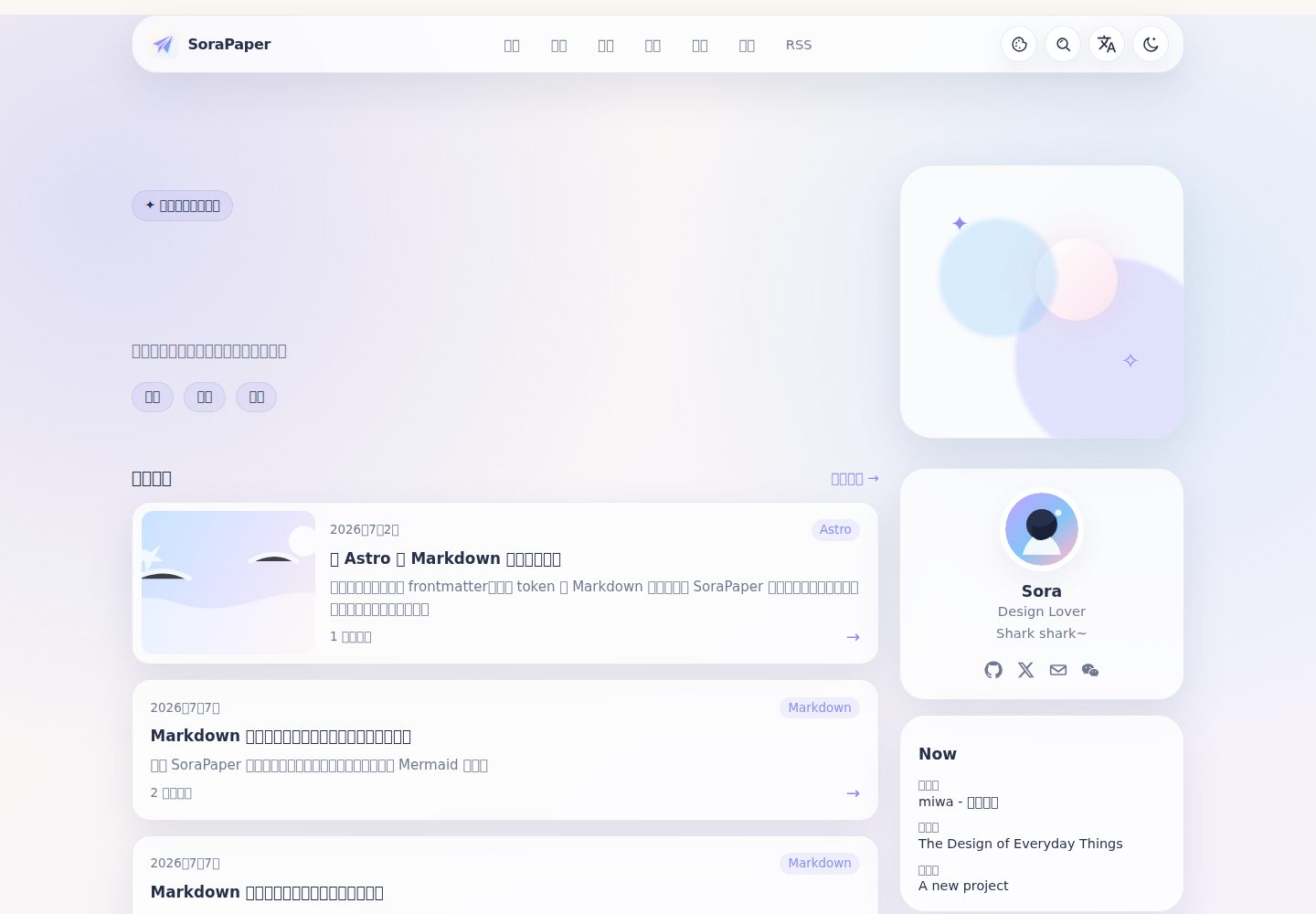
Static blog built with Astro and Content Collections, with built-in RSS, sitemap, and Pagefind local search
AstroBlog
sorapaper — Astro Blog Template
By AllsVoid
SoraPaper is an Astro-based static blog theme for personal long-form writing, offering content collections, local search, and various Markdown extensions.
Explore the design
Compare the page layouts and mobile experience. Open any screenshot for a closer look.
Desktop homepage1 / 3
Desktop captureTop of page
Actual screenshot captured by the server browser.
All pages & views 3
Screenshots show visual appearance; interactive behavior may differ.
Recorded 2026-10-12View source
What stands out
A quick read of the recorded project description.
Centralized configuration in sorapaper.ts for site metadata, profile, color schemes, navigation, localized copy, and feature toggles
Each post can generate SVG and PNG Open Graph share cards; the share panel supports copying the link, system share, download, and WeChat QR code
Supports typed frontmatter, Shiki code windows, math formulas, footnotes, callouts, tabs, collapsible blocks, encrypted blocks, image galleries, music, and video
Mermaid is loaded on demand only for posts containing diagrams and renders when a diagram approaches the viewport; wide diagrams can scroll on small screens and support zoomed viewing
Provides light and dark modes, four color schemes, Chinese/English interfaces, clean URLs, and a responsive layout
Template Details
SoraPaper is a content-first Astro blog theme whose repository also includes an editable preview site. It uses Astro and Content Collections to organize posts, with built-in RSS, sitemap, and Pagefind-based local search, and builds to a static site. The theme provides home, archive, tag, series, friends, and about pages, and demonstrates extended Markdown syntax, code highlighting, math formulas, Mermaid diagrams, image galleries, Live Photo, music, and video embeds in sample posts. Site-level configuration is centralized in sorapaper.ts, where you can adjust site metadata, profile, color schemes, navigation, localized copy, and feature toggles. The interface supports light and dark modes and Chinese/English switching, with a responsive layout for mobile. Before use, note: the theme requires Node.js 22.12+ and pnpm 11+, and when deploying to GitHub Pages or Cloudflare Workers you need to set site.url and base correctly; licenses for third-party assets such as demo images and fonts must be checked separately, and external hosting services may incur costs.
AstroBlog
Is it right for your project?
Use Cases
- Personal long-form writing and blog publishing that needs organization via archives, tags, and series
- Displaying code, math formulas, Mermaid diagrams, image galleries, Live Photo, music, or video in posts
- Wanting to use a static site generator and deploy to any static hosting platform
- Needing a reading experience with Chinese/English bilingual interfaces and light/dark theme switching
- Wanting to optimize how posts appear on social platforms through Open Graph cards and a share panel
Suitable For
- Personal bloggers using Astro who prefer static output
- Long-form writers who need rich Markdown extension capabilities
- Developers who want centralized site configuration and fewer scattered edits
- Content sites that need Chinese/English interfaces and light/dark modes
Getting started & customization
Use these recorded setup notes alongside the repository instructions for your chosen version.
- 1
Requires Node.js 22.12+ and pnpm 11+; you can create a standalone site with npm create sorapaper-astro-theme@latest, or clone the repository and run pnpm install and pnpm dev
- 2
Before deployment, set site.url and base in sorapaper.ts; GitHub Pages project sites need the account address plus repository path, and Cloudflare Workers requires keeping wrangler.jsonc and using npx wrangler deploy
- 3
Posts go in src/content/blog/, with minimal frontmatter containing title, description, pubDate, and tags; site-level configuration is in sorapaper.ts, and static assets are in public/
- 4
Before updating upstream code, commit local changes first, then run git pull --ff-only, pnpm install --frozen-lockfile, pnpm run check, and pnpm run build
- 5
Before deployment, you can run pnpm run check, pnpm run test, and pnpm run build for type, content, and build checks
License & source material
Usage conditions & limitations
Free to use · keep license noticeThis entry covers the free version under the MIT license in the public repository; the free scope is the code of that version and does not mean external services or third-party assets are free.
Must comply with when using
- You may use, modify, commercially use, and distribute the code of this version for free.
- When distributing copies or substantial portions of the code, retain the original author's copyright notice and the complete MIT license notice.
- The code is provided as is; warranties and limitations of liability are governed by the original license and applicable law.
Additional costs & items to verify
- Demo images, fonts, icons, and other third-party assets must be checked against their respective licenses and cannot be judged solely by the code's MIT license.
- External services such as domains, hosting, databases, payments, or AI may incur additional charges.
- Using this theme requires Node.js 22.12 or later and pnpm 11 or later as the package manager; installation and running will not work properly if the environment does not meet these requirements.
- When deploying to Cloudflare Workers, the wrangler.jsonc configuration file must be kept and committed, and deployment must use npx wrangler deploy, which is an additional configuration requirement for that specific hosting platform.
- When deploying to a GitHub Pages project site, site.url and base must be set in sorapaper.ts according to the account address plus repository path, otherwise asset paths will be incorrect.
- Before deployment, you must first set the site's public address (site.url and base) in sorapaper.ts, otherwise the generated static site links will be incorrect.
View Original Text Basis
Permission is hereby granted, free of charge
Original License Text
Requires Node.js 22.12+ and pnpm 11+.
Original README
For Cloudflare Workers, keep `wrangler.jsonc` committed and deploy the built site with:
Original README
For a GitHub Pages project site, use your account URL and repository path:
Original README
https://github.com/AllsVoid/sorapaper/blob/master/LICENSEhttps://github.com/AllsVoid/sorapaper/blob/master/README.mdBefore deployment, set the public address in `sorapaper.ts`:
Original README
Compiled by DeepSeek based on repository license and README ·2026-10-12. Results only cover the materials read; dependencies, images, fonts, and subsequent term changes are subject to their respective original texts.
Project checks & description sources
Template Information
- Source platforms
- GitHub
- Documentation and maintenance reference score
- More documented · 83 / 100
- Technologies
- Astro
- Website type
- Blog
How this score is calculated
Our heuristic uses license records (up to 30), a demo link (12), a preview (10), stars (15), recorded maintenance (15), description completeness (8), feature records (5) and classification data (5). It is not a code, security or performance test, or a Google score. A link does not establish tested functionality.
What to verify for this project
- Repository update recorded
- 2026-10-05
- Screenshot last checked
- 2026-10-12
A demo link is listed. Check it with your own content and viewport sizes; its presence does not confirm that forms, authentication or payments work.
The catalog identifies Astro as the primary stack. Check the actual dependency manifest and lockfile for versions and hosting requirements. These notes use recorded metadata, not a code audit or a deployment test.
Use a selection guide →How this description was prepared
AI-assisted description based on catalog records and repository material. Repository authors are not automatically the reviewers of this description.
Review declaration: [email protected] · 2026-10-13
Inspect the recorded source material
SHA-256: 77af288f42d7a8d25b0ec57dfbf44452bfbba501edae75085f8509b37dea42d0
2026-10-12T23:14:02.302Z
Source file / repository# SoraPaper
> A calm, content-first Astro blog theme for personal writing.
[中文文档](README.zh-CN.md) · [Report a bug](https://github.com/AllsVoid/sorapaper/issues/new/choose) · [Request a feature](https://github.com/AllsVoid/sorapaper/issues/new/choose)
## Theme preview

The repository includes a complete, editable preview site. Start it locally and open <http://localhost:4321>:
```bash
pnpm install
pnpm dev
```
Explore the included examples:
- Home, archive, tags, series, friends, and about pages.
- Extended Markdown examples at `/posts/markdown-extended-preview/`.
- Code, math, and Mermaid examples at `/posts/markdown-extended-code/`.
- Images, Live Photos, and galleries at `/posts/markdown-extended-images/`.
- Music and video embeds at `/posts/markdown-extended-media/`.
## Highlights
- **Static first.** Built with Astro, Content Collections, RSS, sitemap, and Pagefind-powered local search.
- **One place to customize.** Edit `sorapaper.ts` for site metadata, profile, colors, navigation, localized copy, feature flags, and more.
- **Dynamic social images.** Each post can generate its own SVG and PNG Open Graph card; the share panel also offers link copying, native sharing, downloads, and a WeChat QR fallback.
- **Rich writing tools.** Typed frontmatter, Shiki code windows, math, footnotes, callouts, tabs, details, encrypted blocks, image galleries, music, and video.
- **Mermaid without the usual cost.** Mermaid loads only for articles that use it, then renders when a diagram approaches the viewport. Source remains as a fallback, wide diagrams scroll on small screens, and diagrams open in an accessible enlarged view.
- **Media that feels native.** Image blocks support captions, credits, links, responsive layout, galleries, and progressive Live Photo playback.
- **Ready for readers.** Light and dark modes, four color schemes, Chinese/English UI, clean URLs, accessible controls, and responsive layouts.
## Quick start
Requires Node.js 22.12+ and pnpm 11+.
```bash
npm create sorapaper-astro-theme@latest my-site
cd my-site
pnpm install
pnpm dev
```
The command creates a standalone, editable site; it does not add the theme as
a runtime dependency. To develop directly from the repository instead, clone
it and follow the same install and development commands.
Then open <http://localhost:4321> and start with:
- `sorapaper.ts` — site-wide configuration.
- `src/content/blog/` — Markdown and MDX posts.
- `public/` — images, media, and other static assets.
Run the production checks before deploying:
```bash
pnpm run check
pnpm run test
pnpm run build
```
## Write a post
Create a Markdown file in `src/content/blog/`. This minimal frontmatter is enough:
```yaml
---
title: "A quiet note"
description: "A short description for readers and search engines."
pubDate: 2026-07-17
tags: ["Writing"]
---
```
Use the built-in Mermaid directive for diagrams:
```md
:::mermaid[Publishing flow]
flowchart LR
Draft --> Build --> Publish
:::
```
See the [development guide](docs/development-guide.md) for all frontmatter fields, configuration options, and Markdown extensions.
## Deploy
SoraPaper outputs a static site. Build it, then upload `dist/` to any static host:
```bash
pnpm run build
```
Before deployment, set the public address in `sorapaper.ts`:
```ts
site: {
url: "https://example.com",
base: "/"
}
```
For a GitHub Pages project site, use your account URL and repository path:
```ts
site: {
url: "https://username.github.io",
base: "/repository-name"
}
```
For Cloudflare Workers, keep `wrangler.jsonc` committed and deploy the built site with:
```bash
npx wrangler deploy
```
The Cloudflare build command is `pnpm run build`; the deployment command is `npx wrangler deploy`.
## Update safely
SoraPaper is a complete site starter, so keep your configuration and content separate from upstream changes.
1. Commit your site changes first.
2. Read [CHANGELOG.md](CHANGELOG.md).
3. Update the source, install the locked dependencies, and run checks:
```bash
git pull --ff-only
pnpm install --frozen-lockfile
pnpm run check
pnpm run build
```
If you began with `npm create`, generate the new release in a temporary directory with `npm create sorapaper-astro-theme@latest /tmp/sorapaper-upstream`, then deliberately migrate your `sorapaper.ts`, `src/content/`, and `public/` changes. Do not overwrite a customized site without reviewing the release notes and diff.
## Bugs and feature requests
Use the GitHub forms so reports include the details needed to act on them:
- [Report a bug](https://github.com/AllsVoid/sorapaper/issues/new/choose) — include the version, environment, reproduction steps, expected result, and relevant logs.
- [Request a feature](https://github.com/AllsVoid/sorapaper/issues/new/choose) — explain the problem, proposed outcome, and alternatives considered.
Please search existing issues first and never include passwords, tokens, or other sensitive data.
## Commands
| Command | Purpose |
| --- | --- |
| `pnpm dev` | Start the local preview |
| `pnpm run check` | Run Astro type and content checks |
| `pnpm run test` | Run Markdown utility tests |
| `pnpm run build` | Create the production site in `dist/` |
| `pnpm run release:check` | Run the full npm release gate |
## More documentation
- [Development guide](docs/development-guide.md) — configuration, content model, and extension points.
- [Design handoff](docs/design-handoff.md) — visual and accessibility rules.
- [Changelog](CHANGELOG.md) — release notes and upgrade notes.
- [Legacy README](docs/legacy-readme.md) — the detailed configuration and extension reference kept from before the homepage was simplified.
## License
[MIT](LICENSE)
Explore similar templates
Compare previews and descriptions within the same stack and category.

astrowind
AstroWind is a free, open-source Astro starter theme using Astro and Tailwind CSS, released under the MIT license.
Astro · Blog

astro-paper
AstroPaper is a minimal, responsive, accessible, and SEO-friendly Astro blog theme. Articles are stored as Markdown/MDX in src/content/posts/, with subdirectories affecting URLs.
Astro · Blog

fuwari
Fuwari is a static blog template built with Astro and Tailwind CSS for personal blogs. It manages posts as Markdown files in src/content/posts/, with frontmatter for title, date, description, cover, tags, categories, draft status, and language.
Astro · Blog

Firefly
Firefly is a clean personal blog theme forked from Astro and Fuwari, offering four background modes, single/double sidebar and list/grid layouts, Pagefind client-side full-text search, and a six-language UI.
Astro · Blog

astro-theme-cactus
Astro Cactus is an Astro-based blog and portfolio theme that uses Markdown/MDX content collections to manage posts, notes, and tags, with frontmatter type-checked by a schema.
Astro · Portfolio

astrofy
Astrofy is a free and open-source personal portfolio website template built with Astro and TailwindCSS, with built-in blog, CV timeline, project showcase, store, and RSS feed modules.
Astro · Portfolio