基于 Astro 与 Content Collections 构建静态博客,内置 RSS、站点地图和 Pagefind 本地搜索
Astro博客
sorapaper — Astro 博客模板
作者 AllsVoid
SoraPaper 是一个基于 Astro 的静态博客主题,面向个人长文写作,提供内容集合、本地搜索和多种 Markdown 扩展。
看看你的网站会是什么样
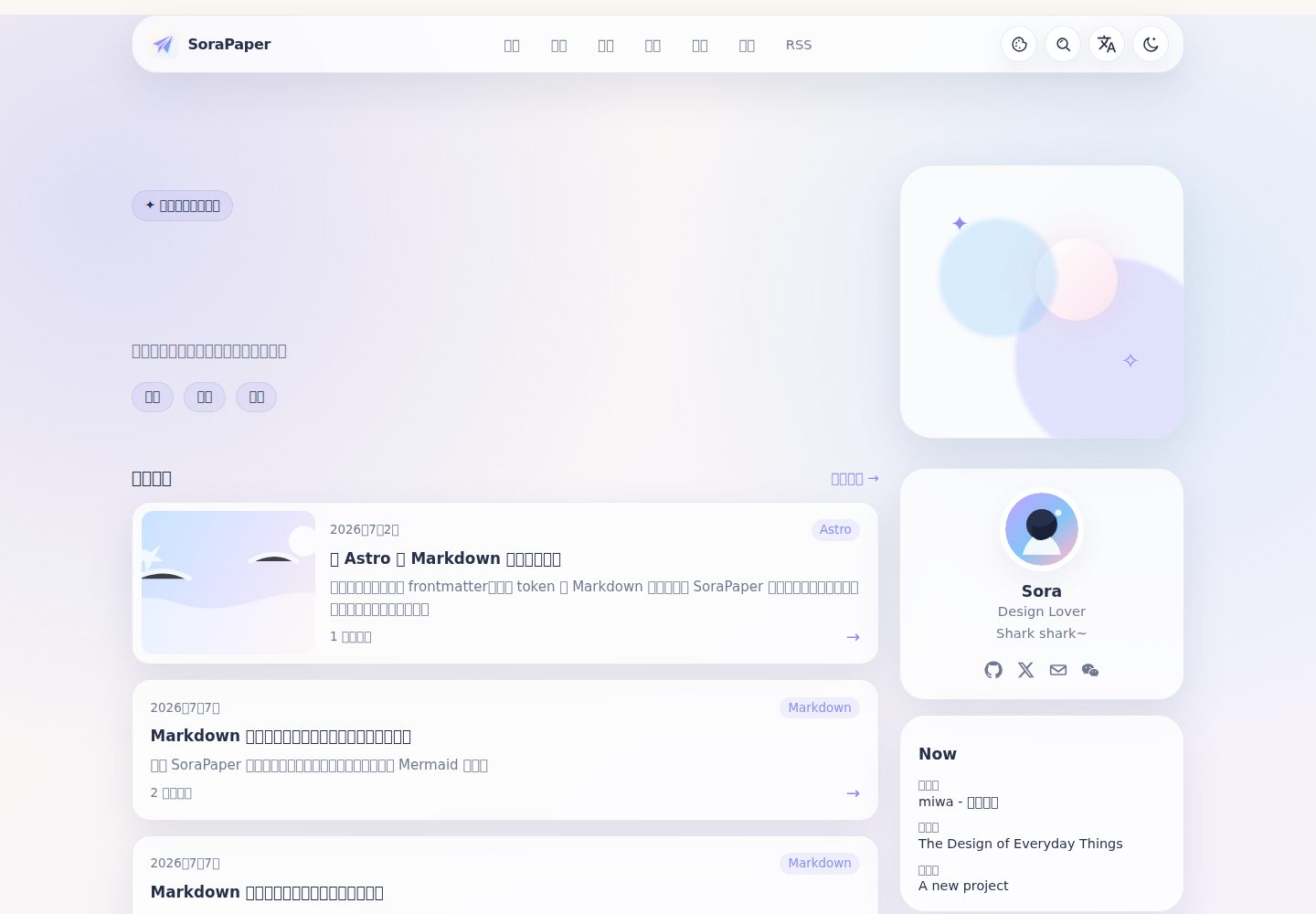
浏览真实页面截图,比较内容排版与手机效果。点击下方缩略图切换,放大查看整页细节。
全部页面与视图 3
截图用于了解视觉与布局,交互效果请以实际项目为准。
采集于 2026-10-12查看来源
值得关注的模板亮点
从已有项目资料中,快速了解它的特点。
通过 sorapaper.ts 集中配置站点元数据、个人资料、配色、导航、本地化文案和功能开关
每篇文章可生成 SVG 与 PNG 的 Open Graph 分享卡片,分享面板支持复制链接、系统分享、下载和微信二维码
支持类型化 frontmatter、Shiki 代码窗口、数学公式、脚注、标注、标签页、折叠块、加密块、图片画廊、音乐和视频
Mermaid 仅在包含图表的文章按需加载,并在图表接近视口时渲染,宽图表在小屏幕上可滚动,支持放大查看
提供明暗模式、四种配色方案、中英文界面、简洁 URL 和响应式布局
模板详细介绍
SoraPaper 是一个以内容为先的 Astro 博客主题,仓库同时包含可编辑的预览站点。它使用 Astro 与 Content Collections 组织文章,内置 RSS、站点地图和基于 Pagefind 的本地搜索,构建输出为静态站点。主题提供首页、归档、标签、系列、友链和关于页面,并在示例文章里演示扩展 Markdown 语法、代码高亮、数学公式、Mermaid 图表、图片画廊、Live Photo、音乐和视频嵌入等写作能力。站点级配置集中在 sorapaper.ts,可调整站点元数据、个人资料、配色、导航、本地化文案和功能开关。界面支持明暗模式与中英文切换,并针对移动端做了响应式布局。使用前需注意:主题要求 Node.js 22.12+ 与 pnpm 11+,部署到 GitHub Pages 或 Cloudflare Workers 时需要正确设置 site.url 与 base;演示图片、字体等第三方素材的许可需单独核对,外部托管服务可能产生费用。
Astro博客
适合你的项目吗?
适用场景
- 个人长文写作与博客发布,需要归档、标签和系列等组织方式
- 在文章中展示代码、数学公式、Mermaid 图表、图片画廊、Live Photo、音乐或视频
- 希望使用静态站点生成器并部署到任意静态托管平台
- 需要中英文双语界面和明暗主题切换的阅读体验
- 希望通过 Open Graph 卡片和分享面板优化文章在社交平台上的呈现
适合人群
- 使用 Astro 并偏好静态输出的个人博客作者
- 需要丰富 Markdown 扩展能力的长文写作者
- 希望集中管理站点配置、减少分散修改的开发者
- 需要中英文界面与明暗模式的内容站点
上手与定制指南
结合仓库当前版本的说明,按下面的资料检查内容、配置与运行要求。
- 1
需要 Node.js 22.12+ 和 pnpm 11+,可用 npm create sorapaper-astro-theme@latest 创建独立站点,或克隆仓库后执行 pnpm install 与 pnpm dev
- 2
部署前在 sorapaper.ts 中设置 site.url 和 base;GitHub Pages 项目站点需使用账户地址加仓库路径,Cloudflare Workers 需保留 wrangler.jsonc 并使用 npx wrangler deploy
- 3
文章放在 src/content/blog/,最小 frontmatter 包含 title、description、pubDate 和 tags;站点级配置在 sorapaper.ts,静态资源在 public/
- 4
更新上游代码前先提交本地改动,再执行 git pull --ff-only、pnpm install --frozen-lockfile、pnpm run check 和 pnpm run build
- 5
部署前可运行 pnpm run check、pnpm run test 和 pnpm run build 进行类型、内容与构建检查
授权与来源资料
使用条件与限制
免费使用 · 保留许可声明本次收录的是公开仓库中采用 MIT 许可的免费版本;免费范围为该版本代码,不代表外部服务或第三方素材免费。
使用时需要遵守
- 允许免费使用、修改、商用和分发该版本代码。
- 分发代码副本或实质性部分时,保留原作者版权声明和完整 MIT 许可声明。
- 代码按现状提供;担保与责任限制以原许可证及适用法律为准。
额外费用与待核对事项
- 演示图片、字体、图标及其他第三方素材需按各自许可核对,不能仅凭代码的 MIT 许可判断。
- 域名、托管、数据库、支付或 AI 等外部服务可能另外收费。
- 使用该主题需要 Node.js 22.12 或更高版本,并使用 pnpm 11 或更高版本作为包管理器,环境不满足时无法正常安装与运行。
- 部署到 Cloudflare Workers 时需保留并提交 wrangler.jsonc 配置文件,并使用 npx wrangler deploy 进行部署,属于特定托管平台的额外配置要求。
- 部署到 GitHub Pages 项目站点时,必须在 sorapaper.ts 中按账户地址加仓库路径设置 site.url 与 base,否则资源路径会出错。
- 部署前必须先在 sorapaper.ts 中设置站点公开地址(site.url 与 base),否则生成的静态站点链接不正确。
查看原文依据
Permission is hereby granted, free of charge
许可证原文
Requires Node.js 22.12+ and pnpm 11+.
README 原文
For Cloudflare Workers, keep `wrangler.jsonc` committed and deploy the built site with:
README 原文
For a GitHub Pages project site, use your account URL and repository path:
README 原文
https://github.com/AllsVoid/sorapaper/blob/master/LICENSEhttps://github.com/AllsVoid/sorapaper/blob/master/README.mdBefore deployment, set the public address in `sorapaper.ts`:
README 原文
DeepSeek 根据仓库许可证和 README 整理 ·2026-10-12。结果仅覆盖已读取资料,依赖、图片、字体及后续条款变更以各自原文为准。
项目核对记录与介绍依据
模板资料
- 来源平台
- GitHub
- 资料与维护参考分
- 资料较完整 · 83 / 100
- 技术栈
- Astro
- 网站类型
- 博客
这个分数如何计算
本站按许可资料(最高30分)、演示链接(12分)、预览图(10分)、Star数(15分)、记录的维护时间(15分)、描述完整度(8分)、功能记录(5分)和分类资料(5分)计算。它不是代码、安全或性能测试,也不是 Google 评分;有链接不代表已实测可用。
这个项目需要核对什么
- 记录的仓库更新时间
- 2026-10-05
- 截图检查日期
- 2026-10-12
已收录演示链接。请用你的内容与屏幕尺寸检查;有演示不代表表单、认证或支付已经可用。
目录记录的主要技术栈是 Astro。请通过依赖清单和锁文件核对实际版本与托管要求。这些说明基于收录资料,不代表代码审计或部署实测。
查看具体选型方法 →介绍的制作与核对状态
介绍由 AI 辅助整理目录与仓库资料。仓库作者不等于这篇介绍的审核者。
审核声明: [email protected] · 2026-10-13
查看当时使用的来源资料
SHA-256: 77af288f42d7a8d25b0ec57dfbf44452bfbba501edae75085f8509b37dea42d0
2026-10-12T23:14:02.302Z
来源文件 / 仓库# SoraPaper
> A calm, content-first Astro blog theme for personal writing.
[中文文档](README.zh-CN.md) · [Report a bug](https://github.com/AllsVoid/sorapaper/issues/new/choose) · [Request a feature](https://github.com/AllsVoid/sorapaper/issues/new/choose)
## Theme preview

The repository includes a complete, editable preview site. Start it locally and open <http://localhost:4321>:
```bash
pnpm install
pnpm dev
```
Explore the included examples:
- Home, archive, tags, series, friends, and about pages.
- Extended Markdown examples at `/posts/markdown-extended-preview/`.
- Code, math, and Mermaid examples at `/posts/markdown-extended-code/`.
- Images, Live Photos, and galleries at `/posts/markdown-extended-images/`.
- Music and video embeds at `/posts/markdown-extended-media/`.
## Highlights
- **Static first.** Built with Astro, Content Collections, RSS, sitemap, and Pagefind-powered local search.
- **One place to customize.** Edit `sorapaper.ts` for site metadata, profile, colors, navigation, localized copy, feature flags, and more.
- **Dynamic social images.** Each post can generate its own SVG and PNG Open Graph card; the share panel also offers link copying, native sharing, downloads, and a WeChat QR fallback.
- **Rich writing tools.** Typed frontmatter, Shiki code windows, math, footnotes, callouts, tabs, details, encrypted blocks, image galleries, music, and video.
- **Mermaid without the usual cost.** Mermaid loads only for articles that use it, then renders when a diagram approaches the viewport. Source remains as a fallback, wide diagrams scroll on small screens, and diagrams open in an accessible enlarged view.
- **Media that feels native.** Image blocks support captions, credits, links, responsive layout, galleries, and progressive Live Photo playback.
- **Ready for readers.** Light and dark modes, four color schemes, Chinese/English UI, clean URLs, accessible controls, and responsive layouts.
## Quick start
Requires Node.js 22.12+ and pnpm 11+.
```bash
npm create sorapaper-astro-theme@latest my-site
cd my-site
pnpm install
pnpm dev
```
The command creates a standalone, editable site; it does not add the theme as
a runtime dependency. To develop directly from the repository instead, clone
it and follow the same install and development commands.
Then open <http://localhost:4321> and start with:
- `sorapaper.ts` — site-wide configuration.
- `src/content/blog/` — Markdown and MDX posts.
- `public/` — images, media, and other static assets.
Run the production checks before deploying:
```bash
pnpm run check
pnpm run test
pnpm run build
```
## Write a post
Create a Markdown file in `src/content/blog/`. This minimal frontmatter is enough:
```yaml
---
title: "A quiet note"
description: "A short description for readers and search engines."
pubDate: 2026-07-17
tags: ["Writing"]
---
```
Use the built-in Mermaid directive for diagrams:
```md
:::mermaid[Publishing flow]
flowchart LR
Draft --> Build --> Publish
:::
```
See the [development guide](docs/development-guide.md) for all frontmatter fields, configuration options, and Markdown extensions.
## Deploy
SoraPaper outputs a static site. Build it, then upload `dist/` to any static host:
```bash
pnpm run build
```
Before deployment, set the public address in `sorapaper.ts`:
```ts
site: {
url: "https://example.com",
base: "/"
}
```
For a GitHub Pages project site, use your account URL and repository path:
```ts
site: {
url: "https://username.github.io",
base: "/repository-name"
}
```
For Cloudflare Workers, keep `wrangler.jsonc` committed and deploy the built site with:
```bash
npx wrangler deploy
```
The Cloudflare build command is `pnpm run build`; the deployment command is `npx wrangler deploy`.
## Update safely
SoraPaper is a complete site starter, so keep your configuration and content separate from upstream changes.
1. Commit your site changes first.
2. Read [CHANGELOG.md](CHANGELOG.md).
3. Update the source, install the locked dependencies, and run checks:
```bash
git pull --ff-only
pnpm install --frozen-lockfile
pnpm run check
pnpm run build
```
If you began with `npm create`, generate the new release in a temporary directory with `npm create sorapaper-astro-theme@latest /tmp/sorapaper-upstream`, then deliberately migrate your `sorapaper.ts`, `src/content/`, and `public/` changes. Do not overwrite a customized site without reviewing the release notes and diff.
## Bugs and feature requests
Use the GitHub forms so reports include the details needed to act on them:
- [Report a bug](https://github.com/AllsVoid/sorapaper/issues/new/choose) — include the version, environment, reproduction steps, expected result, and relevant logs.
- [Request a feature](https://github.com/AllsVoid/sorapaper/issues/new/choose) — explain the problem, proposed outcome, and alternatives considered.
Please search existing issues first and never include passwords, tokens, or other sensitive data.
## Commands
| Command | Purpose |
| --- | --- |
| `pnpm dev` | Start the local preview |
| `pnpm run check` | Run Astro type and content checks |
| `pnpm run test` | Run Markdown utility tests |
| `pnpm run build` | Create the production site in `dist/` |
| `pnpm run release:check` | Run the full npm release gate |
## More documentation
- [Development guide](docs/development-guide.md) — configuration, content model, and extension points.
- [Design handoff](docs/design-handoff.md) — visual and accessibility rules.
- [Changelog](CHANGELOG.md) — release notes and upgrade notes.
- [Legacy README](docs/legacy-readme.md) — the detailed configuration and extension reference kept from before the homepage was simplified.
## License
[MIT](LICENSE)
看看同类模板
对比同技术栈与用途的模板,找到更适合的视觉与内容结构。

astrowind
⭕️ AstroWind: A free template using Astro v7 and Tailwind CSS v4. Astro starter theme.
Astro · 博客

astro-paper
A minimal, accessible and SEO-friendly Astro blog theme.
Astro · 博客

fuwari
✨A static blog template built with Astro.
Astro · 博客

Firefly
Firefly 是一款基于 Astro 的静态博客主题,由 CuteLeaf 在 saicaca 的 Fuwari 模板基础上二次开发,主打清新美观的视觉风格。
Astro · 博客

astro-theme-cactus
A simple Astro theme. Use it to create your blog or website.
Astro · 作品集

astrofy
Astrofy is a free and open-source template for your Personal Portfolio Website built with Astro and TailwindCS…
Astro · 作品集