Outputs purely static HTML by default, with no server, adapter, or database required
AstroBlog
reef — Astro Blog Template
By alohapixelcom-hash
Reef is a free MIT-licensed bilingual blog theme built on Astro. It generates a purely static site by default, and can optionally use the built-in EmDash back office to turn it into a blog CMS running on Cloudflare Workers.
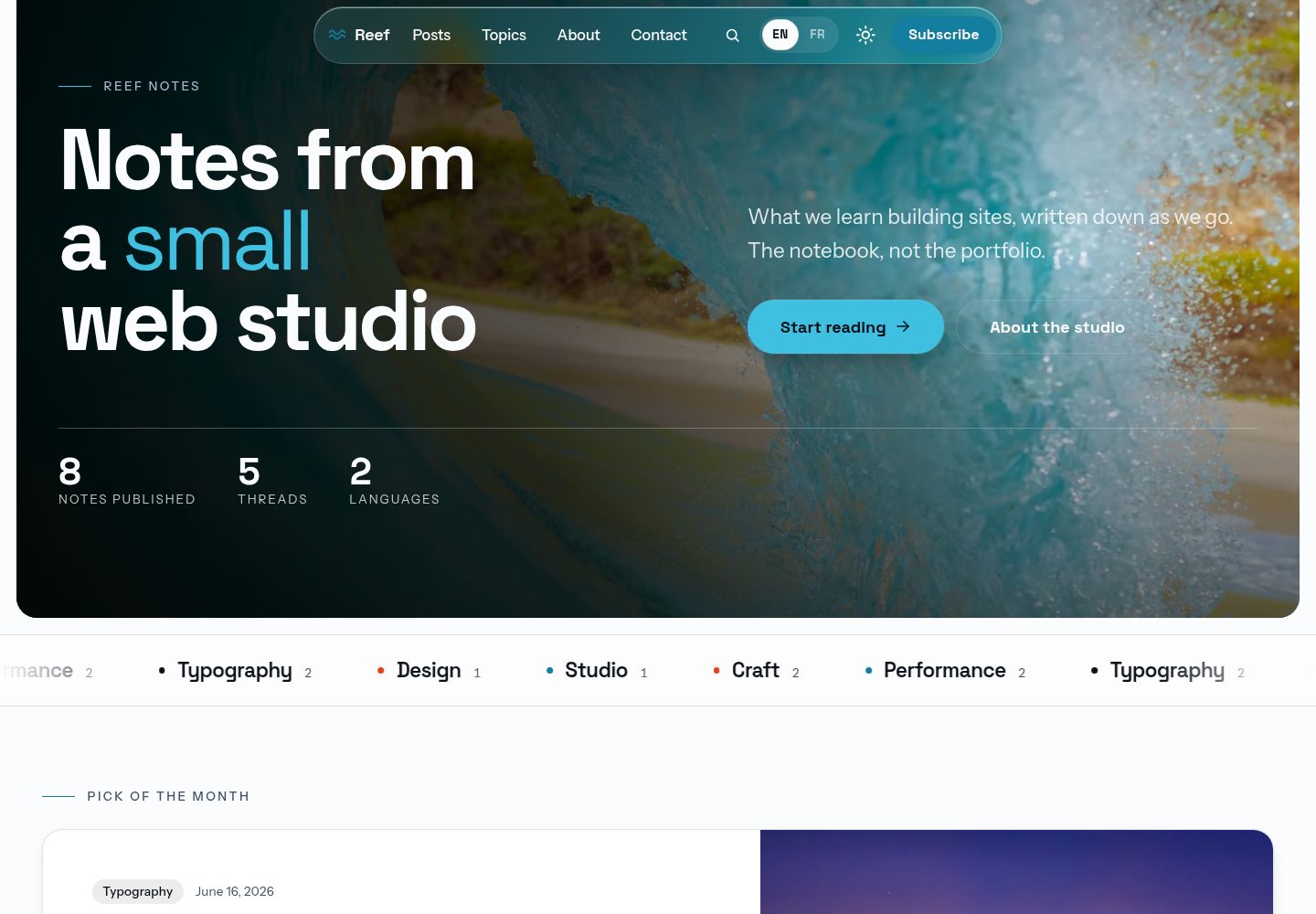
Explore the design
Compare the page layouts and mobile experience. Open any screenshot for a closer look.
Desktop homepage1 / 3
Desktop captureTop of page
Actual screenshot captured by the server browser.
All pages & views 3
Screenshots show visual appearance; interactive behavior may differ.
Recorded 2026-10-02View source
What stands out
A quick read of the recorded project description.
Optional EmDash publishing engine runs a back office CMS on Cloudflare Workers, D1, and R2
Built-in English and French bilingual support, with separate RSS feeds for each language
Includes a Capacitor configuration to package the static build as a native app project
Comes with AGENTS.md and five convention files to help AI agents extend the theme
Back office provides management for articles, authors, tags, SEO, newsletters, contact forms, pages, and menus
Template Details
Reef is a free MIT-licensed blog theme for Astro. By default it builds as a purely static HTML site, including a home page, paginated blog, themes, tags, author pages, a reading column with table of contents, search, and separate RSS feeds for each language. It supports English and French.
The theme also provides an optional EmDash publishing engine. After setting the environment variable ALOHA_MOTEUR to emdash, the same source code builds as a blog CMS running on Cloudflare Workers, using a D1 database and R2 object storage. Articles are stored in the database and appear on the site after publication without rebuilding. All content is managed through the /_emdash/admin back office. The back office provides article writing, drafts, scheduled publishing, revisions, categories and tags, authors, an SEO panel, a newsletter with double opt-in, contact form email, pages and menus, site identity and appearance settings, home page block ordering, redirects, a media library, and RSS and sitemap features. The back office interface is in French by default and can be switched to English.
The theme also includes a Capacitor configuration that can package the static build as a native app project, and comes with AGENTS.md and five convention files for AI agents to reference when extending the theme.
Usage limitations: comments are not included in the theme; the contact form has no action attribute by default and requires configuring an endpoint; legal pages are only a starting point and must be reviewed by a qualified person; third-party assets such as demo images, fonts, and icons must be checked against their respective licenses; external services such as domain, hosting, and database may incur costs.
AstroBlog
Is it right for your project?
Use Cases
- Building a static blog that supports English and French
- A blog CMS that needs back office management, scheduled publishing, and database storage
- Packaging blog content as an iOS or Android native app
- Providing convention files for AI agents to extend the theme
- A blog that needs built-in newsletter subscription and contact form email features
Suitable For
- Developers who want to build a bilingual blog with Astro
- Blog projects that need static output with an optional CMS back office
- Teams planning to package blog content as a native app
- Developers who want to extend the theme with the help of AI agents
Getting started & customization
Use these recorded setup notes alongside the repository instructions for your chosen version.
- 1
Requires Node 22.18 or later and pnpm
- 2
Running pnpm dev first downloads demo photos to src/assets/, because the repository does not store these images
- 3
To enable the EmDash engine, set ALOHA_MOTEUR=emdash and use pnpm dev:moteur or pnpm build:moteur
- 4
The first visit to /_emdash/admin enters the EmDash setup flow; locally, the account step can be skipped via /_emdash/api/setup/dev-bypass
- 5
Before deployment, check the site address in astro.config.mjs, clear demoNotice, replace the share card image, and review the legal pages
License & source material
Usage conditions & limitations
Free to use · keep license noticeThis entry covers the free version in the public repository under the MIT license; the free scope applies to that version's code, not to external services or third-party assets.
Must comply with when using
- You may use, modify, commercialize, and distribute this version's code for free.
- When distributing copies or substantial portions of the code, retain the original author's copyright notice and the full MIT license notice.
- The code is provided as is; warranties and limitations of liability are governed by the original license and applicable law.
Additional costs & items to verify
- The theme does not include comments and cannot provide article comments through the built-in back office or static build.
- The contact form has no submission endpoint by default (no action attribute); you must configure a receiving address yourself or enable the engine's "Courriels" feature.
- Legal pages (privacy, terms, etc.) are only template starting points and must be reviewed by a qualified person before use.
- Demo photos are not provided with the repository; pnpm dev downloads them externally, and you must verify their license and availability yourself.
- Ten demo photos come from Pexels under the Pexels license, which differs from the code's MIT license; check them yourself before commercial use.
- Fonts and dependency packages have their own third-party licenses; check each one according to THIRD-PARTY.md.
- Enabling the engine requires deploying two Cloudflare Workers and using a D1 database and R2 storage, which may incur external service costs.
- The native app only packages the static build; its articles come from Markdown files in src/data/ and cannot use back office CMS content.
- Packaging the native app requires handling signing, icons, and app store review yourself; the related costs and processes are borne by the user.
- The repository does not accept issues; support is provided only through the designated contact page.
- Demo images, fonts, icons, and other third-party assets must be checked against their respective licenses and cannot be judged solely by the code's MIT license.
- External services such as domain, hosting, database, payment, or AI may charge additional fees.
View Original Text Basis
Permission is hereby granted, free of charge
Original License Text
Comments are not part of the theme.
Original README
It ships with no `action`.
Original README
They are a starting point, not legal advice.
Original README
the repository does not store them.
Original README
The ten demo photographs come from Pexels and carry the Pexels licence
Original README
Fonts and packages are listed in [THIRD-PARTY.md](THIRD-PARTY.md).
Original README
Two Cloudflare Workers: the engine (EmDash, D1, R2),
Original README
The app carries the static build, so its posts are the Markdown files of `src/data/`, not the back office.
Original README
Signing, icons, store review: [wiki/subsystems/mobile-app.md](wiki/subsystems/mobile-app.md).
Original README
https://github.com/alohapixelcom-hash/reef/blob/main/LICENSEhttps://github.com/alohapixelcom-hash/reef/blob/main/README.mdIssues are closed on purpose: support lives in one place.
Original README
Compiled by DeepSeek based on repository license and README ·2026-10-02. Results only cover the materials read; dependencies, images, fonts, and subsequent term changes are subject to their respective original texts.
Project checks & description sources
Template Information
- Source platforms
- GitHub
- Documentation and maintenance reference score
- More documented · 87 / 100
- Technologies
- Astro
- Website type
- Blog
How this score is calculated
Our heuristic uses license records (up to 30), a demo link (12), a preview (10), stars (15), recorded maintenance (15), description completeness (8), feature records (5) and classification data (5). It is not a code, security or performance test, or a Google score. A link does not establish tested functionality.
What to verify for this project
- Repository update recorded
- 2026-09-30
- Screenshot last checked
- 2026-10-02
A demo link is listed. Check it with your own content and viewport sizes; its presence does not confirm that forms, authentication or payments work.
The catalog identifies Astro as the primary stack. Check the actual dependency manifest and lockfile for versions and hosting requirements. These notes use recorded metadata, not a code audit or a deployment test.
Use a selection guide →How this description was prepared
AI-assisted description based on catalog records and repository material. Repository authors are not automatically the reviewers of this description.
Automatically checked against source and license rules; no manual editorial review.
Inspect the recorded source material
SHA-256: f275ee3b06cd0d44309f88ed83d46026d34256ee545363ab4656a1e97492f934
2026-10-02T09:39:44.505Z
Source file / repository<!-- README.md - the front page of the repo: what Reef is, how to run it, the back office, deployment, the native app, the licence. -->
<p align="center">
<img src="https://alohapixel.app/screenshots/theme-reef.webp" alt="Reef, a free bilingual blog theme for Astro: the home page, shown on desktop" width="720">
</p>
<h1 align="center">Reef</h1>
<p align="center">
<b>A sober, bilingual blog for Astro 7, with a real blog CMS when you want one.</b><br>
Plain static HTML by default. Switch on the optional EmDash engine and the whole site<br>
is written, scheduled, sent and arranged from its back office.
</p>
<p align="center">
<a href="https://reef.alohapixel.app"><b>Live demo</b></a>
·
<a href="https://reef.alohapixel.app/fr/">Version française</a>
·
<a href="#quick-start">Quick start</a>
·
<a href="https://alohapixel.app/themes/">The rest of the family</a>
</p>
<p align="center">
<img alt="Astro 7" src="https://img.shields.io/badge/Astro-7-BC52EE?style=flat-square&logo=astro&logoColor=white">
<img alt="Tailwind CSS v4" src="https://img.shields.io/badge/Tailwind-v4-38BDF8?style=flat-square&logo=tailwindcss&logoColor=white">
<img alt="TypeScript strict" src="https://img.shields.io/badge/TypeScript-strict-3178C6?style=flat-square&logo=typescript&logoColor=white">
<img alt="English and French" src="https://img.shields.io/badge/i18n-EN%20%2B%20FR-1D7F8D?style=flat-square">
<img alt="MIT" src="https://img.shields.io/badge/licence-MIT-FF7A59?style=flat-square">
</p>
---
Reef is two things from one source, free and MIT licensed.
- **A static blog theme.** `pnpm build` writes plain HTML: a home that leads
with the latest piece, a paginated blog, topic, tag and author pages, a
reading column with a table of contents, search, and an RSS feed per
language, in English and in French. No server, no adapter, no database.
- **A blog CMS.** With `ALOHA_MOTEUR=emdash` the same source builds as a
Cloudflare Worker on [EmDash](https://github.com/emdash-cms/emdash), the
MIT-licensed CMS for Astro that runs on Workers, D1 and R2. Posts live in the
database, a published change shows on the site with no rebuild, and
everything a reader sees is set from the back office at `/_emdash/admin`.
The live demo runs this way.
The demo publication is Reef Notes, the notebook of a fictional web studio.
Every word lives in the back office, in a typed dictionary or in a Markdown
post, never inside a component.
## The blog CMS
What a writer expects from a blogging platform, with the engine on.
<p align="center">
<img src="docs/images/back-office-editor.webp" alt="The post editor of Reef's back office: title, lead, cover and rich text, with the publishing, translation and tags panels" width="720">
</p>
| You want to | Where, in the back office |
|---|---|
| Write, keep drafts, schedule, go back to a revision | « Articles »: title, lead, cover, rich text with headings, lists, quotes, code, images and tables; « Enregistrer » keeps a draft, « Publier » puts it live, « Programmer » picks a date and time |
| Duplicate or delete a post | The list of posts: « Dupliquer » makes a draft copy, « Déplacer vers la corbeille » removes it, the « Corbeille » tab restores it |
| Sort posts into topics and tags | One topic per post, picked by name; tags are typed in the post's « Classement » panel, renamed in « Étiquettes », and each has its own page at `/tags/<tag>/` |
| Show authors | « Auteurs »: name, role, bio, portrait, links, one page each; a post picks its author by name |
| Search engines and social cards | Each post, page, topic and author has an « SEO » panel: title, description, share image, canonical address, noindex |
| A newsletter, with no outside service | Double opt-in signup on the site, the subscriber list in « Lettre d'information », one click sends a published post to every subscriber in their language, unsubscribe through a confirmation page |
| Contact form emails | The « Courriels » screens send and log every message, through the Worker's Cloudflare email binding |
| Pages and menus | « Pages » for free pages, « Menus » for the main bar, the phone menu, the buttons and the three footer columns, per language |
| Identity and look | « Paramètres »: site name, logo, favicon, social links, posts per page; « Réglages par langue »: description, contact details, typeface, brand colour, logo for dark mode |
| Arrange the home page | Each of the eight home blocks can be hidden or moved |
| Redirects and media | « Redirections » (301, 410), and the media library, stored in R2 |
| RSS and sitemap | One feed per language, and a sitemap that keeps itself up to date |
<p align="center">
<img src="docs/images/back-office-posts.webp" alt="The list of posts in Reef's back office, with their status, language and the view, edit, duplicate and delete actions" width="720">
</p>
Every field says, in one sentence above it, what it changes, and an empty
field renders the theme as shipped. The back office opens in French, and
each person can switch it to English. Comments are not part of the theme.
The editor's guide, for someone who never opens the code:
[docs/administer.md](docs/administer.md) (English) and
[docs/administrer.md](docs/administrer.md) (French).
## Quick start
```bash
pnpm install
pnpm dev # http://localhost:4321
```
Node 22.18 or later and pnpm. `pnpm dev` first fetches the demo photographs
into `src/assets/`, because the repository does not store them.
```bash
pnpm dev # dev server
pnpm build # static site into dist/
pnpm preview # serve the build locally
pnpm check # astro check: types and templates
pnpm test # the selfchecks, plain Node, no framework
pnpm lint:house # the mechanical house rules
pnpm rebrand "#7a59ff" # repaint the theme from one brand colour
pnpm rebrand --restore # back to the Reef palette
pnpm app # the build for a native Capacitor app
pnpm dev:moteur # the same site with the publication engine on
pnpm build:moteur # the Worker build of the engine
```
## The back office, locally
```bash
pnpm dev:moteur # http://localhost:4321/_emdash/admin
node scripts/moteur-import.mjs --url http://localhost:4321 # pours the demo posts into the database, once
```
The first visit to `/_emdash/admin` opens EmDash's setup: the site title,
then an administrator account with a passkey, and the schema and demo texts
of `seed/seed.json`. Locally,
`/_emdash/api/setup/dev-bypass?redirect=/_emdash/admin` skips the account
step. With the engine off, nothing of it is bundled: the static build does
not change.
How the engine is wired (the two sources of posts, the managed pages, the
caches, the back office language): [docs/moteur.md](docs/moteur.md).
## Deploy
**Static.** Upload `dist/` to any static host: Cloudflare Pages or Workers,
Netlify, Vercel, an nginx box. `npx wrangler deploy` publishes it as a
Cloudflare Worker with static assets (`wrangler.toml`: the visitor's
language, the sitemaps, the 404 page). No environment variable is required.
**With the engine.** Two Cloudflare Workers: the engine (EmDash, D1, R2),
and a light front Worker that serves the pages already built and keeps the
others in cache. [DEPLOY.md](DEPLOY.md) walks through the first deployment,
the updates, and rolling back.
**Updating a site already online.** Each version that changes the database
ships one SQL file in `migrations/`, applied in order by
`node scripts/base-3.4.0.mjs`: it shows the plan first, never deletes
anything, and a second run changes nothing. The list is in DEPLOY.md.
## A native app (Capacitor)
The static build has no server, no external CDN and local fonts, which is
what Capacitor wraps. Fixed elements respect the safe areas, heights use
`svh`, touch targets are 44 px, and no page scrolls sideways at 390 px.
```bash
pnpm add @capacitor/core @capacitor/ios @capacitor/android
pnpm add -D @capacitor/cli
pnpm app # dist/, tuned for a native shell
npx cap add ios # once (and: npx cap add android)
npx cap sync # after every pnpm app
npx cap open ios # Xcode: signing, then the App Store
```
`capacitor.config.ts` ships with the theme: change `appId` and `appName`
before the first `cap add`. The app carries the static build, so its posts
are the Markdown files of `src/data/`, not the back office. Signing, icons,
store review: [wiki/subsystems/mobile-app.md](wiki/subsystems/mobile-app.md).
## Make it yours
1. `src/config/siteData.json.ts`: name, title, description, author.
2. `astro.config.mjs`: `site`, your production address (canonical links,
share cards, sitemap, robots.txt, RSS).
3. `pnpm rebrand "#yourcolour"`.
4. `src/data/`: your posts (one Markdown file per language, same name),
authors and topics.
5. `src/i18n/ui/en/` and `src/i18n/ui/fr/`: every word of the interface.
6. `src/config/navData.json.ts` and `legalData.json.ts`: your links, your
privacy and terms pages.
With the engine on, the same changes are made in the back office instead.
## Before you deploy
- [ ] `site` in `astro.config.mjs` is your real address.
- [ ] `demoNotice` in `src/config/siteData.json.ts` is empty, so the footer
line saying the site is a demo does not show.
- [ ] The share card is your photograph: `scripts/og.mjs` crops it from the
home page photo at build time.
- [ ] The legal pages (`src/config/legalData.json.ts`, and the bracketed
fields of the legal notice in `src/i18n/ui/*/pages.ts`) are read by
someone qualified. They are a starting point, not legal advice.
- [ ] The contact form points at your endpoint, or at the « Courriels »
screens with the engine on. It ships with no `action`.
- [ ] `pnpm check`, `pnpm test` and `pnpm build` are green.
## Why it feels expensive
- **Almost no JavaScript.** Dialogs are native `<dialog>`, accordions native
`<details>`, the marquee is CSS. The scripts that ship are the phone menu,
the theme switch, the shrinking navbar and the table of contents.
- **A design system, not a stylesheet.** `src/styles/tokens.css` holds the
palette, the roles and the utilities; markup only speaks roles, so one
command repaints the theme, the favicon and the share cards.
- **An owned SEO layer.** Canonical links, Open Graph, JSON-LD, robots.txt,
llms.txt, RSS and the sitemap are readable files in the repo, not a plugin.
- **Light and dark, both composed.** The theme switches before first paint,
with no flash, and dark mode trades cast shadows for luminous borders.
- **Bilingual by construction.** One page source per route, one post file per
language, and a typed dictionary: a missing French key fails the build.
- **Accessible.** 44 px touch targets, visible focus, correct ARIA, reduced
motion honoured by the CSS and by the scroll timelines.
## Structure
```text
src/
components/ ui/ (the primitives), Sections/ (by page), Cards/, svg/icons/
config/ typed site data: siteData, navData, legalData
data/ the demo content: posts (Markdown), authors and topics (JSON)
i18n/ the bilingual layer and its en/ and fr/ dictionaries
js/ pure logic: JSON-LD, pagination, addresses, text
layouts/ BaseLayout and BaseHead (the whole <head>)
moteur/ the optional publication engine and its back office
pages/ [...locale]/ routes, 404, robots.txt, llms.txt, rss.xml
styles/ tokens.css, global.css, prose.css, the motion catalogue
migrations/ the SQL that brings a database online to the current version
scripts/ build steps (photos, share cards, favicon), rebrand, app, engine tools, checks
seed/ seed.json: the engine's schema and first content
docs/ the editor's guide, the engine, the design, the conventions
wiki/ how each subsystem works, anchored to the code
```
## Documentation
- [docs/administer.md](docs/administer.md) and [docs/administrer.md](docs/administrer.md): running the site from the back office.
- [docs/moteur.md](docs/moteur.md): the publication engine.
- [DEPLOY.md](DEPLOY.md): static hosting, the engine online, updates.
- [docs/design.md](docs/design.md) and [docs/conventions/](docs/conventions/): the design rules and the code conventions.
- [wiki/overview.md](wiki/overview.md): the architecture, then one page per subsystem.
- [AGENTS.md](AGENTS.md): the working rules of the repository, for people and for coding assistants.
- [CHANGELOG.md](CHANGELOG.md): what changed, version by version.
## Support
Issues are closed on purpose: support lives in one place.
Write to https://alohapixel.app/contact/. Pull requests are welcome.
Reef is the free member of a family of seven themes built on the same
foundation; the others add a shop, a SaaS site with its dashboard, a launch
page, a portfolio: https://alohapixel.app/themes/
## Licence
MIT, full text in [LICENSE](LICENSE). Use it, fork it, sell what you build
with it, no attribution required.
The ten demo photographs come from Pexels and carry the Pexels licence (free
for commercial use, no attribution required): [NOTICE.md](NOTICE.md) and
[PHOTOS.md](PHOTOS.md). Fonts and packages are listed in
[THIRD-PARTY.md](THIRD-PARTY.md).
Explore similar templates
Compare previews and descriptions within the same stack and category.

astrowind
AstroWind is a free, open-source Astro starter theme using Astro and Tailwind CSS, released under the MIT license.
Astro · Blog

astro-paper
AstroPaper is a minimal, responsive, accessible, and SEO-friendly Astro blog theme. Articles are stored as Markdown/MDX in src/content/posts/, with subdirectories affecting URLs.
Astro · Blog

fuwari
Fuwari is a static blog template built with Astro and Tailwind CSS for personal blogs. It manages posts as Markdown files in src/content/posts/, with frontmatter for title, date, description, cover, tags, categories, draft status, and language.
Astro · Blog

Firefly
Firefly is a clean personal blog theme forked from Astro and Fuwari, offering four background modes, single/double sidebar and list/grid layouts, Pagefind client-side full-text search, and a six-language UI.
Astro · Blog

astro-theme-cactus
Astro Cactus is an Astro-based blog and portfolio theme that uses Markdown/MDX content collections to manage posts, notes, and tags, with frontmatter type-checked by a schema.
Astro · Portfolio

astrofy
Astrofy is a free and open-source personal portfolio website template built with Astro and TailwindCSS, with built-in blog, CV timeline, project showcase, store, and RSS feed modules.
Astro · Portfolio